NiW:
Converting Notebooks into Workflows to
Capture Dataflow and Provenance
Lucas Carvalho1
, Regina Wang2
,
Daniel Garijo2
, Yolanda Gil2
lucas.carvalho@ic.unicamp.br
1
University of Campinas, Institute of Computing, Brazil
2
University of Southern California, Information Sciences Institute, U.S.A
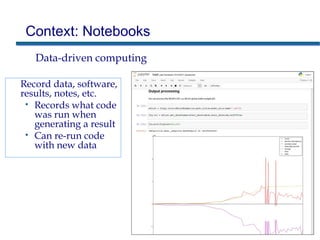
Context: Notebooks
Data-driven computing
Record data, software,
results, notes, etc.
• Records what code
was run when
generating a result
• Can re-run code
with new data
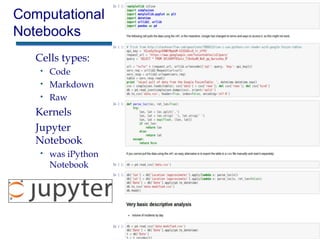
Computational
Notebooks
Cells types:
• Code
• Markdown
• Raw
Kernels
Jupyter
Notebook
• was iPython
Notebook
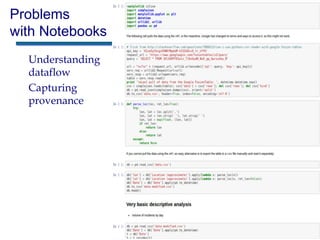
Problems
with Notebooks
Understanding
dataflow
Capturing
provenance
Workflows
Simple dataflow
WINGS semantic workflow system [Gil et al 2011]
Workflow Template Workflow execution
Input data:
May
Input data:
July
Input data:
September
Benefits of Workflows:
Tracking Provenance
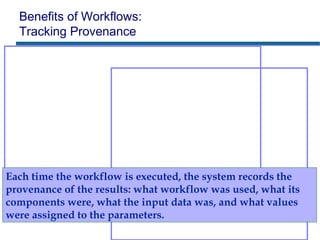
Each time the workflow is executed, the system records the
provenance of the results: what workflow was used, what its
components were, what the input data was, and what values
were assigned to the parameters.
[Sethi et al
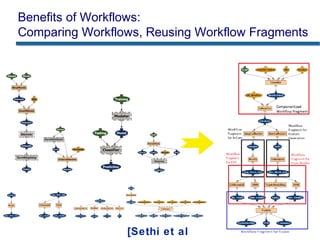
Benefits of Workflows:
Comparing Workflows, Reusing Workflow Fragments
Understanding Dataflow of Notebooks
Common issues that we found include:
• Processing
– Identification of main processing cells of a notebook.
• Dataflow
– Implicit file names.
• Inputs
– Pointers to other files .
• Outputs
– Lack of explicit outputs.
• Files
– Difficulty to correspond files in notebook folders to cells.
• Data
– Lack of data in notebook repositories.
Mapping Notebooks to Workflows:
Components and Dataflow
Components
• Executable Code
– N: cells may contain solely documentation, variables, library
imports… AND splits in cells
– W: must have some running code within it.
– Approach: each running cell = 1 workflow component.
• Libraries and Methods
– N: import a library or state a method once
– W: the imports and method declarations need to be done in each
workflow component that uses them (= Approach)
• Open Files
– N: can open a file and use it in any subsequent cell.
– W: a file can be used only inside the component that has that file as
input.
– Approach: Merge Cells
Mapping Notebooks to Workflows:
Components and Dataflow
Components
• Markdown Cells
– A markdown cells’ information will be attached to the
documentation of the component created for its subsequent code
cell.
• Component Naming
– A name will be generated for each component of the workflow,
starting with “Component”.
Dataflow
• Parameters
– Variables of primitive types that are given constant values in
notebooks will be mapped to parameters in workflows, and they
will be given the name that was used in the notebook.
• Input Files
– A data file will be explicitly generated from the notebook code
Mapping Notebooks to Workflows:
Components and Dataflow
Dataflow
• Output Files
– Create a file for written files and visualizations generated by
notebooks.
• Workflow Structure
– The identifiers of the files generated and consumed by components
generated for a given notebook will be used to obtain the dataflow
between the components, and the dataflow will be explicitly stated
in the workflow structure.
From Jupyter Notebooks to WINGS Workflows
Python-specific issues
• Magic commands
– Magic commands will be replaced with pre-defined Python code
that implements them.
• Visualizations
– If the notebook does not save a visualization, the workflow will
automatically save the visualization in a file.
• Automatic Output
– Print commands will have an extra output with all the results from
the print statements.
WINGS-specific issues
• Software components
• Input Data Files
• Workflow Components
From Jupyter Notebooks to WINGS Workflows
WINGS-specific issues
• Software components
– A script will be generated for each component indicating the
invocation command together with the total number of inputs,
outputs, and parameters.
• Input Data Files
– All input files will be considered to be of the same general data type.
• Workflow Components
– All workflow components will be given a general component type.
Usability Requirements
Minimal changes to a notebook.
Changes should improve notebook’s readability and
documentation as well.
Changes should be independent of the target WMS.
Changes should improve the understanding of the
dataflow.
Workflows should generate as much as possible
notebook results (even the implicitly ones).
Automate the process as much as possible.
Guidelines
1. Provide at least one cell with running code
2. Write into files any newly generated data
3. Keep code that use the same file in the same cell
4. Keep related cells in sequence
5. Provide meaningful names for files and variables
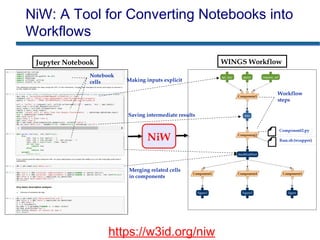
NiW: A Tool for Converting Notebooks into
Workflows
Notebook
cells
Workflow
steps
Jupyter Notebook WINGS Workflow
Making inputs explicit
Saving intermediate results
Merging related cells
in components
https://w3id.org/niw
NiW
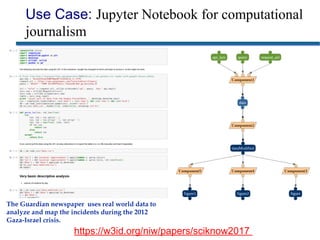
Use Case: Jupyter Notebook for computational
journalism
https://w3id.org/niw/papers/sciknow2017
The Guardian newspaper uses real world data to
analyze and map the incidents during the 2012
Gaza-Israel crisis.
Use Case
Changes related to guideline #3 – to write newly
generated data into files:
• (1) saving the data retrieved online in a local file, instead of
loading it in memory to be used in subsequent cells;
• (2) saving changes made to the data in each cell into a new file;
• (3) opening the updated data file saved by (2) in subsequent
cells.
Limitations of NiW Prototype
Only supports notebooks coded in Python.
Restricted support to magic commands.
Restricted support to open-file commands
Conclusions and Future work
An approach to convert notebooks into scientific workflows
• Workflows capture dataflow explicitly, which facilitates:
– Tracking provenance of new results
– Comparing workflows
– Mining common subworkflows
Implemented in NiW prototype
• Software: https://w3id.org/niw
• Example conversion: https://w3id.org/niw/papers/sciknow2017
Future work
• Explore the use of the workflows generated for comparing different
notebooks
• Using metadata tags in notebooks to better identify components and
outputs
• Mapping workflows into notebooks
Acknowledgments
US National Science Foundation (NSF)
Sao Paulo Research Foundation (FAPESP)
IS-GEO (Intelligent Systems for GeoSciences)
We would like to thank many collaborators for their
feedback on this work, in particular Jeremy White and
Zachary Stanko.
NiW:
Converting Notebooks into Workflows to
Capture Dataflow and Provenance
Lucas Carvalho1
, Regina Wang2
,
Daniel Garijo2
, Yolanda Gil2
lucas.carvalho@ic.unicamp.br
1
University of Campinas, Institute of Computing, Brazil
2
University of Southern California, Information Sciences Institute, U.S.A

NiW: Notebooks into Workflows

  • 1.
    NiW: Converting Notebooks intoWorkflows to Capture Dataflow and Provenance Lucas Carvalho1 , Regina Wang2 , Daniel Garijo2 , Yolanda Gil2 lucas.carvalho@ic.unicamp.br 1 University of Campinas, Institute of Computing, Brazil 2 University of Southern California, Information Sciences Institute, U.S.A
  • 2.
    Context: Notebooks Data-driven computing Recorddata, software, results, notes, etc. • Records what code was run when generating a result • Can re-run code with new data
  • 3.
    Computational Notebooks Cells types: • Code •Markdown • Raw Kernels Jupyter Notebook • was iPython Notebook
  • 4.
  • 5.
    Workflows Simple dataflow WINGS semanticworkflow system [Gil et al 2011] Workflow Template Workflow execution Input data: May Input data: July Input data: September
  • 6.
    Benefits of Workflows: TrackingProvenance Each time the workflow is executed, the system records the provenance of the results: what workflow was used, what its components were, what the input data was, and what values were assigned to the parameters.
  • 7.
    [Sethi et al Benefitsof Workflows: Comparing Workflows, Reusing Workflow Fragments
  • 8.
    Understanding Dataflow ofNotebooks Common issues that we found include: • Processing – Identification of main processing cells of a notebook. • Dataflow – Implicit file names. • Inputs – Pointers to other files . • Outputs – Lack of explicit outputs. • Files – Difficulty to correspond files in notebook folders to cells. • Data – Lack of data in notebook repositories.
  • 9.
    Mapping Notebooks toWorkflows: Components and Dataflow Components • Executable Code – N: cells may contain solely documentation, variables, library imports… AND splits in cells – W: must have some running code within it. – Approach: each running cell = 1 workflow component. • Libraries and Methods – N: import a library or state a method once – W: the imports and method declarations need to be done in each workflow component that uses them (= Approach) • Open Files – N: can open a file and use it in any subsequent cell. – W: a file can be used only inside the component that has that file as input. – Approach: Merge Cells
  • 10.
    Mapping Notebooks toWorkflows: Components and Dataflow Components • Markdown Cells – A markdown cells’ information will be attached to the documentation of the component created for its subsequent code cell. • Component Naming – A name will be generated for each component of the workflow, starting with “Component”. Dataflow • Parameters – Variables of primitive types that are given constant values in notebooks will be mapped to parameters in workflows, and they will be given the name that was used in the notebook. • Input Files – A data file will be explicitly generated from the notebook code
  • 11.
    Mapping Notebooks toWorkflows: Components and Dataflow Dataflow • Output Files – Create a file for written files and visualizations generated by notebooks. • Workflow Structure – The identifiers of the files generated and consumed by components generated for a given notebook will be used to obtain the dataflow between the components, and the dataflow will be explicitly stated in the workflow structure.
  • 12.
    From Jupyter Notebooksto WINGS Workflows Python-specific issues • Magic commands – Magic commands will be replaced with pre-defined Python code that implements them. • Visualizations – If the notebook does not save a visualization, the workflow will automatically save the visualization in a file. • Automatic Output – Print commands will have an extra output with all the results from the print statements. WINGS-specific issues • Software components • Input Data Files • Workflow Components
  • 13.
    From Jupyter Notebooksto WINGS Workflows WINGS-specific issues • Software components – A script will be generated for each component indicating the invocation command together with the total number of inputs, outputs, and parameters. • Input Data Files – All input files will be considered to be of the same general data type. • Workflow Components – All workflow components will be given a general component type.
  • 14.
    Usability Requirements Minimal changesto a notebook. Changes should improve notebook’s readability and documentation as well. Changes should be independent of the target WMS. Changes should improve the understanding of the dataflow. Workflows should generate as much as possible notebook results (even the implicitly ones). Automate the process as much as possible.
  • 15.
    Guidelines 1. Provide atleast one cell with running code 2. Write into files any newly generated data 3. Keep code that use the same file in the same cell 4. Keep related cells in sequence 5. Provide meaningful names for files and variables
  • 16.
    NiW: A Toolfor Converting Notebooks into Workflows Notebook cells Workflow steps Jupyter Notebook WINGS Workflow Making inputs explicit Saving intermediate results Merging related cells in components https://w3id.org/niw NiW
  • 17.
    Use Case: JupyterNotebook for computational journalism https://w3id.org/niw/papers/sciknow2017 The Guardian newspaper uses real world data to analyze and map the incidents during the 2012 Gaza-Israel crisis.
  • 18.
    Use Case Changes relatedto guideline #3 – to write newly generated data into files: • (1) saving the data retrieved online in a local file, instead of loading it in memory to be used in subsequent cells; • (2) saving changes made to the data in each cell into a new file; • (3) opening the updated data file saved by (2) in subsequent cells.
  • 19.
    Limitations of NiWPrototype Only supports notebooks coded in Python. Restricted support to magic commands. Restricted support to open-file commands
  • 20.
    Conclusions and Futurework An approach to convert notebooks into scientific workflows • Workflows capture dataflow explicitly, which facilitates: – Tracking provenance of new results – Comparing workflows – Mining common subworkflows Implemented in NiW prototype • Software: https://w3id.org/niw • Example conversion: https://w3id.org/niw/papers/sciknow2017 Future work • Explore the use of the workflows generated for comparing different notebooks • Using metadata tags in notebooks to better identify components and outputs • Mapping workflows into notebooks
  • 21.
    Acknowledgments US National ScienceFoundation (NSF) Sao Paulo Research Foundation (FAPESP) IS-GEO (Intelligent Systems for GeoSciences) We would like to thank many collaborators for their feedback on this work, in particular Jeremy White and Zachary Stanko.
  • 22.
    NiW: Converting Notebooks intoWorkflows to Capture Dataflow and Provenance Lucas Carvalho1 , Regina Wang2 , Daniel Garijo2 , Yolanda Gil2 lucas.carvalho@ic.unicamp.br 1 University of Campinas, Institute of Computing, Brazil 2 University of Southern California, Information Sciences Institute, U.S.A

Editor's Notes

  • #3 An interactive computing environment that enables users to author notebook documents that include: - Live code - Interactive widgets - Plots - Narrative text - Equations - Images - Video. 
  • #5 Comparing notebook executions Execution order