24/11/2010 1
New assistive technology switch-aids
designed for special conditions
Description,
set-up & operating instructions
Dr Michael Taylor
Excitim Limited
Tel: +44 (0)8707 117153
Web: www.dream-racer.com
Blog: http://excitim.biz
24/11/2010 2
New solutions to difficult conditions
 This presentation introduces four switch-aids designed to help users overcome a
series of conditions that prevent them from using switches correctly; including:
 Banging – a condition were users repeatedly hit the switch rather than operating it with a
single press.
 Tremors – a condition that prevents users from pressing the switch only once.
 Unintended switching – caused by a “casual” touch of the switch.
 Attention deficit – in which the student looses focus on the task and needs to be
reminded to “press the switch”.
 These switch-aids are intended to be helpful to users ranging from young
children beginning to develop their switch skills to older individuals that may
need some assistance to overcome loss of control or an involuntary tremor.
 Each unit is simple to install as it connects between the users personal switch
and the attached device that is being controlled e.g. toy, or input to an
environmental control system.
 Fail-safe versions of the Switch Filter and Sustained Pressure Switch are available
specifically for use in environmental control systems. These units are mains
powered with internal battery back-up and “low-battery” warning.
24/11/2010 3
Four new switches … designed for special
circumstances
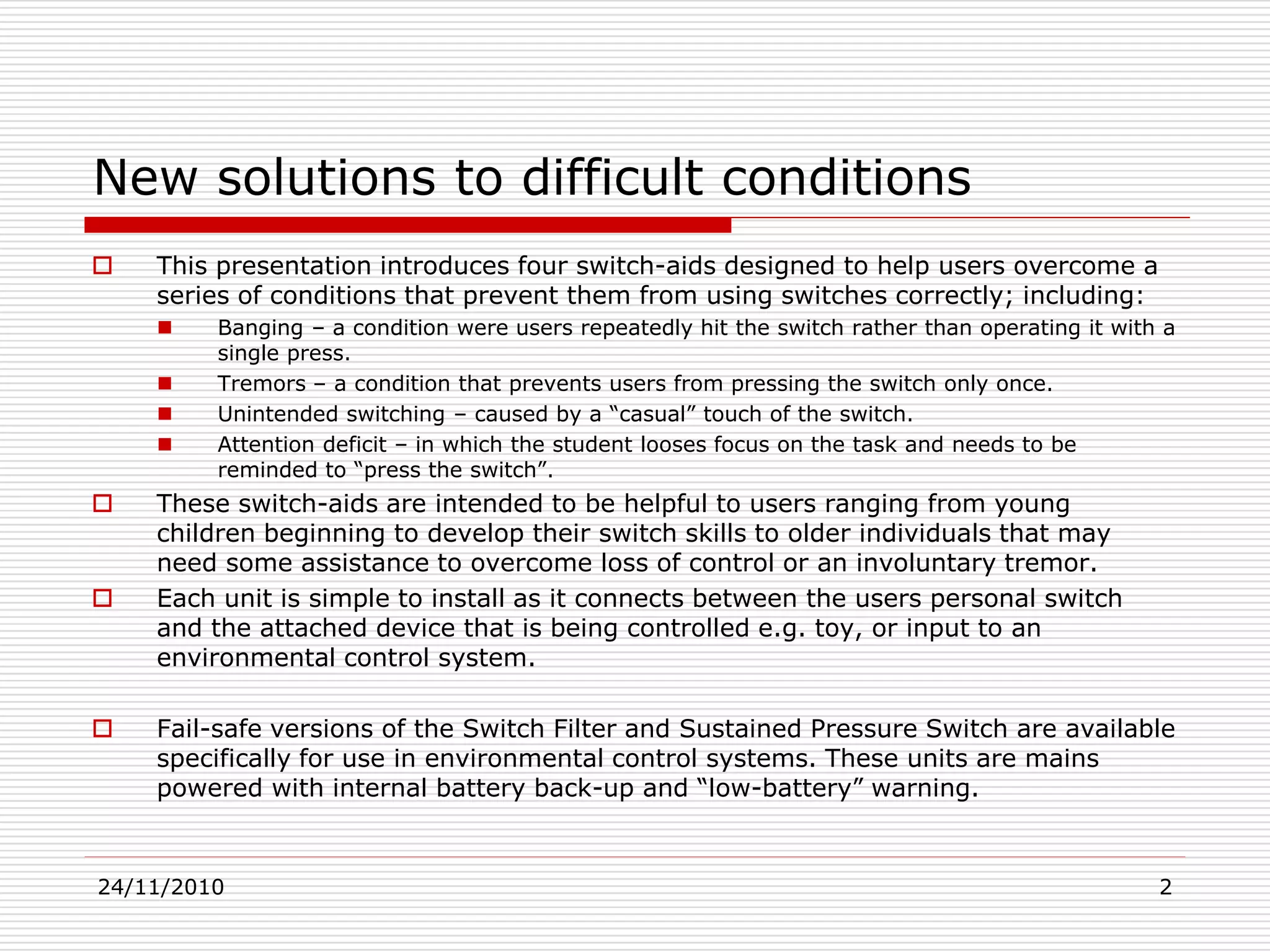
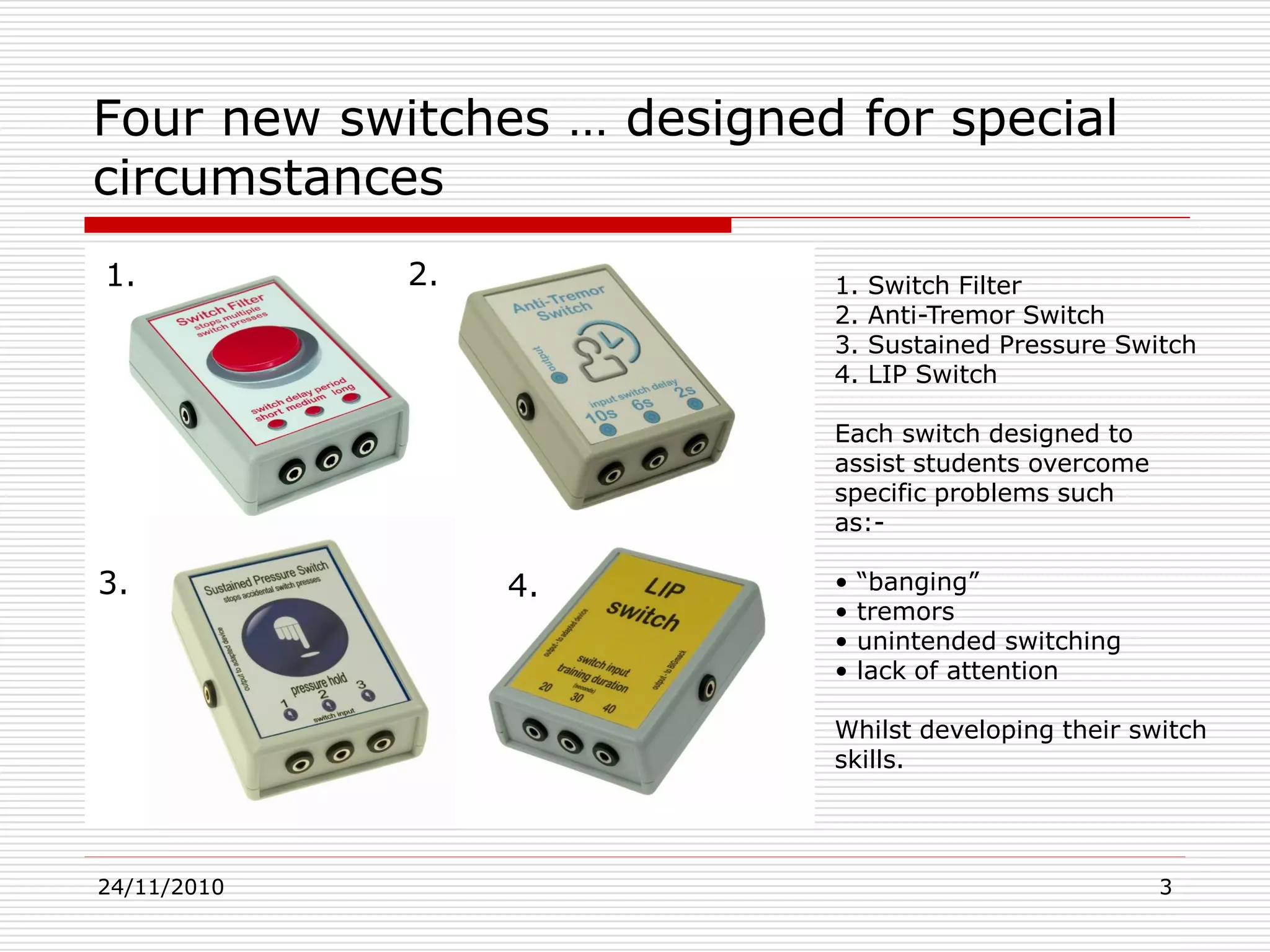
1. Switch Filter
2. Anti-Tremor Switch
3. Sustained Pressure Switch
4. LIP Switch
Each switch designed to
assist students overcome
specific problems such
as:-
• “banging”
• tremors
• unintended switching
• lack of attention
Whilst developing their switch
skills.
1. 2.
3. 4.
24/11/2010 4
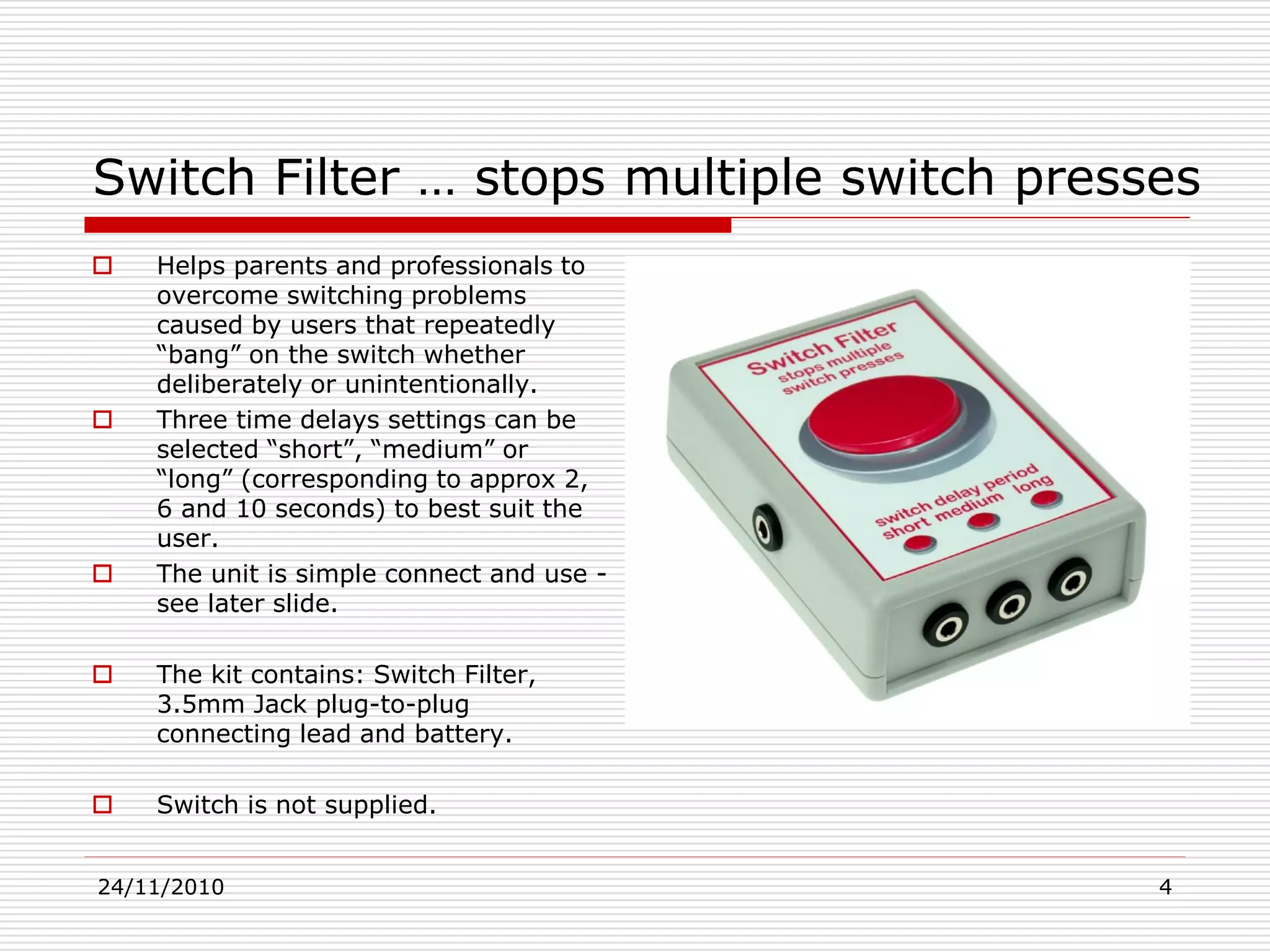
Switch Filter … stops multiple switch presses
 Helps parents and professionals to
overcome switching problems
caused by users that repeatedly
“bang” on the switch whether
deliberately or unintentionally.
 Three time delays settings can be
selected “short”, “medium” or
“long” (corresponding to approx 2,
6 and 10 seconds) to best suit the
user.
 The unit is simple connect and use -
see later slide.
 The kit contains: Switch Filter,
3.5mm Jack plug-to-plug
connecting lead and battery.
 Switch is not supplied.
24/11/2010 5
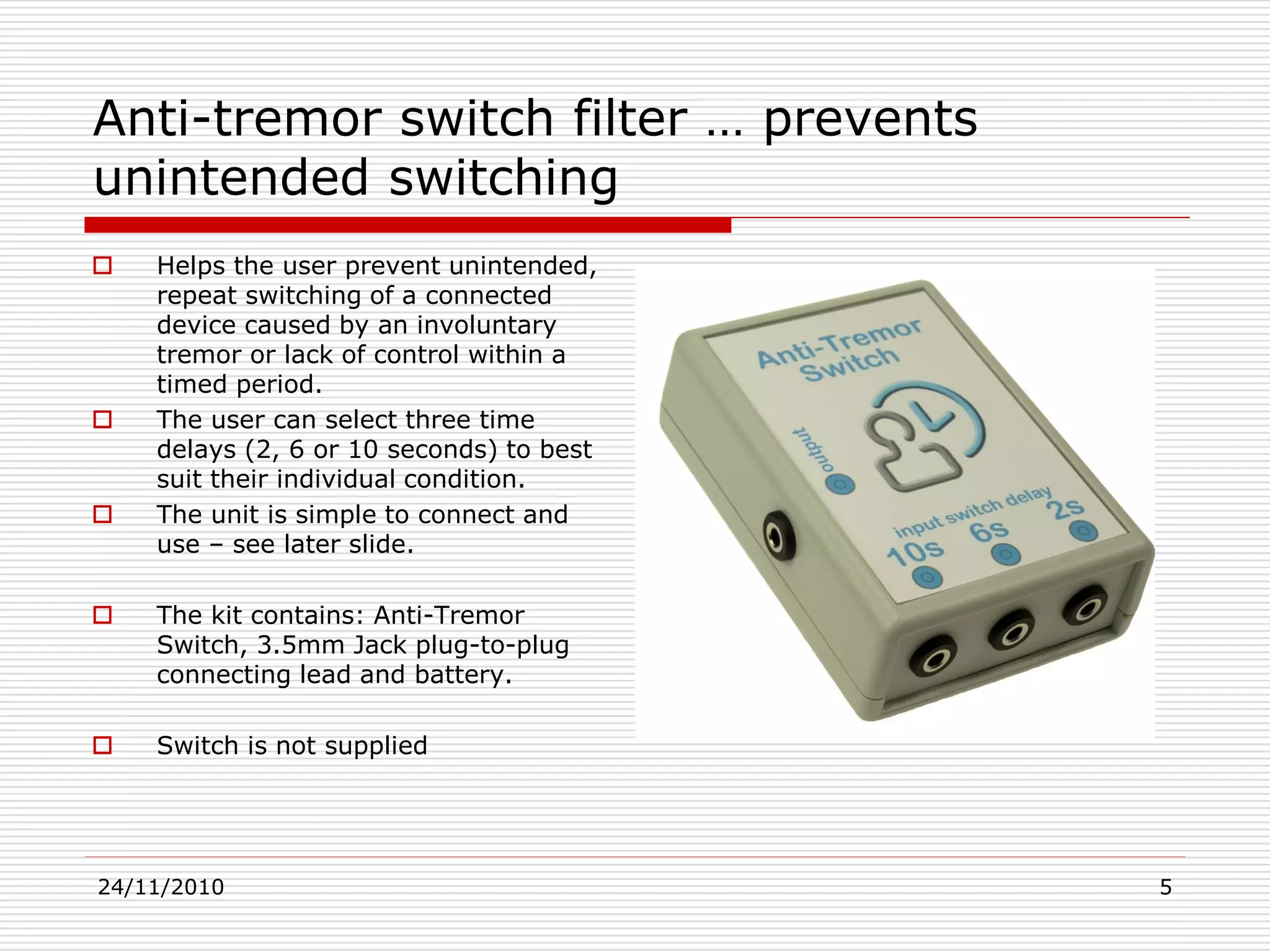
Anti-tremor switch filter … prevents
unintended switching
 Helps the user prevent unintended,
repeat switching of a connected
device caused by an involuntary
tremor or lack of control within a
timed period.
 The user can select three time
delays (2, 6 or 10 seconds) to best
suit their individual condition.
 The unit is simple to connect and
use – see later slide.
 The kit contains: Anti-Tremor
Switch, 3.5mm Jack plug-to-plug
connecting lead and battery.
 Switch is not supplied
24/11/2010 6
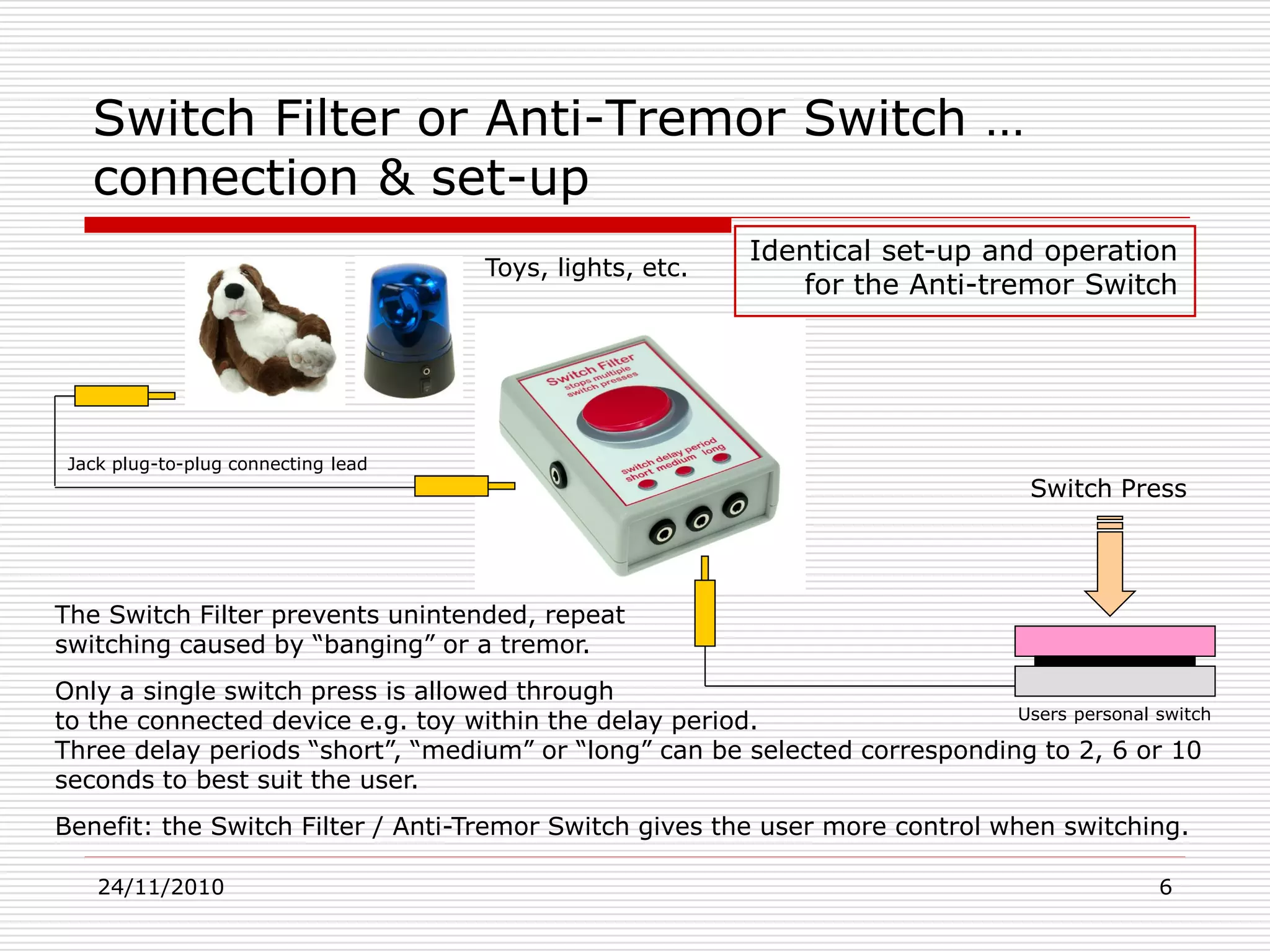
Switch Filter or Anti-Tremor Switch …
connection & set-up
Switch Press
The Switch Filter prevents unintended, repeat
switching caused by “banging” or a tremor.
Only a single switch press is allowed through
to the connected device e.g. toy within the delay period.
Three delay periods “short”, “medium” or “long” can be selected corresponding to 2, 6 or 10
seconds to best suit the user.
Benefit: the Switch Filter / Anti-Tremor Switch gives the user more control when switching.
Toys, lights, etc.
Identical set-up and operation
for the Anti-tremor Switch
Jack plug-to-plug connecting lead
Users personal switch
24/11/2010 7
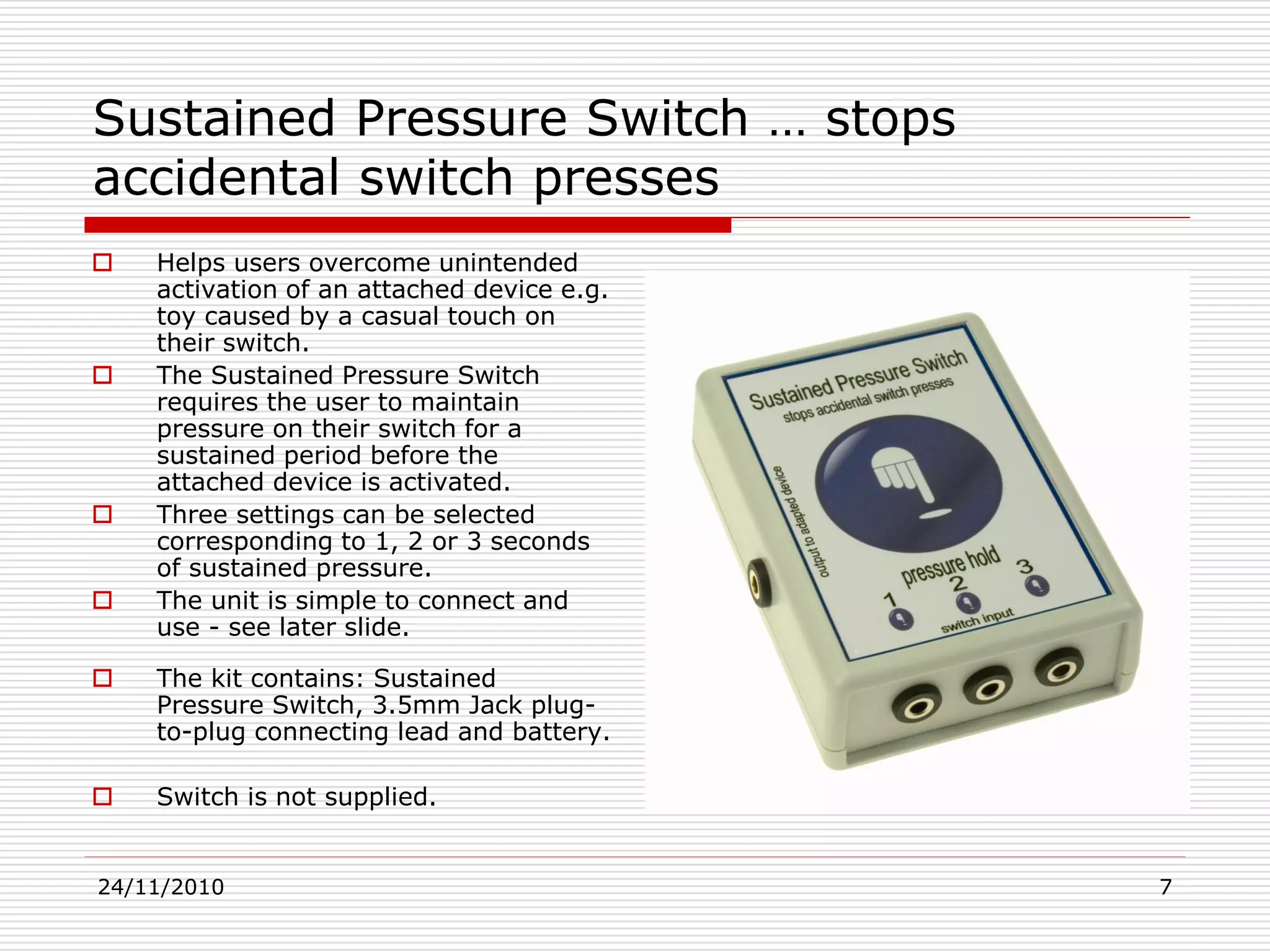
Sustained Pressure Switch … stops
accidental switch presses
 Helps users overcome unintended
activation of an attached device e.g.
toy caused by a casual touch on
their switch.
 The Sustained Pressure Switch
requires the user to maintain
pressure on their switch for a
sustained period before the
attached device is activated.
 Three settings can be selected
corresponding to 1, 2 or 3 seconds
of sustained pressure.
 The unit is simple to connect and
use - see later slide.
 The kit contains: Sustained
Pressure Switch, 3.5mm Jack plug-
to-plug connecting lead and battery.
 Switch is not supplied.
24/11/2010 8
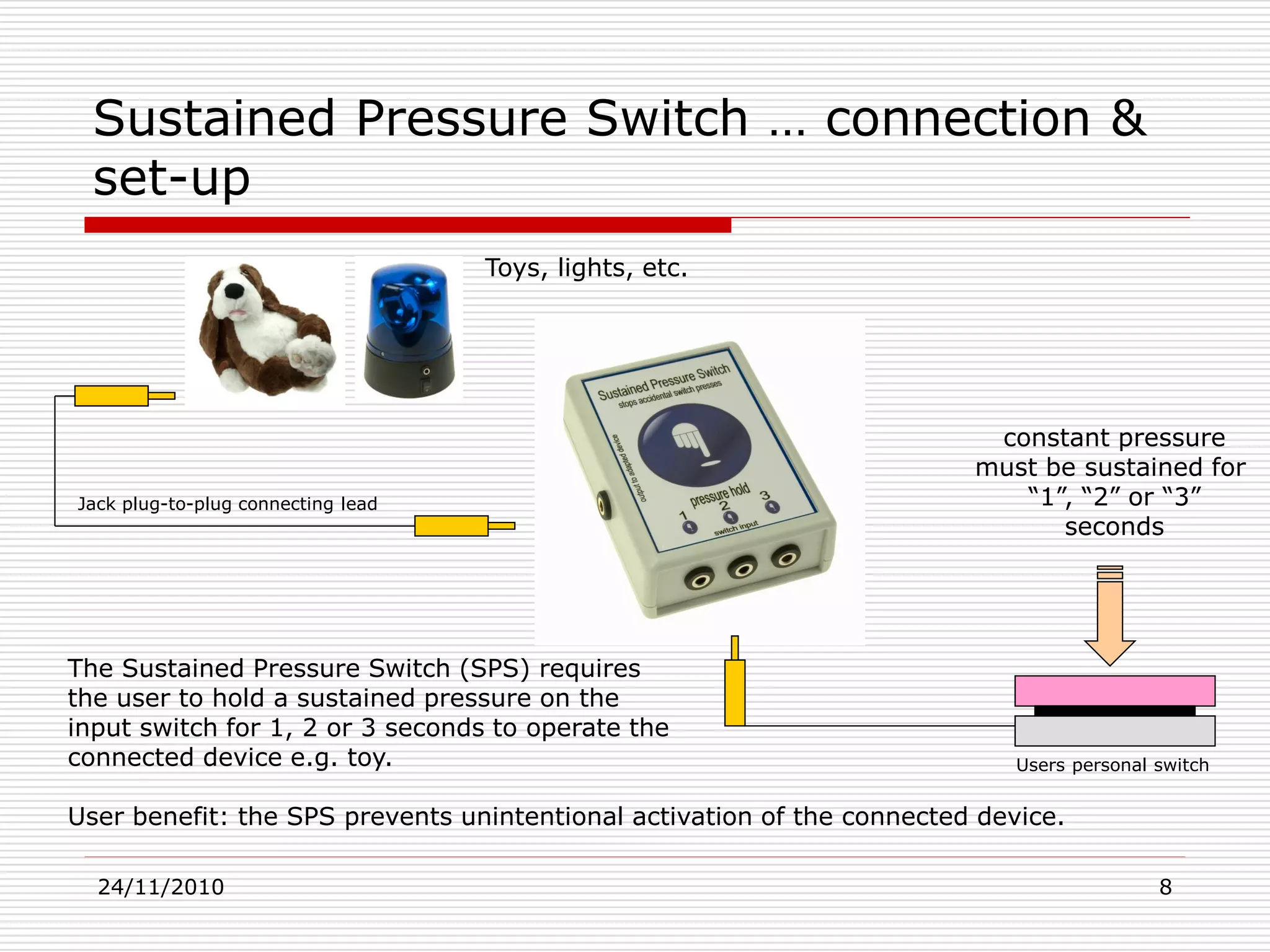
The Sustained Pressure Switch (SPS) requires
the user to hold a sustained pressure on the
input switch for 1, 2 or 3 seconds to operate the
connected device e.g. toy.
User benefit: the SPS prevents unintentional activation of the connected device.
Sustained Pressure Switch … connection &
set-up
constant pressure
must be sustained for
“1”, “2” or “3”
seconds
Toys, lights, etc.
Jack plug-to-plug connecting lead
Users personal switch
24/11/2010 9
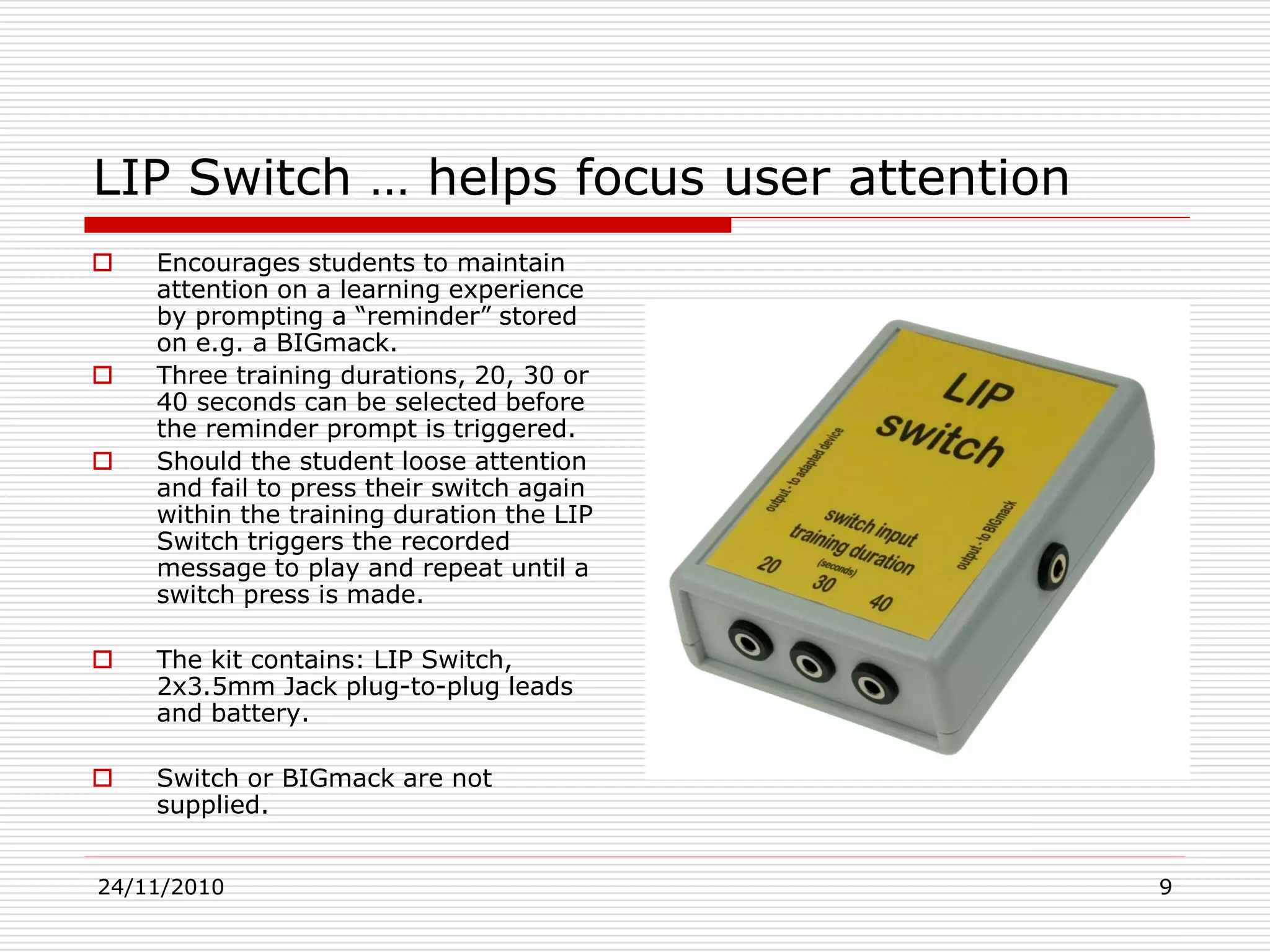
LIP Switch … helps focus user attention
 Encourages students to maintain
attention on a learning experience
by prompting a “reminder” stored
on e.g. a BIGmack.
 Three training durations, 20, 30 or
40 seconds can be selected before
the reminder prompt is triggered.
 Should the student loose attention
and fail to press their switch again
within the training duration the LIP
Switch triggers the recorded
message to play and repeat until a
switch press is made.
 The kit contains: LIP Switch,
2x3.5mm Jack plug-to-plug leads
and battery.
 Switch or BIGmack are not
supplied.
24/11/2010 10
LIP switch … teaching aid with prompt
Connection & set-up
Toys, lights, etc.
Recorded prompt
“press the switch
again…”
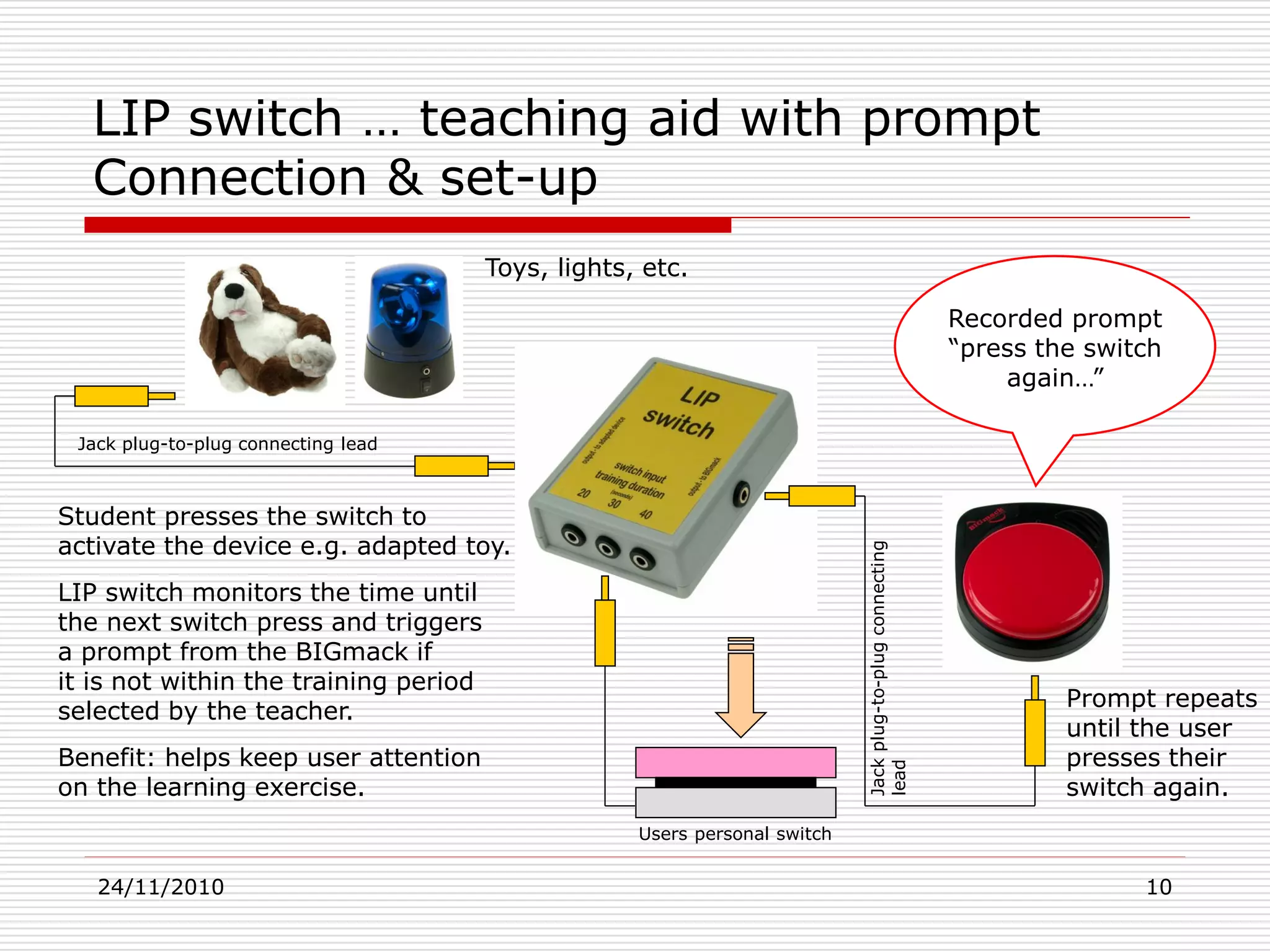
Student presses the switch to
activate the device e.g. adapted toy.
LIP switch monitors the time until
the next switch press and triggers
a prompt from the BIGmack if
it is not within the training period
selected by the teacher.
Benefit: helps keep user attention
on the learning exercise.
Jack plug-to-plug connecting lead
Jackplug-to-plugconnecting
lead
Users personal switch
Prompt repeats
until the user
presses their
switch again.
24/11/2010 11
Summary & further information
 This presentation outlines the functions and benefits of a new series of switch-
aids designed to assist users overcome difficult conditions; including:
 Banging – a condition were users repeatedly hit the switch rather than operating it with a
single press.
 Tremors – a condition that prevents users from pressing the switch only once.
 Unintended switching – caused by a “casual” touch of the switch.
 Attention deficit – in which the student looses focus on the task and needs to be
reminded to “press the switch”.
 Contact Excitim Ltd for further information on these switch-aids and other
assistive technology products including switch adapted toys at:
Dr Michael Taylor
Excitim Limited
Tel: +44 (0)8707 117153
Web: www.dream-racer.com
Blog: http://excitim.biz

New switch designs set-up and operating instructions

  • 1.
    24/11/2010 1 New assistivetechnology switch-aids designed for special conditions Description, set-up & operating instructions Dr Michael Taylor Excitim Limited Tel: +44 (0)8707 117153 Web: www.dream-racer.com Blog: http://excitim.biz
  • 2.
    24/11/2010 2 New solutionsto difficult conditions  This presentation introduces four switch-aids designed to help users overcome a series of conditions that prevent them from using switches correctly; including:  Banging – a condition were users repeatedly hit the switch rather than operating it with a single press.  Tremors – a condition that prevents users from pressing the switch only once.  Unintended switching – caused by a “casual” touch of the switch.  Attention deficit – in which the student looses focus on the task and needs to be reminded to “press the switch”.  These switch-aids are intended to be helpful to users ranging from young children beginning to develop their switch skills to older individuals that may need some assistance to overcome loss of control or an involuntary tremor.  Each unit is simple to install as it connects between the users personal switch and the attached device that is being controlled e.g. toy, or input to an environmental control system.  Fail-safe versions of the Switch Filter and Sustained Pressure Switch are available specifically for use in environmental control systems. These units are mains powered with internal battery back-up and “low-battery” warning.
  • 3.
    24/11/2010 3 Four newswitches … designed for special circumstances 1. Switch Filter 2. Anti-Tremor Switch 3. Sustained Pressure Switch 4. LIP Switch Each switch designed to assist students overcome specific problems such as:- • “banging” • tremors • unintended switching • lack of attention Whilst developing their switch skills. 1. 2. 3. 4.
  • 4.
    24/11/2010 4 Switch Filter… stops multiple switch presses  Helps parents and professionals to overcome switching problems caused by users that repeatedly “bang” on the switch whether deliberately or unintentionally.  Three time delays settings can be selected “short”, “medium” or “long” (corresponding to approx 2, 6 and 10 seconds) to best suit the user.  The unit is simple connect and use - see later slide.  The kit contains: Switch Filter, 3.5mm Jack plug-to-plug connecting lead and battery.  Switch is not supplied.
  • 5.
    24/11/2010 5 Anti-tremor switchfilter … prevents unintended switching  Helps the user prevent unintended, repeat switching of a connected device caused by an involuntary tremor or lack of control within a timed period.  The user can select three time delays (2, 6 or 10 seconds) to best suit their individual condition.  The unit is simple to connect and use – see later slide.  The kit contains: Anti-Tremor Switch, 3.5mm Jack plug-to-plug connecting lead and battery.  Switch is not supplied
  • 6.
    24/11/2010 6 Switch Filteror Anti-Tremor Switch … connection & set-up Switch Press The Switch Filter prevents unintended, repeat switching caused by “banging” or a tremor. Only a single switch press is allowed through to the connected device e.g. toy within the delay period. Three delay periods “short”, “medium” or “long” can be selected corresponding to 2, 6 or 10 seconds to best suit the user. Benefit: the Switch Filter / Anti-Tremor Switch gives the user more control when switching. Toys, lights, etc. Identical set-up and operation for the Anti-tremor Switch Jack plug-to-plug connecting lead Users personal switch
  • 7.
    24/11/2010 7 Sustained PressureSwitch … stops accidental switch presses  Helps users overcome unintended activation of an attached device e.g. toy caused by a casual touch on their switch.  The Sustained Pressure Switch requires the user to maintain pressure on their switch for a sustained period before the attached device is activated.  Three settings can be selected corresponding to 1, 2 or 3 seconds of sustained pressure.  The unit is simple to connect and use - see later slide.  The kit contains: Sustained Pressure Switch, 3.5mm Jack plug- to-plug connecting lead and battery.  Switch is not supplied.
  • 8.
    24/11/2010 8 The SustainedPressure Switch (SPS) requires the user to hold a sustained pressure on the input switch for 1, 2 or 3 seconds to operate the connected device e.g. toy. User benefit: the SPS prevents unintentional activation of the connected device. Sustained Pressure Switch … connection & set-up constant pressure must be sustained for “1”, “2” or “3” seconds Toys, lights, etc. Jack plug-to-plug connecting lead Users personal switch
  • 9.
    24/11/2010 9 LIP Switch… helps focus user attention  Encourages students to maintain attention on a learning experience by prompting a “reminder” stored on e.g. a BIGmack.  Three training durations, 20, 30 or 40 seconds can be selected before the reminder prompt is triggered.  Should the student loose attention and fail to press their switch again within the training duration the LIP Switch triggers the recorded message to play and repeat until a switch press is made.  The kit contains: LIP Switch, 2x3.5mm Jack plug-to-plug leads and battery.  Switch or BIGmack are not supplied.
  • 10.
    24/11/2010 10 LIP switch… teaching aid with prompt Connection & set-up Toys, lights, etc. Recorded prompt “press the switch again…” Student presses the switch to activate the device e.g. adapted toy. LIP switch monitors the time until the next switch press and triggers a prompt from the BIGmack if it is not within the training period selected by the teacher. Benefit: helps keep user attention on the learning exercise. Jack plug-to-plug connecting lead Jackplug-to-plugconnecting lead Users personal switch Prompt repeats until the user presses their switch again.
  • 11.
    24/11/2010 11 Summary &further information  This presentation outlines the functions and benefits of a new series of switch- aids designed to assist users overcome difficult conditions; including:  Banging – a condition were users repeatedly hit the switch rather than operating it with a single press.  Tremors – a condition that prevents users from pressing the switch only once.  Unintended switching – caused by a “casual” touch of the switch.  Attention deficit – in which the student looses focus on the task and needs to be reminded to “press the switch”.  Contact Excitim Ltd for further information on these switch-aids and other assistive technology products including switch adapted toys at: Dr Michael Taylor Excitim Limited Tel: +44 (0)8707 117153 Web: www.dream-racer.com Blog: http://excitim.biz