PC Hardware Servicing
Chapter 21: Networking Hardware
Concepts
Chapter 21 Objectives
• Identify networking topologies
• List common wired networking standards
• List common wireless networking
standards
• Describe hardware needed to create a
network
Resources Shared on a Network
• Hard disk space
• Disk drives (CD-ROM, ZIP)
• Printer access
• Internet access
– DSL/Cable Router
– Internet Connection Sharing
LAN versus WAN
• Local Area Network (LAN)
– Confined to a small area such as a building
• Wide Area Network (WAN)
– Networking on a much larger geographical
scale (ex. the Internet)
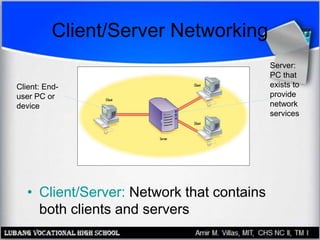
Client/Server Networking
• Client/Server: Network that contains
both clients and servers
Server:
PC that
exists to
provide
network
services
Client: End-
user PC or
device
Peer to Peer Networking
• All clients (no servers)
• All PCs share networking burden
• No server software needed
• Works well for very small networks (under
10 computers)
• Becomes cumbersome with larger
numbers
Physical Topologies
• Bus
• Ring
• Star
• Mesh
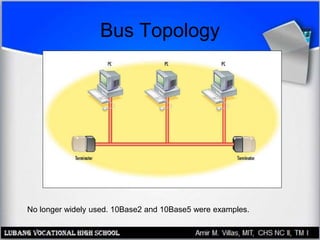
Bus Topology
No longer widely used. 10Base2 and 10Base5 were examples.
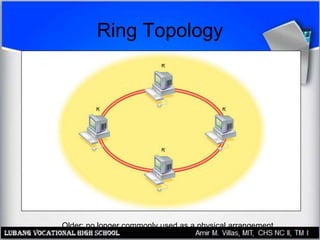
Ring Topology
Older; no longer commonly used as a physical arrangement
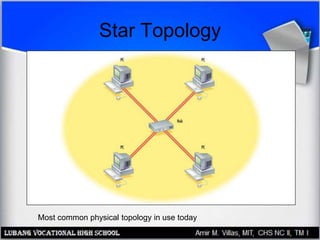
Star Topology
Most common physical topology in use today
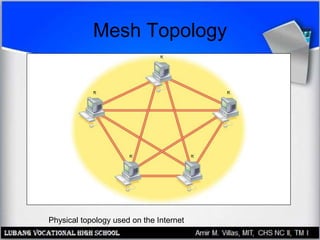
Mesh Topology
Physical topology used on the Internet
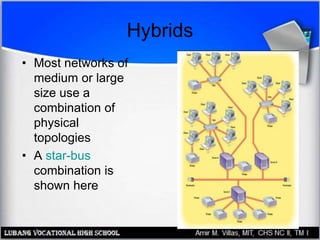
Hybrids
• Most networks of
medium or large
size use a
combination of
physical
topologies
• A star-bus
combination is
shown here
Logical Topologies
• Logical refers to the way information is
passed on the network
– For example, if the physical topology
represents the streets in a town, the logical
topology would represent the mail carrier’s
route
• Logical topologies: star, ring, bus
• Logical topology need not match the
physical topology
Ethernet
• Most popular networking standard
• Logically a bus
• Physically a star, ring, or hybrid
• Can be wired or wireless
• Can use copper wire or fiber optic cable
Some Ethernet Types
• 1000BaseT (Gigabit Ethernet)
• 100BaseT (Fast Ethernet)
• 10BaseT, 10Mbps
• 10Base-2 (Thinnet)
• 10Base-5 (Thicknet)
• Wireless Ethernet
– 802.11a, 802.11b, 802.11g
• 10BaseFL, 10BaseFX
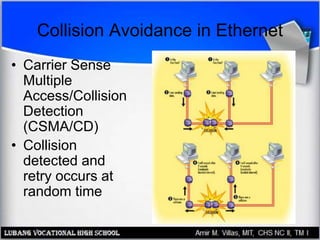
Collision Avoidance in Ethernet
• Carrier Sense
Multiple
Access/Collision
Detection
(CSMA/CD)
• Collision
detected and
retry occurs at
random time
Wireless Ethernet
• Also called Wi-Fi
• 802.11b: up to 11Mbps, very popular,
range of 250 to 300 feet
• 802.11g: up to 54Mbps, backward-
compatible with 802.11b
• 802.11a: up to 54Mbps, not compatible
with 802.11b
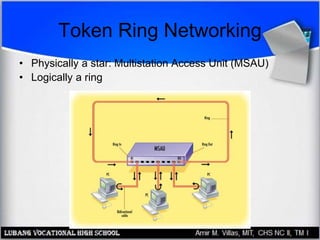
Token Ring Networking
• Physically a star: Multistation Access Unit (MSAU)
• Logically a ring
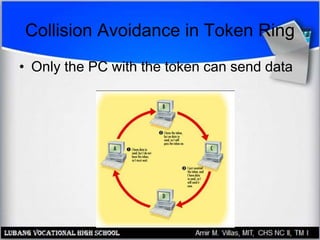
Collision Avoidance in Token Ring
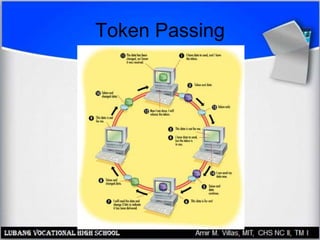
• Only the PC with the token can send data
Token Passing
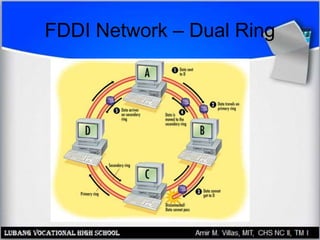
FDDI Network – Dual Ring
Data Packets
• Packet contains data plus header and
footer
• Header specifies destination and protocols
used
• Footer contains error-checking information
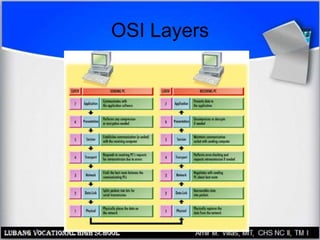
OSI Layers
• Open Systems Interconnection
• Reference model for discussing
networking
• Explains how a network operates
• Helps when troubleshooting network
problems
OSI Layers
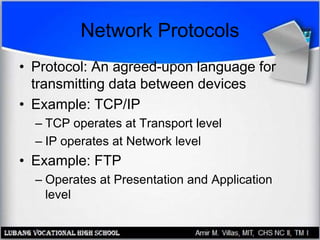
Network Protocols
• Protocol: An agreed-upon language for
transmitting data between devices
• Example: TCP/IP
– TCP operates at Transport level
– IP operates at Network level
• Example: FTP
– Operates at Presentation and Application
level
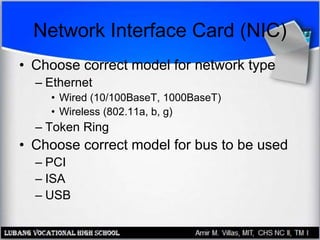
Network Interface Card (NIC)
• Choose correct model for network type
– Ethernet
• Wired (10/100BaseT, 1000BaseT)
• Wireless (802.11a, b, g)
– Token Ring
• Choose correct model for bus to be used
– PCI
– ISA
– USB
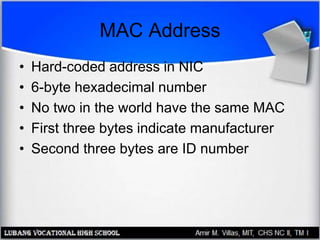
MAC Address
• Hard-coded address in NIC
• 6-byte hexadecimal number
• No two in the world have the same MAC
• First three bytes indicate manufacturer
• Second three bytes are ID number
Connecting Devices
• Hubs
• Switches
• Multi-Station Access Units (MSAUs)
• Routers
• Bridges
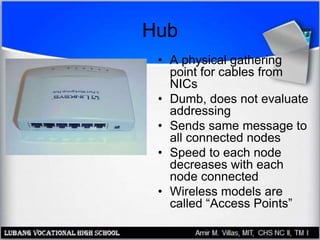
Hub
• A physical gathering
point for cables from
NICs
• Dumb, does not evaluate
addressing
• Sends same message to
all connected nodes
• Speed to each node
decreases with each
node connected
• Wireless models are
called “Access Points”
Switch
• A smart version of a hub
• Evaluates addressing and sends packets
only to addressee
• Attaching more nodes does not split speed
• Replacing hubs in popularity because of
superior performance
Multi-Station Access Unit
• Used in Token Ring networking
• Physically looks like a hub or switch
• Logically conducts packets in a ring
Router
• Reads IP addresses
• Routes packets between subnetworks
• Physically looks like a hub or switch
• Allows home users to share cable or DSL
Internet
• Routers used extensively on Internet
• Both wired and wireless models available
Bridges and Gateways
• Bridge: Connector between two physically
dissimilar networks
– Wired Ethernet to wireless Ethernet
– Phone line Ethernet to 100BaseT Ethernet
• Gateway: Connector between two logically
dissimilar networks
– Token ring to Ethernet
– Ethernet to Apple network
Wireless Networking Hardware
• Similar to wired equivalents
• Standards
– 802.11a
– 802.11b
– 802.11g
• Security is an issue
– Wired Equivalent Privacy (WEP)

Networking Hardware Concepts

  • 1.
    PC Hardware Servicing Chapter21: Networking Hardware Concepts
  • 2.
    Chapter 21 Objectives •Identify networking topologies • List common wired networking standards • List common wireless networking standards • Describe hardware needed to create a network
  • 3.
    Resources Shared ona Network • Hard disk space • Disk drives (CD-ROM, ZIP) • Printer access • Internet access – DSL/Cable Router – Internet Connection Sharing
  • 4.
    LAN versus WAN •Local Area Network (LAN) – Confined to a small area such as a building • Wide Area Network (WAN) – Networking on a much larger geographical scale (ex. the Internet)
  • 5.
    Client/Server Networking • Client/Server:Network that contains both clients and servers Server: PC that exists to provide network services Client: End- user PC or device
  • 6.
    Peer to PeerNetworking • All clients (no servers) • All PCs share networking burden • No server software needed • Works well for very small networks (under 10 computers) • Becomes cumbersome with larger numbers
  • 7.
    Physical Topologies • Bus •Ring • Star • Mesh
  • 8.
    Bus Topology No longerwidely used. 10Base2 and 10Base5 were examples.
  • 9.
    Ring Topology Older; nolonger commonly used as a physical arrangement
  • 10.
    Star Topology Most commonphysical topology in use today
  • 11.
    Mesh Topology Physical topologyused on the Internet
  • 12.
    Hybrids • Most networksof medium or large size use a combination of physical topologies • A star-bus combination is shown here
  • 13.
    Logical Topologies • Logicalrefers to the way information is passed on the network – For example, if the physical topology represents the streets in a town, the logical topology would represent the mail carrier’s route • Logical topologies: star, ring, bus • Logical topology need not match the physical topology
  • 14.
    Ethernet • Most popularnetworking standard • Logically a bus • Physically a star, ring, or hybrid • Can be wired or wireless • Can use copper wire or fiber optic cable
  • 15.
    Some Ethernet Types •1000BaseT (Gigabit Ethernet) • 100BaseT (Fast Ethernet) • 10BaseT, 10Mbps • 10Base-2 (Thinnet) • 10Base-5 (Thicknet) • Wireless Ethernet – 802.11a, 802.11b, 802.11g • 10BaseFL, 10BaseFX
  • 16.
    Collision Avoidance inEthernet • Carrier Sense Multiple Access/Collision Detection (CSMA/CD) • Collision detected and retry occurs at random time
  • 17.
    Wireless Ethernet • Alsocalled Wi-Fi • 802.11b: up to 11Mbps, very popular, range of 250 to 300 feet • 802.11g: up to 54Mbps, backward- compatible with 802.11b • 802.11a: up to 54Mbps, not compatible with 802.11b
  • 18.
    Token Ring Networking •Physically a star: Multistation Access Unit (MSAU) • Logically a ring
  • 19.
    Collision Avoidance inToken Ring • Only the PC with the token can send data
  • 20.
  • 21.
  • 22.
    Data Packets • Packetcontains data plus header and footer • Header specifies destination and protocols used • Footer contains error-checking information
  • 23.
    OSI Layers • OpenSystems Interconnection • Reference model for discussing networking • Explains how a network operates • Helps when troubleshooting network problems
  • 24.
  • 25.
    Network Protocols • Protocol:An agreed-upon language for transmitting data between devices • Example: TCP/IP – TCP operates at Transport level – IP operates at Network level • Example: FTP – Operates at Presentation and Application level
  • 26.
    Network Interface Card(NIC) • Choose correct model for network type – Ethernet • Wired (10/100BaseT, 1000BaseT) • Wireless (802.11a, b, g) – Token Ring • Choose correct model for bus to be used – PCI – ISA – USB
  • 27.
    MAC Address • Hard-codedaddress in NIC • 6-byte hexadecimal number • No two in the world have the same MAC • First three bytes indicate manufacturer • Second three bytes are ID number
  • 28.
    Connecting Devices • Hubs •Switches • Multi-Station Access Units (MSAUs) • Routers • Bridges
  • 29.
    Hub • A physicalgathering point for cables from NICs • Dumb, does not evaluate addressing • Sends same message to all connected nodes • Speed to each node decreases with each node connected • Wireless models are called “Access Points”
  • 30.
    Switch • A smartversion of a hub • Evaluates addressing and sends packets only to addressee • Attaching more nodes does not split speed • Replacing hubs in popularity because of superior performance
  • 31.
    Multi-Station Access Unit •Used in Token Ring networking • Physically looks like a hub or switch • Logically conducts packets in a ring
  • 32.
    Router • Reads IPaddresses • Routes packets between subnetworks • Physically looks like a hub or switch • Allows home users to share cable or DSL Internet • Routers used extensively on Internet • Both wired and wireless models available
  • 33.
    Bridges and Gateways •Bridge: Connector between two physically dissimilar networks – Wired Ethernet to wireless Ethernet – Phone line Ethernet to 100BaseT Ethernet • Gateway: Connector between two logically dissimilar networks – Token ring to Ethernet – Ethernet to Apple network
  • 34.
    Wireless Networking Hardware •Similar to wired equivalents • Standards – 802.11a – 802.11b – 802.11g • Security is an issue – Wired Equivalent Privacy (WEP)