A Complete Education for A Complete Person
P.O. Box 4, Mukono, Uganda, Plot 67-173, Bishop Tucker Road, Mukono Hill
Tel: +256 (0) 312 350 800 Email: info@ucu.ac.ug Web: https://ucu.ac.ug
Founded by the Province of the Church of Uganda. Chartered by the Government of Uganda
Networking Concepts
A Complete Education for A Complete Person
P.O. Box 4, Mukono, Uganda, Plot 67-173, Bishop Tucker Road, Mukono Hill
Tel: +256 (0) 312 350 800 Email: info@ucu.ac.ug Web: https://ucu.ac.ug
Founded by the Province of the Church of Uganda. Chartered by the Government of Uganda
Sections & Objectives
Network Components and Types
• Explain components and types of computer networks.
• Describe the types of networks.
• Describe internet connection types.
 Network Protocols, Standards, and Services
• Explain networking protocols, standards and services.
• Explain the purpose and characteristics of transport layer protocols.
• Explain the significance of application port numbers.
• Explain wireless protocols.
• Explain network services.
A Complete Education for A Complete Person
P.O. Box 4, Mukono, Uganda, Plot 67-173, Bishop Tucker Road, Mukono Hill
Tel: +256 (0) 312 350 800 Email: info@ucu.ac.ug Web: https://ucu.ac.ug
Founded by the Province of the Church of Uganda. Chartered by the Government of Uganda
Sections & Objectives (Cont.)
Network Devices
• Explain the purpose of devices on a network.
• Explain basic network devices.
• Explain security devices.
• Explain other network devices.
 Network Cables
• Explain the characteristics of network cables.
• Describe networking tools and their purpose.
• Explain the purpose and characteristics of common types of copper network cables and
connectors.
• Explain the purpose and characteristics of common types of fiber network cables and
connectors.
A Complete Education for A Complete Person
P.O. Box 4, Mukono, Uganda, Plot 67-173, Bishop Tucker Road, Mukono Hill
Tel: +256 (0) 312 350 800 Email: info@ucu.ac.ug Web: https://ucu.ac.ug
Founded by the Province of the Church of Uganda. Chartered by the Government of Uganda
Network Components and
Types
A Complete Education for A Complete Person
P.O. Box 4, Mukono, Uganda, Plot 67-173, Bishop Tucker Road, Mukono Hill
Tel: +256 (0) 312 350 800 Email: info@ucu.ac.ug Web: https://ucu.ac.ug
Founded by the Province of the Church of Uganda. Chartered by the Government of Uganda
Types of Networks
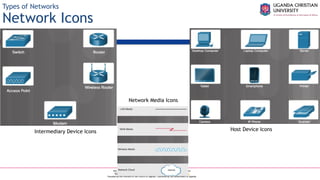
Network Icons
Intermediary Device Icons
Network Media Icons
Host Device Icons
A Complete Education for A Complete Person
P.O. Box 4, Mukono, Uganda, Plot 67-173, Bishop Tucker Road, Mukono Hill
Tel: +256 (0) 312 350 800 Email: info@ucu.ac.ug Web: https://ucu.ac.ug
Founded by the Province of the Church of Uganda. Chartered by the Government of Uganda
Types of Networks
Network Topologies and Description
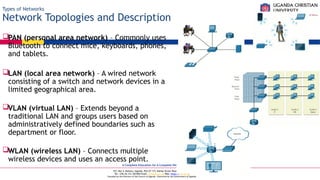
PAN (personal area network) – Commonly uses
Bluetooth to connect mice, keyboards, phones,
and tablets.
LAN (local area network) – A wired network
consisting of a switch and network devices in a
limited geographical area.
VLAN (virtual LAN) – Extends beyond a
traditional LAN and groups users based on
administratively defined boundaries such as
department or floor.
WLAN (wireless LAN) – Connects multiple
wireless devices and uses an access point.
A Complete Education for A Complete Person
P.O. Box 4, Mukono, Uganda, Plot 67-173, Bishop Tucker Road, Mukono Hill
Tel: +256 (0) 312 350 800 Email: info@ucu.ac.ug Web: https://ucu.ac.ug
Founded by the Province of the Church of Uganda. Chartered by the Government of Uganda
Types of Networks
Network Topologies and Description (Cont.)
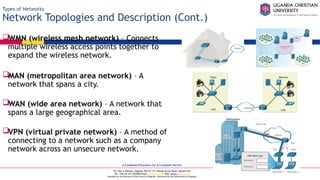
WMN (wireless mesh network) – Connects
multiple wireless access points together to
expand the wireless network.
MAN (metropolitan area network) – A
network that spans a city.
WAN (wide area network) – A network that
spans a large geographical area.
VPN (virtual private network) – A method of
connecting to a network such as a company
network across an unsecure network.
A Complete Education for A Complete Person
P.O. Box 4, Mukono, Uganda, Plot 67-173, Bishop Tucker Road, Mukono Hill
Tel: +256 (0) 312 350 800 Email: info@ucu.ac.ug Web: https://ucu.ac.ug
Founded by the Province of the Church of Uganda. Chartered by the Government of Uganda
Types of Networks
VLANs
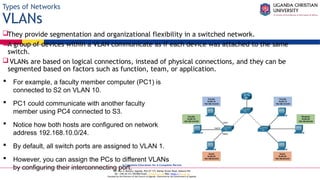
They provide segmentation and organizational flexibility in a switched network.
A group of devices within a VLAN communicate as if each device was attached to the same
switch.
VLANs are based on logical connections, instead of physical connections, and they can be
segmented based on factors such as function, team, or application.
 For example, a faculty member computer (PC1) is
connected to S2 on VLAN 10.
 PC1 could communicate with another faculty
member using PC4 connected to S3.
 Notice how both hosts are configured on network
address 192.168.10.0/24.
 By default, all switch ports are assigned to VLAN 1.
 However, you can assign the PCs to different VLANs
by configuring their interconnecting port.
A Complete Education for A Complete Person
P.O. Box 4, Mukono, Uganda, Plot 67-173, Bishop Tucker Road, Mukono Hill
Tel: +256 (0) 312 350 800 Email: info@ucu.ac.ug Web: https://ucu.ac.ug
Founded by the Province of the Church of Uganda. Chartered by the Government of Uganda
Types of Networks
VLANs (Cont.)
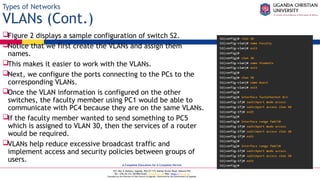
Figure 2 displays a sample configuration of switch S2.
Notice that we first create the VLANs and assign them
names.
This makes it easier to work with the VLANs.
Next, we configure the ports connecting to the PCs to the
corresponding VLANs.
Once the VLAN information is configured on the other
switches, the faculty member using PC1 would be able to
communicate with PC4 because they are on the same VLANs.
If the faculty member wanted to send something to PC5
which is assigned to VLAN 30, then the services of a router
would be required.
VLANs help reduce excessive broadcast traffic and
implement access and security policies between groups of
users.
A Complete Education for A Complete Person
P.O. Box 4, Mukono, Uganda, Plot 67-173, Bishop Tucker Road, Mukono Hill
Tel: +256 (0) 312 350 800 Email: info@ucu.ac.ug Web: https://ucu.ac.ug
Founded by the Province of the Church of Uganda. Chartered by the Government of Uganda
Internet Connection Types
Brief History of Connection Technologies
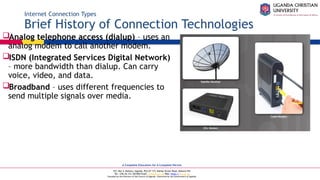
Analog telephone access (dialup) – uses an
analog modem to call another modem.
ISDN (Integrated Services Digital Network)
– more bandwidth than dialup. Can carry
voice, video, and data.
Broadband – uses different frequencies to
send multiple signals over media.
A Complete Education for A Complete Person
P.O. Box 4, Mukono, Uganda, Plot 67-173, Bishop Tucker Road, Mukono Hill
Tel: +256 (0) 312 350 800 Email: info@ucu.ac.ug Web: https://ucu.ac.ug
Founded by the Province of the Church of Uganda. Chartered by the Government of Uganda
Internet Connection Types
DSL, Cable, and Fiber
DSL (digital subscriber line) – always on technology that uses phone lines; voice and data
carried on different frequencies; requires a filter on the port that connects to a phone.
Very high-speed DSL (VDSL) attains much higher bit rates than DSL. A symmetric link can carry as
much as 26 Mbps in both directions while an asymmetric link can carry as much as 52 Mbps download
and 6 Mbps upload. VDSL2 can carry as much as 100 Mbps in both directions.
Cable – Uses a cable modem to connect to a traditional cable TV network; shares the
network with multiple subscribers.
 Fiber – High bandwidth connection used in backbone
networks, large enterprise environments, large data
centers, and now part of some home internet
connections.
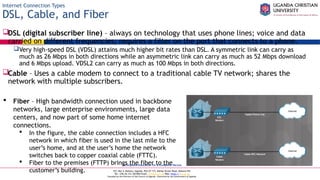
 In the figure, the cable connection includes a HFC
network in which fiber is used in the last mile to the
user’s home, and at the user’s home the network
switches back to copper coaxial cable (FTTC).
 Fiber to the premises (FTTP) brings the fiber to the
customer’s building.
A Complete Education for A Complete Person
P.O. Box 4, Mukono, Uganda, Plot 67-173, Bishop Tucker Road, Mukono Hill
Tel: +256 (0) 312 350 800 Email: info@ucu.ac.ug Web: https://ucu.ac.ug
Founded by the Province of the Church of Uganda. Chartered by the Government of Uganda
Internet Connection Types
Line of Sight Wireless Internet Service
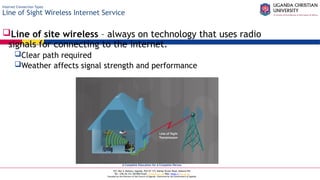
Line of site wireless – always on technology that uses radio
signals for connecting to the internet.
Clear path required
Weather affects signal strength and performance
A Complete Education for A Complete Person
P.O. Box 4, Mukono, Uganda, Plot 67-173, Bishop Tucker Road, Mukono Hill
Tel: +256 (0) 312 350 800 Email: info@ucu.ac.ug Web: https://ucu.ac.ug
Founded by the Province of the Church of Uganda. Chartered by the Government of Uganda
Internet Connection Types
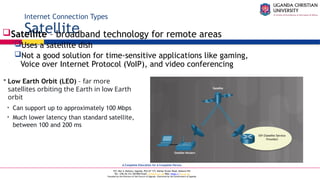
Satellite
Satellite – broadband technology for remote areas
Uses a satellite dish
Not a good solution for time-sensitive applications like gaming,
Voice over Internet Protocol (VoIP), and video conferencing
 Low Earth Orbit (LEO) – far more
satellites orbiting the Earth in low Earth
orbit
• Can support up to approximately 100 Mbps
• Much lower latency than standard satellite,
between 100 and 200 ms
A Complete Education for A Complete Person
P.O. Box 4, Mukono, Uganda, Plot 67-173, Bishop Tucker Road, Mukono Hill
Tel: +256 (0) 312 350 800 Email: info@ucu.ac.ug Web: https://ucu.ac.ug
Founded by the Province of the Church of Uganda. Chartered by the Government of Uganda
Internet Connection Types
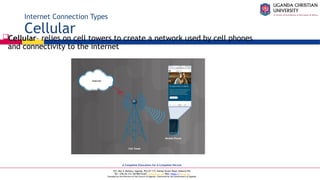
Cellular
Cellular– relies on cell towers to create a network used by cell phones
and connectivity to the internet
A Complete Education for A Complete Person
P.O. Box 4, Mukono, Uganda, Plot 67-173, Bishop Tucker Road, Mukono Hill
Tel: +256 (0) 312 350 800 Email: info@ucu.ac.ug Web: https://ucu.ac.ug
Founded by the Province of the Church of Uganda. Chartered by the Government of Uganda
Internet Connection Types
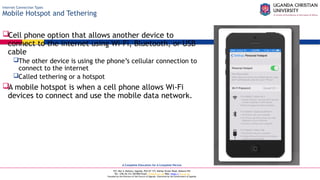
Mobile Hotspot and Tethering
Cell phone option that allows another device to
connect to the internet using Wi-Fi, Bluetooth, or USB
cable
The other device is using the phone’s cellular connection to
connect to the internet
Called tethering or a hotspot
A mobile hotspot is when a cell phone allows Wi-Fi
devices to connect and use the mobile data network.
A Complete Education for A Complete Person
P.O. Box 4, Mukono, Uganda, Plot 67-173, Bishop Tucker Road, Mukono Hill
Tel: +256 (0) 312 350 800 Email: info@ucu.ac.ug Web: https://ucu.ac.ug
Founded by the Province of the Church of Uganda. Chartered by the Government of Uganda
Networking Protocols,
Standards, and Services
A Complete Education for A Complete Person
P.O. Box 4, Mukono, Uganda, Plot 67-173, Bishop Tucker Road, Mukono Hill
Tel: +256 (0) 312 350 800 Email: info@ucu.ac.ug Web: https://ucu.ac.ug
Founded by the Province of the Church of Uganda. Chartered by the Government of Uganda
Video Explanation – Transport Layer Protocols
Transport Layer Protocols
A Complete Education for A Complete Person
P.O. Box 4, Mukono, Uganda, Plot 67-173, Bishop Tucker Road, Mukono Hill
Tel: +256 (0) 312 350 800 Email: info@ucu.ac.ug Web: https://ucu.ac.ug
Founded by the Province of the Church of Uganda. Chartered by the Government of Uganda
Transport Layer Protocols
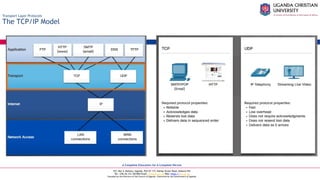
The TCP/IP Model
A Complete Education for A Complete Person
P.O. Box 4, Mukono, Uganda, Plot 67-173, Bishop Tucker Road, Mukono Hill
Tel: +256 (0) 312 350 800 Email: info@ucu.ac.ug Web: https://ucu.ac.ug
Founded by the Province of the Church of Uganda. Chartered by the Government of Uganda
Transport Layer Protocols
TCP
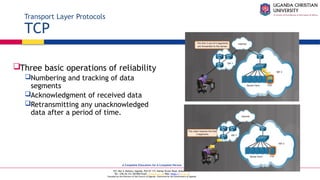
Three basic operations of reliability
Numbering and tracking of data
segments
Acknowledgment of received data
Retransmitting any unacknowledged
data after a period of time.
A Complete Education for A Complete Person
P.O. Box 4, Mukono, Uganda, Plot 67-173, Bishop Tucker Road, Mukono Hill
Tel: +256 (0) 312 350 800 Email: info@ucu.ac.ug Web: https://ucu.ac.ug
Founded by the Province of the Church of Uganda. Chartered by the Government of Uganda
Transport Layer Protocols
UDP
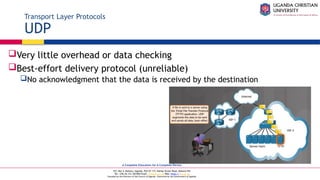
Very little overhead or data checking
Best-effort delivery protocol (unreliable)
No acknowledgment that the data is received by the destination
A Complete Education for A Complete Person
P.O. Box 4, Mukono, Uganda, Plot 67-173, Bishop Tucker Road, Mukono Hill
Tel: +256 (0) 312 350 800 Email: info@ucu.ac.ug Web: https://ucu.ac.ug
Founded by the Province of the Church of Uganda. Chartered by the Government of Uganda
Transport Layer Protocols
Video Explanation – Application Port Numbers
A Complete Education for A Complete Person
P.O. Box 4, Mukono, Uganda, Plot 67-173, Bishop Tucker Road, Mukono Hill
Tel: +256 (0) 312 350 800 Email: info@ucu.ac.ug Web: https://ucu.ac.ug
Founded by the Province of the Church of Uganda. Chartered by the Government of Uganda
Application Port Numbers
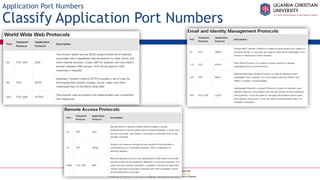
Classify Application Port Numbers
A Complete Education for A Complete Person
P.O. Box 4, Mukono, Uganda, Plot 67-173, Bishop Tucker Road, Mukono Hill
Tel: +256 (0) 312 350 800 Email: info@ucu.ac.ug Web: https://ucu.ac.ug
Founded by the Province of the Church of Uganda. Chartered by the Government of Uganda
Application Port Numbers
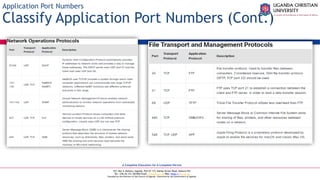
Classify Application Port Numbers (Cont.)
A Complete Education for A Complete Person
P.O. Box 4, Mukono, Uganda, Plot 67-173, Bishop Tucker Road, Mukono Hill
Tel: +256 (0) 312 350 800 Email: info@ucu.ac.ug Web: https://ucu.ac.ug
Founded by the Province of the Church of Uganda. Chartered by the Government of Uganda
Wireless Protocols
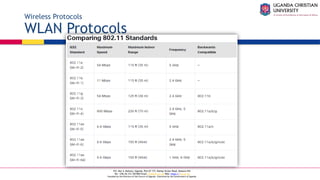
WLAN Protocols
A Complete Education for A Complete Person
P.O. Box 4, Mukono, Uganda, Plot 67-173, Bishop Tucker Road, Mukono Hill
Tel: +256 (0) 312 350 800 Email: info@ucu.ac.ug Web: https://ucu.ac.ug
Founded by the Province of the Church of Uganda. Chartered by the Government of Uganda
Wireless Protocols
Bluetooth, NFC, and RFID
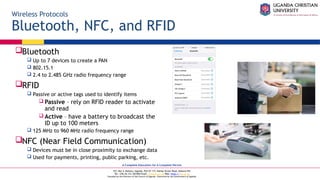
Bluetooth
 Up to 7 devices to create a PAN
 802.15.1
 2.4 to 2.485 GHz radio frequency range
RFID
 Passive or active tags used to identify items
 Passive – rely on RFID reader to activate
and read
 Active – have a battery to broadcast the
ID up to 100 meters
 125 MHz to 960 MHz radio frequency range
NFC (Near Field Communication)
 Devices must be in close proximity to exchange data
 Used for payments, printing, public parking, etc.
A Complete Education for A Complete Person
P.O. Box 4, Mukono, Uganda, Plot 67-173, Bishop Tucker Road, Mukono Hill
Tel: +256 (0) 312 350 800 Email: info@ucu.ac.ug Web: https://ucu.ac.ug
Founded by the Province of the Church of Uganda. Chartered by the Government of Uganda
Wireless Protocols
Zigbee and Z-Wave
Zigbee
Requires a ZigBee Coordinator to manage client
devices connected in a wireless mesh network.
Devices commonly managed from a cell phone
app
IEEE 802.15.4 standard
868 MHz to 2.4 GHz range up to 20 meters,
65,000 devices, and data speeds up to 250 kb/s
Z-Wave
Proprietary standard, but public version available
232 devices can connect to a wireless mesh
network with data speeds up to 100 kb/s.
A Complete Education for A Complete Person
P.O. Box 4, Mukono, Uganda, Plot 67-173, Bishop Tucker Road, Mukono Hill
Tel: +256 (0) 312 350 800 Email: info@ucu.ac.ug Web: https://ucu.ac.ug
Founded by the Province of the Church of Uganda. Chartered by the Government of Uganda
Wireless Protocols
Cellular Generations
1G/2G – First generation was analog calls only. 2G introduced digital voice, conference calls, and
caller ID with speeds less than 9.6 Kb/s
2.5G – supports web browsing, short audio and video clips with speeds up to 237 Kb/s.
3G – full motion video and streaming music at speeds up to 2 Mb/s.
3.5G – supports high-quality streaming video, high-quality video conferencing, and VoIP, at speeds up
to 16 Mb/s.
4G - IPv6, IP-based voice, gaming services, high quality multimedia at speeds up to 672 Mb/s.
LTE (Long Term Evolution) – means it meets the 4G speed standards and improves connectivity while
in motion. Speeds up to 100 Mb/s when mobile and up to 1 Gb/s when stationary.
5G – supports augmented reality (AR), virtual reality (VR), smart homes, smart cars, and data
transfer between devices. Download speeds up to 3 Gb/s; upload speeds up to 1.5 Gb/s.
6G – is currently in development. As of late 2022, no standard yet exists. It will support even faster
speeds required for AR/VR applications, AI applications, and instantaneous communications.
A Complete Education for A Complete Person
P.O. Box 4, Mukono, Uganda, Plot 67-173, Bishop Tucker Road, Mukono Hill
Tel: +256 (0) 312 350 800 Email: info@ucu.ac.ug Web: https://ucu.ac.ug
Founded by the Province of the Church of Uganda. Chartered by the Government of Uganda
Network Services
Video Explanation – Network Services
A Complete Education for A Complete Person
P.O. Box 4, Mukono, Uganda, Plot 67-173, Bishop Tucker Road, Mukono Hill
Tel: +256 (0) 312 350 800 Email: info@ucu.ac.ug Web: https://ucu.ac.ug
Founded by the Province of the Church of Uganda. Chartered by the Government of Uganda
Network Services
Client – Server Roles
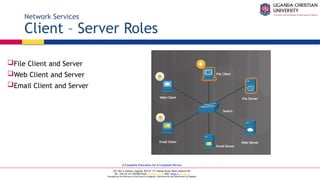
File Client and Server
Web Client and Server
Email Client and Server
A Complete Education for A Complete Person
P.O. Box 4, Mukono, Uganda, Plot 67-173, Bishop Tucker Road, Mukono Hill
Tel: +256 (0) 312 350 800 Email: info@ucu.ac.ug Web: https://ucu.ac.ug
Founded by the Province of the Church of Uganda. Chartered by the Government of Uganda
Network Services
DHCP Server
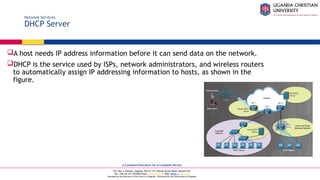
A host needs IP address information before it can send data on the network.
DHCP is the service used by ISPs, network administrators, and wireless routers
to automatically assign IP addressing information to hosts, as shown in the
figure.
A Complete Education for A Complete Person
P.O. Box 4, Mukono, Uganda, Plot 67-173, Bishop Tucker Road, Mukono Hill
Tel: +256 (0) 312 350 800 Email: info@ucu.ac.ug Web: https://ucu.ac.ug
Founded by the Province of the Church of Uganda. Chartered by the Government of Uganda
Network Services
DHCP Server (Cont.)
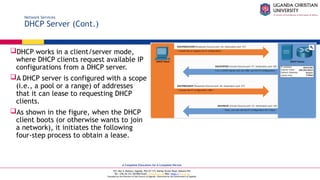
DHCP works in a client/server mode,
where DHCP clients request available IP
configurations from a DHCP server.
A DHCP server is configured with a scope
(i.e., a pool or a range) of addresses
that it can lease to requesting DHCP
clients.
As shown in the figure, when the DHCP
client boots (or otherwise wants to join
a network), it initiates the following
four-step process to obtain a lease.
A Complete Education for A Complete Person
P.O. Box 4, Mukono, Uganda, Plot 67-173, Bishop Tucker Road, Mukono Hill
Tel: +256 (0) 312 350 800 Email: info@ucu.ac.ug Web: https://ucu.ac.ug
Founded by the Province of the Church of Uganda. Chartered by the Government of Uganda
Network Services
DHCP Server (Cont.)
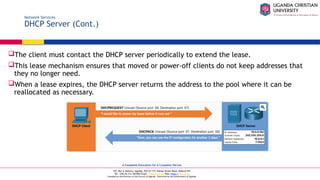
The client must contact the DHCP server periodically to extend the lease.
This lease mechanism ensures that moved or power-off clients do not keep addresses that
they no longer need.
When a lease expires, the DHCP server returns the address to the pool where it can be
reallocated as necessary.
A Complete Education for A Complete Person
P.O. Box 4, Mukono, Uganda, Plot 67-173, Bishop Tucker Road, Mukono Hill
Tel: +256 (0) 312 350 800 Email: info@ucu.ac.ug Web: https://ucu.ac.ug
Founded by the Province of the Church of Uganda. Chartered by the Government of Uganda
Network Services
DNS Server
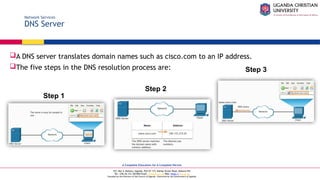
A DNS server translates domain names such as cisco.com to an IP address.
The five steps in the DNS resolution process are:
Step 1
Step 2
Step 3
A Complete Education for A Complete Person
P.O. Box 4, Mukono, Uganda, Plot 67-173, Bishop Tucker Road, Mukono Hill
Tel: +256 (0) 312 350 800 Email: info@ucu.ac.ug Web: https://ucu.ac.ug
Founded by the Province of the Church of Uganda. Chartered by the Government of Uganda
Network Services
DNS Server (Cont.)
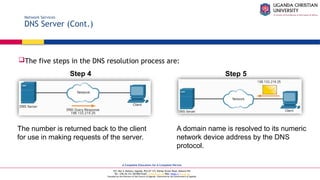
The five steps in the DNS resolution process are:
The number is returned back to the client
for use in making requests of the server.
A domain name is resolved to its numeric
network device address by the DNS
protocol.
Step 4 Step 5
A Complete Education for A Complete Person
P.O. Box 4, Mukono, Uganda, Plot 67-173, Bishop Tucker Road, Mukono Hill
Tel: +256 (0) 312 350 800 Email: info@ucu.ac.ug Web: https://ucu.ac.ug
Founded by the Province of the Church of Uganda. Chartered by the Government of Uganda
Network Services
Print Server
A print server
Can control multiple printers
Provides client access to print resources
Allows centralized print job administration
Provides feedback to network clients
A Complete Education for A Complete Person
P.O. Box 4, Mukono, Uganda, Plot 67-173, Bishop Tucker Road, Mukono Hill
Tel: +256 (0) 312 350 800 Email: info@ucu.ac.ug Web: https://ucu.ac.ug
Founded by the Province of the Church of Uganda. Chartered by the Government of Uganda
Network Services
File Server
A file server allows clients to access
files using a specific protocol
FTP (File Transfer Protocol)
FTPS (File Transfer Protocol
Secure)
SFTP (Secure Shell File
Transfer Protocol)
SCP (Secure Copy)
A Complete Education for A Complete Person
P.O. Box 4, Mukono, Uganda, Plot 67-173, Bishop Tucker Road, Mukono Hill
Tel: +256 (0) 312 350 800 Email: info@ucu.ac.ug Web: https://ucu.ac.ug
Founded by the Province of the Church of Uganda. Chartered by the Government of Uganda
Network Services
Web Server
A web server provides web resources using these protocols
Hypertext Transfer Protocol (HTTP) operating on TCP port 80
Secure HTTP (HTTPS) using Secure Sockets Layer (SSL) or Transport Layer
Security (TLS) operating on TCP port 443
 How a web page is opened in a browser:
• For this example, use the http://www.cisco.com/index.html
URL.
• First, the browser interprets the three parts of the URL:
1. http (the protocol or scheme)
2. www.cisco.com (the server name)
3. index.html (the specific filename requested)
 The browser then checks with a DNS to convert www.cisco.com into a numeric address, which it
uses to connect to the server.
A Complete Education for A Complete Person
P.O. Box 4, Mukono, Uganda, Plot 67-173, Bishop Tucker Road, Mukono Hill
Tel: +256 (0) 312 350 800 Email: info@ucu.ac.ug Web: https://ucu.ac.ug
Founded by the Province of the Church of Uganda. Chartered by the Government of Uganda
Network Services
Web Server (Cont.)
Step 1: Using HTTP requirements, the browser sends a GET request to the server and asks
for the index.html file.
Step 2: The server sends the HTML code for this web page back to the client’s browser.
Step 3: The browser interprets the HTML code and formats the page for the browser
window.
Step 1 Step 2 Step 3
A Complete Education for A Complete Person
P.O. Box 4, Mukono, Uganda, Plot 67-173, Bishop Tucker Road, Mukono Hill
Tel: +256 (0) 312 350 800 Email: info@ucu.ac.ug Web: https://ucu.ac.ug
Founded by the Province of the Church of Uganda. Chartered by the Government of Uganda
Network Services
Mail Server
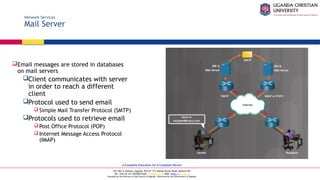
Email messages are stored in databases
on mail servers
Client communicates with server
in order to reach a different
client
Protocol used to send email
 Simple Mail Transfer Protocol (SMTP)
Protocols used to retrieve email
 Post Office Protocol (POP)
 Internet Message Access Protocol
(IMAP)
A Complete Education for A Complete Person
P.O. Box 4, Mukono, Uganda, Plot 67-173, Bishop Tucker Road, Mukono Hill
Tel: +256 (0) 312 350 800 Email: info@ucu.ac.ug Web: https://ucu.ac.ug
Founded by the Province of the Church of Uganda. Chartered by the Government of Uganda
Network Services
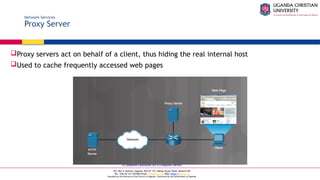
Proxy Server
Proxy servers act on behalf of a client, thus hiding the real internal host
Used to cache frequently accessed web pages
A Complete Education for A Complete Person
P.O. Box 4, Mukono, Uganda, Plot 67-173, Bishop Tucker Road, Mukono Hill
Tel: +256 (0) 312 350 800 Email: info@ucu.ac.ug Web: https://ucu.ac.ug
Founded by the Province of the Church of Uganda. Chartered by the Government of Uganda
Network Services
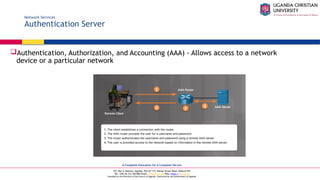
Authentication Server
Authentication, Authorization, and Accounting (AAA) - Allows access to a network
device or a particular network
A Complete Education for A Complete Person
P.O. Box 4, Mukono, Uganda, Plot 67-173, Bishop Tucker Road, Mukono Hill
Tel: +256 (0) 312 350 800 Email: info@ucu.ac.ug Web: https://ucu.ac.ug
Founded by the Province of the Church of Uganda. Chartered by the Government of Uganda
Network Services
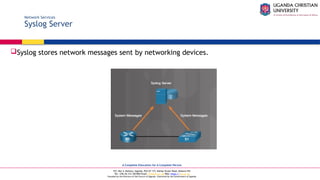
Syslog Server
Syslog stores network messages sent by networking devices.
A Complete Education for A Complete Person
P.O. Box 4, Mukono, Uganda, Plot 67-173, Bishop Tucker Road, Mukono Hill
Tel: +256 (0) 312 350 800 Email: info@ucu.ac.ug Web: https://ucu.ac.ug
Founded by the Province of the Church of Uganda. Chartered by the Government of Uganda
Network Services
Load Balancer
Some network servers can experience very heavy loads.
Some examples include streaming media servers, web servers, and email servers.
Often, multiple servers are providing one service in order to provide timely content.
A load balancer can be used distribute the demand of requests.
It is placed in front of the servers to ensure each server is being used as much as the
others.
This prevents things like network timeouts and slow responses.
A Complete Education for A Complete Person
P.O. Box 4, Mukono, Uganda, Plot 67-173, Bishop Tucker Road, Mukono Hill
Tel: +256 (0) 312 350 800 Email: info@ucu.ac.ug Web: https://ucu.ac.ug
Founded by the Province of the Church of Uganda. Chartered by the Government of Uganda
Network Services
Scada
A Supervisory Control and Data Acquisition (SCADA) system is used in an industrial
control system (ICS).
This type of system provides automation for critical services such as national security,
water treatment plants, or power suppliers.
SCADA software runs on a computer to gather data from the devices used by the ICS.
 The SCADA manages the devices remotely typically through the use of satellite or
cellular communications.
A Complete Education for A Complete Person
P.O. Box 4, Mukono, Uganda, Plot 67-173, Bishop Tucker Road, Mukono Hill
Tel: +256 (0) 312 350 800 Email: info@ucu.ac.ug Web: https://ucu.ac.ug
Founded by the Province of the Church of Uganda. Chartered by the Government of Uganda
Basic Network Devices
Video Explanation - Basic Network Devices
A Complete Education for A Complete Person
P.O. Box 4, Mukono, Uganda, Plot 67-173, Bishop Tucker Road, Mukono Hill
Tel: +256 (0) 312 350 800 Email: info@ucu.ac.ug Web: https://ucu.ac.ug
Founded by the Province of the Church of Uganda. Chartered by the Government of Uganda
Basic Network Devices
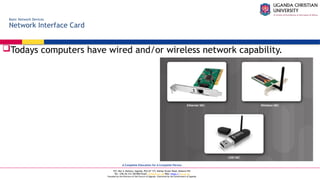
Network Interface Card
Todays computers have wired and/or wireless network capability.
A Complete Education for A Complete Person
P.O. Box 4, Mukono, Uganda, Plot 67-173, Bishop Tucker Road, Mukono Hill
Tel: +256 (0) 312 350 800 Email: info@ucu.ac.ug Web: https://ucu.ac.ug
Founded by the Province of the Church of Uganda. Chartered by the Government of Uganda
Basic Network Devices
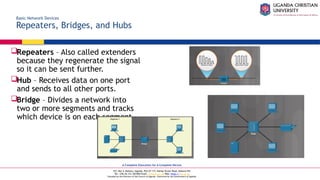
Repeaters, Bridges, and Hubs
Repeaters – Also called extenders
because they regenerate the signal
so it can be sent further.
Hub – Receives data on one port
and sends to all other ports.
Bridge – Divides a network into
two or more segments and tracks
which device is on each segment.
A Complete Education for A Complete Person
P.O. Box 4, Mukono, Uganda, Plot 67-173, Bishop Tucker Road, Mukono Hill
Tel: +256 (0) 312 350 800 Email: info@ucu.ac.ug Web: https://ucu.ac.ug
Founded by the Province of the Church of Uganda. Chartered by the Government of Uganda
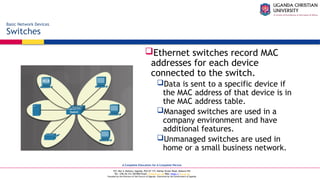
Ethernet switches record MAC
addresses for each device
connected to the switch.
Data is sent to a specific device if
the MAC address of that device is in
the MAC address table.
Managed switches are used in a
company environment and have
additional features.
Unmanaged switches are used in
home or a small business network.
Basic Network Devices
Switches
A Complete Education for A Complete Person
P.O. Box 4, Mukono, Uganda, Plot 67-173, Bishop Tucker Road, Mukono Hill
Tel: +256 (0) 312 350 800 Email: info@ucu.ac.ug Web: https://ucu.ac.ug
Founded by the Province of the Church of Uganda. Chartered by the Government of Uganda
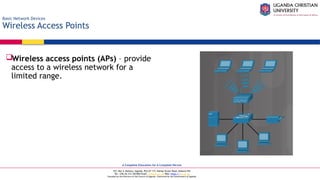
Wireless access points (APs) – provide
access to a wireless network for a
limited range.
Basic Network Devices
Wireless Access Points
A Complete Education for A Complete Person
P.O. Box 4, Mukono, Uganda, Plot 67-173, Bishop Tucker Road, Mukono Hill
Tel: +256 (0) 312 350 800 Email: info@ucu.ac.ug Web: https://ucu.ac.ug
Founded by the Province of the Church of Uganda. Chartered by the Government of Uganda
Basic Network Devices
Routers
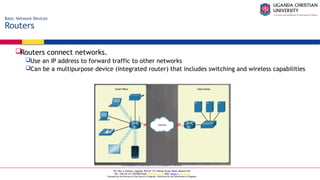
Routers connect networks.
Use an IP address to forward traffic to other networks
Can be a multipurpose device (integrated router) that includes switching and wireless capabilities
A Complete Education for A Complete Person
P.O. Box 4, Mukono, Uganda, Plot 67-173, Bishop Tucker Road, Mukono Hill
Tel: +256 (0) 312 350 800 Email: info@ucu.ac.ug Web: https://ucu.ac.ug
Founded by the Province of the Church of Uganda. Chartered by the Government of Uganda
Security Devices
Video Explanation – Security Devices
A Complete Education for A Complete Person
P.O. Box 4, Mukono, Uganda, Plot 67-173, Bishop Tucker Road, Mukono Hill
Tel: +256 (0) 312 350 800 Email: info@ucu.ac.ug Web: https://ucu.ac.ug
Founded by the Province of the Church of Uganda. Chartered by the Government of Uganda
Security Devices
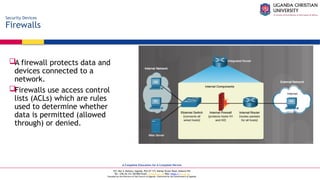
Firewalls
A firewall protects data and
devices connected to a
network.
Firewalls use access control
lists (ACLs) which are rules
used to determine whether
data is permitted (allowed
through) or denied.
A Complete Education for A Complete Person
P.O. Box 4, Mukono, Uganda, Plot 67-173, Bishop Tucker Road, Mukono Hill
Tel: +256 (0) 312 350 800 Email: info@ucu.ac.ug Web: https://ucu.ac.ug
Founded by the Province of the Church of Uganda. Chartered by the Government of Uganda
Security Devices
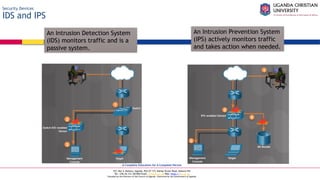
IDS and IPS
An Intrusion Detection System
(IDS) monitors traffic and is a
passive system.
An Intrusion Prevention System
(IPS) actively monitors traffic
and takes action when needed.
A Complete Education for A Complete Person
P.O. Box 4, Mukono, Uganda, Plot 67-173, Bishop Tucker Road, Mukono Hill
Tel: +256 (0) 312 350 800 Email: info@ucu.ac.ug Web: https://ucu.ac.ug
Founded by the Province of the Church of Uganda. Chartered by the Government of Uganda
Security Devices
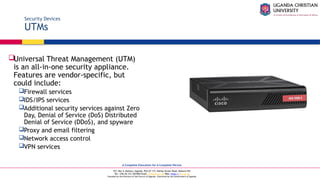
UTMs
Universal Threat Management (UTM)
is an all-in-one security appliance.
Features are vendor-specific, but
could include:
Firewall services
IDS/IPS services
Additional security services against Zero
Day, Denial of Service (DoS) Distributed
Denial of Service (DDoS), and spyware
Proxy and email filtering
Network access control
VPN services
A Complete Education for A Complete Person
P.O. Box 4, Mukono, Uganda, Plot 67-173, Bishop Tucker Road, Mukono Hill
Tel: +256 (0) 312 350 800 Email: info@ucu.ac.ug Web: https://ucu.ac.ug
Founded by the Province of the Church of Uganda. Chartered by the Government of Uganda
Security Devices
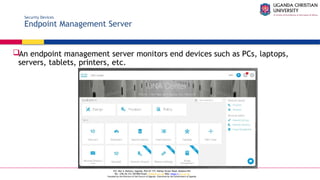
Endpoint Management Server
An endpoint management server monitors end devices such as PCs, laptops,
servers, tablets, printers, etc.
A Complete Education for A Complete Person
P.O. Box 4, Mukono, Uganda, Plot 67-173, Bishop Tucker Road, Mukono Hill
Tel: +256 (0) 312 350 800 Email: info@ucu.ac.ug Web: https://ucu.ac.ug
Founded by the Province of the Church of Uganda. Chartered by the Government of Uganda
Security Devices
Spam Management
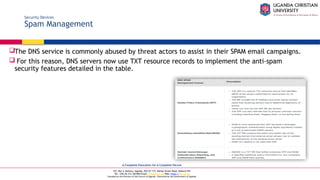
The DNS service is commonly abused by threat actors to assist in their SPAM email campaigns.
 For this reason, DNS servers now use TXT resource records to implement the anti-spam
security features detailed in the table.
A Complete Education for A Complete Person
P.O. Box 4, Mukono, Uganda, Plot 67-173, Bishop Tucker Road, Mukono Hill
Tel: +256 (0) 312 350 800 Email: info@ucu.ac.ug Web: https://ucu.ac.ug
Founded by the Province of the Church of Uganda. Chartered by the Government of Uganda
Other Network Devices
Legacy and Embedded Systems
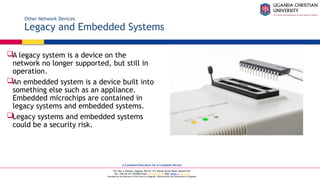
A legacy system is a device on the
network no longer supported, but still in
operation.
An embedded system is a device built into
something else such as an appliance.
Embedded microchips are contained in
legacy systems and embedded systems.
Legacy systems and embedded systems
could be a security risk.
A Complete Education for A Complete Person
P.O. Box 4, Mukono, Uganda, Plot 67-173, Bishop Tucker Road, Mukono Hill
Tel: +256 (0) 312 350 800 Email: info@ucu.ac.ug Web: https://ucu.ac.ug
Founded by the Province of the Church of Uganda. Chartered by the Government of Uganda
Other Network Devices
Patch Panel
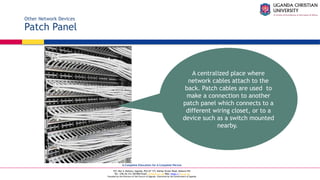
A centralized place where
network cables attach to the
back. Patch cables are used to
make a connection to another
patch panel which connects to a
different wiring closet, or to a
device such as a switch mounted
nearby.
A Complete Education for A Complete Person
P.O. Box 4, Mukono, Uganda, Plot 67-173, Bishop Tucker Road, Mukono Hill
Tel: +256 (0) 312 350 800 Email: info@ucu.ac.ug Web: https://ucu.ac.ug
Founded by the Province of the Church of Uganda. Chartered by the Government of Uganda
Other Network Devices
Power over Ethernet and Ethernet over Power
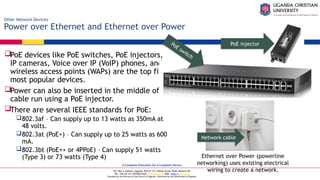
PoE devices like PoE switches, PoE injectors,
IP cameras, Voice over IP (VoIP) phones, and
wireless access points (WAPs) are the top five
most popular devices.
Power can also be inserted in the middle of a
cable run using a PoE injector.
There are several IEEE standards for PoE:
802.3af – Can supply up to 13 watts as 350mA at
48 volts.
802.3at (PoE+) – Can supply up to 25 watts as 600
mA.
802.3bt (PoE++ or 4PPoE) – Can supply 51 watts
(Type 3) or 73 watts (Type 4)
PoE switch
PoE injector
Ethernet over Power (powerline
networking) uses existing electrical
wiring to create a network.
Network cable
A Complete Education for A Complete Person
P.O. Box 4, Mukono, Uganda, Plot 67-173, Bishop Tucker Road, Mukono Hill
Tel: +256 (0) 312 350 800 Email: info@ucu.ac.ug Web: https://ucu.ac.ug
Founded by the Province of the Church of Uganda. Chartered by the Government of Uganda
Other Network Devices
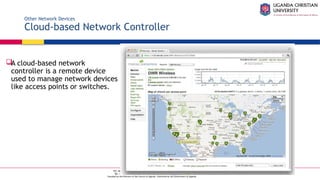
Cloud-based Network Controller
A cloud-based network
controller is a remote device
used to manage network devices
like access points or switches.
A Complete Education for A Complete Person
P.O. Box 4, Mukono, Uganda, Plot 67-173, Bishop Tucker Road, Mukono Hill
Tel: +256 (0) 312 350 800 Email: info@ucu.ac.ug Web: https://ucu.ac.ug
Founded by the Province of the Church of Uganda. Chartered by the Government of Uganda
Network Tools
Video Explanation – Network Cable Tools
A Complete Education for A Complete Person
P.O. Box 4, Mukono, Uganda, Plot 67-173, Bishop Tucker Road, Mukono Hill
Tel: +256 (0) 312 350 800 Email: info@ucu.ac.ug Web: https://ucu.ac.ug
Founded by the Province of the Church of Uganda. Chartered by the Government of Uganda
Network Tools
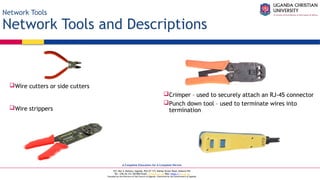
Network Tools and Descriptions
Wire cutters or side cutters
Wire strippers
Crimper – used to securely attach an RJ-45 connector
Punch down tool – used to terminate wires into
termination
A Complete Education for A Complete Person
P.O. Box 4, Mukono, Uganda, Plot 67-173, Bishop Tucker Road, Mukono Hill
Tel: +256 (0) 312 350 800 Email: info@ucu.ac.ug Web: https://ucu.ac.ug
Founded by the Province of the Church of Uganda. Chartered by the Government of Uganda
Network Tools
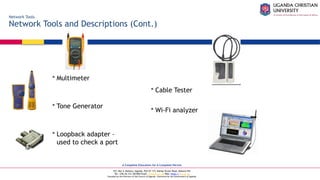
Network Tools and Descriptions (Cont.)
 Multimeter
 Tone Generator
 Loopback adapter –
used to check a port
 Cable Tester
 Wi-Fi analyzer
A Complete Education for A Complete Person
P.O. Box 4, Mukono, Uganda, Plot 67-173, Bishop Tucker Road, Mukono Hill
Tel: +256 (0) 312 350 800 Email: info@ucu.ac.ug Web: https://ucu.ac.ug
Founded by the Province of the Church of Uganda. Chartered by the Government of Uganda
Copper Cables and Connectors
Network Taps
Sometimes it is necessary to capture network traffic to analyze it, and this can often be done
with software such as Wireshark.
If this is not possible, a network tap can be used to capture the cable signals and send them to
analyzing software.
A network tap can be passive or active (powered):
Passive test access point (TAP) - This type of TAP is a box with network ports to carry signals in and out.
Inside, an inductor or optical splitter is used to copy the signal and send it out a monitor port. The
monitor port receives all the traffic from the cable.
Active TAP - This type of TAP regenerates the signal. Due to the complexity of gigabit signaling, a passive
TAP is unable to be used. Also, some fiber links may become corrupt using an optical splitter, so an active
TAP is used instead.
Network sniffing can also be completed using a special port on a network switch, knowning as
a switched port analyzer (SPAN)/mirror port.
A mirror receives a copy of the traffic that are addressed to a specific port or all other ports.
A Complete Education for A Complete Person
P.O. Box 4, Mukono, Uganda, Plot 67-173, Bishop Tucker Road, Mukono Hill
Tel: +256 (0) 312 350 800 Email: info@ucu.ac.ug Web: https://ucu.ac.ug
Founded by the Province of the Church of Uganda. Chartered by the Government of Uganda
Copper Cables and Connectors
Cable Types
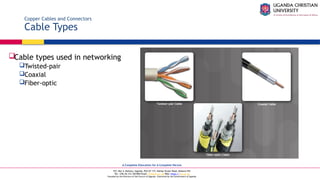
Cable types used in networking
Twisted-pair
Coaxial
Fiber-optic
A Complete Education for A Complete Person
P.O. Box 4, Mukono, Uganda, Plot 67-173, Bishop Tucker Road, Mukono Hill
Tel: +256 (0) 312 350 800 Email: info@ucu.ac.ug Web: https://ucu.ac.ug
Founded by the Province of the Church of Uganda. Chartered by the Government of Uganda
Copper Cables and Connectors
Coaxial Cables
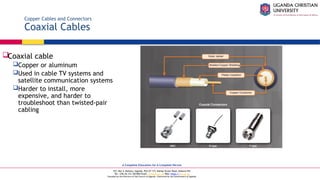
Coaxial cable
Copper or aluminum
Used in cable TV systems and
satellite communication systems
Harder to install, more
expensive, and harder to
troubleshoot than twisted-pair
cabling
A Complete Education for A Complete Person
P.O. Box 4, Mukono, Uganda, Plot 67-173, Bishop Tucker Road, Mukono Hill
Tel: +256 (0) 312 350 800 Email: info@ucu.ac.ug Web: https://ucu.ac.ug
Founded by the Province of the Church of Uganda. Chartered by the Government of Uganda
Copper Cables and Connectors
Twisted-Pair Cables
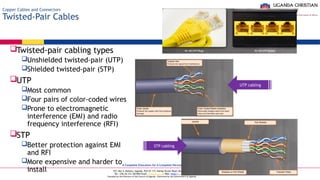
Twisted-pair cabling types
Unshielded twisted-pair (UTP)
Shielded twisted-pair (STP)
UTP
Most common
Four pairs of color-coded wires
Prone to electromagnetic
interference (EMI) and radio
frequency interference (RFI)
STP
Better protection against EMI
and RFI
More expensive and harder to
install
UTP cabling
STP cabling
A Complete Education for A Complete Person
P.O. Box 4, Mukono, Uganda, Plot 67-173, Bishop Tucker Road, Mukono Hill
Tel: +256 (0) 312 350 800 Email: info@ucu.ac.ug Web: https://ucu.ac.ug
Founded by the Province of the Church of Uganda. Chartered by the Government of Uganda
Copper Cables and Connectors
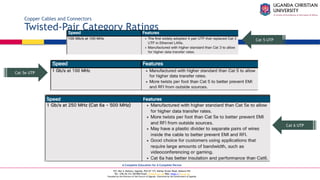
Twisted-Pair Category Ratings
Cat 5 UTP
Cat 5e UTP
Cat 6 UTP
A Complete Education for A Complete Person
P.O. Box 4, Mukono, Uganda, Plot 67-173, Bishop Tucker Road, Mukono Hill
Tel: +256 (0) 312 350 800 Email: info@ucu.ac.ug Web: https://ucu.ac.ug
Founded by the Province of the Church of Uganda. Chartered by the Government of Uganda
Copper Cables and Connectors
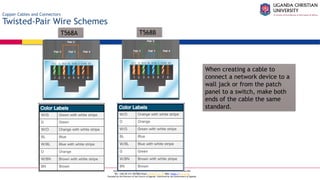
Twisted-Pair Wire Schemes
When creating a cable to
connect a network device to a
wall jack or from the patch
panel to a switch, make both
ends of the cable the same
standard.
T568A T568B
A Complete Education for A Complete Person
P.O. Box 4, Mukono, Uganda, Plot 67-173, Bishop Tucker Road, Mukono Hill
Tel: +256 (0) 312 350 800 Email: info@ucu.ac.ug Web: https://ucu.ac.ug
Founded by the Province of the Church of Uganda. Chartered by the Government of Uganda
Copper Cables and Connectors
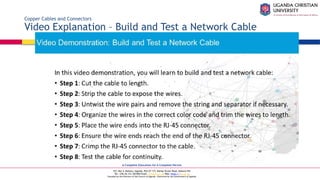
Video Explanation – Build and Test a Network Cable
A Complete Education for A Complete Person
P.O. Box 4, Mukono, Uganda, Plot 67-173, Bishop Tucker Road, Mukono Hill
Tel: +256 (0) 312 350 800 Email: info@ucu.ac.ug Web: https://ucu.ac.ug
Founded by the Province of the Church of Uganda. Chartered by the Government of Uganda
Copper Cables and Connectors
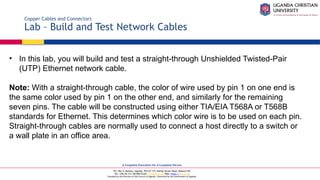
Lab – Build and Test Network Cables
• In this lab, you will build and test a straight-through Unshielded Twisted-Pair
(UTP) Ethernet network cable.
Note: With a straight-through cable, the color of wire used by pin 1 on one end is
the same color used by pin 1 on the other end, and similarly for the remaining
seven pins. The cable will be constructed using either TIA/EIA T568A or T568B
standards for Ethernet. This determines which color wire is to be used on each pin.
Straight-through cables are normally used to connect a host directly to a switch or
a wall plate in an office area.
A Complete Education for A Complete Person
P.O. Box 4, Mukono, Uganda, Plot 67-173, Bishop Tucker Road, Mukono Hill
Tel: +256 (0) 312 350 800 Email: info@ucu.ac.ug Web: https://ucu.ac.ug
Founded by the Province of the Church of Uganda. Chartered by the Government of Uganda
Fiber Cables and Connectors
Fiber-Optic Cables
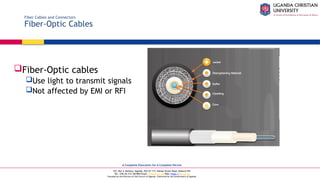
Fiber-Optic cables
Use light to transmit signals
Not affected by EMI or RFI
A Complete Education for A Complete Person
P.O. Box 4, Mukono, Uganda, Plot 67-173, Bishop Tucker Road, Mukono Hill
Tel: +256 (0) 312 350 800 Email: info@ucu.ac.ug Web: https://ucu.ac.ug
Founded by the Province of the Church of Uganda. Chartered by the Government of Uganda
Fiber Cables and Connectors
Types of Fiber Media
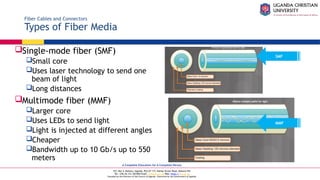
Single-mode fiber (SMF)
Small core
Uses laser technology to send one
beam of light
Long distances
Multimode fiber (MMF)
Larger core
Uses LEDs to send light
Light is injected at different angles
Cheaper
Bandwidth up to 10 Gb/s up to 550
meters
SMF
MMF
A Complete Education for A Complete Person
P.O. Box 4, Mukono, Uganda, Plot 67-173, Bishop Tucker Road, Mukono Hill
Tel: +256 (0) 312 350 800 Email: info@ucu.ac.ug Web: https://ucu.ac.ug
Founded by the Province of the Church of Uganda. Chartered by the Government of Uganda
Fiber Cables and Connectors
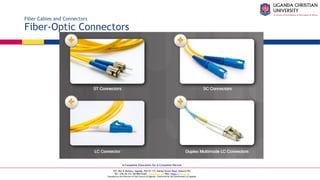
Fiber-Optic Connectors
A Complete Education for A Complete Person
P.O. Box 4, Mukono, Uganda, Plot 67-173, Bishop Tucker Road, Mukono Hill
Tel: +256 (0) 312 350 800 Email: info@ucu.ac.ug Web: https://ucu.ac.ug
Founded by the Province of the Church of Uganda. Chartered by the Government of Uganda
Conclusion
Network Concepts
• Explain components and types of computer networks.
• Explain networking protocols, standards and services.
• Explain the purpose of devices on a network.
• Explain the characteristics of network cables.
A Complete Education for A Complete Person
P.O. Box 4, Mukono, Uganda, Plot 67-173, Bishop Tucker Road, Mukono Hill
Tel: +256 (0) 312 350 800 Email: info@ucu.ac.ug Web: https://ucu.ac.ug
Founded by the Province of the Church of Uganda. Chartered by the Government of Uganda
@ugandachristianuniversity
https://ucu.ac.ug/
@UCUniversity
@UgandaChristianUniversity
P.O. Box 4 Mukono, Uganda
Tel: 256-312-350800
Email: info@ucu.ac.ug
Uganda Christian University

Networking-Concepts-for begin-Lecture.pptx

  • 1.
    A Complete Educationfor A Complete Person P.O. Box 4, Mukono, Uganda, Plot 67-173, Bishop Tucker Road, Mukono Hill Tel: +256 (0) 312 350 800 Email: info@ucu.ac.ug Web: https://ucu.ac.ug Founded by the Province of the Church of Uganda. Chartered by the Government of Uganda Networking Concepts
  • 2.
    A Complete Educationfor A Complete Person P.O. Box 4, Mukono, Uganda, Plot 67-173, Bishop Tucker Road, Mukono Hill Tel: +256 (0) 312 350 800 Email: info@ucu.ac.ug Web: https://ucu.ac.ug Founded by the Province of the Church of Uganda. Chartered by the Government of Uganda Sections & Objectives Network Components and Types • Explain components and types of computer networks. • Describe the types of networks. • Describe internet connection types.  Network Protocols, Standards, and Services • Explain networking protocols, standards and services. • Explain the purpose and characteristics of transport layer protocols. • Explain the significance of application port numbers. • Explain wireless protocols. • Explain network services.
  • 3.
    A Complete Educationfor A Complete Person P.O. Box 4, Mukono, Uganda, Plot 67-173, Bishop Tucker Road, Mukono Hill Tel: +256 (0) 312 350 800 Email: info@ucu.ac.ug Web: https://ucu.ac.ug Founded by the Province of the Church of Uganda. Chartered by the Government of Uganda Sections & Objectives (Cont.) Network Devices • Explain the purpose of devices on a network. • Explain basic network devices. • Explain security devices. • Explain other network devices.  Network Cables • Explain the characteristics of network cables. • Describe networking tools and their purpose. • Explain the purpose and characteristics of common types of copper network cables and connectors. • Explain the purpose and characteristics of common types of fiber network cables and connectors.
  • 4.
    A Complete Educationfor A Complete Person P.O. Box 4, Mukono, Uganda, Plot 67-173, Bishop Tucker Road, Mukono Hill Tel: +256 (0) 312 350 800 Email: info@ucu.ac.ug Web: https://ucu.ac.ug Founded by the Province of the Church of Uganda. Chartered by the Government of Uganda Network Components and Types
  • 5.
    A Complete Educationfor A Complete Person P.O. Box 4, Mukono, Uganda, Plot 67-173, Bishop Tucker Road, Mukono Hill Tel: +256 (0) 312 350 800 Email: info@ucu.ac.ug Web: https://ucu.ac.ug Founded by the Province of the Church of Uganda. Chartered by the Government of Uganda Types of Networks Network Icons Intermediary Device Icons Network Media Icons Host Device Icons
  • 6.
    A Complete Educationfor A Complete Person P.O. Box 4, Mukono, Uganda, Plot 67-173, Bishop Tucker Road, Mukono Hill Tel: +256 (0) 312 350 800 Email: info@ucu.ac.ug Web: https://ucu.ac.ug Founded by the Province of the Church of Uganda. Chartered by the Government of Uganda Types of Networks Network Topologies and Description PAN (personal area network) – Commonly uses Bluetooth to connect mice, keyboards, phones, and tablets. LAN (local area network) – A wired network consisting of a switch and network devices in a limited geographical area. VLAN (virtual LAN) – Extends beyond a traditional LAN and groups users based on administratively defined boundaries such as department or floor. WLAN (wireless LAN) – Connects multiple wireless devices and uses an access point.
  • 7.
    A Complete Educationfor A Complete Person P.O. Box 4, Mukono, Uganda, Plot 67-173, Bishop Tucker Road, Mukono Hill Tel: +256 (0) 312 350 800 Email: info@ucu.ac.ug Web: https://ucu.ac.ug Founded by the Province of the Church of Uganda. Chartered by the Government of Uganda Types of Networks Network Topologies and Description (Cont.) WMN (wireless mesh network) – Connects multiple wireless access points together to expand the wireless network. MAN (metropolitan area network) – A network that spans a city. WAN (wide area network) – A network that spans a large geographical area. VPN (virtual private network) – A method of connecting to a network such as a company network across an unsecure network.
  • 8.
    A Complete Educationfor A Complete Person P.O. Box 4, Mukono, Uganda, Plot 67-173, Bishop Tucker Road, Mukono Hill Tel: +256 (0) 312 350 800 Email: info@ucu.ac.ug Web: https://ucu.ac.ug Founded by the Province of the Church of Uganda. Chartered by the Government of Uganda Types of Networks VLANs They provide segmentation and organizational flexibility in a switched network. A group of devices within a VLAN communicate as if each device was attached to the same switch. VLANs are based on logical connections, instead of physical connections, and they can be segmented based on factors such as function, team, or application.  For example, a faculty member computer (PC1) is connected to S2 on VLAN 10.  PC1 could communicate with another faculty member using PC4 connected to S3.  Notice how both hosts are configured on network address 192.168.10.0/24.  By default, all switch ports are assigned to VLAN 1.  However, you can assign the PCs to different VLANs by configuring their interconnecting port.
  • 9.
    A Complete Educationfor A Complete Person P.O. Box 4, Mukono, Uganda, Plot 67-173, Bishop Tucker Road, Mukono Hill Tel: +256 (0) 312 350 800 Email: info@ucu.ac.ug Web: https://ucu.ac.ug Founded by the Province of the Church of Uganda. Chartered by the Government of Uganda Types of Networks VLANs (Cont.) Figure 2 displays a sample configuration of switch S2. Notice that we first create the VLANs and assign them names. This makes it easier to work with the VLANs. Next, we configure the ports connecting to the PCs to the corresponding VLANs. Once the VLAN information is configured on the other switches, the faculty member using PC1 would be able to communicate with PC4 because they are on the same VLANs. If the faculty member wanted to send something to PC5 which is assigned to VLAN 30, then the services of a router would be required. VLANs help reduce excessive broadcast traffic and implement access and security policies between groups of users.
  • 10.
    A Complete Educationfor A Complete Person P.O. Box 4, Mukono, Uganda, Plot 67-173, Bishop Tucker Road, Mukono Hill Tel: +256 (0) 312 350 800 Email: info@ucu.ac.ug Web: https://ucu.ac.ug Founded by the Province of the Church of Uganda. Chartered by the Government of Uganda Internet Connection Types Brief History of Connection Technologies Analog telephone access (dialup) – uses an analog modem to call another modem. ISDN (Integrated Services Digital Network) – more bandwidth than dialup. Can carry voice, video, and data. Broadband – uses different frequencies to send multiple signals over media.
  • 11.
    A Complete Educationfor A Complete Person P.O. Box 4, Mukono, Uganda, Plot 67-173, Bishop Tucker Road, Mukono Hill Tel: +256 (0) 312 350 800 Email: info@ucu.ac.ug Web: https://ucu.ac.ug Founded by the Province of the Church of Uganda. Chartered by the Government of Uganda Internet Connection Types DSL, Cable, and Fiber DSL (digital subscriber line) – always on technology that uses phone lines; voice and data carried on different frequencies; requires a filter on the port that connects to a phone. Very high-speed DSL (VDSL) attains much higher bit rates than DSL. A symmetric link can carry as much as 26 Mbps in both directions while an asymmetric link can carry as much as 52 Mbps download and 6 Mbps upload. VDSL2 can carry as much as 100 Mbps in both directions. Cable – Uses a cable modem to connect to a traditional cable TV network; shares the network with multiple subscribers.  Fiber – High bandwidth connection used in backbone networks, large enterprise environments, large data centers, and now part of some home internet connections.  In the figure, the cable connection includes a HFC network in which fiber is used in the last mile to the user’s home, and at the user’s home the network switches back to copper coaxial cable (FTTC).  Fiber to the premises (FTTP) brings the fiber to the customer’s building.
  • 12.
    A Complete Educationfor A Complete Person P.O. Box 4, Mukono, Uganda, Plot 67-173, Bishop Tucker Road, Mukono Hill Tel: +256 (0) 312 350 800 Email: info@ucu.ac.ug Web: https://ucu.ac.ug Founded by the Province of the Church of Uganda. Chartered by the Government of Uganda Internet Connection Types Line of Sight Wireless Internet Service Line of site wireless – always on technology that uses radio signals for connecting to the internet. Clear path required Weather affects signal strength and performance
  • 13.
    A Complete Educationfor A Complete Person P.O. Box 4, Mukono, Uganda, Plot 67-173, Bishop Tucker Road, Mukono Hill Tel: +256 (0) 312 350 800 Email: info@ucu.ac.ug Web: https://ucu.ac.ug Founded by the Province of the Church of Uganda. Chartered by the Government of Uganda Internet Connection Types Satellite Satellite – broadband technology for remote areas Uses a satellite dish Not a good solution for time-sensitive applications like gaming, Voice over Internet Protocol (VoIP), and video conferencing  Low Earth Orbit (LEO) – far more satellites orbiting the Earth in low Earth orbit • Can support up to approximately 100 Mbps • Much lower latency than standard satellite, between 100 and 200 ms
  • 14.
    A Complete Educationfor A Complete Person P.O. Box 4, Mukono, Uganda, Plot 67-173, Bishop Tucker Road, Mukono Hill Tel: +256 (0) 312 350 800 Email: info@ucu.ac.ug Web: https://ucu.ac.ug Founded by the Province of the Church of Uganda. Chartered by the Government of Uganda Internet Connection Types Cellular Cellular– relies on cell towers to create a network used by cell phones and connectivity to the internet
  • 15.
    A Complete Educationfor A Complete Person P.O. Box 4, Mukono, Uganda, Plot 67-173, Bishop Tucker Road, Mukono Hill Tel: +256 (0) 312 350 800 Email: info@ucu.ac.ug Web: https://ucu.ac.ug Founded by the Province of the Church of Uganda. Chartered by the Government of Uganda Internet Connection Types Mobile Hotspot and Tethering Cell phone option that allows another device to connect to the internet using Wi-Fi, Bluetooth, or USB cable The other device is using the phone’s cellular connection to connect to the internet Called tethering or a hotspot A mobile hotspot is when a cell phone allows Wi-Fi devices to connect and use the mobile data network.
  • 16.
    A Complete Educationfor A Complete Person P.O. Box 4, Mukono, Uganda, Plot 67-173, Bishop Tucker Road, Mukono Hill Tel: +256 (0) 312 350 800 Email: info@ucu.ac.ug Web: https://ucu.ac.ug Founded by the Province of the Church of Uganda. Chartered by the Government of Uganda Networking Protocols, Standards, and Services
  • 17.
    A Complete Educationfor A Complete Person P.O. Box 4, Mukono, Uganda, Plot 67-173, Bishop Tucker Road, Mukono Hill Tel: +256 (0) 312 350 800 Email: info@ucu.ac.ug Web: https://ucu.ac.ug Founded by the Province of the Church of Uganda. Chartered by the Government of Uganda Video Explanation – Transport Layer Protocols Transport Layer Protocols
  • 18.
    A Complete Educationfor A Complete Person P.O. Box 4, Mukono, Uganda, Plot 67-173, Bishop Tucker Road, Mukono Hill Tel: +256 (0) 312 350 800 Email: info@ucu.ac.ug Web: https://ucu.ac.ug Founded by the Province of the Church of Uganda. Chartered by the Government of Uganda Transport Layer Protocols The TCP/IP Model
  • 19.
    A Complete Educationfor A Complete Person P.O. Box 4, Mukono, Uganda, Plot 67-173, Bishop Tucker Road, Mukono Hill Tel: +256 (0) 312 350 800 Email: info@ucu.ac.ug Web: https://ucu.ac.ug Founded by the Province of the Church of Uganda. Chartered by the Government of Uganda Transport Layer Protocols TCP Three basic operations of reliability Numbering and tracking of data segments Acknowledgment of received data Retransmitting any unacknowledged data after a period of time.
  • 20.
    A Complete Educationfor A Complete Person P.O. Box 4, Mukono, Uganda, Plot 67-173, Bishop Tucker Road, Mukono Hill Tel: +256 (0) 312 350 800 Email: info@ucu.ac.ug Web: https://ucu.ac.ug Founded by the Province of the Church of Uganda. Chartered by the Government of Uganda Transport Layer Protocols UDP Very little overhead or data checking Best-effort delivery protocol (unreliable) No acknowledgment that the data is received by the destination
  • 21.
    A Complete Educationfor A Complete Person P.O. Box 4, Mukono, Uganda, Plot 67-173, Bishop Tucker Road, Mukono Hill Tel: +256 (0) 312 350 800 Email: info@ucu.ac.ug Web: https://ucu.ac.ug Founded by the Province of the Church of Uganda. Chartered by the Government of Uganda Transport Layer Protocols Video Explanation – Application Port Numbers
  • 22.
    A Complete Educationfor A Complete Person P.O. Box 4, Mukono, Uganda, Plot 67-173, Bishop Tucker Road, Mukono Hill Tel: +256 (0) 312 350 800 Email: info@ucu.ac.ug Web: https://ucu.ac.ug Founded by the Province of the Church of Uganda. Chartered by the Government of Uganda Application Port Numbers Classify Application Port Numbers
  • 23.
    A Complete Educationfor A Complete Person P.O. Box 4, Mukono, Uganda, Plot 67-173, Bishop Tucker Road, Mukono Hill Tel: +256 (0) 312 350 800 Email: info@ucu.ac.ug Web: https://ucu.ac.ug Founded by the Province of the Church of Uganda. Chartered by the Government of Uganda Application Port Numbers Classify Application Port Numbers (Cont.)
  • 24.
    A Complete Educationfor A Complete Person P.O. Box 4, Mukono, Uganda, Plot 67-173, Bishop Tucker Road, Mukono Hill Tel: +256 (0) 312 350 800 Email: info@ucu.ac.ug Web: https://ucu.ac.ug Founded by the Province of the Church of Uganda. Chartered by the Government of Uganda Wireless Protocols WLAN Protocols
  • 25.
    A Complete Educationfor A Complete Person P.O. Box 4, Mukono, Uganda, Plot 67-173, Bishop Tucker Road, Mukono Hill Tel: +256 (0) 312 350 800 Email: info@ucu.ac.ug Web: https://ucu.ac.ug Founded by the Province of the Church of Uganda. Chartered by the Government of Uganda Wireless Protocols Bluetooth, NFC, and RFID Bluetooth  Up to 7 devices to create a PAN  802.15.1  2.4 to 2.485 GHz radio frequency range RFID  Passive or active tags used to identify items  Passive – rely on RFID reader to activate and read  Active – have a battery to broadcast the ID up to 100 meters  125 MHz to 960 MHz radio frequency range NFC (Near Field Communication)  Devices must be in close proximity to exchange data  Used for payments, printing, public parking, etc.
  • 26.
    A Complete Educationfor A Complete Person P.O. Box 4, Mukono, Uganda, Plot 67-173, Bishop Tucker Road, Mukono Hill Tel: +256 (0) 312 350 800 Email: info@ucu.ac.ug Web: https://ucu.ac.ug Founded by the Province of the Church of Uganda. Chartered by the Government of Uganda Wireless Protocols Zigbee and Z-Wave Zigbee Requires a ZigBee Coordinator to manage client devices connected in a wireless mesh network. Devices commonly managed from a cell phone app IEEE 802.15.4 standard 868 MHz to 2.4 GHz range up to 20 meters, 65,000 devices, and data speeds up to 250 kb/s Z-Wave Proprietary standard, but public version available 232 devices can connect to a wireless mesh network with data speeds up to 100 kb/s.
  • 27.
    A Complete Educationfor A Complete Person P.O. Box 4, Mukono, Uganda, Plot 67-173, Bishop Tucker Road, Mukono Hill Tel: +256 (0) 312 350 800 Email: info@ucu.ac.ug Web: https://ucu.ac.ug Founded by the Province of the Church of Uganda. Chartered by the Government of Uganda Wireless Protocols Cellular Generations 1G/2G – First generation was analog calls only. 2G introduced digital voice, conference calls, and caller ID with speeds less than 9.6 Kb/s 2.5G – supports web browsing, short audio and video clips with speeds up to 237 Kb/s. 3G – full motion video and streaming music at speeds up to 2 Mb/s. 3.5G – supports high-quality streaming video, high-quality video conferencing, and VoIP, at speeds up to 16 Mb/s. 4G - IPv6, IP-based voice, gaming services, high quality multimedia at speeds up to 672 Mb/s. LTE (Long Term Evolution) – means it meets the 4G speed standards and improves connectivity while in motion. Speeds up to 100 Mb/s when mobile and up to 1 Gb/s when stationary. 5G – supports augmented reality (AR), virtual reality (VR), smart homes, smart cars, and data transfer between devices. Download speeds up to 3 Gb/s; upload speeds up to 1.5 Gb/s. 6G – is currently in development. As of late 2022, no standard yet exists. It will support even faster speeds required for AR/VR applications, AI applications, and instantaneous communications.
  • 28.
    A Complete Educationfor A Complete Person P.O. Box 4, Mukono, Uganda, Plot 67-173, Bishop Tucker Road, Mukono Hill Tel: +256 (0) 312 350 800 Email: info@ucu.ac.ug Web: https://ucu.ac.ug Founded by the Province of the Church of Uganda. Chartered by the Government of Uganda Network Services Video Explanation – Network Services
  • 29.
    A Complete Educationfor A Complete Person P.O. Box 4, Mukono, Uganda, Plot 67-173, Bishop Tucker Road, Mukono Hill Tel: +256 (0) 312 350 800 Email: info@ucu.ac.ug Web: https://ucu.ac.ug Founded by the Province of the Church of Uganda. Chartered by the Government of Uganda Network Services Client – Server Roles File Client and Server Web Client and Server Email Client and Server
  • 30.
    A Complete Educationfor A Complete Person P.O. Box 4, Mukono, Uganda, Plot 67-173, Bishop Tucker Road, Mukono Hill Tel: +256 (0) 312 350 800 Email: info@ucu.ac.ug Web: https://ucu.ac.ug Founded by the Province of the Church of Uganda. Chartered by the Government of Uganda Network Services DHCP Server A host needs IP address information before it can send data on the network. DHCP is the service used by ISPs, network administrators, and wireless routers to automatically assign IP addressing information to hosts, as shown in the figure.
  • 31.
    A Complete Educationfor A Complete Person P.O. Box 4, Mukono, Uganda, Plot 67-173, Bishop Tucker Road, Mukono Hill Tel: +256 (0) 312 350 800 Email: info@ucu.ac.ug Web: https://ucu.ac.ug Founded by the Province of the Church of Uganda. Chartered by the Government of Uganda Network Services DHCP Server (Cont.) DHCP works in a client/server mode, where DHCP clients request available IP configurations from a DHCP server. A DHCP server is configured with a scope (i.e., a pool or a range) of addresses that it can lease to requesting DHCP clients. As shown in the figure, when the DHCP client boots (or otherwise wants to join a network), it initiates the following four-step process to obtain a lease.
  • 32.
    A Complete Educationfor A Complete Person P.O. Box 4, Mukono, Uganda, Plot 67-173, Bishop Tucker Road, Mukono Hill Tel: +256 (0) 312 350 800 Email: info@ucu.ac.ug Web: https://ucu.ac.ug Founded by the Province of the Church of Uganda. Chartered by the Government of Uganda Network Services DHCP Server (Cont.) The client must contact the DHCP server periodically to extend the lease. This lease mechanism ensures that moved or power-off clients do not keep addresses that they no longer need. When a lease expires, the DHCP server returns the address to the pool where it can be reallocated as necessary.
  • 33.
    A Complete Educationfor A Complete Person P.O. Box 4, Mukono, Uganda, Plot 67-173, Bishop Tucker Road, Mukono Hill Tel: +256 (0) 312 350 800 Email: info@ucu.ac.ug Web: https://ucu.ac.ug Founded by the Province of the Church of Uganda. Chartered by the Government of Uganda Network Services DNS Server A DNS server translates domain names such as cisco.com to an IP address. The five steps in the DNS resolution process are: Step 1 Step 2 Step 3
  • 34.
    A Complete Educationfor A Complete Person P.O. Box 4, Mukono, Uganda, Plot 67-173, Bishop Tucker Road, Mukono Hill Tel: +256 (0) 312 350 800 Email: info@ucu.ac.ug Web: https://ucu.ac.ug Founded by the Province of the Church of Uganda. Chartered by the Government of Uganda Network Services DNS Server (Cont.) The five steps in the DNS resolution process are: The number is returned back to the client for use in making requests of the server. A domain name is resolved to its numeric network device address by the DNS protocol. Step 4 Step 5
  • 35.
    A Complete Educationfor A Complete Person P.O. Box 4, Mukono, Uganda, Plot 67-173, Bishop Tucker Road, Mukono Hill Tel: +256 (0) 312 350 800 Email: info@ucu.ac.ug Web: https://ucu.ac.ug Founded by the Province of the Church of Uganda. Chartered by the Government of Uganda Network Services Print Server A print server Can control multiple printers Provides client access to print resources Allows centralized print job administration Provides feedback to network clients
  • 36.
    A Complete Educationfor A Complete Person P.O. Box 4, Mukono, Uganda, Plot 67-173, Bishop Tucker Road, Mukono Hill Tel: +256 (0) 312 350 800 Email: info@ucu.ac.ug Web: https://ucu.ac.ug Founded by the Province of the Church of Uganda. Chartered by the Government of Uganda Network Services File Server A file server allows clients to access files using a specific protocol FTP (File Transfer Protocol) FTPS (File Transfer Protocol Secure) SFTP (Secure Shell File Transfer Protocol) SCP (Secure Copy)
  • 37.
    A Complete Educationfor A Complete Person P.O. Box 4, Mukono, Uganda, Plot 67-173, Bishop Tucker Road, Mukono Hill Tel: +256 (0) 312 350 800 Email: info@ucu.ac.ug Web: https://ucu.ac.ug Founded by the Province of the Church of Uganda. Chartered by the Government of Uganda Network Services Web Server A web server provides web resources using these protocols Hypertext Transfer Protocol (HTTP) operating on TCP port 80 Secure HTTP (HTTPS) using Secure Sockets Layer (SSL) or Transport Layer Security (TLS) operating on TCP port 443  How a web page is opened in a browser: • For this example, use the http://www.cisco.com/index.html URL. • First, the browser interprets the three parts of the URL: 1. http (the protocol or scheme) 2. www.cisco.com (the server name) 3. index.html (the specific filename requested)  The browser then checks with a DNS to convert www.cisco.com into a numeric address, which it uses to connect to the server.
  • 38.
    A Complete Educationfor A Complete Person P.O. Box 4, Mukono, Uganda, Plot 67-173, Bishop Tucker Road, Mukono Hill Tel: +256 (0) 312 350 800 Email: info@ucu.ac.ug Web: https://ucu.ac.ug Founded by the Province of the Church of Uganda. Chartered by the Government of Uganda Network Services Web Server (Cont.) Step 1: Using HTTP requirements, the browser sends a GET request to the server and asks for the index.html file. Step 2: The server sends the HTML code for this web page back to the client’s browser. Step 3: The browser interprets the HTML code and formats the page for the browser window. Step 1 Step 2 Step 3
  • 39.
    A Complete Educationfor A Complete Person P.O. Box 4, Mukono, Uganda, Plot 67-173, Bishop Tucker Road, Mukono Hill Tel: +256 (0) 312 350 800 Email: info@ucu.ac.ug Web: https://ucu.ac.ug Founded by the Province of the Church of Uganda. Chartered by the Government of Uganda Network Services Mail Server Email messages are stored in databases on mail servers Client communicates with server in order to reach a different client Protocol used to send email  Simple Mail Transfer Protocol (SMTP) Protocols used to retrieve email  Post Office Protocol (POP)  Internet Message Access Protocol (IMAP)
  • 40.
    A Complete Educationfor A Complete Person P.O. Box 4, Mukono, Uganda, Plot 67-173, Bishop Tucker Road, Mukono Hill Tel: +256 (0) 312 350 800 Email: info@ucu.ac.ug Web: https://ucu.ac.ug Founded by the Province of the Church of Uganda. Chartered by the Government of Uganda Network Services Proxy Server Proxy servers act on behalf of a client, thus hiding the real internal host Used to cache frequently accessed web pages
  • 41.
    A Complete Educationfor A Complete Person P.O. Box 4, Mukono, Uganda, Plot 67-173, Bishop Tucker Road, Mukono Hill Tel: +256 (0) 312 350 800 Email: info@ucu.ac.ug Web: https://ucu.ac.ug Founded by the Province of the Church of Uganda. Chartered by the Government of Uganda Network Services Authentication Server Authentication, Authorization, and Accounting (AAA) - Allows access to a network device or a particular network
  • 42.
    A Complete Educationfor A Complete Person P.O. Box 4, Mukono, Uganda, Plot 67-173, Bishop Tucker Road, Mukono Hill Tel: +256 (0) 312 350 800 Email: info@ucu.ac.ug Web: https://ucu.ac.ug Founded by the Province of the Church of Uganda. Chartered by the Government of Uganda Network Services Syslog Server Syslog stores network messages sent by networking devices.
  • 43.
    A Complete Educationfor A Complete Person P.O. Box 4, Mukono, Uganda, Plot 67-173, Bishop Tucker Road, Mukono Hill Tel: +256 (0) 312 350 800 Email: info@ucu.ac.ug Web: https://ucu.ac.ug Founded by the Province of the Church of Uganda. Chartered by the Government of Uganda Network Services Load Balancer Some network servers can experience very heavy loads. Some examples include streaming media servers, web servers, and email servers. Often, multiple servers are providing one service in order to provide timely content. A load balancer can be used distribute the demand of requests. It is placed in front of the servers to ensure each server is being used as much as the others. This prevents things like network timeouts and slow responses.
  • 44.
    A Complete Educationfor A Complete Person P.O. Box 4, Mukono, Uganda, Plot 67-173, Bishop Tucker Road, Mukono Hill Tel: +256 (0) 312 350 800 Email: info@ucu.ac.ug Web: https://ucu.ac.ug Founded by the Province of the Church of Uganda. Chartered by the Government of Uganda Network Services Scada A Supervisory Control and Data Acquisition (SCADA) system is used in an industrial control system (ICS). This type of system provides automation for critical services such as national security, water treatment plants, or power suppliers. SCADA software runs on a computer to gather data from the devices used by the ICS.  The SCADA manages the devices remotely typically through the use of satellite or cellular communications.
  • 45.
    A Complete Educationfor A Complete Person P.O. Box 4, Mukono, Uganda, Plot 67-173, Bishop Tucker Road, Mukono Hill Tel: +256 (0) 312 350 800 Email: info@ucu.ac.ug Web: https://ucu.ac.ug Founded by the Province of the Church of Uganda. Chartered by the Government of Uganda Basic Network Devices Video Explanation - Basic Network Devices
  • 46.
    A Complete Educationfor A Complete Person P.O. Box 4, Mukono, Uganda, Plot 67-173, Bishop Tucker Road, Mukono Hill Tel: +256 (0) 312 350 800 Email: info@ucu.ac.ug Web: https://ucu.ac.ug Founded by the Province of the Church of Uganda. Chartered by the Government of Uganda Basic Network Devices Network Interface Card Todays computers have wired and/or wireless network capability.
  • 47.
    A Complete Educationfor A Complete Person P.O. Box 4, Mukono, Uganda, Plot 67-173, Bishop Tucker Road, Mukono Hill Tel: +256 (0) 312 350 800 Email: info@ucu.ac.ug Web: https://ucu.ac.ug Founded by the Province of the Church of Uganda. Chartered by the Government of Uganda Basic Network Devices Repeaters, Bridges, and Hubs Repeaters – Also called extenders because they regenerate the signal so it can be sent further. Hub – Receives data on one port and sends to all other ports. Bridge – Divides a network into two or more segments and tracks which device is on each segment.
  • 48.
    A Complete Educationfor A Complete Person P.O. Box 4, Mukono, Uganda, Plot 67-173, Bishop Tucker Road, Mukono Hill Tel: +256 (0) 312 350 800 Email: info@ucu.ac.ug Web: https://ucu.ac.ug Founded by the Province of the Church of Uganda. Chartered by the Government of Uganda Ethernet switches record MAC addresses for each device connected to the switch. Data is sent to a specific device if the MAC address of that device is in the MAC address table. Managed switches are used in a company environment and have additional features. Unmanaged switches are used in home or a small business network. Basic Network Devices Switches
  • 49.
    A Complete Educationfor A Complete Person P.O. Box 4, Mukono, Uganda, Plot 67-173, Bishop Tucker Road, Mukono Hill Tel: +256 (0) 312 350 800 Email: info@ucu.ac.ug Web: https://ucu.ac.ug Founded by the Province of the Church of Uganda. Chartered by the Government of Uganda Wireless access points (APs) – provide access to a wireless network for a limited range. Basic Network Devices Wireless Access Points
  • 50.
    A Complete Educationfor A Complete Person P.O. Box 4, Mukono, Uganda, Plot 67-173, Bishop Tucker Road, Mukono Hill Tel: +256 (0) 312 350 800 Email: info@ucu.ac.ug Web: https://ucu.ac.ug Founded by the Province of the Church of Uganda. Chartered by the Government of Uganda Basic Network Devices Routers Routers connect networks. Use an IP address to forward traffic to other networks Can be a multipurpose device (integrated router) that includes switching and wireless capabilities
  • 51.
    A Complete Educationfor A Complete Person P.O. Box 4, Mukono, Uganda, Plot 67-173, Bishop Tucker Road, Mukono Hill Tel: +256 (0) 312 350 800 Email: info@ucu.ac.ug Web: https://ucu.ac.ug Founded by the Province of the Church of Uganda. Chartered by the Government of Uganda Security Devices Video Explanation – Security Devices
  • 52.
    A Complete Educationfor A Complete Person P.O. Box 4, Mukono, Uganda, Plot 67-173, Bishop Tucker Road, Mukono Hill Tel: +256 (0) 312 350 800 Email: info@ucu.ac.ug Web: https://ucu.ac.ug Founded by the Province of the Church of Uganda. Chartered by the Government of Uganda Security Devices Firewalls A firewall protects data and devices connected to a network. Firewalls use access control lists (ACLs) which are rules used to determine whether data is permitted (allowed through) or denied.
  • 53.
    A Complete Educationfor A Complete Person P.O. Box 4, Mukono, Uganda, Plot 67-173, Bishop Tucker Road, Mukono Hill Tel: +256 (0) 312 350 800 Email: info@ucu.ac.ug Web: https://ucu.ac.ug Founded by the Province of the Church of Uganda. Chartered by the Government of Uganda Security Devices IDS and IPS An Intrusion Detection System (IDS) monitors traffic and is a passive system. An Intrusion Prevention System (IPS) actively monitors traffic and takes action when needed.
  • 54.
    A Complete Educationfor A Complete Person P.O. Box 4, Mukono, Uganda, Plot 67-173, Bishop Tucker Road, Mukono Hill Tel: +256 (0) 312 350 800 Email: info@ucu.ac.ug Web: https://ucu.ac.ug Founded by the Province of the Church of Uganda. Chartered by the Government of Uganda Security Devices UTMs Universal Threat Management (UTM) is an all-in-one security appliance. Features are vendor-specific, but could include: Firewall services IDS/IPS services Additional security services against Zero Day, Denial of Service (DoS) Distributed Denial of Service (DDoS), and spyware Proxy and email filtering Network access control VPN services
  • 55.
    A Complete Educationfor A Complete Person P.O. Box 4, Mukono, Uganda, Plot 67-173, Bishop Tucker Road, Mukono Hill Tel: +256 (0) 312 350 800 Email: info@ucu.ac.ug Web: https://ucu.ac.ug Founded by the Province of the Church of Uganda. Chartered by the Government of Uganda Security Devices Endpoint Management Server An endpoint management server monitors end devices such as PCs, laptops, servers, tablets, printers, etc.
  • 56.
    A Complete Educationfor A Complete Person P.O. Box 4, Mukono, Uganda, Plot 67-173, Bishop Tucker Road, Mukono Hill Tel: +256 (0) 312 350 800 Email: info@ucu.ac.ug Web: https://ucu.ac.ug Founded by the Province of the Church of Uganda. Chartered by the Government of Uganda Security Devices Spam Management The DNS service is commonly abused by threat actors to assist in their SPAM email campaigns.  For this reason, DNS servers now use TXT resource records to implement the anti-spam security features detailed in the table.
  • 57.
    A Complete Educationfor A Complete Person P.O. Box 4, Mukono, Uganda, Plot 67-173, Bishop Tucker Road, Mukono Hill Tel: +256 (0) 312 350 800 Email: info@ucu.ac.ug Web: https://ucu.ac.ug Founded by the Province of the Church of Uganda. Chartered by the Government of Uganda Other Network Devices Legacy and Embedded Systems A legacy system is a device on the network no longer supported, but still in operation. An embedded system is a device built into something else such as an appliance. Embedded microchips are contained in legacy systems and embedded systems. Legacy systems and embedded systems could be a security risk.
  • 58.
    A Complete Educationfor A Complete Person P.O. Box 4, Mukono, Uganda, Plot 67-173, Bishop Tucker Road, Mukono Hill Tel: +256 (0) 312 350 800 Email: info@ucu.ac.ug Web: https://ucu.ac.ug Founded by the Province of the Church of Uganda. Chartered by the Government of Uganda Other Network Devices Patch Panel A centralized place where network cables attach to the back. Patch cables are used to make a connection to another patch panel which connects to a different wiring closet, or to a device such as a switch mounted nearby.
  • 59.
    A Complete Educationfor A Complete Person P.O. Box 4, Mukono, Uganda, Plot 67-173, Bishop Tucker Road, Mukono Hill Tel: +256 (0) 312 350 800 Email: info@ucu.ac.ug Web: https://ucu.ac.ug Founded by the Province of the Church of Uganda. Chartered by the Government of Uganda Other Network Devices Power over Ethernet and Ethernet over Power PoE devices like PoE switches, PoE injectors, IP cameras, Voice over IP (VoIP) phones, and wireless access points (WAPs) are the top five most popular devices. Power can also be inserted in the middle of a cable run using a PoE injector. There are several IEEE standards for PoE: 802.3af – Can supply up to 13 watts as 350mA at 48 volts. 802.3at (PoE+) – Can supply up to 25 watts as 600 mA. 802.3bt (PoE++ or 4PPoE) – Can supply 51 watts (Type 3) or 73 watts (Type 4) PoE switch PoE injector Ethernet over Power (powerline networking) uses existing electrical wiring to create a network. Network cable
  • 60.
    A Complete Educationfor A Complete Person P.O. Box 4, Mukono, Uganda, Plot 67-173, Bishop Tucker Road, Mukono Hill Tel: +256 (0) 312 350 800 Email: info@ucu.ac.ug Web: https://ucu.ac.ug Founded by the Province of the Church of Uganda. Chartered by the Government of Uganda Other Network Devices Cloud-based Network Controller A cloud-based network controller is a remote device used to manage network devices like access points or switches.
  • 61.
    A Complete Educationfor A Complete Person P.O. Box 4, Mukono, Uganda, Plot 67-173, Bishop Tucker Road, Mukono Hill Tel: +256 (0) 312 350 800 Email: info@ucu.ac.ug Web: https://ucu.ac.ug Founded by the Province of the Church of Uganda. Chartered by the Government of Uganda Network Tools Video Explanation – Network Cable Tools
  • 62.
    A Complete Educationfor A Complete Person P.O. Box 4, Mukono, Uganda, Plot 67-173, Bishop Tucker Road, Mukono Hill Tel: +256 (0) 312 350 800 Email: info@ucu.ac.ug Web: https://ucu.ac.ug Founded by the Province of the Church of Uganda. Chartered by the Government of Uganda Network Tools Network Tools and Descriptions Wire cutters or side cutters Wire strippers Crimper – used to securely attach an RJ-45 connector Punch down tool – used to terminate wires into termination
  • 63.
    A Complete Educationfor A Complete Person P.O. Box 4, Mukono, Uganda, Plot 67-173, Bishop Tucker Road, Mukono Hill Tel: +256 (0) 312 350 800 Email: info@ucu.ac.ug Web: https://ucu.ac.ug Founded by the Province of the Church of Uganda. Chartered by the Government of Uganda Network Tools Network Tools and Descriptions (Cont.)  Multimeter  Tone Generator  Loopback adapter – used to check a port  Cable Tester  Wi-Fi analyzer
  • 64.
    A Complete Educationfor A Complete Person P.O. Box 4, Mukono, Uganda, Plot 67-173, Bishop Tucker Road, Mukono Hill Tel: +256 (0) 312 350 800 Email: info@ucu.ac.ug Web: https://ucu.ac.ug Founded by the Province of the Church of Uganda. Chartered by the Government of Uganda Copper Cables and Connectors Network Taps Sometimes it is necessary to capture network traffic to analyze it, and this can often be done with software such as Wireshark. If this is not possible, a network tap can be used to capture the cable signals and send them to analyzing software. A network tap can be passive or active (powered): Passive test access point (TAP) - This type of TAP is a box with network ports to carry signals in and out. Inside, an inductor or optical splitter is used to copy the signal and send it out a monitor port. The monitor port receives all the traffic from the cable. Active TAP - This type of TAP regenerates the signal. Due to the complexity of gigabit signaling, a passive TAP is unable to be used. Also, some fiber links may become corrupt using an optical splitter, so an active TAP is used instead. Network sniffing can also be completed using a special port on a network switch, knowning as a switched port analyzer (SPAN)/mirror port. A mirror receives a copy of the traffic that are addressed to a specific port or all other ports.
  • 65.
    A Complete Educationfor A Complete Person P.O. Box 4, Mukono, Uganda, Plot 67-173, Bishop Tucker Road, Mukono Hill Tel: +256 (0) 312 350 800 Email: info@ucu.ac.ug Web: https://ucu.ac.ug Founded by the Province of the Church of Uganda. Chartered by the Government of Uganda Copper Cables and Connectors Cable Types Cable types used in networking Twisted-pair Coaxial Fiber-optic
  • 66.
    A Complete Educationfor A Complete Person P.O. Box 4, Mukono, Uganda, Plot 67-173, Bishop Tucker Road, Mukono Hill Tel: +256 (0) 312 350 800 Email: info@ucu.ac.ug Web: https://ucu.ac.ug Founded by the Province of the Church of Uganda. Chartered by the Government of Uganda Copper Cables and Connectors Coaxial Cables Coaxial cable Copper or aluminum Used in cable TV systems and satellite communication systems Harder to install, more expensive, and harder to troubleshoot than twisted-pair cabling
  • 67.
    A Complete Educationfor A Complete Person P.O. Box 4, Mukono, Uganda, Plot 67-173, Bishop Tucker Road, Mukono Hill Tel: +256 (0) 312 350 800 Email: info@ucu.ac.ug Web: https://ucu.ac.ug Founded by the Province of the Church of Uganda. Chartered by the Government of Uganda Copper Cables and Connectors Twisted-Pair Cables Twisted-pair cabling types Unshielded twisted-pair (UTP) Shielded twisted-pair (STP) UTP Most common Four pairs of color-coded wires Prone to electromagnetic interference (EMI) and radio frequency interference (RFI) STP Better protection against EMI and RFI More expensive and harder to install UTP cabling STP cabling
  • 68.
    A Complete Educationfor A Complete Person P.O. Box 4, Mukono, Uganda, Plot 67-173, Bishop Tucker Road, Mukono Hill Tel: +256 (0) 312 350 800 Email: info@ucu.ac.ug Web: https://ucu.ac.ug Founded by the Province of the Church of Uganda. Chartered by the Government of Uganda Copper Cables and Connectors Twisted-Pair Category Ratings Cat 5 UTP Cat 5e UTP Cat 6 UTP
  • 69.
    A Complete Educationfor A Complete Person P.O. Box 4, Mukono, Uganda, Plot 67-173, Bishop Tucker Road, Mukono Hill Tel: +256 (0) 312 350 800 Email: info@ucu.ac.ug Web: https://ucu.ac.ug Founded by the Province of the Church of Uganda. Chartered by the Government of Uganda Copper Cables and Connectors Twisted-Pair Wire Schemes When creating a cable to connect a network device to a wall jack or from the patch panel to a switch, make both ends of the cable the same standard. T568A T568B
  • 70.
    A Complete Educationfor A Complete Person P.O. Box 4, Mukono, Uganda, Plot 67-173, Bishop Tucker Road, Mukono Hill Tel: +256 (0) 312 350 800 Email: info@ucu.ac.ug Web: https://ucu.ac.ug Founded by the Province of the Church of Uganda. Chartered by the Government of Uganda Copper Cables and Connectors Video Explanation – Build and Test a Network Cable
  • 71.
    A Complete Educationfor A Complete Person P.O. Box 4, Mukono, Uganda, Plot 67-173, Bishop Tucker Road, Mukono Hill Tel: +256 (0) 312 350 800 Email: info@ucu.ac.ug Web: https://ucu.ac.ug Founded by the Province of the Church of Uganda. Chartered by the Government of Uganda Copper Cables and Connectors Lab – Build and Test Network Cables • In this lab, you will build and test a straight-through Unshielded Twisted-Pair (UTP) Ethernet network cable. Note: With a straight-through cable, the color of wire used by pin 1 on one end is the same color used by pin 1 on the other end, and similarly for the remaining seven pins. The cable will be constructed using either TIA/EIA T568A or T568B standards for Ethernet. This determines which color wire is to be used on each pin. Straight-through cables are normally used to connect a host directly to a switch or a wall plate in an office area.
  • 72.
    A Complete Educationfor A Complete Person P.O. Box 4, Mukono, Uganda, Plot 67-173, Bishop Tucker Road, Mukono Hill Tel: +256 (0) 312 350 800 Email: info@ucu.ac.ug Web: https://ucu.ac.ug Founded by the Province of the Church of Uganda. Chartered by the Government of Uganda Fiber Cables and Connectors Fiber-Optic Cables Fiber-Optic cables Use light to transmit signals Not affected by EMI or RFI
  • 73.
    A Complete Educationfor A Complete Person P.O. Box 4, Mukono, Uganda, Plot 67-173, Bishop Tucker Road, Mukono Hill Tel: +256 (0) 312 350 800 Email: info@ucu.ac.ug Web: https://ucu.ac.ug Founded by the Province of the Church of Uganda. Chartered by the Government of Uganda Fiber Cables and Connectors Types of Fiber Media Single-mode fiber (SMF) Small core Uses laser technology to send one beam of light Long distances Multimode fiber (MMF) Larger core Uses LEDs to send light Light is injected at different angles Cheaper Bandwidth up to 10 Gb/s up to 550 meters SMF MMF
  • 74.
    A Complete Educationfor A Complete Person P.O. Box 4, Mukono, Uganda, Plot 67-173, Bishop Tucker Road, Mukono Hill Tel: +256 (0) 312 350 800 Email: info@ucu.ac.ug Web: https://ucu.ac.ug Founded by the Province of the Church of Uganda. Chartered by the Government of Uganda Fiber Cables and Connectors Fiber-Optic Connectors
  • 75.
    A Complete Educationfor A Complete Person P.O. Box 4, Mukono, Uganda, Plot 67-173, Bishop Tucker Road, Mukono Hill Tel: +256 (0) 312 350 800 Email: info@ucu.ac.ug Web: https://ucu.ac.ug Founded by the Province of the Church of Uganda. Chartered by the Government of Uganda Conclusion Network Concepts • Explain components and types of computer networks. • Explain networking protocols, standards and services. • Explain the purpose of devices on a network. • Explain the characteristics of network cables.
  • 76.
    A Complete Educationfor A Complete Person P.O. Box 4, Mukono, Uganda, Plot 67-173, Bishop Tucker Road, Mukono Hill Tel: +256 (0) 312 350 800 Email: info@ucu.ac.ug Web: https://ucu.ac.ug Founded by the Province of the Church of Uganda. Chartered by the Government of Uganda @ugandachristianuniversity https://ucu.ac.ug/ @UCUniversity @UgandaChristianUniversity P.O. Box 4 Mukono, Uganda Tel: 256-312-350800 Email: info@ucu.ac.ug Uganda Christian University

Editor's Notes

  • #2 Cisco Networking Academy Program IT Essentials v8.0 Chapter 5: Networking Concepts
  • #3 Cisco Networking Academy Program IT Essentials v8.0 Chapter 5: Networking Concepts
  • #5 5.1 – Network Components and Types 5.1.1 – Types of Networks 5.1.1.1 – Network Icons
  • #6 5.1 – Network Components and Types 5.1.1 – Types of Networks 5.1.1.2 – Network Topologies and Description
  • #7 5.1 – Network Components and Types 5.1.1 – Types of Networks 5.1.1.2 – Network Topologies and Description (Cont.) 5.1.1.3 – Check Your Understanding – Types of Networks
  • #8 5.1 – Network Components and Types 5.1.1 – Types of Networks 5.1.1.4 – VLANs
  • #9 5.1 – Network Components and Types 5.1.1 – Types of Networks 5.1.1.4 – VLANs (Cont.)
  • #10 5.1 – Network Components and Types 5.1.2 – Internet Connection Types 5.1.2.1 – Brief History of Connection Technologies
  • #11 5.1 – Network Components and Types 5.1.2 – Internet Connection Types 5.1.2.2 – DSL, Cable, and Fiber
  • #12 5.1 – Network Components and Types 5.1.2 – Internet Connection Types 5.1.2.3 – Line of Sight Wireless Internet Service
  • #13 5.1 – Network Components and Types 5.1.2 – Internet Connection Types 5.1.2.4 – Satellite
  • #14 5.1 – Network Components and Types 5.1.2 – Internet Connection Types 5.1.2.5 – Cellular
  • #15 5.1 – Network Components and Types 5.1.2 – Internet Connection Types 5.1.2.6 – Mobile Hotspot and Tethering 5.1.2.7 – Check Your Understanding – Internet Connection Types
  • #17 5.2 – Network Protocols, Standards, and Services 5.2.1 – Transport Layer Protocols 5.2.1.1 – Video Explanation – Transport Layer Protocols 5.2.1.2 – Activity – Transport Layer Protocols
  • #18 5.2 – Network Protocols, Standards, and Services 5.2.1 – Transport Layer Protocols 5.2.1.3 – The TCP/IP Model
  • #19 5.2 – Network Protocols, Standards, and Services 5.2.1 – Transport Layer Protocols 5.2.1.4 – TCP
  • #20 5.2 – Network Protocols, Standards, and Services 5.2.1 – Transport Layer Protocols 5.2.1.5 – UDP 5.2.1.6 – Check Your Understanding – Transport Layer Protocols
  • #21 5.2 – Network Protocols, Standards, and Services 5.2.2 – Application Port Numbers 5.2.2.1 – Video Explanation – Application Port Numbers
  • #22 5.2 – Network Protocols, Standards, and Services 5.2.2 – Application Port Numbers 5.2.2.2 – Classify Application Port Numbers
  • #23 5.2 – Network Protocols, Standards, and Services 5.2.2 – Application Port Numbers 5.2.2.2 – Classify Application Port Numbers (Cont.) 5.2.2.3 – Check Your Understanding – Application Port Numbers
  • #24 5.2 – Network Protocols, Standards, and Services 5.2.3 – Wireless Protocols 5.2.3.1 – WLAN Protocols
  • #25 5.2 – Network Protocols, Standards, and Services 5.2.3 – Wireless Protocols 5.2.3.2 – Bluetooth, NFC, and RFID
  • #26 5.2 – Network Protocols, Standards, and Services 5.2.3 – Wireless Protocols 5.2.3.3 – Zigbee and Z-Wave
  • #27 5.2 – Network Protocols, Standards, and Services 5.2.3 – Wireless Protocols 5.2.3.4 – Cellular Generations 5.2.3.5 – Check Your Understanding – Wireless Protocols
  • #28 5.2 – Network Protocols, Standards, and Services 5.2.4 – Network Services 5.2.4.1 – Video Explanation – Network Services
  • #29 5.2 – Network Protocols, Standards, and Services 5.2.4 – Network Services 5.2.4.2 – Client – Server Roles
  • #30 5.2 – Network Protocols, Standards, and Services 5.2.4 – Network Services 5.2.4.3 – DHCP Server
  • #31 5.2 – Network Protocols, Standards, and Services 5.2.4 – Network Services 5.2.4.3 – DHCP Server (Cont.)
  • #32 5.2 – Network Protocols, Standards, and Services 5.2.4 – Network Services 5.2.4.3 – DHCP Server (Cont.)
  • #33 5.2 – Network Protocols, Standards, and Services 5.2.4 – Network Services 5.2.4.4 – DNS Server
  • #34 5.2 – Network Protocols, Standards, and Services 5.2.4 – Network Services 5.2.4.4 – DNS Server (Cont.)
  • #35 5.2 – Network Protocols, Standards, and Services 5.2.4 – Network Services 5.2.4.5 – Print Server
  • #36 5.2 – Network Protocols, Standards, and Services 5.2.4 – Network Services 5.2.4.6 – File Server
  • #37 5.2 – Network Protocols, Standards, and Services 5.2.4 – Network Services 5.2.4.7 – Web Server
  • #38 5.2 – Network Protocols, Standards, and Services 5.2.4 – Network Services 5.2.4.7 – Web Server (Cont.)
  • #39 5.2 – Network Protocols, Standards, and Services 5.2.4 – Network Services 5.2.4.8 – Mail Server
  • #40 5.2 – Network Protocols, Standards, and Services 5.2.4 – Network Services 5.2.4.9 – Proxy Server
  • #41 5.2 – Network Protocols, Standards, and Services 5.2.4 – Network Services 5.2.4.10 – Authentication Server
  • #42 5.2 – Network Protocols, Standards, and Services 5.2.4 – Network Services 5.2.4.11 – Syslog Server
  • #43 5.2 – Network Protocols, Standards, and Services 5.2.4 – Network Services 5.2.4.12 – Load Balancer
  • #44 5.2 – Network Protocols, Standards, and Services 5.2.4 – Network Services 5.2.4.13 – Scada 5.2.4.14 – Check Your Understanding – Network Services
  • #45 5.3 – Network Devices 5.3.1 – Basic Network Devices 5.3.1.1 – Video Explanation – Basic Network Devices
  • #46 5.3 – Network Devices 5.3.1 – Basic Network Devices 5.3.1.2 – Network Interface Card
  • #47 5.3 – Network Devices 5.3.1 – Basic Network Devices 5.3.1.3 – Repeaters, Bridges, and Hubs
  • #48 5.3 – Network Devices 5.3.1 – Basic Network Devices 5.3.1.4 – Switches
  • #49 5.3 – Network Devices 5.3.1 – Basic Network Devices 5.3.1.5 – Wireless Access Points
  • #50 5.3 – Network Devices 5.3.1 – Basic Network Devices 5.3.1.6 – Routers 5.3.1.7 – Check Your Understanding – Traditional Network Devices
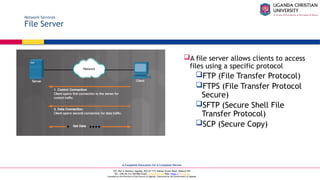
  • #51 5.3 – Network Devices 5.3.2 – Security Devices 5.3.2.1 – Video Explanation – Security Devices
  • #52 5.3 – Network Devices 5.3.2 – Security Devices 5.3.2.2 – Firewalls
  • #53 5.3 – Network Devices 5.3.2 – Security Devices 5.3.2.3 – IDS and IPS
  • #54 5.3 – Network Devices 5.3.2 – Security Devices 5.3.2.4 – UTMs
  • #55 5.3 – Network Devices 5.3.2 – Security Devices 5.3.2.5 – Endpoint Management Server
  • #56 5.3 – Network Devices 5.3.2 – Security Devices 5.3.2.6 – Spam Management  5.3.2.7 – Check Your Understanding – Security Devices
  • #57 5.3 – Network Devices 5.3.3 – Other Network Devices 5.3.3.1 – Legacy and Embedded Systems
  • #58 5.3 – Network Devices 5.3.3 – Other Network Devices 5.3.3.2 – Patch Panel
  • #59 5.3 – Network Devices 5.3.3 – Other Network Devices 5.3.3.3 – Power over Ethernet and Ethernet over Power
  • #60 5.3 – Network Devices 5.3.3 – Other Network Devices 5.3.3.4 – Cloud-based Network Controller 5.3.3.5 Check Your Understanding – Other Network Devices
  • #61 5.4 – Network Cables 5.4.1 – Network Tools 5.4.1.1 – Video Explanation – Network Cable Tools
  • #62 5.4 – Network Cables 5.4.1 – Network Tools 5.4.1.2 – Network Tools and Descriptions
  • #63 5.4 – Network Cables 5.4.1 – Network Tools 5.4.1.2 – Network Tools and Descriptions (Cont.)
  • #64 5.4 – Network Cables 5.4.2 – Copper Cables and Connectors 5.4.1.3 – Network Taps 5.4.1.4 – Check Your Understanding – Network Tools 
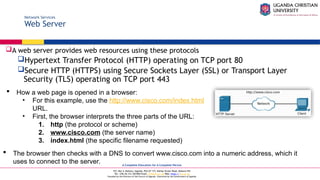
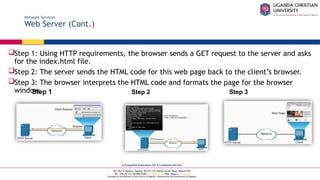
  • #65 5.4 – Network Cables 5.4.2 – Copper Cables and Connectors 5.4.2.1 – Cable Types
  • #66 5.4 – Network Cables 5.4.2 – Copper Cables and Connectors 5.4.2.2 – Coaxial Cables
  • #67 5.4 – Network Cables 5.4.2 – Copper Cables and Connectors 5.4.2.3 – Twisted-Pair Cables
  • #68 5.4 – Network Cables 5.4.2 – Copper Cables and Connectors 5.4.2.4 – Twisted-Pair Category Ratings
  • #69 5.4 – Network Cables 5.4.2 – Copper Cables and Connectors 5.4.2.5 – Twisted-Pair Wire Schemes 5.4.2.6 – Activity – T568A Cable Pinouts and T568B Cable Pinouts
  • #70 5.4 – Network Cables 5.4.2 – Copper Cables and Connectors 5.4.2.7 – Video Explanation – Build and Test a Network Cable
  • #71 5.4 – Network Cables 5.4.2 – Copper Cables and Connectors 5.4.2.8 – Lab – Build and Test Network Cables
  • #72 5.4 – Network Cables 5.4.3 – Fiber Cables and Connectors 5.4.3.1 – Fiber-Optic Cables
  • #73 5.4 – Network Cables 5.4.3 – Fiber Cables and Connectors 5.4.3.2 – Types of Fiber Media
  • #74 5.4 – Network Cables 5.4.3 – Fiber Cables and Connectors 5.4.3.3 – Fiber-Optic Connectors 5.4.3.4 – Check Your Understanding – Fiber Cables and Connectors
  • #75 5.5 – Summary 5.5.1 – Conclusion 5.5.5.1 – Chapter 5: Network Concepts
  • #76 Chapter 5 - New Terms and Commands
  • #77 Chapter 5 - New Terms