Network Programming 
with Java
public static void main(String[] args) throws 
UnknownHostException { 
InetAddress localAddress = InetAddress.getLocalHost(); 
System.out.println(localAddress.getHostAddress()); 
} 
public static void main(String[] args) throws 
UnknownHostException { 
InetAddress googleAddress = 
InetAddress.getByName("www.google.com"); 
System.out.println(googleAddress.getHostAddress()); 
}
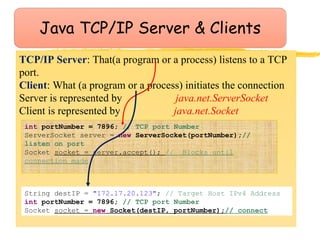
TCP/IP Server: That(a program or a process) listens to a TCP 
port. 
Client: What (a program or a process) initiates the connection 
Server is represented by java.net.ServerSocket 
Client is represented by java.net.Socket 
int portNumber = 7896; // TCP port Number 
ServerSocket server = new ServerSocket(portNumber);// 
listen on port 
Socket socket = server.accept(); // Blocks until 
connection made 
String destIP = "172.17.20.123"; // Target Host IPv4 Address 
int portNumber = 7896; // TCP port Number 
Socket socket = new Socket(destIP, portNumber);// connect
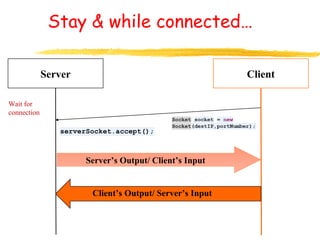
Stay & while connected… 
Server Client 
Wait for 
connection 
Server’s Output/ Client’s Input 
Client’s Output/ Server’s Input
Java I/O 
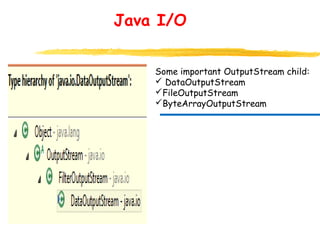
Some important OutputStream child: 
 DataOutputStream 
FileOutputStream 
ByteArrayOutputStream
Java I/O 
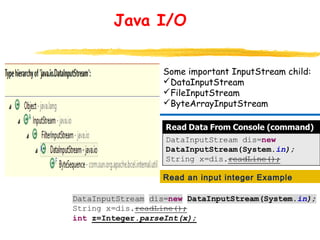
Some important InputStream child: 
DataInputStream 
FileInputStream 
ByteArrayInputStream 
Read an input integer Example
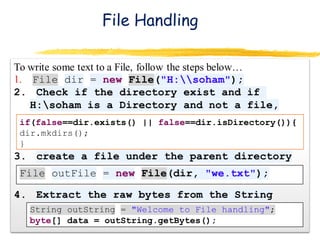
File Handling 
if(false==dir.exists() || false==dir.isDirectory()){ 
dir.mkdirs(); 
}
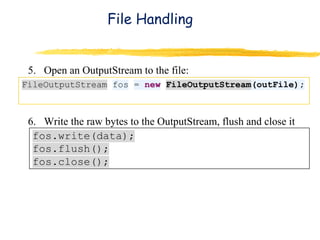
File Handling 
5. Open an OutputStream to the file: 
6. Write the raw bytes to the OutputStream, flush and close it
Write to a File : Second approach 
DataOutputStream provides a wrapper over an OutputStream to 
write primitive data types, not just byte[]
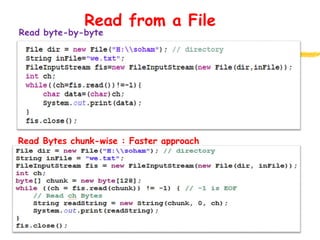
Read from a File 
Read byte-by-byte 
Read Bytes chunk-wise : Faster approach

Network programming1

  • 1.
  • 2.
    public static voidmain(String[] args) throws UnknownHostException { InetAddress localAddress = InetAddress.getLocalHost(); System.out.println(localAddress.getHostAddress()); } public static void main(String[] args) throws UnknownHostException { InetAddress googleAddress = InetAddress.getByName("www.google.com"); System.out.println(googleAddress.getHostAddress()); }
  • 3.
    TCP/IP Server: That(aprogram or a process) listens to a TCP port. Client: What (a program or a process) initiates the connection Server is represented by java.net.ServerSocket Client is represented by java.net.Socket int portNumber = 7896; // TCP port Number ServerSocket server = new ServerSocket(portNumber);// listen on port Socket socket = server.accept(); // Blocks until connection made String destIP = "172.17.20.123"; // Target Host IPv4 Address int portNumber = 7896; // TCP port Number Socket socket = new Socket(destIP, portNumber);// connect
  • 4.
    Stay & whileconnected… Server Client Wait for connection Server’s Output/ Client’s Input Client’s Output/ Server’s Input
  • 5.
    Java I/O Someimportant OutputStream child:  DataOutputStream FileOutputStream ByteArrayOutputStream
  • 6.
    Java I/O Someimportant InputStream child: DataInputStream FileInputStream ByteArrayInputStream Read an input integer Example
  • 7.
    File Handling if(false==dir.exists()|| false==dir.isDirectory()){ dir.mkdirs(); }
  • 8.
    File Handling 5.Open an OutputStream to the file: 6. Write the raw bytes to the OutputStream, flush and close it
  • 9.
    Write to aFile : Second approach DataOutputStream provides a wrapper over an OutputStream to write primitive data types, not just byte[]
  • 10.
    Read from aFile Read byte-by-byte Read Bytes chunk-wise : Faster approach