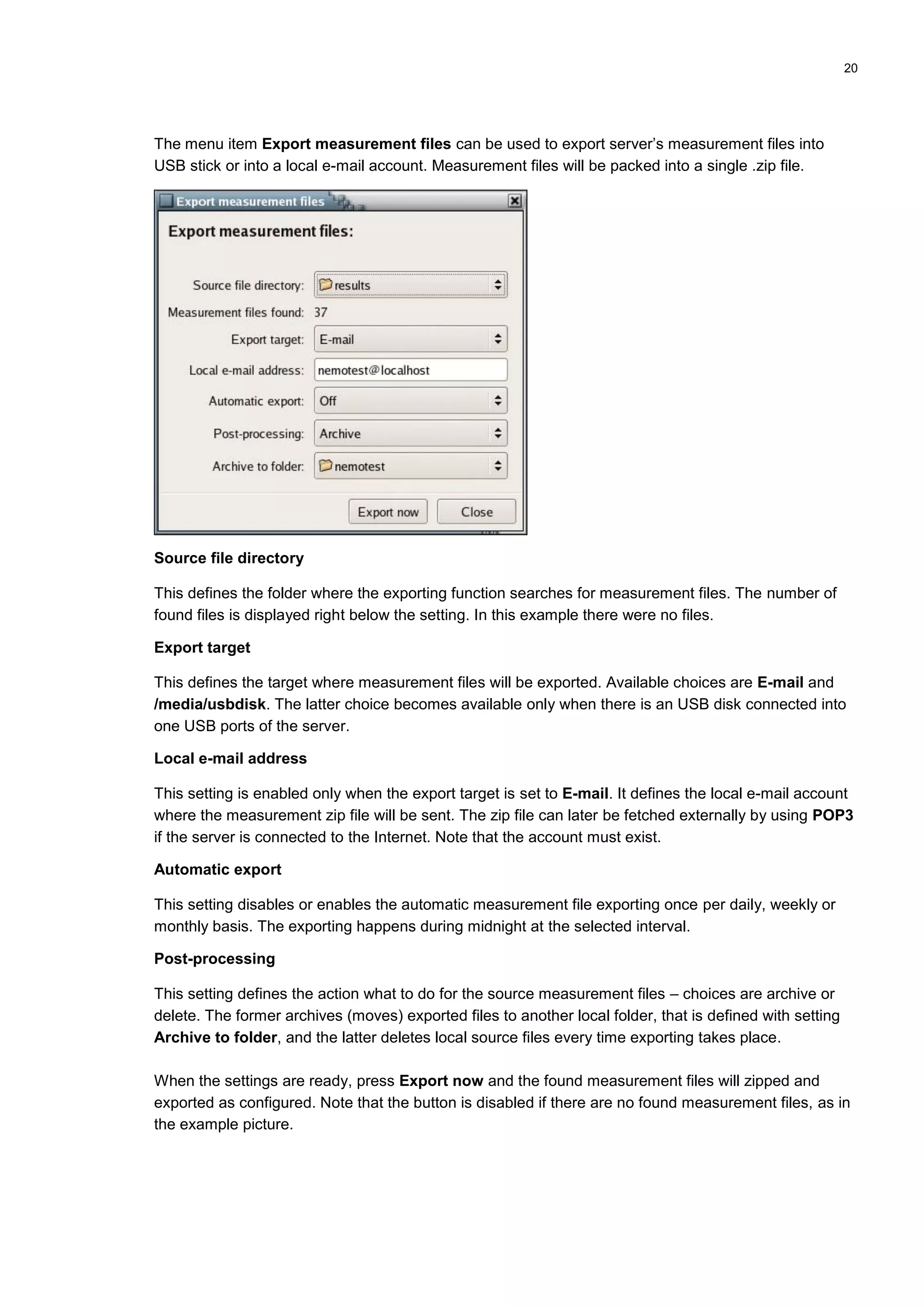
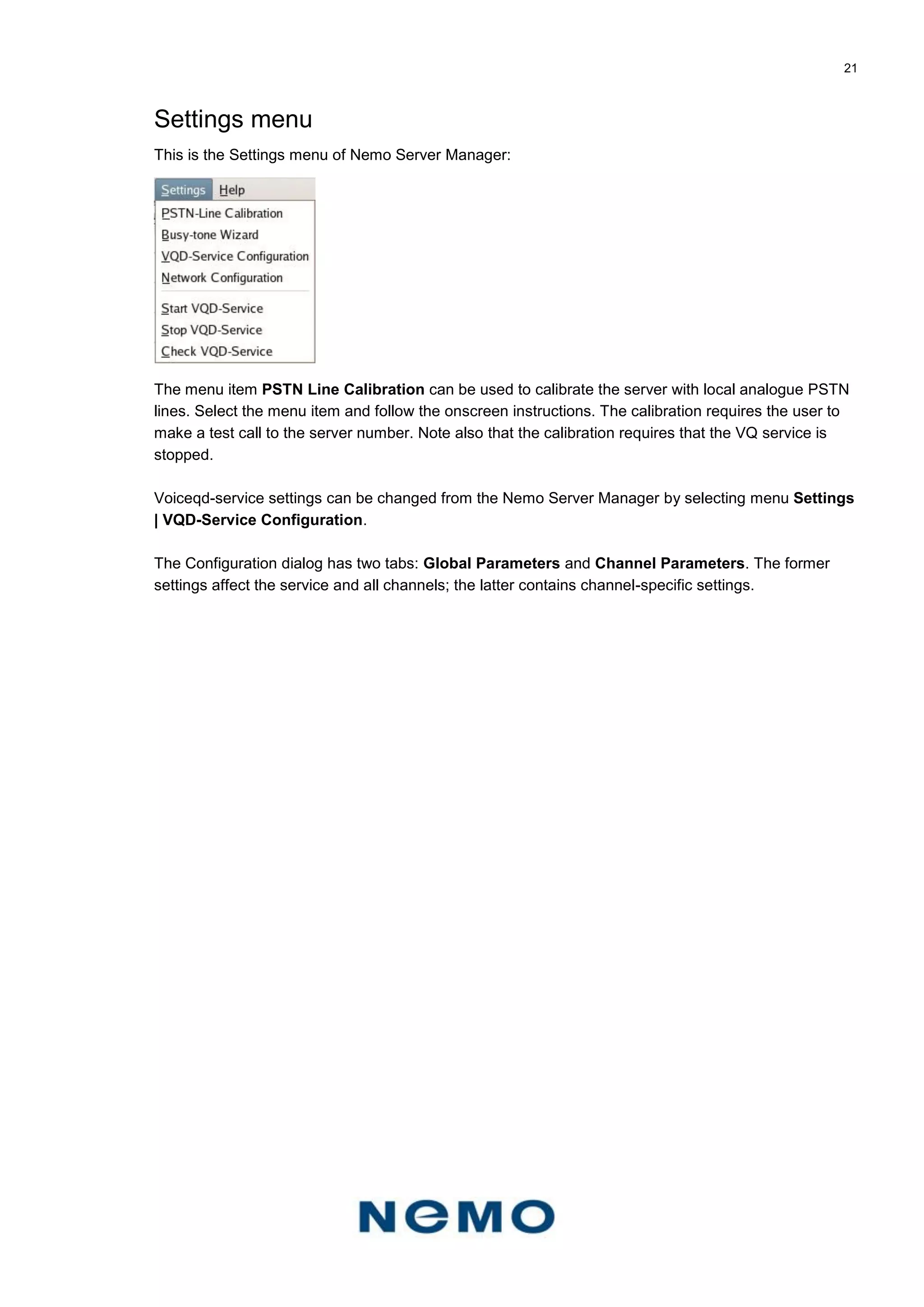
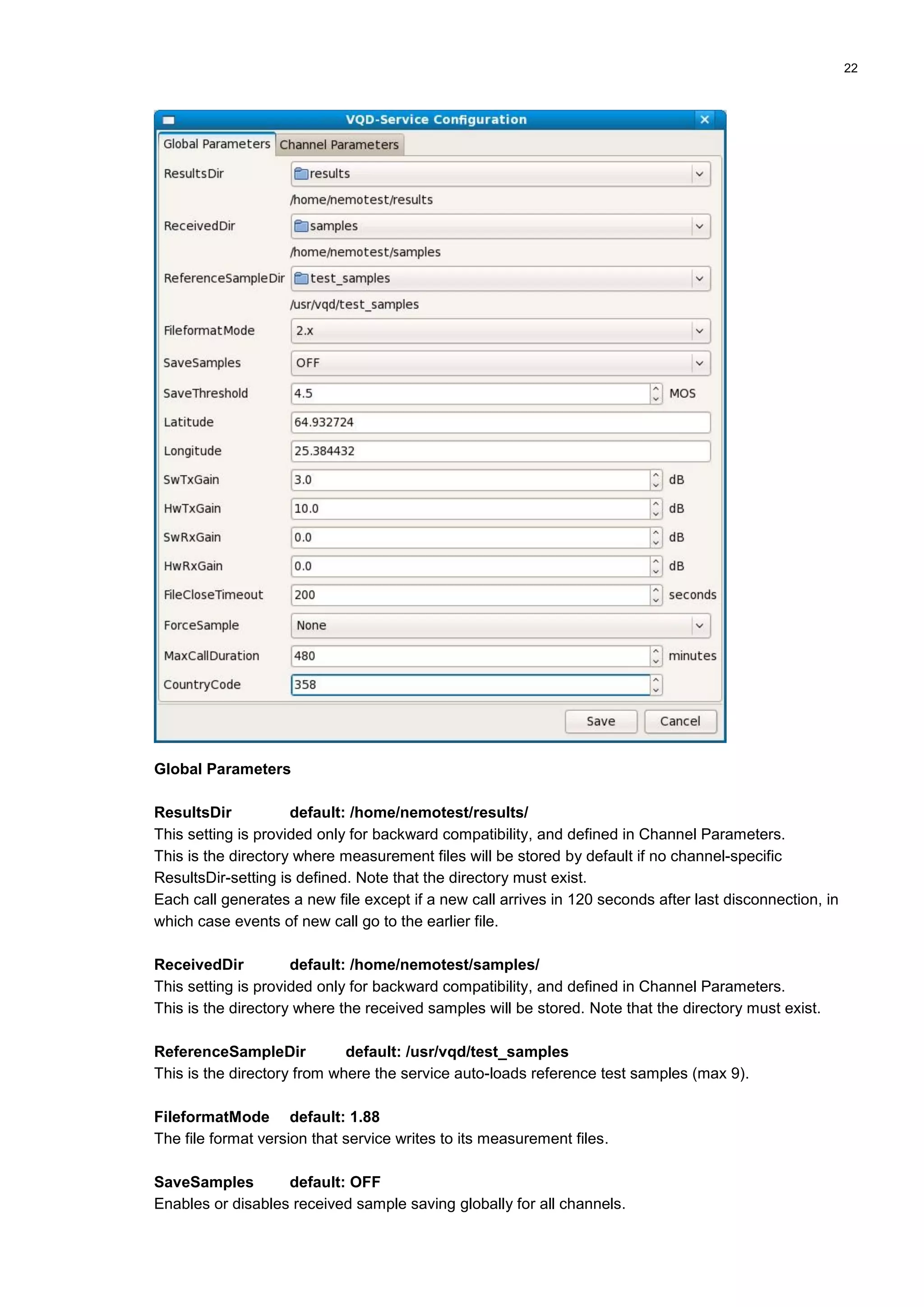
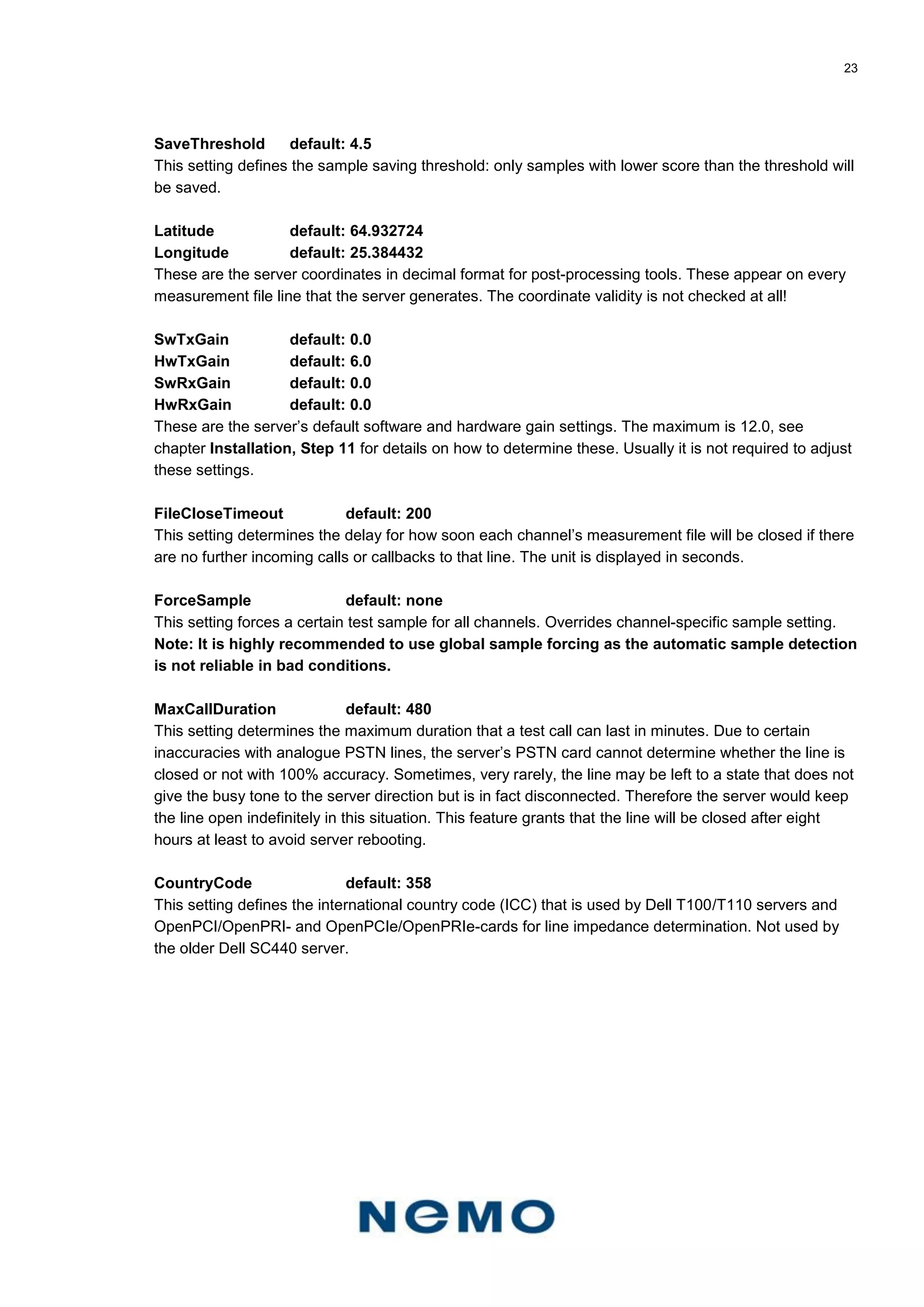
Downloaded 42 times
![8
Step 3: Opening terminal
Select the Terminal / Command Line icon from the bottom row:
The following prompt refers to console commands from now on:
[root@nemoserver root]#
Step 4: Change the superuser password
This step is required only if the server is to be connected to the Internet.
The superuser is called root in Linux. The superuser password can be changed with the passwd
command:
[root@nemoserver root]# passwd
Changing password for user root.
New UNIX password:
Retype new UNIX password:
passwd: all authentication tokens updated successfully.
Create a new password according to the following guidelines:
Do not use common words or names
The password must be least 8 characters long
The password should have upper and lower case characters, numbers, and special characters
The following is an example of a valid password (do not use this, as it is the default password for
server 2.0.1 and earlier versions):
6yV-1pSc](https://image.slidesharecdn.com/nemoservermanualv1-160720152838/75/Nemo-server-manual_v1-8-2048.jpg)
![11
Step 6: Configure WAN (optional)
This step is required only if the server is to be connected to the Internet and if the WAN interface uses
a static IP address. By default, all WAN interfaces are configured to use dynamic (DHCP) IP
addresses. In case PPPOE connection is used, see PPPOE Instructions in the APPENDICES at the
end of this manual for more information.
Note that it is recommended to use a static IP address on the WAN side so that there is no need to
change the IP address into measurement unit configurations in case of possible later changes to it.
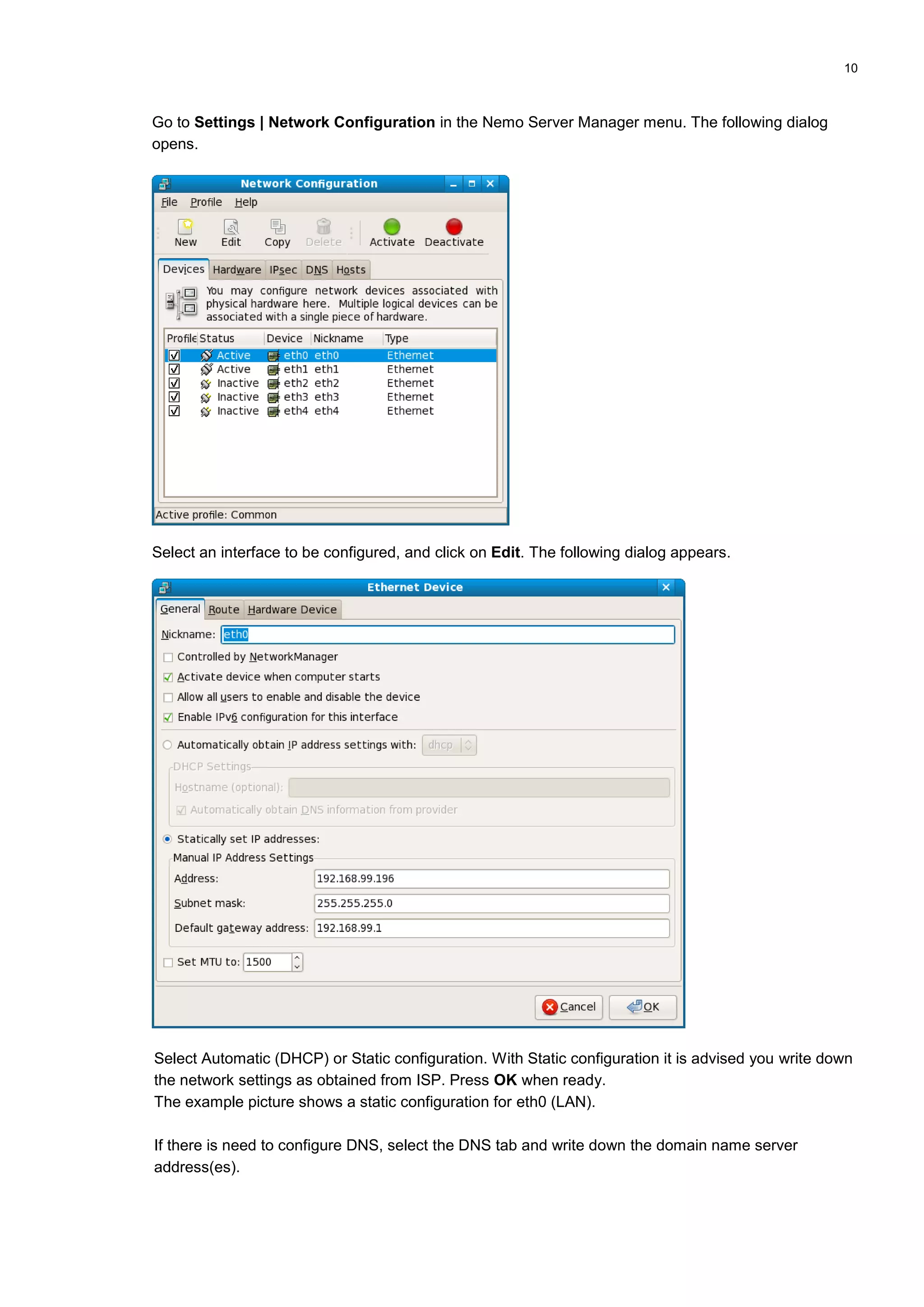
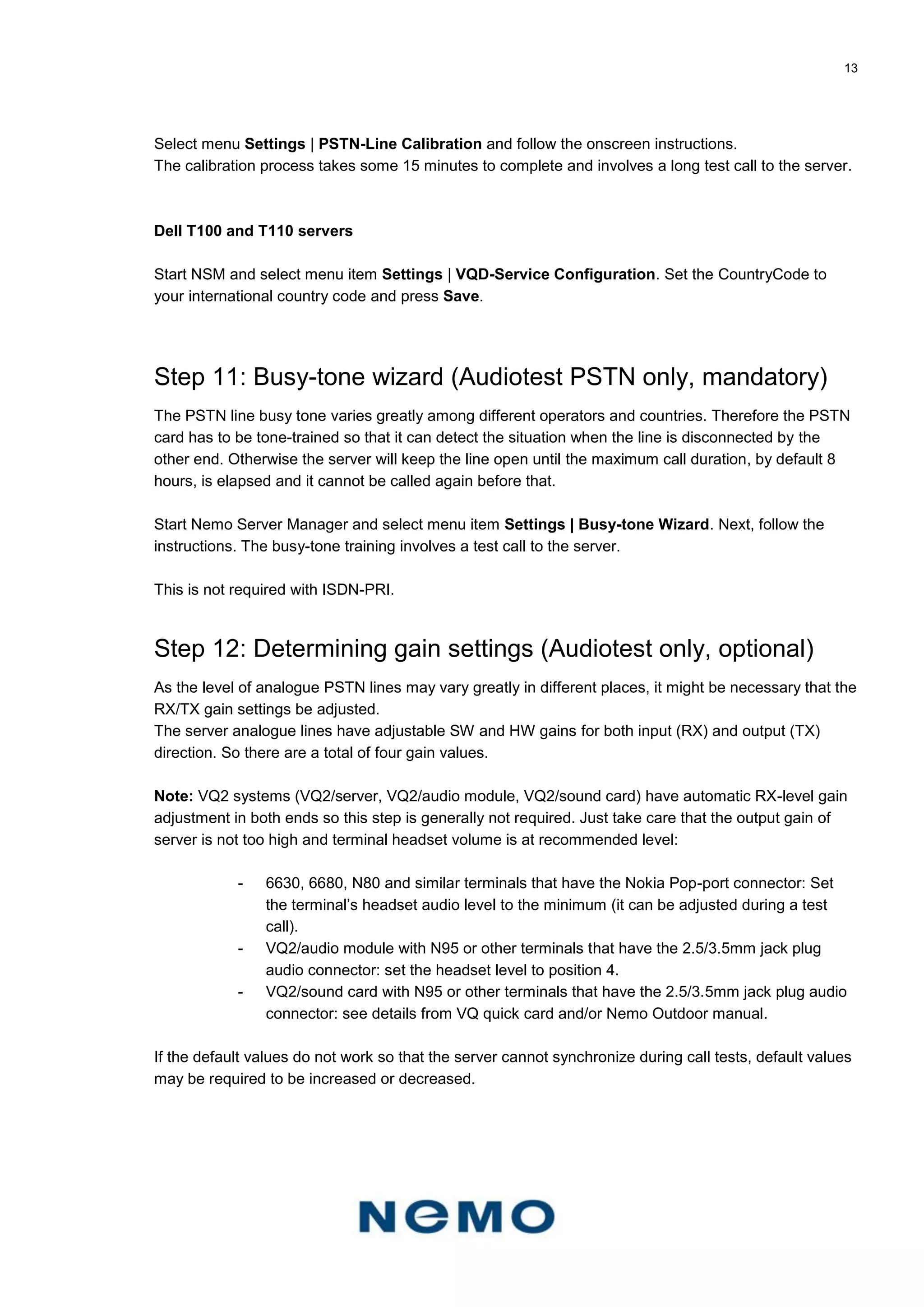
See the previous step for how to open the network settings, and then select the WAN interface to be
configured: eth1, eth2, eth3 or eth4 (or eth5-eth8).
Step 7: Restart configured network interfaces
If the network interface settings were changed, it is required to restart those interfaces to activate them
in order for the changes to become active. It is also time to connect the WAN interface network cables.
Repeat this procedure with every changed interface.
Select network interface in the Network Configuration dialog, and click on Deactivate, then Activate.
Sometimes, especially if gateway settings are changed, it is required to restart the whole network
system. In this case it is noticed when network settings are saved. Open the terminal and type in the
following command:
[root@nemoserver root]# service network restart
All interfaces will be shut down, after which they are restarted with new settings.
Step 8: Configure Samba workgroup (optional)
The Samba service is responsible for Windows network file/folder sharing.
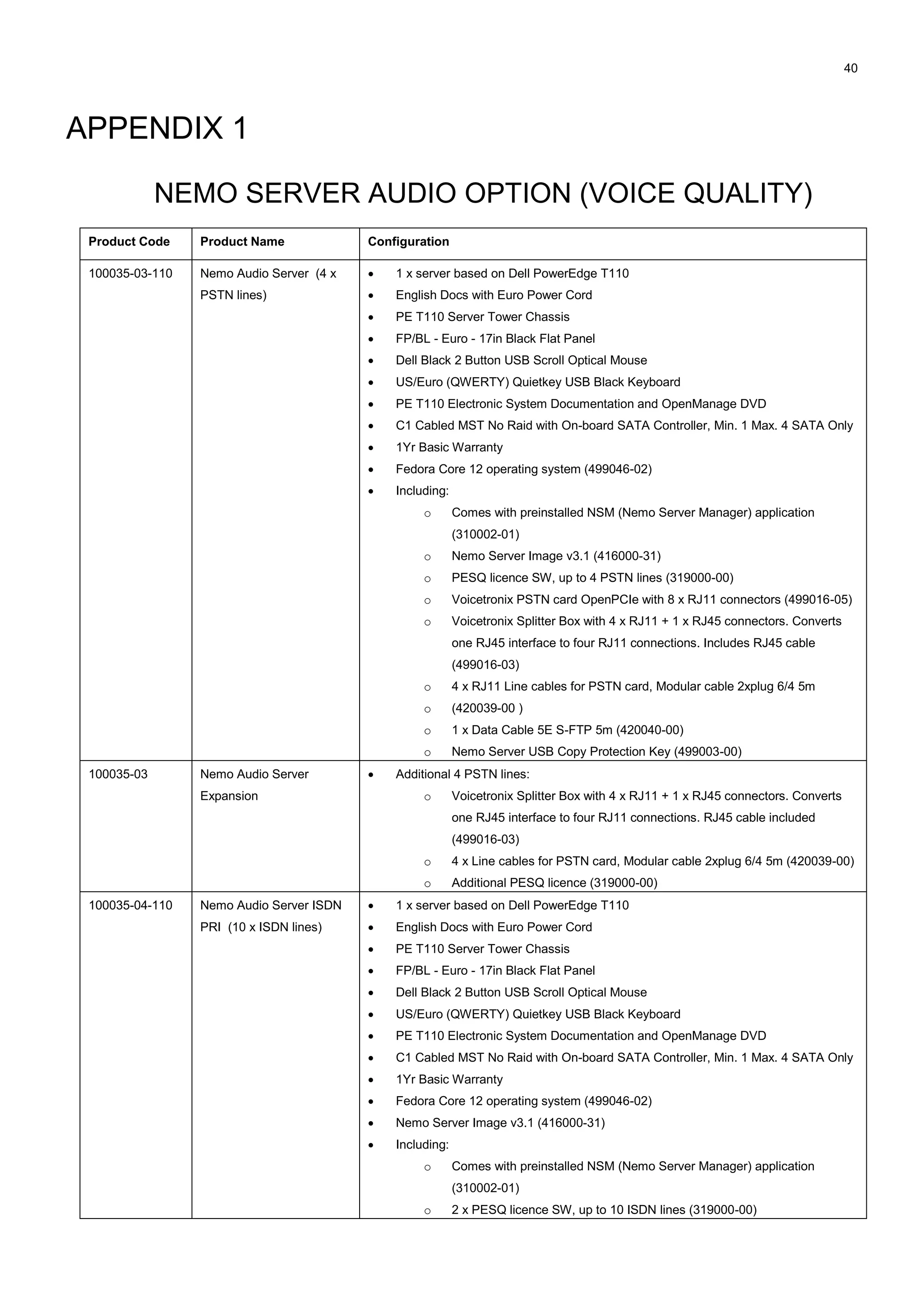
The server’s Samba service is preconfigured to use the following workgroup name: NEMOTEST. This
should be changed so that it matches with the local network’s workgroup - otherwise the server’s
shares will not appear on workstations.
If the workgroup name needs to be changed, give the following commands:
1. First, open the Samba configuration with vi-editor:
[root@nemoserver root]# vi /etc/samba/smb.conf
2. Press Esc I to set the vi editor to insert mode.
Search the line that reads workgroup:
workgroup = NEMOTEST
3. Replace NEMOTEST with the correct workgroup name. Remember to use upper-case letters.
4. Find a line that reads:
hosts allow = 192.168. 127. 10.](https://image.slidesharecdn.com/nemoservermanualv1-160720152838/75/Nemo-server-manual_v1-11-2048.jpg)
![12
In case your LAN uses a different subnet than the one defined above, add your subnet at the
end of the line. For example, if your LAN uses the 72.10.x.x network, add 72.10. to the end,
each subnet separated with a space character.
hosts allow = 192.168. 127. 10. 72.10.
5. Press Esc : x [enter] to save the configuration and to close the vi editor.
Next, restart the Samba service:
[root@nemoserver root]# service smb restart
Step 9: Determining server’s IP addresses (optional)
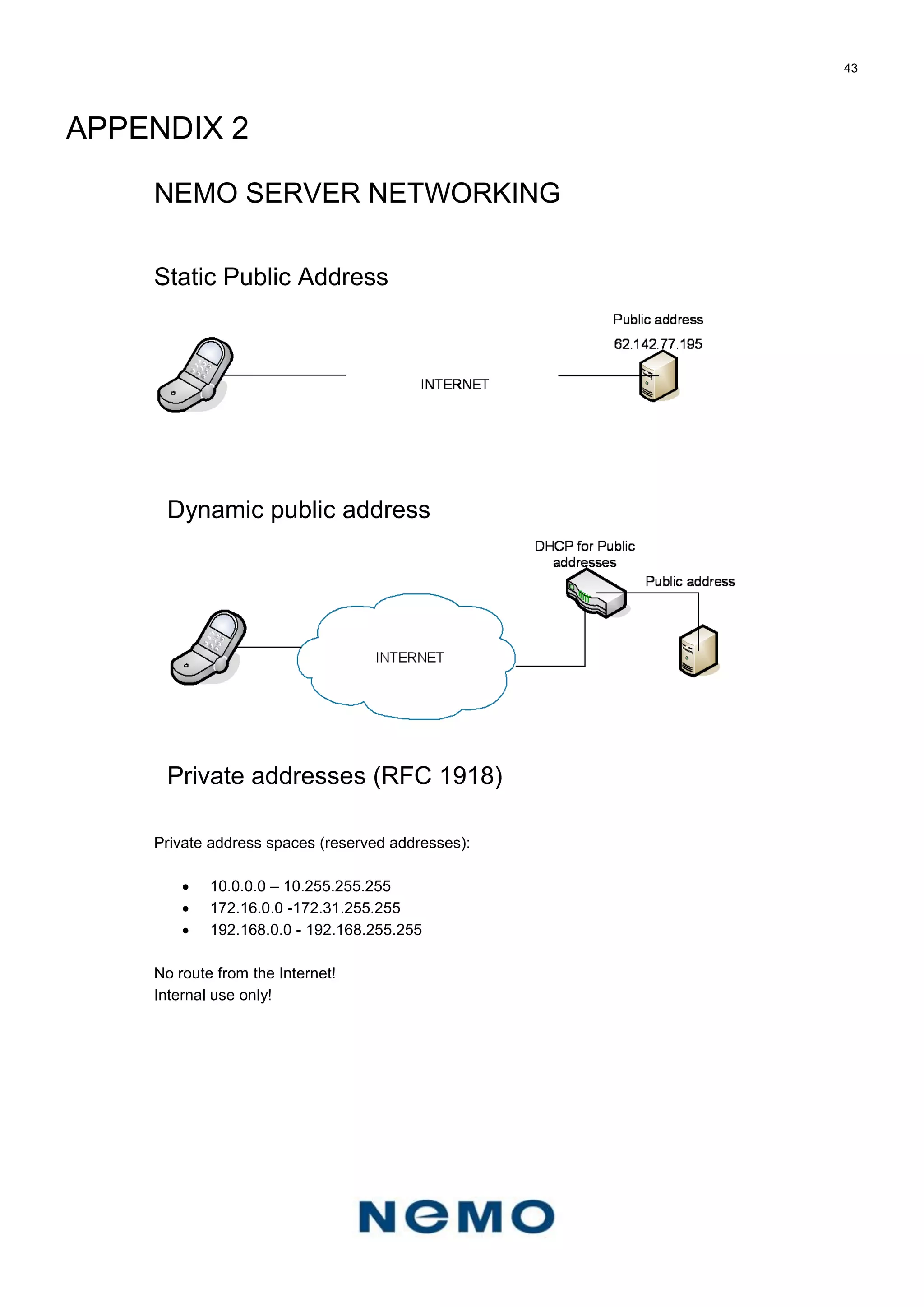
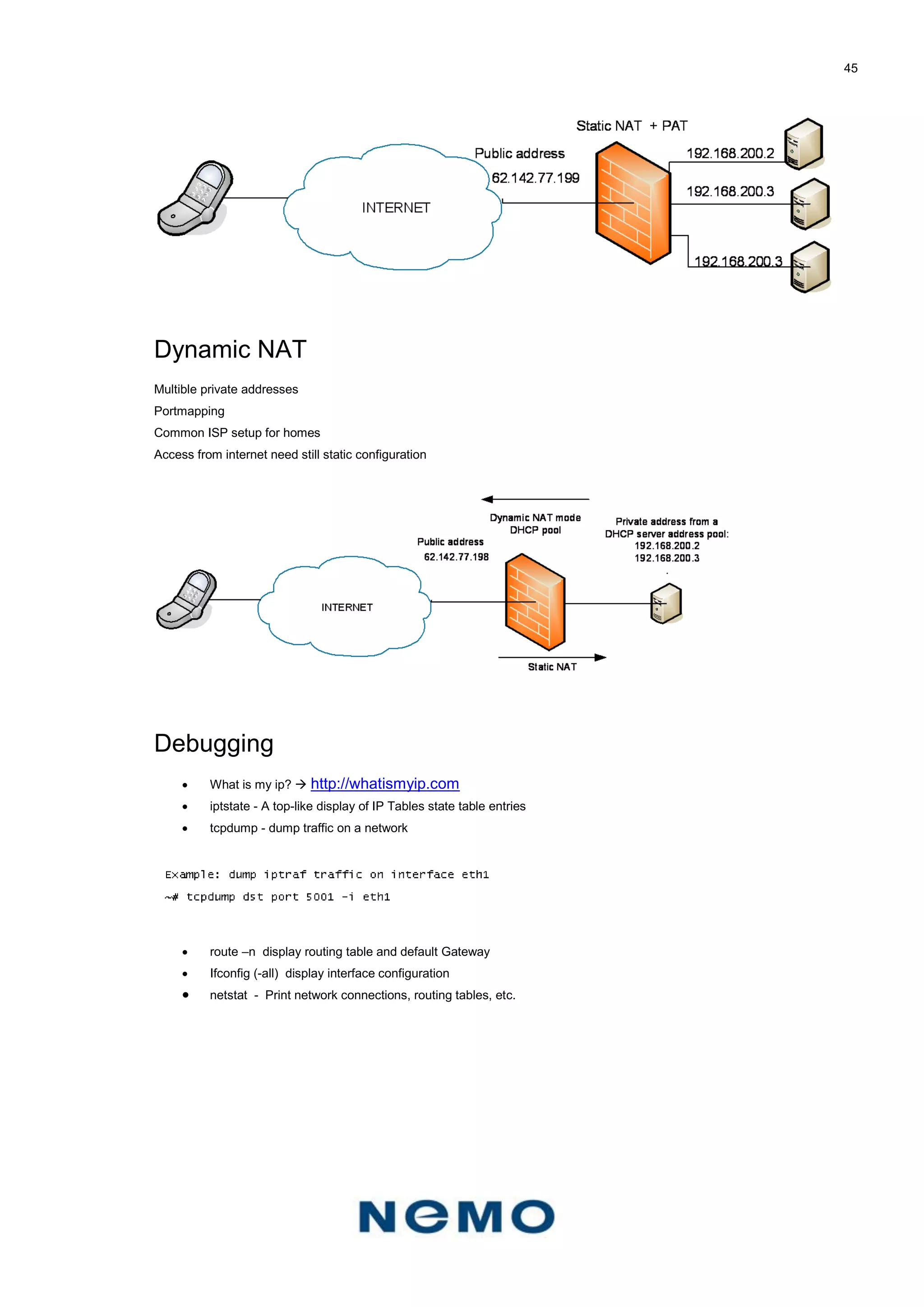
If the server is configured to use dynamic IP addresses (DHCP), it is required to check which
addresses the server retrieved in order to access the server by using its IP address, from LAN or
WAN.
If the server IP address is unknown (it was assigned automatically by DHCP), use the following
command to retrieve the address:
[root@nemoserver root]# ifconfig eth0
eth0 Link encap:Ethernet HWaddr 00:11:25:57:37:3B
inet addr:192.168.10.4 Bcast:192.168.10.255 Mask:255.255.255.0 […]
The IP address is next to inet addr field, in this case 192.168.10.4.
Repeat the procedure for each interface from eth1 to eth4 to obtain the addresses. If the interface
does not have an assigned IP address, the inet addr field does not appear.
What is more, whenever the server reboots it may or may not get new IP addresses depending on the
network’s DHCP settings.
Step 10: Calibration (Audiotest PSTN Openline4 only)
Since fixed lines are analogue, their electrical properties vary greatly among different operators and
countries. Therefore the PSTN card’s electrical interface has to be adjusted to match the local
conditions.
However, this is required only with Openline4 card with the Dell SC440 server platform – with the
newer Dell T100/T110 and OpenPCI/OpenPCIe-card the user is only required to input country code to
NSM settings and the card then selects proper impedance settings based on the international country
code (ICC).
Dell SC440 server
Line calibration is done by determining three values for a card’s hybrid balance registers. These
values assign the interface impedances so that the impedances of the card and the line are as close
to each other as possible.
Be sure that all used phone cables are identical – otherwise the electric properties of the lines are not
identical and the balance values obtained for one test line do not necessarily work with other lines.
The Nemo Server Manager has a calibration wizard which performs the calibration but requires the
user to call one of the connected fixed lines.](https://image.slidesharecdn.com/nemoservermanualv1-160720152838/75/Nemo-server-manual_v1-12-2048.jpg)
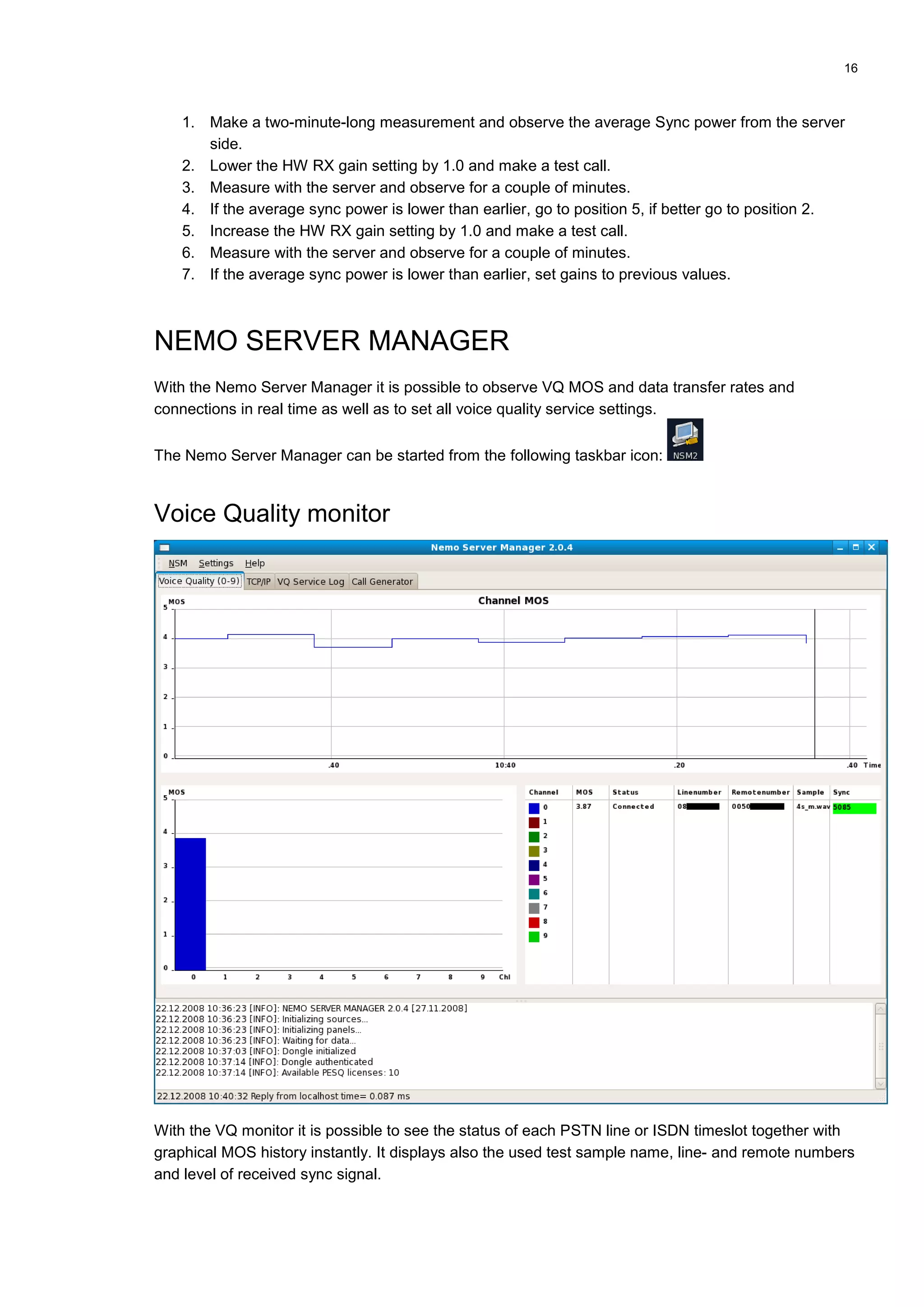
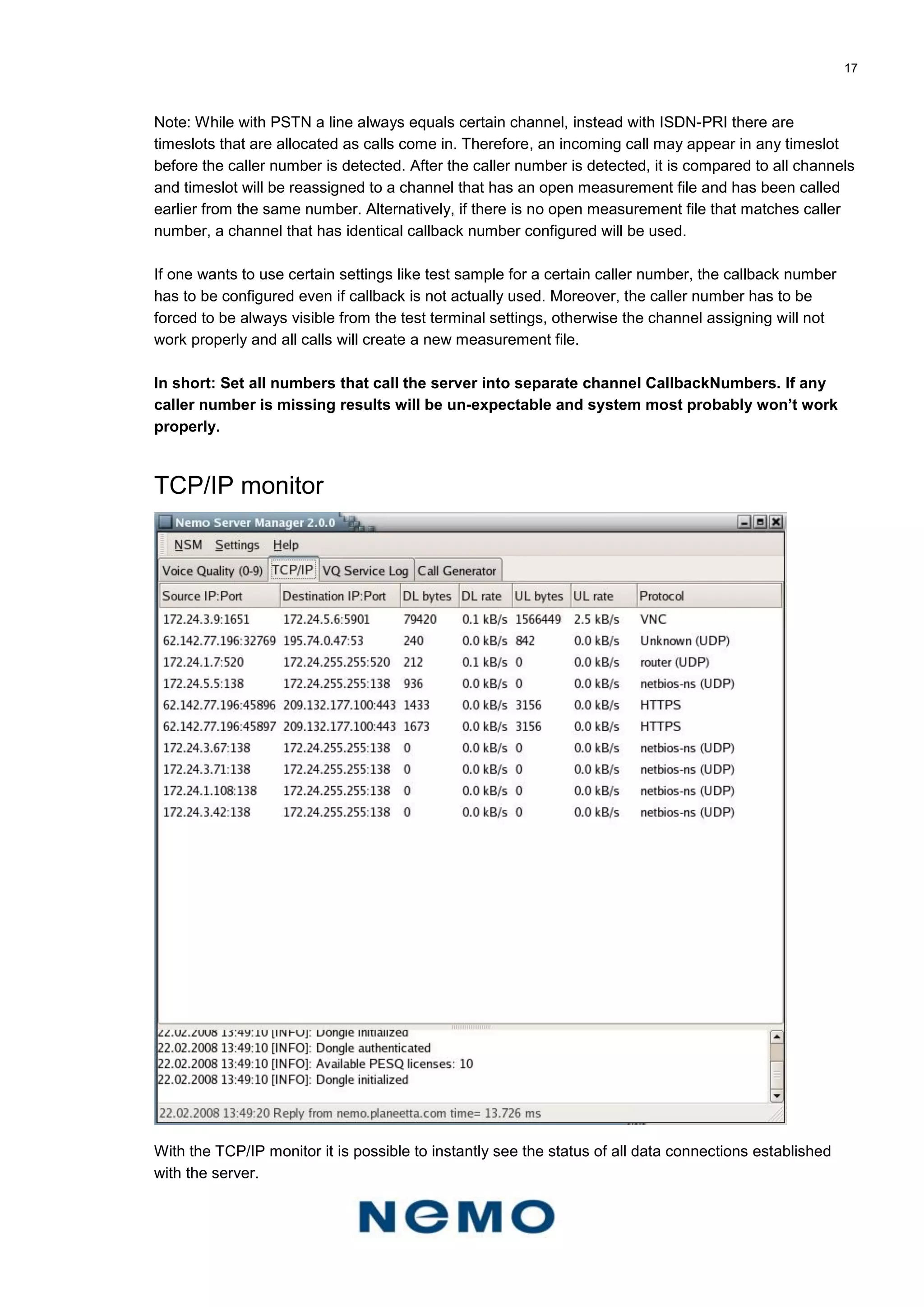
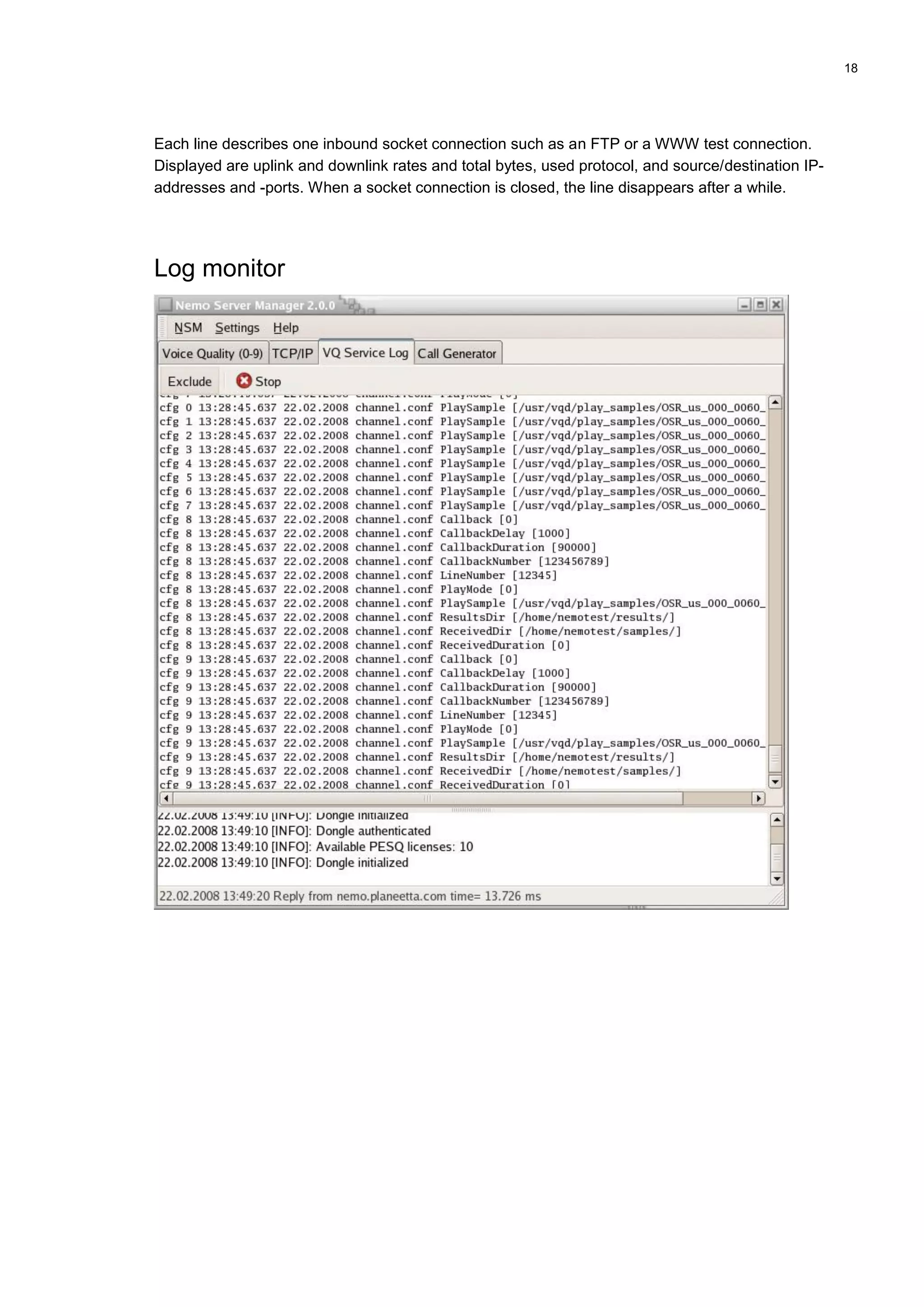
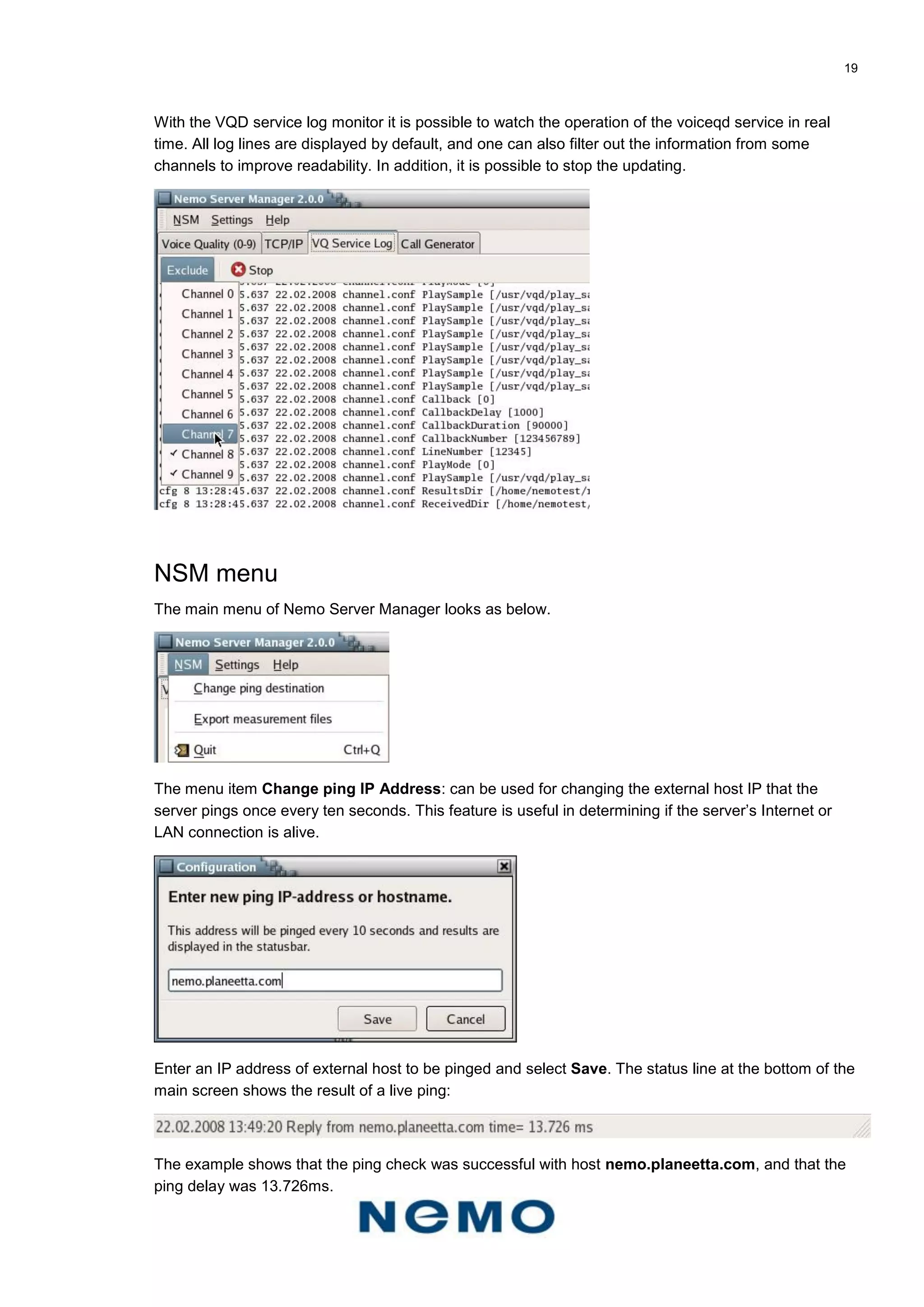

![27
ADMINISTRATION
Once it is set up, the server is administration free when it comes to server settings and the like. The
only situation where administration may be required is if the hard disk becomes full. By default, the
server has more than 60GB of free disk space, but it may run out of it in a couple of years, especially if
sample saving is used. If this happens, open the server Samba share and remove/delete obsolete
measurement files.
Samba/Windows file sharing
Once the server is connected to LAN, it is possible to browse into it and access its files by using
Windows file sharing.
If the server’s LAN IP address is 192.168.10.4, run the following command: 192.168.10.4
It should open a file window that contains the server’s shared folders.
Instead, if Windows asks for a password, close the password prompt and run the following command:
net use 192.168.10.4 7UcW49kq /USER:nemotest
And after the command is completed try again the command 192.168.10.4
By default the server has the following shared folders:
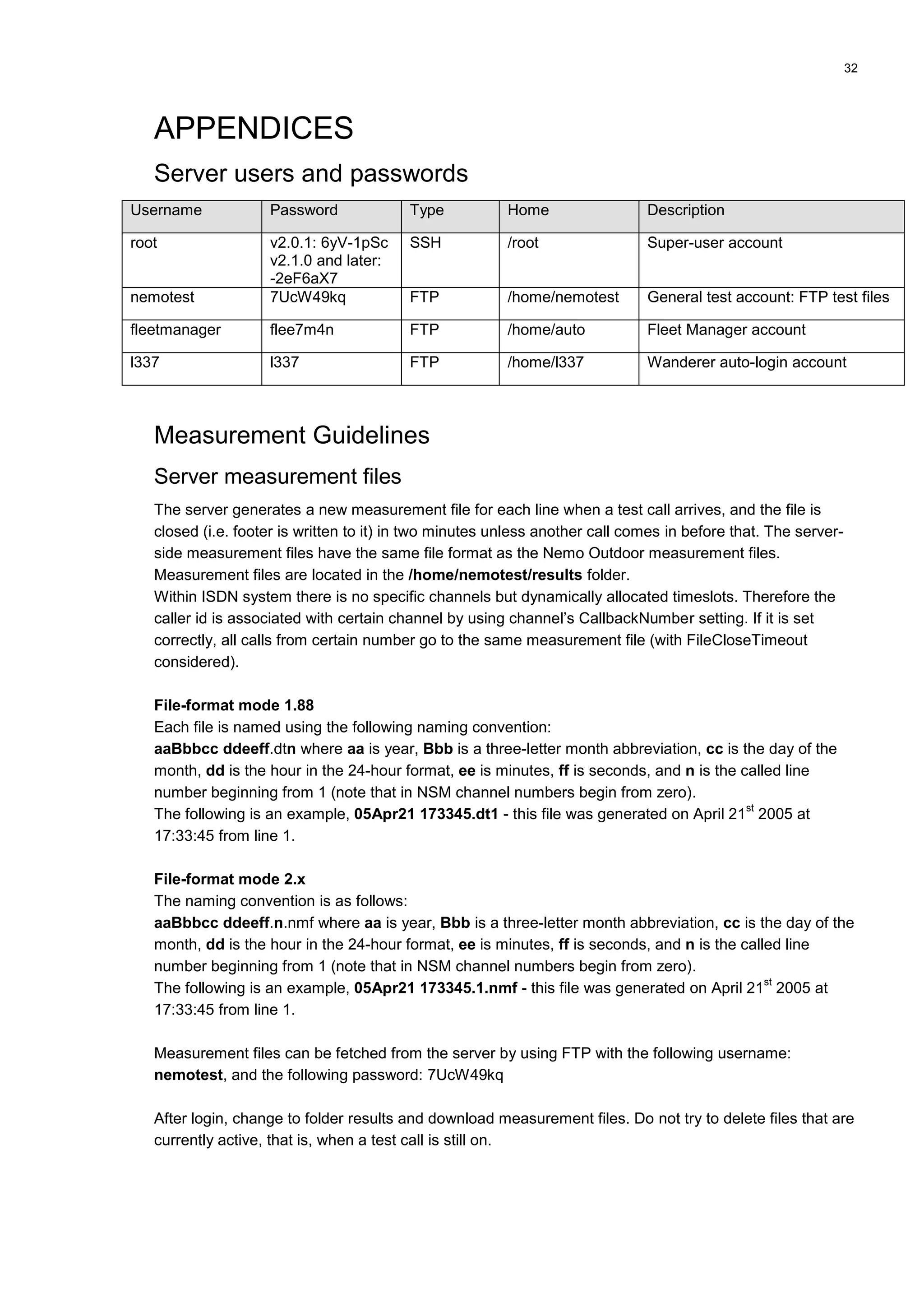
Share name Real folder Description
auto /home/auto The root folder of Nemo Autonomous.
movies /usr/local/movies Catra streaming service video folder.
nemotest /home/nemotest The root folder of generic test account ‘nemotest’.
VNC and Remote Desktop
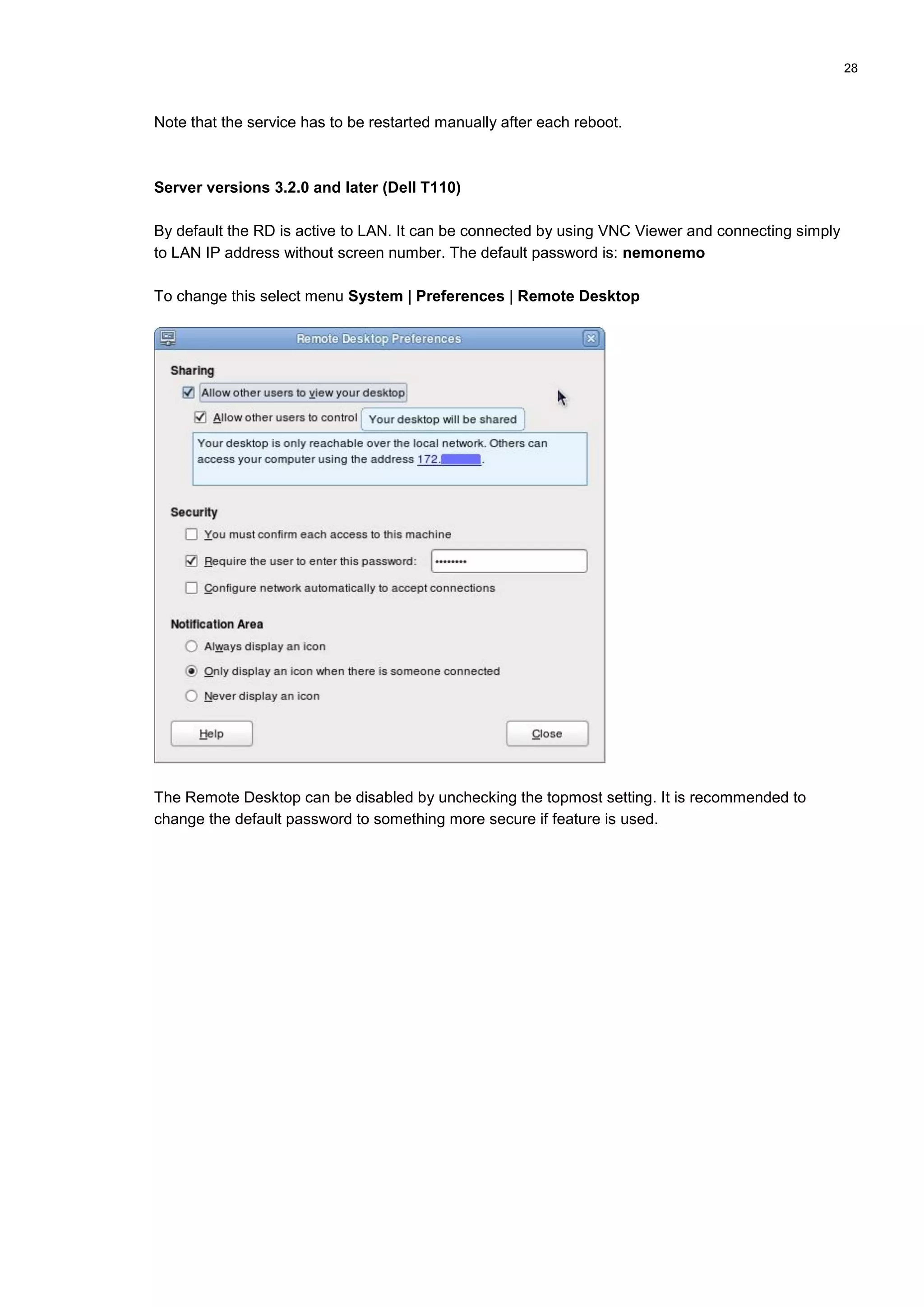
With Fedora 12 the VNC service was dropped out and instead there is system Remote Desktop
functionality available into LAN. However, the new RD is protocol-wise compliant with VNC and not
with Windows’ Remote Desktop so VNC Viewer is required to access the server.
The VNC service is disabled to WAN interfaces from server version 2.0.1 onwards due to security
risks, and VNC service and Remote Desktop ports are open only to LAN interface from the firewall.
Server versions before 3.0.0 (Dell SC440 and Dell T100)
In case VNC service is needed for LAN access, open console as root and run command:
[root@nemoserver root]# vncpasswd
Feed new VNC password and then run the following command to start the VNC service manually:
[root@nemoserver root]# vncserver &](https://image.slidesharecdn.com/nemoservermanualv1-160720152838/75/Nemo-server-manual_v1-27-2048.jpg)

![30
SMTP To: nemotest
POP3 login / password: nemotest / 7UcW49kq
Note: The server requires a domain name for at least one WAN interface IP address that is going to
be used on SMTP testing - otherwise the server does not accept the inbound SMTP connection. This
security mechanism has been recently added due to continually increasing e-mail fraudulency and
spamming.
After the server is connected to the Internet (WAN) and has public domain name, the user has to
run the following commands as the root-user to set the domain name permanently to SMTP-service
configuration:
[root@nemoserver root]# postconf -e myhostname=nemoserver.nemo.fi
[root@nemoserver root]# service postfix restart
Where nemoserver.nemo.fi is replaced with the user's own domain name.
Note: Some operators prevent accessing other SMTP services than their own - therefore it is not
possible to test SMTP against the server with these operators' SIM cards.
RTSP
The server has the Catra Streaming service running, and it is bound automatically with interface eth1.
Thus, make sure that there is only one WAN/Internet connection that is connected to the upper
network cards’ port A. The RTSP service can be accessed only by using an eth1 IP address, for
example, if the eth1 IP address is 62.142.xx.yy, then the file 6.3gp can loaded by typing this address
on a mobile browser: RTSP://62.142.xx.yy/6.3gp
RTSP test videos are located in the /usr/local/movies folder. This folder is also accessible through
Samba file sharing so it is easy to add more test videos.
The server contains the following test videos (videos are downloaded from the Catra WWW-site
http://www.catrasoftware.it/Streaming/CatraStreamingServer.htm):
Filename File size Original filename
6.3gp 2819 kB 06_H263_BR_48000_FR_3_AAC_BR_16000_VID_Trailer1.3gp
7.3gp 2718 kB 07_H263_BR_48000_FR_3_GSMAMR_BR_16000_VID_Trailer1.3gp
8.2gp 2893 kB 08_H263_BR_48000_FR_3_WBAMR_BR_16000_VID_Trailer1.3gp
9.3gp 2930 kB 09_MP4_BR_48000_FR_3_AAC_BR_16000_VID_Trailer1.3gp
10.3gp 2130 kB 10_MP4_BR_48000_FR_3_AMR_BR_16000_VID_Trailer1.3gp
11.3gp 3003 kB 11_MP4_BR_48000_FR_3_WBAMR_BR_16000_VID_Trailer1.3gp
12.3gp 2647 kB 12_MP4_BR_42000_FR_8_3_GSMAMR_BR_8000_VID_TomJerry.3gp
Note: Nemo Outdoor cannot establish streaming with the Nemo Server Catra streaming service. With
Nemo Handy the streaming is OK with the included test files.](https://image.slidesharecdn.com/nemoservermanualv1-160720152838/75/Nemo-server-manual_v1-30-2048.jpg)
![35
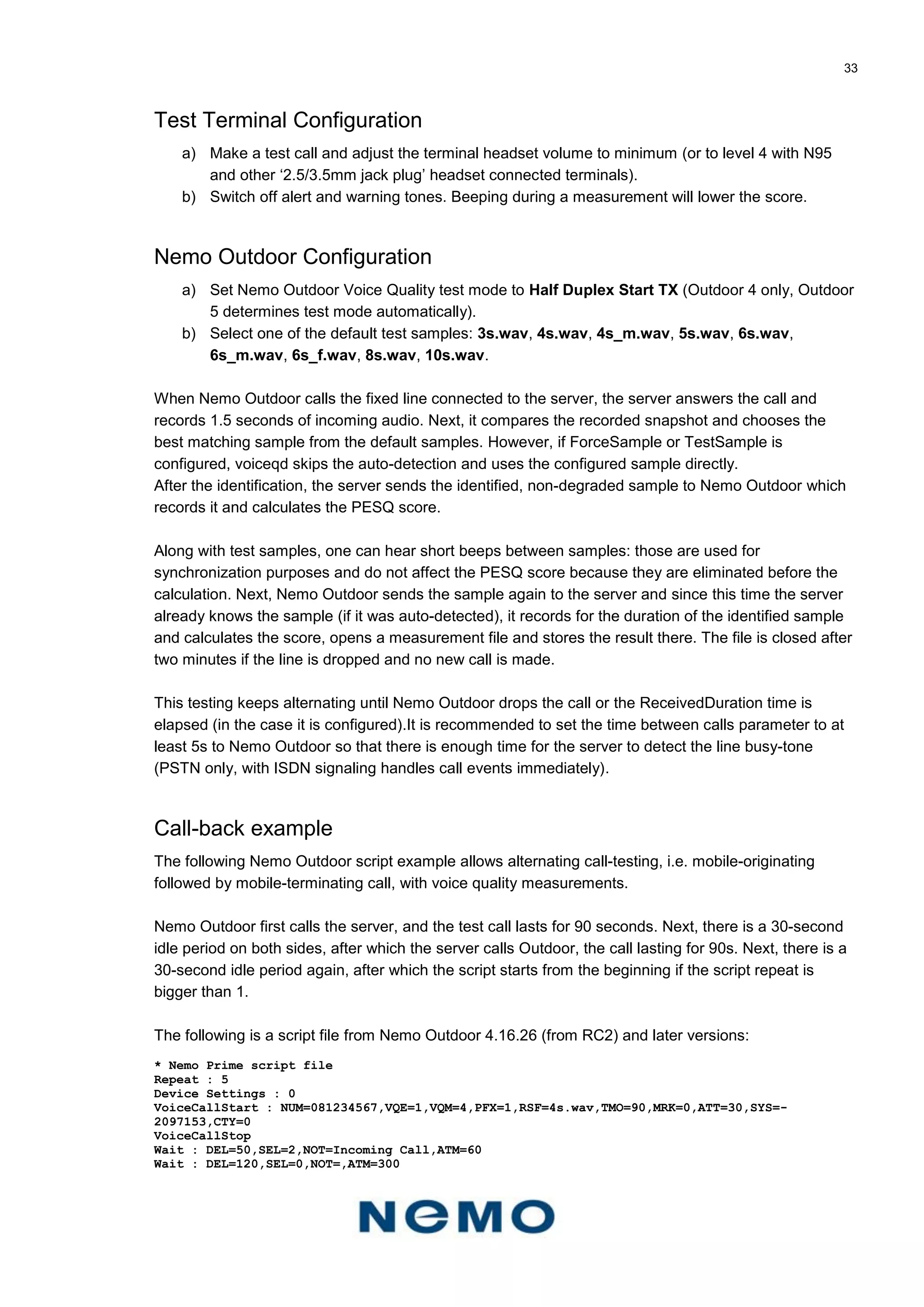
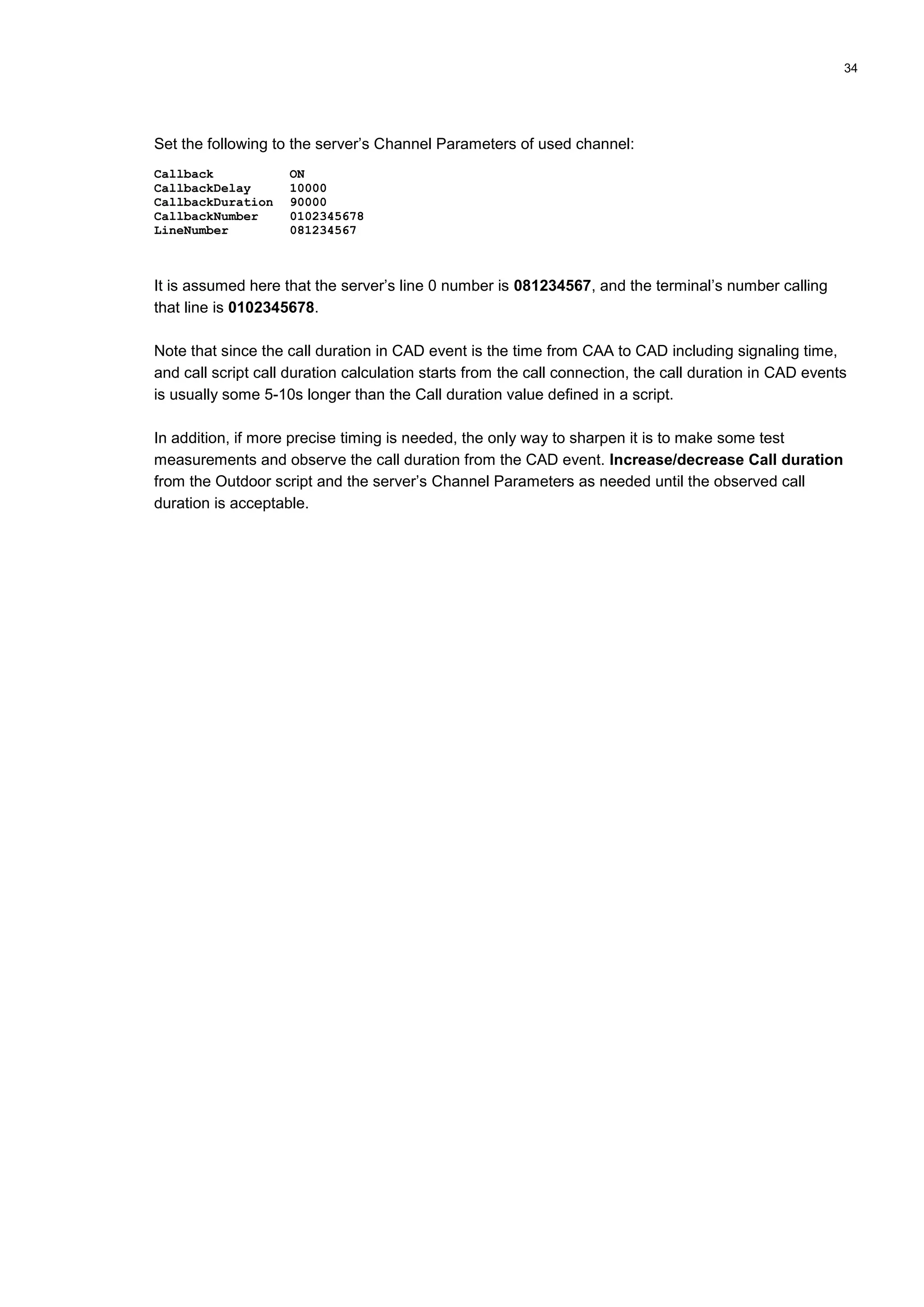
The server’s main WWW page
PPPOE Instructions
Open the root console and run the following command:
[root@nemoserver root]# adsl-setup
The command runs the ADSL/VDSL/xDSL configuration script that asks several questions about the
new connection. After the script is done, a new network configuration script is created to:
/etc/sysconfig/network-scripts/ifcfg-ppp0
PPPOE settings can be edited, if necessary, but this is usually not required if the entered information
was correct:
[root@nemoserver root]# cd /etc/sysconfig/network-scripts](https://image.slidesharecdn.com/nemoservermanualv1-160720152838/75/Nemo-server-manual_v1-35-2048.jpg)
![36
[root@nemoserver root]# vi ifcfg-ppp0
Press Esc i to set the vi editor to insert mode.
Note that all vi editor commands are case sensitive.
Press Esc : x [enter] to save the crontab and to close the vi editor.
After the PPPOE script is ready, the connection can be started with the following command:
[root@nemoserver root]# pppoe-start
Verify that the new connection received an IP address with the following command:
[root@nemoserver root]# ifconfig ppp0
If the inet addr field is present, the connection should be OK. In failure situations use the following
command to get more information about PPPOE:
[root@nemoserver root]# man pppoe
PPPOE can be set to start automatically when the server boots:
[root@nemoserver root]# vi /etc/rc.d/rc.local
Add the following line just below the lowest commented line:
pppoe-start
The beginning of the file should look as follows:
#!/bin/sh
#
# This script will be executed *after* all the other init scripts.
# You can put your own initialization stuff in here if you don't
# want to do the full Sys V style init stuff.
pppoe-start
Manual configuration
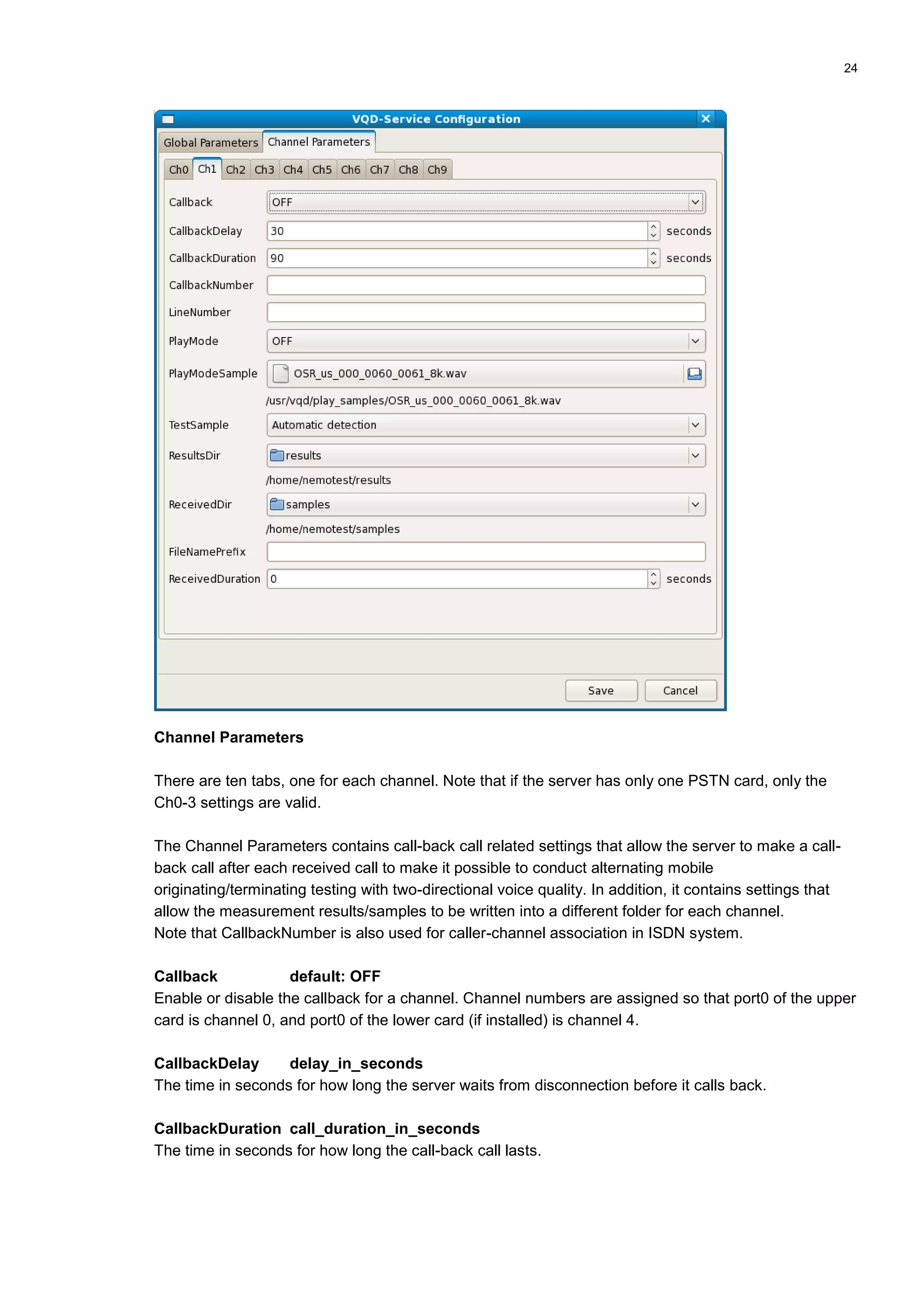
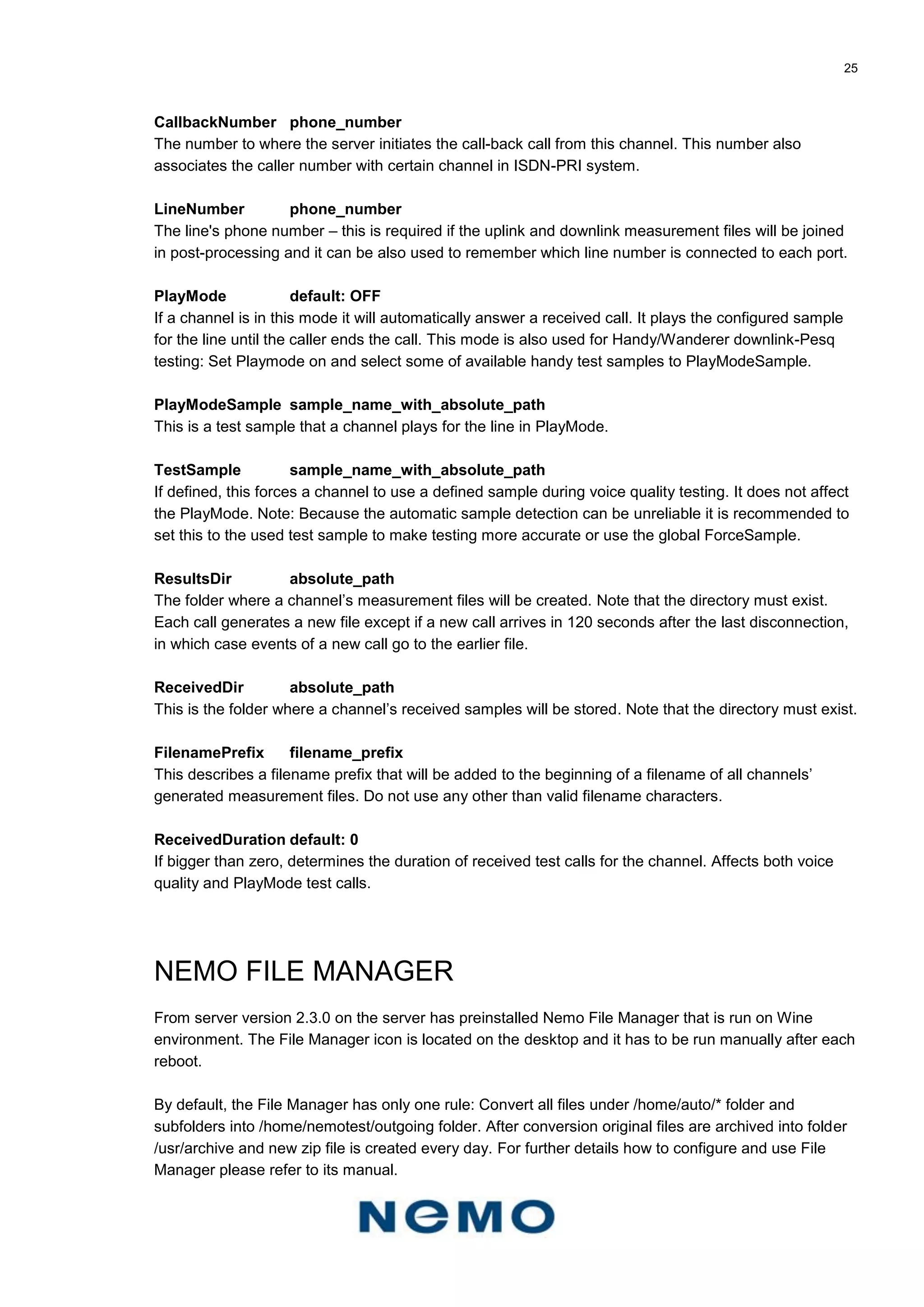
Note that all voice quality service configurations can be made from Nemo Server Manager. This
chapter is provided for backward compatibility. These instructions continue from the Installation
chapter, Step 4.
Step 5: Configure LAN (optional)
Each of the server’s interfaces has a separate start-up script and these scripts are located in the
following folder: /etc/sysconfig/network-scripts/ and are named as follows: Script for eth0 is ifcfg-eth0,
script for eth1 is ifcfg-eth1, and so on.
By editing these scripts it is possible to switch between DCHP and manually assigned IP addresses.
Note that it is recommended to use a static IP address on the LAN-side so that there is no need to
change the IP address if it changes later.
Change the interface eth0 settings with the following command:
[root@nemoserver root]# cd /etc/sysconfig/network-scripts
[root@nemoserver root]# vi ifcfg-eth0](https://image.slidesharecdn.com/nemoservermanualv1-160720152838/75/Nemo-server-manual_v1-36-2048.jpg)
![37
Now the vi editor opens. By default the configuration uses a static IP and shows:
DEVICE=eth0
ONBOOT=yes
# Comment EITHER of these sections
# Static IP
BOOTPROTO=static
IPADDR=192.168.10.4
NETMASK=255.255.255.0
GATEWAY=192.168.10.1
# Dynamic IP
#BOOTPROTO=dhcp
Press Esc I to set the vi editor to insert mode.
Note that all vi editor commands are case sensitive.
Change the configuration to the dynamic IP by commenting the Static section with the hash character
(#), and uncommenting the Dynamic section by removing # from the BOOTPROTO=dhcp item:
DEVICE=eth0
ONBOOT=yes
# Comment EITHER of these sections
# Static IP
#BOOTPROTO=static
#IPADDR=192.168.10.4
#NETMASK=255.255.255.0
#GATEWAY=192.168.10.1
# Dynamic IP
BOOTPROTO=dhcp
Note that the following parameters, IPADDR, NETMASK, GATEWAY, and BROADCAST, are supplied
by ISP, and BROADCAST is optional.
Press Esc : x [enter] to save the script and to close the vi editor.
Step 6: Configure WAN (optional)
In this example, eth1 is configured. When configuring other WAN interfaces replace eth1 with eth2,
eth3 or eth4 (or eth5-eth8).
Change the interface eth1 settings with the following command:
[root@nemoserver root]# cd /etc/sysconfig/network-scripts
[root@nemoserver root]# vi ifcfg-eth1
The vi editor opens. By default the configuration uses a dynamic IP and the following is displayed:
DEVICE=eth1
ONBOOT=yes
# Comment EITHER of these sections](https://image.slidesharecdn.com/nemoservermanualv1-160720152838/75/Nemo-server-manual_v1-37-2048.jpg)
![38
# Static IP
#BOOTPROTO=static
#IPADDR=
#NETMASK=
#GATEWAY=
# Dynamic IP
BOOTPROTO=dhcp
Press Esc i. to set the vi editor to insert mode.
Note that all vi editor commands are case sensitive.
Change the configuration to a static IP by removing the hash character (#) from the static section, thus
un-commenting it, and commenting the dynamic section by adding # next to it.
Note that the following parameters, IPADDR, NETMASK, GATEWAY, and BROADCAST, are supplied
by ISP, and that BROADCAST is optional.
Press Esc : x [enter] to save the script and to close the vi editor.
Step 7: Restart configured network interfaces
If network interface settings were changed, it is sometimes required to restart those interfaces to
activate it in order for the changes to become active. It is also time to connect the WAN interface
network cables.
Open terminal and write command:
[root@nemoserver root]# service network restart
All interfaces will be shutdown and then they are restarted with new settings.
Updating Instructions
Server image updating
Note that the server update erases all files that are currently on your PC’s hard-disk! Backup all
measurement data before continuing with the update.
1. Shut down the server, open the chassis and remove all OpenPCI/OpenPRI and 4xEthernet
cards.
2. Start the server and press F11 as soon as the BIOS POST screen appears. Press Ctrl-Alt-Del
to reset if you were not fast enough and Linux already started.
3. Insert server image DVD.
4. Select CD/DVD for boot device, after which Debian Isolinux should appear on the screen.
After a while there will be a question whether to continue with hard-disk overwriting. Answer y
to continue. Image writing will take almost 2 hours.
5. After the writing is finished, take the DVD out and press the power button some seconds to
power the server off.](https://image.slidesharecdn.com/nemoservermanualv1-160720152838/75/Nemo-server-manual_v1-38-2048.jpg)




This document provides instructions for installing and configuring the Nemo Server. It outlines 12 steps for installation including installing the server hardware, configuring network interfaces, changing passwords, configuring audio testing options, and calibrating audio lines. It also provides overviews of the Nemo Server Manager software, file management tools, administration options, and data testing capabilities of the server. Appendices include additional details on networking, passwords, guidelines, and updating instructions.


