Middle School
     Library Orientation
Welcome to the Main Library
       Mon-Fri: 7.45 am – 4.45 pm
   When can you visit    Book renewals &
    the library            returns
   Rules                 How to use the
   What’s in the          OPAC
    Library               Finding a book
   Loan Limits &         Checking your
    Duration               account
   Fines


What you need to know….
We are opened from 7.45 am to 4.45 pm so
you can come to the library before school,
during your first break or lunch and after
school.

Please do NOT visit the library during your
second short break as this falls during the
High School Lunch Period and the library is
usually very crowded then.


When can you come to the library?
The BIG 6 Rules

   Leave your bag on the shelves outside the
    library
   No food or drink is allowed in the library
   No running or playing hide n’ seek
   Speak softly
   If you’re here, it’s for a reason
   The computers are for work ONLY!


Library Rules
   Books                      Other sections
    ◦   Fiction – F & YA       •   Careers
    ◦   Non Fiction            •   Extended Essays
    ◦   Graphic Novels            Teacher’s Resource
    ◦   True Life Stories         Tertiary Education
    ◦   Oversized                 Textbooks
    ◦   Other language books      Theory of Knowledge
    ◦   Ebooks (accessed
        through the OPAC
   Newspapers &
    Magazines
   VCDs/DVDs
   Online databases


What’s in the Library
There are 3 different types of FICTION in the
Main Library. These are:
  ◦ Graded Readers (GR)
  ◦ F (Teen Reads)
  ◦ YA (Young Adult)


YA books are for Grade 9 students and
older. However, if you are in Grade 7 or 8
and you want to read a YA book, you may
Provided you get a permission slip signed by
your English teacher or parent.


Fiction
Loans

   You’re allowed to have 4 books out at any
    one time (inclusive of 2 VCDs or DVDs)
   Textbooks are NOT included in this loan limit
    of 4
   Books are loaned out for 2 weeks
   VCDs/DVDs are loaned out for 1 week
   Magazines (Back issues) are loaned out for 3
    days


Loan limits & Duration
 You can return all items borrowed at the
  counter. Hand the item over and then wait.
  The library staff will tell you when your item
  is clear.
 You can renew an item as many times as you
  like provided:
    ◦ You bring the item to the library each time you
      want to renew &
    ◦ No one else has reserved the item.


             Any item that is returned late will be charged a
              fine of 20 cents per day until the item is returned.


Fines, Renewals & Returns
You can search the library catalogue (OPAC) from any computer
at school or at home. The can be found online at
http://library.uwcsea.edu.sg

For instructions on how to use the OPAC, check out the Library
Catalog Tutorial at http://libguides.uwcsea.edu.sg/mschool
Searching the OPAC
   You’ve searched the OPAC and found the
    title you want.
   How do you find the actual book? What do
    you need to know?
   The most important things you need to
    know are:
    ◦ The title of the book &
    ◦ Its CALL NUMBER


Finding a book…
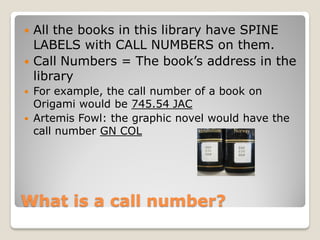
   All the books in this library have SPINE
    LABELS with CALL NUMBERS on them.
   Call Numbers = The book’s address in the
    library
   For example, the call number of a book on
    Origami would be 745.54 JAC
   Artemis Fowl: the graphic novel would have the
    call number GN COL


What is a call number?
FICTION                   NON-FICTION

These call numbers           These call numbers
have 2 parts                 have 3 parts

   GR, F or YA followed        A prefix e.g. R, TLS &
                                 OL followed by the
    by the first 3 letters       DEWEY number and
    of the author’s name         then by the first 3
                                 letters of the author’s
                                 name


Call Numbers
You can check your library account by clicking the ‘Login’ button at
the top right of your computer screen and entering your user
name and password.


Library homepage & library a/c
Library Homepage
URL to remember:
http://library.uwcsea.edu.sg

   Can be accessed from any computer in
    school or at home
   Can be used to search for a book, make
    recommendations to your friends, write a
    review of a book you’ve read &
    recommend a book for purchase


The OPAC
View Library Account
DO YOU KNOW THE
       ANSWERS?
Q1

How many library books can you have out
at any one time?
 a. Two
 b. Four
 c. Six


QuestionTime
Q2.

You are charged 20 cents for every day that
your book is late.

 ◦ TRUE
 ◦ FALSE


QuestionTime
Q3.

You can borrow all of the following from the
library:
 ◦   Magazines
 ◦   Books
 ◦   Power Tools
 ◦   DVDs

 TRUE OR FALSE


QuestionTime
Q4.

Which one of the following is not one of the
Big 6 rules?
1. No food or drink is allowed in the library
2. No running or playing hide n’ seek
3. Speak as loud as you want to
4. If you’re here, it’s for a reason
5. The computers are for work ONLY!


QuestionTime
Don’t hesitate to
            talk to any of the
            library staff if
            you have any
            questions.


Any Questions?
1.   b. 4
2.   TRUE
3.   FALSE
4.   Speak as loud as you want to


Answer Key

Ms library orientation

  • 1.
    Middle School Library Orientation
  • 2.
    Welcome to theMain Library Mon-Fri: 7.45 am – 4.45 pm
  • 3.
    When can you visit  Book renewals & the library returns  Rules  How to use the  What’s in the OPAC Library  Finding a book  Loan Limits &  Checking your Duration account  Fines What you need to know….
  • 4.
    We are openedfrom 7.45 am to 4.45 pm so you can come to the library before school, during your first break or lunch and after school. Please do NOT visit the library during your second short break as this falls during the High School Lunch Period and the library is usually very crowded then. When can you come to the library?
  • 5.
    The BIG 6Rules  Leave your bag on the shelves outside the library  No food or drink is allowed in the library  No running or playing hide n’ seek  Speak softly  If you’re here, it’s for a reason  The computers are for work ONLY! Library Rules
  • 6.
    Books Other sections ◦ Fiction – F & YA • Careers ◦ Non Fiction • Extended Essays ◦ Graphic Novels  Teacher’s Resource ◦ True Life Stories  Tertiary Education ◦ Oversized  Textbooks ◦ Other language books  Theory of Knowledge ◦ Ebooks (accessed through the OPAC  Newspapers & Magazines  VCDs/DVDs  Online databases What’s in the Library
  • 7.
    There are 3different types of FICTION in the Main Library. These are: ◦ Graded Readers (GR) ◦ F (Teen Reads) ◦ YA (Young Adult) YA books are for Grade 9 students and older. However, if you are in Grade 7 or 8 and you want to read a YA book, you may Provided you get a permission slip signed by your English teacher or parent. Fiction
  • 8.
    Loans  You’re allowed to have 4 books out at any one time (inclusive of 2 VCDs or DVDs)  Textbooks are NOT included in this loan limit of 4  Books are loaned out for 2 weeks  VCDs/DVDs are loaned out for 1 week  Magazines (Back issues) are loaned out for 3 days Loan limits & Duration
  • 9.
     You canreturn all items borrowed at the counter. Hand the item over and then wait. The library staff will tell you when your item is clear.  You can renew an item as many times as you like provided: ◦ You bring the item to the library each time you want to renew & ◦ No one else has reserved the item.  Any item that is returned late will be charged a fine of 20 cents per day until the item is returned. Fines, Renewals & Returns
  • 10.
    You can searchthe library catalogue (OPAC) from any computer at school or at home. The can be found online at http://library.uwcsea.edu.sg For instructions on how to use the OPAC, check out the Library Catalog Tutorial at http://libguides.uwcsea.edu.sg/mschool Searching the OPAC
  • 11.
    You’ve searched the OPAC and found the title you want.  How do you find the actual book? What do you need to know?  The most important things you need to know are: ◦ The title of the book & ◦ Its CALL NUMBER Finding a book…
  • 12.
    All the books in this library have SPINE LABELS with CALL NUMBERS on them.  Call Numbers = The book’s address in the library  For example, the call number of a book on Origami would be 745.54 JAC  Artemis Fowl: the graphic novel would have the call number GN COL What is a call number?
  • 13.
    FICTION NON-FICTION These call numbers These call numbers have 2 parts have 3 parts  GR, F or YA followed  A prefix e.g. R, TLS & OL followed by the by the first 3 letters DEWEY number and of the author’s name then by the first 3 letters of the author’s name Call Numbers
  • 14.
    You can checkyour library account by clicking the ‘Login’ button at the top right of your computer screen and entering your user name and password. Library homepage & library a/c
  • 15.
  • 16.
    URL to remember: http://library.uwcsea.edu.sg  Can be accessed from any computer in school or at home  Can be used to search for a book, make recommendations to your friends, write a review of a book you’ve read & recommend a book for purchase The OPAC
  • 17.
  • 18.
    DO YOU KNOWTHE ANSWERS?
  • 19.
    Q1 How many librarybooks can you have out at any one time? a. Two b. Four c. Six QuestionTime
  • 20.
    Q2. You are charged20 cents for every day that your book is late. ◦ TRUE ◦ FALSE QuestionTime
  • 21.
    Q3. You can borrowall of the following from the library: ◦ Magazines ◦ Books ◦ Power Tools ◦ DVDs TRUE OR FALSE QuestionTime
  • 22.
    Q4. Which one ofthe following is not one of the Big 6 rules? 1. No food or drink is allowed in the library 2. No running or playing hide n’ seek 3. Speak as loud as you want to 4. If you’re here, it’s for a reason 5. The computers are for work ONLY! QuestionTime
  • 23.
    Don’t hesitate to talk to any of the library staff if you have any questions. Any Questions?
  • 24.
    1. b. 4 2. TRUE 3. FALSE 4. Speak as loud as you want to Answer Key