How to Embed A Librarian, Library Resources and Service Components in Moodle! Dr. Indira Koneru Online Course Facilitator Library 2.011 Virtual Conference November 3, 2011
About Me
Presentation Agenda Embedded librarianship (Definition & Types) Need for embedding a librarian and library components in Moodle (LMS) Why should we collaborate with Moodle Administrator & Instructors? How to embed  a librarian, library resources and service components in Moodle!
Embedded Librarianship “ Embedded librarianship involves the delivery of highly customized and highly valued information and knowledge services to a customer group with well-defined needs” (Shumaker, D., 2010). Embedded librarianship enables a librarian connect with and guide students through information research process
Embedded Librarianship - Types within a f-2-f class  within an academic & research program within Library Guides within social networks – Facebook, Twitter  within an LMS – Blackboard, Moodle
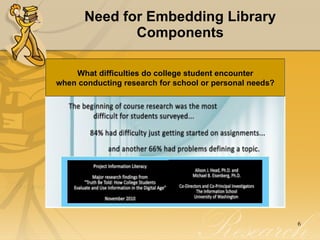
Need for Embedding Library Components What difficulties do college student encounter when conducting research for school or personal needs?
PIL Research Questions  How do students find information and conduct research for course work & for use in their everyday lives? What obstacles & barriers make finding information difficult for students? How do students resolve issues of credibility, authority and currency?  Who do students turn to for help with solving information problems? How do assignment handouts guide, instruct, support during students research process? Source: http://projectinfolit.org/
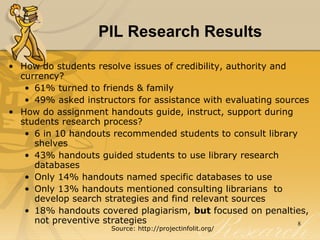
PIL Research Results How do students resolve issues of credibility, authority and currency?  61% turned to friends & family 49% asked instructors for assistance with evaluating sources How do assignment handouts guide, instruct, support during students research process? 6 in 10 handouts recommended students to consult library shelves 43% handouts guided students to use library research databases Only 14% handouts named specific databases to use Only 13% handouts mentioned consulting librarians  to develop search strategies and find relevant sources 18% handouts covered plagiarism,  but  focused on penalties, not preventive strategies Source: http://projectinfolit.org/
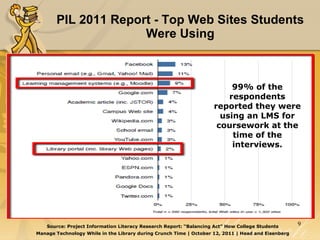
PIL 2011 Report - Top Web Sites Students Were Using Source: Project Information Literacy Research Report: “Balancing Act” How College Students Manage Technology While in the Library during Crunch Time | October 12, 2011 | Head and Eisenberg 99% of the respondents reported they were using an LMS for coursework at the time of the interviews.
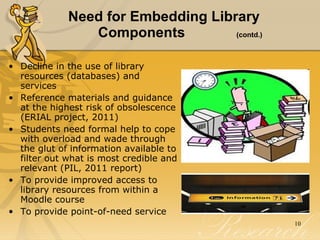
Need for Embedding Library  Components  (contd.) Decline in the use of library resources (databases) and services  Reference materials and guidance at the highest risk of obsolescence (ERIAL project, 2011) Students need formal help to cope with overload and wade through the glut of information available to filter out what is most credible and relevant (PIL, 2011 report)  To provide improved access to library resources from within a Moodle course To provide point-of-need service
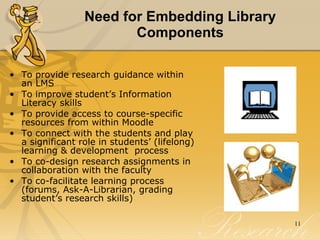
Need for Embedding Library Components To provide research guidance within an LMS  To improve student’s Information Literacy skills  To provide access to course-specific resources from within Moodle To connect with the students and play a significant role in students’ (lifelong) learning & development  process To co-design research assignments in collaboration with the faculty  To co-facilitate learning process (forums, Ask-A-Librarian, grading student’s research skills)
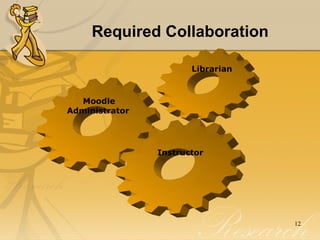
Required Collaboration Librarian Moodle Administrator Instructor
Need for Collaborating with Moodle Administrator To create a librarian role in the Moodle site To add new blocks and modules To script code for embedding library resources and service components in Moodle HTML code Widget code (JS)
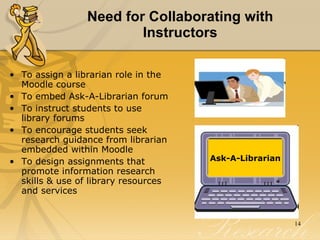
Need for Collaborating with Instructors To assign a librarian role in the Moodle course To embed Ask-A-Librarian forum To instruct students to use library forums  To encourage students seek research guidance from librarian embedded within Moodle To design assignments that promote information research skills & use of library resources and services Ask-A-Librarian
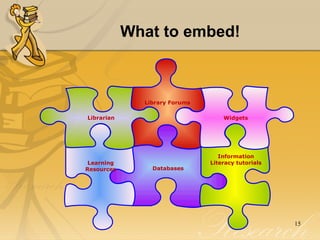
What to embed! Widgets Library Forums Databases Learning Resources Librarian Information Literacy tutorials
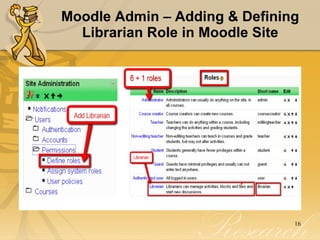
Moodle Admin – Adding & Defining Librarian Role in Moodle Site
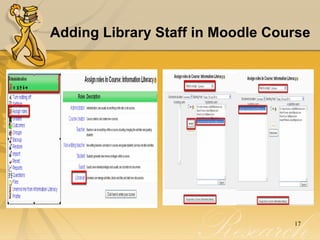
Adding Library Staff in Moodle Course
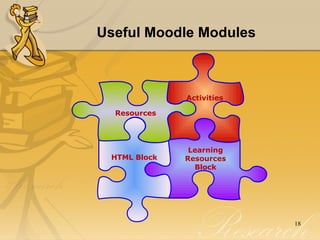
Useful Moodle Modules  Activities Learning Resources Block HTML Block   Resources
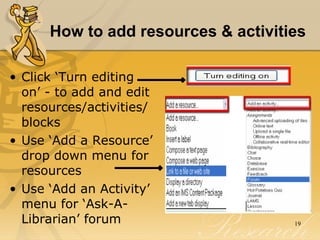
How to add resources & activities   Click ‘Turn editing on’ - to add and edit resources/activities/ blocks Use ‘Add a Resource’ drop down menu for resources Use ‘Add an Activity’ menu for ‘Ask-A-Librarian’ forum
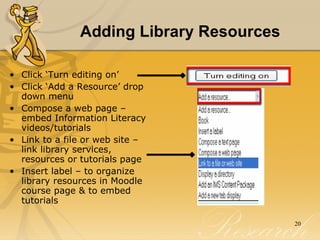
Adding Library Resources Click ‘Turn editing on’  Click ‘Add a Resource’ drop down menu  Compose a web page – embed Information Literacy videos/tutorials Link to a file or web site – link library services, resources or tutorials page Insert label – to organize library resources in Moodle course page & to embed tutorials
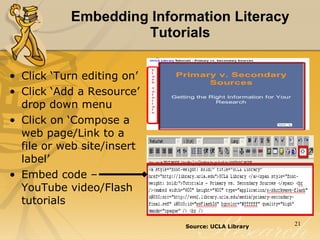
Embedding Information Literacy Tutorials Click ‘Turn editing on’  Click ‘Add a Resource’ drop down menu  Click on ‘Compose a web page/Link to a file or web site/insert label’  Embed code – YouTube video/Flash tutorials Source: UCLA Library
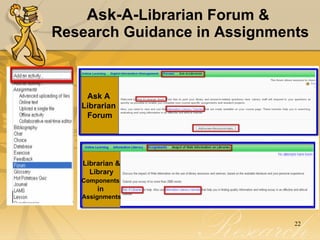
Ask-A- Librarian Forum &  Research Guidance in Assignments Ask A  Librarian  Forum Librarian & Library  Components   in  Assignments
Adding Widgets (HTML Block) Library widgets (HTML Blocks)  Ask-A-Librarian (IM) Library Catalog (search from within Moodle) Library guides  Research Databases
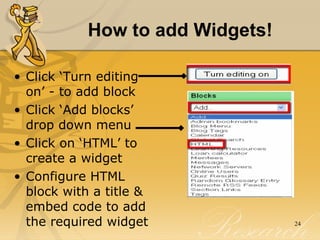
How to add Widgets! Click ‘Turn editing on’ - to add block Click ‘Add blocks’ drop down menu  Click on ‘HTML’ to create a widget Configure HTML block with a title & embed code to add the required widget
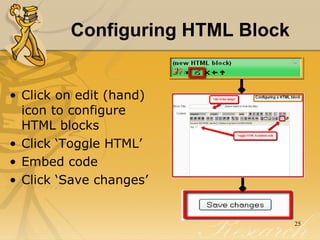
Configuring HTML Block Click on edit (hand) icon to configure HTML blocks Click ‘Toggle HTML’  Embed code  Click ‘Save changes’
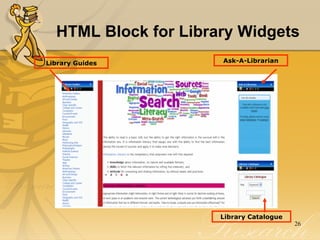
HTML Block for Library Widgets  Library Guides Ask-A-Librarian Library Catalogue
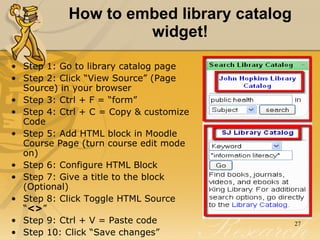
How to embed library catalog widget! Step 1: Go to library catalog page Step 2: Click “View Source” (Page Source) in your browser Step 3: Ctrl + F = “form” Step 4: Ctrl + C = Copy & customize Code  Step 5: Add HTML block in Moodle Course Page (turn course edit mode on) Step 6: Configure HTML Block Step 7: Give a title to the block (Optional) Step 8: Click Toggle HTML Source “ <> ”  Step 9: Ctrl + V = Paste code  Step 10: Click “Save changes”
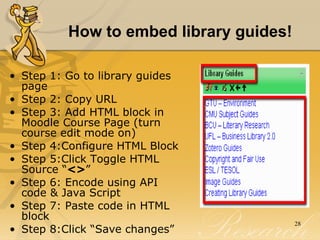
How to embed library guides! Step 1: Go to library guides page Step 2: Copy URL Step 3: Add HTML block in Moodle Course Page (turn course edit mode on) Step 4:Configure HTML Block Step 5:Click Toggle HTML Source “ <> ”  Step 6: Encode using API code & Java Script  Step 7: Paste code in HTML block  Step 8:Click “Save changes”
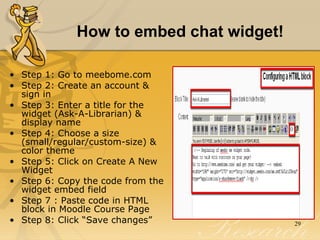
How to embed chat widget! Step 1: Go to meebome.com Step 2: Create an account & sign in  Step 3: Enter a title for the widget (Ask-A-Librarian) & display name Step 4: Choose a size (small/regular/custom-size) & color theme Step 5: Click on Create A New Widget Step 6: Copy the code from the widget embed field Step 7 : Paste code in HTML block in Moodle Course Page Step 8: Click “Save changes”
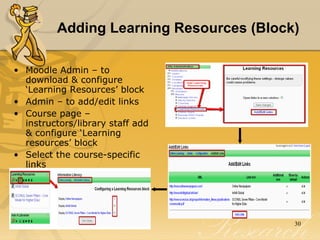
Adding Learning Resources (Block)  Moodle Admin – to download & configure ‘Learning Resources’ block Admin – to add/edit links Course page – instructors/library staff add & configure ‘Learning resources’ block Select the course-specific links
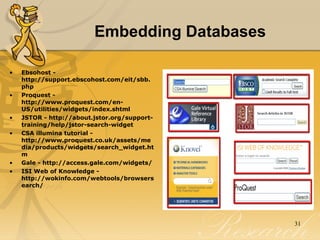
Embedding Databases Ebsohost - http://support.ebscohost.com/eit/sbb.php Proquest - http://www.proquest.com/en-US/utilities/widgets/index.shtml JSTOR - http://about.jstor.org/support-training/help/jstor-search-widget CSA illumina tutorial - http://www.proquest.co.uk/assets/media/products/widgets/search_widget.htm Gale - http://access.gale.com/widgets/ ISI Web of Knowledge - http://wokinfo.com/webtools/browsersearch/
Conclusion Collaborate with Moodle administrator & instructors Seek management support Create or identify course-related resources Be prepared to provide point-of-need service & facilitate student’s learning processs
“ The  Mission  of  Librarians  is to  Improve   Society  through  Facilitating Knowledge Creation  in their  Communities ”  – The Atlas of New Librarianship

How to Embed A Librarian, Library Resources & Service Components in Moodle!

  • 1.
    How to EmbedA Librarian, Library Resources and Service Components in Moodle! Dr. Indira Koneru Online Course Facilitator Library 2.011 Virtual Conference November 3, 2011
  • 2.
  • 3.
    Presentation Agenda Embeddedlibrarianship (Definition & Types) Need for embedding a librarian and library components in Moodle (LMS) Why should we collaborate with Moodle Administrator & Instructors? How to embed a librarian, library resources and service components in Moodle!
  • 4.
    Embedded Librarianship “Embedded librarianship involves the delivery of highly customized and highly valued information and knowledge services to a customer group with well-defined needs” (Shumaker, D., 2010). Embedded librarianship enables a librarian connect with and guide students through information research process
  • 5.
    Embedded Librarianship -Types within a f-2-f class within an academic & research program within Library Guides within social networks – Facebook, Twitter within an LMS – Blackboard, Moodle
  • 6.
    Need for EmbeddingLibrary Components What difficulties do college student encounter when conducting research for school or personal needs?
  • 7.
    PIL Research Questions How do students find information and conduct research for course work & for use in their everyday lives? What obstacles & barriers make finding information difficult for students? How do students resolve issues of credibility, authority and currency? Who do students turn to for help with solving information problems? How do assignment handouts guide, instruct, support during students research process? Source: http://projectinfolit.org/
  • 8.
    PIL Research ResultsHow do students resolve issues of credibility, authority and currency? 61% turned to friends & family 49% asked instructors for assistance with evaluating sources How do assignment handouts guide, instruct, support during students research process? 6 in 10 handouts recommended students to consult library shelves 43% handouts guided students to use library research databases Only 14% handouts named specific databases to use Only 13% handouts mentioned consulting librarians to develop search strategies and find relevant sources 18% handouts covered plagiarism, but focused on penalties, not preventive strategies Source: http://projectinfolit.org/
  • 9.
    PIL 2011 Report- Top Web Sites Students Were Using Source: Project Information Literacy Research Report: “Balancing Act” How College Students Manage Technology While in the Library during Crunch Time | October 12, 2011 | Head and Eisenberg 99% of the respondents reported they were using an LMS for coursework at the time of the interviews.
  • 10.
    Need for EmbeddingLibrary Components (contd.) Decline in the use of library resources (databases) and services Reference materials and guidance at the highest risk of obsolescence (ERIAL project, 2011) Students need formal help to cope with overload and wade through the glut of information available to filter out what is most credible and relevant (PIL, 2011 report) To provide improved access to library resources from within a Moodle course To provide point-of-need service
  • 11.
    Need for EmbeddingLibrary Components To provide research guidance within an LMS To improve student’s Information Literacy skills To provide access to course-specific resources from within Moodle To connect with the students and play a significant role in students’ (lifelong) learning & development process To co-design research assignments in collaboration with the faculty To co-facilitate learning process (forums, Ask-A-Librarian, grading student’s research skills)
  • 12.
    Required Collaboration LibrarianMoodle Administrator Instructor
  • 13.
    Need for Collaboratingwith Moodle Administrator To create a librarian role in the Moodle site To add new blocks and modules To script code for embedding library resources and service components in Moodle HTML code Widget code (JS)
  • 14.
    Need for Collaboratingwith Instructors To assign a librarian role in the Moodle course To embed Ask-A-Librarian forum To instruct students to use library forums To encourage students seek research guidance from librarian embedded within Moodle To design assignments that promote information research skills & use of library resources and services Ask-A-Librarian
  • 15.
    What to embed!Widgets Library Forums Databases Learning Resources Librarian Information Literacy tutorials
  • 16.
    Moodle Admin –Adding & Defining Librarian Role in Moodle Site
  • 17.
    Adding Library Staffin Moodle Course
  • 18.
    Useful Moodle Modules Activities Learning Resources Block HTML Block Resources
  • 19.
    How to addresources & activities Click ‘Turn editing on’ - to add and edit resources/activities/ blocks Use ‘Add a Resource’ drop down menu for resources Use ‘Add an Activity’ menu for ‘Ask-A-Librarian’ forum
  • 20.
    Adding Library ResourcesClick ‘Turn editing on’ Click ‘Add a Resource’ drop down menu Compose a web page – embed Information Literacy videos/tutorials Link to a file or web site – link library services, resources or tutorials page Insert label – to organize library resources in Moodle course page & to embed tutorials
  • 21.
    Embedding Information LiteracyTutorials Click ‘Turn editing on’ Click ‘Add a Resource’ drop down menu Click on ‘Compose a web page/Link to a file or web site/insert label’ Embed code – YouTube video/Flash tutorials Source: UCLA Library
  • 22.
    Ask-A- Librarian Forum& Research Guidance in Assignments Ask A Librarian Forum Librarian & Library Components in Assignments
  • 23.
    Adding Widgets (HTMLBlock) Library widgets (HTML Blocks) Ask-A-Librarian (IM) Library Catalog (search from within Moodle) Library guides Research Databases
  • 24.
    How to addWidgets! Click ‘Turn editing on’ - to add block Click ‘Add blocks’ drop down menu Click on ‘HTML’ to create a widget Configure HTML block with a title & embed code to add the required widget
  • 25.
    Configuring HTML BlockClick on edit (hand) icon to configure HTML blocks Click ‘Toggle HTML’ Embed code Click ‘Save changes’
  • 26.
    HTML Block forLibrary Widgets Library Guides Ask-A-Librarian Library Catalogue
  • 27.
    How to embedlibrary catalog widget! Step 1: Go to library catalog page Step 2: Click “View Source” (Page Source) in your browser Step 3: Ctrl + F = “form” Step 4: Ctrl + C = Copy & customize Code Step 5: Add HTML block in Moodle Course Page (turn course edit mode on) Step 6: Configure HTML Block Step 7: Give a title to the block (Optional) Step 8: Click Toggle HTML Source “ <> ” Step 9: Ctrl + V = Paste code Step 10: Click “Save changes”
  • 28.
    How to embedlibrary guides! Step 1: Go to library guides page Step 2: Copy URL Step 3: Add HTML block in Moodle Course Page (turn course edit mode on) Step 4:Configure HTML Block Step 5:Click Toggle HTML Source “ <> ” Step 6: Encode using API code & Java Script Step 7: Paste code in HTML block Step 8:Click “Save changes”
  • 29.
    How to embedchat widget! Step 1: Go to meebome.com Step 2: Create an account & sign in Step 3: Enter a title for the widget (Ask-A-Librarian) & display name Step 4: Choose a size (small/regular/custom-size) & color theme Step 5: Click on Create A New Widget Step 6: Copy the code from the widget embed field Step 7 : Paste code in HTML block in Moodle Course Page Step 8: Click “Save changes”
  • 30.
    Adding Learning Resources(Block) Moodle Admin – to download & configure ‘Learning Resources’ block Admin – to add/edit links Course page – instructors/library staff add & configure ‘Learning resources’ block Select the course-specific links
  • 31.
    Embedding Databases Ebsohost- http://support.ebscohost.com/eit/sbb.php Proquest - http://www.proquest.com/en-US/utilities/widgets/index.shtml JSTOR - http://about.jstor.org/support-training/help/jstor-search-widget CSA illumina tutorial - http://www.proquest.co.uk/assets/media/products/widgets/search_widget.htm Gale - http://access.gale.com/widgets/ ISI Web of Knowledge - http://wokinfo.com/webtools/browsersearch/
  • 32.
    Conclusion Collaborate withMoodle administrator & instructors Seek management support Create or identify course-related resources Be prepared to provide point-of-need service & facilitate student’s learning processs
  • 33.
    “ The Mission of Librarians is to Improve Society through Facilitating Knowledge Creation in their Communities ” – The Atlas of New Librarianship

Editor's Notes

  • #5 Librarian embedded in an LMS connects and interacts with students to facilitate their research process and also to encourage use of library resources and services. We can create and manage library-related discussion board threads; post relevant links to course-related resources, databases, e-books and information literacy tutorials. Using discussion boards, we can post content or upload files that explain the research process from topic selection through citing sources, sending announcements of research techniques to help students solve their current information problems (Burke, J. &amp; Tumbleson, B., 2011).
  • #7 PIL Information Scientists from iSchool, University of Washington. It is a large-scale study about early adults and their research habits. Since 2008 PIL studied over 11,000 students from 41 US campuses. PIL report, 2010 8, 353 students in the sample from 25 US campuses. How competent students are with Course-related research and Everyday life research. Research assignments are a mainstay of college curricula; topics may vary, but assignments consistently require inquiry, argument and evidence.
  • #8 In the era of information overload, evaluating skills are imperative for assessing the quality of information before its use. Here arises the need for a librarian who can guide students through researching information in an effective and ethical manner. Library staff in collaboration with the faculty need to design course-related assignments and decide on the assessment criteria for evaluating research skills, in addition to identifying course-specific library resources. It may be quick and easy to find information today but finding credible and relevant information is harder than ever. Students need to conduct comprehensive research that promotes deep learning and innovative ideas.
  • #9 Most handouts emphasized the mechanics of preparing assignments ; more than substantive details about finding, evaluating and using research resources in an ethical manner. Here comes the need for a librarian who can guide students through researching information in an effective and ethical manner.
  • #10 An exploratory study on “ &amp;quot;How College Students Manage Technology While in the Library during Crunch Time: the final weeks of the term ” a relatively small sample (n=560) of students enrolled at 10 colleges and universities across the US. These findings are based on data collected from observation and interviews. Almost 1 student in 10 (9%) had a learning management system (LMS) up and running on his or her primary device. Nearly all of the respondents (99%) reported they were using an LMS for coursework at the time of the interview. http://projectinfolit.org/pdfs/PIL_Fall2011_TechStudy_FullReport1.1.pdf
  • #11 (Ethnographic Research in Illinois Academic Libraries (ERIAL) project, 2011) (need to embed tutorials on how to use library tools and services) – improved access to library resources from within Moodle courses Most students, even those sitting in the library, do not use its reference resources. Faculty who incorporate research components in their courses need to collaborate with the library staff to create research assignments (while devising course syllabus) and to make librarian as an integral part of course management. A co-developed assignment can help better align student’s learning experience with the course learning outcomes, while saving faculty time and effort for other teaching activities. exchanges with librarians or online by using services such as “Ask a Librarian.” (ERIAL) project with studies conducted on five Illinois campuses found students rarely asked for help from librarians, especially students who may have been in the greatest need of help. See College Libraries and Student Culture: What We Now Know (2011). Lynda M. Duke and Andrew D. Asher, editors at http://www.erialproject.org/publications/ala-project/ (accessed August 30, 2011). Students seek help for finding relevant and credible information and what are the new ways of finding, using, processing, and communicating information using new technologies and tools.. They also need help in managing and making the best use of their digital tools. For example, how does one take and manage notes in an electronic, online environment?
  • #12 To help students conceptualize and operationalize course-related research (PIL) (collecting and substantiating information from existing primary and secondary sources for research papers and presentations, by avoiding plagiarism) To direct students to (library guides, databases identified in collaboration with the faculty) within an LMS. To promote Information Literacy engage students in independent research and critical evaluation fosters lifelong learning (independent research and critical evaluation Steering students through research allows them to learn how to do research independently and critically beyond the classroom ). IL is everybody’s responsibility so involve all stakeholders to make students competent with Course-related research and Everyday life research
  • #13 Collaboration with Moodle Administrator and Instructors enables library staff connect with the students and provide point-of-need service. Admin collaboration is required at Site level and collaboration with instructors required at Course Level. Admin creates a Moodle role for library staff and help in embedding library resources and services. Collaborating with the instructors provides scope not only for designing research-oriented course assignments but also for evaluating student’s research skills.
  • #14 API – Application Programming Interface (sticky blocks, learning resources etc.). JS – Java Scripting. Giving librarian access to Moodle courses can be helpful for students in many ways. Librarian can recommend (i) search strategies, how to evaluate and cite information (ii) Share his/her research expertise in class discussions (iii) Answer students&apos; questions related to Library and information research.
  • #16 Library widgets (HTML Block) may include Ask-A-Librarian, Library Guides, Library Catalogue, Bibliography Maker, customized search engines.
  • #17 Moodle Administrator can add and define a role. Moodle comes with 6 pre-defined roles: Administrator, Course creator, Teacher, Non-editing teacher, Student, and Guest. Some university add Teaching Assistant role to a librarian.
  • #18 Instructors can assign the Librarian role to the library staff within a course. Once library staff are added to a course, they can manage library and research related resources, forums, widgets, blocks within a course. And also can assess student’s research skills in collaboration with the course instructors.
  • #19 We can manage some of these modules; but some require help from Moodle Administrator. say for example downloading blocks such as Learning Resources and configuring resources – to embed a file or web resource in a frame etcetera.
  • #23 Creating Ask A Librarian forum lets the students to know there is a librarian in the course to guide them through their research process. Librarian posts a welcome message, providing instructions on how to use this forum, course-specific resources and Information Literacy Tutorials from within Moodle. Instructors can direct students to Ask A Librarian Forum, while giving instructions about assignments. Students are encouraged to post their library resources and research related questions on the Librarian forum so that all students can benefit from librarians responses to the questions posted.
  • #24 Widgets (also known as gadgets) are Web objects or applications that contain dynamic content, which can be easily embedded onto a Web site or into Blackboard or Moodle/LMS. Overall growth in searches of libraries that have widgets = 60%. http://access.gale.com/widgets/
  • #25 To embed widgets we need to add a HTML block and configure it. Click on edit (hand) icon to configure HTML blocks.
  • #26 Click on edit (hand) icon to configure HTML blocks. Enter a title, toggle HTML and embed code for Ask-A-Librarian, Library catalogue, Library guides, Library databases, Citation maker etc.
  • #27 API and Java Scripting skills are required for embedding library guides. Seek guidance from in-house Web/IT people for help adding &amp; editing library tools and services widgets in Moodle courses. IM/Chat widget University Libraries use Question Point chat widgets http://www.oclc.org/questionpoint/default.htm. Alternatively, w e can embed MeeboMe Chat Widget on Moodle course pages. Next slide&gt; How to add and customize Library Catalogue
  • #28 Step 1: Example: https://catalyst.library.jhu.edu/ (John Hopkins Library) &amp; San José State University Library. John Hopkins university has 4 search fields – Title, author, subject and numbers. And San Jose University Library has 8 search fields – Keyword, Title, Author, Subject Heading, Journal Title, DDC call no. LC call no., ISBN/ISSN. Customize code before pasting in the HTML block to modify its appearance – background color, text to be added (instructions to students), font size and color etc. (Take the help of Moodle Admin/IT dept.)
  • #29 API - A pplication programming interface ( API ) is a particular set of rules (&apos;code&apos;) which facilitates communication and interaction. API code and Java Scripting are required to embed library guides in Moodle (so take the help of Moodle Admin/IT dept of your university). Source: http://lanecc.libguides.com
  • #30 University Libraries use Question Point chat widgets http://www.oclc.org/questionpoint/default.htm. Alternatively, w e can embed MeeboMe Chat Widget on Moodle course pages. Follow these steps and check whether Chat widget is available and accessible for students. http://wiki.meebo.com/doku.php?id=meebome
  • #31 Ask Moodle admin to download Learning Resources Block from Moodle site. Learning Resources block is configured initially via Moodle Site Administration &gt;&gt; Blocks. Links are added/edited by the administrator. Using this block we can add generic online resources. Certain links e.g. the Library catalogue search may be shown in all courses by default . Or course-specific resources. Additional text e.g. a message stating that a resource is available within College only may be added below each link. Library Staff/Instructors may then configure the block within their course to display course-specific links. You can use simply HTML block to add resources relevant to a course instead of Learning Resources block. Learning Resources Block http://moodle.org/mod/data/view.php?d=13&amp;rid=361
  • #32 Database search widgets help bring library resources to the LMS/sites students use the most.  But we need to authenticate with the Proxy prefix of our institution to create search widgets of a database. When a user is off campus, s/he will be sent to a login screen, and after authenticating will be sent to search results. When a user is on campus, s/he will be sent directly to search results. Contact your IT dept. for proxy prefix , which allows off-campus use of search widgets. http://www.ebscohost.com/academic/search-box-builder http://www.proquest.co.uk/en-UK/support/training/materials.shtml CSA Illumina http://www.csa.com/ http://csadb101.csa.com/ids70/admin_profile.php
  • #33 Collaborate with Moodle admin To create a Moodle account for library staff To help in scripting embed code Collaborate with instructors To make librarian as an integral part of the course To embed library resources, services and Information Literacy tutorials To integrate library (research) related forums and resources &amp; services blocks Collaborate with management To get needed support for embedding library staff, resources and services in Moodle courses
  • #34 http://www.newlibrarianship.org/wordpress/ Reach me @ indkon@gmail.com