1© 2017 ThousandEyes Inc. All Rights Reserved.Confidential © 2017 ThousandEyes Inc. All Rights Reserved.
Monitoring Route Changes
Nick Kephart, Sr. Director of Product Marketing
2© 2017 ThousandEyes Inc. All Rights Reserved.
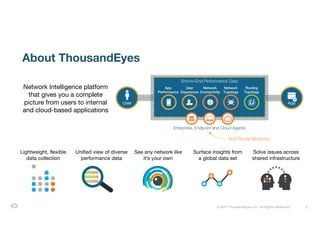
About ThousandEyes
Network Intelligence platform
that gives you a complete
picture from users to internal
and cloud-based applications
Routing
User App
End-to-End Performance Data
App
Performance
User
Experience
Network
Topology
Routing
Topology
Enterprise, Endpoint and Cloud Agents
Network
Connectivity
And Route Monitors!
Surface insights from
a global data set
Lightweight, flexible
data collection
Unified view of diverse
performance data
Solve issues across
shared infrastructure
See any network like
it’s your own
3© 2017 ThousandEyes Inc. All Rights Reserved.
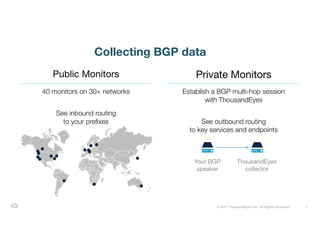
40 monitors on 30+ networks
See inbound routing
to your prefixes
Establish a BGP multi-hop session
with ThousandEyes
See outbound routing
to key services and endpoints
Public Monitors Private Monitors
Collecting BGP data
Your BGP
speaker
ThousandEyes
collector
4© 2017 ThousandEyes Inc. All Rights Reserved.
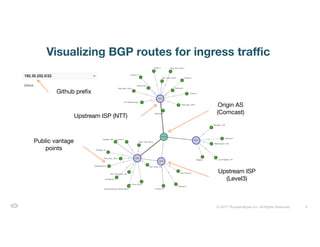
Visualizing BGP routes for ingress traffic
Origin AS
(Comcast)
Public vantage
points
Upstream ISP
(Level3)
Upstream ISP (NTT)
Github prefix
5© 2017 ThousandEyes Inc. All Rights Reserved.
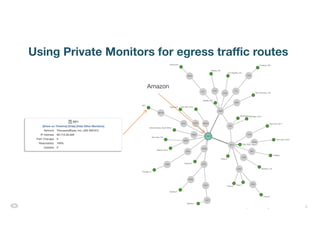
Using Private Monitors for egress traffic routes
Amazon
6© 2017 ThousandEyes Inc. All Rights Reserved.
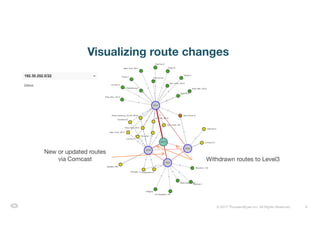
Visualizing route changes
Withdrawn routes to Level3
New or updated routes
via Comcast
7© 2017 ThousandEyes Inc. All Rights Reserved.
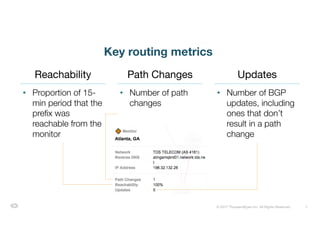
Key routing metrics
• Proportion of 15-
min period that the
prefix was
reachable from the
monitor
• Number of path
changes
• Number of BGP
updates, including
ones that don’t
result in a path
change
Reachability Path Changes Updates
8© 2017 ThousandEyes Inc. All Rights Reserved.
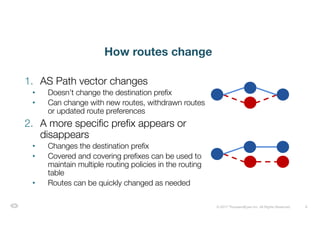
How routes change
1. AS Path vector changes
• Doesn’t change the destination prefix
• Can change with new routes, withdrawn routes
or updated route preferences
2. A more specific prefix appears or
disappears
• Changes the destination prefix
• Covered and covering prefixes can be used to
maintain multiple routing policies in the routing
table
• Routes can be quickly changed as needed
9© 2017 ThousandEyes Inc. All Rights Reserved.
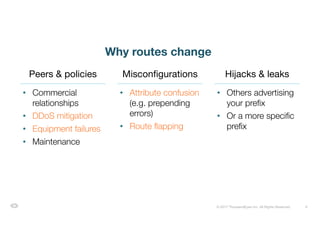
Why routes change
• Commercial
relationships
• DDoS mitigation
• Equipment failures
• Maintenance
• Attribute confusion
(e.g. prepending
errors)
• Route flapping
• Others advertising
your prefix
• Or a more specific
prefix
Peers & policies Misconfigurations Hijacks & leaks
10© 2017 ThousandEyes Inc. All Rights Reserved.
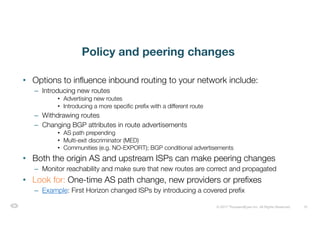
Policy and peering changes
• Options to influence inbound routing to your network include:
– Introducing new routes
• Advertising new routes
• Introducing a more specific prefix with a different route
– Withdrawing routes
– Changing BGP attributes in route advertisements
• AS path prepending
• Multi-exit discriminator (MED)
• Communities (e.g. NO-EXPORT); BGP conditional advertisements
• Both the origin AS and upstream ISPs can make peering changes
– Monitor reachability and make sure that new routes are correct and propagated
• Look for: One-time AS path change, new providers or prefixes
– Example: First Horizon changed ISPs by introducing a covered prefix
11© 2017 ThousandEyes Inc. All Rights Reserved.
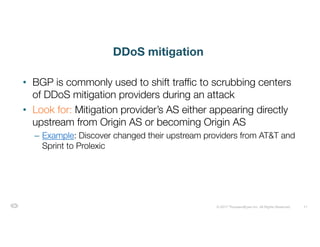
DDoS mitigation
• BGP is commonly used to shift traffic to scrubbing centers
of DDoS mitigation providers during an attack
• Look for: Mitigation provider’s AS either appearing directly
upstream from Origin AS or becoming Origin AS
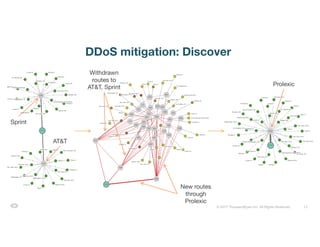
– Example: Discover changed their upstream providers from AT&T and
Sprint to Prolexic
12© 2017 ThousandEyes Inc. All Rights Reserved.
DDoS mitigation: Discover
Sprint
AT&T
Withdrawn
routes to
AT&T, Sprint
New routes
through
Prolexic
Prolexic
13© 2017 ThousandEyes Inc. All Rights Reserved.
Equipment failures
• Failures can occur on links or interfaces in upstream
providers
– May re-route on its own or may require intervention
• Look for: Issues isolated within specific ISPs and
subsequent routing changes
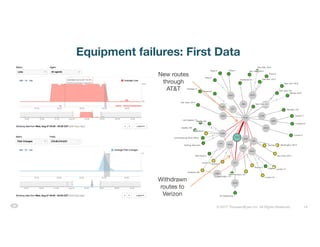
– Example: When upstream ISP Verizon experienced severe issues,
First Data made a BGP change and dropped Verizon
14© 2017 ThousandEyes Inc. All Rights Reserved.
Equipment failures: First Data
New routes
through
AT&T
Withdrawn
routes to
Verizon
15© 2017 ThousandEyes Inc. All Rights Reserved.
Routing misconfigurations
• Common misconfigurations include:
– BGP attribute confusion
• AS path prepending errors
– Route flapping
– Route leaks
• Look for: Unexpected ASes, routes or route changes
– Example: Country Financial mistyped an AS when prepending the
AS path
16© 2017 ThousandEyes Inc. All Rights Reserved.
Route flapping
• When routes alternate or are advertised and withdrawn in
rapid sequence
– Usually from equipment or configuration errors
– Often causes packet loss and performance degradation
• Look for: Repeating spikes or elevated levels of route
changes over time
– Example: Ancestry’s upstream ISP XO Communications experienced
a route flap
17© 2017 ThousandEyes Inc. All Rights Reserved.
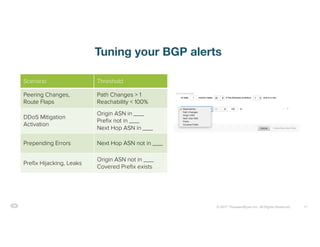
Tuning your BGP alerts
Scenario Threshold
Peering Changes,
Route Flaps
Path Changes > 1
Reachability < 100%
DDoS Mitigation
Activation
Origin ASN in ___
Prefix not in ___
Next Hop ASN in ___
Prepending Errors Next Hop ASN not in ___
Prefix Hijacking, Leaks
Origin ASN not in ___
Covered Prefix exists
18© 2017 ThousandEyes Inc. All Rights Reserved.
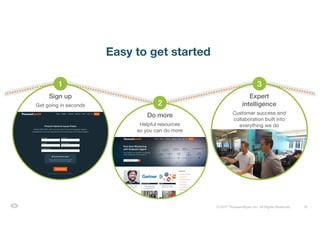
Easy to get started
Do more
Helpful resources
so you can do more
Sign up
Get going in seconds
1
2
Expert
intelligence
Customer success and
collaboration built into
everything we do
3
19© 2017 ThousandEyes Inc. All Rights Reserved.© 2017 ThousandEyes Inc. All Rights Reserved.
Watch the webinar:
www.thousandeyes.com/webinars/monitoring-route-changes

Monitoring Route Changes

  • 1.
    1© 2017 ThousandEyesInc. All Rights Reserved.Confidential © 2017 ThousandEyes Inc. All Rights Reserved. Monitoring Route Changes Nick Kephart, Sr. Director of Product Marketing
  • 2.
    2© 2017 ThousandEyesInc. All Rights Reserved. About ThousandEyes Network Intelligence platform that gives you a complete picture from users to internal and cloud-based applications Routing User App End-to-End Performance Data App Performance User Experience Network Topology Routing Topology Enterprise, Endpoint and Cloud Agents Network Connectivity And Route Monitors! Surface insights from a global data set Lightweight, flexible data collection Unified view of diverse performance data Solve issues across shared infrastructure See any network like it’s your own
  • 3.
    3© 2017 ThousandEyesInc. All Rights Reserved. 40 monitors on 30+ networks See inbound routing to your prefixes Establish a BGP multi-hop session with ThousandEyes See outbound routing to key services and endpoints Public Monitors Private Monitors Collecting BGP data Your BGP speaker ThousandEyes collector
  • 4.
    4© 2017 ThousandEyesInc. All Rights Reserved. Visualizing BGP routes for ingress traffic Origin AS (Comcast) Public vantage points Upstream ISP (Level3) Upstream ISP (NTT) Github prefix
  • 5.
    5© 2017 ThousandEyesInc. All Rights Reserved. Using Private Monitors for egress traffic routes Amazon
  • 6.
    6© 2017 ThousandEyesInc. All Rights Reserved. Visualizing route changes Withdrawn routes to Level3 New or updated routes via Comcast
  • 7.
    7© 2017 ThousandEyesInc. All Rights Reserved. Key routing metrics • Proportion of 15- min period that the prefix was reachable from the monitor • Number of path changes • Number of BGP updates, including ones that don’t result in a path change Reachability Path Changes Updates
  • 8.
    8© 2017 ThousandEyesInc. All Rights Reserved. How routes change 1. AS Path vector changes • Doesn’t change the destination prefix • Can change with new routes, withdrawn routes or updated route preferences 2. A more specific prefix appears or disappears • Changes the destination prefix • Covered and covering prefixes can be used to maintain multiple routing policies in the routing table • Routes can be quickly changed as needed
  • 9.
    9© 2017 ThousandEyesInc. All Rights Reserved. Why routes change • Commercial relationships • DDoS mitigation • Equipment failures • Maintenance • Attribute confusion (e.g. prepending errors) • Route flapping • Others advertising your prefix • Or a more specific prefix Peers & policies Misconfigurations Hijacks & leaks
  • 10.
    10© 2017 ThousandEyesInc. All Rights Reserved. Policy and peering changes • Options to influence inbound routing to your network include: – Introducing new routes • Advertising new routes • Introducing a more specific prefix with a different route – Withdrawing routes – Changing BGP attributes in route advertisements • AS path prepending • Multi-exit discriminator (MED) • Communities (e.g. NO-EXPORT); BGP conditional advertisements • Both the origin AS and upstream ISPs can make peering changes – Monitor reachability and make sure that new routes are correct and propagated • Look for: One-time AS path change, new providers or prefixes – Example: First Horizon changed ISPs by introducing a covered prefix
  • 11.
    11© 2017 ThousandEyesInc. All Rights Reserved. DDoS mitigation • BGP is commonly used to shift traffic to scrubbing centers of DDoS mitigation providers during an attack • Look for: Mitigation provider’s AS either appearing directly upstream from Origin AS or becoming Origin AS – Example: Discover changed their upstream providers from AT&T and Sprint to Prolexic
  • 12.
    12© 2017 ThousandEyesInc. All Rights Reserved. DDoS mitigation: Discover Sprint AT&T Withdrawn routes to AT&T, Sprint New routes through Prolexic Prolexic
  • 13.
    13© 2017 ThousandEyesInc. All Rights Reserved. Equipment failures • Failures can occur on links or interfaces in upstream providers – May re-route on its own or may require intervention • Look for: Issues isolated within specific ISPs and subsequent routing changes – Example: When upstream ISP Verizon experienced severe issues, First Data made a BGP change and dropped Verizon
  • 14.
    14© 2017 ThousandEyesInc. All Rights Reserved. Equipment failures: First Data New routes through AT&T Withdrawn routes to Verizon
  • 15.
    15© 2017 ThousandEyesInc. All Rights Reserved. Routing misconfigurations • Common misconfigurations include: – BGP attribute confusion • AS path prepending errors – Route flapping – Route leaks • Look for: Unexpected ASes, routes or route changes – Example: Country Financial mistyped an AS when prepending the AS path
  • 16.
    16© 2017 ThousandEyesInc. All Rights Reserved. Route flapping • When routes alternate or are advertised and withdrawn in rapid sequence – Usually from equipment or configuration errors – Often causes packet loss and performance degradation • Look for: Repeating spikes or elevated levels of route changes over time – Example: Ancestry’s upstream ISP XO Communications experienced a route flap
  • 17.
    17© 2017 ThousandEyesInc. All Rights Reserved. Tuning your BGP alerts Scenario Threshold Peering Changes, Route Flaps Path Changes > 1 Reachability < 100% DDoS Mitigation Activation Origin ASN in ___ Prefix not in ___ Next Hop ASN in ___ Prepending Errors Next Hop ASN not in ___ Prefix Hijacking, Leaks Origin ASN not in ___ Covered Prefix exists
  • 18.
    18© 2017 ThousandEyesInc. All Rights Reserved. Easy to get started Do more Helpful resources so you can do more Sign up Get going in seconds 1 2 Expert intelligence Customer success and collaboration built into everything we do 3
  • 19.
    19© 2017 ThousandEyesInc. All Rights Reserved.© 2017 ThousandEyes Inc. All Rights Reserved. Watch the webinar: www.thousandeyes.com/webinars/monitoring-route-changes