
MongoDB and Mongoose 101
Phoenix MongoDB Meetup
November 16, 2013
Will Button @wfbutton
About Me
• DevOps/IT/DBA for myList.com
• Founder of FitMeal.me – Meal Planning
• Extensive background in both development
and ops, specifically in scalability and
sustainability
MongoDB – The 10,000 foot View
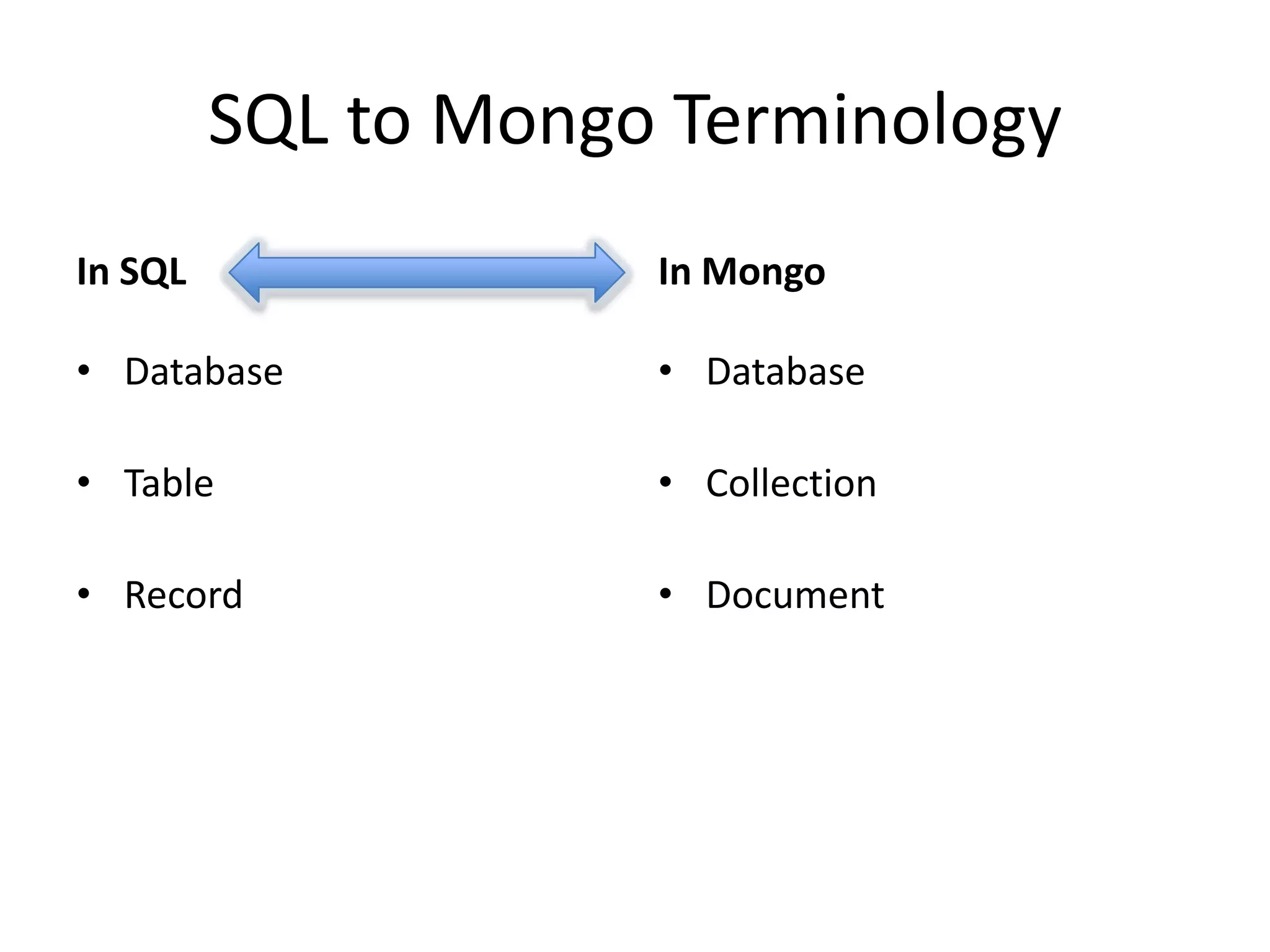
SQL to Mongo Terminology
In SQL

In Mongo

• Database

• Database

• Table

• Collection

• Record

• Document
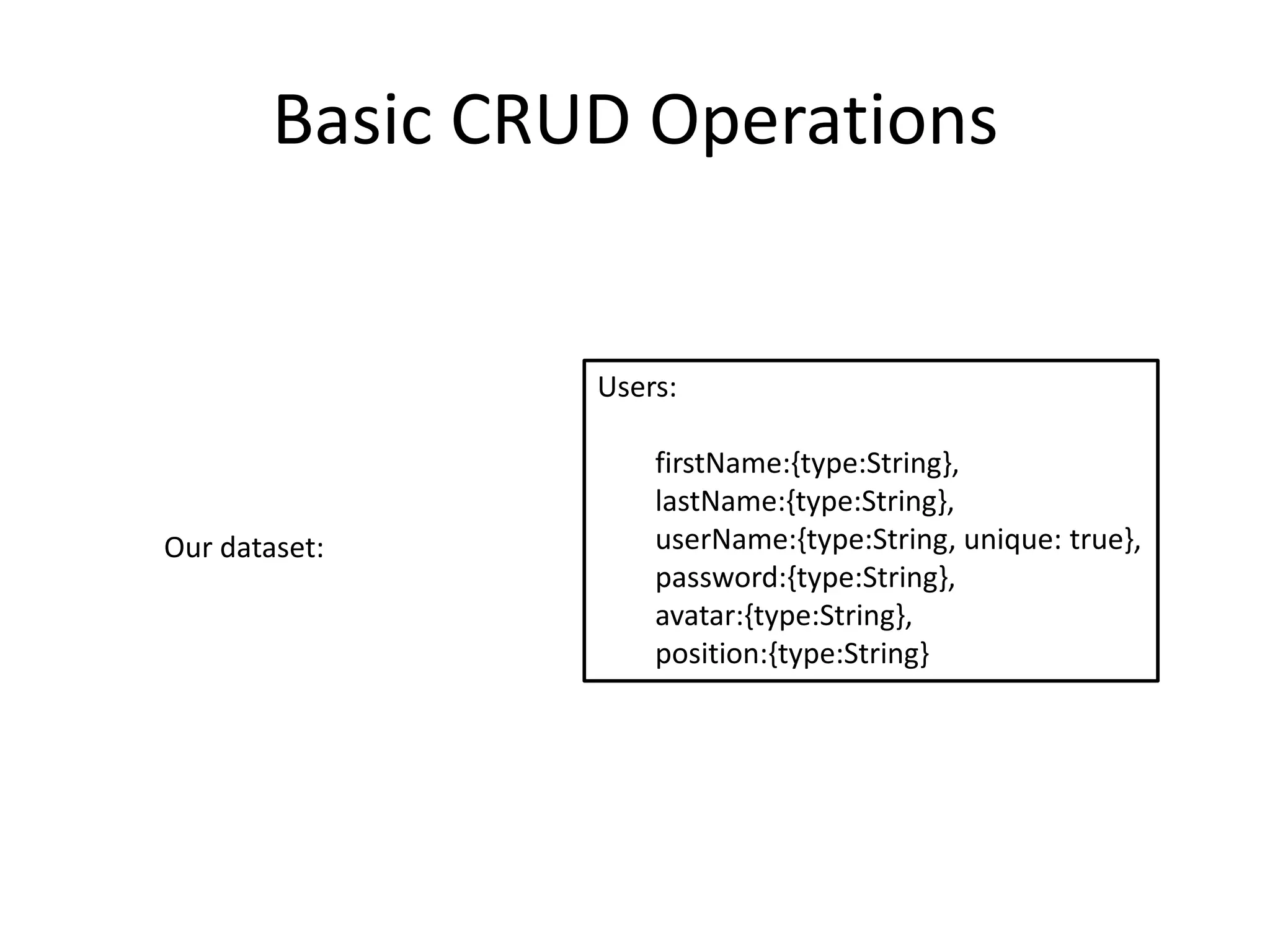
Basic CRUD Operations

Users:

Our dataset:

firstName:{type:String},
lastName:{type:String},
userName:{type:String, unique: true},
password:{type:String},
avatar:{type:String},
position:{type:String}
Basic CRUD Operations

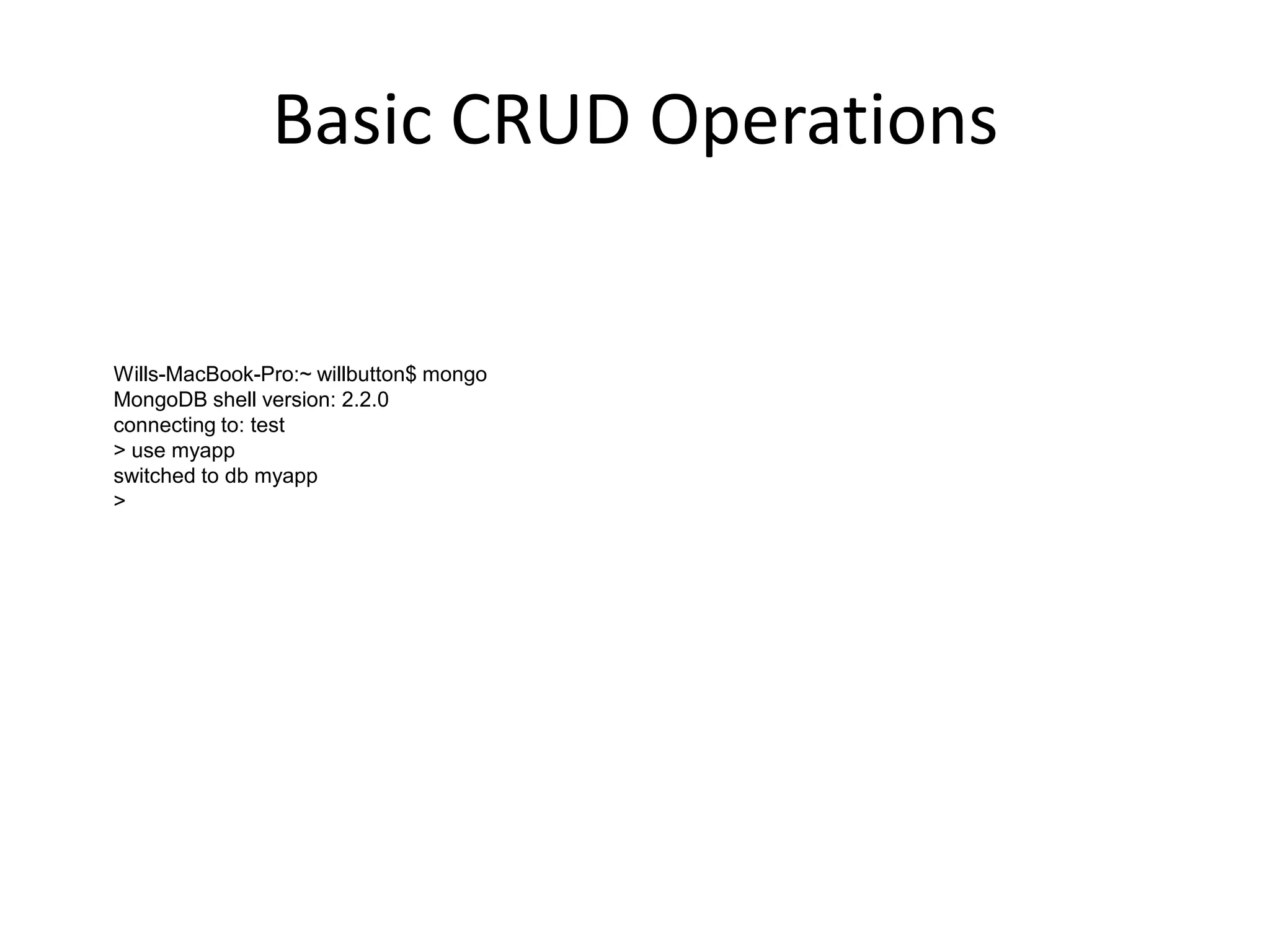
Wills-MacBook-Pro:~ willbutton$ mongo
MongoDB shell version: 2.2.0
connecting to: test
> use myapp
switched to db myapp
>
Basic CRUD Operations
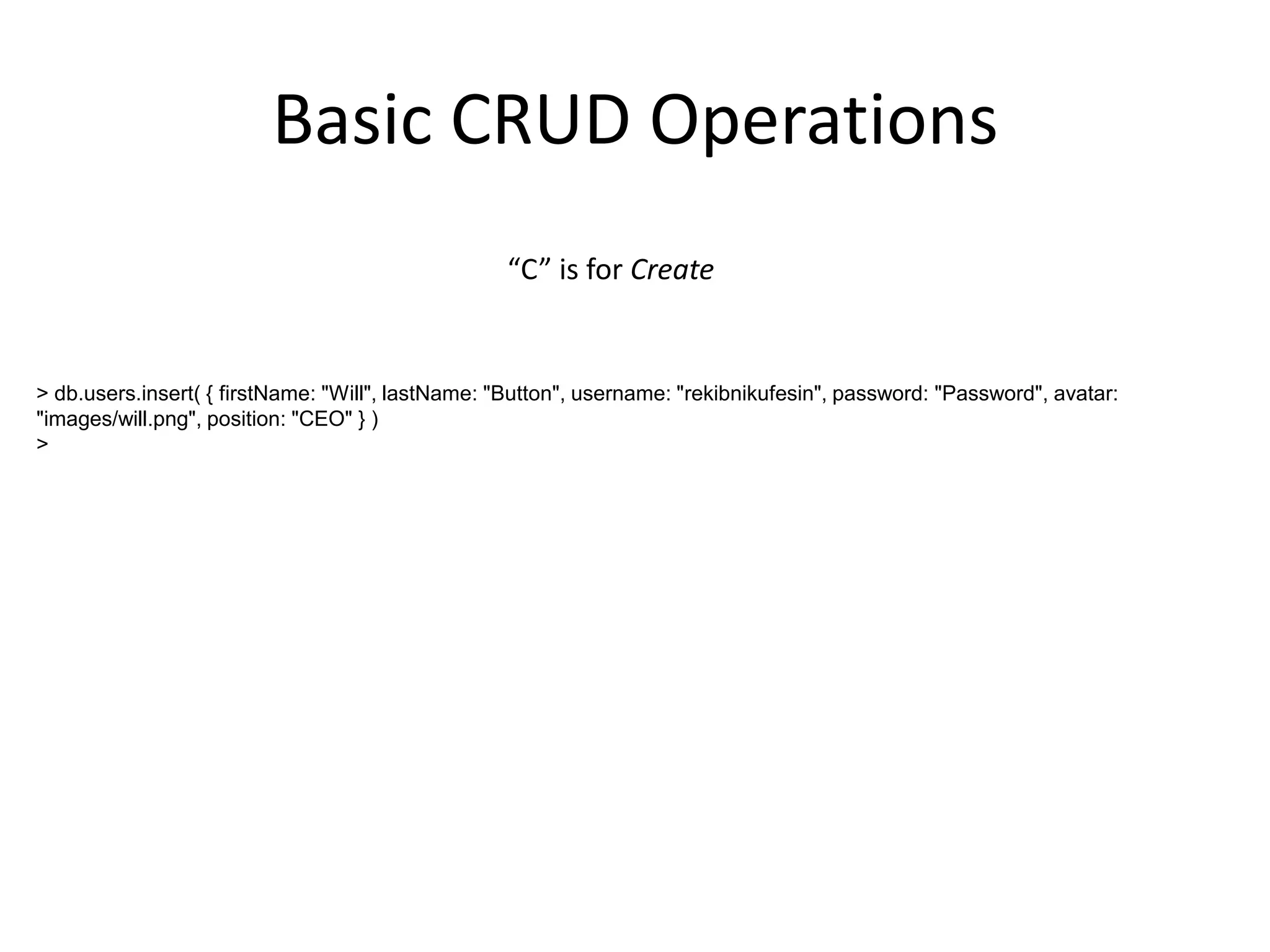
“C” is for Create

> db.users.insert( { firstName: "Will", lastName: "Button", username: "rekibnikufesin", password: "Password", avatar:
"images/will.png", position: "CEO" } )
>
Basic CRUD Operations
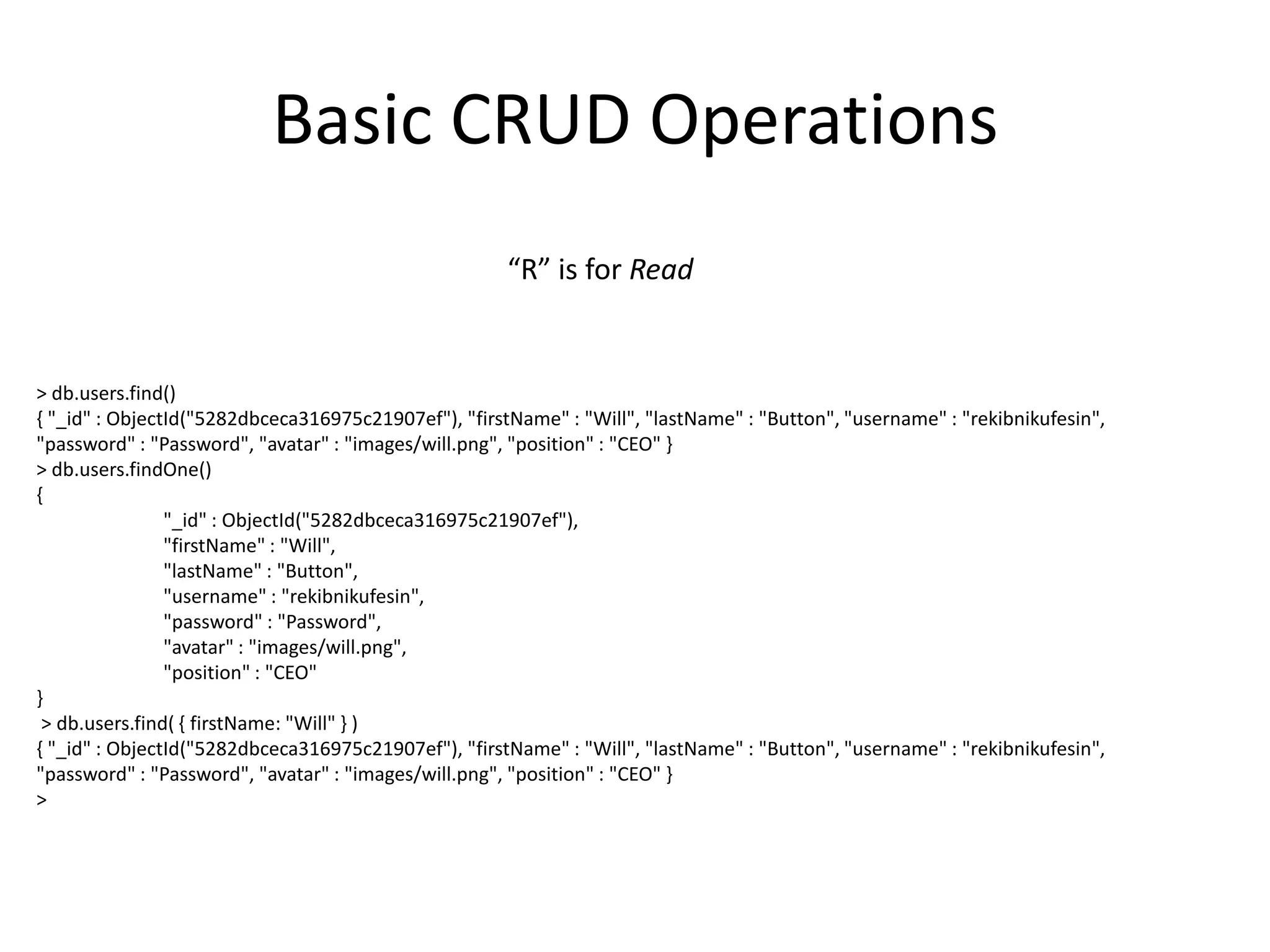
“R” is for Read

> db.users.find()
{ "_id" : ObjectId("5282dbceca316975c21907ef"), "firstName" : "Will", "lastName" : "Button", "username" : "rekibnikufesin",
"password" : "Password", "avatar" : "images/will.png", "position" : "CEO" }
> db.users.findOne()
{
"_id" : ObjectId("5282dbceca316975c21907ef"),
"firstName" : "Will",
"lastName" : "Button",
"username" : "rekibnikufesin",
"password" : "Password",
"avatar" : "images/will.png",
"position" : "CEO"
}
> db.users.find( { firstName: "Will" } )
{ "_id" : ObjectId("5282dbceca316975c21907ef"), "firstName" : "Will", "lastName" : "Button", "username" : "rekibnikufesin",
"password" : "Password", "avatar" : "images/will.png", "position" : "CEO" }
>
Basic CRUD Operations
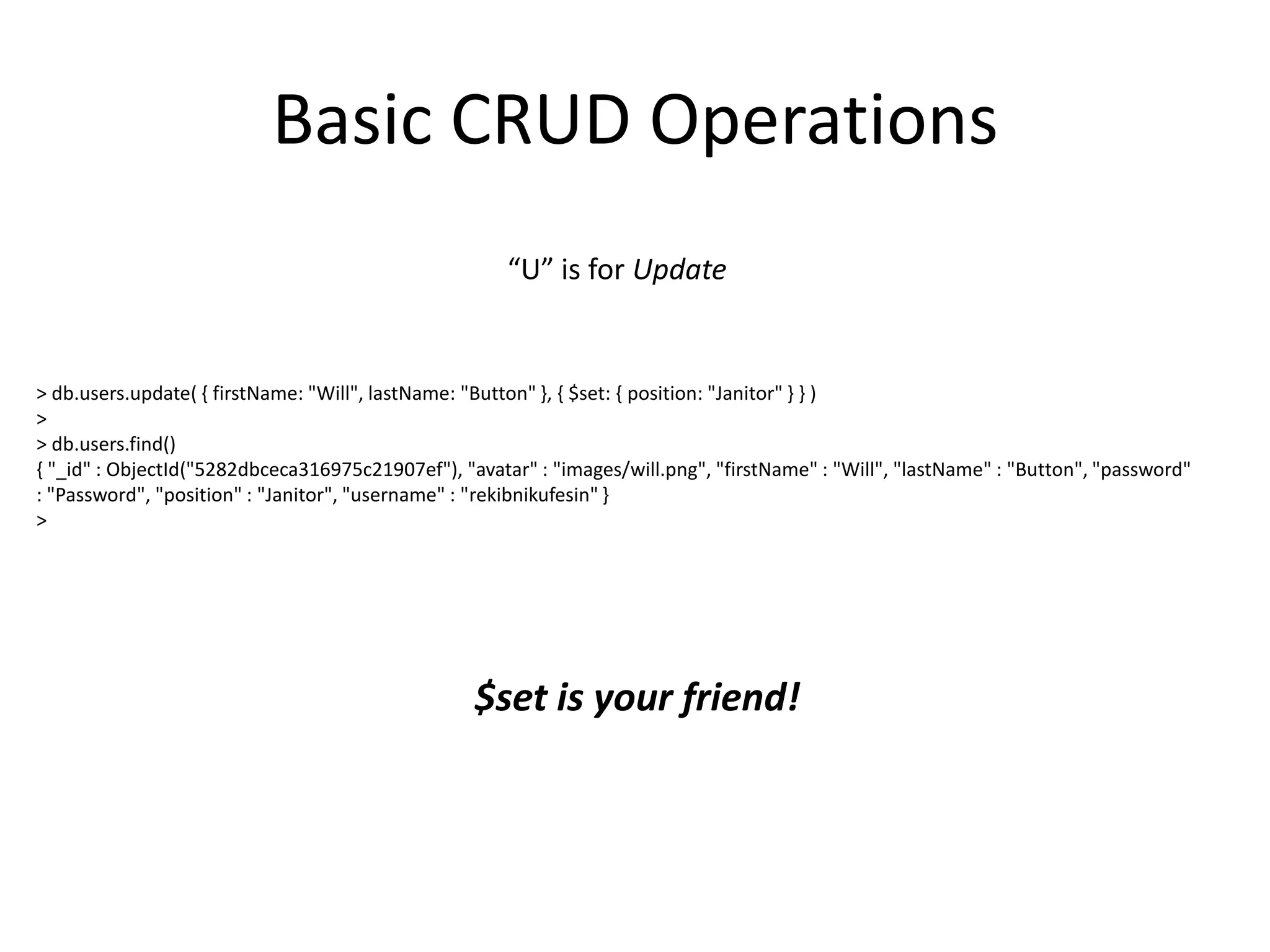
“U” is for Update

> db.users.update( { firstName: "Will", lastName: "Button" }, { $set: { position: "Janitor" } } )
>
> db.users.find()
{ "_id" : ObjectId("5282dbceca316975c21907ef"), "avatar" : "images/will.png", "firstName" : "Will", "lastName" : "Button", "password"
: "Password", "position" : "Janitor", "username" : "rekibnikufesin" }
>

$set is your friend!
Basic CRUD Operations
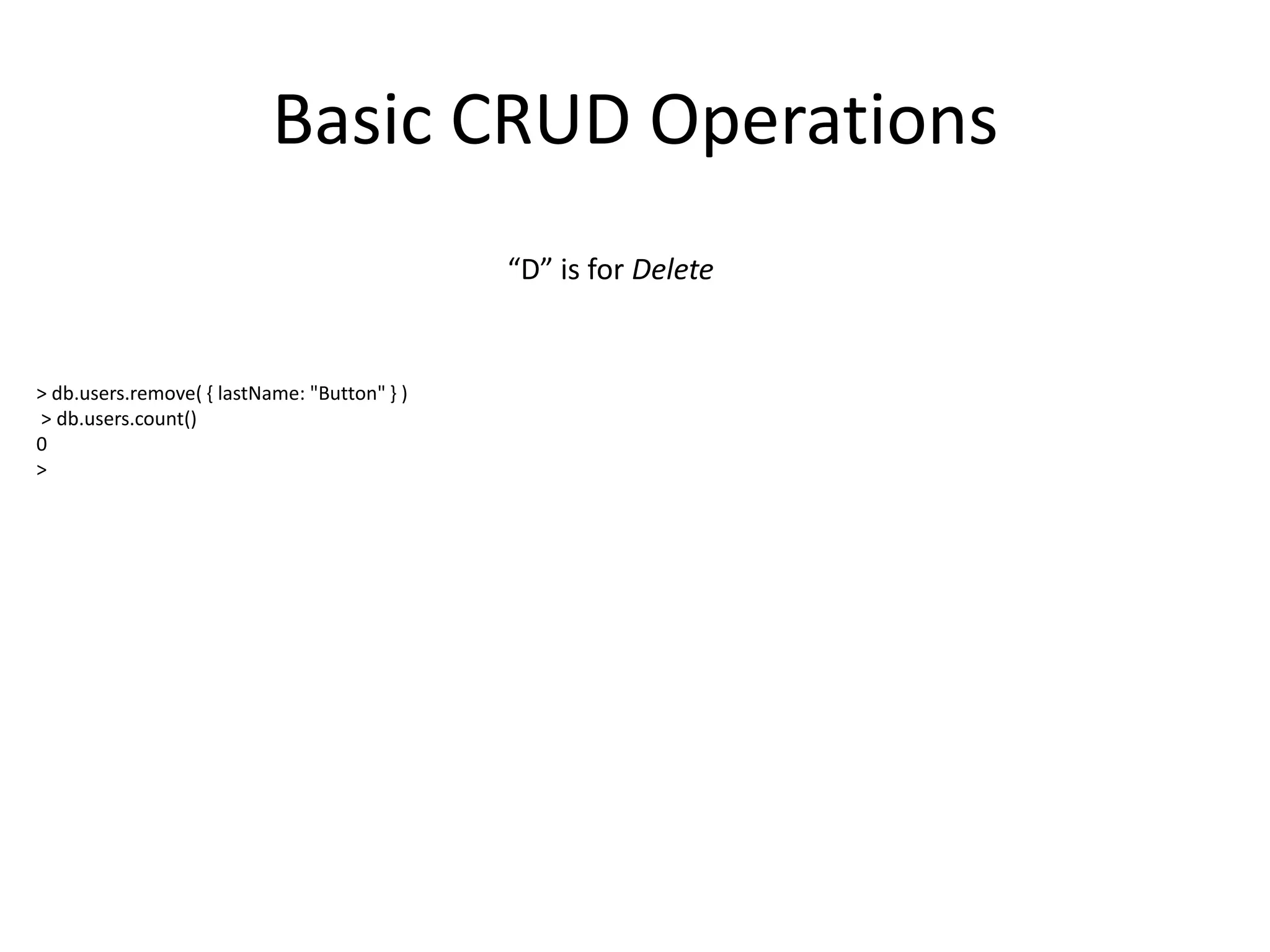
“D” is for Delete

> db.users.remove( { lastName: "Button" } )
> db.users.count()
0
>
mongoose
• MongoDB object modeling for node.js
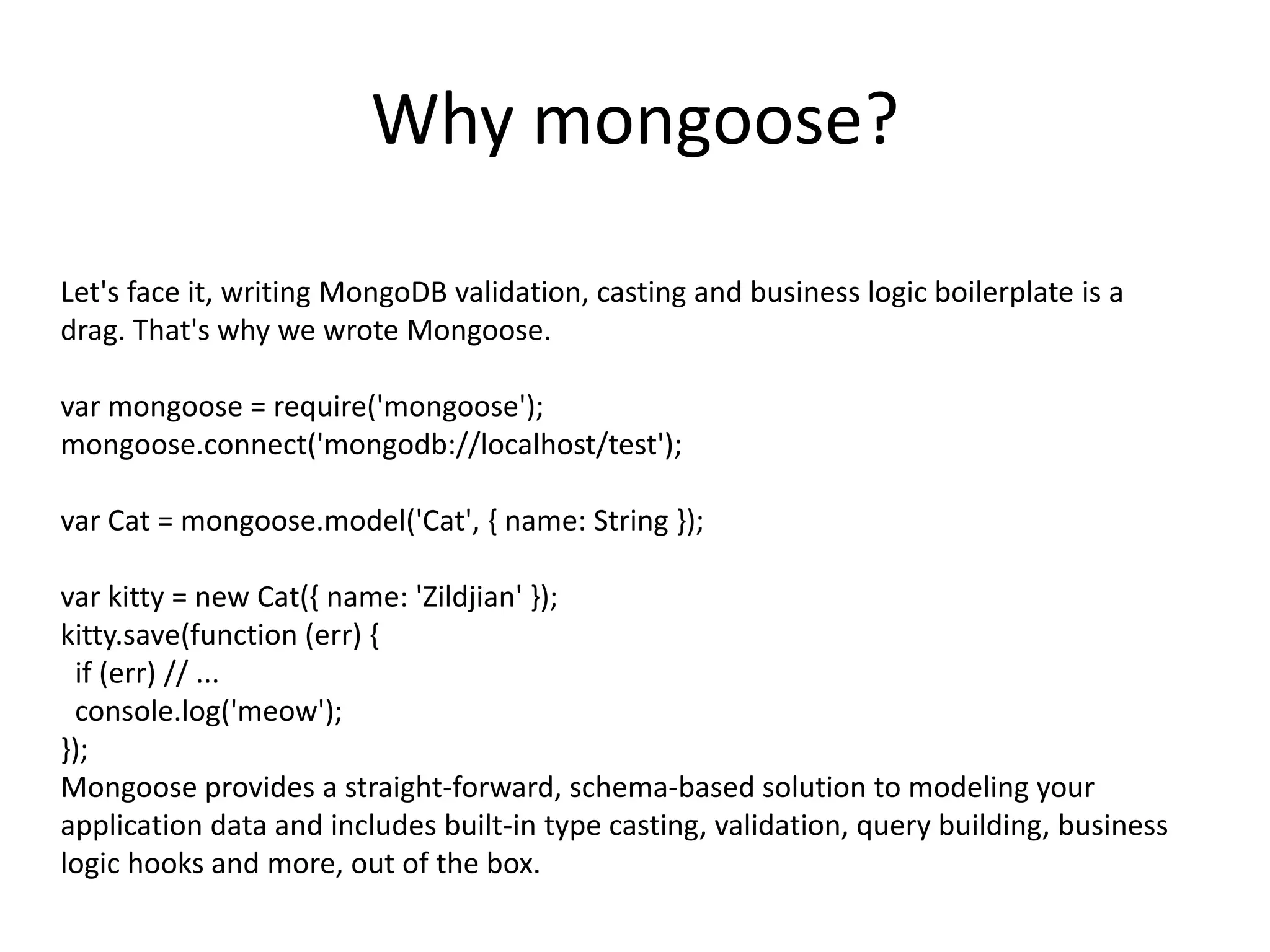
Why mongoose?
Let's face it, writing MongoDB validation, casting and business logic boilerplate is a
drag. That's why we wrote Mongoose.
var mongoose = require('mongoose');
mongoose.connect('mongodb://localhost/test');
var Cat = mongoose.model('Cat', { name: String });
var kitty = new Cat({ name: 'Zildjian' });
kitty.save(function (err) {
if (err) // ...
console.log('meow');
});
Mongoose provides a straight-forward, schema-based solution to modeling your
application data and includes built-in type casting, validation, query building, business
logic hooks and more, out of the box.
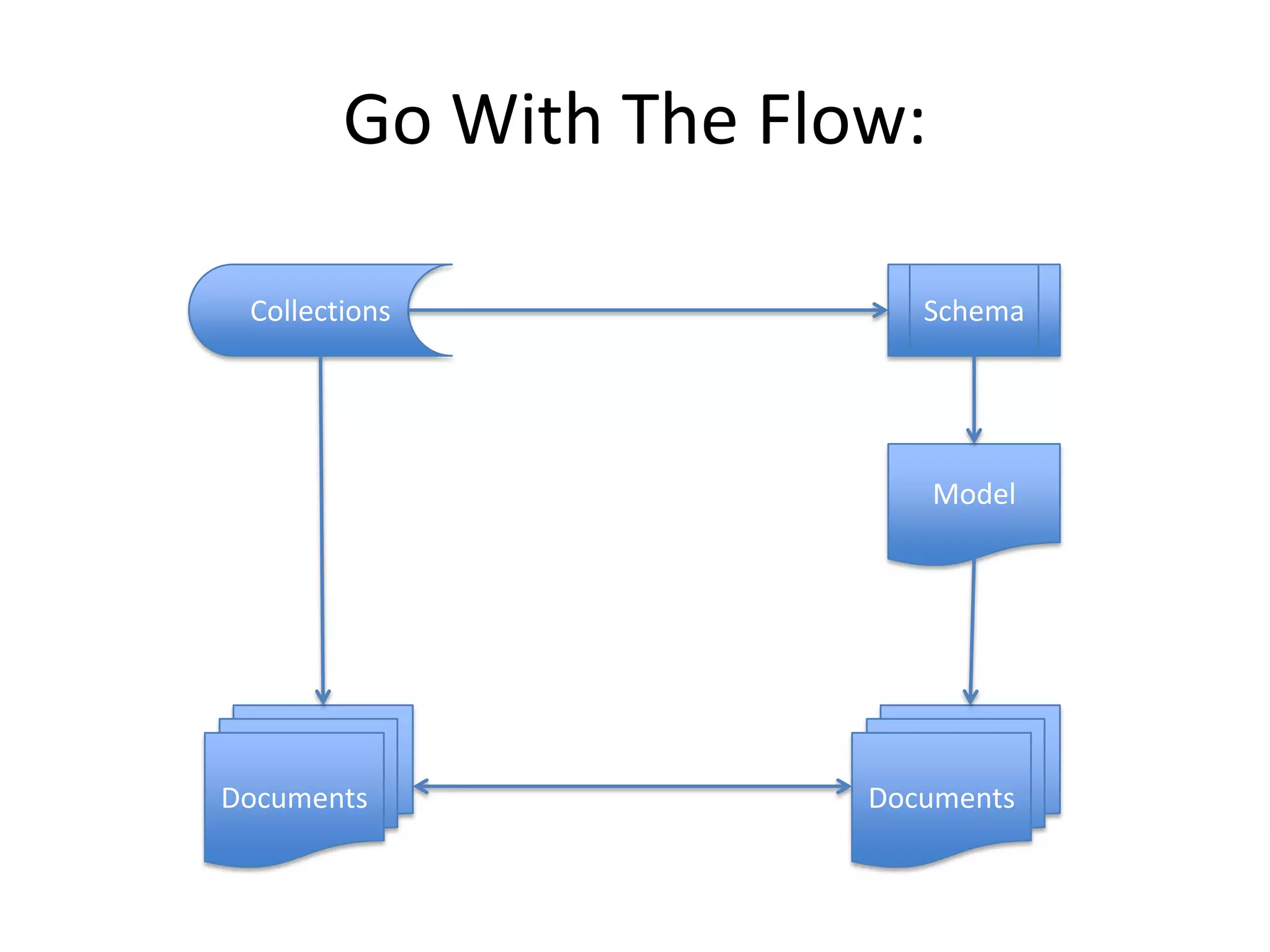
Go With The Flow:
Collections

Schema

Model

Documents

Documents
Putting it in action:
Use case:
• Build a CRM application using the M.E.A.N. stack
• Using Mongoose, provide basic CRUD operations inside the node stack
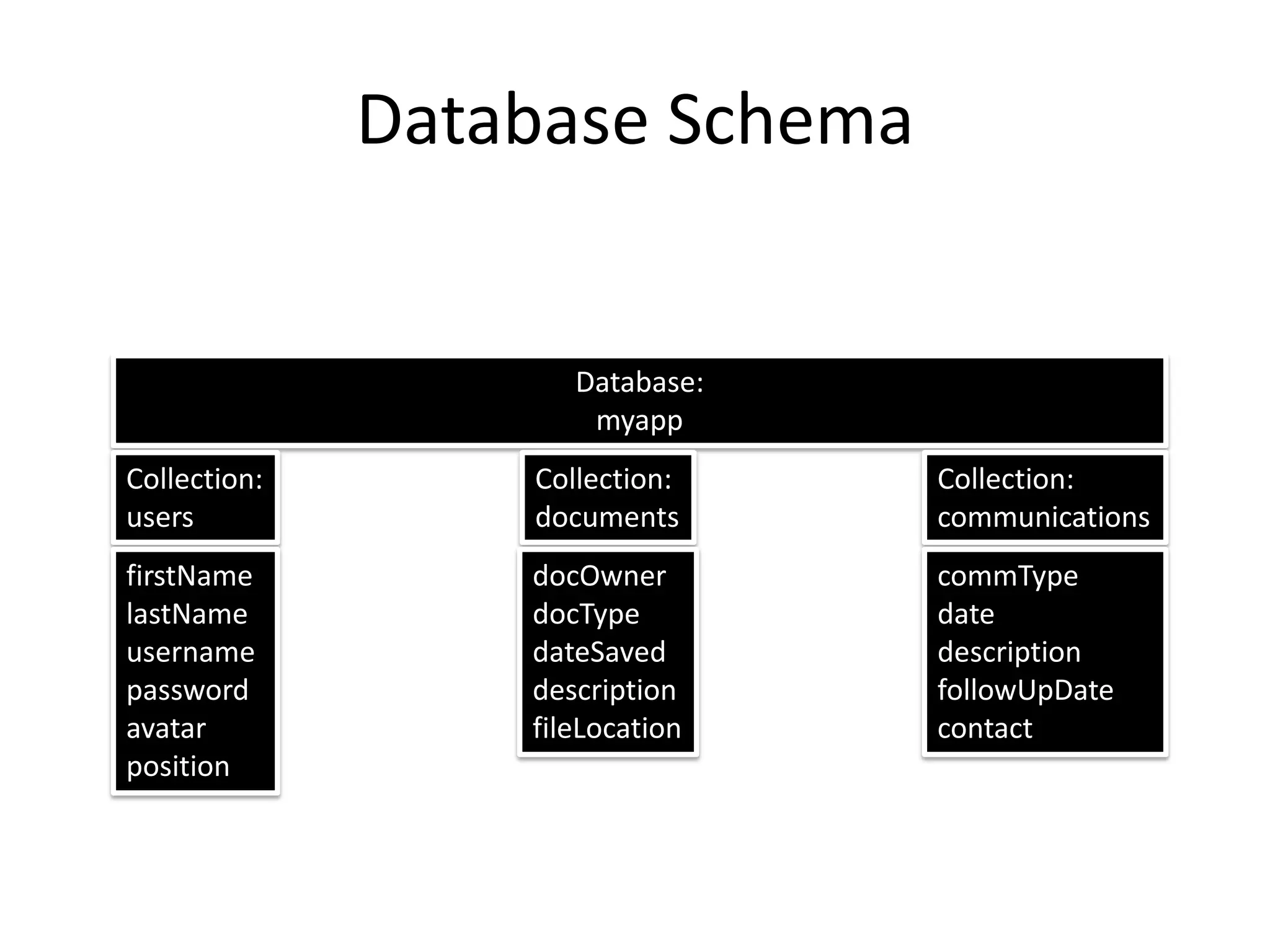
Database Schema

Database:
myapp
Collection:
users

Collection:
documents

Collection:
communications

firstName
lastName
username
password
avatar
position

docOwner
docType
dateSaved
description
fileLocation

commType
date
description
followUpDate
contact
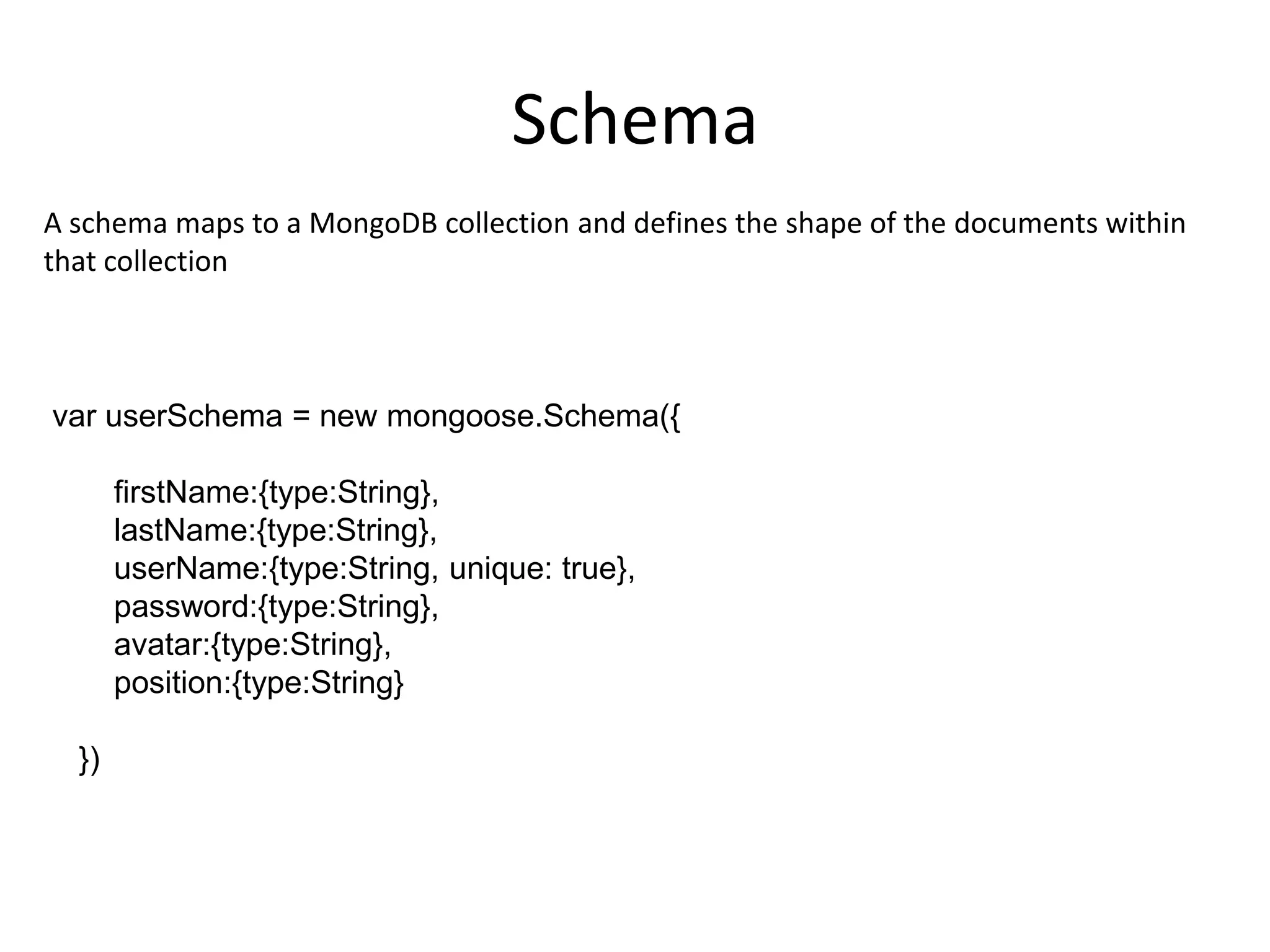
Schema
A schema maps to a MongoDB collection and defines the shape of the documents within
that collection

var userSchema = new mongoose.Schema({

firstName:{type:String},
lastName:{type:String},
userName:{type:String, unique: true},
password:{type:String},
avatar:{type:String},
position:{type:String}
})
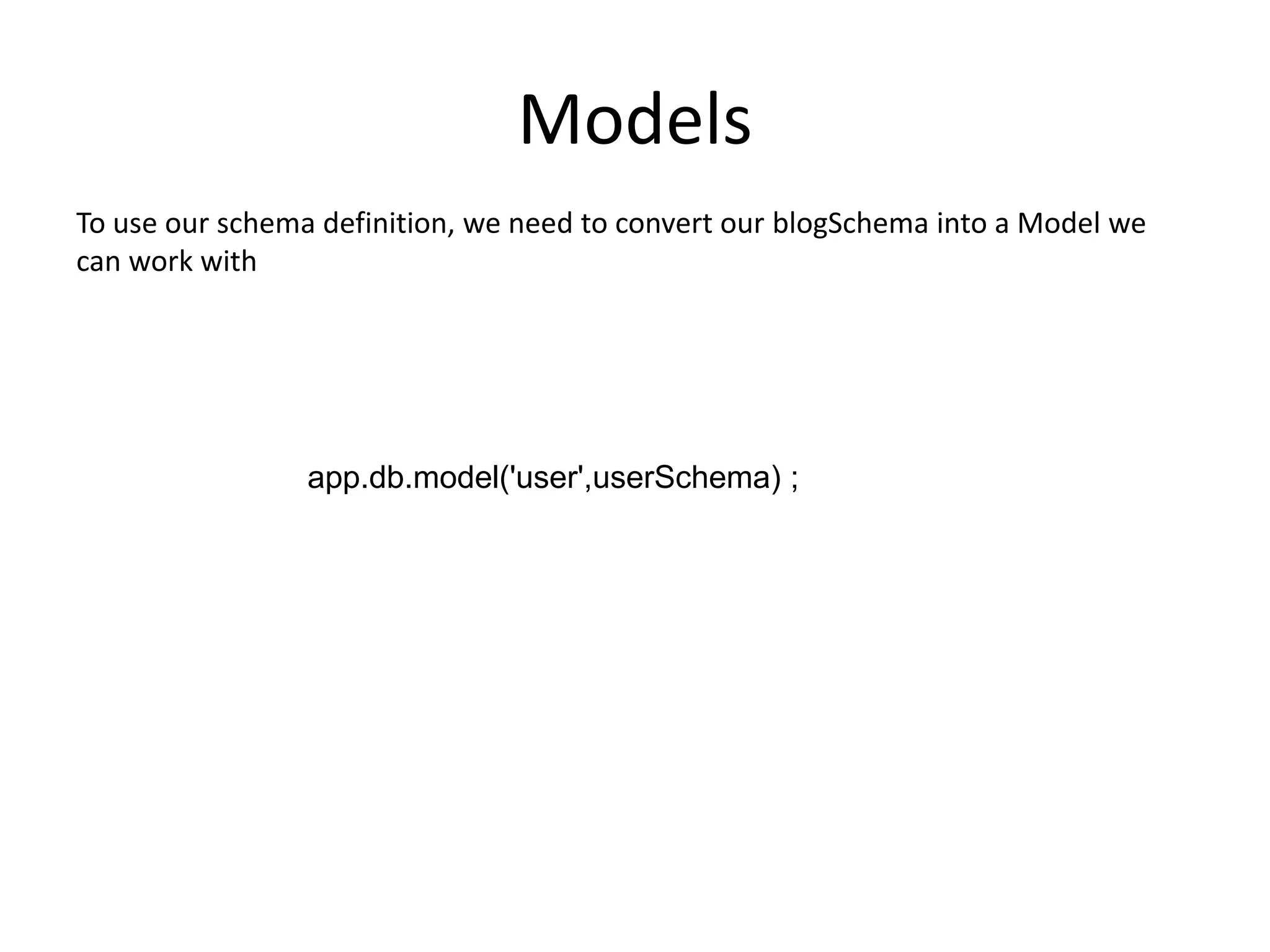
Models
To use our schema definition, we need to convert our blogSchema into a Model we
can work with

app.db.model('user',userSchema) ;
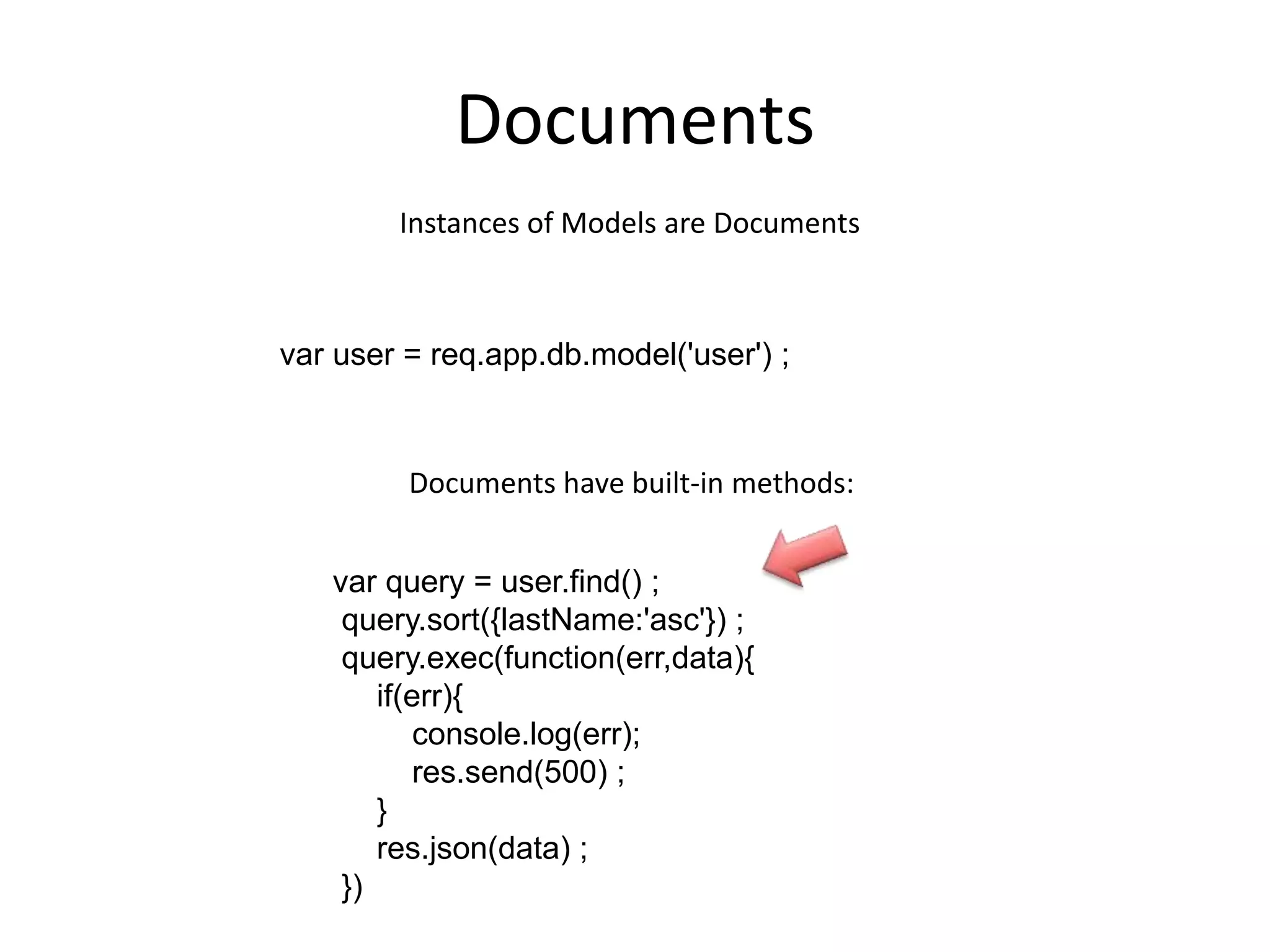
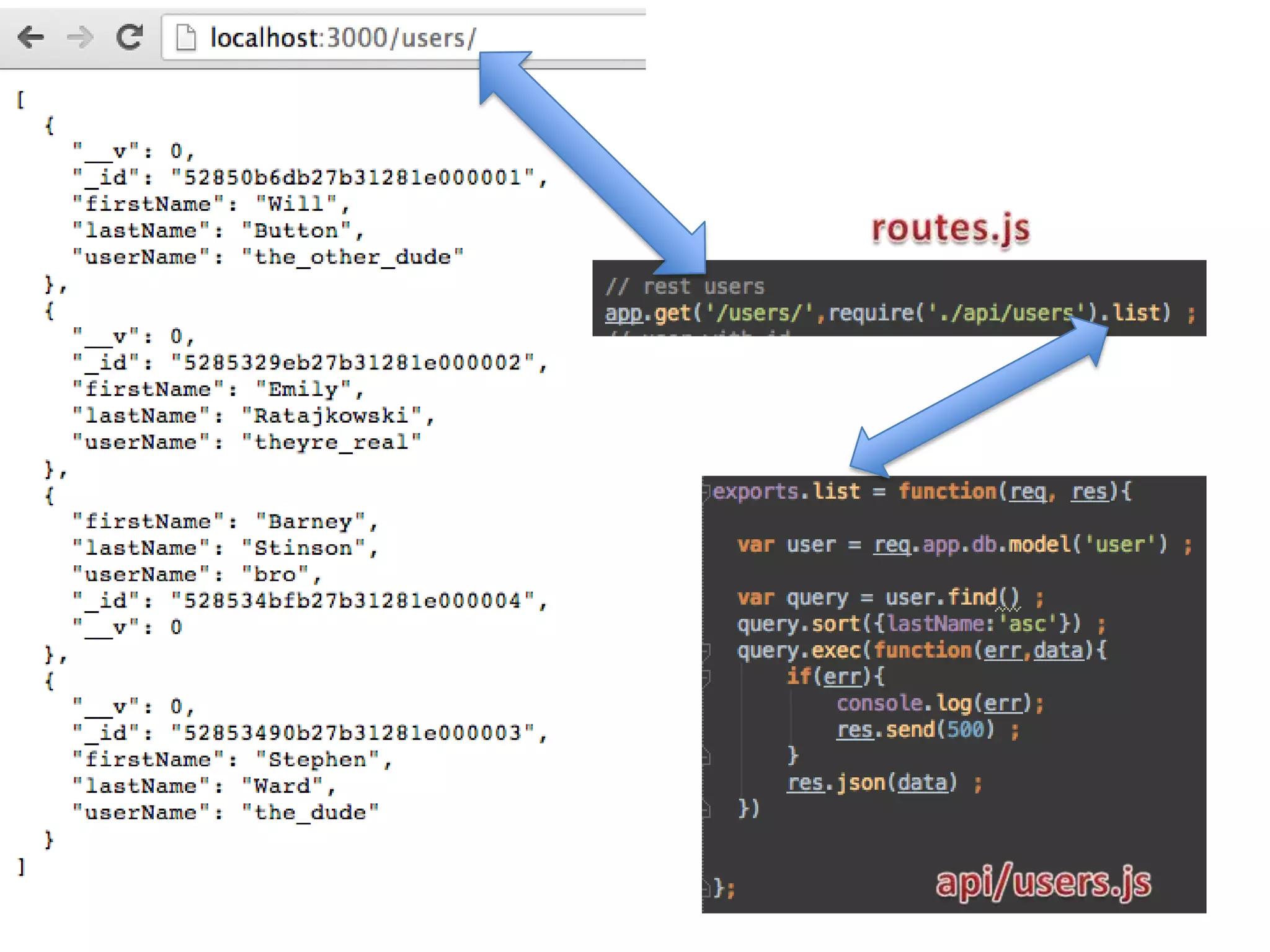
Documents
Instances of Models are Documents

var user = req.app.db.model('user') ;

Documents have built-in methods:
var query = user.find() ;
query.sort({lastName:'asc'}) ;
query.exec(function(err,data){
if(err){
console.log(err);
res.send(500) ;
}
res.json(data) ;
})
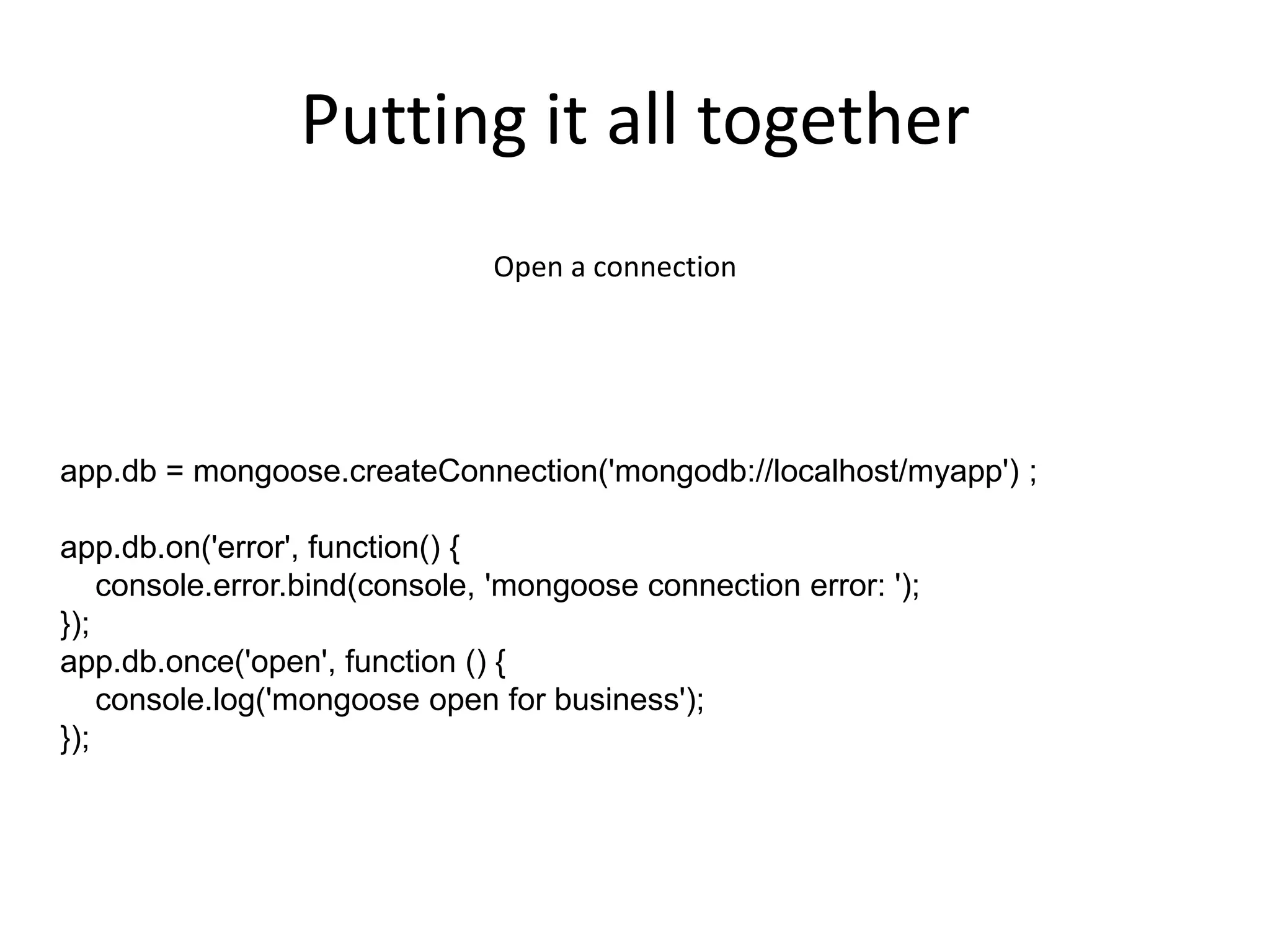
Putting it all together
Open a connection

app.db = mongoose.createConnection('mongodb://localhost/myapp') ;

app.db.on('error', function() {
console.error.bind(console, 'mongoose connection error: ');
});
app.db.once('open', function () {
console.log('mongoose open for business');
});
Badass, Right?

But that only gets us so far.
Let’s explore some of the other features available to us, such as validations,
sub-documents, populations
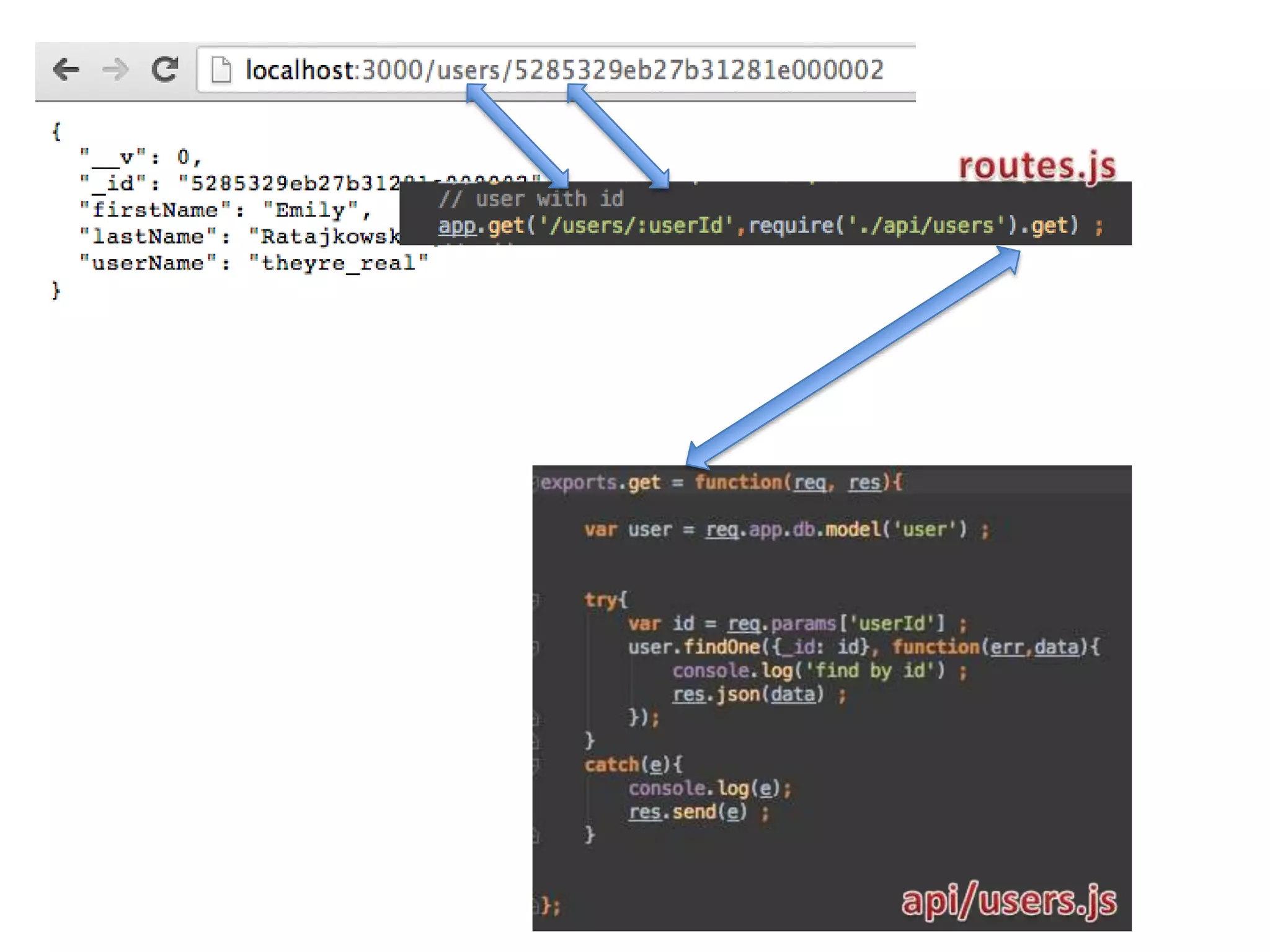
Queries
var user = req.app.db.model('user') ;

try{
var id = req.params['userId'] ;
user.findOne({_id: id}, 'firstName userName', function(err,data){
console.log('find by id') ;
res.json(data) ;
});
}
catch(e){
console.log(e);
res.send(e) ;
}
var user = req.app.db.model('user');
// console.log(req.body) ;
var newuser = new user(req.body);
newuser.validate(function(error) {
if (error) {
res.json({ error : error });
} else {
delete req.body._id ;
user.findByIdAndUpdate({_id:newuser._id},{$set:req.body},function(err,data){
res.json(data) ;
})
}
});
Validations
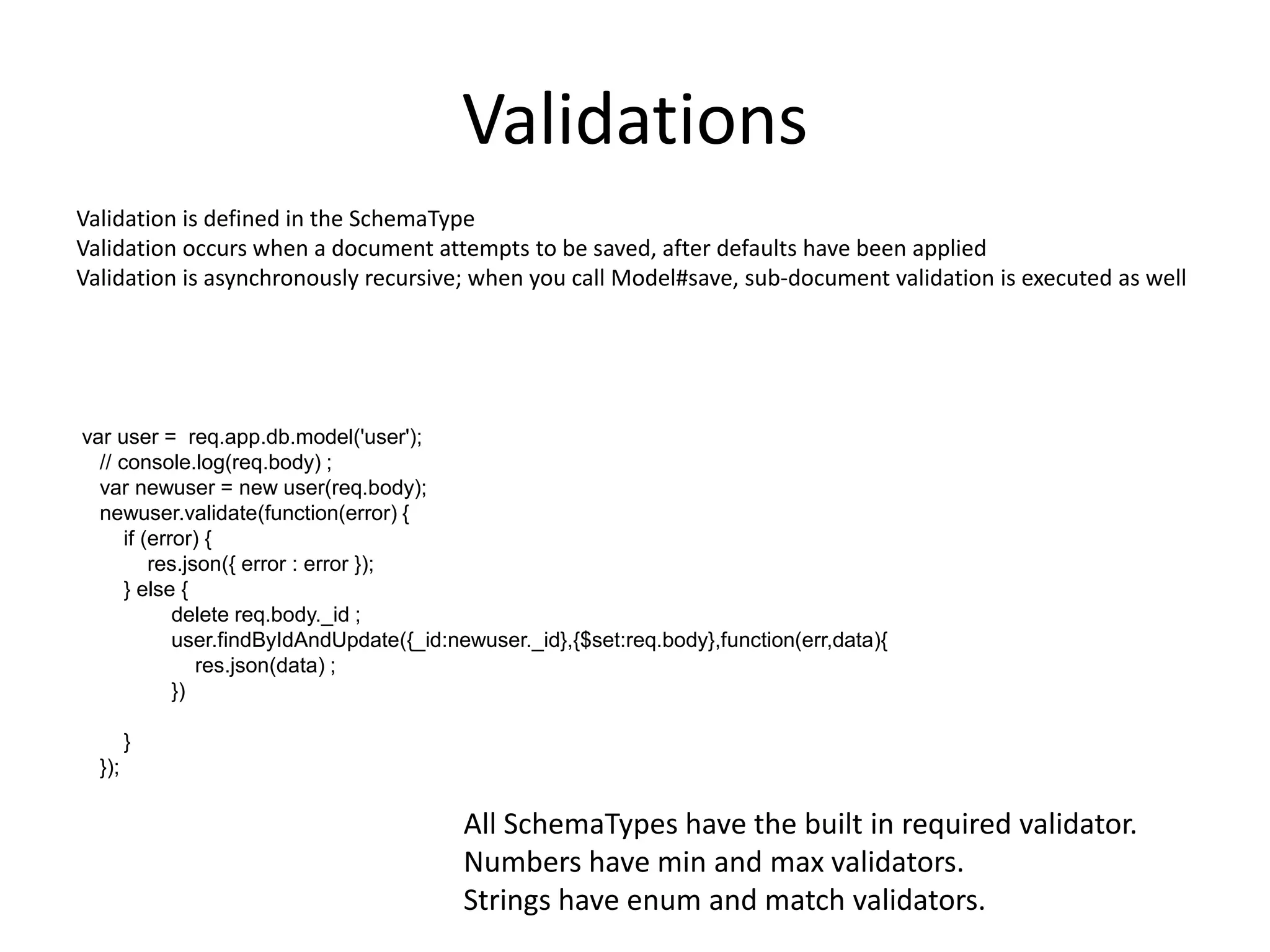
Validation is defined in the SchemaType
Validation occurs when a document attempts to be saved, after defaults have been applied
Validation is asynchronously recursive; when you call Model#save, sub-document validation is executed as well

var user = req.app.db.model('user');
// console.log(req.body) ;
var newuser = new user(req.body);
newuser.validate(function(error) {
if (error) {
res.json({ error : error });
} else {
delete req.body._id ;
user.findByIdAndUpdate({_id:newuser._id},{$set:req.body},function(err,data){
res.json(data) ;
})

}
});

All SchemaTypes have the built in required validator.
Numbers have min and max validators.
Strings have enum and match validators.
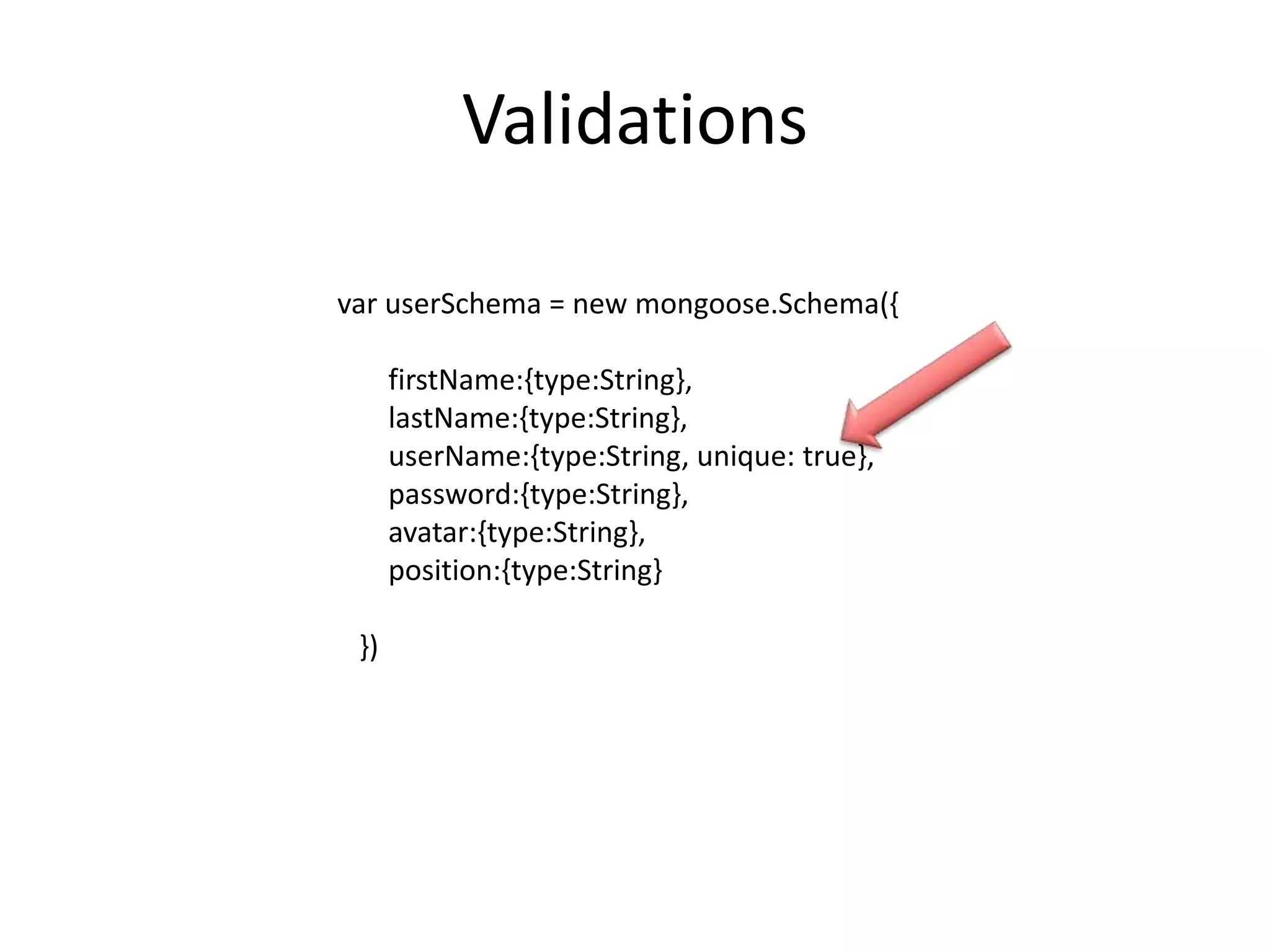
Validations
var userSchema = new mongoose.Schema({
firstName:{type:String},
lastName:{type:String},
userName:{type:String, unique: true},
password:{type:String},
avatar:{type:String},
position:{type:String}
})
Sub-Documents
Documents within documents?!?!? What is this witchcraft you speak of???
Sub-documents are documents with their own schema and are elements of a
parent’s document array

• All the same features as normal documents
• Saved when parent document saved
• Errors bubble up to parent callback
Sub-Documents
var childSchema = new Schema({ name: 'string' });
var parentSchema = new Schema({
children: [childSchema]
})

Finding a sub-document
var doc = parent.children.id(id);

Add with standard array methods: push, addToSet, unshift
parent.children.push({ name: 'Liesl' });

Remove by id
var doc = parent.children.id(id).remove();
Population
Allows “joining” data from other collections
var communicationSchema = new mongoose.Schema({
commType:{type:String},
date:{type:Date},
description:{type:String},
followUpDate:{type:Date},
owner:[{type: mongoose.Schema.Types.ObjectId, ref:'user'}]
})

var userSchema = new mongoose.Schema({
firstName:{type:String},
lastName:{type:String},
userName:{type:String, unique: true},
password:{type:String},
avatar:{type:String},
position:{type:String}
})

var Communication= mongoose.model(‟Comm', communicationSchema);
var User= mongoose.model(‟User', userSchema);
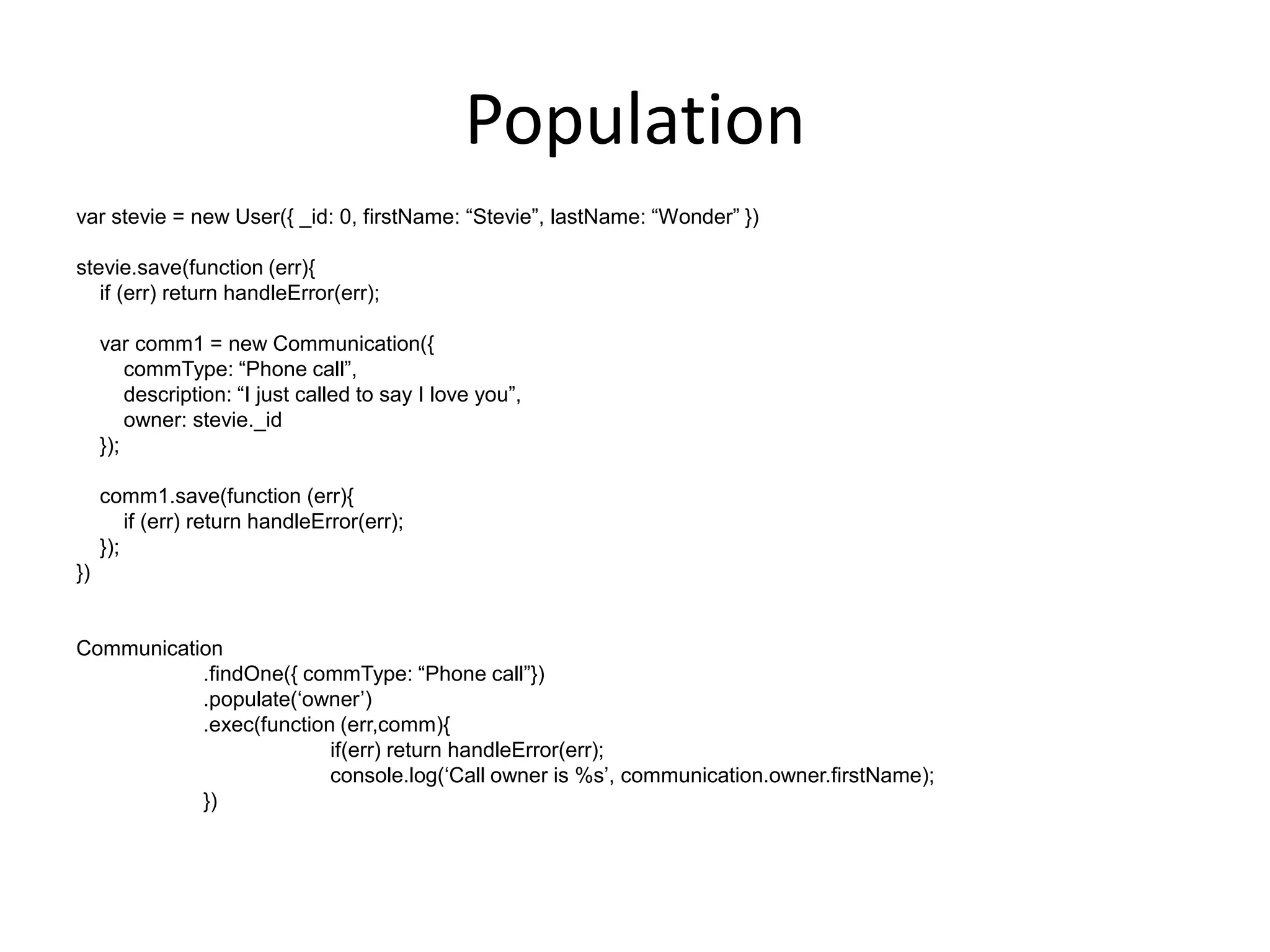
Population
var stevie = new User({ _id: 0, firstName: “Stevie”, lastName: “Wonder” })
stevie.save(function (err){
if (err) return handleError(err);
var comm1 = new Communication({
commType: “Phone call”,
description: “I just called to say I love you”,
owner: stevie._id
});
comm1.save(function (err){
if (err) return handleError(err);
});
})

Communication
.findOne({ commType: “Phone call”})
.populate(„owner‟)
.exec(function (err,comm){
if(err) return handleError(err);
console.log(„Call owner is %s‟, communication.owner.firstName);
})
Thank You!
• Questions
• Comments
• More Info

Mongoose and MongoDB 101

  • 1.
    MongoDB and Mongoose101 Phoenix MongoDB Meetup November 16, 2013 Will Button @wfbutton
  • 2.
    About Me • DevOps/IT/DBAfor myList.com • Founder of FitMeal.me – Meal Planning • Extensive background in both development and ops, specifically in scalability and sustainability
  • 3.
    MongoDB – The10,000 foot View
  • 4.
    SQL to MongoTerminology In SQL In Mongo • Database • Database • Table • Collection • Record • Document
  • 5.
    Basic CRUD Operations Users: Ourdataset: firstName:{type:String}, lastName:{type:String}, userName:{type:String, unique: true}, password:{type:String}, avatar:{type:String}, position:{type:String}
  • 6.
    Basic CRUD Operations Wills-MacBook-Pro:~willbutton$ mongo MongoDB shell version: 2.2.0 connecting to: test > use myapp switched to db myapp >
  • 7.
    Basic CRUD Operations “C”is for Create > db.users.insert( { firstName: "Will", lastName: "Button", username: "rekibnikufesin", password: "Password", avatar: "images/will.png", position: "CEO" } ) >
  • 8.
    Basic CRUD Operations “R”is for Read > db.users.find() { "_id" : ObjectId("5282dbceca316975c21907ef"), "firstName" : "Will", "lastName" : "Button", "username" : "rekibnikufesin", "password" : "Password", "avatar" : "images/will.png", "position" : "CEO" } > db.users.findOne() { "_id" : ObjectId("5282dbceca316975c21907ef"), "firstName" : "Will", "lastName" : "Button", "username" : "rekibnikufesin", "password" : "Password", "avatar" : "images/will.png", "position" : "CEO" } > db.users.find( { firstName: "Will" } ) { "_id" : ObjectId("5282dbceca316975c21907ef"), "firstName" : "Will", "lastName" : "Button", "username" : "rekibnikufesin", "password" : "Password", "avatar" : "images/will.png", "position" : "CEO" } >
  • 9.
    Basic CRUD Operations “U”is for Update > db.users.update( { firstName: "Will", lastName: "Button" }, { $set: { position: "Janitor" } } ) > > db.users.find() { "_id" : ObjectId("5282dbceca316975c21907ef"), "avatar" : "images/will.png", "firstName" : "Will", "lastName" : "Button", "password" : "Password", "position" : "Janitor", "username" : "rekibnikufesin" } > $set is your friend!
  • 10.
    Basic CRUD Operations “D”is for Delete > db.users.remove( { lastName: "Button" } ) > db.users.count() 0 >
  • 11.
    mongoose • MongoDB objectmodeling for node.js
  • 12.
    Why mongoose? Let's faceit, writing MongoDB validation, casting and business logic boilerplate is a drag. That's why we wrote Mongoose. var mongoose = require('mongoose'); mongoose.connect('mongodb://localhost/test'); var Cat = mongoose.model('Cat', { name: String }); var kitty = new Cat({ name: 'Zildjian' }); kitty.save(function (err) { if (err) // ... console.log('meow'); }); Mongoose provides a straight-forward, schema-based solution to modeling your application data and includes built-in type casting, validation, query building, business logic hooks and more, out of the box.
  • 13.
    Go With TheFlow: Collections Schema Model Documents Documents
  • 14.
    Putting it inaction: Use case: • Build a CRM application using the M.E.A.N. stack • Using Mongoose, provide basic CRUD operations inside the node stack
  • 15.
  • 16.
    Schema A schema mapsto a MongoDB collection and defines the shape of the documents within that collection var userSchema = new mongoose.Schema({ firstName:{type:String}, lastName:{type:String}, userName:{type:String, unique: true}, password:{type:String}, avatar:{type:String}, position:{type:String} })
  • 17.
    Models To use ourschema definition, we need to convert our blogSchema into a Model we can work with app.db.model('user',userSchema) ;
  • 18.
    Documents Instances of Modelsare Documents var user = req.app.db.model('user') ; Documents have built-in methods: var query = user.find() ; query.sort({lastName:'asc'}) ; query.exec(function(err,data){ if(err){ console.log(err); res.send(500) ; } res.json(data) ; })
  • 19.
    Putting it alltogether Open a connection app.db = mongoose.createConnection('mongodb://localhost/myapp') ; app.db.on('error', function() { console.error.bind(console, 'mongoose connection error: '); }); app.db.once('open', function () { console.log('mongoose open for business'); });
  • 22.
    Badass, Right? But thatonly gets us so far. Let’s explore some of the other features available to us, such as validations, sub-documents, populations
  • 23.
    Queries var user =req.app.db.model('user') ; try{ var id = req.params['userId'] ; user.findOne({_id: id}, 'firstName userName', function(err,data){ console.log('find by id') ; res.json(data) ; }); } catch(e){ console.log(e); res.send(e) ; } var user = req.app.db.model('user'); // console.log(req.body) ; var newuser = new user(req.body); newuser.validate(function(error) { if (error) { res.json({ error : error }); } else { delete req.body._id ; user.findByIdAndUpdate({_id:newuser._id},{$set:req.body},function(err,data){ res.json(data) ; }) } });
  • 24.
    Validations Validation is definedin the SchemaType Validation occurs when a document attempts to be saved, after defaults have been applied Validation is asynchronously recursive; when you call Model#save, sub-document validation is executed as well var user = req.app.db.model('user'); // console.log(req.body) ; var newuser = new user(req.body); newuser.validate(function(error) { if (error) { res.json({ error : error }); } else { delete req.body._id ; user.findByIdAndUpdate({_id:newuser._id},{$set:req.body},function(err,data){ res.json(data) ; }) } }); All SchemaTypes have the built in required validator. Numbers have min and max validators. Strings have enum and match validators.
  • 25.
    Validations var userSchema =new mongoose.Schema({ firstName:{type:String}, lastName:{type:String}, userName:{type:String, unique: true}, password:{type:String}, avatar:{type:String}, position:{type:String} })
  • 26.
    Sub-Documents Documents within documents?!?!?What is this witchcraft you speak of??? Sub-documents are documents with their own schema and are elements of a parent’s document array • All the same features as normal documents • Saved when parent document saved • Errors bubble up to parent callback
  • 27.
    Sub-Documents var childSchema =new Schema({ name: 'string' }); var parentSchema = new Schema({ children: [childSchema] }) Finding a sub-document var doc = parent.children.id(id); Add with standard array methods: push, addToSet, unshift parent.children.push({ name: 'Liesl' }); Remove by id var doc = parent.children.id(id).remove();
  • 28.
    Population Allows “joining” datafrom other collections var communicationSchema = new mongoose.Schema({ commType:{type:String}, date:{type:Date}, description:{type:String}, followUpDate:{type:Date}, owner:[{type: mongoose.Schema.Types.ObjectId, ref:'user'}] }) var userSchema = new mongoose.Schema({ firstName:{type:String}, lastName:{type:String}, userName:{type:String, unique: true}, password:{type:String}, avatar:{type:String}, position:{type:String} }) var Communication= mongoose.model(‟Comm', communicationSchema); var User= mongoose.model(‟User', userSchema);
  • 29.
    Population var stevie =new User({ _id: 0, firstName: “Stevie”, lastName: “Wonder” }) stevie.save(function (err){ if (err) return handleError(err); var comm1 = new Communication({ commType: “Phone call”, description: “I just called to say I love you”, owner: stevie._id }); comm1.save(function (err){ if (err) return handleError(err); }); }) Communication .findOne({ commType: “Phone call”}) .populate(„owner‟) .exec(function (err,comm){ if(err) return handleError(err); console.log(„Call owner is %s‟, communication.owner.firstName); })
  • 30.
    Thank You! • Questions •Comments • More Info

Editor's Notes