Beating Android Fragmentation
Juan Gomez
Agenda
• Intro
• Types of fragmentation
• Tools
• Best practices
• Review
• Q&A

!2
Intro
Who am I?
• Mobile Engineer at Eventbrite
• Previously at OneLouder Apps
• Android & Python Developer

!3
Eventbrite by the Numbers

Over 2 million events


150 million tickets sold 

$2 billion in gross ticket sales

Events in 179 countries
Intro
Slides:
• http://lanyrd.com/profile/juandg/

!5
ANDROID FRAGMENTATION
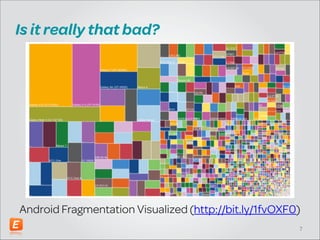
Is it really that bad?

!
!
!
!
!
!

Android Fragmentation Visualized (http://bit.ly/1fvOXF0)
!7
Types of fragmentation
• OS Fragmentation
• OEM Fragmentation
• Hardware Fragmentation

!8
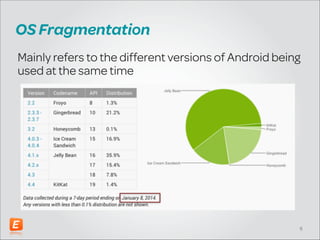
OS Fragmentation
Mainly refers to the different versions of Android being
used at the same time

!9
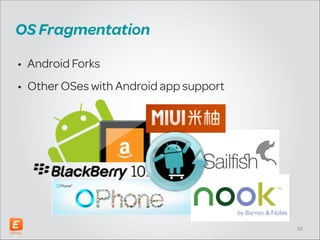
OS Fragmentation
• Android Forks
• Other OSes with Android app support

!10
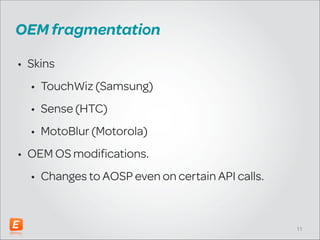
OEM fragmentation
• Skins
• TouchWiz (Samsung)
• Sense (HTC)
• MotoBlur (Motorola)
• OEM OS modifications.
• Changes to AOSP even on certain API calls.

!11
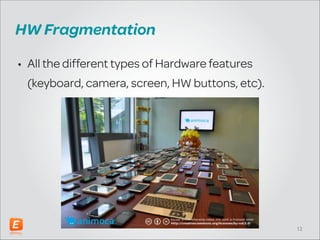
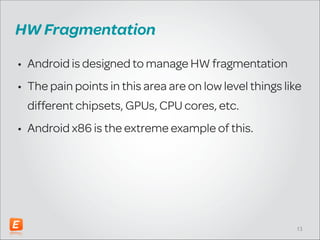
HW Fragmentation
• All the different types of Hardware features
(keyboard, camera, screen, HW buttons, etc).

!12
HW Fragmentation
• Android is designed to manage HW fragmentation
• The pain points in this area are on low level things like
different chipsets, GPUs, CPU cores, etc.
• Android x86 is the extreme example of this.

!13
TOOLS
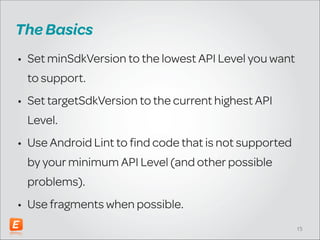
The Basics
• Set minSdkVersion to the lowest API Level you want
to support.
• Set targetSdkVersion to the current highest API
Level.
• Use Android Lint to find code that is not supported
by your minimum API Level (and other possible
problems).
• Use fragments when possible.
!15
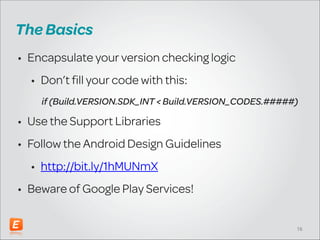
The Basics
• Encapsulate your version checking logic
• Don’t fill your code with this:
if (Build.VERSION.SDK_INT < Build.VERSION_CODES.#####)

• Use the Support Libraries
• Follow the Android Design Guidelines
• http://bit.ly/1hMUNmX
• Beware of Google Play Services!
!16
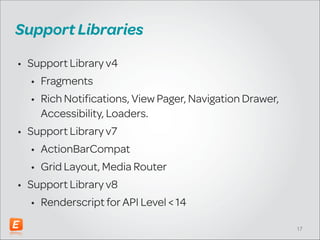
Support Libraries
• Support Library v4
• Fragments
• Rich Notifications, View Pager, Navigation Drawer,
Accessibility, Loaders.
• Support Library v7
• ActionBarCompat
• Grid Layout, Media Router
• Support Library v8
• Renderscript for API Level < 14
!17
3rd-party libraries
• ActionBarSherlock
• NineOldAndroids
• Android Asset Studio
• http://bit.ly/Lo6Xb5
• Square libraries:
• OkHttp, Picasso, Wire, Retrofit
• CommonsWare libraries
• http://bit.ly/1d7NQs0
!18
HTTP Stack
• Avoid using Apache HTTPClient
• Only use if you’re still supporting API Level < 10
• You should be using URLConnection and its
descendants.
• Better yet use OkHttp from Square (fork of
HttpURLConnection).
• You could also use Volley from Google
!19
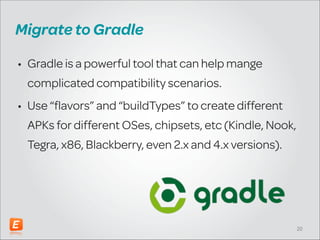
Migrate to Gradle
• Gradle is a powerful tool that can help manage
complicated compatibility scenarios.
• Use “flavors” and “buildTypes” to create different
APKs for different OSes, chipsets, etc (Kindle, Nook,
Tegra, x86, Blackberry, even 2.x and 4.x versions).

!20
BEST PRACTICES
API Levels Recommendations
• Older projects should be supporting API Level ≥ 8
• Recommended would be API Level ≥ 10
• If you’re already using ActionBarSherlock, no need
to migrate to ActionBarCompat.
• New projects should start with minSdkVersion=”14”
• If you absolutely have to support API Level ≥ 8 then
use ActionBarCompat.
!22
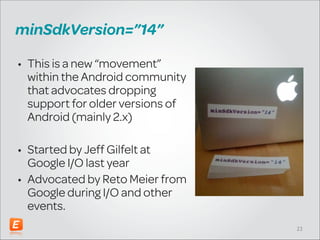
minSdkVersion=”14”
• This is a new “movement”
within the Android community
that advocates dropping
support for older versions of
Android (mainly 2.x)
!

• Started by Jeff Gilfelt at
Google I/O last year
• Advocated by Reto Meier from
Google during I/O and other
events.
!23
Lots of Testing
• Hopefully automated!
• Test on actual devices
• Use tools like JUnit, Espresso, Monkey, Roboelectric,
Robotium, etc.
• Leverage something like Spoon (from Square) to run
your tests on multiple devices.

!24
Leverage analytics
• Measure everything
• Make decisions
based on your data
• Analytics suites:
• Flurry
• MixPanel

!25
Crash reporting
• Get a tool to monitor crashes
• Lots of options, including:
• Crashlytics (Free)
• Crittercism
• HockeyApp
• Some analytics suites provide this as well (like Flurry)
• Worst case, use Google Play Dev Console
!26
Tools from Google
• Multiple APK support.
• Alpha and Beta groups
• Combined with Analytics + Crash reporting
• Beta users can’t post reviews
• Staged rollouts.

!27
Summary
•
•
•
•
•
•
•
•
•

Android fragmentation is massively over hyped!
Be aware of the different types of fragmentation
Use libraries to homogenize feature support.
Start planning on dropping 2.x support (Old projects)
minSdkVersion=”14” on all new projects
Leverage Gradle to create multiple versions if needed.
Do lots of tests (Hopefully automated and on devices)
Use Analytics + Crash reporting
Create a Beta community and use staged rollouts.

• Rinse and repeat 😜
!28
Eventbrite Tech Talk:
Android Development + Design

February 18, 2014 @ 6:30 PM

http://bit.ly/1e7oIrl
We’re hiring!

If you’re interested, let’s talk after the session

eventbrite.com/jobs
Questions?

Download our apps:

eventbrite.com/eventbriteapp
Thank You!
@_juandg
jgomez@eventbrite.com

Beating Android Fragmentation

  • 1.
  • 2.
    Agenda • Intro • Typesof fragmentation • Tools • Best practices • Review • Q&A !2
  • 3.
    Intro Who am I? •Mobile Engineer at Eventbrite • Previously at OneLouder Apps • Android & Python Developer !3
  • 4.
    Eventbrite by theNumbers Over 2 million events
 150 million tickets sold 
 $2 billion in gross ticket sales
 Events in 179 countries
  • 5.
  • 6.
  • 7.
    Is it reallythat bad? ! ! ! ! ! ! Android Fragmentation Visualized (http://bit.ly/1fvOXF0) !7
  • 8.
    Types of fragmentation •OS Fragmentation • OEM Fragmentation • Hardware Fragmentation !8
  • 9.
    OS Fragmentation Mainly refersto the different versions of Android being used at the same time !9
  • 10.
    OS Fragmentation • AndroidForks • Other OSes with Android app support !10
  • 11.
    OEM fragmentation • Skins •TouchWiz (Samsung) • Sense (HTC) • MotoBlur (Motorola) • OEM OS modifications. • Changes to AOSP even on certain API calls. !11
  • 12.
    HW Fragmentation • Allthe different types of Hardware features (keyboard, camera, screen, HW buttons, etc). !12
  • 13.
    HW Fragmentation • Androidis designed to manage HW fragmentation • The pain points in this area are on low level things like different chipsets, GPUs, CPU cores, etc. • Android x86 is the extreme example of this. !13
  • 14.
  • 15.
    The Basics • SetminSdkVersion to the lowest API Level you want to support. • Set targetSdkVersion to the current highest API Level. • Use Android Lint to find code that is not supported by your minimum API Level (and other possible problems). • Use fragments when possible. !15
  • 16.
    The Basics • Encapsulateyour version checking logic • Don’t fill your code with this: if (Build.VERSION.SDK_INT < Build.VERSION_CODES.#####) • Use the Support Libraries • Follow the Android Design Guidelines • http://bit.ly/1hMUNmX • Beware of Google Play Services! !16
  • 17.
    Support Libraries • SupportLibrary v4 • Fragments • Rich Notifications, View Pager, Navigation Drawer, Accessibility, Loaders. • Support Library v7 • ActionBarCompat • Grid Layout, Media Router • Support Library v8 • Renderscript for API Level < 14 !17
  • 18.
    3rd-party libraries • ActionBarSherlock •NineOldAndroids • Android Asset Studio • http://bit.ly/Lo6Xb5 • Square libraries: • OkHttp, Picasso, Wire, Retrofit • CommonsWare libraries • http://bit.ly/1d7NQs0 !18
  • 19.
    HTTP Stack • Avoidusing Apache HTTPClient • Only use if you’re still supporting API Level < 10 • You should be using URLConnection and its descendants. • Better yet use OkHttp from Square (fork of HttpURLConnection). • You could also use Volley from Google !19
  • 20.
    Migrate to Gradle •Gradle is a powerful tool that can help manage complicated compatibility scenarios. • Use “flavors” and “buildTypes” to create different APKs for different OSes, chipsets, etc (Kindle, Nook, Tegra, x86, Blackberry, even 2.x and 4.x versions). !20
  • 21.
  • 22.
    API Levels Recommendations •Older projects should be supporting API Level ≥ 8 • Recommended would be API Level ≥ 10 • If you’re already using ActionBarSherlock, no need to migrate to ActionBarCompat. • New projects should start with minSdkVersion=”14” • If you absolutely have to support API Level ≥ 8 then use ActionBarCompat. !22
  • 23.
    minSdkVersion=”14” • This isa new “movement” within the Android community that advocates dropping support for older versions of Android (mainly 2.x) ! • Started by Jeff Gilfelt at Google I/O last year • Advocated by Reto Meier from Google during I/O and other events. !23
  • 24.
    Lots of Testing •Hopefully automated! • Test on actual devices • Use tools like JUnit, Espresso, Monkey, Roboelectric, Robotium, etc. • Leverage something like Spoon (from Square) to run your tests on multiple devices. !24
  • 25.
    Leverage analytics • Measureeverything • Make decisions based on your data • Analytics suites: • Flurry • MixPanel !25
  • 26.
    Crash reporting • Geta tool to monitor crashes • Lots of options, including: • Crashlytics (Free) • Crittercism • HockeyApp • Some analytics suites provide this as well (like Flurry) • Worst case, use Google Play Dev Console !26
  • 27.
    Tools from Google •Multiple APK support. • Alpha and Beta groups • Combined with Analytics + Crash reporting • Beta users can’t post reviews • Staged rollouts. !27
  • 28.
    Summary • • • • • • • • • Android fragmentation ismassively over hyped! Be aware of the different types of fragmentation Use libraries to homogenize feature support. Start planning on dropping 2.x support (Old projects) minSdkVersion=”14” on all new projects Leverage Gradle to create multiple versions if needed. Do lots of tests (Hopefully automated and on devices) Use Analytics + Crash reporting Create a Beta community and use staged rollouts. • Rinse and repeat 😜 !28
  • 29.
    Eventbrite Tech Talk: AndroidDevelopment + Design February 18, 2014 @ 6:30 PM http://bit.ly/1e7oIrl
  • 30.
    We’re hiring! If you’reinterested, let’s talk after the session eventbrite.com/jobs
  • 31.
  • 32.