MOBILE IN THE CLOUD
WITH DIAMONDS

2013

2013
Mobile & Cloud

Content

Bicycles we ride
Essential frameworks
Advanced frameworks
Wondertools
You don't test me
Backends
Imagination
mobile and the internets
m
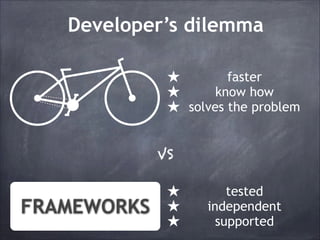
Developer’s dilemma
★
★
★

faster
know how
solves the problem

VS

FRAMEWORKS

★
★
★

tested
independent
supported
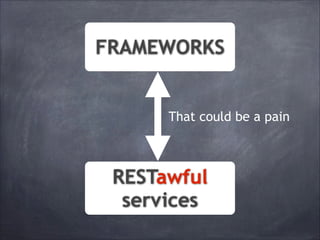
FRAMEWORKS

That could be a pain

RESTawful
services
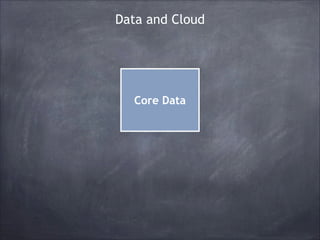
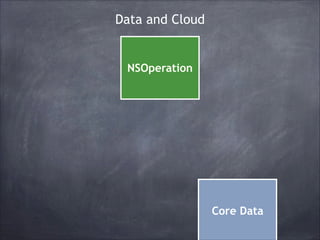
Data and Cloud

Core Data
Data and Cloud

NSOperation

Core Data
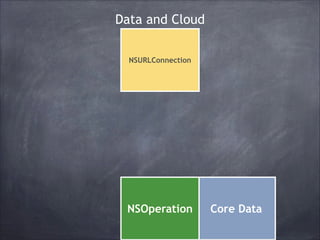
Data and Cloud
NSURLConnection

NSOperation

Core Data
Data and Cloud
AFNetworking

NSURL *url = [NSURL URLWithString:@"https://alpha-api.app.net/
stream/0/posts/stream/global"];!
NSURLRequest *request = [NSURLRequest requestWithURL:url];!
AFJSONRequestOperation *operation = [AFJSONRequestOperation
JSONRequestOperationWithRequest:request success:^(NSURLRequest
*request, NSHTTPURLResponse *response, id JSON) {!
NSLog(@"App.net Global Stream: %@", JSON);!
} failure:nil];!
[operation start];

NSURLConnection

NSOperation

Core Data
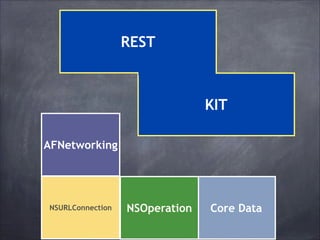
Data and Cloud

REST

KIT
AFNetworking

NSURLConnection

NSOperation

Core Data
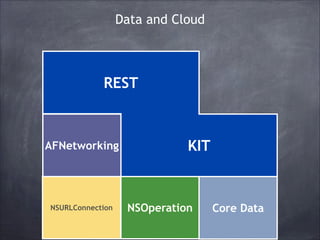
Data and Cloud

REST

AFNetworking

NSURLConnection

KIT

NSOperation

Core Data
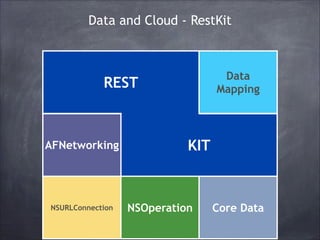
Data and Cloud - RestKit

Data
Mapping

REST

AFNetworking

NSURLConnection

KIT

NSOperation

Core Data
RestKit example
@interface RKTweet NSObject!
@interface RKTweet : : NSObject!
@property (nonatomic, copy) NSNumber *userID;!
@property (nonatomic, copy) NSString *username;!
@property (nonatomic, copy) NSString *text;!
@property (nonatomic, copy) NSString *username;!
@property (nonatomic, copy) NSString *text;!
@end!
@end!
!
RKObjectMapping *mapping = [RKObjectMapping mappingForClass:[RKTweet
class]];!
[mapping addAttributeMappingsFromDictionary:@{!
@"user.name":
@"username",!
@"user.id":
@"userID",!
@"text":
@"text"!
}];!
RKResponseDescriptor *responseDescriptor = [RKResponseDescriptor
responseDescriptorWithMapping:mapping pathPattern:nil keyPath:nil
statusCodes:nil];!
NSURL *url = [NSURL URLWithString:@"http://api.twitter.com/1/statuses/
public_timeline.json"];!
NSURLRequest *request = [NSURLRequest requestWithURL:url];!
RKObjectRequestOperation *operation = [[RKObjectRequestOperation alloc]
initWithRequest:request responseDescriptors:@[responseDescriptor]];!
[operation setCompletionBlockWithSuccess:^(RKObjectRequestOperation
*operation, RKMappingResult *result) {!
NSLog(@"The public timeline Tweets: %@", [result array]);!
} failure:nil];!
[operation start];
RestKit example
@interface RKTweet : NSObject!
@property (nonatomic, copy) NSNumber *userID;!
@property (nonatomic, copy) NSString *username;!
@property (nonatomic, copy) NSString *text;!
@end!

!
RKObjectMapping *mapping = [RKObjectMapping mappingForClass:[RKTweet class]];!
RKObjectMapping *mapping = [RKObjectMapping mappingForClass:
[mapping class]];!
[RKTweet addAttributeMappingsFromDictionary:@{!
@"user.name":
@"username",!
[mapping addAttributeMappingsFromDictionary:@{!
@"user.id":
@"userID",!
@"user.name": @"text"!
@"username",!
@"text":
@"userID",!
}];! @"user.id":
!
@"text":
@"text"!
RKResponseDescriptor *responseDescriptor = [RKResponseDescriptor
}];
responseDescriptorWithMapping:mapping pathPattern:nil keyPath:nil
statusCodes:nil];!

!

NSURL *url = [NSURL URLWithString:@"http://api.twitter.com/1/statuses/
public_timeline.json"];!
NSURLRequest *request = [NSURLRequest requestWithURL:url];!
RKObjectRequestOperation *operation = [[RKObjectRequestOperation alloc]
initWithRequest:request responseDescriptors:@[responseDescriptor]];!
!
[operation setCompletionBlockWithSuccess:^(RKObjectRequestOperation
*operation, RKMappingResult *result) {!
NSLog(@"The public timeline Tweets: %@", [result array]);!
} failure:nil];!
[operation start];
RestKit example
@interface RKTweet : NSObject!
@property (nonatomic, copy) NSNumber *userID;!
@property (nonatomic, copy) NSString *username;!
@property (nonatomic, copy) NSString *text;!
@end!
RKObjectMapping *mapping = [RKObjectMapping mappingForClass:[RKTweet
class]];!
[mapping addAttributeMappingsFromDictionary:@{!
@"user.name":
@"username",!
@"user.id":
@"userID",!
@"text":
@"text"!
}];!
RKResponseDescriptor *responseDescriptor = [RKResponseDescriptor
responseDescriptorWithMapping:mapping pathPattern:nil keyPath:nil
statusCodes:nil];!
statusCodes:nil];! URLWithString:@"http://api.twitter.com/1/statuses/
NSURL *url = [NSURL
public_timeline.json"];!
NSURL *url = [NSURL URLWithString:@"http://api.twitter.com/1/
NSURLRequest *request = [NSURLRequest
statuses/public_timeline.json"];! requestWithURL:url];!
RKObjectRequestOperation [NSURLRequest requestWithURL:url];!
NSURLRequest *request = *operation = [[RKObjectRequestOperation alloc]
initWithRequest:request responseDescriptors:@[responseDescriptor]];!
RKObjectRequestOperation *operation = [[RKObjectRequestOperation
[operation setCompletionBlockWithSuccess:^(RKObjectRequestOperation
alloc] initWithRequest:request
*operation, RKMappingResult *result) {!
responseDescriptors:@[responseDescriptor]];
NSLog(@"The public timeline Tweets: %@", [result array]);!
} failure:nil];!
[operation start];
RestKit example
@interface RKTweet : NSObject!
@property (nonatomic, copy) NSNumber *userID;!
@property (nonatomic, copy) NSString *username;!
@property (nonatomic, copy) NSString *text;!
@end!
RKObjectMapping *mapping = [RKObjectMapping mappingForClass:[RKTweet
class]];!
[mapping addAttributeMappingsFromDictionary:@{!
@"user.name":
@"username",!
@"user.id":
@"userID",!
@"text":
@"text"!
}];!
RKResponseDescriptor *responseDescriptor = [RKResponseDescriptor
responseDescriptorWithMapping:mapping pathPattern:nil keyPath:nil
statusCodes:nil];!
NSURL *url = [NSURL URLWithString:@"http://api.twitter.com/1/statuses/
public_timeline.json"];!
NSURLRequest *request = [NSURLRequest requestWithURL:url];!
RKObjectRequestOperation *operation = [[RKObjectRequestOperation alloc]
initWithRequest:request responseDescriptors:@[responseDescriptor]];!
[operation setCompletionBlockWithSuccess:^(RKObjectRequestOperation
[operation setCompletionBlockWithSuccess:^(RKObjectRequestOperation
*operation, RKMappingResult *result) {!
NSLog(@"The public timeline Tweets: %@", [result array]);!
} failure:nil];!
} failure:nil];!
[operation start];
[operation start];
RestKit example
@interface RKTweet : NSObject!
@property (nonatomic, copy) NSNumber *userID;!
@property (nonatomic, copy) NSString *username;!
@property (nonatomic, copy) NSString *text;!
@end!
RKObjectMapping *mapping = [RKObjectMapping mappingForClass:[RKTweet
class]];!
[mapping addAttributeMappingsFromDictionary:@{!
@"user.name":
@"username",!
@"user.id":
@"userID",!
@"text":
@"text"!
}];!
RKResponseDescriptor *responseDescriptor = [RKResponseDescriptor
responseDescriptorWithMapping:mapping pathPattern:nil keyPath:nil
statusCodes:nil];!
NSURL *url = [NSURL URLWithString:@"http://api.twitter.com/1/statuses/
public_timeline.json"];!
NSURLRequest *request = [NSURLRequest requestWithURL:url];!
RKObjectRequestOperation *operation = [[RKObjectRequestOperation alloc]
initWithRequest:request responseDescriptors:@[responseDescriptor]];!
[operation setCompletionBlockWithSuccess:^(RKObjectRequestOperation
*operation, RKMappingResult *result) {!
NSLog(@"The public timeline Tweets: %@", [result array]);!
} failure:nil];!
[operation start];
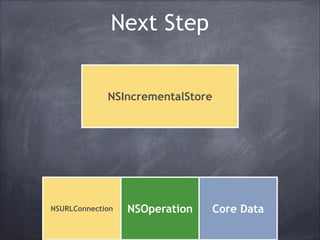
Next Step
NSIncrementalStore

NSURLConnection

NSOperation

Core Data
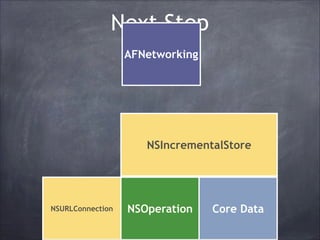
Next Step
AFNetworking

NSIncrementalStore

NSURLConnection

NSOperation

Core Data
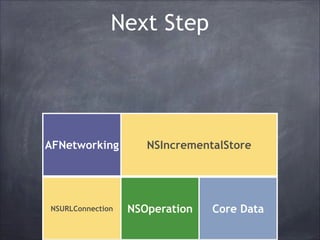
Next Step

AFNetworking

NSURLConnection

NSIncrementalStore

NSOperation

Core Data
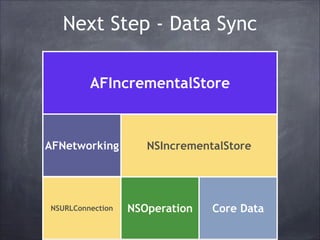
Next Step - Data Sync
AFIncrementalStore

AFNetworking

NSURLConnection

NSIncrementalStore

NSOperation

Core Data
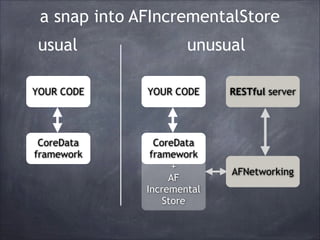
a snap into AFIncrementalStore
usual

unusual

YOUR CODE

YOUR CODE

RESTful server

CoreData
framework

CoreData
framework
+
AF
Incremental
Store

AFNetworking
working with AFIncrementalStore
is the same as with CoreData
@interface
TasksViewController()<NSFetchedResultsControllerDelegate>!
@property NSFetchedResultsController *fetchedResultsController;!
@end!
!
- (UITableViewCell *)tableView:(UITableView *)tableView!
cellForRowAtIndexPath:(NSIndexPath *)indexPath !
{!

...!
[self configureCell:cell forRowAtIndexPath:indexPath];!
return cell;!
}!
!
- (void)configureCell:(UITableViewCell *)cell !
forRowAtIndexPath:(NSIndexPath *)indexPath !
{!
NSManagedObject *managedObject = [self.fetchedResultsController
objectAtIndexPath:indexPath];!
cell.textLabel.text = [managedObject valueForKey:@"text"];!
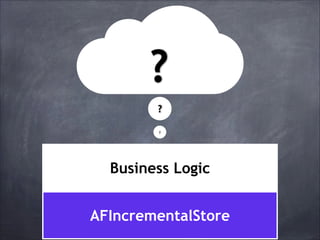
?
?
?

Business Logic
AFIncrementalStore
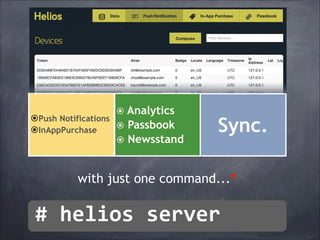
⦿Push Notifications
⦿InAppPurchase

⦿ Analytics
⦿ Passbook
⦿ Newsstand

Sync.

with just one command...*

#	
  helios	
  server
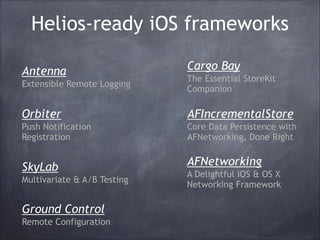
Helios-ready iOS frameworks
Antenna

Cargo Bay

Extensible Remote Logging

The Essential StoreKit
Companion

Orbiter

AFIncrementalStore

Push Notification
Registration

Core Data Persistence with
AFNetworking, Done Right

SkyLab
Multivariate & A/B Testing

Ground Control
Remote Configuration

AFNetworking
A Delightful iOS & OS X
Networking Framework
Cocoa Pods
http://cocoapods.org
$ [sudo] gem install cocoapods
$ pod setup
myproject$ pod install
Podfile example:
platform :ios, '7.0'
pod 'AFNetworking', '~> 2.0.3’
pod 'ICViewPager', '~> 1.5’

RestKit
AFNetworking
AFIncrementalStore
AFAmazonS3Client
...
https://github.com/
CocoaPods/Specs
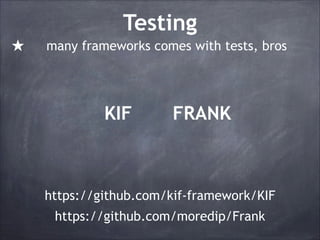
Testing
★

many frameworks comes with tests, bros

KIF

FRANK

https://github.com/kif-framework/KIF
https://github.com/moredip/Frank
KIF
★
★
★

leveraging the accessibility attributes
conducted synchronously in the main thread
uses undocumented Apple APIs

- (void)testSuccessfulLogin!
{!
[tester enterText:@"user@example.com"
intoViewWithAccessibilityLabel:@"Login User Name"];!
[tester enterText:@"thisismypassword"
intoViewWithAccessibilityLabel:@"Login Password"];!
[tester tapViewWithAccessibilityLabel:@"Log In"];!
!
// Verify that the login succeeded!
[tester waitForTappableViewWithAccessibilityLabel:@"Welcome"];!
}
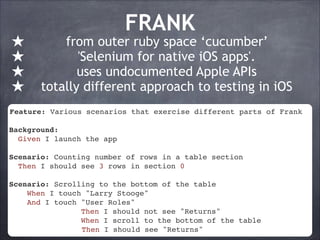
★
★
★
★

FRANK

from outer ruby space ‘cucumber’
'Selenium for native iOS apps'.
uses undocumented Apple APIs
totally different approach to testing in iOS

Feature: Various scenarios that exercise different parts of Frank!
!
Background:!
Given I launch the app !
!
Scenario: Counting number of rows in a table section!
Then I should see 3 rows in section 0!
!
Scenario: Scrolling to the bottom of the table !
When I touch "Larry Stooge"!
And I touch "User Roles"!
Then I should not see "Returns"!
When I scroll to the bottom of the table!
Then I should see "Returns"
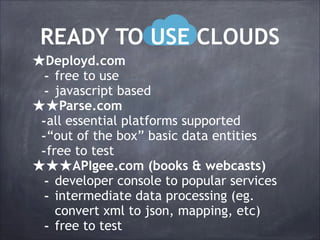
READY TO USE CLOUDS
★Deployd.com
- free to use
- javascript based
★★Parse.com
-all essential platforms supported
-“out of the box” basic data entities
-free to test
★★★APIgee.com (books & webcasts)
- developer console to popular services
- intermediate data processing (eg.
-

convert xml to json, mapping, etc)
free to test
Oleg.Shanyuk@gmail.com
@gelosi - http://obrij.com

AFNetworking, AFIncrementalStore, AF***
https://github.com/helios-framework/helios
RESTKit - https://github.com/RestKit/RestKit
CocoaPods - http://cocoapods.org
Follow: @mattt, @soffes, @gruber, @edog1203

mobile in the cloud with diamonds. improved.

  • 1.
    MOBILE IN THECLOUD WITH DIAMONDS 2013 2013
  • 3.
    Mobile & Cloud Content Bicycleswe ride Essential frameworks Advanced frameworks Wondertools You don't test me Backends Imagination
  • 4.
    mobile and theinternets m
  • 5.
    Developer’s dilemma ★ ★ ★ faster know how solvesthe problem VS FRAMEWORKS ★ ★ ★ tested independent supported
  • 6.
    FRAMEWORKS That could bea pain RESTawful services
  • 7.
  • 8.
  • 9.
  • 10.
    Data and Cloud AFNetworking NSURL*url = [NSURL URLWithString:@"https://alpha-api.app.net/ stream/0/posts/stream/global"];! NSURLRequest *request = [NSURLRequest requestWithURL:url];! AFJSONRequestOperation *operation = [AFJSONRequestOperation JSONRequestOperationWithRequest:request success:^(NSURLRequest *request, NSHTTPURLResponse *response, id JSON) {! NSLog(@"App.net Global Stream: %@", JSON);! } failure:nil];! [operation start]; NSURLConnection NSOperation Core Data
  • 11.
  • 12.
  • 13.
    Data and Cloud- RestKit Data Mapping REST AFNetworking NSURLConnection KIT NSOperation Core Data
  • 14.
    RestKit example @interface RKTweetNSObject! @interface RKTweet : : NSObject! @property (nonatomic, copy) NSNumber *userID;! @property (nonatomic, copy) NSNumber *userID;! @property (nonatomic, copy) NSString *username;! @property (nonatomic, copy) NSString *text;! @property (nonatomic, copy) NSString *username;! @property (nonatomic, copy) NSString *text;! @end! @end! ! RKObjectMapping *mapping = [RKObjectMapping mappingForClass:[RKTweet class]];! [mapping addAttributeMappingsFromDictionary:@{! @"user.name": @"username",! @"user.id": @"userID",! @"text": @"text"! }];! RKResponseDescriptor *responseDescriptor = [RKResponseDescriptor responseDescriptorWithMapping:mapping pathPattern:nil keyPath:nil statusCodes:nil];! NSURL *url = [NSURL URLWithString:@"http://api.twitter.com/1/statuses/ public_timeline.json"];! NSURLRequest *request = [NSURLRequest requestWithURL:url];! RKObjectRequestOperation *operation = [[RKObjectRequestOperation alloc] initWithRequest:request responseDescriptors:@[responseDescriptor]];! [operation setCompletionBlockWithSuccess:^(RKObjectRequestOperation *operation, RKMappingResult *result) {! NSLog(@"The public timeline Tweets: %@", [result array]);! } failure:nil];! [operation start];
  • 15.
    RestKit example @interface RKTweet: NSObject! @property (nonatomic, copy) NSNumber *userID;! @property (nonatomic, copy) NSString *username;! @property (nonatomic, copy) NSString *text;! @end! ! RKObjectMapping *mapping = [RKObjectMapping mappingForClass:[RKTweet class]];! RKObjectMapping *mapping = [RKObjectMapping mappingForClass: [mapping class]];! [RKTweet addAttributeMappingsFromDictionary:@{! @"user.name": @"username",! [mapping addAttributeMappingsFromDictionary:@{! @"user.id": @"userID",! @"user.name": @"text"! @"username",! @"text": @"userID",! }];! @"user.id": ! @"text": @"text"! RKResponseDescriptor *responseDescriptor = [RKResponseDescriptor }]; responseDescriptorWithMapping:mapping pathPattern:nil keyPath:nil statusCodes:nil];! ! NSURL *url = [NSURL URLWithString:@"http://api.twitter.com/1/statuses/ public_timeline.json"];! NSURLRequest *request = [NSURLRequest requestWithURL:url];! RKObjectRequestOperation *operation = [[RKObjectRequestOperation alloc] initWithRequest:request responseDescriptors:@[responseDescriptor]];! ! [operation setCompletionBlockWithSuccess:^(RKObjectRequestOperation *operation, RKMappingResult *result) {! NSLog(@"The public timeline Tweets: %@", [result array]);! } failure:nil];! [operation start];
  • 16.
    RestKit example @interface RKTweet: NSObject! @property (nonatomic, copy) NSNumber *userID;! @property (nonatomic, copy) NSString *username;! @property (nonatomic, copy) NSString *text;! @end! RKObjectMapping *mapping = [RKObjectMapping mappingForClass:[RKTweet class]];! [mapping addAttributeMappingsFromDictionary:@{! @"user.name": @"username",! @"user.id": @"userID",! @"text": @"text"! }];! RKResponseDescriptor *responseDescriptor = [RKResponseDescriptor RKResponseDescriptor *responseDescriptor = [RKResponseDescriptor responseDescriptorWithMapping:mapping pathPattern:nil keyPath:nil responseDescriptorWithMapping:mapping pathPattern:nil keyPath:nil statusCodes:nil];! statusCodes:nil];! URLWithString:@"http://api.twitter.com/1/statuses/ NSURL *url = [NSURL public_timeline.json"];! NSURL *url = [NSURL URLWithString:@"http://api.twitter.com/1/ NSURLRequest *request = [NSURLRequest statuses/public_timeline.json"];! requestWithURL:url];! RKObjectRequestOperation [NSURLRequest requestWithURL:url];! NSURLRequest *request = *operation = [[RKObjectRequestOperation alloc] initWithRequest:request responseDescriptors:@[responseDescriptor]];! RKObjectRequestOperation *operation = [[RKObjectRequestOperation [operation setCompletionBlockWithSuccess:^(RKObjectRequestOperation alloc] initWithRequest:request *operation, RKMappingResult *result) {! responseDescriptors:@[responseDescriptor]]; NSLog(@"The public timeline Tweets: %@", [result array]);! } failure:nil];! [operation start];
  • 17.
    RestKit example @interface RKTweet: NSObject! @property (nonatomic, copy) NSNumber *userID;! @property (nonatomic, copy) NSString *username;! @property (nonatomic, copy) NSString *text;! @end! RKObjectMapping *mapping = [RKObjectMapping mappingForClass:[RKTweet class]];! [mapping addAttributeMappingsFromDictionary:@{! @"user.name": @"username",! @"user.id": @"userID",! @"text": @"text"! }];! RKResponseDescriptor *responseDescriptor = [RKResponseDescriptor responseDescriptorWithMapping:mapping pathPattern:nil keyPath:nil statusCodes:nil];! NSURL *url = [NSURL URLWithString:@"http://api.twitter.com/1/statuses/ public_timeline.json"];! NSURLRequest *request = [NSURLRequest requestWithURL:url];! RKObjectRequestOperation *operation = [[RKObjectRequestOperation alloc] initWithRequest:request responseDescriptors:@[responseDescriptor]];! [operation setCompletionBlockWithSuccess:^(RKObjectRequestOperation [operation setCompletionBlockWithSuccess:^(RKObjectRequestOperation *operation, RKMappingResult *result) {! *operation, RKMappingResult *result) {! NSLog(@"The public timeline Tweets: %@", [result array]);! NSLog(@"The public timeline Tweets: %@", [result array]);! } failure:nil];! } failure:nil];! [operation start]; [operation start];
  • 18.
    RestKit example @interface RKTweet: NSObject! @property (nonatomic, copy) NSNumber *userID;! @property (nonatomic, copy) NSString *username;! @property (nonatomic, copy) NSString *text;! @end! RKObjectMapping *mapping = [RKObjectMapping mappingForClass:[RKTweet class]];! [mapping addAttributeMappingsFromDictionary:@{! @"user.name": @"username",! @"user.id": @"userID",! @"text": @"text"! }];! RKResponseDescriptor *responseDescriptor = [RKResponseDescriptor responseDescriptorWithMapping:mapping pathPattern:nil keyPath:nil statusCodes:nil];! NSURL *url = [NSURL URLWithString:@"http://api.twitter.com/1/statuses/ public_timeline.json"];! NSURLRequest *request = [NSURLRequest requestWithURL:url];! RKObjectRequestOperation *operation = [[RKObjectRequestOperation alloc] initWithRequest:request responseDescriptors:@[responseDescriptor]];! [operation setCompletionBlockWithSuccess:^(RKObjectRequestOperation *operation, RKMappingResult *result) {! NSLog(@"The public timeline Tweets: %@", [result array]);! } failure:nil];! [operation start];
  • 19.
  • 20.
  • 21.
  • 22.
    Next Step -Data Sync AFIncrementalStore AFNetworking NSURLConnection NSIncrementalStore NSOperation Core Data
  • 23.
    a snap intoAFIncrementalStore usual unusual YOUR CODE YOUR CODE RESTful server CoreData framework CoreData framework + AF Incremental Store AFNetworking
  • 24.
    working with AFIncrementalStore isthe same as with CoreData @interface TasksViewController()<NSFetchedResultsControllerDelegate>! @property NSFetchedResultsController *fetchedResultsController;! @end! ! - (UITableViewCell *)tableView:(UITableView *)tableView! cellForRowAtIndexPath:(NSIndexPath *)indexPath ! {! ...! [self configureCell:cell forRowAtIndexPath:indexPath];! return cell;! }! ! - (void)configureCell:(UITableViewCell *)cell ! forRowAtIndexPath:(NSIndexPath *)indexPath ! {! NSManagedObject *managedObject = [self.fetchedResultsController objectAtIndexPath:indexPath];! cell.textLabel.text = [managedObject valueForKey:@"text"];!
  • 25.
  • 26.
    ⦿Push Notifications ⦿InAppPurchase ⦿ Analytics ⦿Passbook ⦿ Newsstand Sync. with just one command...* #  helios  server
  • 27.
    Helios-ready iOS frameworks Antenna CargoBay Extensible Remote Logging The Essential StoreKit Companion Orbiter AFIncrementalStore Push Notification Registration Core Data Persistence with AFNetworking, Done Right SkyLab Multivariate & A/B Testing Ground Control Remote Configuration AFNetworking A Delightful iOS & OS X Networking Framework
  • 28.
    Cocoa Pods http://cocoapods.org $ [sudo]gem install cocoapods $ pod setup myproject$ pod install Podfile example: platform :ios, '7.0' pod 'AFNetworking', '~> 2.0.3’ pod 'ICViewPager', '~> 1.5’ RestKit AFNetworking AFIncrementalStore AFAmazonS3Client ... https://github.com/ CocoaPods/Specs
  • 29.
    Testing ★ many frameworks comeswith tests, bros KIF FRANK https://github.com/kif-framework/KIF https://github.com/moredip/Frank
  • 30.
    KIF ★ ★ ★ leveraging the accessibilityattributes conducted synchronously in the main thread uses undocumented Apple APIs - (void)testSuccessfulLogin! {! [tester enterText:@"user@example.com" intoViewWithAccessibilityLabel:@"Login User Name"];! [tester enterText:@"thisismypassword" intoViewWithAccessibilityLabel:@"Login Password"];! [tester tapViewWithAccessibilityLabel:@"Log In"];! ! // Verify that the login succeeded! [tester waitForTappableViewWithAccessibilityLabel:@"Welcome"];! }
  • 31.
    ★ ★ ★ ★ FRANK from outer rubyspace ‘cucumber’ 'Selenium for native iOS apps'. uses undocumented Apple APIs totally different approach to testing in iOS Feature: Various scenarios that exercise different parts of Frank! ! Background:! Given I launch the app ! ! Scenario: Counting number of rows in a table section! Then I should see 3 rows in section 0! ! Scenario: Scrolling to the bottom of the table ! When I touch "Larry Stooge"! And I touch "User Roles"! Then I should not see "Returns"! When I scroll to the bottom of the table! Then I should see "Returns"
  • 32.
    READY TO USECLOUDS ★Deployd.com - free to use - javascript based ★★Parse.com -all essential platforms supported -“out of the box” basic data entities -free to test ★★★APIgee.com (books & webcasts) - developer console to popular services - intermediate data processing (eg. - convert xml to json, mapping, etc) free to test
  • 33.
    Oleg.Shanyuk@gmail.com @gelosi - http://obrij.com AFNetworking,AFIncrementalStore, AF*** https://github.com/helios-framework/helios RESTKit - https://github.com/RestKit/RestKit CocoaPods - http://cocoapods.org Follow: @mattt, @soffes, @gruber, @edog1203