Mission
Impossible
Malware Edition The Tools Strike Back
Decoding and Understanding Malware,
Trojans, Bots, and Ransomware
About Me
• Mohammed Danish Amber
• Project Manager (Cognizant)
• Security Researcher | IOT
Hacker | OSS Contributor
• www.mohammeddanishamber
.com
• me@mohammeddanishamber.
com
Your Mission,
Should You
Choose to
Accept It…
“Good morning, Agent. Your mission, should you choose to
accept it, is to uncover and neutralize a set of the most dangerous
digital threats: a malware, a trojan, a bot, and ransomware.”
“To complete this mission, you’ll be equipped with the finest
online tools in the field: Virus Total, Malware Bazaar, and Any Run.
Each tool offers a unique perspective, from rapid static scans to
real-time behavioral analysis in a secure sandbox environment.”
“Your objective is to decode, analyze, and understand each
threat’s behavior and tactics to stop their digital mayhem.”
“This mission will be perilous—malware often hides behind
complex disguises, Trojans mislead, bots infiltrate, and
ransomware seeks to take hostages. However, with the right tools
and a sharp eye, you will uncover their secrets and bring them to
light.”
“As always, should you or any member of your team be
compromised, the cybersecurity community will disavow all
knowledge of your actions.”
Good luck, Agent. The cyber world depends on you.
Introduction to
Malware Analysis
• What is Malware?
• Malware, short for "malicious
software," is any program or code
intentionally designed to harm,
exploit, or otherwise compromise
devices, networks, or data.
• Importance of Malware Analysis
• Malware analysis is crucial for
understanding, detecting, and
mitigating cyber threats. By analyzing
malware, security professionals can
determine how it operates, what it
targets, and the potential damage it
can cause. This knowledge helps in
creating effective defenses, updating
antivirus definitions, and developing
patches or workarounds to protect
against similar attacks.
Types of Analysis
• Static
• Examining the malware without running it, often
by analyzing the code or structure. This can reveal
file details, embedded URLs, or malicious scripts,
helping identify the malware’s capabilities with
minimal risk.
• Dynamic
• Running the malware in a controlled environment
(like a sandbox) to observe its behavior in real-
time. This helps uncover actions like network
connections, file modifications, and registry
changes, providing insights into its impact on a
system.
• Hybrid
• Combining static and dynamic techniques to
leverage the strengths of both. Hybrid analysis
provides a comprehensive view, enabling security
teams to understand a malware’s structure and
behavior for a more effective response.
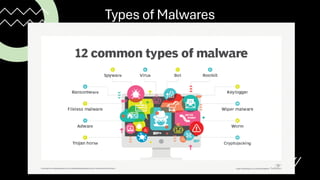
Types of Malwares
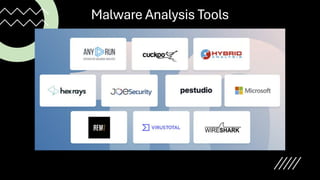
Malware Analysis Tools
Tool 1 – VirusTotal
• Static Analysis: File, URL, IP, and
Domain Scanning
• AV Detection Engines
• VirusTotal Graph: Relationships
and Behaviors
• Demo
• Analyze a top malware sample
(e.g., Emotet malware) using
VirusTotal.
• How to interpret the AV
detection rates and file
metadata.
Tool 2 – Malware
Bazaar
• Malware Sample Repository
• Threat Intelligence Sharing
• Searching by Hash, YARA Rules,
and Family
• DEMO
• Analyze a trojan sample (e.g.,
Zeus Trojan) using Malware
Bazaar.
• How to gather additional
intelligence from the metadata
and YARA rules.
Tool 3 – Any Run
• Dynamic Analysis in a Virtual Sandbox
• Real-Time Execution of Files
• Behavioral Analysis: Processes, Network,
and System Changes
• DEMO
• how to run a malware sample in Any
Run’s interactive sandbox.
• Observe file behavior (e.g., process
creation, network calls).
• Analyze a botnet sample (e.g., Mirai
botnet) in Any Run.
• how to track its network activity and
understand its propagation behavior.
Practical
Analysis –
Ransomware
• Decrypting a Ransomware Sample
(e.g., WannaCry)
• Combining VirusTotal, Malware
Bazaar, and Any Run for a complete
analysis
• Identifying encryption behavior and
ransom notes
• DEMO
• Run the ransomware sample in
Any Run to observe encryption
behavior.
Combining Tools for
Comprehensive
Analysis
• Start with VirusTotal for a
quick overview and detection.
• Use Malware Bazaar for
further threat intelligence and
related samples.
• Conduct deep behavioral
analysis in Any Run to
understand real-time impact.
Q & A
MISSION
ACCOMPISHED

Mission Impossible - Malware Analysis.pdf

  • 1.
    Mission Impossible Malware Edition TheTools Strike Back Decoding and Understanding Malware, Trojans, Bots, and Ransomware
  • 2.
    About Me • MohammedDanish Amber • Project Manager (Cognizant) • Security Researcher | IOT Hacker | OSS Contributor • www.mohammeddanishamber .com • me@mohammeddanishamber. com
  • 3.
    Your Mission, Should You Chooseto Accept It… “Good morning, Agent. Your mission, should you choose to accept it, is to uncover and neutralize a set of the most dangerous digital threats: a malware, a trojan, a bot, and ransomware.” “To complete this mission, you’ll be equipped with the finest online tools in the field: Virus Total, Malware Bazaar, and Any Run. Each tool offers a unique perspective, from rapid static scans to real-time behavioral analysis in a secure sandbox environment.” “Your objective is to decode, analyze, and understand each threat’s behavior and tactics to stop their digital mayhem.” “This mission will be perilous—malware often hides behind complex disguises, Trojans mislead, bots infiltrate, and ransomware seeks to take hostages. However, with the right tools and a sharp eye, you will uncover their secrets and bring them to light.” “As always, should you or any member of your team be compromised, the cybersecurity community will disavow all knowledge of your actions.” Good luck, Agent. The cyber world depends on you.
  • 4.
    Introduction to Malware Analysis •What is Malware? • Malware, short for "malicious software," is any program or code intentionally designed to harm, exploit, or otherwise compromise devices, networks, or data. • Importance of Malware Analysis • Malware analysis is crucial for understanding, detecting, and mitigating cyber threats. By analyzing malware, security professionals can determine how it operates, what it targets, and the potential damage it can cause. This knowledge helps in creating effective defenses, updating antivirus definitions, and developing patches or workarounds to protect against similar attacks.
  • 5.
    Types of Analysis •Static • Examining the malware without running it, often by analyzing the code or structure. This can reveal file details, embedded URLs, or malicious scripts, helping identify the malware’s capabilities with minimal risk. • Dynamic • Running the malware in a controlled environment (like a sandbox) to observe its behavior in real- time. This helps uncover actions like network connections, file modifications, and registry changes, providing insights into its impact on a system. • Hybrid • Combining static and dynamic techniques to leverage the strengths of both. Hybrid analysis provides a comprehensive view, enabling security teams to understand a malware’s structure and behavior for a more effective response.
  • 6.
  • 7.
  • 8.
    Tool 1 –VirusTotal • Static Analysis: File, URL, IP, and Domain Scanning • AV Detection Engines • VirusTotal Graph: Relationships and Behaviors • Demo • Analyze a top malware sample (e.g., Emotet malware) using VirusTotal. • How to interpret the AV detection rates and file metadata.
  • 9.
    Tool 2 –Malware Bazaar • Malware Sample Repository • Threat Intelligence Sharing • Searching by Hash, YARA Rules, and Family • DEMO • Analyze a trojan sample (e.g., Zeus Trojan) using Malware Bazaar. • How to gather additional intelligence from the metadata and YARA rules.
  • 10.
    Tool 3 –Any Run • Dynamic Analysis in a Virtual Sandbox • Real-Time Execution of Files • Behavioral Analysis: Processes, Network, and System Changes • DEMO • how to run a malware sample in Any Run’s interactive sandbox. • Observe file behavior (e.g., process creation, network calls). • Analyze a botnet sample (e.g., Mirai botnet) in Any Run. • how to track its network activity and understand its propagation behavior.
  • 11.
    Practical Analysis – Ransomware • Decryptinga Ransomware Sample (e.g., WannaCry) • Combining VirusTotal, Malware Bazaar, and Any Run for a complete analysis • Identifying encryption behavior and ransom notes • DEMO • Run the ransomware sample in Any Run to observe encryption behavior.
  • 12.
    Combining Tools for Comprehensive Analysis •Start with VirusTotal for a quick overview and detection. • Use Malware Bazaar for further threat intelligence and related samples. • Conduct deep behavioral analysis in Any Run to understand real-time impact.
  • 13.
  • 14.