MICROSOFT OFFICE: A POWERFUL
SUITE FOR PRODUCTIVITY
WHAT IS MS?
• Microsoft is a company/corporation in USA.
• Bill Gates is the owner of Microsoft Company.
OVERVIEW OF MICROSOFT OFFICE
•Microsoft Office is a suite of productivity software
applications developed by Microsoft. It includes programs such
as Word, Excel, PowerPoint, Outlook, Access, and OneNote,
among others. These applications are widely used for creating
documents, spreadsheets, presentations, emails, databases, and
note-taking.
IMPORTANCE OF MICROSOFT
OFFICE IN PROFESSIONAL AND
PERSONAL SETTINGS
MICROSOFT OFFICE IS WIDELY USED IN BOTH PROFESSIONAL AND PERSONAL
SETTINGS FOR VARIOUS TASKS SUCH AS WRITING REPORTS, CREATING
PRESENTATIONS, MANAGING DATA, COMMUNICATING VIA EMAIL, AND ORGANIZING
INFORMATION. ITS VERSATILITY AND USER-FRIENDLY INTERFACE MAKE IT AN ESSENTIAL
TOOL FOR INDIVIDUALS AND ORGANIZATIONS TO IMPROVE PRODUCTIVITY AND
EFFICIENCY.
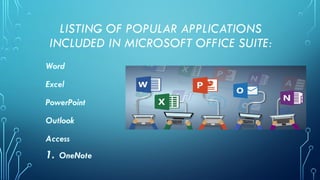
LISTING OF POPULAR APPLICATIONS
INCLUDED IN MICROSOFT OFFICE SUITE:
Word
Excel
PowerPoint
Outlook
Access
1. OneNote
1. MICROSOFT
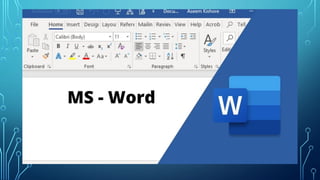
WORD • is a word processing program
used for creating and editing
documents such as letters, reports,
resumes, and other written
communication.
2. MICROSOFT
EXCEL
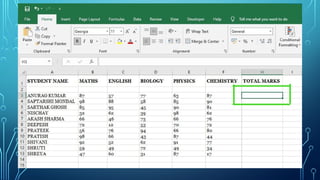
is a spreadsheet program used for
organizing, analyzing, and
presenting data in tables and
charts. It is commonly used for
financial analysis, budgeting, and
data management.
3. MICROSOFT
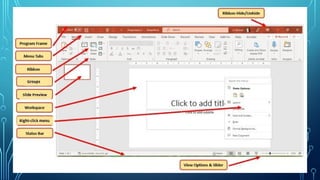
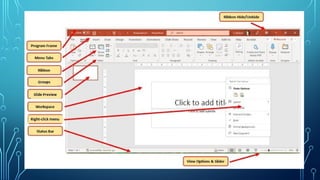
POWERPOINT • is a presentation program used
for creating slideshows and visual
presentations. It is frequently
used in business meetings,
conferences, and educational
settings.
4. MICROSOFT
OUTLOOK
• is an email and personal information
management program that includes
features such as email, calendar,
contacts, tasks, and notes. It is
commonly used for managing emails,
scheduling appointments, and staying
organized.
5. MICROSOFT
ACCESS
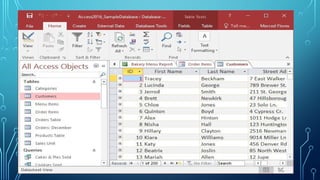
• is a database management program
used for creating and managing
databases. It is commonly used for
storing and organizing large amounts of
data and creating custom database
applications.
6. MICROSOFT
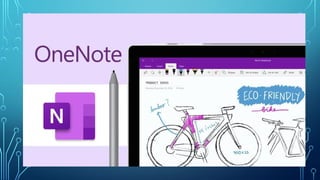
ONENOTE • is a digital note-taking program used
for capturing, organizing, and sharing
notes, drawings, and multimedia content.
It is commonly used for taking meeting
notes, brainstorming ideas, and
organizing information in a virtual
notebook format.
COLLABORATION TOOLS
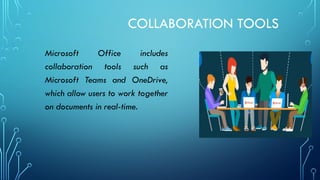
Microsoft Office includes
collaboration tools such as
Microsoft Teams and OneDrive,
which allow users to work together
on documents in real-time.
INTEGRATION WITH OTHER PROGRAMS
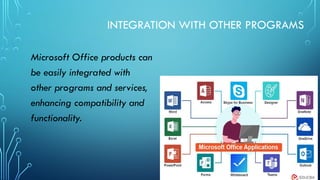
Microsoft Office products can
be easily integrated with
other programs and services,
enhancing compatibility and
functionality.
MOBILE COMPATIBILITY
•Microsoft Office is
available on mobile devices,
allowing users to work on-
the-go and access their
documents from anywhere.
SECURITY FEATURES
•Microsoft Office includes
robust security features to
protect sensitive data and
ensure the privacy of users.
UPDATES AND SUPPORT
Microsoft Office regularly
releases updates and
provides support to users,
ensuring that they have the
latest features and tools at
their disposal.
PRICING OPTIONS
Microsoft Office offers
various pricing options and
plans to suit the needs of
individual users, businesses,
and organizations.
TRAINING AND RESOURCES
Microsoft Office provides
training resources, tutorials,
and support to help users
maximize their productivity
and efficiency in using the
software.
THANK YOU!

MICROSOFT OFFICE A POWERFUL SUITE FOR PRODUCTIVITY

  • 1.
    MICROSOFT OFFICE: APOWERFUL SUITE FOR PRODUCTIVITY
  • 2.
    WHAT IS MS? •Microsoft is a company/corporation in USA. • Bill Gates is the owner of Microsoft Company.
  • 3.
    OVERVIEW OF MICROSOFTOFFICE •Microsoft Office is a suite of productivity software applications developed by Microsoft. It includes programs such as Word, Excel, PowerPoint, Outlook, Access, and OneNote, among others. These applications are widely used for creating documents, spreadsheets, presentations, emails, databases, and note-taking.
  • 4.
    IMPORTANCE OF MICROSOFT OFFICEIN PROFESSIONAL AND PERSONAL SETTINGS MICROSOFT OFFICE IS WIDELY USED IN BOTH PROFESSIONAL AND PERSONAL SETTINGS FOR VARIOUS TASKS SUCH AS WRITING REPORTS, CREATING PRESENTATIONS, MANAGING DATA, COMMUNICATING VIA EMAIL, AND ORGANIZING INFORMATION. ITS VERSATILITY AND USER-FRIENDLY INTERFACE MAKE IT AN ESSENTIAL TOOL FOR INDIVIDUALS AND ORGANIZATIONS TO IMPROVE PRODUCTIVITY AND EFFICIENCY.
  • 5.
    LISTING OF POPULARAPPLICATIONS INCLUDED IN MICROSOFT OFFICE SUITE: Word Excel PowerPoint Outlook Access 1. OneNote
  • 6.
    1. MICROSOFT WORD •is a word processing program used for creating and editing documents such as letters, reports, resumes, and other written communication.
  • 8.
    2. MICROSOFT EXCEL is aspreadsheet program used for organizing, analyzing, and presenting data in tables and charts. It is commonly used for financial analysis, budgeting, and data management.
  • 10.
    3. MICROSOFT POWERPOINT •is a presentation program used for creating slideshows and visual presentations. It is frequently used in business meetings, conferences, and educational settings.
  • 12.
    4. MICROSOFT OUTLOOK • isan email and personal information management program that includes features such as email, calendar, contacts, tasks, and notes. It is commonly used for managing emails, scheduling appointments, and staying organized.
  • 14.
    5. MICROSOFT ACCESS • isa database management program used for creating and managing databases. It is commonly used for storing and organizing large amounts of data and creating custom database applications.
  • 16.
    6. MICROSOFT ONENOTE •is a digital note-taking program used for capturing, organizing, and sharing notes, drawings, and multimedia content. It is commonly used for taking meeting notes, brainstorming ideas, and organizing information in a virtual notebook format.
  • 18.
    COLLABORATION TOOLS Microsoft Officeincludes collaboration tools such as Microsoft Teams and OneDrive, which allow users to work together on documents in real-time.
  • 19.
    INTEGRATION WITH OTHERPROGRAMS Microsoft Office products can be easily integrated with other programs and services, enhancing compatibility and functionality.
  • 20.
    MOBILE COMPATIBILITY •Microsoft Officeis available on mobile devices, allowing users to work on- the-go and access their documents from anywhere.
  • 21.
    SECURITY FEATURES •Microsoft Officeincludes robust security features to protect sensitive data and ensure the privacy of users.
  • 22.
    UPDATES AND SUPPORT MicrosoftOffice regularly releases updates and provides support to users, ensuring that they have the latest features and tools at their disposal.
  • 23.
    PRICING OPTIONS Microsoft Officeoffers various pricing options and plans to suit the needs of individual users, businesses, and organizations.
  • 24.
    TRAINING AND RESOURCES MicrosoftOffice provides training resources, tutorials, and support to help users maximize their productivity and efficiency in using the software.
  • 25.