
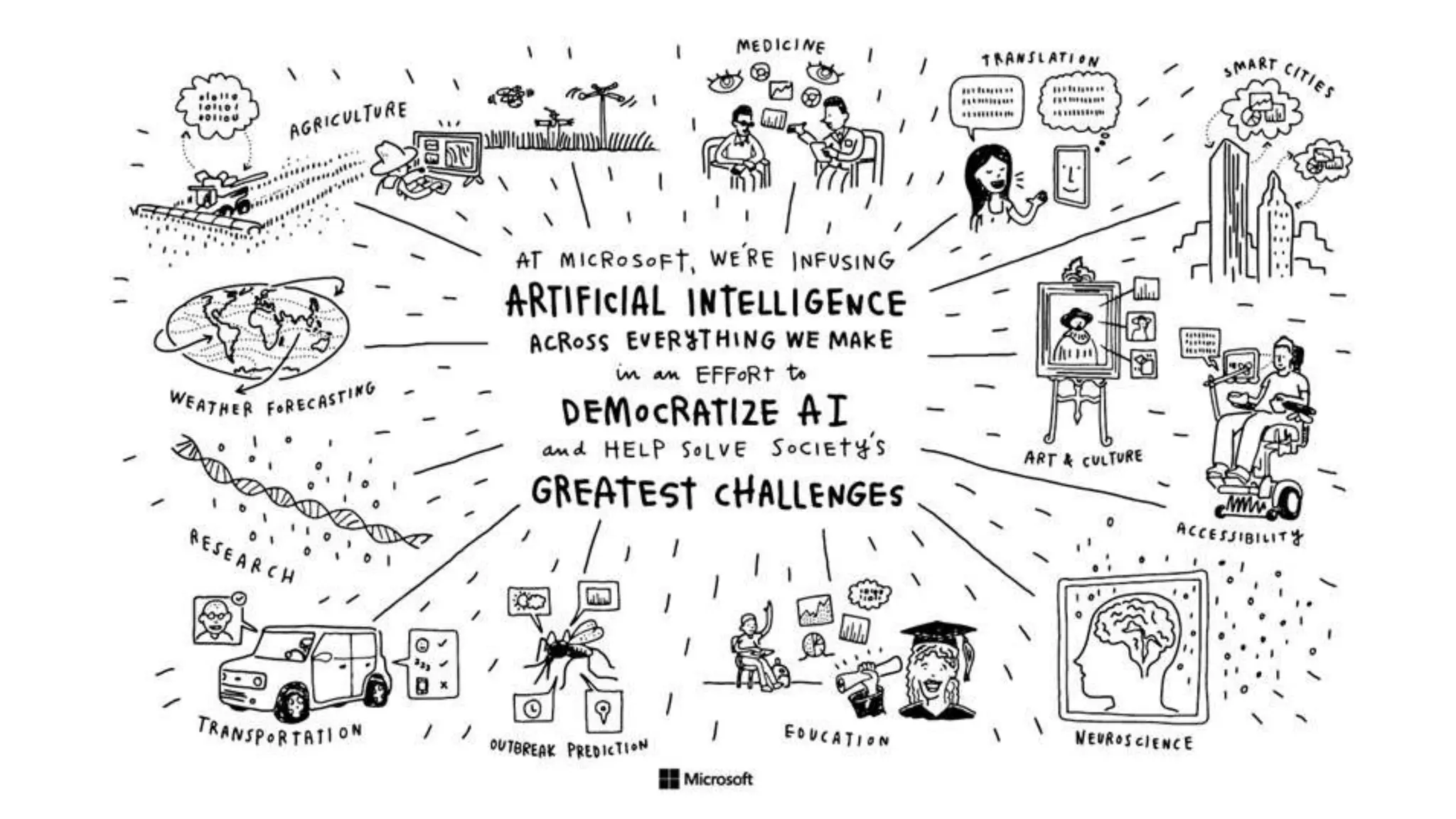


Microsoft AI
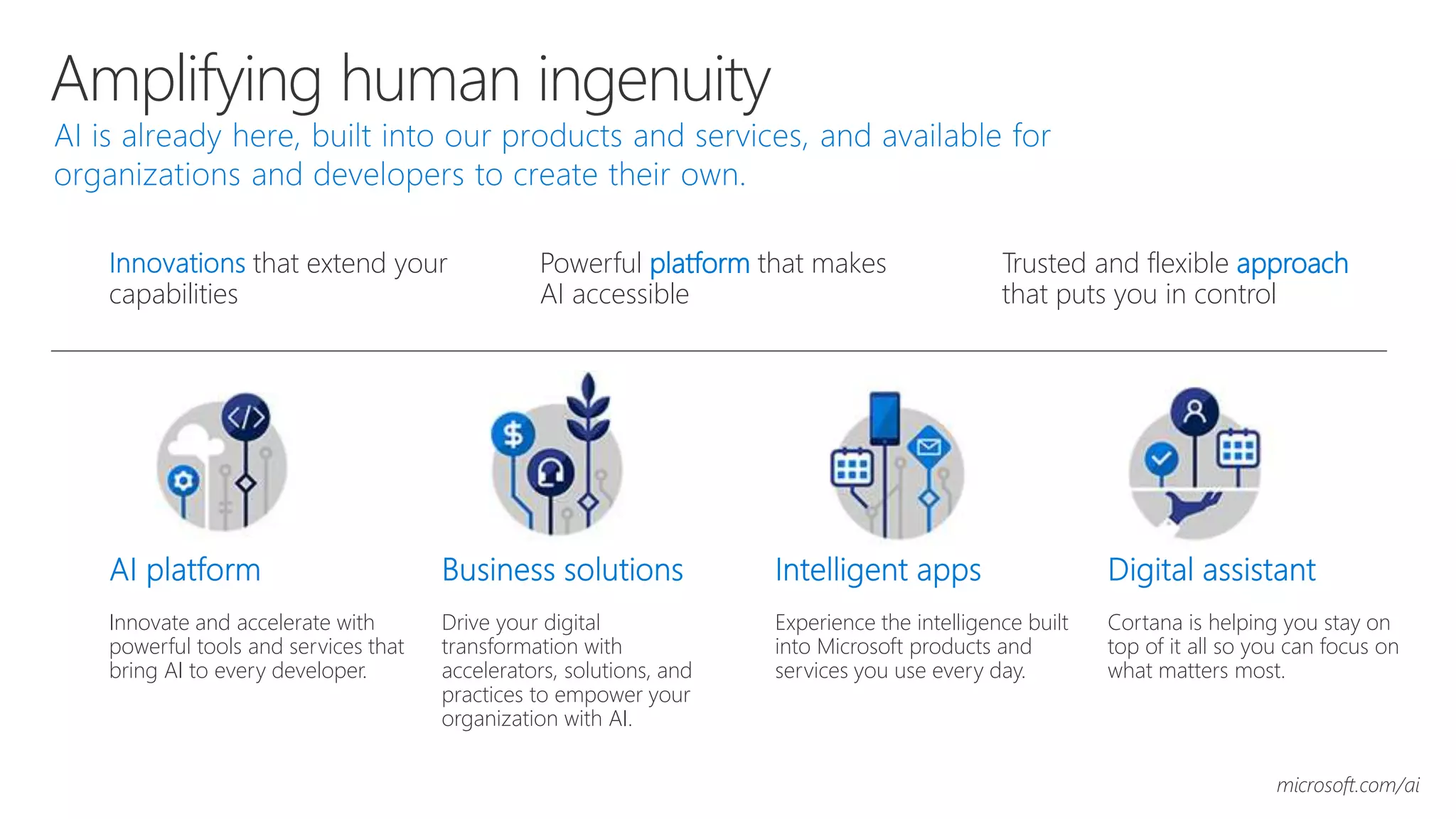
Amplifying human ingenuity
Trusted and flexible approach
that puts you in control
Powerful platform that makes
AI accessible
that extend your
capabilities
Innovate and accelerate with
powerful tools and services that
bring AI to every developer.
Drive your digital
transformation with
accelerators, solutions, and
practices to empower your
organization with AI.
Experience the intelligence built
into Microsoft products and
services you use every day.
Cortana is helping you stay on
top of it all so you can focus on
what matters most.
microsoft.com/ai
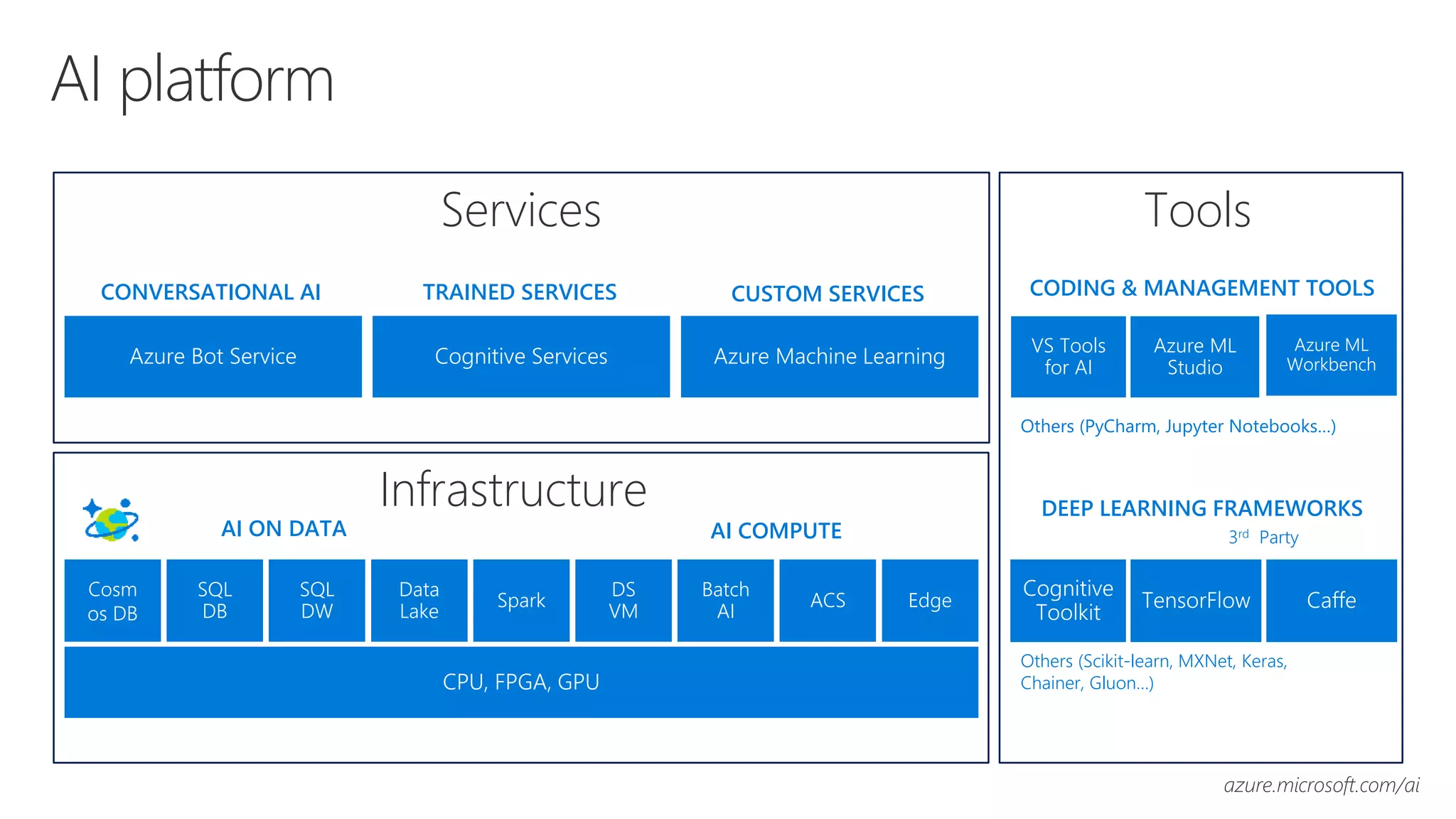
AI platform
VS Tools
for AI
Azure ML
Studio
CODING & MANAGEMENT TOOLS
Azure ML
Workbench
DEEP LEARNING FRAMEWORKS
Cognitive
Toolkit
TensorFlow Caffe
Others (Scikit-learn, MXNet, Keras,
Chainer, Gluon…)
3rd Party
Others (PyCharm, Jupyter Notebooks…)
AI ON DATA
Cosm
os DB
AI COMPUTE
SQL
DB
SQL
DW
Data
Lake
Spark
DS
VM
Batch
AI
ACS
CPU, FPGA, GPU
Edge
CUSTOM SERVICESCONVERSATIONAL AI TRAINED SERVICES
Azure Bot Service Azure Machine LearningCognitive Services
Services
Infrastructure
Tools
azure.microsoft.com/ai
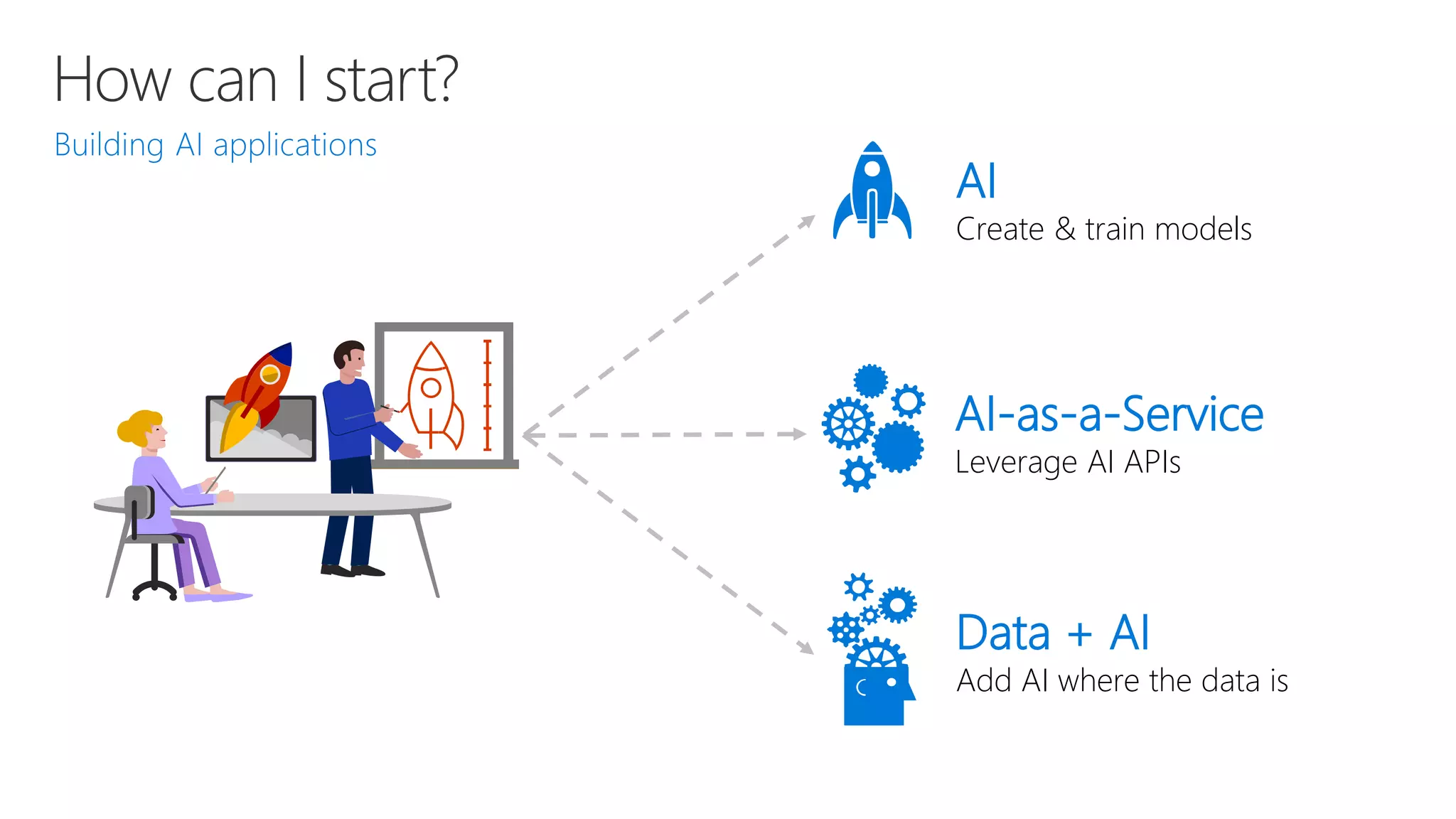
How can I start?
AI-as-a-Service
Leverage AI APIs
Data + AI
Add AI where the data is
AI
Create & train models
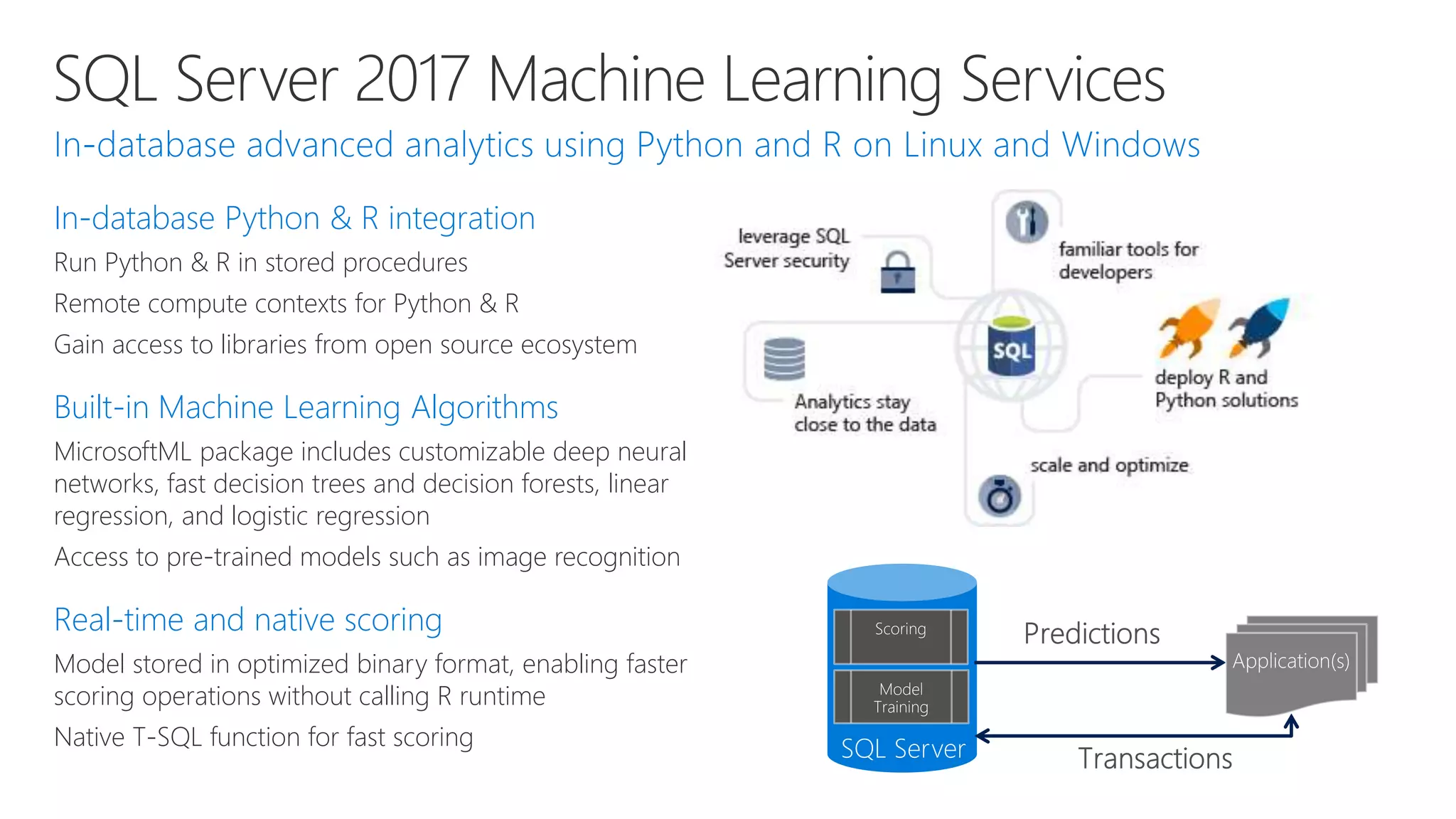
SQL Server 2017 Machine Learning Services
In-database Python & R integration
Run Python & R in stored procedures
Remote compute contexts for Python & R
Gain access to libraries from open source ecosystem
Built-in Machine Learning Algorithms
MicrosoftML package includes customizable deep neural
networks, fast decision trees and decision forests, linear
regression, and logistic regression
Access to pre-trained models such as image recognition
Real-time and native scoring
Model stored in optimized binary format, enabling faster
scoring operations without calling R runtime
Native T-SQL function for fast scoring
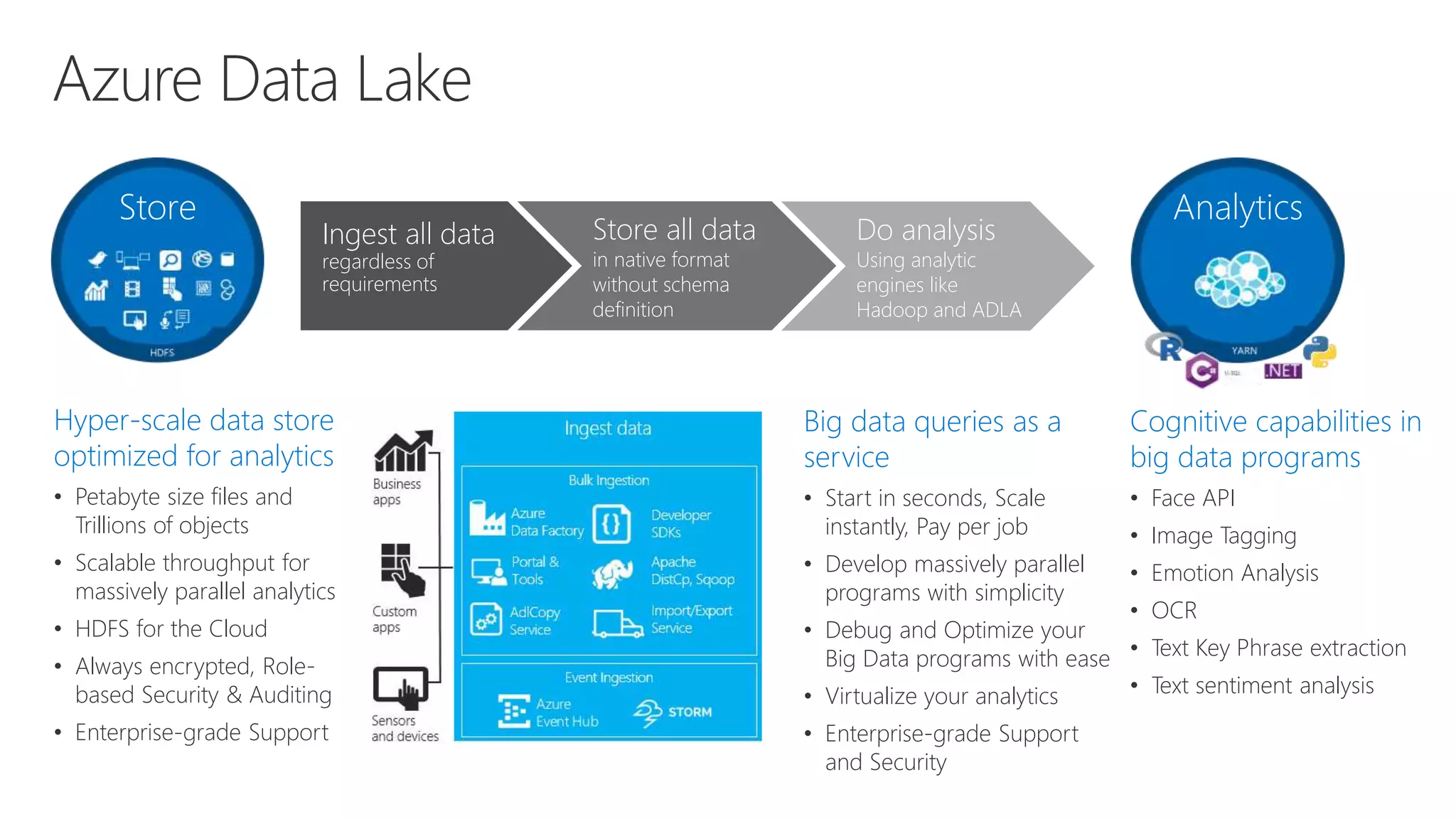
Azure Data Lake
Hyper-scale data store
optimized for analytics
• Petabyte size files and
Trillions of objects
• Scalable throughput for
massively parallel analytics
• HDFS for the Cloud
• Always encrypted, Role-
based Security & Auditing
• Enterprise-grade Support
Big data queries as a
service
• Start in seconds, Scale
instantly, Pay per job
• Develop massively parallel
programs with simplicity
• Debug and Optimize your
Big Data programs with ease
• Virtualize your analytics
• Enterprise-grade Support
and Security
Store Analytics
Cognitive capabilities in
big data programs
• Face API
• Image Tagging
• Emotion Analysis
• OCR
• Text Key Phrase extraction
• Text sentiment analysis
Ingest all data
regardless of
requirements
Store all data
in native format
without schema
definition
Do analysis
Using analytic
engines like
Hadoop and ADLA
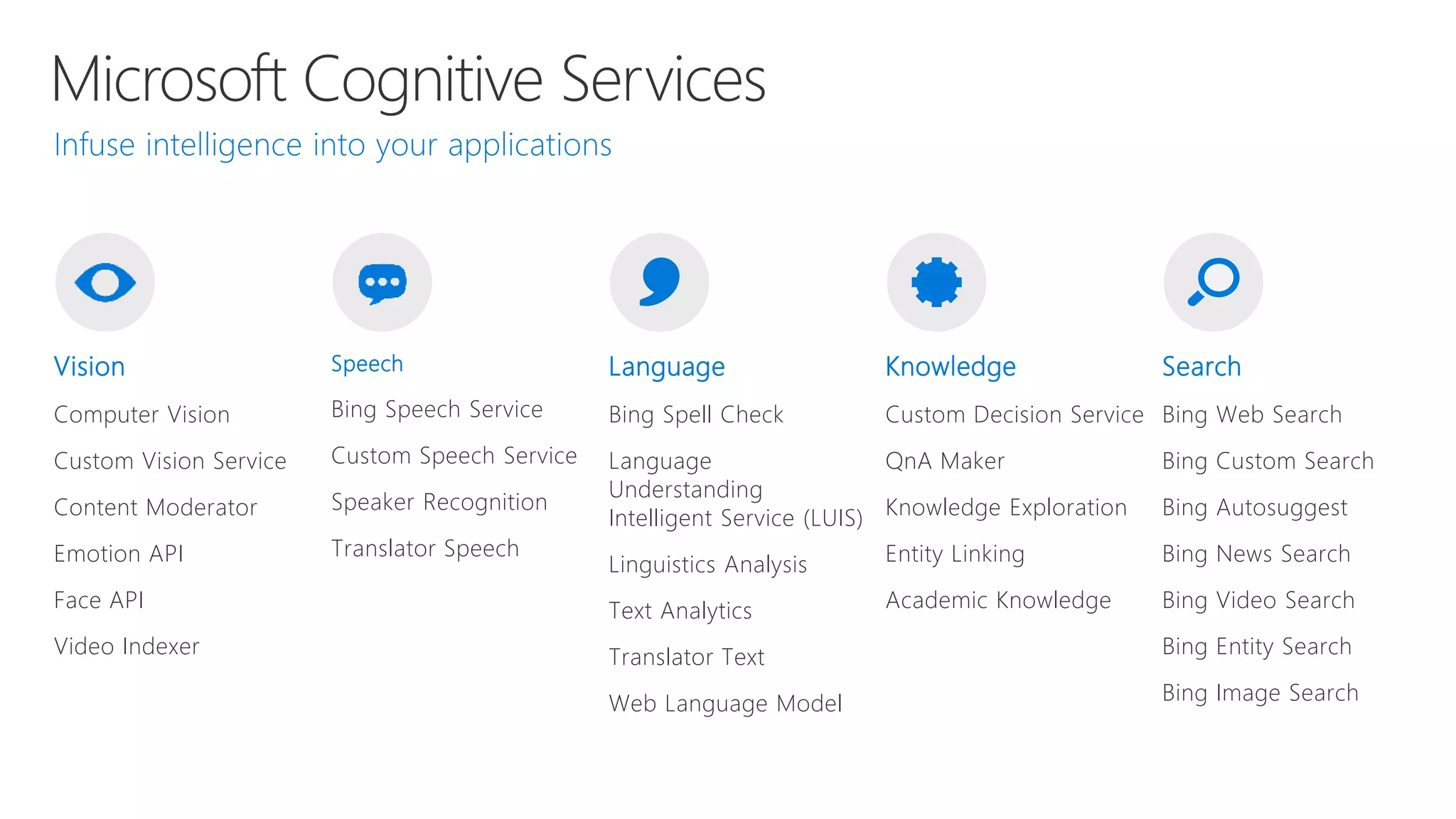
Microsoft Cognitive Services
Vision
Computer Vision
Custom Vision Service
Content Moderator
Emotion API
Face API
Video Indexer
Speech
Bing Speech Service
Custom Speech Service
Speaker Recognition
Translator Speech
Language
Bing Spell Check
Language
Understanding
Intelligent Service (LUIS)
Linguistics Analysis
Text Analytics
Translator Text
Web Language Model
Knowledge
Custom Decision Service
QnA Maker
Knowledge Exploration
Entity Linking
Academic Knowledge
Search
Bing Web Search
Bing Custom Search
Bing Autosuggest
Bing News Search
Bing Video Search
Bing Entity Search
Bing Image Search
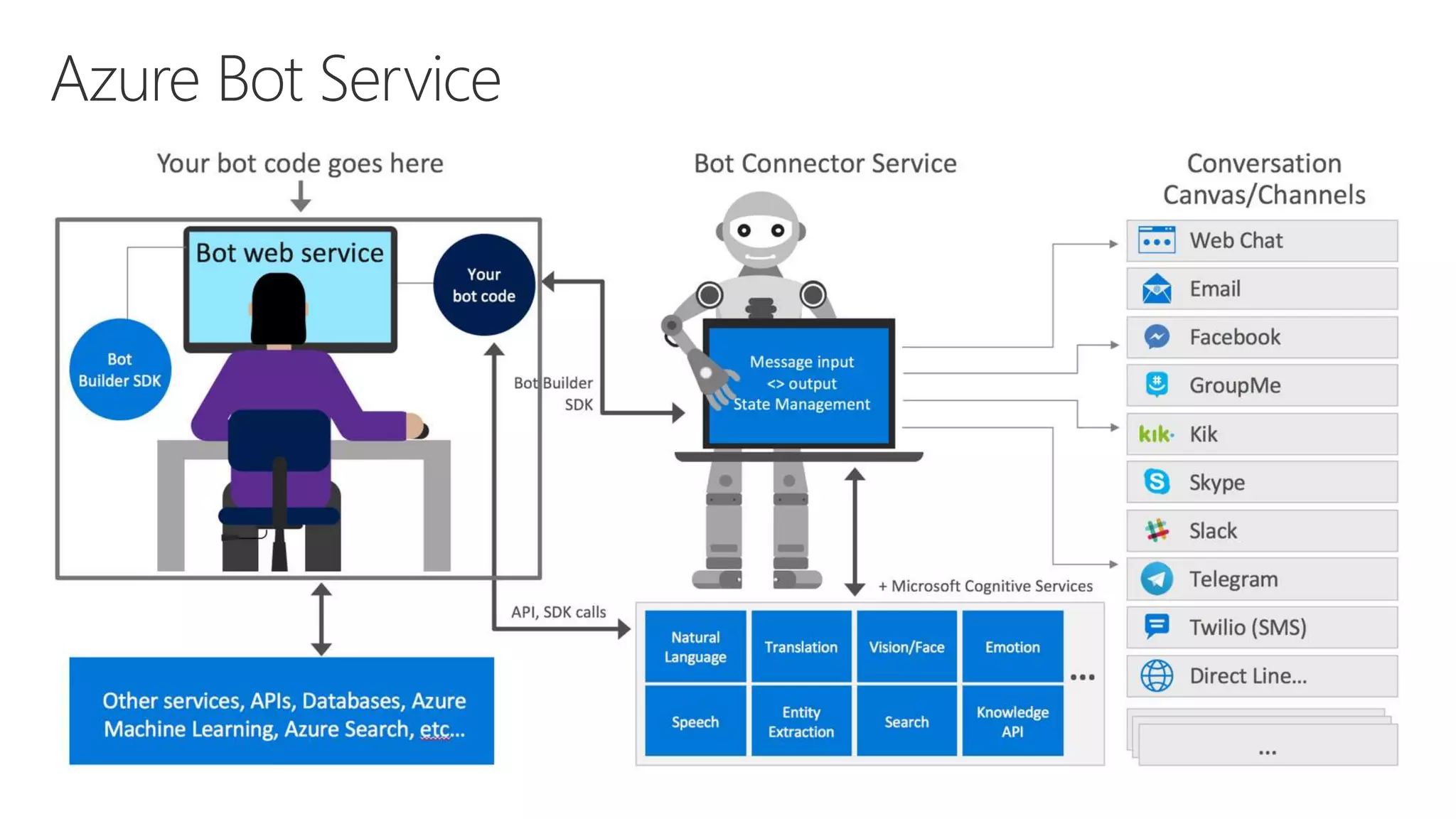
Azure Bot Service
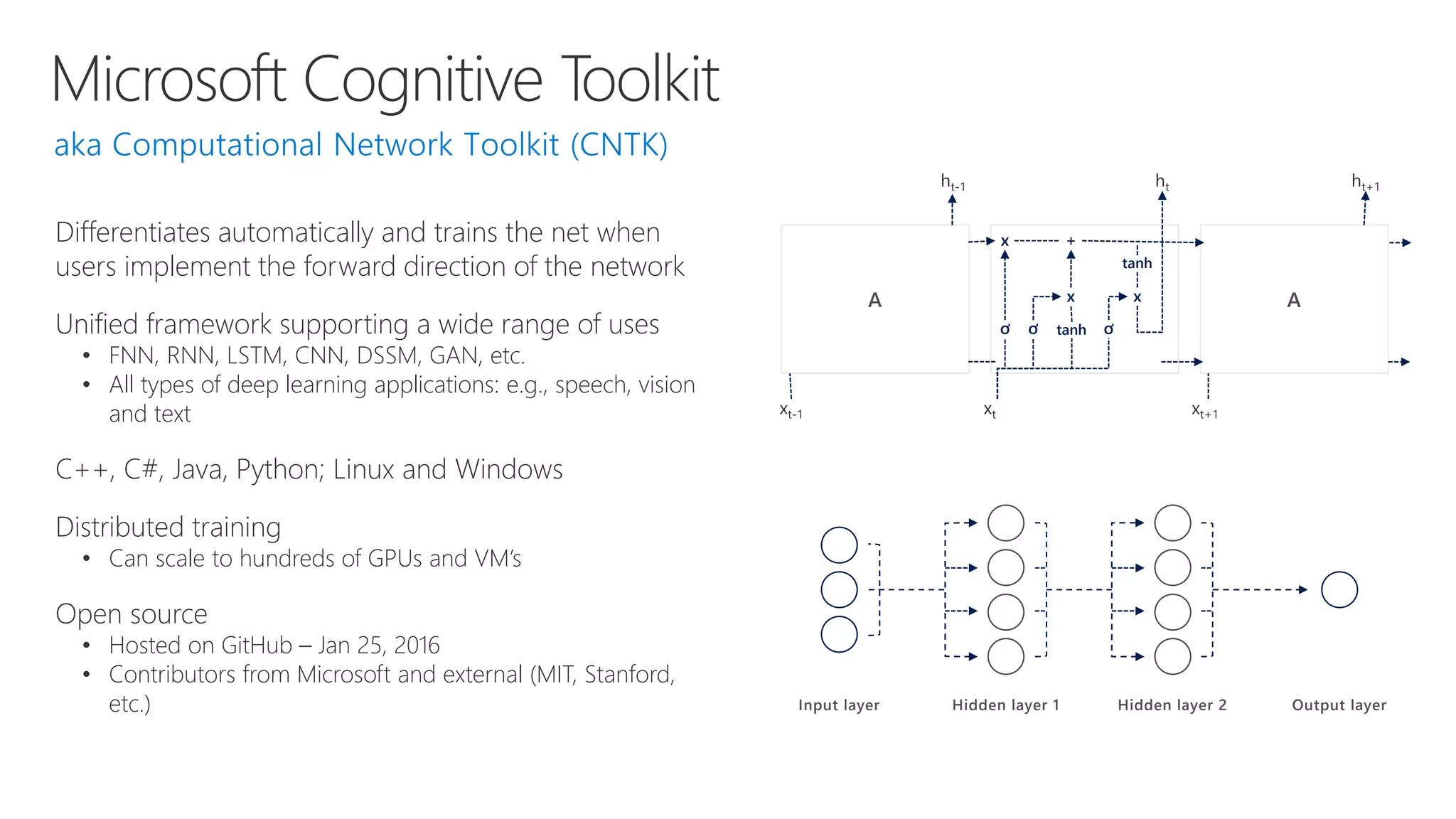
Microsoft Cognitive Toolkit
Differentiates automatically and trains the net when
users implement the forward direction of the network
Unified framework supporting a wide range of uses
• FNN, RNN, LSTM, CNN, DSSM, GAN, etc.
• All types of deep learning applications: e.g., speech, vision
and text
C++, C#, Java, Python; Linux and Windows
Distributed training
• Can scale to hundreds of GPUs and VM’s
Open source
• Hosted on GitHub – Jan 25, 2016
• Contributors from Microsoft and external (MIT, Stanford,
etc.) Input layer Hidden layer 1 Hidden layer 2 Output layer
A A
x
x x
+
tanh
tanhơ ơ ơ
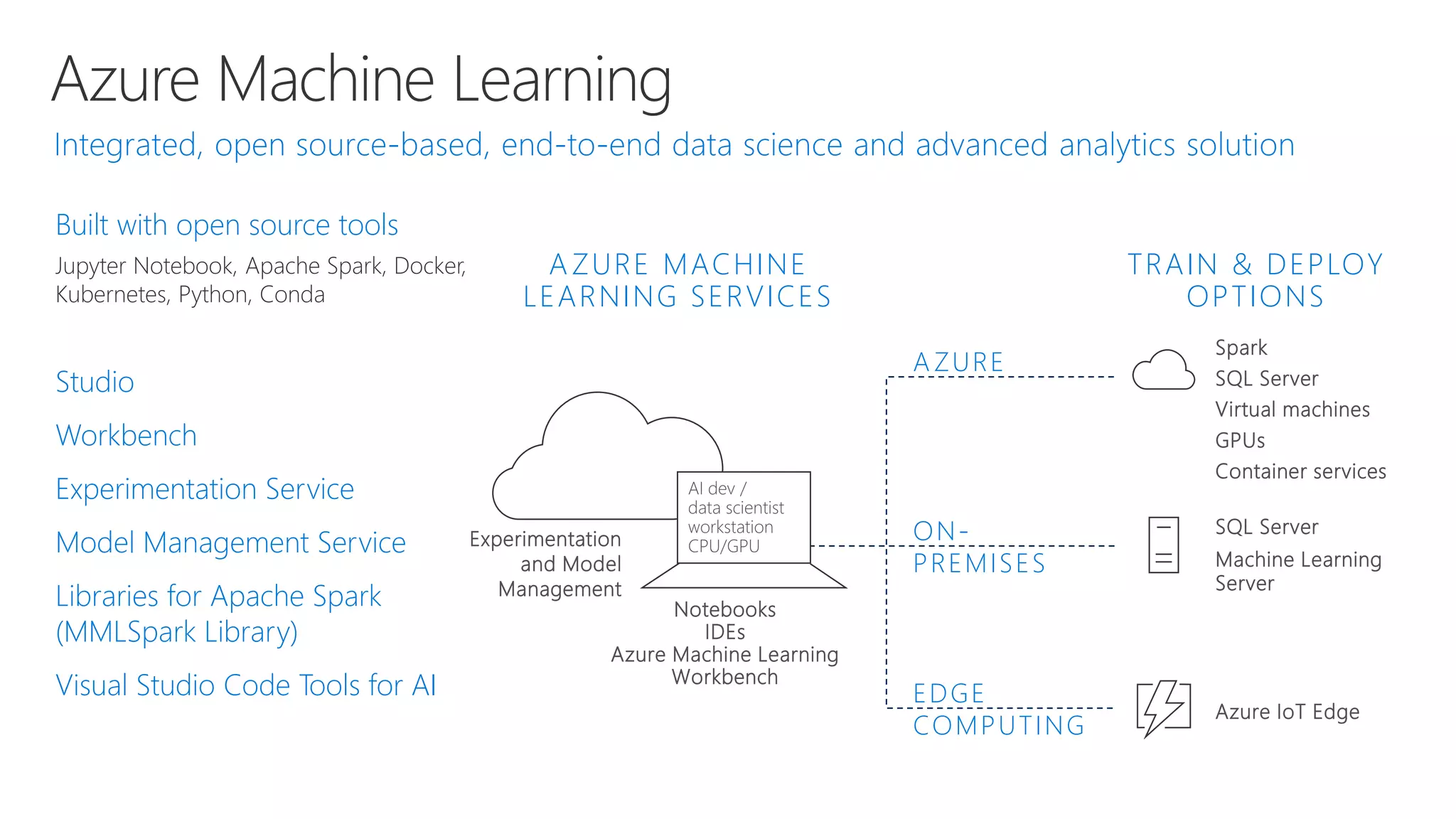
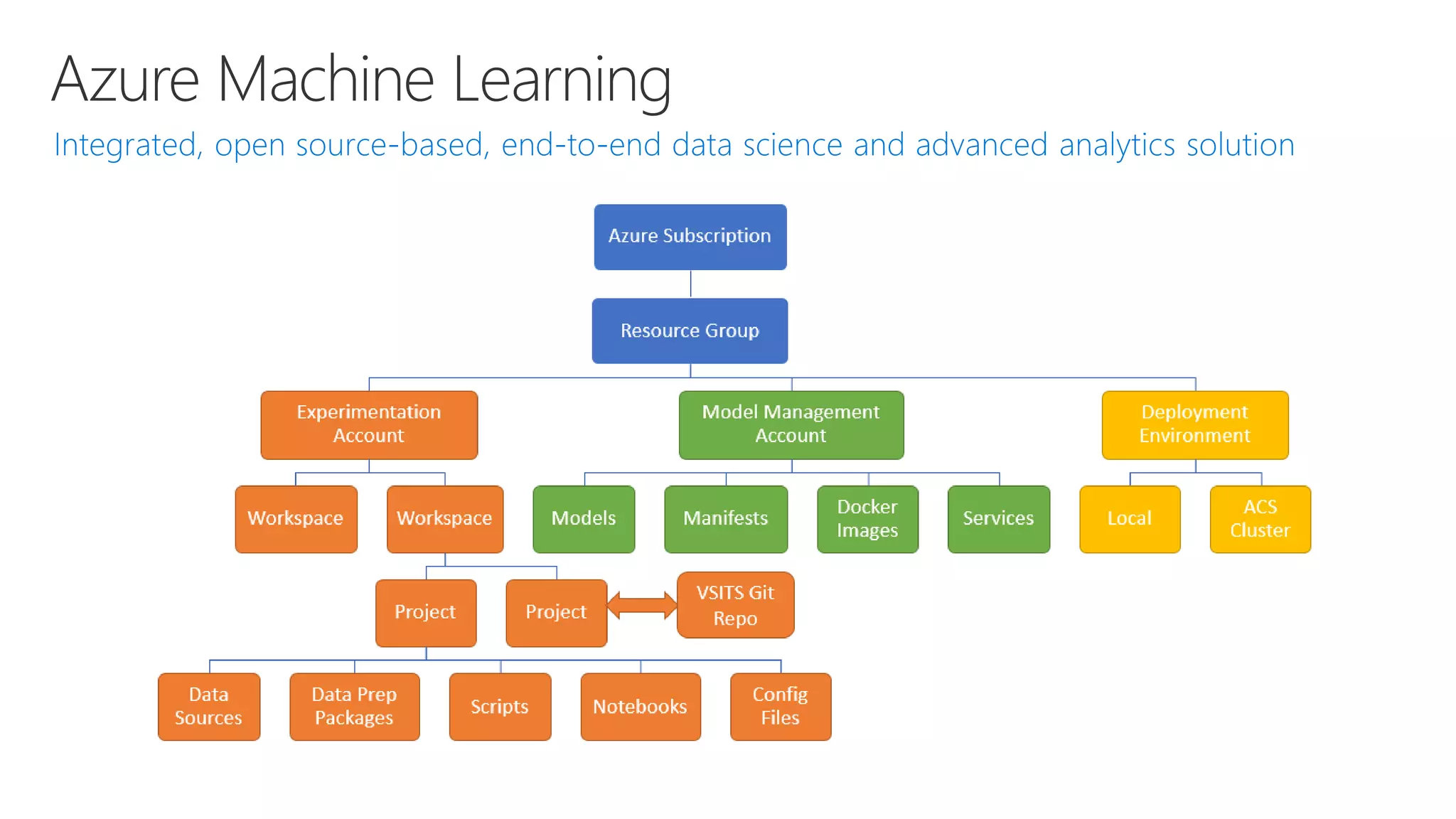
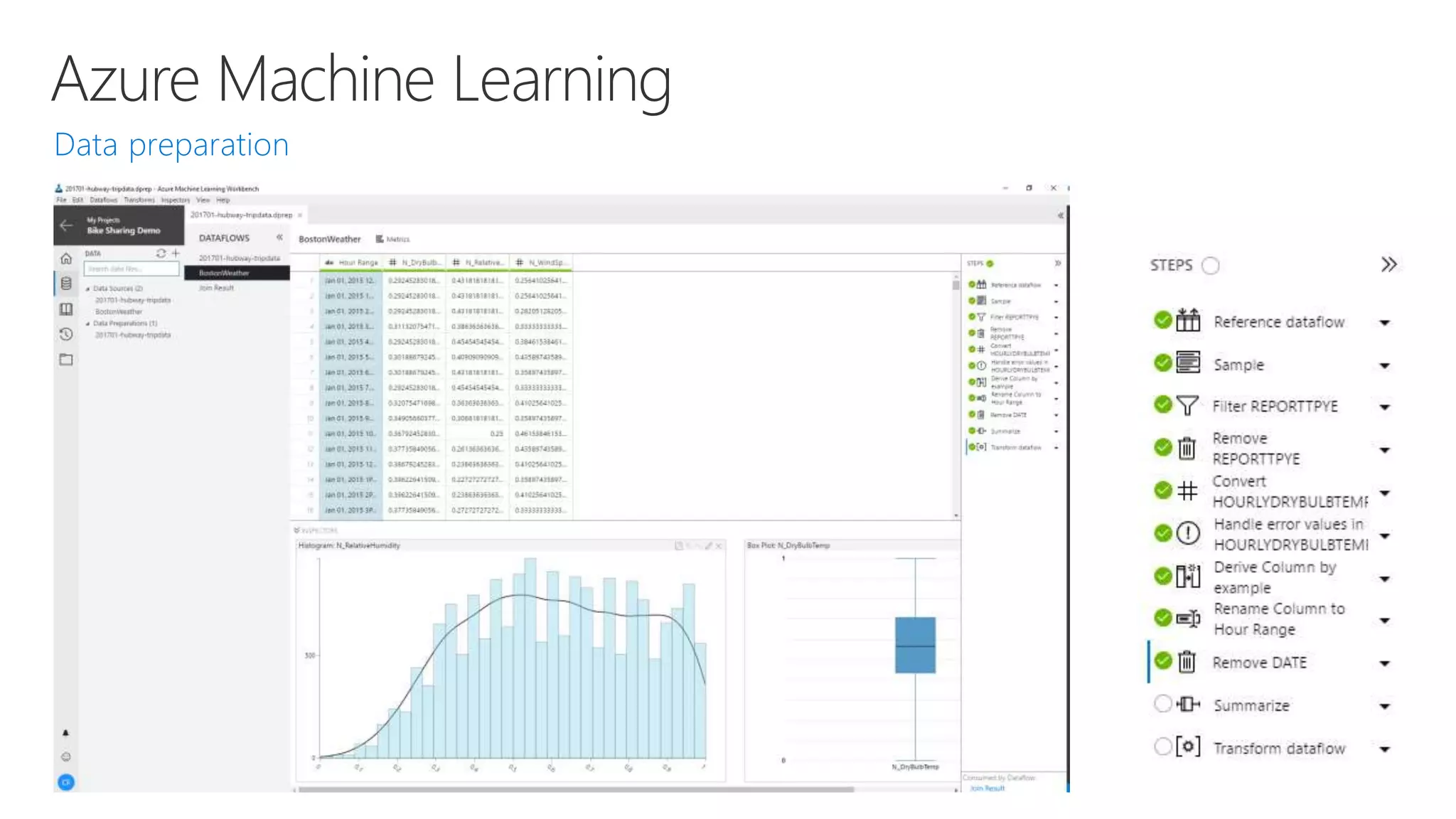
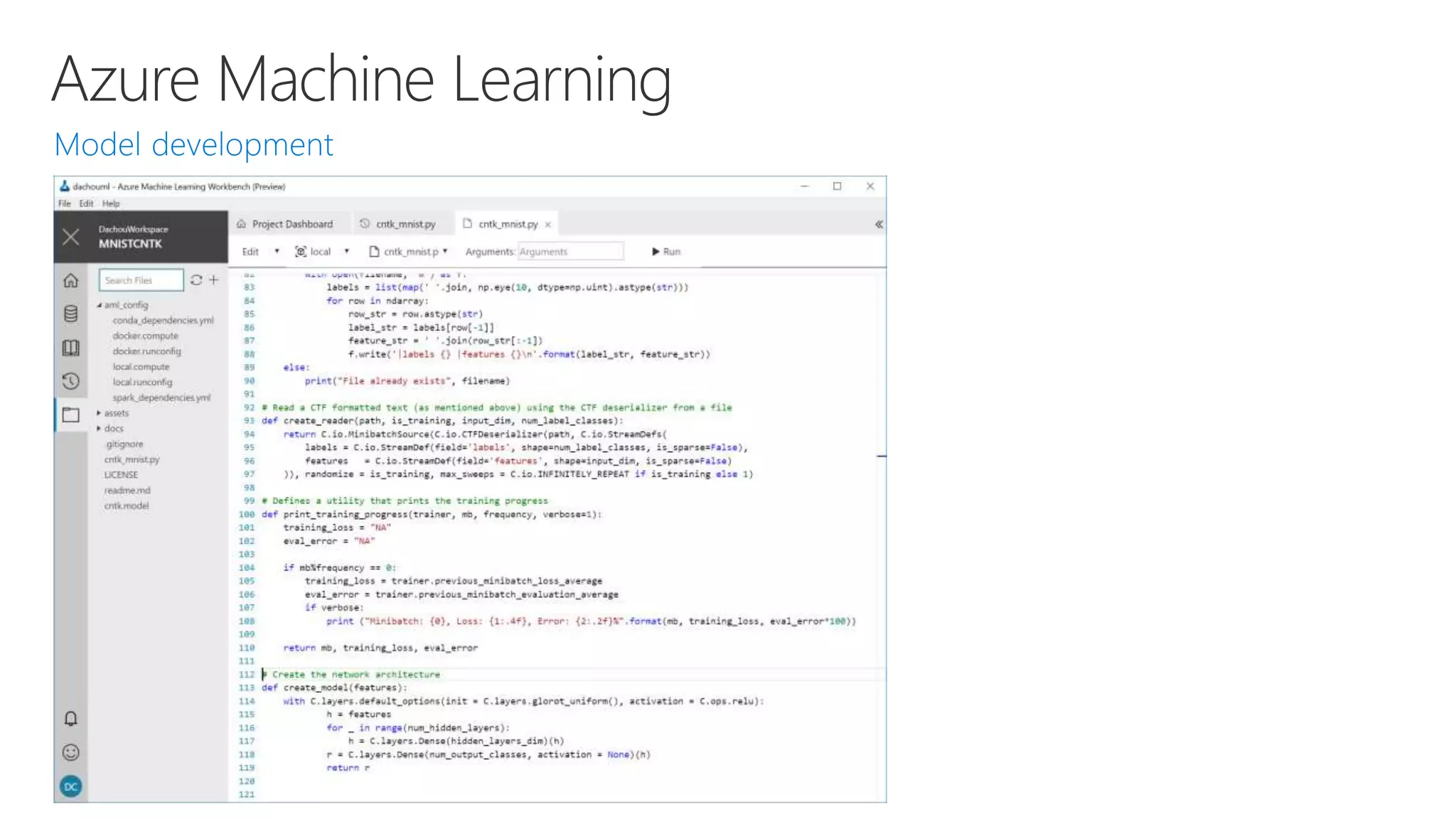
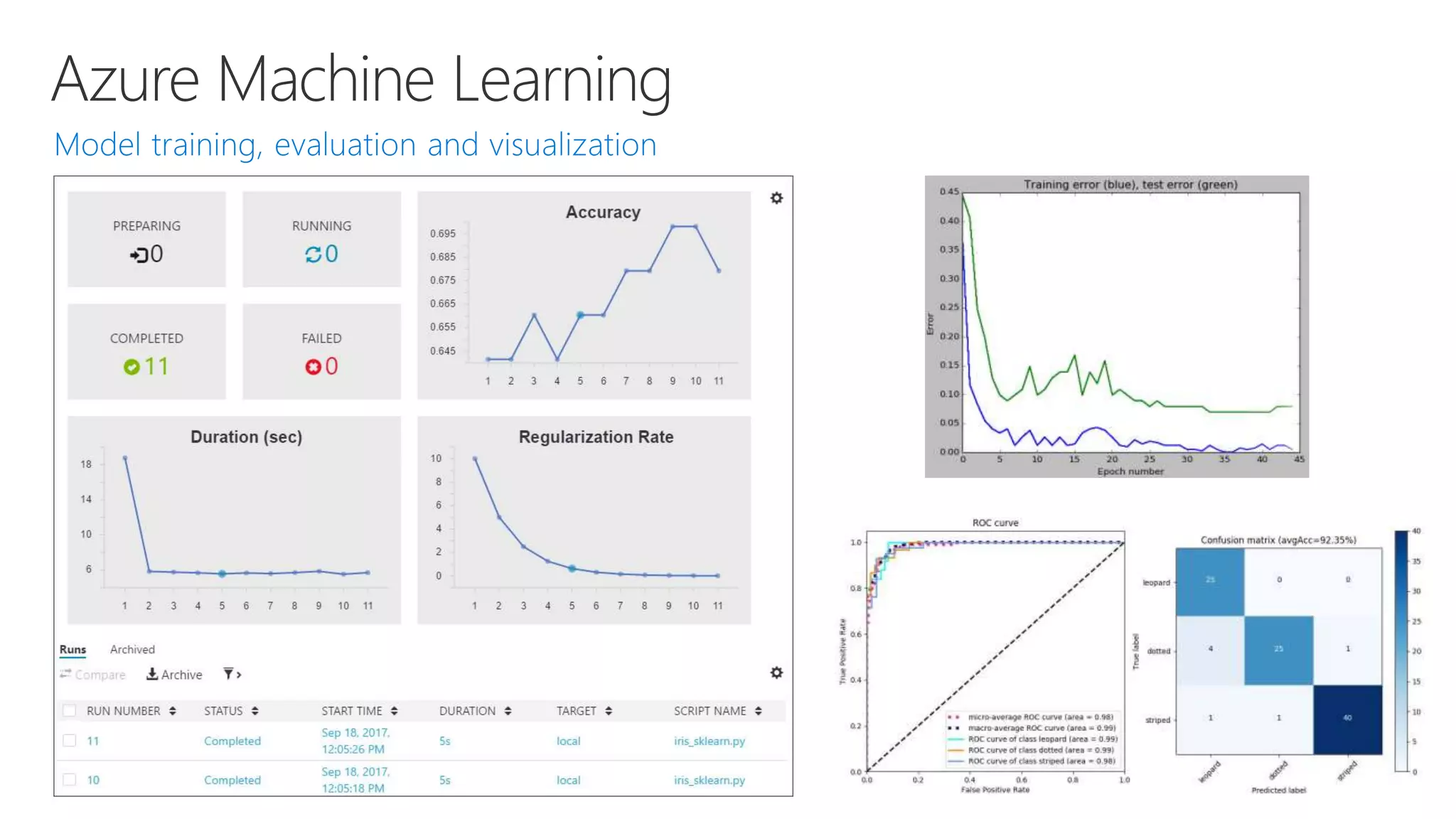
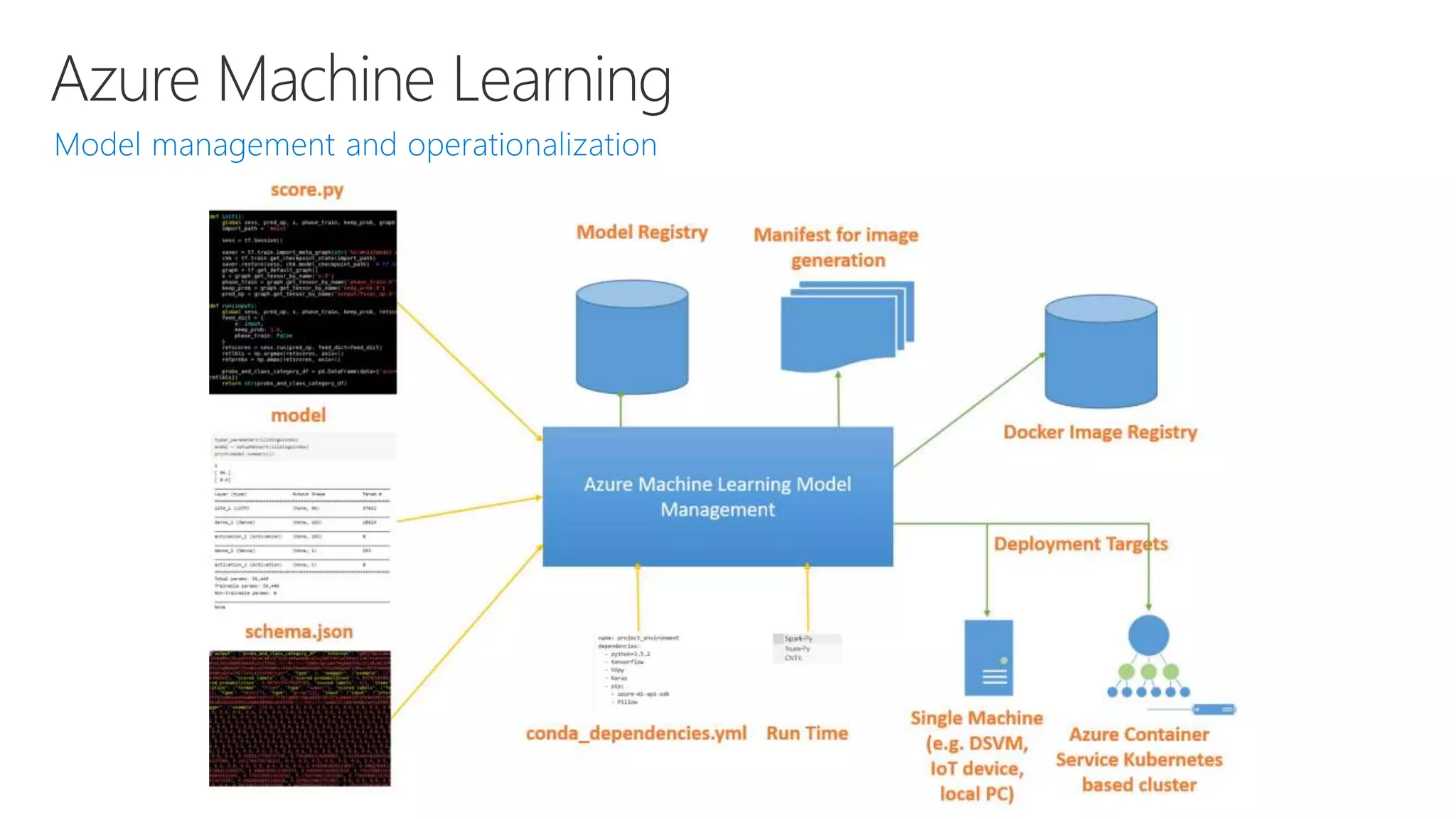
Azure Machine Learning
Spark
SQL Server
Virtual machines
GPUs
Container services
Notebooks
IDEs
Azure Machine Learning
Workbench
SQL Server
Machine Learning
Server
ON-
PREMISES
EDGE
COMPUTING
Azure IoT Edge
Experimentation
and Model
Management
AZURE MACHINE
LEARNING SERVICES
TRAIN & DEPLOY
OPTIONS
A ZURE
Built with open source tools
Jupyter Notebook, Apache Spark, Docker,
Kubernetes, Python, Conda
Studio
Workbench
Experimentation Service
Model Management Service
Libraries for Apache Spark
(MMLSpark Library)
Visual Studio Code Tools for AI
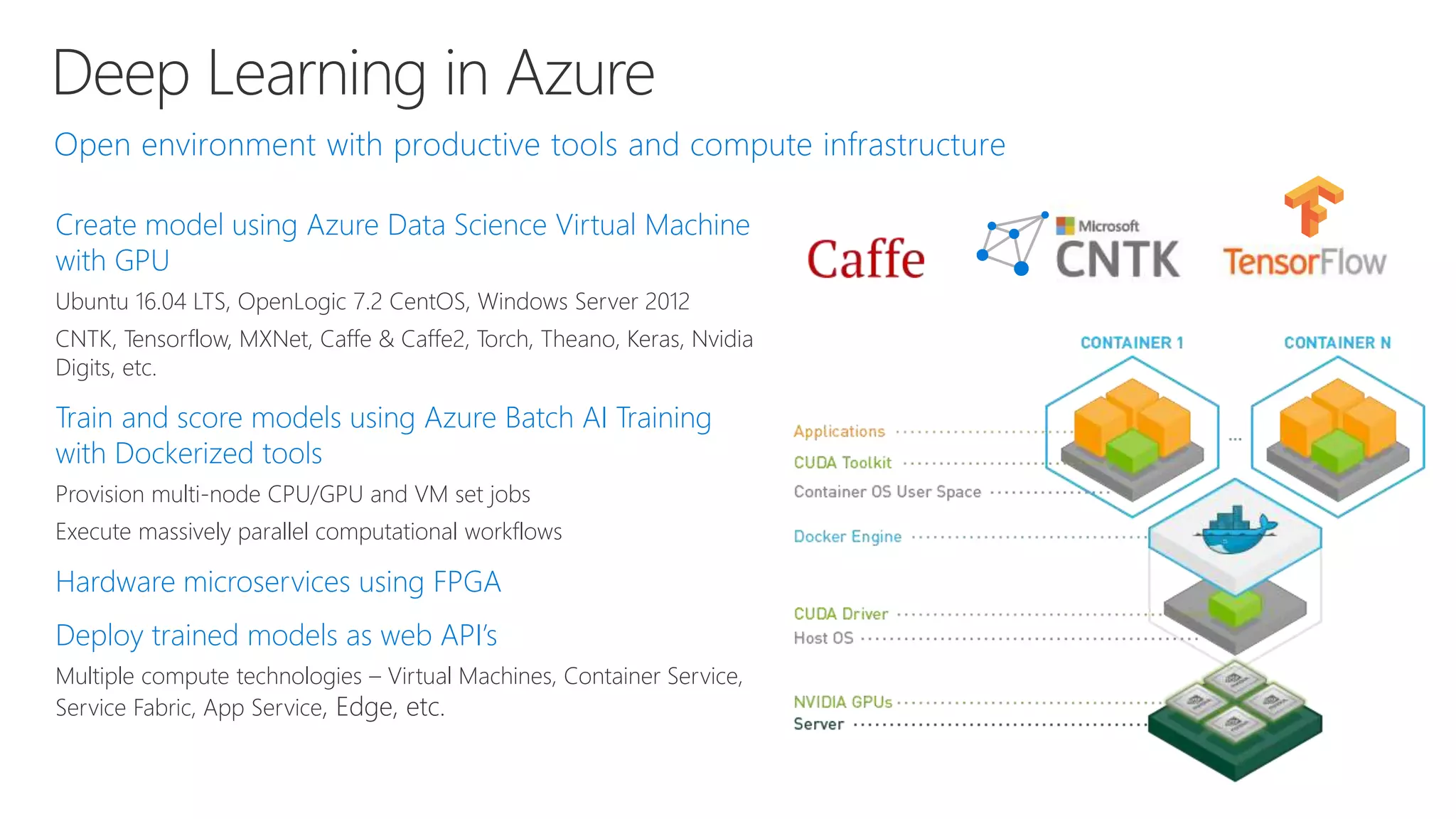
Deep Learning in Azure
Create model using Azure Data Science Virtual Machine
with GPU
Ubuntu 16.04 LTS, OpenLogic 7.2 CentOS, Windows Server 2012
CNTK, Tensorflow, MXNet, Caffe & Caffe2, Torch, Theano, Keras, Nvidia
Digits, etc.
Train and score models using Azure Batch AI Training
with Dockerized tools
Provision multi-node CPU/GPU and VM set jobs
Execute massively parallel computational workflows
Hardware microservices using FPGA
Deploy trained models as web API’s
Multiple compute technologies – Virtual Machines, Container Service,
Service Fabric, App Service, Edge, etc.
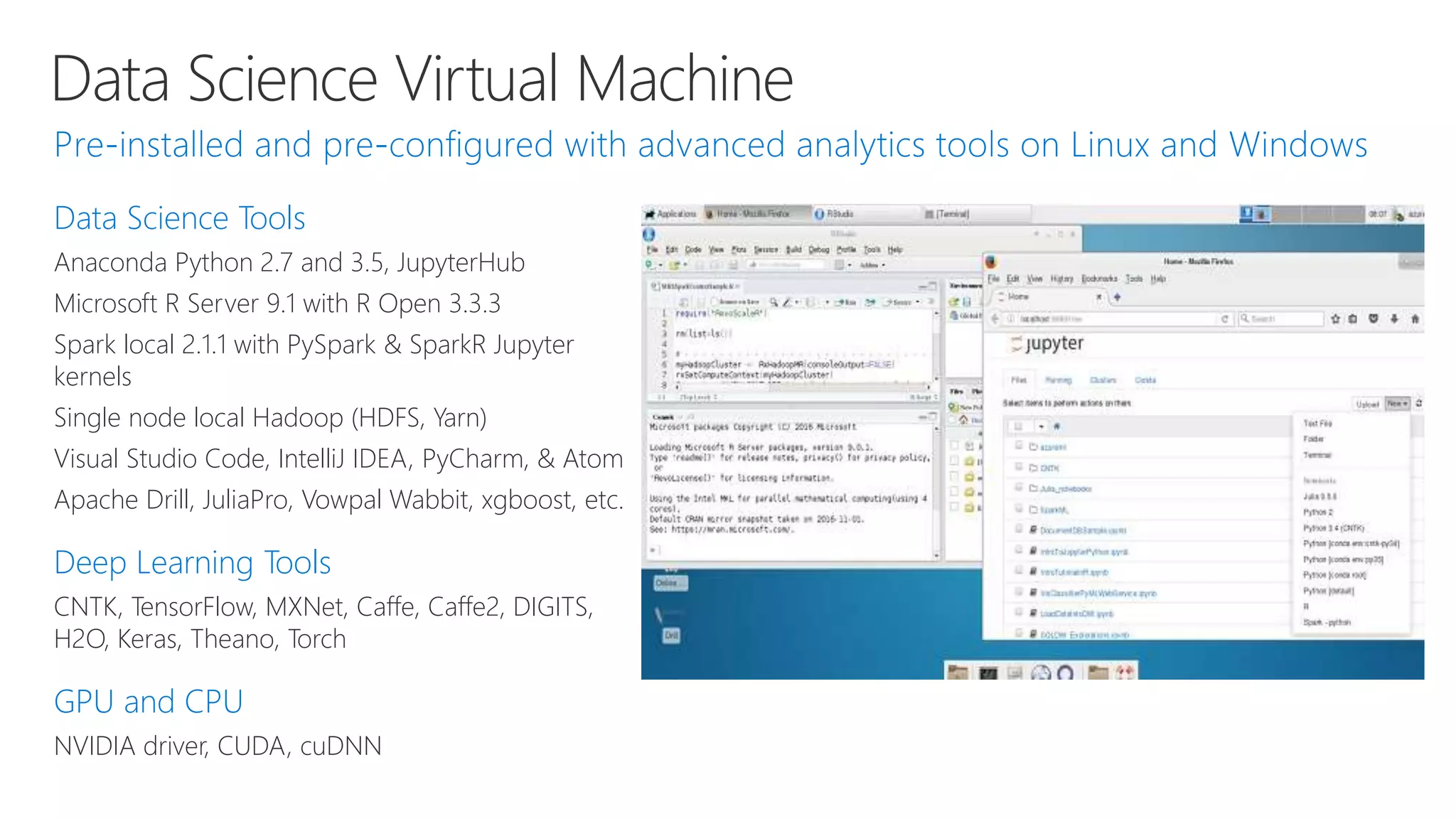
Data Science Virtual Machine
Data Science Tools
Anaconda Python 2.7 and 3.5, JupyterHub
Microsoft R Server 9.1 with R Open 3.3.3
Spark local 2.1.1 with PySpark & SparkR Jupyter
kernels
Single node local Hadoop (HDFS, Yarn)
Visual Studio Code, IntelliJ IDEA, PyCharm, & Atom
Apache Drill, JuliaPro, Vowpal Wabbit, xgboost, etc.
Deep Learning Tools
CNTK, TensorFlow, MXNet, Caffe, Caffe2, DIGITS,
H2O, Keras, Theano, Torch
GPU and CPU
NVIDIA driver, CUDA, cuDNN
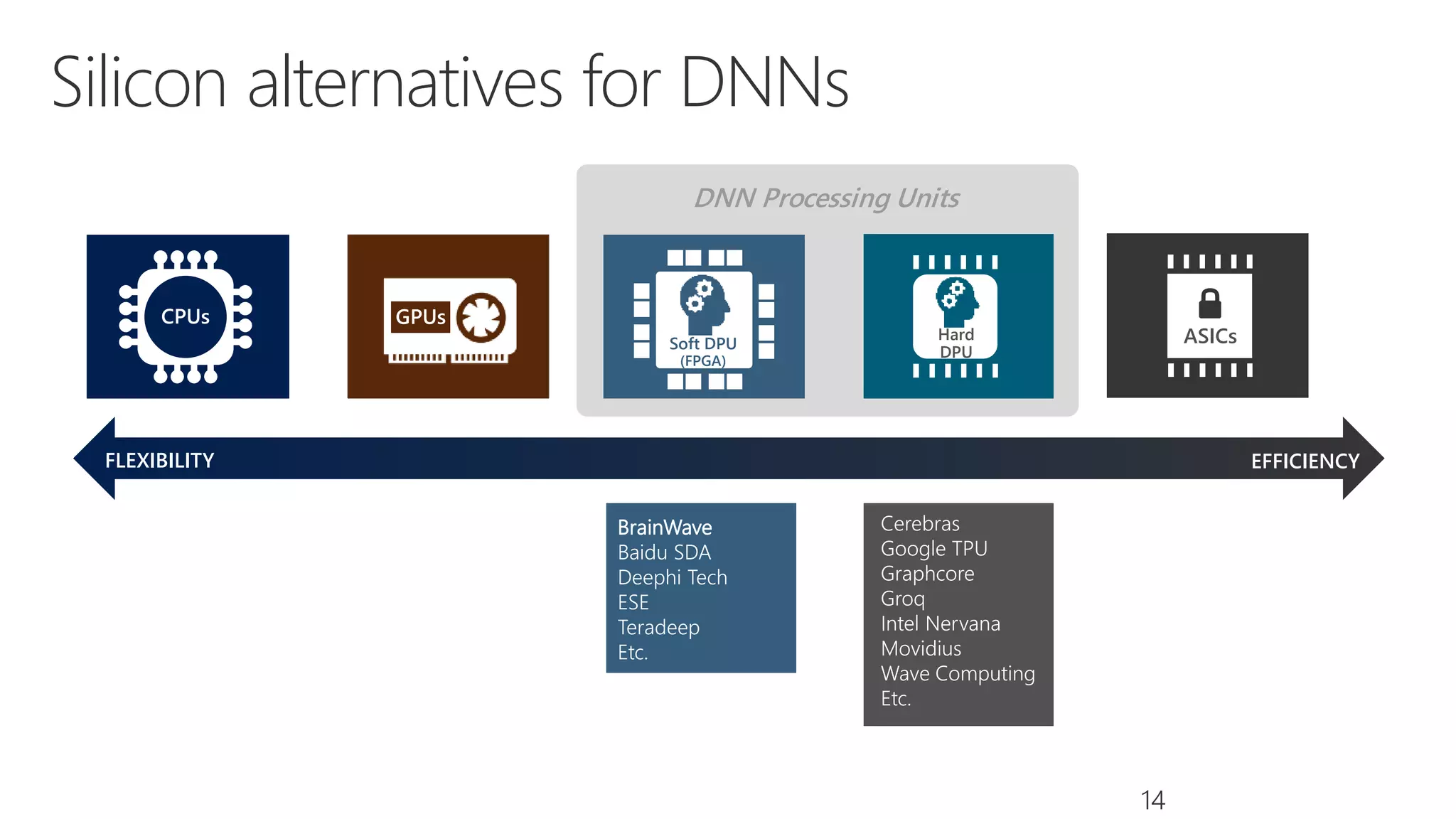
DNN Processing Units
EFFICIENCY
Silicon alternatives for DNNs
14
FLEXIBILITY
Soft DPU
(FPGA)
Contro
l Unit
(CU)
Registers
Arithmeti
c Logic
Unit
(ALU)
CPUs GPUs
ASICsHard
DPU
Cerebras
Google TPU
Graphcore
Groq
Intel Nervana
Movidius
Wave Computing
Etc.
BrainWave
Baidu SDA
Deephi Tech
ESE
Teradeep
Etc.
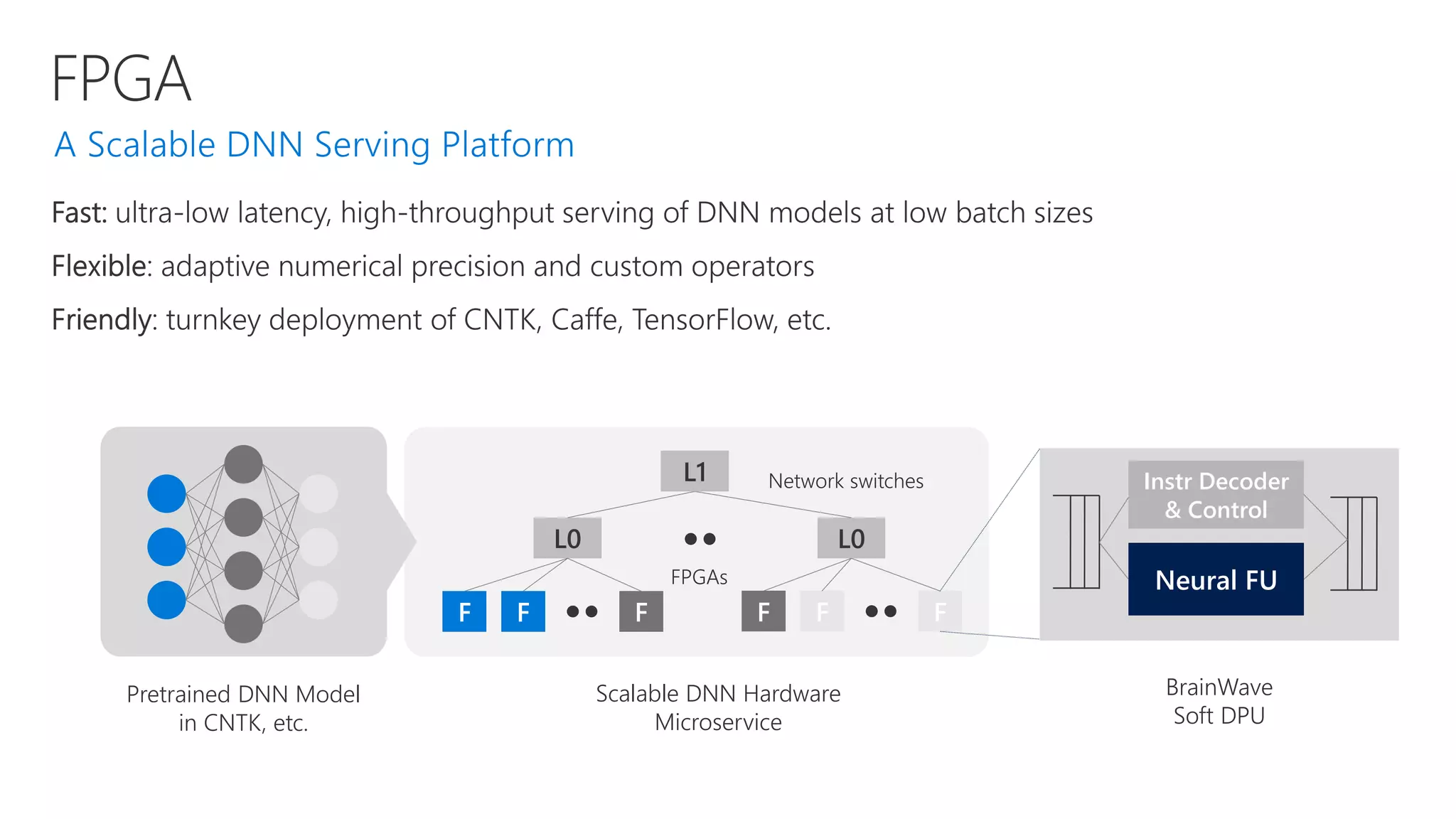
FPGA
F F F
L0
L1
F F F
L0
Pretrained DNN Model
in CNTK, etc.
Scalable DNN Hardware
Microservice
BrainWave
Soft DPU
Instr Decoder
& Control
Neural FU
Network switches
FPGAs
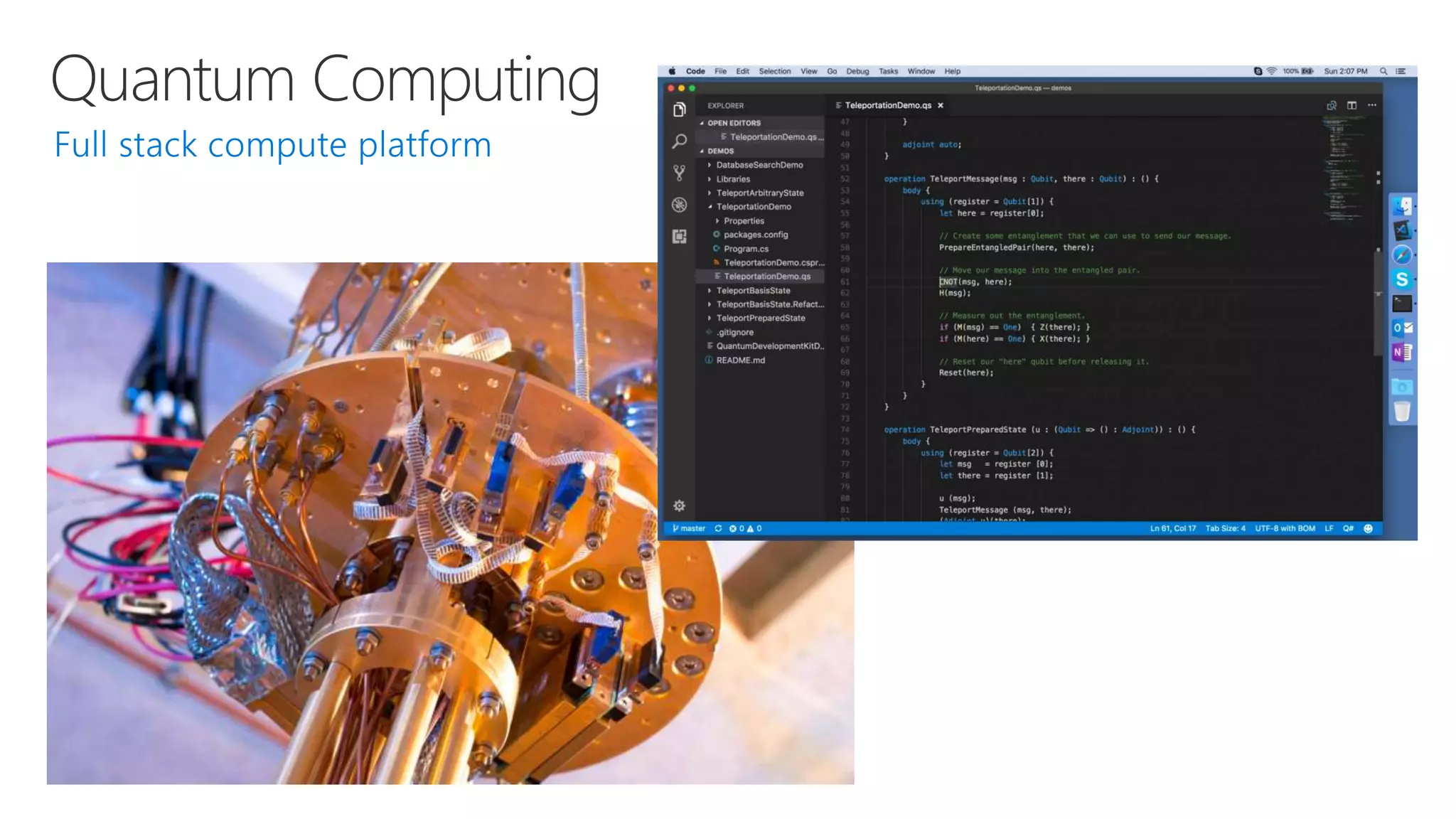
Quantum Computing
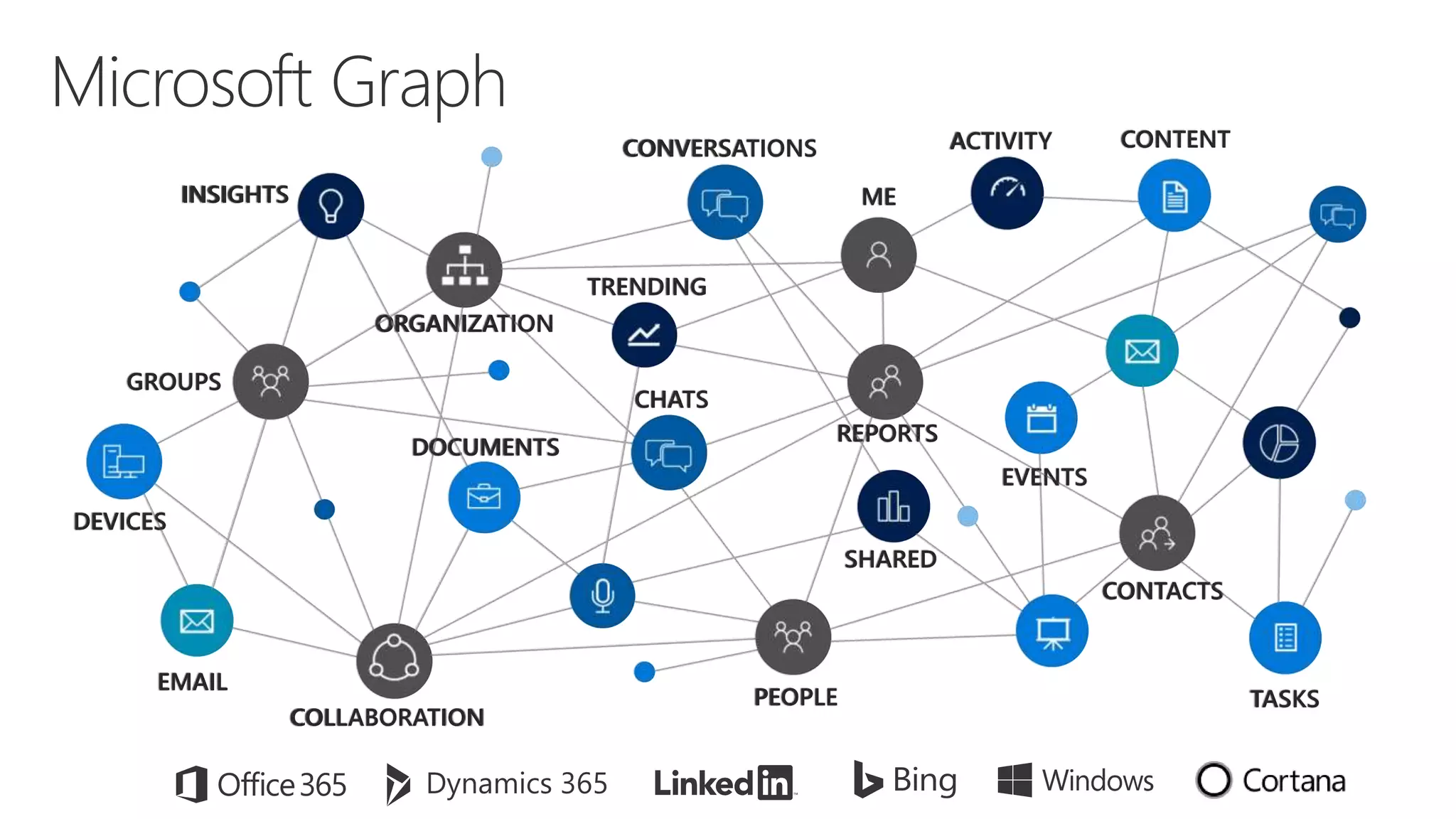
Microsoft Graph
GROUPS
ME
CONVERSATIONS CONTENT
INSIGHTS
CONTACTS
PEOPLE
ORGANIZATION
TASKS
EMAIL
EVENTS
DOCUMENTS
DEVICES
CHATS
COLLABORATION
ACTIVITY
TRENDING
SHARED
REPORTS
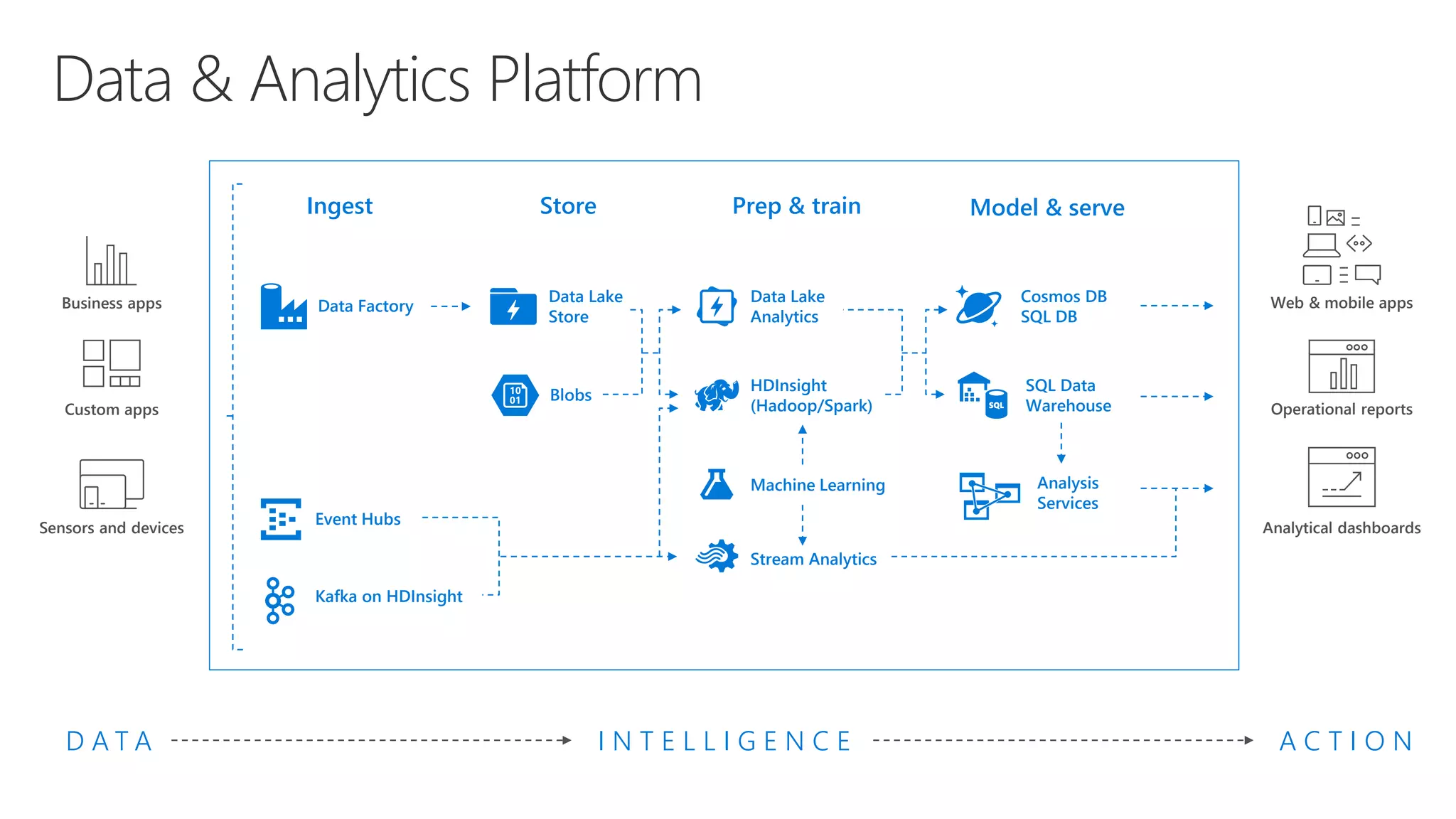
Data & Analytics Platform
Model & servePrep & train
Data Lake
Analytics
D A T A
Business apps
Custom apps
Sensors and devices
I N T E L L I G E N C E A C T I O N
Store
Data Lake
Store
Ingest
Data Factory
Machine Learning
Web & mobile appsCosmos DB
SQL DB
Analytical dashboards
SQL Data
Warehouse
Analysis
Services
Operational reports
HDInsight
(Hadoop/Spark)
Stream Analytics
Event Hubs
Kafka on HDInsight
Blobs
Azure Machine Learning
AI Development
Deep Learning
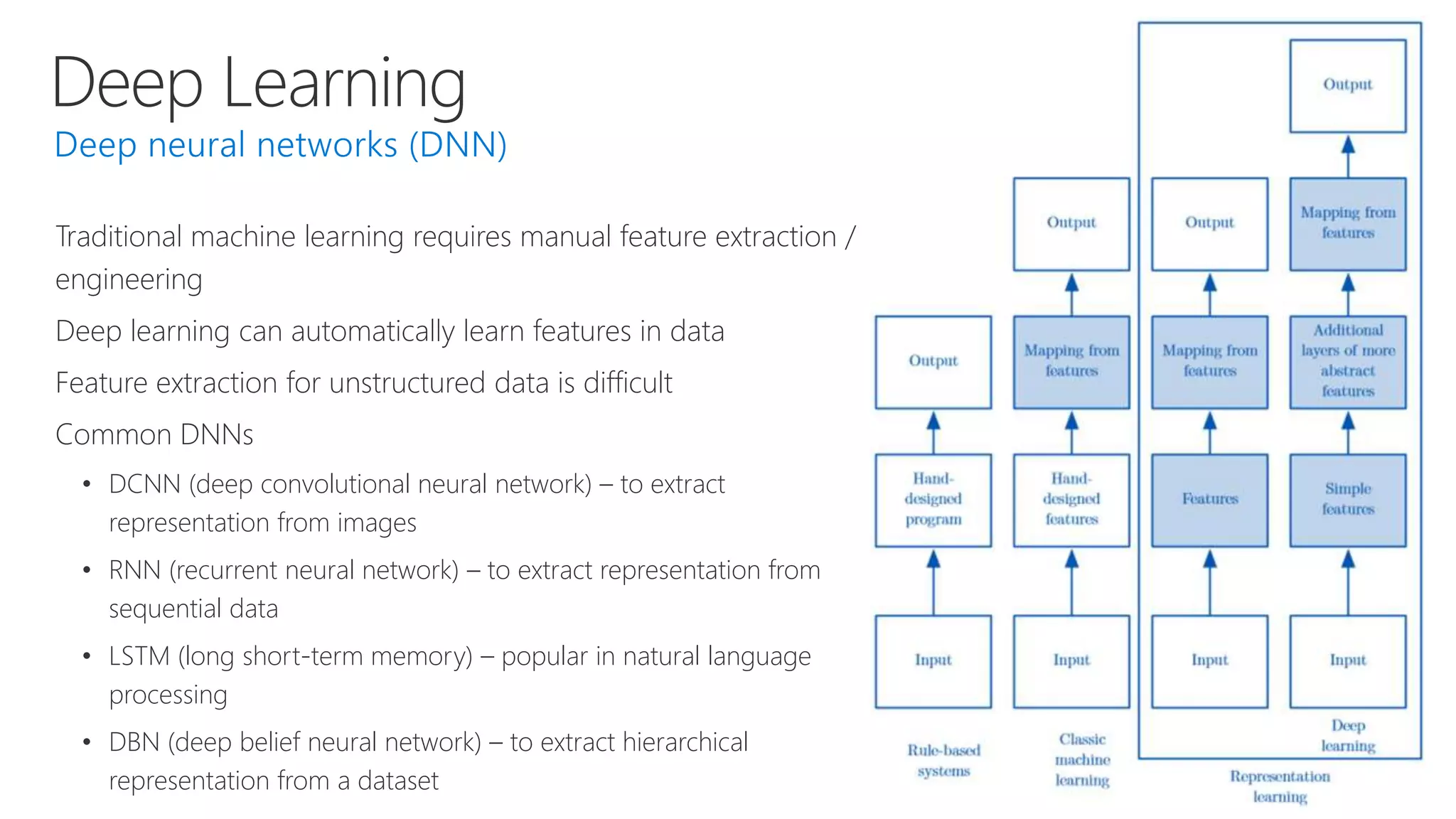
Traditional machine learning requires manual feature extraction /
engineering
Deep learning can automatically learn features in data
Feature extraction for unstructured data is difficult
Common DNNs
• DCNN (deep convolutional neural network) – to extract
representation from images
• RNN (recurrent neural network) – to extract representation from
sequential data
• LSTM (long short-term memory) – popular in natural language
processing
• DBN (deep belief neural network) – to extract hierarchical
representation from a dataset
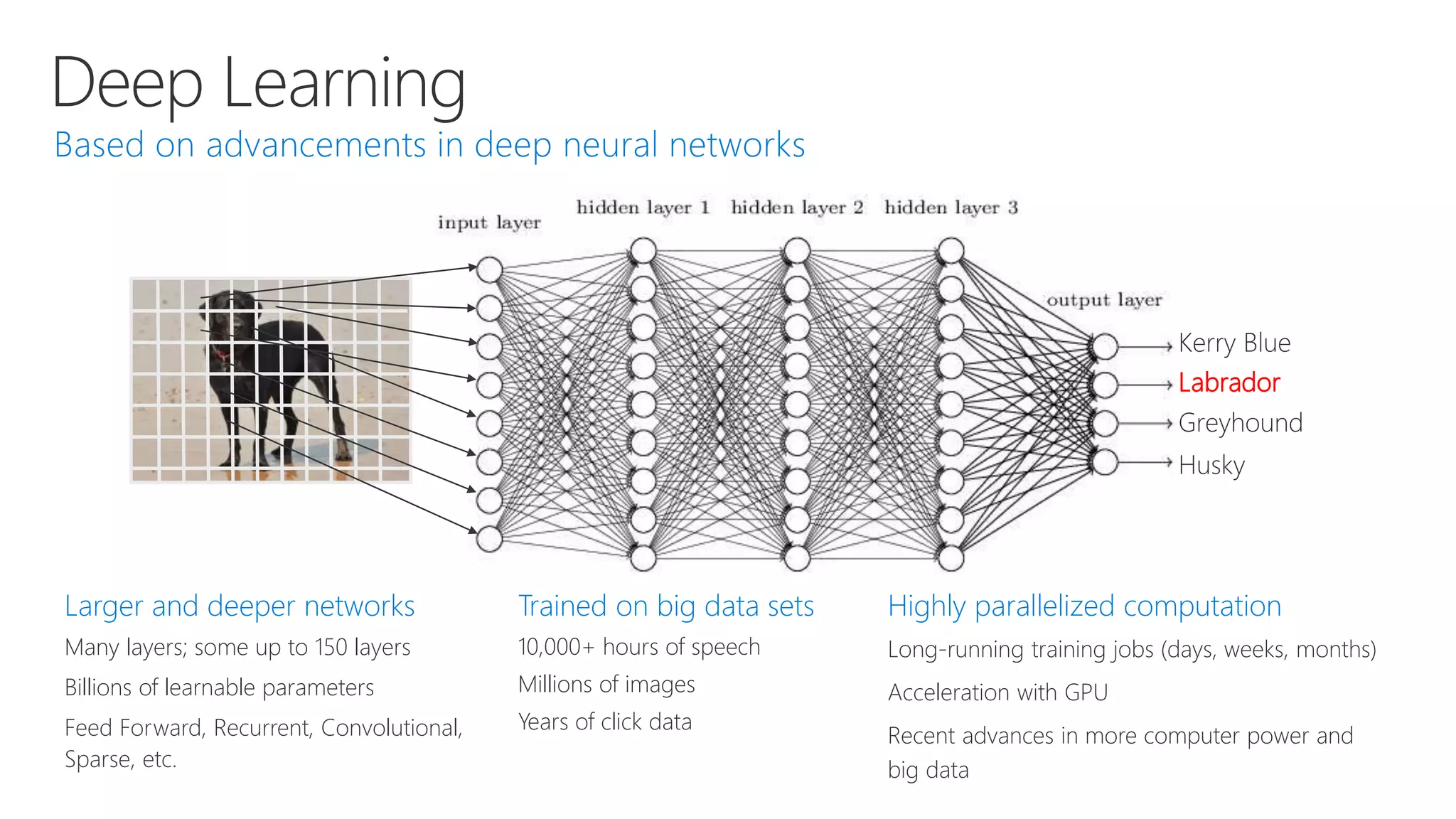
Deep Learning
Labrador
Larger and deeper networks
Many layers; some up to 150 layers
Billions of learnable parameters
Feed Forward, Recurrent, Convolutional,
Sparse, etc.
Trained on big data sets
10,000+ hours of speech
Millions of images
Years of click data
Highly parallelized computation
Long-running training jobs (days, weeks, months)
Acceleration with GPU
Recent advances in more computer power and
big data
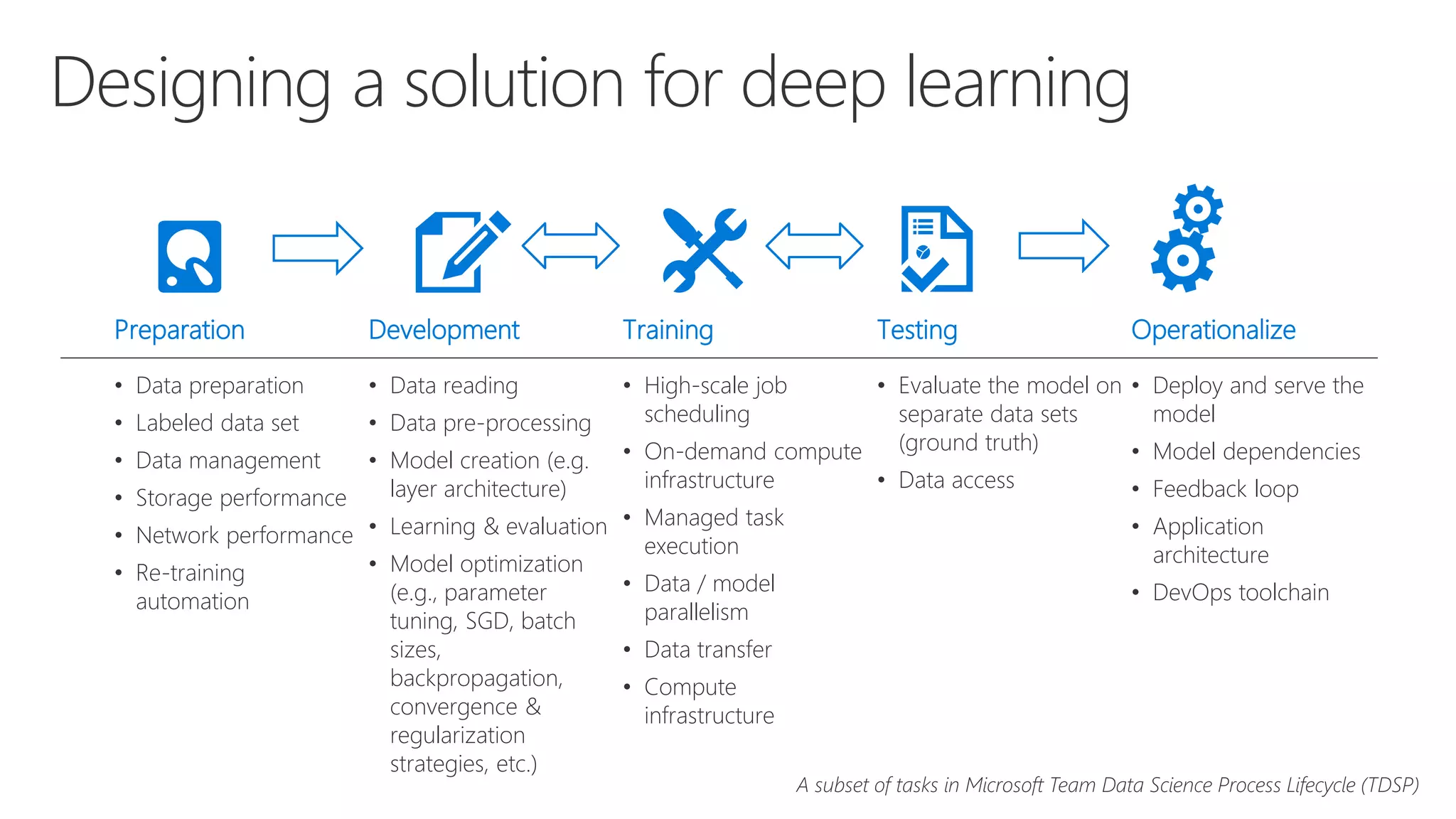
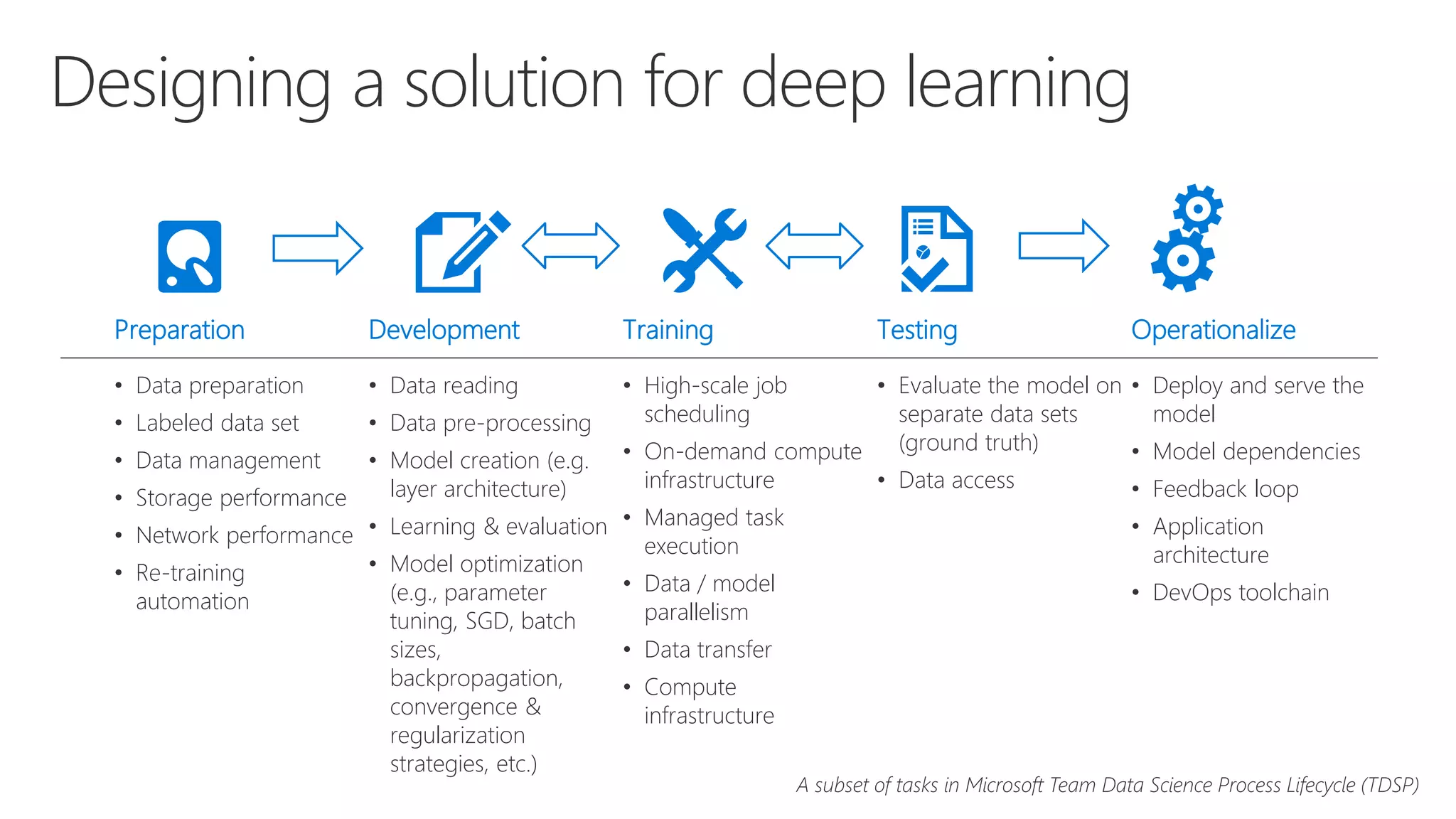
Designing a solution for deep learning
TestingPreparation Development Training Operationalize
• Evaluate the model on
separate data sets
(ground truth)
• Data access
• Data preparation
• Labeled data set
• Data management
• Storage performance
• Network performance
• Re-training
automation
• Data reading
• Data pre-processing
• Model creation (e.g.
layer architecture)
• Learning & evaluation
• Model optimization
(e.g., parameter
tuning, SGD, batch
sizes,
backpropagation,
convergence &
regularization
strategies, etc.)
• High-scale job
scheduling
• On-demand compute
infrastructure
• Managed task
execution
• Data / model
parallelism
• Data transfer
• Compute
infrastructure
• Deploy and serve the
model
• Model dependencies
• Feedback loop
• Application
architecture
• DevOps toolchain
A subset of tasks in Microsoft Team Data Science Process Lifecycle (TDSP)
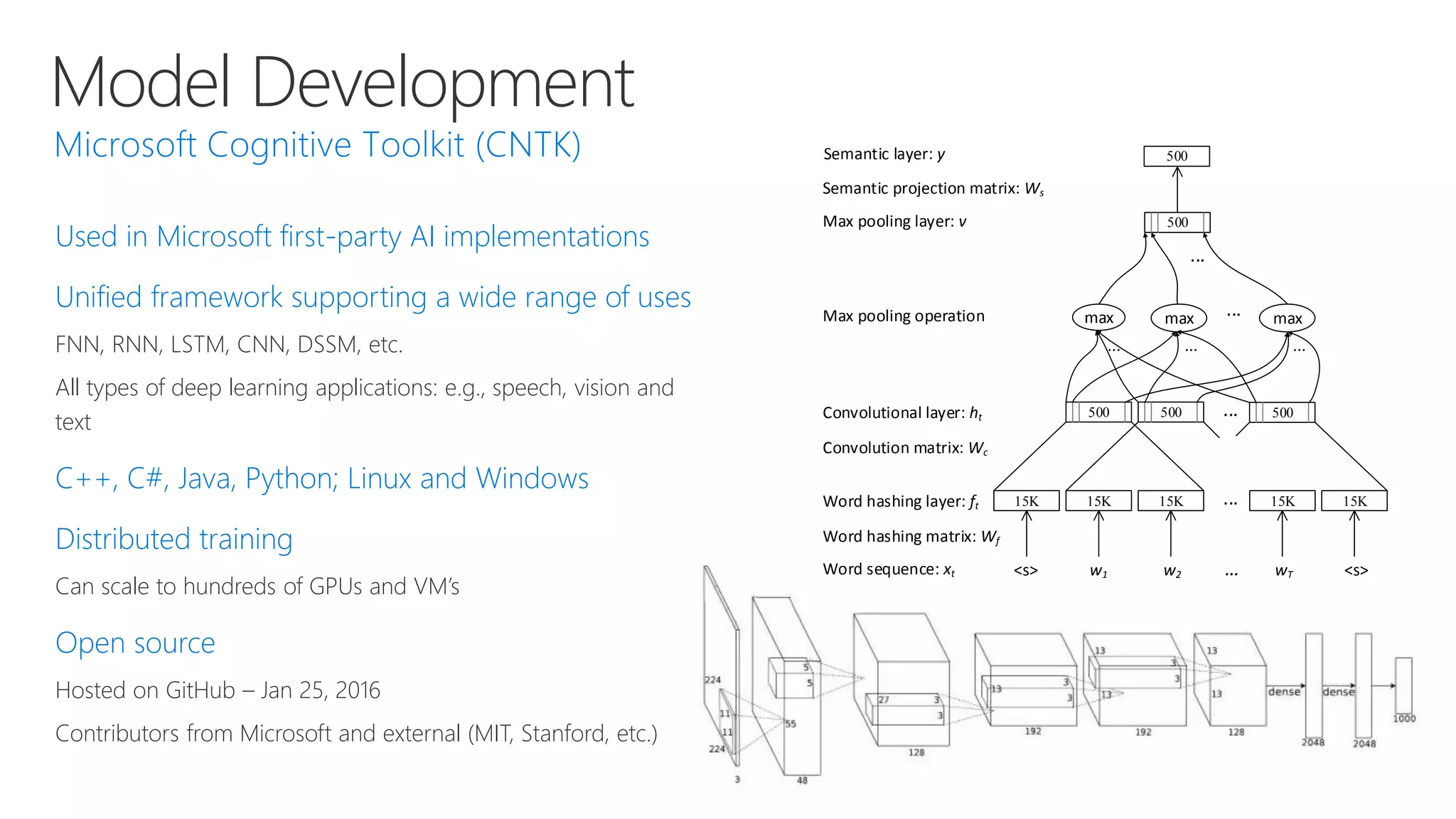
Model Development
Used in Microsoft first-party AI implementations
Unified framework supporting a wide range of uses
FNN, RNN, LSTM, CNN, DSSM, etc.
All types of deep learning applications: e.g., speech, vision and
text
C++, C#, Java, Python; Linux and Windows
Distributed training
Can scale to hundreds of GPUs and VM’s
Open source
Hosted on GitHub – Jan 25, 2016
Contributors from Microsoft and external (MIT, Stanford, etc.)
15K 15K 15K 15K 15K
500 500 500
max max
...
...
... max
500
...
...
Word hashing layer: ft
Convolutional layer: ht
Max pooling layer: v
Semantic layer: y
<s> w1 w2 wT <s>Word sequence: xt
Word hashing matrix: Wf
Convolution matrix: Wc
Max pooling operation
Semantic projection matrix: Ws
... ...
500
Model Development
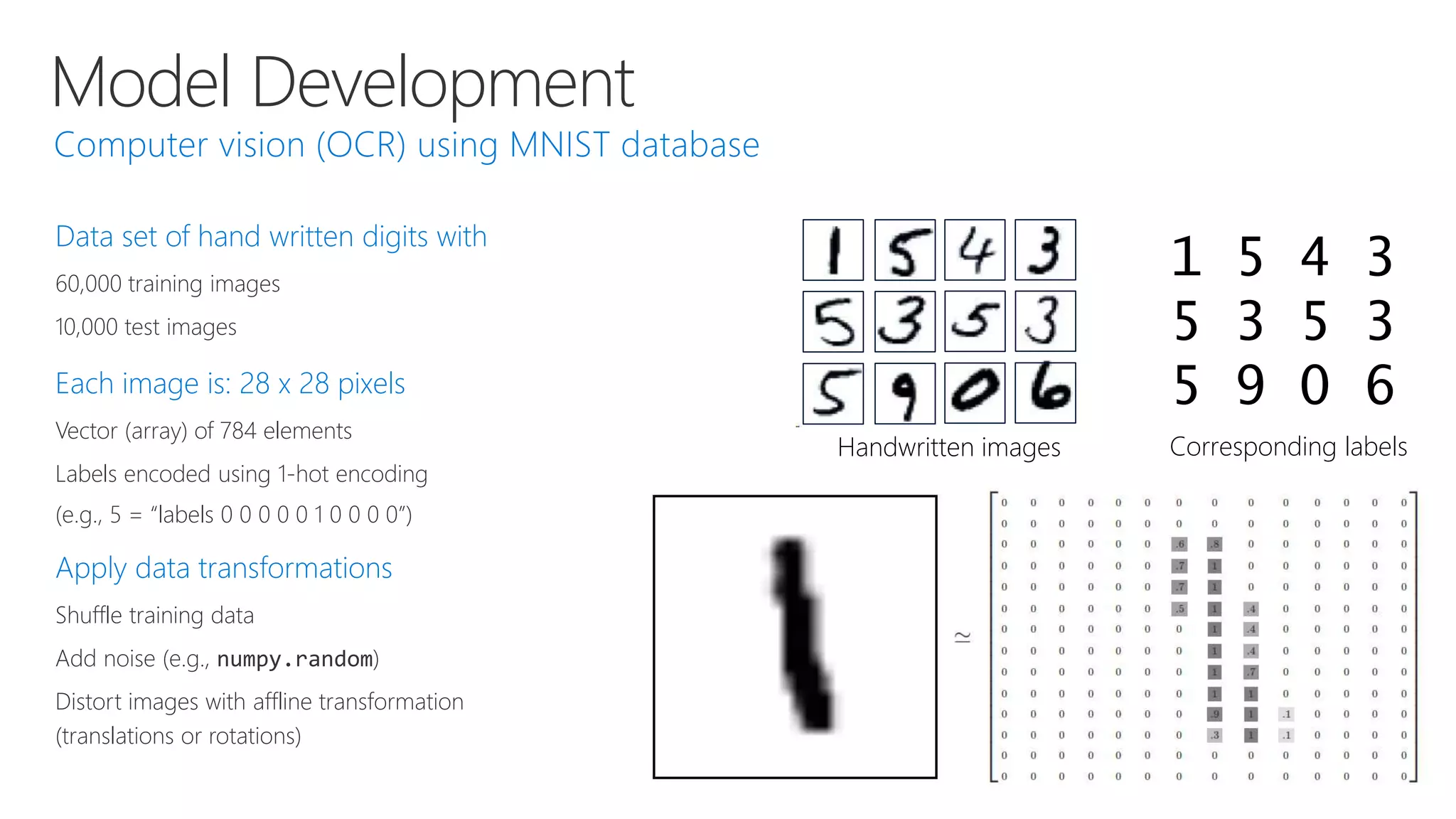
Data set of hand written digits with
60,000 training images
10,000 test images
Each image is: 28 x 28 pixels
Vector (array) of 784 elements
Labels encoded using 1-hot encoding
(e.g., 5 = “labels 0 0 0 0 0 1 0 0 0 0”)
Apply data transformations
Shuffle training data
Add noise (e.g., numpy.random)
Distort images with affline transformation
(translations or rotations)
1 5 4 3
5 3 5 3
5 9 0 6
Corresponding labelsHandwritten images
Model Development
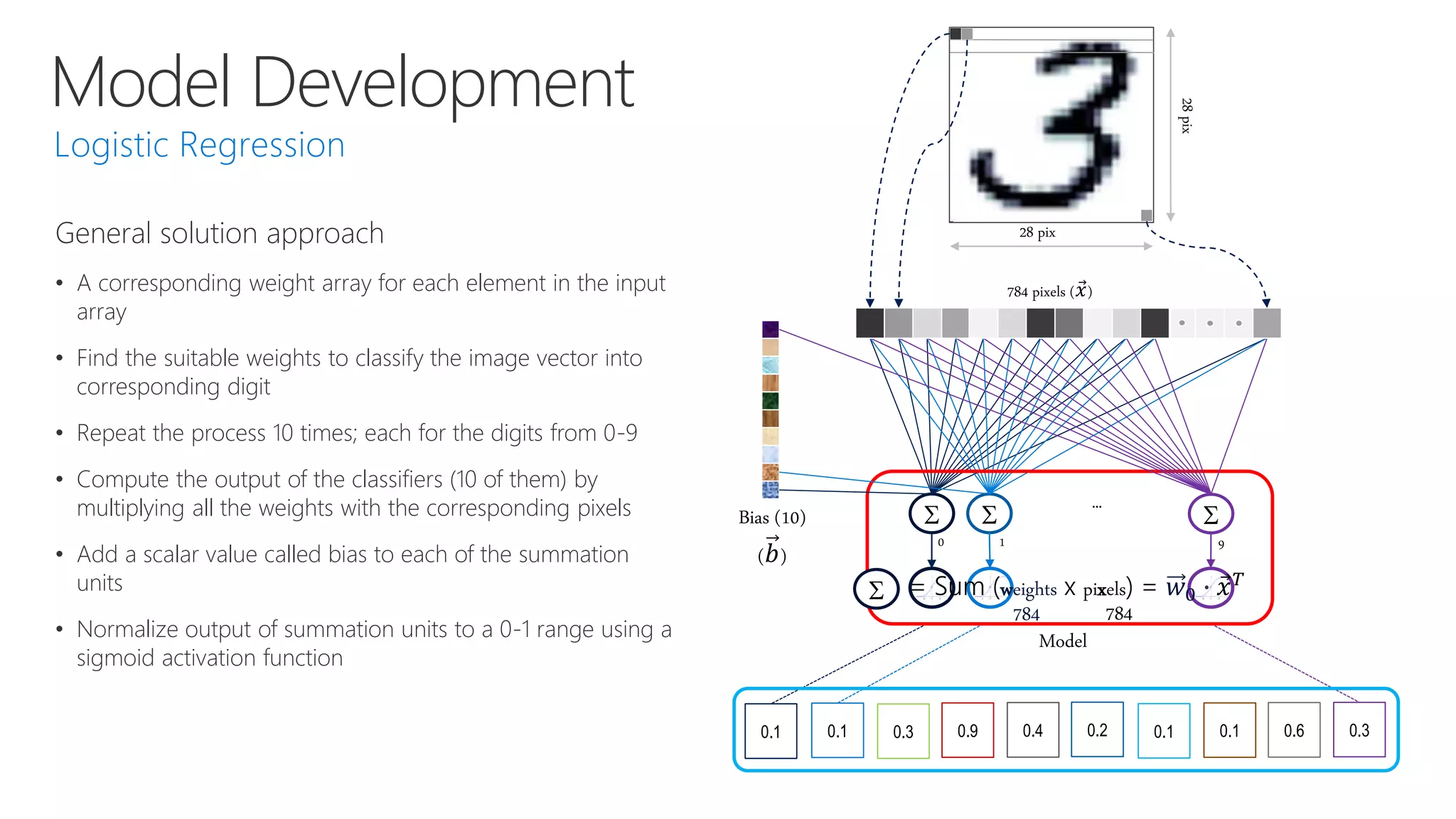
S S
0.1 0.1 0.3 0.9 0.4 0.2 0.1 0.1 0.6 0.3
Model
SBias (10)
(𝑏)
0 1 9
…
784 pixels ( 𝑥)
28 pix
28pix
S = Sum (weights x pixels) = 𝑤0 ∙ 𝑥 𝑇
784 784
General solution approach
• A corresponding weight array for each element in the input
array
• Find the suitable weights to classify the image vector into
corresponding digit
• Repeat the process 10 times; each for the digits from 0-9
• Compute the output of the classifiers (10 of them) by
multiplying all the weights with the corresponding pixels
• Add a scalar value called bias to each of the summation
units
• Normalize output of summation units to a 0-1 range using a
sigmoid activation function
Model Development
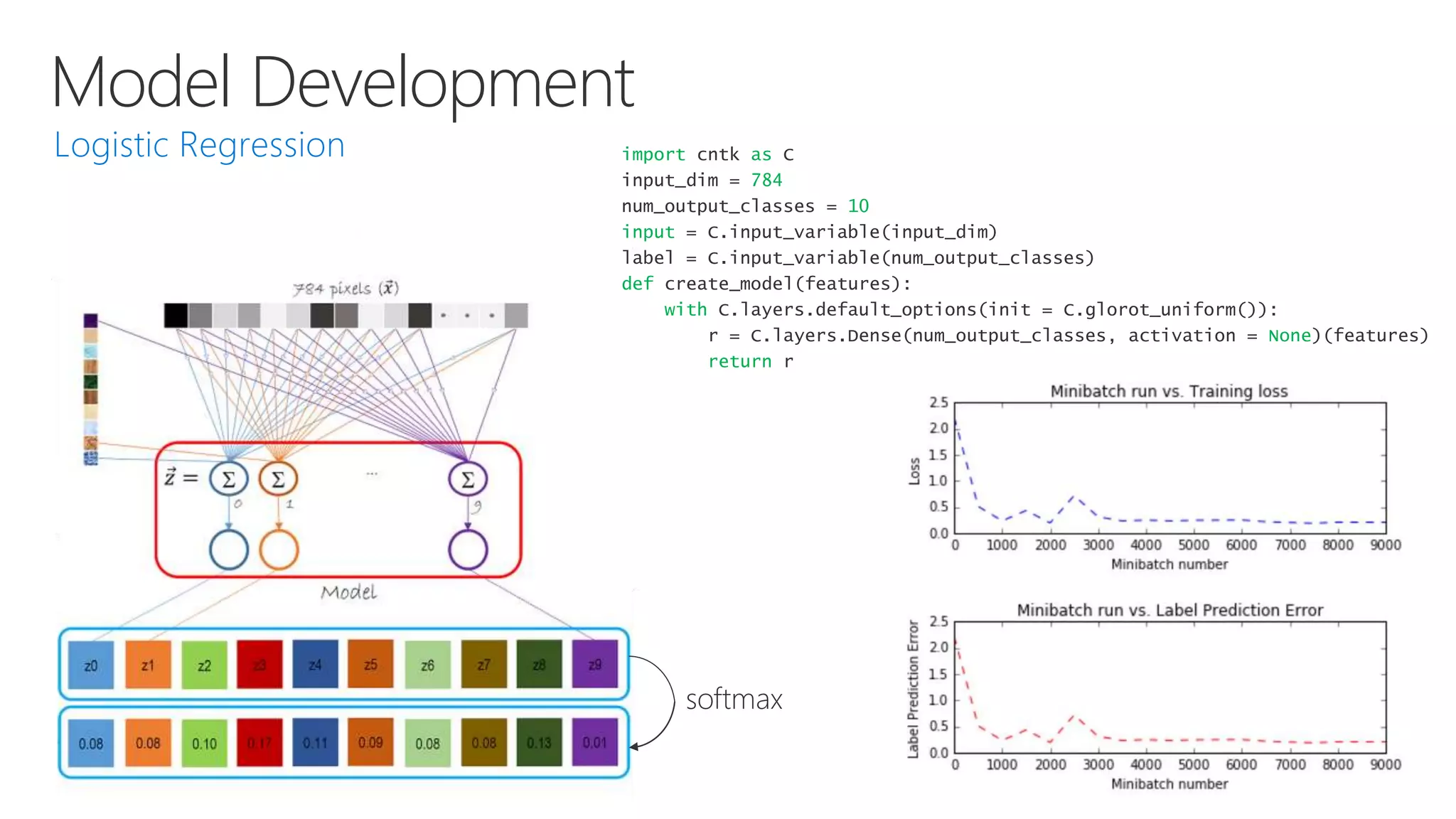
softmax
import cntk as C
input_dim = 784
num_output_classes = 10
input = C.input_variable(input_dim)
label = C.input_variable(num_output_classes)
def create_model(features):
with C.layers.default_options(init = C.glorot_uniform()):
r = C.layers.Dense(num_output_classes, activation = None)(features)
return r
Model Development
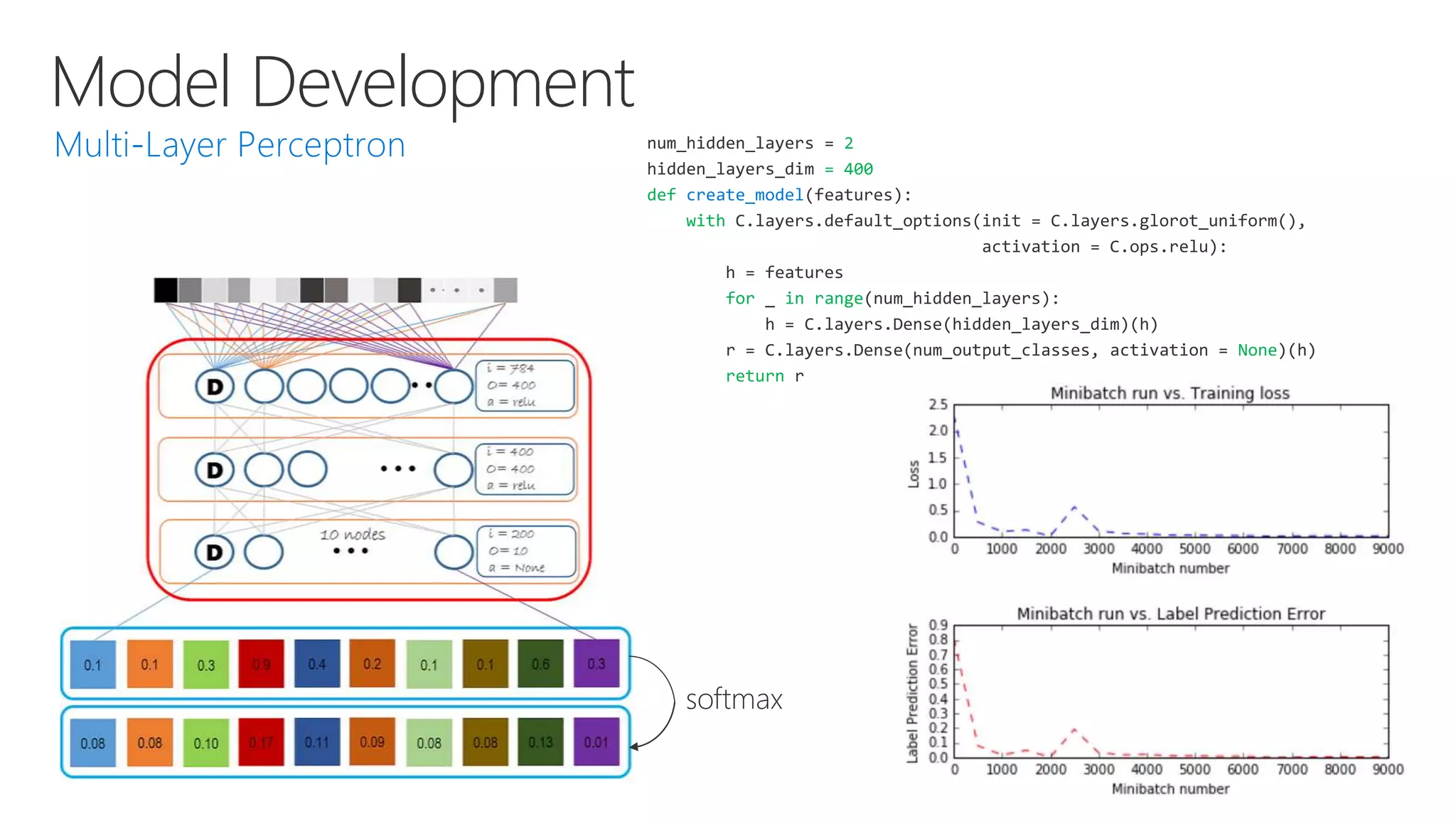
num_hidden_layers = 2
hidden_layers_dim = 400
def create_model(features):
with C.layers.default_options(init = C.layers.glorot_uniform(),
activation = C.ops.relu):
h = features
for _ in range(num_hidden_layers):
h = C.layers.Dense(hidden_layers_dim)(h)
r = C.layers.Dense(num_output_classes, activation = None)(h)
return r
softmax
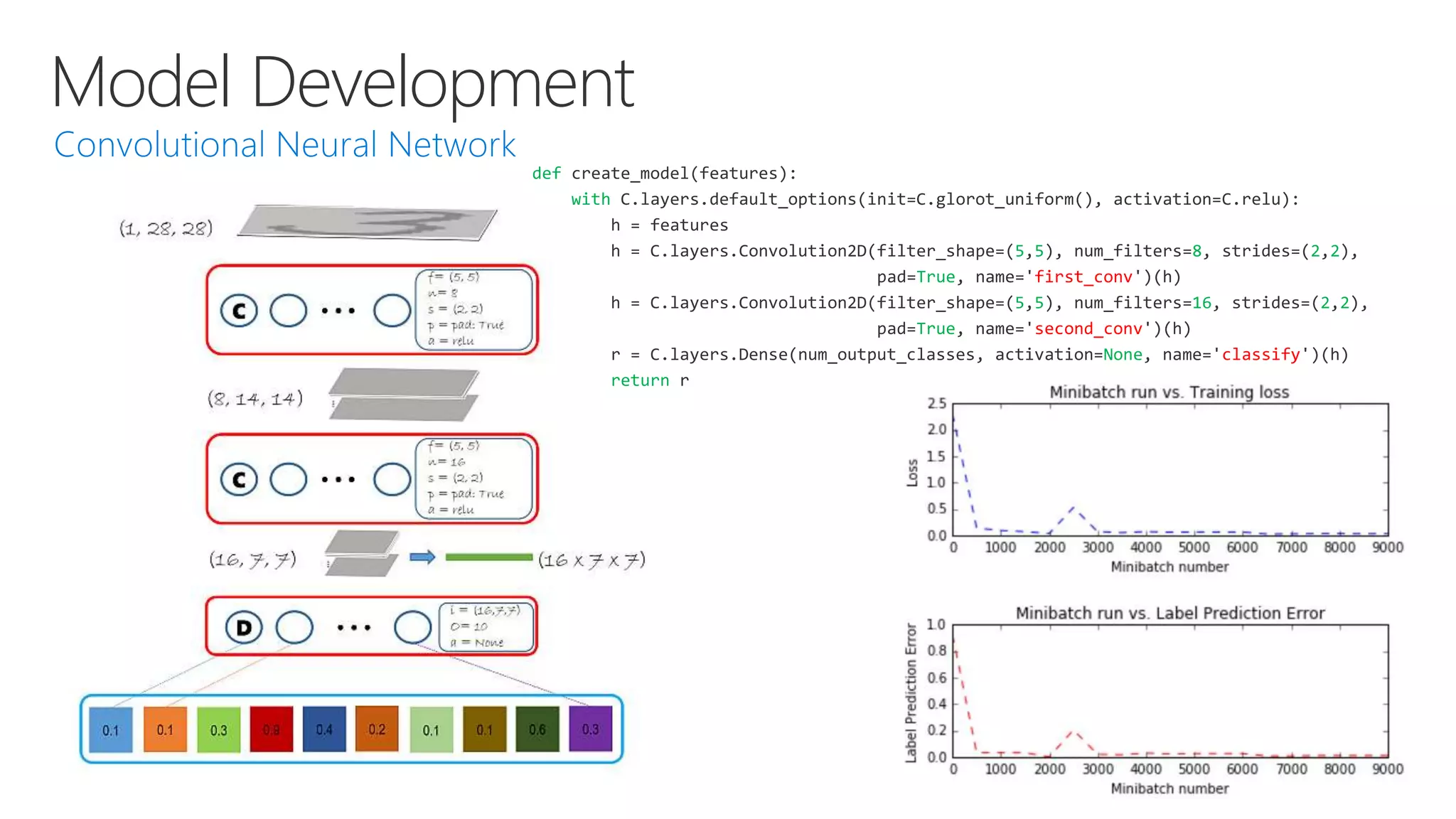
Model Development
def create_model(features):
with C.layers.default_options(init=C.glorot_uniform(), activation=C.relu):
h = features
h = C.layers.Convolution2D(filter_shape=(5,5), num_filters=8, strides=(2,2),
pad=True, name='first_conv')(h)
h = C.layers.Convolution2D(filter_shape=(5,5), num_filters=16, strides=(2,2),
pad=True, name='second_conv')(h)
r = C.layers.Dense(num_output_classes, activation=None, name='classify')(h)
return r
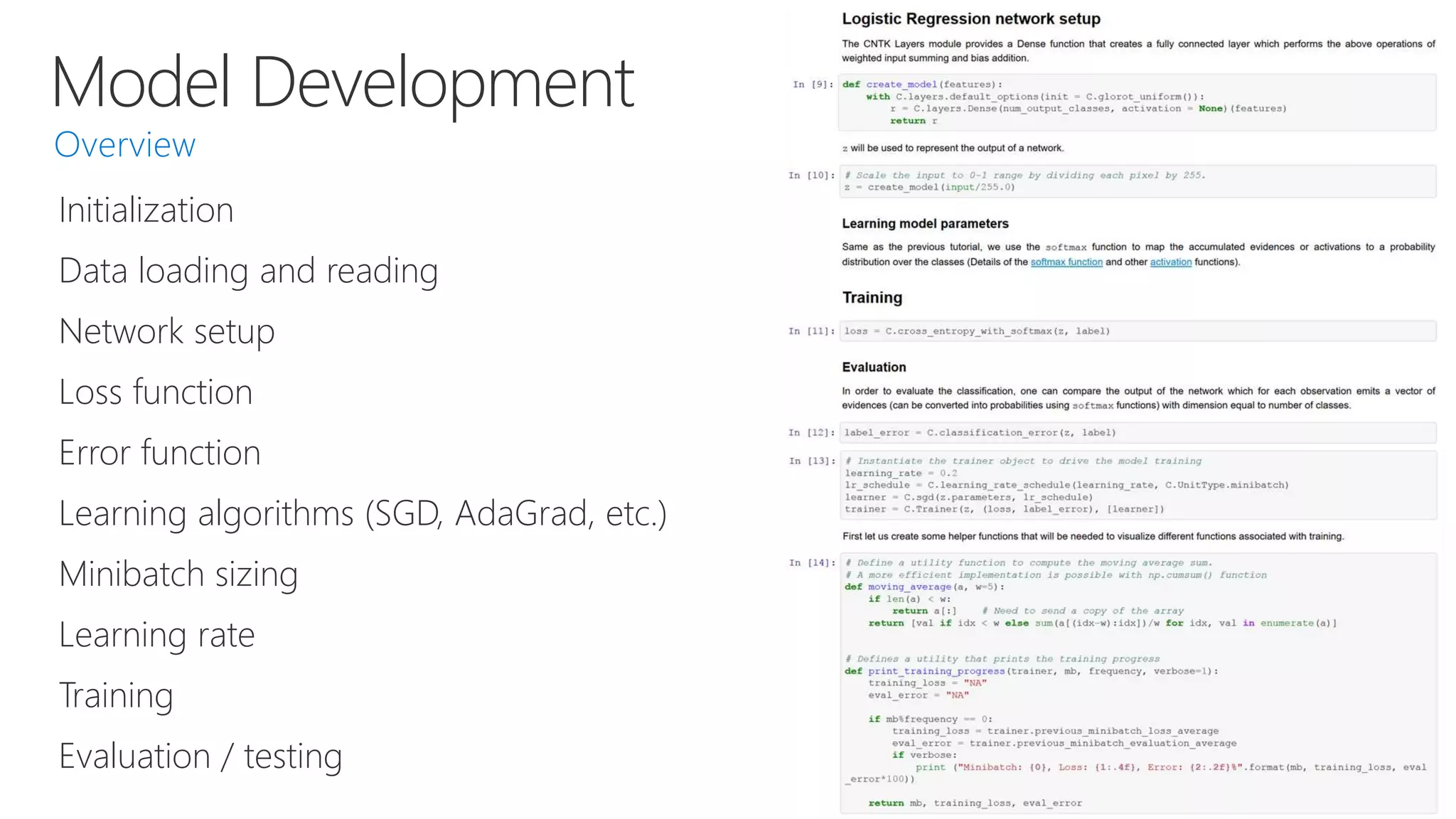
Model Development
Initialization
Data loading and reading
Network setup
Loss function
Error function
Learning algorithms (SGD, AdaGrad, etc.)
Minibatch sizing
Learning rate
Training
Evaluation / testing
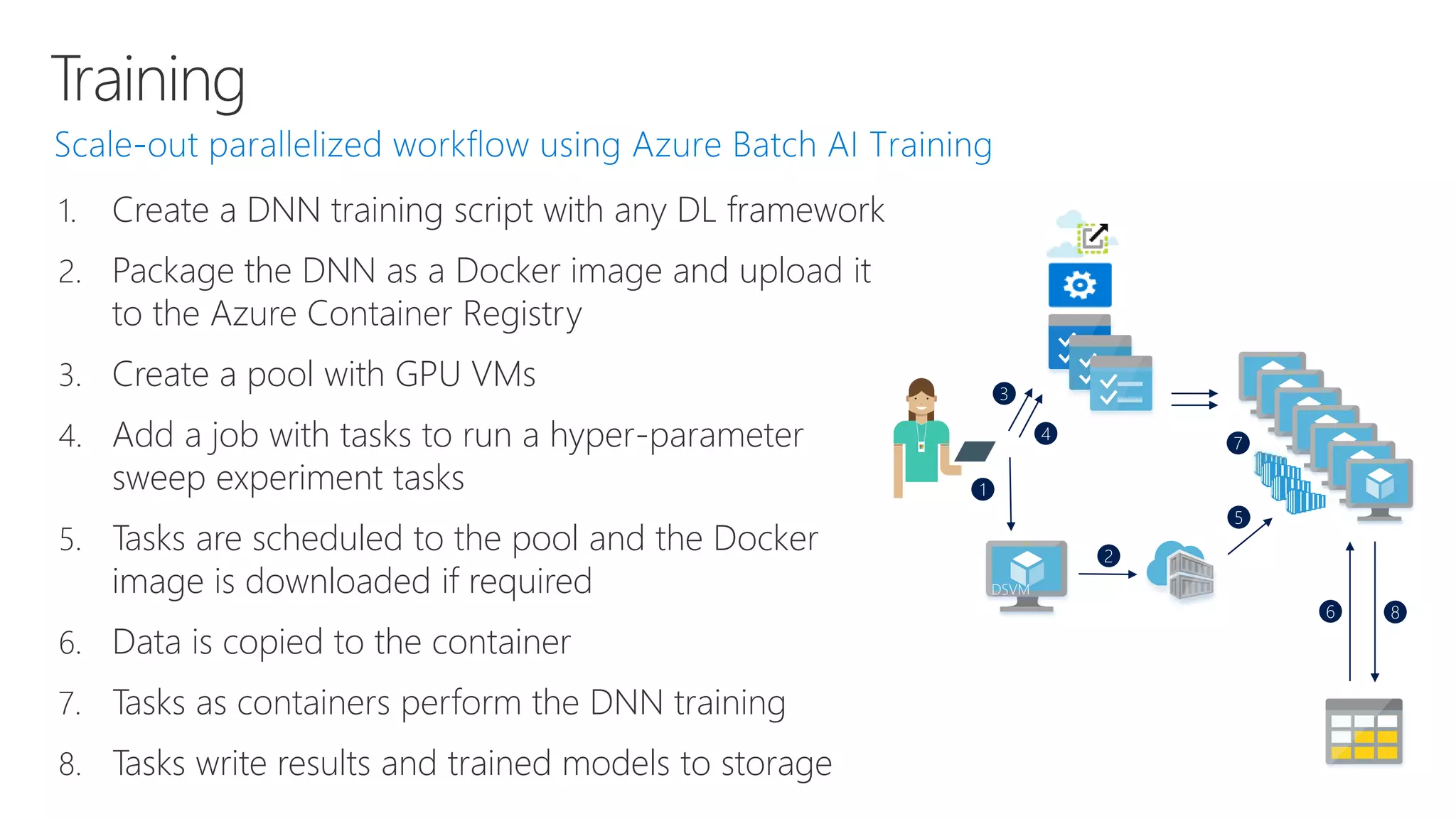
Training
1. Create a DNN training script with any DL framework
2. Package the DNN as a Docker image and upload it
to the Azure Container Registry
3. Create a pool with GPU VMs
4. Add a job with tasks to run a hyper-parameter
sweep experiment tasks
5. Tasks are scheduled to the pool and the Docker
image is downloaded if required
6. Data is copied to the container
7. Tasks as containers perform the DNN training
8. Tasks write results and trained models to storage
DSVM
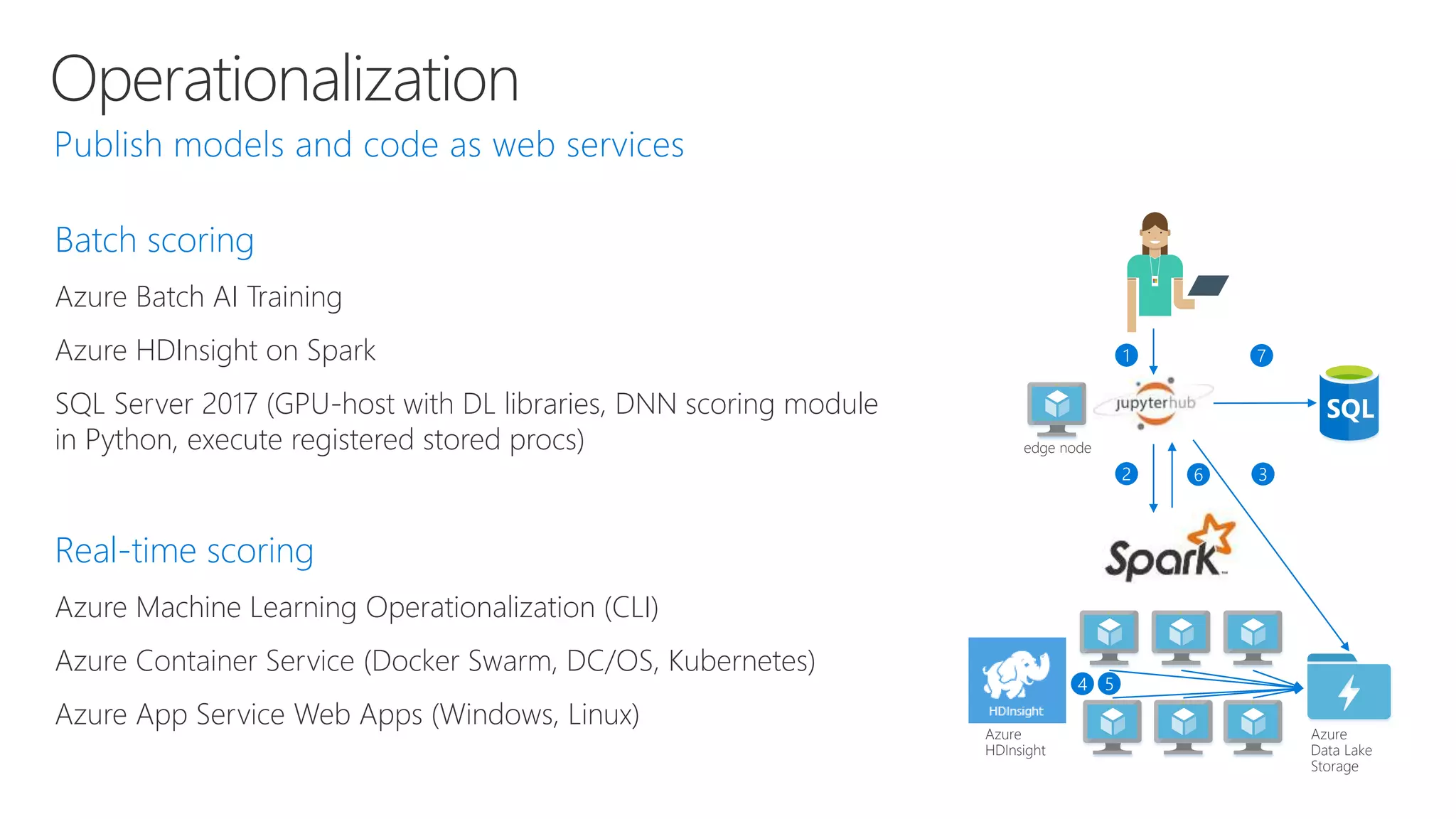
Operationalization
Batch scoring
Azure Batch AI Training
Azure HDInsight on Spark
SQL Server 2017 (GPU-host with DL libraries, DNN scoring module
in Python, execute registered stored procs)
Real-time scoring
Azure Machine Learning Operationalization (CLI)
Azure Container Service (Docker Swarm, DC/OS, Kubernetes)
Azure App Service Web Apps (Windows, Linux)
edge node
Azure
Data Lake
Storage
Azure
HDInsight
Operationalization
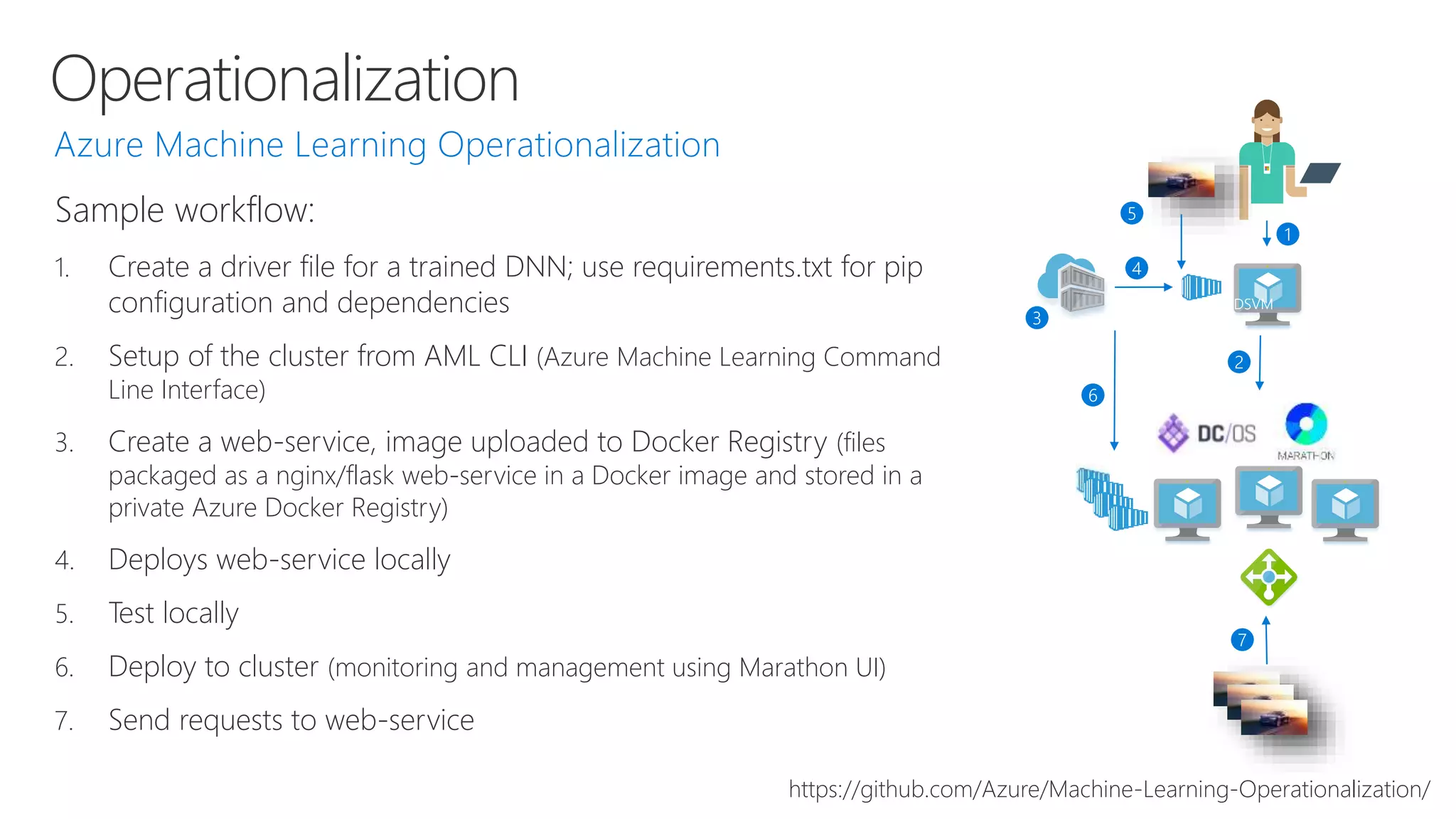
Sample workflow:
1. Create a driver file for a trained DNN; use requirements.txt for pip
configuration and dependencies
2. Setup of the cluster from AML CLI (Azure Machine Learning Command
Line Interface)
3. Create a web-service, image uploaded to Docker Registry (files
packaged as a nginx/flask web-service in a Docker image and stored in a
private Azure Docker Registry)
4. Deploys web-service locally
5. Test locally
6. Deploy to cluster (monitoring and management using Marathon UI)
7. Send requests to web-service
DSVM
https://github.com/Azure/Machine-Learning-Operationalization/
Operationalization
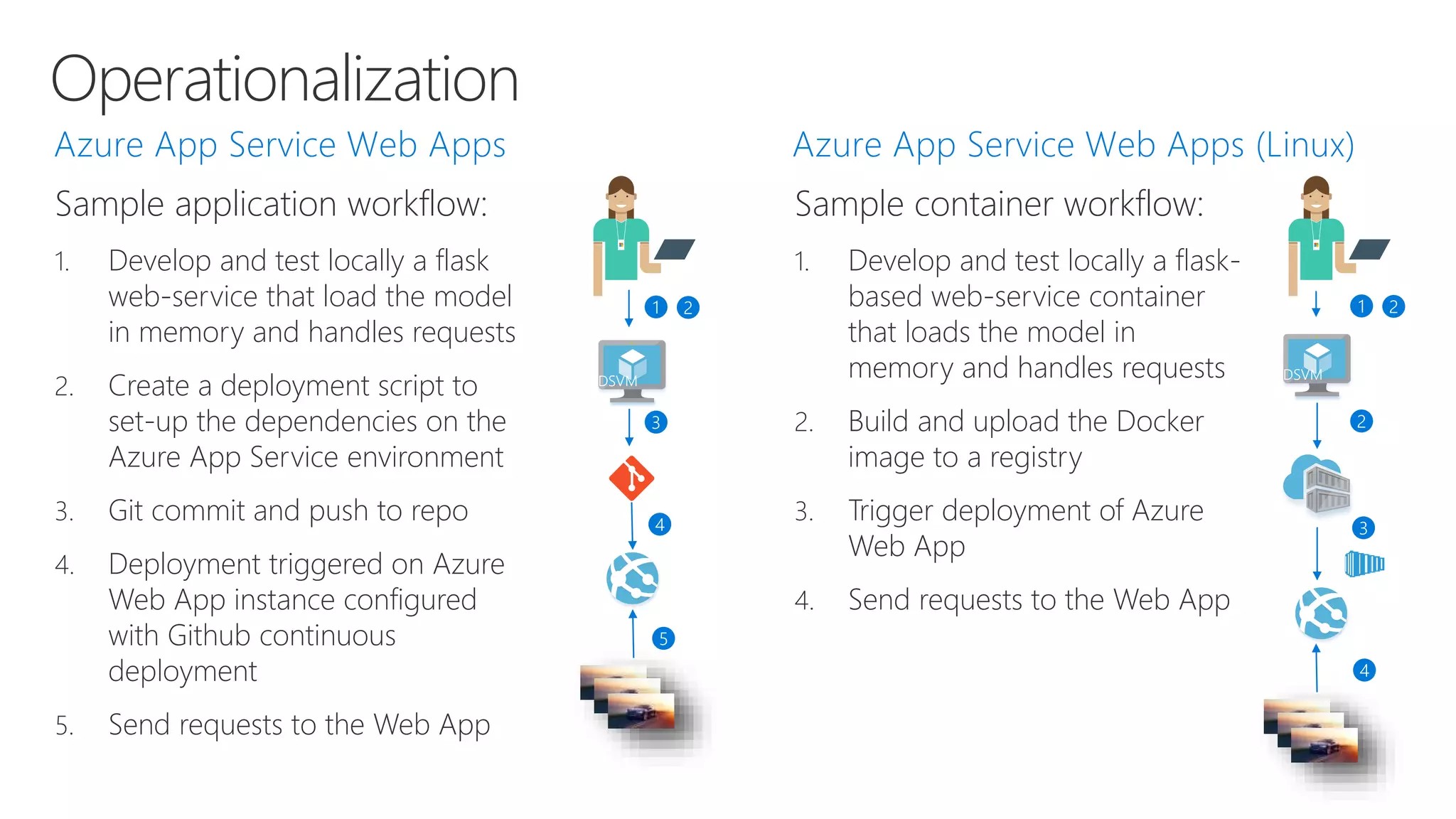
Sample application workflow:
1. Develop and test locally a flask
web-service that load the model
in memory and handles requests
2. Create a deployment script to
set-up the dependencies on the
Azure App Service environment
3. Git commit and push to repo
4. Deployment triggered on Azure
Web App instance configured
with Github continuous
deployment
5. Send requests to the Web App
DSVM DSVM
Sample container workflow:
1. Develop and test locally a flask-
based web-service container
that loads the model in
memory and handles requests
2. Build and upload the Docker
image to a registry
3. Trigger deployment of Azure
Web App
4. Send requests to the Web App
Designing a solution for deep learning
TestingPreparation Development Training Operationalize
• Evaluate the model on
separate data sets
(ground truth)
• Data access
• Data preparation
• Labeled data set
• Data management
• Storage performance
• Network performance
• Re-training
automation
• Data reading
• Data pre-processing
• Model creation (e.g.
layer architecture)
• Learning & evaluation
• Model optimization
(e.g., parameter
tuning, SGD, batch
sizes,
backpropagation,
convergence &
regularization
strategies, etc.)
• High-scale job
scheduling
• On-demand compute
infrastructure
• Managed task
execution
• Data / model
parallelism
• Data transfer
• Compute
infrastructure
• Deploy and serve the
model
• Model dependencies
• Feedback loop
• Application
architecture
• DevOps toolchain
A subset of tasks in Microsoft Team Data Science Process Lifecycle (TDSP)
Deep Learning
Deep learning
 Specify a structure and a
loss function
 Optimize using gradient
descent
 Network feeds forward
with matrix multiplications
and point-wise activations
 Network backpropagates
using multivariate chain
rule
 Update the weights
accordingly
 Optimize structure
 Prevent over or under
fitting
 Converge to a high-
quality local minima
 Use the right loss function
 Effective learning rate
 Appropriate data
augmentation
 Proper pre-processing
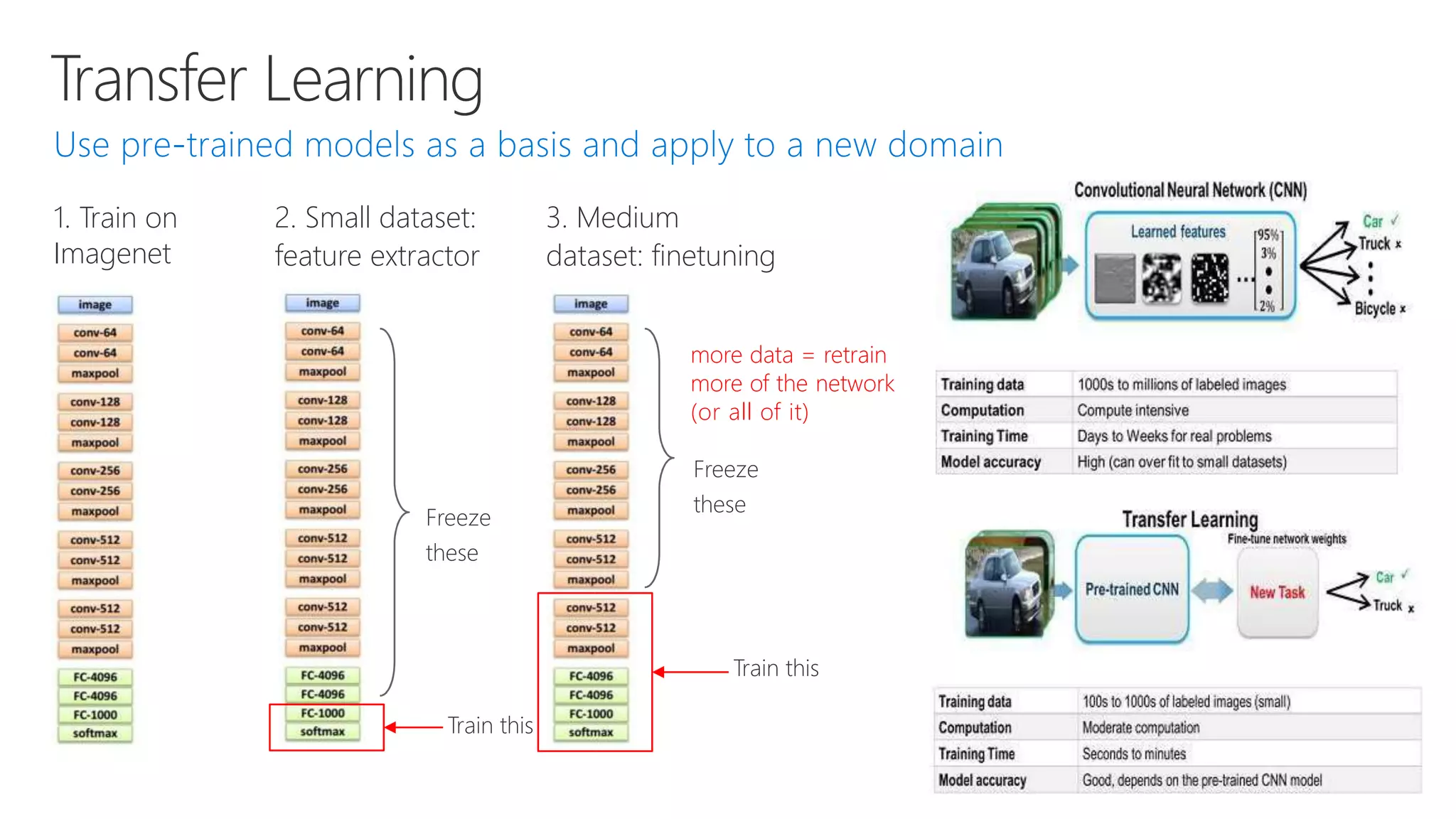
Transfer Learning
1. Train on
Imagenet
3. Medium
dataset: finetuning
2. Small dataset:
feature extractor
Freeze
these
Train this
more data = retrain
more of the network
(or all of it)
Freeze
these
Train this
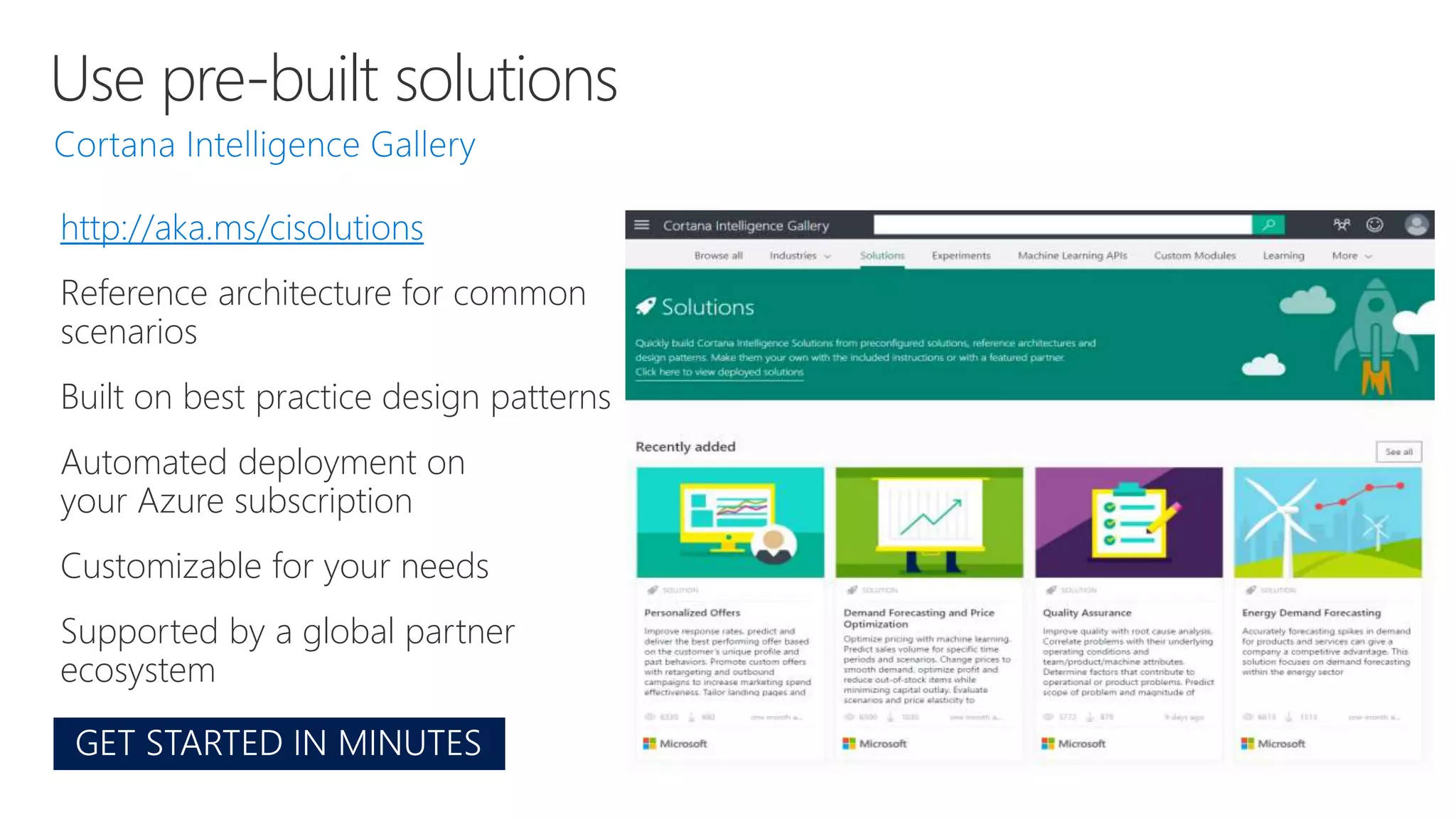
Use pre-built solutions
http://aka.ms/cisolutions
Reference architecture for common
scenarios
Built on best practice design patterns
Automated deployment on
your Azure subscription
Customizable for your needs
Supported by a global partner
ecosystem
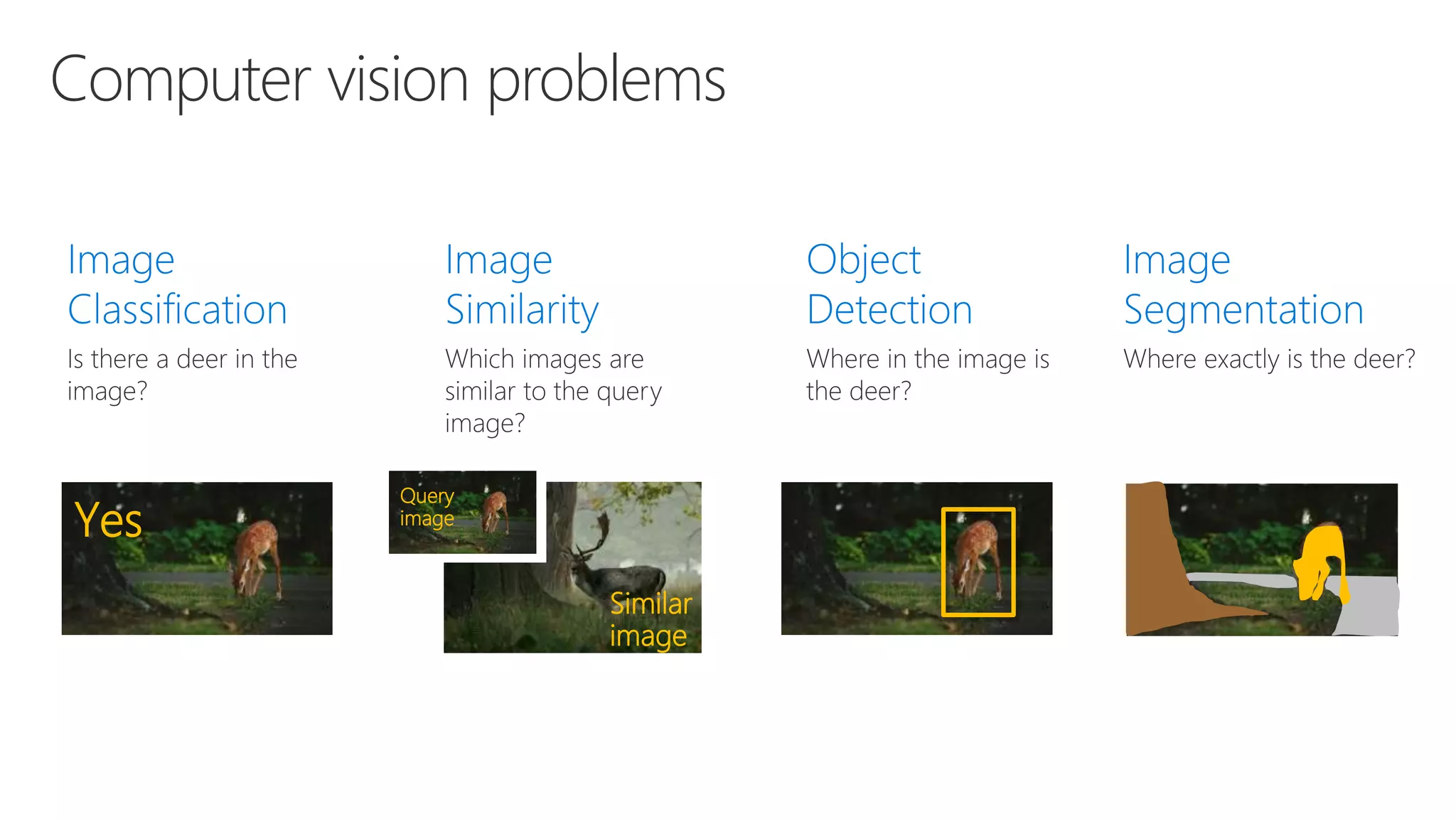
Computer vision problems
Yes
Similar
image
Query
image
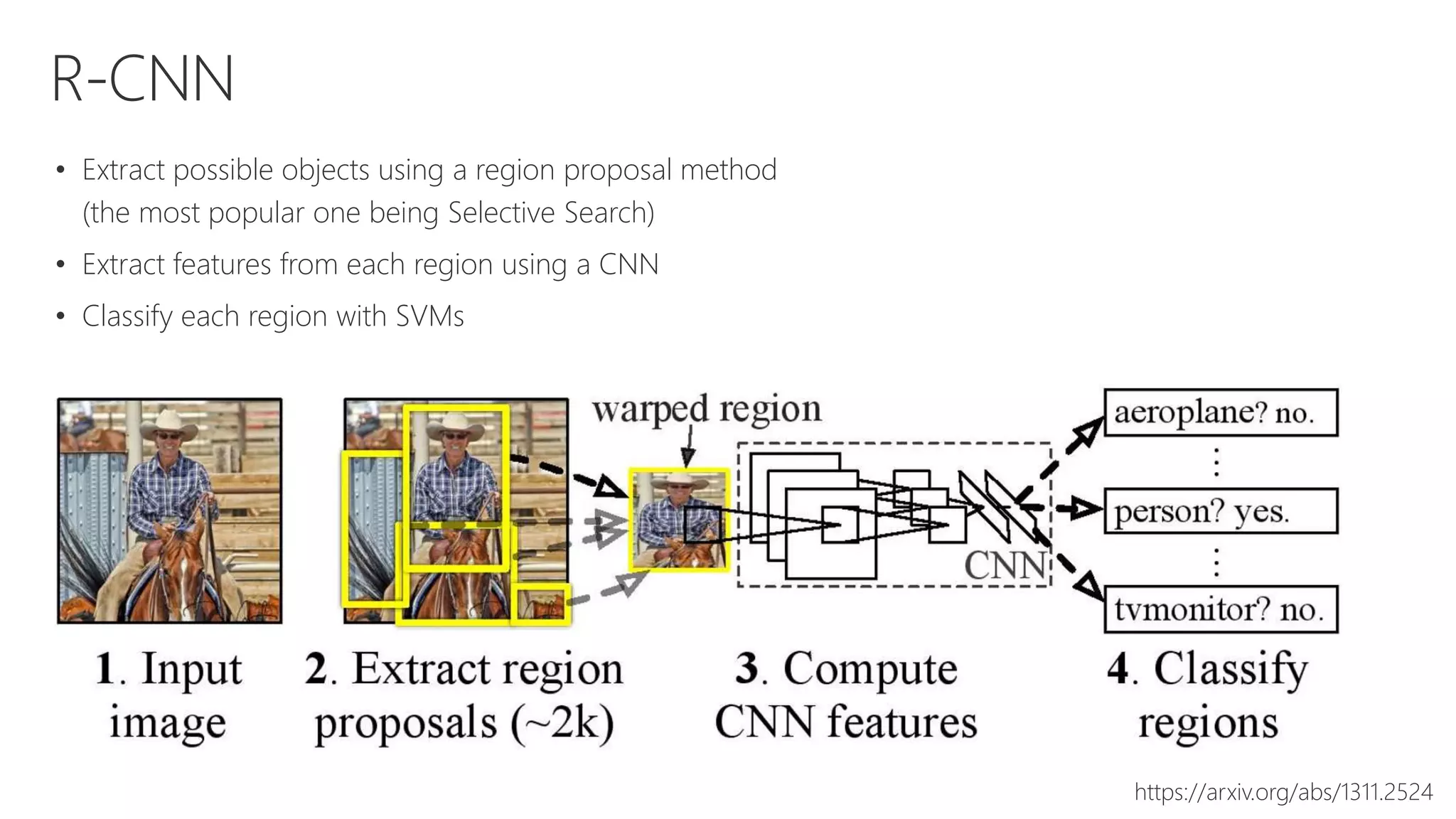
R-CNN
• Extract possible objects using a region proposal method
(the most popular one being Selective Search)
• Extract features from each region using a CNN
• Classify each region with SVMs
https://arxiv.org/abs/1311.2524
Fast R-CNN
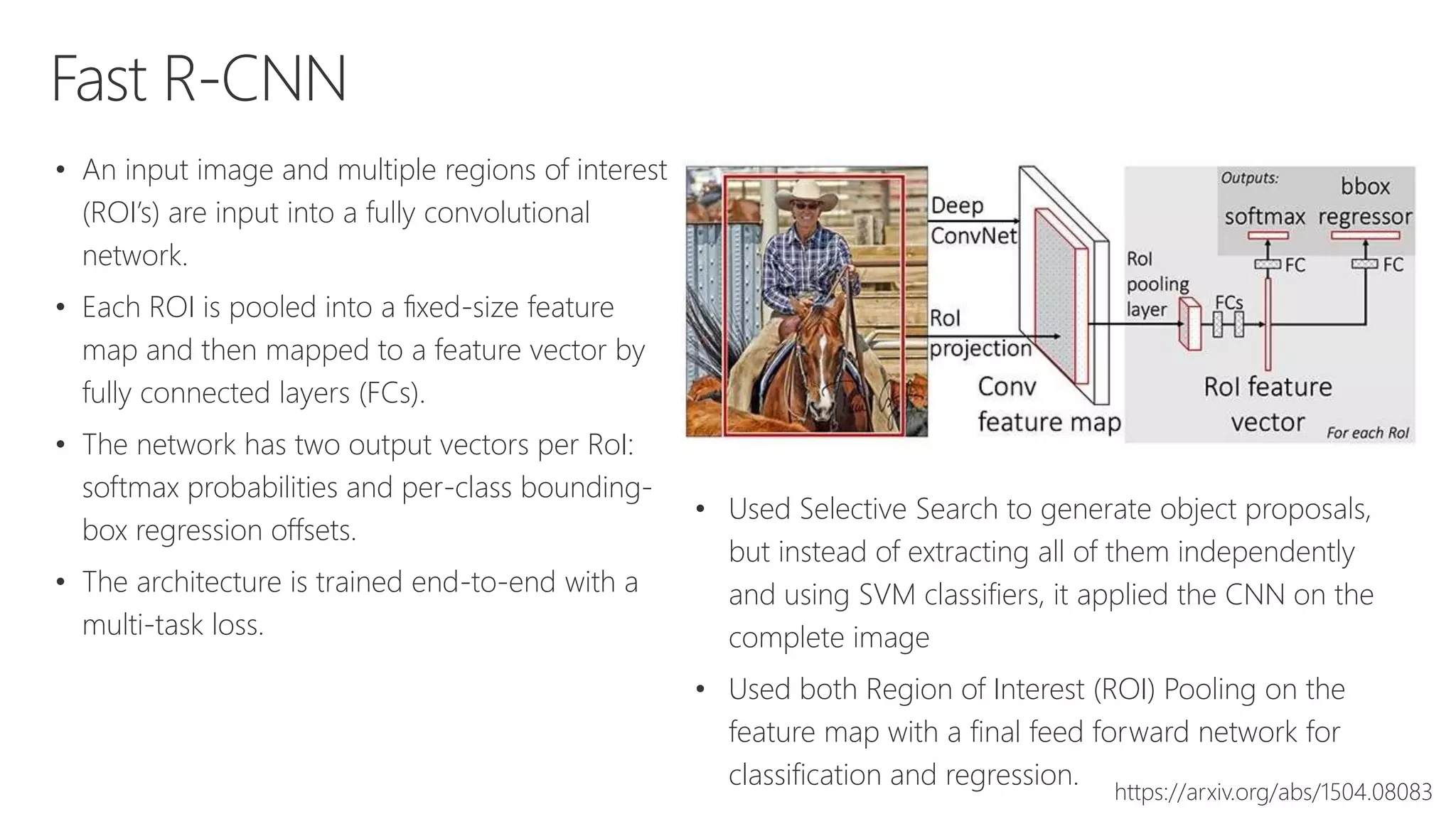
• An input image and multiple regions of interest
(ROI’s) are input into a fully convolutional
network.
• Each ROI is pooled into a fixed-size feature
map and then mapped to a feature vector by
fully connected layers (FCs).
• The network has two output vectors per RoI:
softmax probabilities and per-class bounding-
box regression offsets.
• The architecture is trained end-to-end with a
multi-task loss.
https://arxiv.org/abs/1504.08083
• Used Selective Search to generate object proposals,
but instead of extracting all of them independently
and using SVM classifiers, it applied the CNN on the
complete image
• Used both Region of Interest (ROI) Pooling on the
feature map with a final feed forward network for
classification and regression.
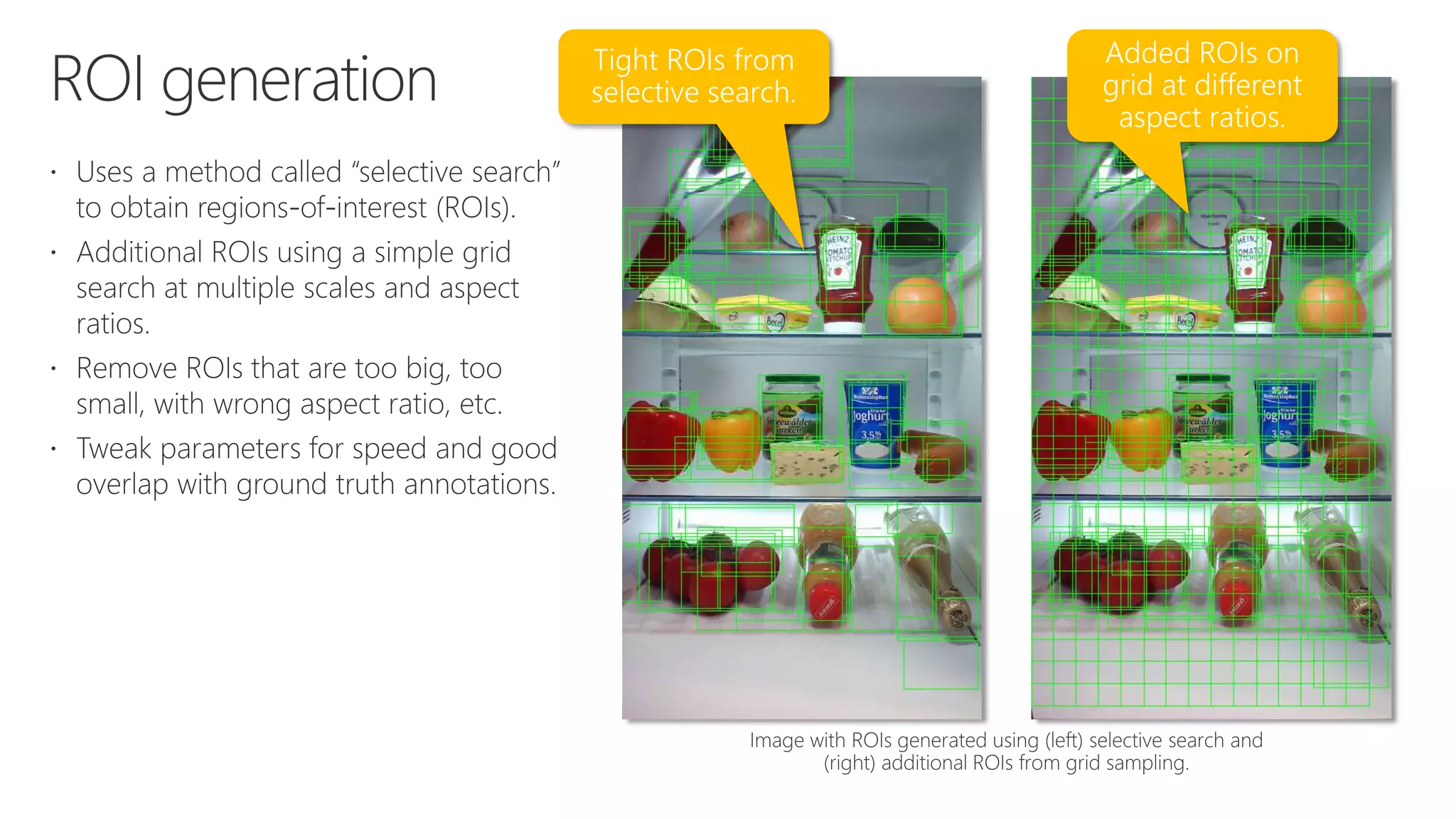
ROI generation
Faster R-CNN
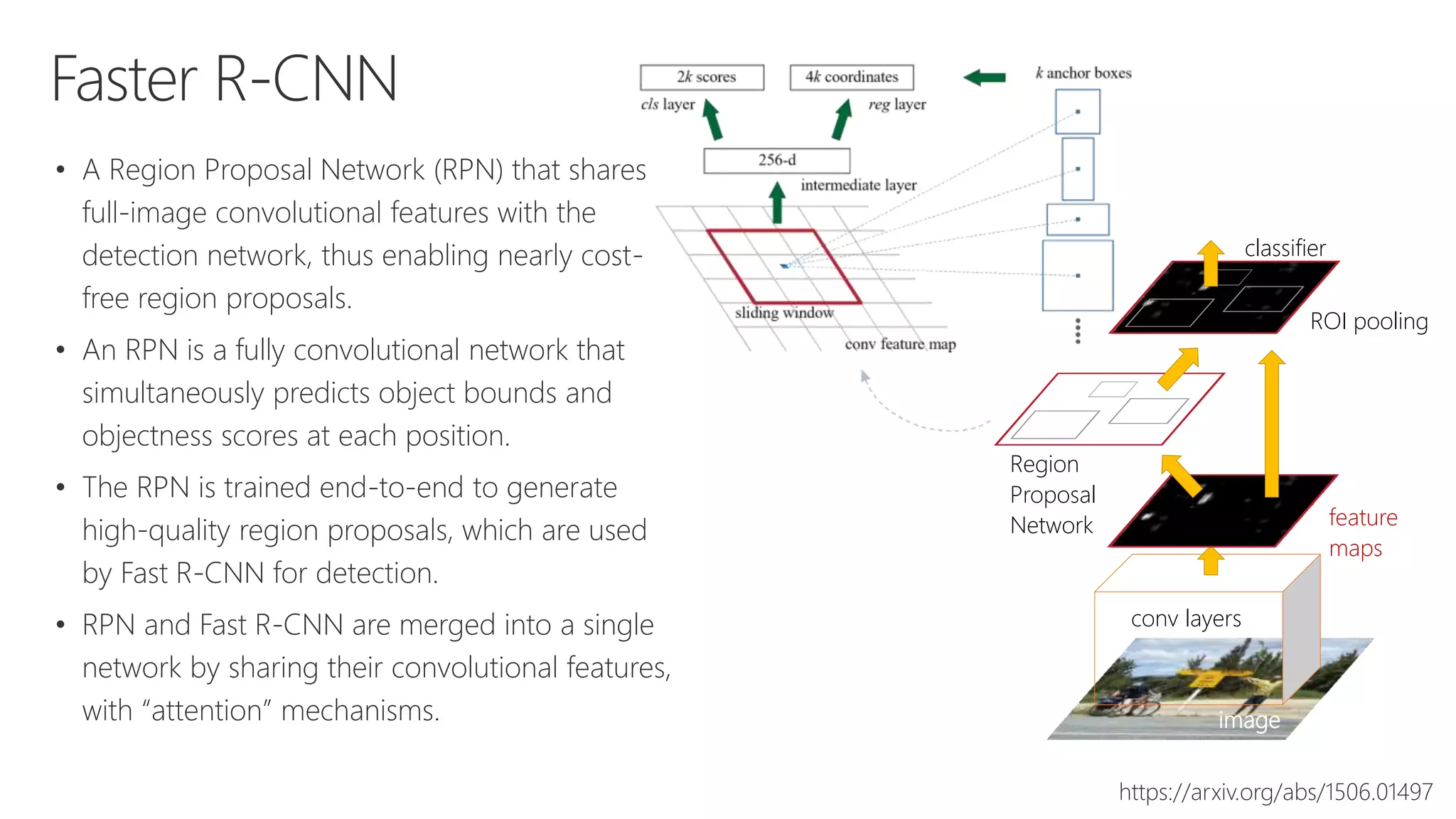
• A Region Proposal Network (RPN) that shares
full-image convolutional features with the
detection network, thus enabling nearly cost-
free region proposals.
• An RPN is a fully convolutional network that
simultaneously predicts object bounds and
objectness scores at each position.
• The RPN is trained end-to-end to generate
high-quality region proposals, which are used
by Fast R-CNN for detection.
• RPN and Fast R-CNN are merged into a single
network by sharing their convolutional features,
with “attention” mechanisms.
https://arxiv.org/abs/1506.01497
image
conv layers
feature
maps
Region
Proposal
Network
classifier
ROI pooling
Grocery item object detection and classification
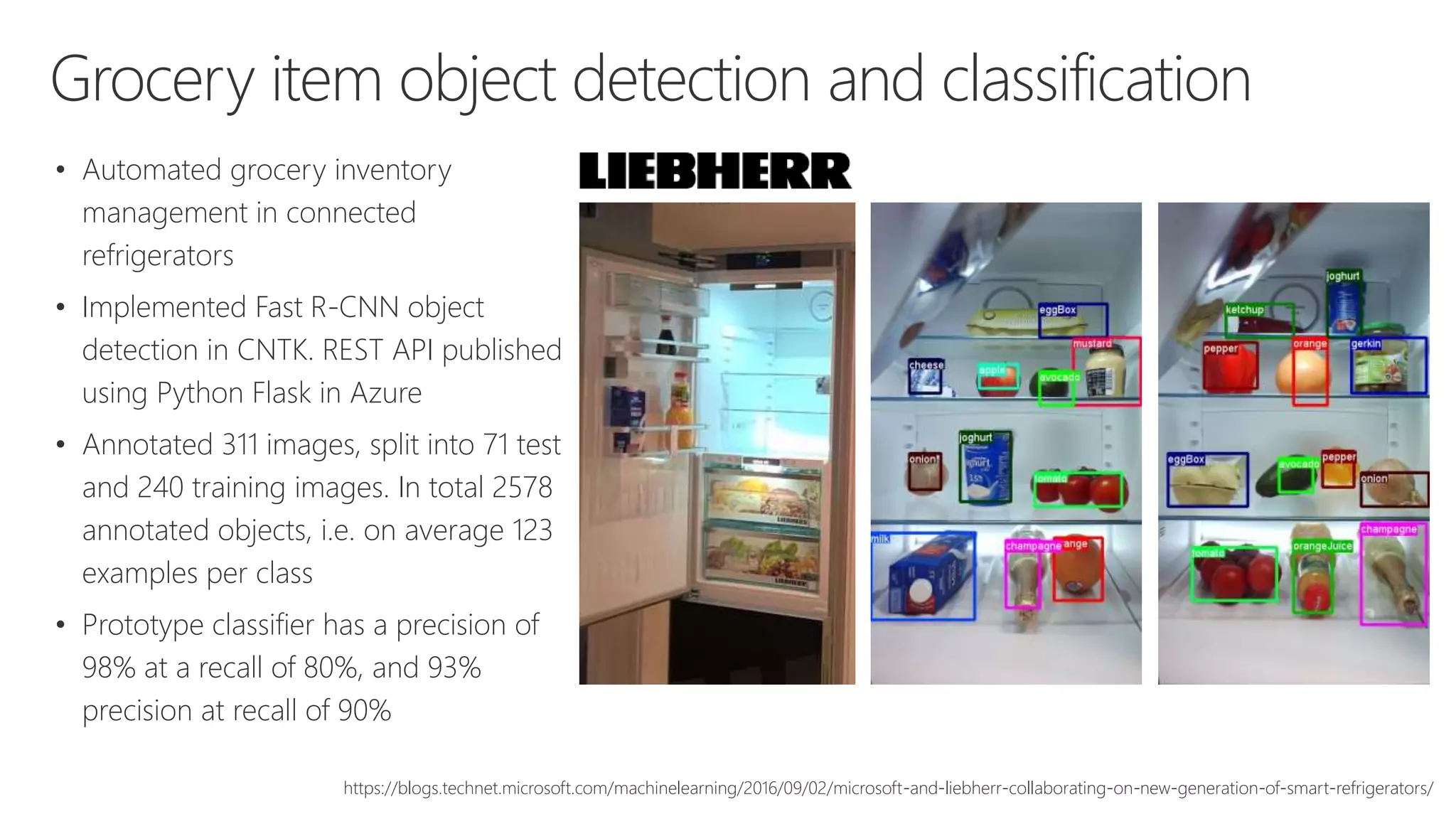
• Automated grocery inventory
management in connected
refrigerators
• Implemented Fast R-CNN object
detection in CNTK. REST API published
using Python Flask in Azure
• Annotated 311 images, split into 71 test
and 240 training images. In total 2578
annotated objects, i.e. on average 123
examples per class
• Prototype classifier has a precision of
98% at a recall of 80%, and 93%
precision at recall of 90%
https://blogs.technet.microsoft.com/machinelearning/2016/09/02/microsoft-and-liebherr-collaborating-on-new-generation-of-smart-refrigerators/
© Copyright Microsoft Corporation. All rights reserved.
Thank you!

Microsoft AI Platform Overview

  • 1.
  • 3.
    Amplifying human ingenuity Trustedand flexible approach that puts you in control Powerful platform that makes AI accessible that extend your capabilities Innovate and accelerate with powerful tools and services that bring AI to every developer. Drive your digital transformation with accelerators, solutions, and practices to empower your organization with AI. Experience the intelligence built into Microsoft products and services you use every day. Cortana is helping you stay on top of it all so you can focus on what matters most. microsoft.com/ai
  • 4.
    AI platform VS Tools forAI Azure ML Studio CODING & MANAGEMENT TOOLS Azure ML Workbench DEEP LEARNING FRAMEWORKS Cognitive Toolkit TensorFlow Caffe Others (Scikit-learn, MXNet, Keras, Chainer, Gluon…) 3rd Party Others (PyCharm, Jupyter Notebooks…) AI ON DATA Cosm os DB AI COMPUTE SQL DB SQL DW Data Lake Spark DS VM Batch AI ACS CPU, FPGA, GPU Edge CUSTOM SERVICESCONVERSATIONAL AI TRAINED SERVICES Azure Bot Service Azure Machine LearningCognitive Services Services Infrastructure Tools azure.microsoft.com/ai
  • 5.
    How can Istart? AI-as-a-Service Leverage AI APIs Data + AI Add AI where the data is AI Create & train models
  • 6.
    SQL Server 2017Machine Learning Services In-database Python & R integration Run Python & R in stored procedures Remote compute contexts for Python & R Gain access to libraries from open source ecosystem Built-in Machine Learning Algorithms MicrosoftML package includes customizable deep neural networks, fast decision trees and decision forests, linear regression, and logistic regression Access to pre-trained models such as image recognition Real-time and native scoring Model stored in optimized binary format, enabling faster scoring operations without calling R runtime Native T-SQL function for fast scoring
  • 7.
    Azure Data Lake Hyper-scaledata store optimized for analytics • Petabyte size files and Trillions of objects • Scalable throughput for massively parallel analytics • HDFS for the Cloud • Always encrypted, Role- based Security & Auditing • Enterprise-grade Support Big data queries as a service • Start in seconds, Scale instantly, Pay per job • Develop massively parallel programs with simplicity • Debug and Optimize your Big Data programs with ease • Virtualize your analytics • Enterprise-grade Support and Security Store Analytics Cognitive capabilities in big data programs • Face API • Image Tagging • Emotion Analysis • OCR • Text Key Phrase extraction • Text sentiment analysis Ingest all data regardless of requirements Store all data in native format without schema definition Do analysis Using analytic engines like Hadoop and ADLA
  • 8.
    Microsoft Cognitive Services Vision ComputerVision Custom Vision Service Content Moderator Emotion API Face API Video Indexer Speech Bing Speech Service Custom Speech Service Speaker Recognition Translator Speech Language Bing Spell Check Language Understanding Intelligent Service (LUIS) Linguistics Analysis Text Analytics Translator Text Web Language Model Knowledge Custom Decision Service QnA Maker Knowledge Exploration Entity Linking Academic Knowledge Search Bing Web Search Bing Custom Search Bing Autosuggest Bing News Search Bing Video Search Bing Entity Search Bing Image Search
  • 9.
  • 10.
    Microsoft Cognitive Toolkit Differentiatesautomatically and trains the net when users implement the forward direction of the network Unified framework supporting a wide range of uses • FNN, RNN, LSTM, CNN, DSSM, GAN, etc. • All types of deep learning applications: e.g., speech, vision and text C++, C#, Java, Python; Linux and Windows Distributed training • Can scale to hundreds of GPUs and VM’s Open source • Hosted on GitHub – Jan 25, 2016 • Contributors from Microsoft and external (MIT, Stanford, etc.) Input layer Hidden layer 1 Hidden layer 2 Output layer A A x x x + tanh tanhơ ơ ơ
  • 11.
    Azure Machine Learning Spark SQLServer Virtual machines GPUs Container services Notebooks IDEs Azure Machine Learning Workbench SQL Server Machine Learning Server ON- PREMISES EDGE COMPUTING Azure IoT Edge Experimentation and Model Management AZURE MACHINE LEARNING SERVICES TRAIN & DEPLOY OPTIONS A ZURE Built with open source tools Jupyter Notebook, Apache Spark, Docker, Kubernetes, Python, Conda Studio Workbench Experimentation Service Model Management Service Libraries for Apache Spark (MMLSpark Library) Visual Studio Code Tools for AI
  • 12.
    Deep Learning inAzure Create model using Azure Data Science Virtual Machine with GPU Ubuntu 16.04 LTS, OpenLogic 7.2 CentOS, Windows Server 2012 CNTK, Tensorflow, MXNet, Caffe & Caffe2, Torch, Theano, Keras, Nvidia Digits, etc. Train and score models using Azure Batch AI Training with Dockerized tools Provision multi-node CPU/GPU and VM set jobs Execute massively parallel computational workflows Hardware microservices using FPGA Deploy trained models as web API’s Multiple compute technologies – Virtual Machines, Container Service, Service Fabric, App Service, Edge, etc.
  • 13.
    Data Science VirtualMachine Data Science Tools Anaconda Python 2.7 and 3.5, JupyterHub Microsoft R Server 9.1 with R Open 3.3.3 Spark local 2.1.1 with PySpark & SparkR Jupyter kernels Single node local Hadoop (HDFS, Yarn) Visual Studio Code, IntelliJ IDEA, PyCharm, & Atom Apache Drill, JuliaPro, Vowpal Wabbit, xgboost, etc. Deep Learning Tools CNTK, TensorFlow, MXNet, Caffe, Caffe2, DIGITS, H2O, Keras, Theano, Torch GPU and CPU NVIDIA driver, CUDA, cuDNN
  • 14.
    DNN Processing Units EFFICIENCY Siliconalternatives for DNNs 14 FLEXIBILITY Soft DPU (FPGA) Contro l Unit (CU) Registers Arithmeti c Logic Unit (ALU) CPUs GPUs ASICsHard DPU Cerebras Google TPU Graphcore Groq Intel Nervana Movidius Wave Computing Etc. BrainWave Baidu SDA Deephi Tech ESE Teradeep Etc.
  • 15.
    FPGA F F F L0 L1 FF F L0 Pretrained DNN Model in CNTK, etc. Scalable DNN Hardware Microservice BrainWave Soft DPU Instr Decoder & Control Neural FU Network switches FPGAs
  • 16.
  • 17.
  • 18.
    Data & AnalyticsPlatform Model & servePrep & train Data Lake Analytics D A T A Business apps Custom apps Sensors and devices I N T E L L I G E N C E A C T I O N Store Data Lake Store Ingest Data Factory Machine Learning Web & mobile appsCosmos DB SQL DB Analytical dashboards SQL Data Warehouse Analysis Services Operational reports HDInsight (Hadoop/Spark) Stream Analytics Event Hubs Kafka on HDInsight Blobs
  • 20.
  • 21.
  • 22.
  • 23.
  • 24.
  • 25.
  • 26.
  • 27.
    Deep Learning Traditional machinelearning requires manual feature extraction / engineering Deep learning can automatically learn features in data Feature extraction for unstructured data is difficult Common DNNs • DCNN (deep convolutional neural network) – to extract representation from images • RNN (recurrent neural network) – to extract representation from sequential data • LSTM (long short-term memory) – popular in natural language processing • DBN (deep belief neural network) – to extract hierarchical representation from a dataset
  • 28.
    Deep Learning Labrador Larger anddeeper networks Many layers; some up to 150 layers Billions of learnable parameters Feed Forward, Recurrent, Convolutional, Sparse, etc. Trained on big data sets 10,000+ hours of speech Millions of images Years of click data Highly parallelized computation Long-running training jobs (days, weeks, months) Acceleration with GPU Recent advances in more computer power and big data
  • 29.
    Designing a solutionfor deep learning TestingPreparation Development Training Operationalize • Evaluate the model on separate data sets (ground truth) • Data access • Data preparation • Labeled data set • Data management • Storage performance • Network performance • Re-training automation • Data reading • Data pre-processing • Model creation (e.g. layer architecture) • Learning & evaluation • Model optimization (e.g., parameter tuning, SGD, batch sizes, backpropagation, convergence & regularization strategies, etc.) • High-scale job scheduling • On-demand compute infrastructure • Managed task execution • Data / model parallelism • Data transfer • Compute infrastructure • Deploy and serve the model • Model dependencies • Feedback loop • Application architecture • DevOps toolchain A subset of tasks in Microsoft Team Data Science Process Lifecycle (TDSP)
  • 30.
    Model Development Used inMicrosoft first-party AI implementations Unified framework supporting a wide range of uses FNN, RNN, LSTM, CNN, DSSM, etc. All types of deep learning applications: e.g., speech, vision and text C++, C#, Java, Python; Linux and Windows Distributed training Can scale to hundreds of GPUs and VM’s Open source Hosted on GitHub – Jan 25, 2016 Contributors from Microsoft and external (MIT, Stanford, etc.) 15K 15K 15K 15K 15K 500 500 500 max max ... ... ... max 500 ... ... Word hashing layer: ft Convolutional layer: ht Max pooling layer: v Semantic layer: y <s> w1 w2 wT <s>Word sequence: xt Word hashing matrix: Wf Convolution matrix: Wc Max pooling operation Semantic projection matrix: Ws ... ... 500
  • 31.
    Model Development Data setof hand written digits with 60,000 training images 10,000 test images Each image is: 28 x 28 pixels Vector (array) of 784 elements Labels encoded using 1-hot encoding (e.g., 5 = “labels 0 0 0 0 0 1 0 0 0 0”) Apply data transformations Shuffle training data Add noise (e.g., numpy.random) Distort images with affline transformation (translations or rotations) 1 5 4 3 5 3 5 3 5 9 0 6 Corresponding labelsHandwritten images
  • 32.
    Model Development S S 0.10.1 0.3 0.9 0.4 0.2 0.1 0.1 0.6 0.3 Model SBias (10) (𝑏) 0 1 9 … 784 pixels ( 𝑥) 28 pix 28pix S = Sum (weights x pixels) = 𝑤0 ∙ 𝑥 𝑇 784 784 General solution approach • A corresponding weight array for each element in the input array • Find the suitable weights to classify the image vector into corresponding digit • Repeat the process 10 times; each for the digits from 0-9 • Compute the output of the classifiers (10 of them) by multiplying all the weights with the corresponding pixels • Add a scalar value called bias to each of the summation units • Normalize output of summation units to a 0-1 range using a sigmoid activation function
  • 33.
    Model Development softmax import cntkas C input_dim = 784 num_output_classes = 10 input = C.input_variable(input_dim) label = C.input_variable(num_output_classes) def create_model(features): with C.layers.default_options(init = C.glorot_uniform()): r = C.layers.Dense(num_output_classes, activation = None)(features) return r
  • 34.
    Model Development num_hidden_layers =2 hidden_layers_dim = 400 def create_model(features): with C.layers.default_options(init = C.layers.glorot_uniform(), activation = C.ops.relu): h = features for _ in range(num_hidden_layers): h = C.layers.Dense(hidden_layers_dim)(h) r = C.layers.Dense(num_output_classes, activation = None)(h) return r softmax
  • 35.
    Model Development def create_model(features): withC.layers.default_options(init=C.glorot_uniform(), activation=C.relu): h = features h = C.layers.Convolution2D(filter_shape=(5,5), num_filters=8, strides=(2,2), pad=True, name='first_conv')(h) h = C.layers.Convolution2D(filter_shape=(5,5), num_filters=16, strides=(2,2), pad=True, name='second_conv')(h) r = C.layers.Dense(num_output_classes, activation=None, name='classify')(h) return r
  • 36.
    Model Development Initialization Data loadingand reading Network setup Loss function Error function Learning algorithms (SGD, AdaGrad, etc.) Minibatch sizing Learning rate Training Evaluation / testing
  • 37.
    Training 1. Create aDNN training script with any DL framework 2. Package the DNN as a Docker image and upload it to the Azure Container Registry 3. Create a pool with GPU VMs 4. Add a job with tasks to run a hyper-parameter sweep experiment tasks 5. Tasks are scheduled to the pool and the Docker image is downloaded if required 6. Data is copied to the container 7. Tasks as containers perform the DNN training 8. Tasks write results and trained models to storage DSVM
  • 38.
    Operationalization Batch scoring Azure BatchAI Training Azure HDInsight on Spark SQL Server 2017 (GPU-host with DL libraries, DNN scoring module in Python, execute registered stored procs) Real-time scoring Azure Machine Learning Operationalization (CLI) Azure Container Service (Docker Swarm, DC/OS, Kubernetes) Azure App Service Web Apps (Windows, Linux) edge node Azure Data Lake Storage Azure HDInsight
  • 39.
    Operationalization Sample workflow: 1. Createa driver file for a trained DNN; use requirements.txt for pip configuration and dependencies 2. Setup of the cluster from AML CLI (Azure Machine Learning Command Line Interface) 3. Create a web-service, image uploaded to Docker Registry (files packaged as a nginx/flask web-service in a Docker image and stored in a private Azure Docker Registry) 4. Deploys web-service locally 5. Test locally 6. Deploy to cluster (monitoring and management using Marathon UI) 7. Send requests to web-service DSVM https://github.com/Azure/Machine-Learning-Operationalization/
  • 40.
    Operationalization Sample application workflow: 1.Develop and test locally a flask web-service that load the model in memory and handles requests 2. Create a deployment script to set-up the dependencies on the Azure App Service environment 3. Git commit and push to repo 4. Deployment triggered on Azure Web App instance configured with Github continuous deployment 5. Send requests to the Web App DSVM DSVM Sample container workflow: 1. Develop and test locally a flask- based web-service container that loads the model in memory and handles requests 2. Build and upload the Docker image to a registry 3. Trigger deployment of Azure Web App 4. Send requests to the Web App
  • 41.
    Designing a solutionfor deep learning TestingPreparation Development Training Operationalize • Evaluate the model on separate data sets (ground truth) • Data access • Data preparation • Labeled data set • Data management • Storage performance • Network performance • Re-training automation • Data reading • Data pre-processing • Model creation (e.g. layer architecture) • Learning & evaluation • Model optimization (e.g., parameter tuning, SGD, batch sizes, backpropagation, convergence & regularization strategies, etc.) • High-scale job scheduling • On-demand compute infrastructure • Managed task execution • Data / model parallelism • Data transfer • Compute infrastructure • Deploy and serve the model • Model dependencies • Feedback loop • Application architecture • DevOps toolchain A subset of tasks in Microsoft Team Data Science Process Lifecycle (TDSP)
  • 42.
  • 43.
    Deep learning  Specifya structure and a loss function  Optimize using gradient descent  Network feeds forward with matrix multiplications and point-wise activations  Network backpropagates using multivariate chain rule  Update the weights accordingly  Optimize structure  Prevent over or under fitting  Converge to a high- quality local minima  Use the right loss function  Effective learning rate  Appropriate data augmentation  Proper pre-processing
  • 44.
    Transfer Learning 1. Trainon Imagenet 3. Medium dataset: finetuning 2. Small dataset: feature extractor Freeze these Train this more data = retrain more of the network (or all of it) Freeze these Train this
  • 45.
    Use pre-built solutions http://aka.ms/cisolutions Referencearchitecture for common scenarios Built on best practice design patterns Automated deployment on your Azure subscription Customizable for your needs Supported by a global partner ecosystem
  • 46.
  • 47.
    R-CNN • Extract possibleobjects using a region proposal method (the most popular one being Selective Search) • Extract features from each region using a CNN • Classify each region with SVMs https://arxiv.org/abs/1311.2524
  • 48.
    Fast R-CNN • Aninput image and multiple regions of interest (ROI’s) are input into a fully convolutional network. • Each ROI is pooled into a fixed-size feature map and then mapped to a feature vector by fully connected layers (FCs). • The network has two output vectors per RoI: softmax probabilities and per-class bounding- box regression offsets. • The architecture is trained end-to-end with a multi-task loss. https://arxiv.org/abs/1504.08083 • Used Selective Search to generate object proposals, but instead of extracting all of them independently and using SVM classifiers, it applied the CNN on the complete image • Used both Region of Interest (ROI) Pooling on the feature map with a final feed forward network for classification and regression.
  • 49.
  • 50.
    Faster R-CNN • ARegion Proposal Network (RPN) that shares full-image convolutional features with the detection network, thus enabling nearly cost- free region proposals. • An RPN is a fully convolutional network that simultaneously predicts object bounds and objectness scores at each position. • The RPN is trained end-to-end to generate high-quality region proposals, which are used by Fast R-CNN for detection. • RPN and Fast R-CNN are merged into a single network by sharing their convolutional features, with “attention” mechanisms. https://arxiv.org/abs/1506.01497 image conv layers feature maps Region Proposal Network classifier ROI pooling
  • 51.
    Grocery item objectdetection and classification • Automated grocery inventory management in connected refrigerators • Implemented Fast R-CNN object detection in CNTK. REST API published using Python Flask in Azure • Annotated 311 images, split into 71 test and 240 training images. In total 2578 annotated objects, i.e. on average 123 examples per class • Prototype classifier has a precision of 98% at a recall of 80%, and 93% precision at recall of 90% https://blogs.technet.microsoft.com/machinelearning/2016/09/02/microsoft-and-liebherr-collaborating-on-new-generation-of-smart-refrigerators/
  • 52.
    © Copyright MicrosoftCorporation. All rights reserved. Thank you!

Editor's Notes

  • #4 AI intelligently senses, processes, and acts on information—learning and adapting over time. We believe that, when designed with people at the center, AI can extend your capabilities, free you up for more creative and strategic endeavors, and help you or your organization achieve more. Innovations that extend your capabilities Intelligence infused into products like Office 365, Cortana, Bing and Skype are helping millions of people save time and be more productive. Whether you’re looking to break down language barriers or bring professional design to your presentations, Microsoft AI can extend your capabilities today. Powerful platform that makes AI accessible Built on breakthrough advances in AI research and the power of the cloud, we’re delivering a flexible platform for organizations and developers to infuse intelligence into their products and services using tools and services like Microsoft Cognitive Services, Azure Machine Learning, and the Bot Framework. Trusted approach that puts you in control Our transparent approach to AI puts your privacy first. Built on our enterprise-grade security practices, it helps protect your information and puts you in control. Our principles lead with ethics, accountability, and inclusive design to empower people and organizations, and positively impact society. Please go visit microsoft.com/ai to learn more about the overall approach. Today we will focus on various technologies in the AI platform.
  • #5 AI intelligently senses, processes, and acts on information—learning and adapting over time. We believe that, when designed with people at the center, AI can extend your capabilities, free you up for more creative and strategic endeavors, and help you or your organization achieve more. Innovations that extend your capabilities Intelligence infused into products like Office 365, Cortana, Bing and Skype are helping millions of people save time and be more productive. Whether you’re looking to break down language barriers or bring professional design to your presentations, Microsoft AI can extend your capabilities today. Powerful platform that makes AI accessible Built on breakthrough advances in AI research and the power of the cloud, we’re delivering a flexible platform for organizations and developers to infuse intelligence into their products and services using tools and services like Microsoft Cognitive Services, Azure Machine Learning, and the Bot Framework. Trusted approach that puts you in control Our transparent approach to AI puts your privacy first. Built on our enterprise-grade security practices, it helps protect your information and puts you in control. Our principles lead with ethics, accountability, and inclusive design to empower people and organizations, and positively impact society. Please go visit microsoft.com/ai to learn more about the overall approach. Today we will focus on various technologies in the AI platform.
  • #20 https://azure.microsoft.com/en-us/blog/root-cause-analysis-with-in-query-machine-learning-in-application-insights-analytics/ https://cloudblogs.microsoft.com/microsoftsecure/2017/05/08/antivirus-evolved/?source=mmpc
  • #46 https://gallery.cortanaintelligence.com/Tutorial/Deep-Learning-Basics-for-Predictive-Maintenance https://gallery.cortanaintelligence.com/Notebook/Medical-Image-Recognition-for-the-Kaggle-Data-Science-Bowl-2017-with-CNTK-and-LightGBM-1https://blogs.technet.microsoft.com/machinelearning/2017/02/17/quick-start-guide-to-the-data-science-bowl-lung-cancer-detection-challenge-using-deep-learning-microsoft-cognitive-toolkit-and-azure-gpu-vms/