Numerical Bases Used in Programming
• Hexadecimal
• Binary
• BCD
Hexadecimal Basis
• Hexadecimal Digits:
1 2 3 4 5 6 7 8 9 A B C D E F
A=10
B=11
C=12
D=13
E=14
F=15
Decimal, Binary, BCD, & Hexadecimal Numbers
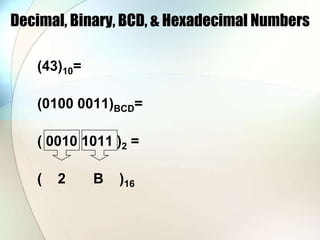
(43)10=
(0100 0011)BCD=
( 0010 1011 )2 =
( 2 B )16
Registers
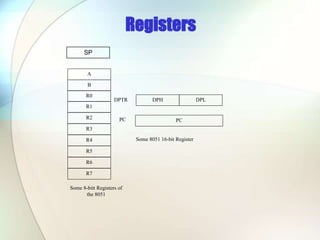
A
B
R0
R1
R3
R4
R2
R5
R7
R6
DPH DPL
PC
DPTR
PC
Some 8051 16-bit Register
Some 8-bitt Registers of
the 8051
SP
Memory mapping in 8051
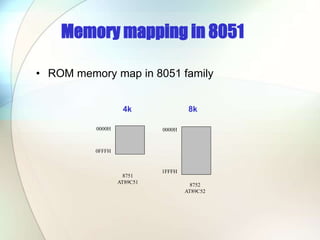
• ROM memory map in 8051 family
0000H
0FFFH
0000H
1FFFH
8751
AT89C51
8752
AT89C52
4k 8k
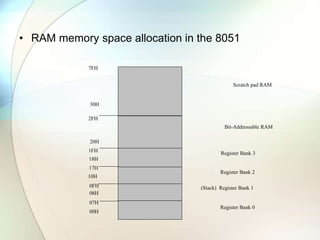
• RAM memory space allocation in the 8051
7FH
30H
2FH
20H
1FH
17H
10H
0FH
07H
08H
18H
00H
Register Bank 0
(Stack) Register Bank 1
Register Bank 2
Register Bank 3
Bit-Addressable RAM
Scratch pad RAM
Addressing Modes
• Register
• Direct
• Register Indirect
• Immediate
• Relative
• Absolute
• Long
• Indexed
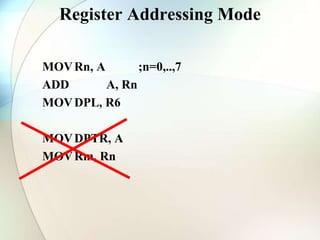
Register Addressing Mode
MOVRn, A ;n=0,..,7
ADD A, Rn
MOVDPL, R6
MOVDPTR, A
MOVRm, Rn
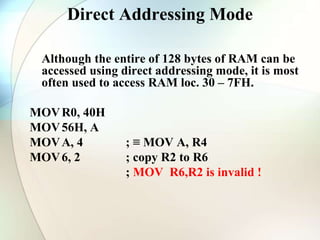
Direct Addressing Mode
Although the entire of 128 bytes of RAM can be
accessed using direct addressing mode, it is most
often used to access RAM loc. 30 – 7FH.
MOVR0, 40H
MOV56H, A
MOVA, 4 ; ≡ MOV A, R4
MOV6, 2 ; copy R2 to R6
; MOV R6,R2 is invalid !
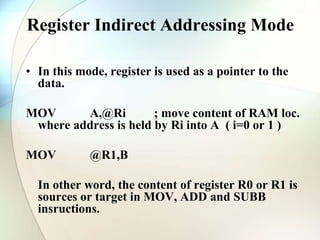
Register Indirect Addressing Mode
• In this mode, register is used as a pointer to the
data.
MOV A,@Ri ; move content of RAM loc.
where address is held by Ri into A ( i=0 or 1 )
MOV @R1,B
In other word, the content of register R0 or R1 is
sources or target in MOV, ADD and SUBB
insructions.
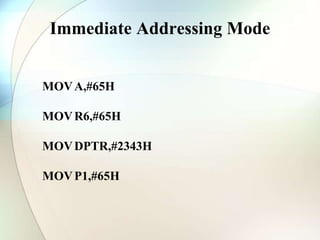
Immediate Addressing Mode
MOVA,#65H
MOVR6,#65H
MOVDPTR,#2343H
MOVP1,#65H
Relative, Absolute, & Long Addressing
Used only with jump and call instructions:
SJMP
ACALL,AJMP
LCALL,LJMP
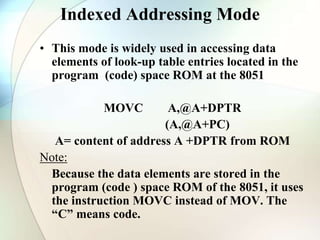
Indexed Addressing Mode
• This mode is widely used in accessing data
elements of look-up table entries located in the
program (code) space ROM at the 8051
MOVC A,@A+DPTR
(A,@A+PC)
A= content of address A +DPTR from ROM
Note:
Because the data elements are stored in the
program (code ) space ROM of the 8051, it uses
the instruction MOVC instead of MOV. The
“C” means code.
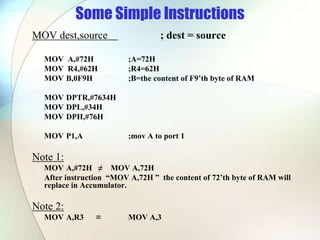
Some Simple Instructions
MOV dest,source ; dest = source
MOV A,#72H ;A=72H
MOV R4,#62H ;R4=62H
MOV B,0F9H ;B=the content of F9’th byte of RAM
MOV DPTR,#7634H
MOV DPL,#34H
MOV DPH,#76H
MOV P1,A ;mov A to port 1
Note 1:
MOV A,#72H ≠ MOV A,72H
After instruction “MOV A,72H ” the content of 72’th byte of RAM will
replace in Accumulator.
Note 2:
MOV A,R3 ≡ MOV A,3
ADDA, Source ;A=A+SOURCE
ADDA,#6 ;A=A+6
ADDA,R6 ;A=A+R6
ADD A,6 ;A=A+[6] or A=A+R6
ADD A,0F3H ;A=A+[0F3H]
SUBB A, Source ;A=A-SOURCE-C
SUBB A,#6 ;A=A-6
SUBB A,R6 ;A=A+R6
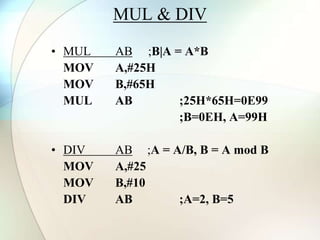
MUL & DIV
• MUL AB ;B|A = A*B
MOV A,#25H
MOV B,#65H
MUL AB ;25H*65H=0E99
;B=0EH, A=99H
• DIV AB ;A = A/B, B = A mod B
MOV A,#25
MOV B,#10
DIV AB ;A=2, B=5
SETB bit ; bit=1
CLR bit ; bit=0
SETB C ; CY=1
SETB P0.0 ;bit 0 from port 0 =1
SETB P3.7 ;bit 7 from port 3 =1
SETB ACC.2 ;bit 2 from ACCUMULATOR =1
SETB 05 ;set high D5 of RAM loc. 20h
Note:
CLR instruction is as same as SETB
i.e.:
CLR C ;CY=0
But following instruction is only for CLR:
CLR A ;A=0
DEC byte ;byte=byte-1
INC byte ;byte=byte+1
INC R7
DEC A
DEC 40H ; [40]=[40]-1
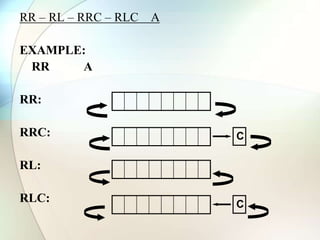
RR – RL – RRC – RLC A
EXAMPLE:
RR A
RR:
RRC:
RL:
RLC:
C
C
ANL - ORL – XRL
Bitwise Logical Operations:
AND, OR, XOR
EXAMPLE:
MOV R5,#89H
ANLR5,#08H
CPL A ;1’s complement
Example:
MOV A,#55H ;A=01010101 B
L01: CPL A
MOV P1,A
ACALL DELAY
SJMP L01
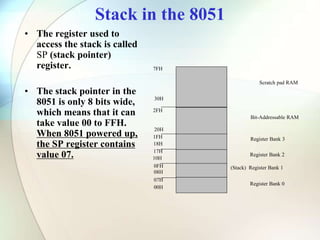
Stack in the 8051
• The register used to
access the stack is called
SP (stack pointer)
register.
• The stack pointer in the
8051 is only 8 bits wide,
which means that it can
take value 00 to FFH.
When 8051 powered up,
the SP register contains
value 07.
7FH
30H
2FH
20H
1FH
17H
10H
0FH
07H
08H
18H
00H
Register Bank 0
(Stack) Register Bank 1
Register Bank 2
Register Bank 3
Bit-Addressable RAM
Scratch pad RAM
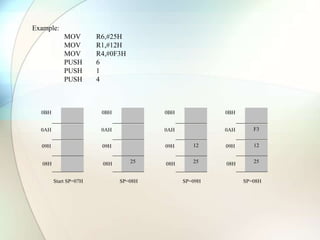
Example:
MOV R6,#25H
MOV R1,#12H
MOV R4,#0F3H
PUSH 6
PUSH 1
PUSH 4
0BH
0AH
09H
08H
Start SP=07H
25
0BH
0AH
09H
08H
SP=08H
F3
12
25
0BH
0AH
09H
08H
SP=08H
12
25
0BH
0AH
09H
08H
SP=09H
LOOP and JUMP Instructions
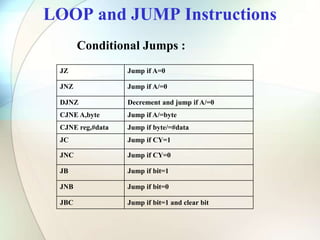
JZ Jump if A=0
JNZ Jump if A/=0
DJNZ Decrement and jump if A/=0
CJNE A,byte Jump if A/=byte
CJNE reg,#data Jump if byte/=#data
JC Jump if CY=1
JNC Jump if CY=0
JB Jump if bit=1
JNB Jump if bit=0
JBC Jump if bit=1 and clear bit
Conditional Jumps :
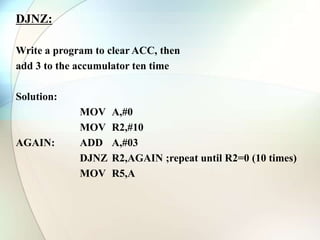
DJNZ:
Write a program to clear ACC, then
add 3 to the accumulator ten time
Solution:
MOV A,#0
MOV R2,#10
AGAIN: ADD A,#03
DJNZ R2,AGAIN ;repeat until R2=0 (10 times)
MOV R5,A
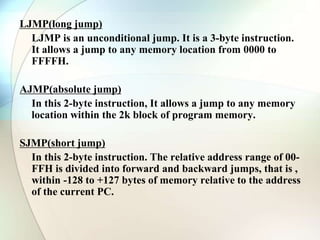
LJMP(long jump)
LJMP is an unconditional jump. It is a 3-byte instruction.
It allows a jump to any memory location from 0000 to
FFFFH.
AJMP(absolute jump)
In this 2-byte instruction, It allows a jump to any memory
location within the 2k block of program memory.
SJMP(short jump)
In this 2-byte instruction. The relative address range of 00-
FFH is divided into forward and backward jumps, that is ,
within -128 to +127 bytes of memory relative to the address
of the current PC.
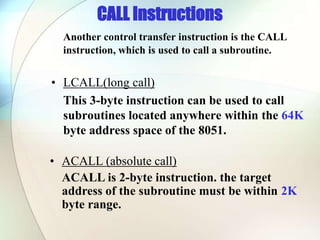
CALL Instructions
Another control transfer instruction is the CALL
instruction, which is used to call a subroutine.
• LCALL(long call)
This 3-byte instruction can be used to call
subroutines located anywhere within the 64K
byte address space of the 8051.
• ACALL (absolute call)
ACALL is 2-byte instruction. the target
address of the subroutine must be within 2K
byte range.
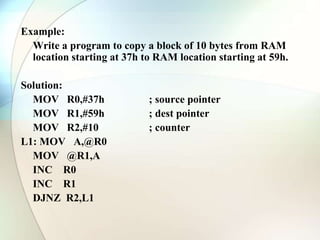
Example:
Write a program to copy a block of 10 bytes from RAM
location starting at 37h to RAM location starting at 59h.
Solution:
MOV R0,#37h ; source pointer
MOV R1,#59h ; dest pointer
MOV R2,#10 ; counter
L1: MOV A,@R0
MOV @R1,A
INC R0
INC R1
DJNZ R2,L1
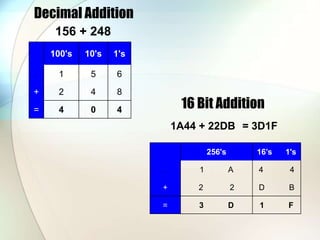
. 100's 10's 1's
. 1 5 6
+ 2 4 8
= 4 0 4
Decimal Addition
156 + 248
16 Bit Addition
1A44 + 22DB
. 256's 16’s 1's
. 1 A 4 4
+ 2 2 D B
= 3 D 1 F
= 3D1F
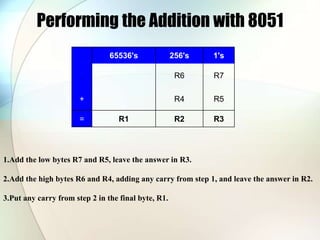
Performing the Addition with 8051
. 65536's 256's 1's
. R6 R7
+ R4 R5
= R1 R2 R3
1.Add the low bytes R7 and R5, leave the answer in R3.
2.Add the high bytes R6 and R4, adding any carry from step 1, and leave the answer in R2.
3.Put any carry from step 2 in the final byte, R1.
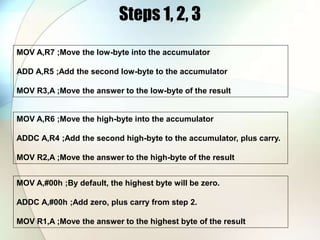
Steps 1, 2, 3
MOV A,R7 ;Move the low-byte into the accumulator
ADD A,R5 ;Add the second low-byte to the accumulator
MOV R3,A ;Move the answer to the low-byte of the result
MOV A,R6 ;Move the high-byte into the accumulator
ADDC A,R4 ;Add the second high-byte to the accumulator, plus carry.
MOV R2,A ;Move the answer to the high-byte of the result
MOV A,#00h ;By default, the highest byte will be zero.
ADDC A,#00h ;Add zero, plus carry from step 2.
MOV R1,A ;Move the answer to the highest byte of the result
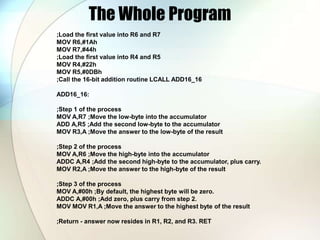
The Whole Program
;Load the first value into R6 and R7
MOV R6,#1Ah
MOV R7,#44h
;Load the first value into R4 and R5
MOV R4,#22h
MOV R5,#0DBh
;Call the 16-bit addition routine LCALL ADD16_16
ADD16_16:
;Step 1 of the process
MOV A,R7 ;Move the low-byte into the accumulator
ADD A,R5 ;Add the second low-byte to the accumulator
MOV R3,A ;Move the answer to the low-byte of the result
;Step 2 of the process
MOV A,R6 ;Move the high-byte into the accumulator
ADDC A,R4 ;Add the second high-byte to the accumulator, plus carry.
MOV R2,A ;Move the answer to the high-byte of the result
;Step 3 of the process
MOV A,#00h ;By default, the highest byte will be zero.
ADDC A,#00h ;Add zero, plus carry from step 2.
MOV MOV R1,A ;Move the answer to the highest byte of the result
;Return - answer now resides in R1, R2, and R3. RET
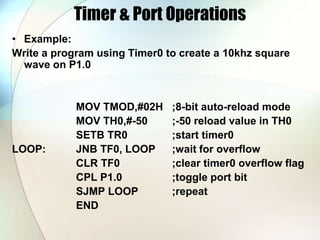
Timer & Port Operations
• Example:
Write a program using Timer0 to create a 10khz square
wave on P1.0
MOV TMOD,#02H ;8-bit auto-reload mode
MOV TH0,#-50 ;-50 reload value in TH0
SETB TR0 ;start timer0
LOOP: JNB TF0, LOOP ;wait for overflow
CLR TF0 ;clear timer0 overflow flag
CPL P1.0 ;toggle port bit
SJMP LOOP ;repeat
END
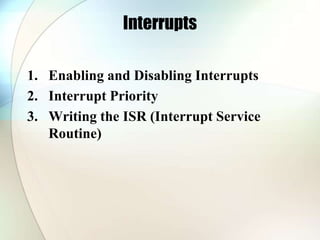
Interrupts
1. Enabling and Disabling Interrupts
2. Interrupt Priority
3. Writing the ISR (Interrupt Service
Routine)
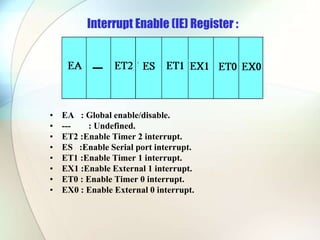
Interrupt Enable (IE) Register :
• EA : Global enable/disable.
• --- : Undefined.
• ET2 :Enable Timer 2 interrupt.
• ES :Enable Serial port interrupt.
• ET1 :Enable Timer 1 interrupt.
• EX1 :Enable External 1 interrupt.
• ET0 : Enable Timer 0 interrupt.
• EX0 : Enable External 0 interrupt.
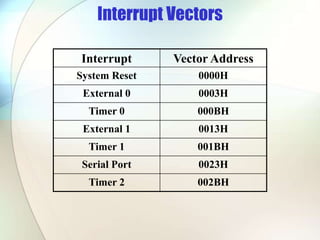
Interrupt Vectors
Interrupt Vector Address
System Reset 0000H
External 0 0003H
Timer 0 000BH
External 1 0013H
Timer 1 001BH
Serial Port 0023H
Timer 2 002BH
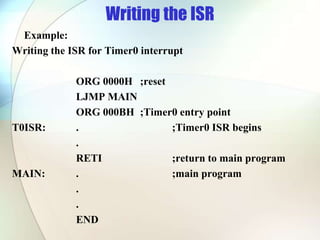
Writing the ISR
Example:
Writing the ISR for Timer0 interrupt
ORG 0000H ;reset
LJMP MAIN
ORG 000BH ;Timer0 entry point
T0ISR: . ;Timer0 ISR begins
.
RETI ;return to main program
MAIN: . ;main program
.
.
END
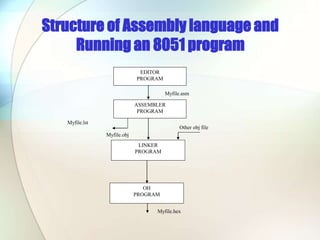
Structure of Assembly language and
Running an 8051 program
EDITOR
PROGRAM
ASSEMBLER
PROGRAM
LINKER
PROGRAM
OH
PROGRAM
Myfile.asm
Myfile.obj
Other obj file
Myfile.lst
Myfile.hex
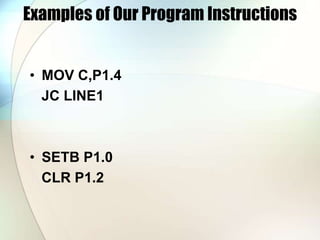
Examples of Our Program Instructions
• MOV C,P1.4
JC LINE1
• SETB P1.0
CLR P1.2
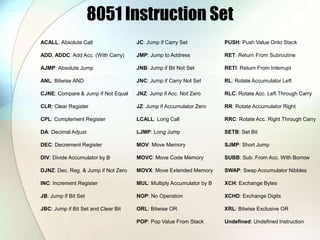
8051 Instruction Set
ACALL: Absolute Call
ADD, ADDC: Add Acc. (With Carry)
AJMP: Absolute Jump
ANL: Bitwise AND
CJNE: Compare & Jump if Not Equal
CLR: Clear Register
CPL: Complement Register
DA: Decimal Adjust
DEC: Decrement Register
DIV: Divide Accumulator by B
DJNZ: Dec. Reg. & Jump if Not Zero
INC: Increment Register
JB: Jump if Bit Set
JBC: Jump if Bit Set and Clear Bit
JC: Jump if Carry Set
JMP: Jump to Address
JNB: Jump if Bit Not Set
JNC: Jump if Carry Not Set
JNZ: Jump if Acc. Not Zero
JZ: Jump if Accumulator Zero
LCALL: Long Call
LJMP: Long Jump
MOV: Move Memory
MOVC: Move Code Memory
MOVX: Move Extended Memory
MUL: Multiply Accumulator by B
NOP: No Operation
ORL: Bitwise OR
POP: Pop Value From Stack
PUSH: Push Value Onto Stack
RET: Return From Subroutine
RETI: Return From Interrupt
RL: Rotate Accumulator Left
RLC: Rotate Acc. Left Through Carry
RR: Rotate Accumulator Right
RRC: Rotate Acc. Right Through Carry
SETB: Set Bit
SJMP: Short Jump
SUBB: Sub. From Acc. With Borrow
SWAP: Swap Accumulator Nibbles
XCH: Exchange Bytes
XCHD: Exchange Digits
XRL: Bitwise Exclusive OR
Undefined: Undefined Instruction

Microcontroller 8051- soft.ppt

  • 2.
    Numerical Bases Usedin Programming • Hexadecimal • Binary • BCD
  • 3.
    Hexadecimal Basis • HexadecimalDigits: 1 2 3 4 5 6 7 8 9 A B C D E F A=10 B=11 C=12 D=13 E=14 F=15
  • 4.
    Decimal, Binary, BCD,& Hexadecimal Numbers (43)10= (0100 0011)BCD= ( 0010 1011 )2 = ( 2 B )16
  • 5.
    Registers A B R0 R1 R3 R4 R2 R5 R7 R6 DPH DPL PC DPTR PC Some 805116-bit Register Some 8-bitt Registers of the 8051 SP
  • 6.
    Memory mapping in8051 • ROM memory map in 8051 family 0000H 0FFFH 0000H 1FFFH 8751 AT89C51 8752 AT89C52 4k 8k
  • 7.
    • RAM memoryspace allocation in the 8051 7FH 30H 2FH 20H 1FH 17H 10H 0FH 07H 08H 18H 00H Register Bank 0 (Stack) Register Bank 1 Register Bank 2 Register Bank 3 Bit-Addressable RAM Scratch pad RAM
  • 8.
    Addressing Modes • Register •Direct • Register Indirect • Immediate • Relative • Absolute • Long • Indexed
  • 9.
    Register Addressing Mode MOVRn,A ;n=0,..,7 ADD A, Rn MOVDPL, R6 MOVDPTR, A MOVRm, Rn
  • 10.
    Direct Addressing Mode Althoughthe entire of 128 bytes of RAM can be accessed using direct addressing mode, it is most often used to access RAM loc. 30 – 7FH. MOVR0, 40H MOV56H, A MOVA, 4 ; ≡ MOV A, R4 MOV6, 2 ; copy R2 to R6 ; MOV R6,R2 is invalid !
  • 11.
    Register Indirect AddressingMode • In this mode, register is used as a pointer to the data. MOV A,@Ri ; move content of RAM loc. where address is held by Ri into A ( i=0 or 1 ) MOV @R1,B In other word, the content of register R0 or R1 is sources or target in MOV, ADD and SUBB insructions.
  • 12.
  • 13.
    Relative, Absolute, &Long Addressing Used only with jump and call instructions: SJMP ACALL,AJMP LCALL,LJMP
  • 14.
    Indexed Addressing Mode •This mode is widely used in accessing data elements of look-up table entries located in the program (code) space ROM at the 8051 MOVC A,@A+DPTR (A,@A+PC) A= content of address A +DPTR from ROM Note: Because the data elements are stored in the program (code ) space ROM of the 8051, it uses the instruction MOVC instead of MOV. The “C” means code.
  • 15.
    Some Simple Instructions MOVdest,source ; dest = source MOV A,#72H ;A=72H MOV R4,#62H ;R4=62H MOV B,0F9H ;B=the content of F9’th byte of RAM MOV DPTR,#7634H MOV DPL,#34H MOV DPH,#76H MOV P1,A ;mov A to port 1 Note 1: MOV A,#72H ≠ MOV A,72H After instruction “MOV A,72H ” the content of 72’th byte of RAM will replace in Accumulator. Note 2: MOV A,R3 ≡ MOV A,3
  • 16.
    ADDA, Source ;A=A+SOURCE ADDA,#6;A=A+6 ADDA,R6 ;A=A+R6 ADD A,6 ;A=A+[6] or A=A+R6 ADD A,0F3H ;A=A+[0F3H] SUBB A, Source ;A=A-SOURCE-C SUBB A,#6 ;A=A-6 SUBB A,R6 ;A=A+R6
  • 17.
    MUL & DIV •MUL AB ;B|A = A*B MOV A,#25H MOV B,#65H MUL AB ;25H*65H=0E99 ;B=0EH, A=99H • DIV AB ;A = A/B, B = A mod B MOV A,#25 MOV B,#10 DIV AB ;A=2, B=5
  • 18.
    SETB bit ;bit=1 CLR bit ; bit=0 SETB C ; CY=1 SETB P0.0 ;bit 0 from port 0 =1 SETB P3.7 ;bit 7 from port 3 =1 SETB ACC.2 ;bit 2 from ACCUMULATOR =1 SETB 05 ;set high D5 of RAM loc. 20h Note: CLR instruction is as same as SETB i.e.: CLR C ;CY=0 But following instruction is only for CLR: CLR A ;A=0
  • 19.
    DEC byte ;byte=byte-1 INCbyte ;byte=byte+1 INC R7 DEC A DEC 40H ; [40]=[40]-1
  • 20.
    RR – RL– RRC – RLC A EXAMPLE: RR A RR: RRC: RL: RLC: C C
  • 21.
    ANL - ORL– XRL Bitwise Logical Operations: AND, OR, XOR EXAMPLE: MOV R5,#89H ANLR5,#08H CPL A ;1’s complement Example: MOV A,#55H ;A=01010101 B L01: CPL A MOV P1,A ACALL DELAY SJMP L01
  • 22.
    Stack in the8051 • The register used to access the stack is called SP (stack pointer) register. • The stack pointer in the 8051 is only 8 bits wide, which means that it can take value 00 to FFH. When 8051 powered up, the SP register contains value 07. 7FH 30H 2FH 20H 1FH 17H 10H 0FH 07H 08H 18H 00H Register Bank 0 (Stack) Register Bank 1 Register Bank 2 Register Bank 3 Bit-Addressable RAM Scratch pad RAM
  • 23.
    Example: MOV R6,#25H MOV R1,#12H MOVR4,#0F3H PUSH 6 PUSH 1 PUSH 4 0BH 0AH 09H 08H Start SP=07H 25 0BH 0AH 09H 08H SP=08H F3 12 25 0BH 0AH 09H 08H SP=08H 12 25 0BH 0AH 09H 08H SP=09H
  • 24.
    LOOP and JUMPInstructions JZ Jump if A=0 JNZ Jump if A/=0 DJNZ Decrement and jump if A/=0 CJNE A,byte Jump if A/=byte CJNE reg,#data Jump if byte/=#data JC Jump if CY=1 JNC Jump if CY=0 JB Jump if bit=1 JNB Jump if bit=0 JBC Jump if bit=1 and clear bit Conditional Jumps :
  • 25.
    DJNZ: Write a programto clear ACC, then add 3 to the accumulator ten time Solution: MOV A,#0 MOV R2,#10 AGAIN: ADD A,#03 DJNZ R2,AGAIN ;repeat until R2=0 (10 times) MOV R5,A
  • 26.
    LJMP(long jump) LJMP isan unconditional jump. It is a 3-byte instruction. It allows a jump to any memory location from 0000 to FFFFH. AJMP(absolute jump) In this 2-byte instruction, It allows a jump to any memory location within the 2k block of program memory. SJMP(short jump) In this 2-byte instruction. The relative address range of 00- FFH is divided into forward and backward jumps, that is , within -128 to +127 bytes of memory relative to the address of the current PC.
  • 27.
    CALL Instructions Another controltransfer instruction is the CALL instruction, which is used to call a subroutine. • LCALL(long call) This 3-byte instruction can be used to call subroutines located anywhere within the 64K byte address space of the 8051. • ACALL (absolute call) ACALL is 2-byte instruction. the target address of the subroutine must be within 2K byte range.
  • 28.
    Example: Write a programto copy a block of 10 bytes from RAM location starting at 37h to RAM location starting at 59h. Solution: MOV R0,#37h ; source pointer MOV R1,#59h ; dest pointer MOV R2,#10 ; counter L1: MOV A,@R0 MOV @R1,A INC R0 INC R1 DJNZ R2,L1
  • 29.
    . 100's 10's1's . 1 5 6 + 2 4 8 = 4 0 4 Decimal Addition 156 + 248 16 Bit Addition 1A44 + 22DB . 256's 16’s 1's . 1 A 4 4 + 2 2 D B = 3 D 1 F = 3D1F
  • 30.
    Performing the Additionwith 8051 . 65536's 256's 1's . R6 R7 + R4 R5 = R1 R2 R3 1.Add the low bytes R7 and R5, leave the answer in R3. 2.Add the high bytes R6 and R4, adding any carry from step 1, and leave the answer in R2. 3.Put any carry from step 2 in the final byte, R1.
  • 31.
    Steps 1, 2,3 MOV A,R7 ;Move the low-byte into the accumulator ADD A,R5 ;Add the second low-byte to the accumulator MOV R3,A ;Move the answer to the low-byte of the result MOV A,R6 ;Move the high-byte into the accumulator ADDC A,R4 ;Add the second high-byte to the accumulator, plus carry. MOV R2,A ;Move the answer to the high-byte of the result MOV A,#00h ;By default, the highest byte will be zero. ADDC A,#00h ;Add zero, plus carry from step 2. MOV R1,A ;Move the answer to the highest byte of the result
  • 32.
    The Whole Program ;Loadthe first value into R6 and R7 MOV R6,#1Ah MOV R7,#44h ;Load the first value into R4 and R5 MOV R4,#22h MOV R5,#0DBh ;Call the 16-bit addition routine LCALL ADD16_16 ADD16_16: ;Step 1 of the process MOV A,R7 ;Move the low-byte into the accumulator ADD A,R5 ;Add the second low-byte to the accumulator MOV R3,A ;Move the answer to the low-byte of the result ;Step 2 of the process MOV A,R6 ;Move the high-byte into the accumulator ADDC A,R4 ;Add the second high-byte to the accumulator, plus carry. MOV R2,A ;Move the answer to the high-byte of the result ;Step 3 of the process MOV A,#00h ;By default, the highest byte will be zero. ADDC A,#00h ;Add zero, plus carry from step 2. MOV MOV R1,A ;Move the answer to the highest byte of the result ;Return - answer now resides in R1, R2, and R3. RET
  • 33.
    Timer & PortOperations • Example: Write a program using Timer0 to create a 10khz square wave on P1.0 MOV TMOD,#02H ;8-bit auto-reload mode MOV TH0,#-50 ;-50 reload value in TH0 SETB TR0 ;start timer0 LOOP: JNB TF0, LOOP ;wait for overflow CLR TF0 ;clear timer0 overflow flag CPL P1.0 ;toggle port bit SJMP LOOP ;repeat END
  • 34.
    Interrupts 1. Enabling andDisabling Interrupts 2. Interrupt Priority 3. Writing the ISR (Interrupt Service Routine)
  • 35.
    Interrupt Enable (IE)Register : • EA : Global enable/disable. • --- : Undefined. • ET2 :Enable Timer 2 interrupt. • ES :Enable Serial port interrupt. • ET1 :Enable Timer 1 interrupt. • EX1 :Enable External 1 interrupt. • ET0 : Enable Timer 0 interrupt. • EX0 : Enable External 0 interrupt.
  • 36.
    Interrupt Vectors Interrupt VectorAddress System Reset 0000H External 0 0003H Timer 0 000BH External 1 0013H Timer 1 001BH Serial Port 0023H Timer 2 002BH
  • 37.
    Writing the ISR Example: Writingthe ISR for Timer0 interrupt ORG 0000H ;reset LJMP MAIN ORG 000BH ;Timer0 entry point T0ISR: . ;Timer0 ISR begins . RETI ;return to main program MAIN: . ;main program . . END
  • 38.
    Structure of Assemblylanguage and Running an 8051 program EDITOR PROGRAM ASSEMBLER PROGRAM LINKER PROGRAM OH PROGRAM Myfile.asm Myfile.obj Other obj file Myfile.lst Myfile.hex
  • 39.
    Examples of OurProgram Instructions • MOV C,P1.4 JC LINE1 • SETB P1.0 CLR P1.2
  • 40.
    8051 Instruction Set ACALL:Absolute Call ADD, ADDC: Add Acc. (With Carry) AJMP: Absolute Jump ANL: Bitwise AND CJNE: Compare & Jump if Not Equal CLR: Clear Register CPL: Complement Register DA: Decimal Adjust DEC: Decrement Register DIV: Divide Accumulator by B DJNZ: Dec. Reg. & Jump if Not Zero INC: Increment Register JB: Jump if Bit Set JBC: Jump if Bit Set and Clear Bit JC: Jump if Carry Set JMP: Jump to Address JNB: Jump if Bit Not Set JNC: Jump if Carry Not Set JNZ: Jump if Acc. Not Zero JZ: Jump if Accumulator Zero LCALL: Long Call LJMP: Long Jump MOV: Move Memory MOVC: Move Code Memory MOVX: Move Extended Memory MUL: Multiply Accumulator by B NOP: No Operation ORL: Bitwise OR POP: Pop Value From Stack PUSH: Push Value Onto Stack RET: Return From Subroutine RETI: Return From Interrupt RL: Rotate Accumulator Left RLC: Rotate Acc. Left Through Carry RR: Rotate Accumulator Right RRC: Rotate Acc. Right Through Carry SETB: Set Bit SJMP: Short Jump SUBB: Sub. From Acc. With Borrow SWAP: Swap Accumulator Nibbles XCH: Exchange Bytes XCHD: Exchange Digits XRL: Bitwise Exclusive OR Undefined: Undefined Instruction