© 2013 IBM Corporation
Chris Bailey – IBM Java Service Architect
26th
September 2013
Memory-Efficient Java Code
Write low overhead application code
Document number
© 2013 IBM Corporation
Important Disclaimers
THE INFORMATION CONTAINED IN THIS PRESENTATION IS PROVIDED FOR INFORMATIONAL PURPOSES ONLY.
WHILST EFFORTS WERE MADE TO VERIFY THE COMPLETENESS AND ACCURACY OF THE INFORMATION
CONTAINED IN THIS PRESENTATION, IT IS PROVIDED “AS IS”, WITHOUT WARRANTY OF ANY KIND, EXPRESS OR
IMPLIED.
ALL PERFORMANCE DATA INCLUDED IN THIS PRESENTATION HAVE BEEN GATHERED IN A CONTROLLED
ENVIRONMENT. YOUR OWN TEST RESULTS MAY VARY BASED ON HARDWARE, SOFTWARE OR
INFRASTRUCTURE DIFFERENCES.
ALL DATA INCLUDED IN THIS PRESENTATION ARE MEANT TO BE USED ONLY AS A GUIDE.
IN ADDITION, THE INFORMATION CONTAINED IN THIS PRESENTATION IS BASED ON IBM’S CURRENT PRODUCT
PLANS AND STRATEGY, WHICH ARE SUBJECT TO CHANGE BY IBM, WITHOUT NOTICE.
IBM AND ITS AFFILIATED COMPANIES SHALL NOT BE RESPONSIBLE FOR ANY DAMAGES ARISING OUT OF THE
USE OF, OR OTHERWISE RELATED TO, THIS PRESENTATION OR ANY OTHER DOCUMENTATION.
NOTHING CONTAINED IN THIS PRESENTATION IS INTENDED TO, OR SHALL HAVE THE EFFECT OF:
- CREATING ANY WARRANT OR REPRESENTATION FROM IBM, ITS AFFILIATED COMPANIES OR ITS OR THEIR
SUPPLIERS AND/OR LICENSORS
2
© 2013 IBM Corporation3
Introduction to the speaker
 13 years experience developing and deploying Java SDKs
 Recent work focus:
– Java applications in the cloud
– Java usability and quality
– Debugging tools and capabilities
– Requirements gathering
– Highly resilient and scalable deployments
–
 My contact information:
– baileyc@uk.ibm.com
– http://www.linkedin.com/in/chrisbaileyibm
– http://www.slideshare.net/cnbailey/
© 2013 IBM Corporation4
Goals of this talk
 Understand the memory usage of Java code
 Minimize the creation of new objects
 Choose the right collection types
 Analyze your application for memory inefficiencies
© 2013 IBM Corporation5
Java Memory Usage
© 2013 IBM Corporation6
Anatomy of a Java Object
 A: Option 5: 128bits (4:1)
public static void main(String[] args) {
Integer myInteger = new Integer(10);
}
 Q: An int value is 32bits. How big is an Integer object? (on 32bit)
– Option 1: 32 bits (1:1)
– Option 2: 48 bits (1.5:1)
– Option 3: 64 bits (2:1)
– Option 4: 96 bits (3:1)
© 2013 IBM Corporation7
Anatomy of a Java Object
 Typical Object Metadata:
0 32 64 96 128 160 192 224 256 288 320
Class pointer Flags Locks int: 10
Class pointer Flags Locks int: 10Size
Java Object
Array Object
public static void main(String[] args) {
Integer myInteger = new Integer(10);
}
– Class: pointer to class information
– Flags: shape, hash code, etc
– Lock: flatlock or pointer to inflated monitor
– Size: the length of the array (arrays only)
© 2013 IBM Corporation8
Anatomy of a Java Object: 64bit
0 32 64 96 128 160 192 224 256 288 320
Java Object
Array Object
public static void main(String[] args) {
Integer myInteger = new Integer(10);
}
Class pointer Flags Locks intClass pointer Flags Locks int, eg. 10
Class pointer Flags Locks intSizeClass pointer Flags Locks int, eg. 10Size
 Size ratio of an Integer object to an int value becomes 9:1 !!
 Typical Object Metadata:
– Class: pointer to class information
– Flags: shape, hash code, etc
– Lock: flatlock or pointer to inflated monitor
– Size: the length of the array (arrays only)
© 2013 IBM Corporation9
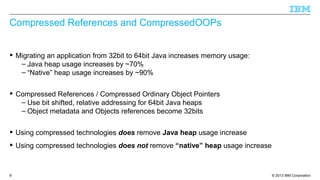
Compressed References and CompressedOOPs
 Migrating an application from 32bit to 64bit Java increases memory usage:
– Java heap usage increases by ~70%
– “Native” heap usage increases by ~90%
 Compressed References / Compressed Ordinary Object Pointers
– Use bit shifted, relative addressing for 64bit Java heaps
– Object metadata and Objects references become 32bits
 Using compressed technologies does remove Java heap usage increase
 Using compressed technologies does not remove “native” heap usage increase
© 2013 IBM Corporation10
Anatomy of a Java Object: 64bit with Compressed Refs/OOPs
0 32 64 96 128 160 192 224 256 288 320
Java Object
Array Object
public static void main(String[] args) {
Integer myInteger = new Integer(10);
}
Class pointer Flags Locks intClass pointer Flags Locks int, eg. 10
Class pointer Flags Locks intSizeClass pointer Flags Locks int, eg. 10Size
 Typical Object Metadata:
– Class: pointer to class information
– Flags: shape, hash code, etc
– Lock: flatlock or pointer to inflated monitor
– Size: the length of the array (arrays only)
© 2013 IBM Corporation11
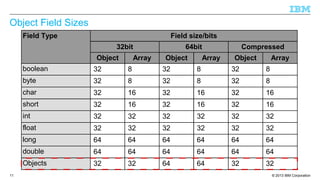
Object Field Sizes
Field Type Field size/bits
32bit 64bit Compressed
Object Array Object Array Object Array
boolean 32 8 32 8 32 8
byte 32 8 32 8 32 8
char 32 16 32 16 32 16
short 32 16 32 16 32 16
int 32 32 32 32 32 32
float 32 32 32 32 32 32
long 64 64 64 64 64 64
double 64 64 64 64 64 64
Objects 32 32 64 64 32 32
© 2013 IBM Corporation12
Allocating (slightly) more complex objects
 Good object orientated design encourages encapsulation and delegation
 Example: java.lang.String encapsulates a character array:
Class pointer Flags Locks hash
Class pointer Flags Locks Size
java.lang.Stringcount offset value
char
M
char
Y
char
S
char
T
char
R
char
I
char
N
char
G char[]
public static void main(String[] args) {
String myString = new String("MyString");
}
0 32 64 96 128 160 192 224 256 288 320
 128 bits of char data, stored in 480 bits of memory, size ratio of x3.75
– Maximum overhead would be x24 for a single character!
© 2013 IBM Corporation13
Summary
 Objects are (much) larger than the data you store in them
– Allows Java to do memory management
– Allows Java to provide synchronization on your data
– Allows tools to analyze and visualize application memory
 32bit vs 64bit has an effect on your memory usage
– Use CompressedOOPs/Refs to mitigate additional Object overhead
 More recent Java VMs also have other memory improvements
– Lazy lock word allocation, etc
© 2013 IBM Corporation14
Object Allocation / Reclamation
© 2013 IBM Corporation15
Temporary Objects
 Most Objects created by an application are “temporary”
– Used as part of a calculation, transform, business transaction, etc
 Temporary Objects need to be allocated and reclaimed
– Memory management carried out by the Garbage Collector
 Garbage Collection is a tax on your application performance
– Time spent garbage collecting is time the application isn't running
– Typically up to 10% of overhead
© 2013 IBM Corporation16
Allocated 0
Reclaimed 0
Allocated 2
Reclaimed 0
Allocated 4
Reclaimed 0
Allocated 6
Reclaimed 0
Allocated 8
Reclaimed 0
Allocated 8
Reclaimed 2
Allocated 8
Reclaimed 4
Allocated 8
Reclaimed 6
String Concatenation
 Concatenation of Strings using the '+' operator equates to:
String s1 = “String1”;
String s2 = “String2”;
String s3 = s1 + s2;
String s3 = new StringBuilder(String.valueOf(s1)).append(s2).toString()
String s1
char[] “String 1”
String s2
char[] “String 2”
char[]
String s3
char[]
StringBuilderchar[] “String 1”
char[] “String 2”
© 2013 IBM Corporation17
String Interning and String Literals
 Java optimizes String usage by interning Strings
– Stores unique strings in a data collection
 Prevents the need to allocate Strings if they are already in the data collection
– No need to allocate s1 and s2
– They become references into the data collection
– The intern String cache reduces are allocations to 2, and our reclamations to 1.
 String literals are automatically interned by the JVM
 Concatenation of final String literals is done at compile time
© 2013 IBM Corporation18
Summary
 Time is spent by garbage collection removing unwanted data and Objects
– Performance tax: Time spent running GC and not running your application
 Allocation and reclamation can be reduced using caches
– The data we need already exists
 Using caches can actually reduce overall memory usage
– Where data can be shared rather than copied
© 2013 IBM Corporation19
Object Caching
© 2013 IBM Corporation20
Java Collections
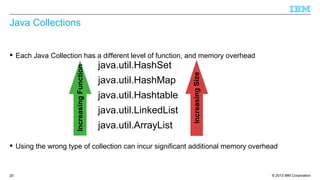
 Each Java Collection has a different level of function, and memory overhead
 Using the wrong type of collection can incur significant additional memory overhead
IncreasingFunction
java.util.HashSet
java.util.HashMap
java.util.Hashtable
java.util.LinkedList
java.util.ArrayList
IncreasingSize
© 2013 IBM Corporation21
HashMap
 Implementation of the Map interface:
– “An object that maps keys to values. A map cannot contain duplicate keys; each key can
map to at most one value.“
 Implementation is an array of HashMap$Entry objects:
 Default capacity is 16 entries
 Empty size is 128 bytes
 Overhead is 48 bytes for HashMap, plus (16 + (entries * 4bytes)) for array
– Plus overhead of HashMap$Entry objects
public static void main(String[] args) {
HashMap myHashMap = new HashMap();
}
© 2013 IBM Corporation22
HashMap Structure
HashMap
array[16]
© 2013 IBM Corporation23
HashMap$Entry
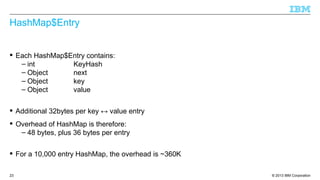
 Each HashMap$Entry contains:
– int KeyHash
– Object next
– Object key
– Object value
 Additional 32bytes per key ↔ value entry
 Overhead of HashMap is therefore:
– 48 bytes, plus 36 bytes per entry
 For a 10,000 entry HashMap, the overhead is ~360K
© 2013 IBM Corporation24
HashMap Structure
HashMap
array[16]
HashMap$Entry
Object key
Object value
HashMap$Entry
Object key
Object value
HashMap$Entry
Object key
Object value
HashMap$Entry
Object key
Object value
HashMap$Entry
Object key
Object value
© 2013 IBM Corporation25
LinkedList
 Linked list implementation of the List interface:
– “An ordered collection (also known as a sequence). The user of this interface has
precise control over where in the list each element is inserted. The user can access
elements by their integer index (position in the list), and search for elements in the list.
– Unlike sets, lists typically allow duplicate elements. “
 Implementation is a linked list of LinkedList$Entry objects (or LinkedList$Link):
 Default capacity is 1 entry
 Empty size is 48 bytes
 Overhead is 24 bytes for LinkedList, plus overhead of LinkedList$Entry/Link objects
public static void main(String[] args) {
LinkedList myLinkedList = new LinkedList();
}
© 2013 IBM Corporation26
LinkedList Structure
LinkedList
© 2013 IBM Corporation27
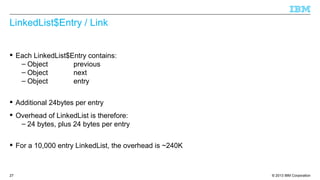
LinkedList$Entry / Link
 Each LinkedList$Entry contains:
– Object previous
– Object next
– Object entry
 Additional 24bytes per entry
 Overhead of LinkedList is therefore:
– 24 bytes, plus 24 bytes per entry
 For a 10,000 entry LinkedList, the overhead is ~240K
© 2013 IBM Corporation28
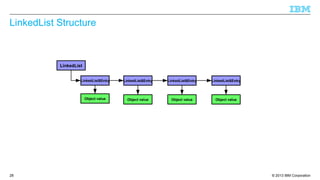
LinkedList Structure
LinkedList
LinkedList$Entry
Object value
LinkedList$Entry
Object value
LinkedList$Entry
Object value
LinkedList$Entry
Object value
© 2013 IBM Corporation29
ArrayList
 A resizeable array instance of the List interface:
– “An ordered collection (also known as a sequence). The user of this interface has
precise control over where in the list each element is inserted. The user can access
elements by their integer index (position in the list), and search for elements in the list.
– Unlike sets, lists typically allow duplicate elements. “
 Implementation is an array of Object:
 Default capacity is 10 entries
 Empty size is 88 bytes
 Overhead is 32bytes for ArrayList, plus (16 + (entries * 4bytes)) for array
 For a 10,000 entry ArrayList, the overhead is ~40K
public static void main(String[] args) {
ArrayList myArrayList = new ArrayList();
}
© 2013 IBM Corporation30
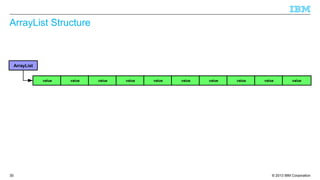
ArrayList Structure
ArrayList
value value value value value value value value value value
© 2013 IBM Corporation31
Other types of “Collections”
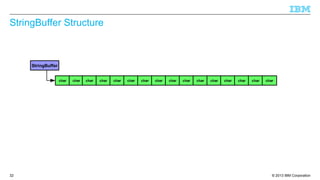
 StringBuffers can be considered to be a type of collection
– “A thread-safe, mutable sequence of characters...
– Every string buffer has a capacity. As long as the length of the character sequence
contained in the string buffer does not exceed the capacity, it is not necessary to
allocate a new internal buffer array. If the internal buffer overflows, it is automatically
made larger.”
 Implementation is an array of char
 Default capacity is 16 characters
 Empty size is 72 bytes
 Overhead is just 24bytes for StringBuffer
public static void main(String[] args) {
StringBuffer myStringBuffer = new StringBuffer();
}
© 2013 IBM Corporation32
StringBuffer Structure
StringBuffer
char char char char char char char char char char char char char char char char
© 2013 IBM Corporation33
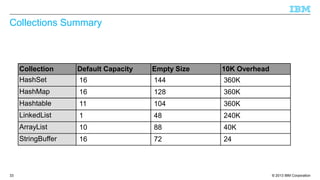
Collections Summary
Collection Default Capacity Empty Size 10K Overhead
HashSet 16 144 360K
HashMap 16 128 360K
Hashtable 11 104 360K
LinkedList 1 48 240K
ArrayList 10 88 40K
StringBuffer 16 72 24
© 2013 IBM Corporation34
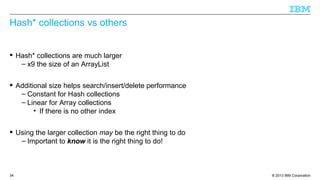
Hash* collections vs others
 Hash* collections are much larger
– x9 the size of an ArrayList
 Additional size helps search/insert/delete performance
– Constant for Hash collections
– Linear for Array collections
• If there is no other index
 Using the larger collection may be the right thing to do
– Important to know it is the right thing to do!
© 2013 IBM Corporation35
Empty space in collections
 Collections that contain empty space introduce additional overhead
 Default collection size may not be appropriate for the amount of data being held
java.lang.StringBuffer
char[]
0 32 64 96 128 160 192 224 256 288 320
Class Flags Locks count
Class Flags Locks charSize
value
charcharcharcharcharcharcharcharcharcharcharcharcharcharcharM Y S T R I N G
352 384 416 448 480 512 544 576 608 640
 StringBuffer default of 16 is inappropriate to hold a 9 character string
– 7 additional entries in char[]
– 112 byte additional overhead
public static void main(String[] args) {
StringBuffer myStringBuffer = new StringBuffer(“MyString”);
}
© 2013 IBM Corporation36
Expansion of collections
 When collections hit the limit of their capacity, they expand
– Greatly increases capacity
– Greatly reduces “fill ratio”
 Introduces additional collection overhead:
java.lang.StringBuffer
char[]
0 32 64 96 128 160 192 224 256 288 320
Class Flags Locks count
Class Flags Locks charSize
value
charcharcharcharcharcharcharcharcharcharcharcharcharcharcharcharcharcharcharcharcharcharcharcharcharcharcharcharcharcharM Y S T R I N G O F T E X T
352 384 416 448 480 512 544 576 608 640
 Additional 16 char[] entries to hold single extra character
– 240 byte additional overhead
© 2013 IBM Corporation37
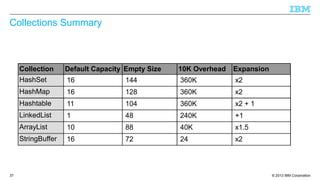
Collections Summary
Collection Default Capacity Empty Size 10K Overhead Expansion
HashSet 16 144 360K x2
HashMap 16 128 360K x2
Hashtable 11 104 360K x2 + 1
LinkedList 1 48 240K +1
ArrayList 10 88 40K x1.5
StringBuffer 16 72 24 x2
© 2013 IBM Corporation38
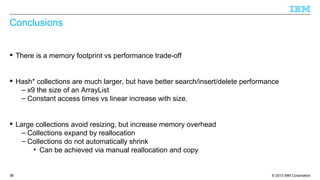
Conclusions
 There is a memory footprint vs performance trade-off
 Hash* collections are much larger, but have better search/insert/delete performance
– x9 the size of an ArrayList
– Constant access times vs linear increase with size.
 Large collections avoid resizing, but increase memory overhead
– Collections expand by reallocation
– Collections do not automatically shrink
• Can be achieved via manual reallocation and copy
© 2013 IBM Corporation39
Application Analysis
© 2013 IBM Corporation40
Collections Summary
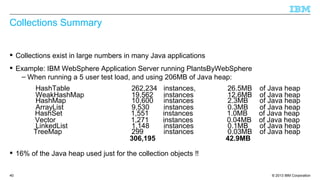
 Collections exist in large numbers in many Java applications
 Example: IBM WebSphere Application Server running PlantsByWebSphere
– When running a 5 user test load, and using 206MB of Java heap:
 16% of the Java heap used just for the collection objects !!
HashTable 262,234 instances, 26.5MB of Java heap
WeakHashMap 19,562 instances 12.6MB of Java heap
HashMap 10,600 instances 2.3MB of Java heap
ArrayList 9,530 instances 0.3MB of Java heap
HashSet 1,551 instances 1.0MB of Java heap
Vector 1,271 instances 0.04MB of Java heap
LinkedList 1,148 instances 0.1MB of Java heap
TreeMap 299 instances 0.03MB of Java heap
306,195 42.9MB
© 2013 IBM Corporation41
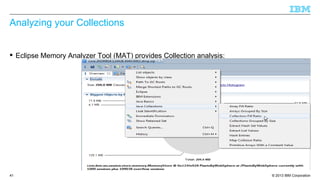
Analyzing your Collections
 Eclipse Memory Analyzer Tool (MAT) provides Collection analysis:
© 2013 IBM Corporation42
Analyzing your Collections
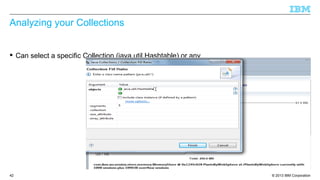
 Can select a specific Collection (java.util.Hashtable) or any
© 2013 IBM Corporation43
Analyzing your Collections
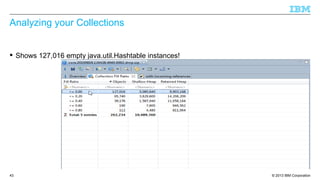
 Shows 127,016 empty java.util.Hashtable instances!
© 2013 IBM Corporation44
Analyzing your Collections
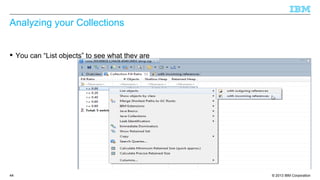
 You can “List objects” to see what they are
© 2013 IBM Corporation45
Analyzing your Collections
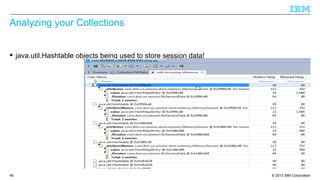
 java.util.Hashtable objects being used to store session data!
© 2013 IBM Corporation46
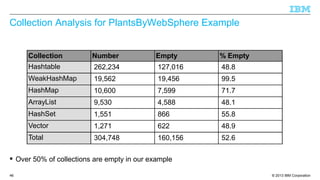
Collection Analysis for PlantsByWebSphere Example
 Over 50% of collections are empty in our example
Collection Number Empty % Empty
Hashtable 262,234 127,016 48.8
WeakHashMap 19,562 19,456 99.5
HashMap 10,600 7,599 71.7
ArrayList 9,530 4,588 48.1
HashSet 1,551 866 55.8
Vector 1,271 622 48.9
Total 304,748 160,156 52.6
© 2013 IBM Corporation47
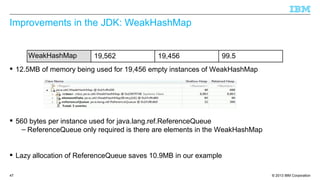
Improvements in the JDK: WeakHashMap
 12.5MB of memory being used for 19,456 empty instances of WeakHashMap
 560 bytes per instance used for java.lang.ref.ReferenceQueue
– ReferenceQueue only required is there are elements in the WeakHashMap
 Lazy allocation of ReferenceQueue saves 10.9MB in our example
WeakHashMap 19,562 19,456 99.5
© 2013 IBM Corporation48
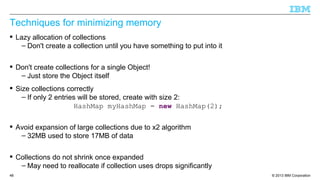
Techniques for minimizing memory
 Lazy allocation of collections
– Don't create a collection until you have something to put into it
 Don't create collections for a single Object!
– Just store the Object itself
 Size collections correctly
– If only 2 entries will be stored, create with size 2:
HashMap myHashMap = new HashMap(2);
 Avoid expansion of large collections due to x2 algorithm
– 32MB used to store 17MB of data
 Collections do not shrink once expanded
– May need to reallocate if collection uses drops significantly
© 2013 IBM Corporation49
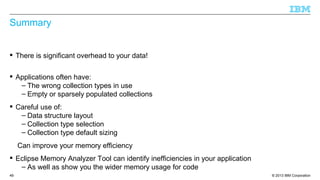
Summary
 There is significant overhead to your data!
 Applications often have:
– The wrong collection types in use
– Empty or sparsely populated collections
 Careful use of:
– Data structure layout
– Collection type selection
– Collection type default sizing
Can improve your memory efficiency
 Eclipse Memory Analyzer Tool can identify inefficiencies in your application
– As well as show you the wider memory usage for code
© 2013 IBM Corporation50
http://ibm.co/JavaOne2013
© 2013 IBM Corporation51
References
 Get Products and Technologies:
– IBM Monitoring and Diagnostic Tools for Java:
• https://www.ibm.com/developerworks/java/jdk/tools/
– Eclipse Memory Analyzer Tool:
• http://eclipse.org/mat/downloads.php
 Learn:
– Debugging from Dumps:
• http://www.ibm.com/developerworks/java/library/j-memoryanalyzer/index.html
– Why the Memory Analyzer (with IBM Extensions) isn't just for memory leaks anymore:
• http://www.ibm.com/developerworks/websphere/techjournal/1103_supauth/1103_sup
auth.html
 Discuss:
– IBM on Troubleshooting Java Applications Blog:
• https://www.ibm.com/developerworks/mydeveloperworks/blogs/troubleshootingjava/
– IBM Java Runtimes and SDKs Forum:
• http://www.ibm.com/developerworks/forums/forum.jspa?forumID=367&start=0
© 2013 IBM Corporation52
Copyright and Trademarks
© IBM Corporation 2013. All Rights Reserved.
IBM, the IBM logo, and ibm.com are trademarks or registered trademarks of International
Business Machines Corp., and registered in many jurisdictions worldwide.
Other product and service names might be trademarks of IBM or other companies.
A current list of IBM trademarks is available on the Web – see the IBM “Copyright and
trademark information” page at URL: www.ibm.com/legal/copytrade.shtml

JavaOne 2013: Memory Efficient Java

  • 1.
    © 2013 IBMCorporation Chris Bailey – IBM Java Service Architect 26th September 2013 Memory-Efficient Java Code Write low overhead application code Document number
  • 2.
    © 2013 IBMCorporation Important Disclaimers THE INFORMATION CONTAINED IN THIS PRESENTATION IS PROVIDED FOR INFORMATIONAL PURPOSES ONLY. WHILST EFFORTS WERE MADE TO VERIFY THE COMPLETENESS AND ACCURACY OF THE INFORMATION CONTAINED IN THIS PRESENTATION, IT IS PROVIDED “AS IS”, WITHOUT WARRANTY OF ANY KIND, EXPRESS OR IMPLIED. ALL PERFORMANCE DATA INCLUDED IN THIS PRESENTATION HAVE BEEN GATHERED IN A CONTROLLED ENVIRONMENT. YOUR OWN TEST RESULTS MAY VARY BASED ON HARDWARE, SOFTWARE OR INFRASTRUCTURE DIFFERENCES. ALL DATA INCLUDED IN THIS PRESENTATION ARE MEANT TO BE USED ONLY AS A GUIDE. IN ADDITION, THE INFORMATION CONTAINED IN THIS PRESENTATION IS BASED ON IBM’S CURRENT PRODUCT PLANS AND STRATEGY, WHICH ARE SUBJECT TO CHANGE BY IBM, WITHOUT NOTICE. IBM AND ITS AFFILIATED COMPANIES SHALL NOT BE RESPONSIBLE FOR ANY DAMAGES ARISING OUT OF THE USE OF, OR OTHERWISE RELATED TO, THIS PRESENTATION OR ANY OTHER DOCUMENTATION. NOTHING CONTAINED IN THIS PRESENTATION IS INTENDED TO, OR SHALL HAVE THE EFFECT OF: - CREATING ANY WARRANT OR REPRESENTATION FROM IBM, ITS AFFILIATED COMPANIES OR ITS OR THEIR SUPPLIERS AND/OR LICENSORS 2
  • 3.
    © 2013 IBMCorporation3 Introduction to the speaker  13 years experience developing and deploying Java SDKs  Recent work focus: – Java applications in the cloud – Java usability and quality – Debugging tools and capabilities – Requirements gathering – Highly resilient and scalable deployments –  My contact information: – baileyc@uk.ibm.com – http://www.linkedin.com/in/chrisbaileyibm – http://www.slideshare.net/cnbailey/
  • 4.
    © 2013 IBMCorporation4 Goals of this talk  Understand the memory usage of Java code  Minimize the creation of new objects  Choose the right collection types  Analyze your application for memory inefficiencies
  • 5.
    © 2013 IBMCorporation5 Java Memory Usage
  • 6.
    © 2013 IBMCorporation6 Anatomy of a Java Object  A: Option 5: 128bits (4:1) public static void main(String[] args) { Integer myInteger = new Integer(10); }  Q: An int value is 32bits. How big is an Integer object? (on 32bit) – Option 1: 32 bits (1:1) – Option 2: 48 bits (1.5:1) – Option 3: 64 bits (2:1) – Option 4: 96 bits (3:1)
  • 7.
    © 2013 IBMCorporation7 Anatomy of a Java Object  Typical Object Metadata: 0 32 64 96 128 160 192 224 256 288 320 Class pointer Flags Locks int: 10 Class pointer Flags Locks int: 10Size Java Object Array Object public static void main(String[] args) { Integer myInteger = new Integer(10); } – Class: pointer to class information – Flags: shape, hash code, etc – Lock: flatlock or pointer to inflated monitor – Size: the length of the array (arrays only)
  • 8.
    © 2013 IBMCorporation8 Anatomy of a Java Object: 64bit 0 32 64 96 128 160 192 224 256 288 320 Java Object Array Object public static void main(String[] args) { Integer myInteger = new Integer(10); } Class pointer Flags Locks intClass pointer Flags Locks int, eg. 10 Class pointer Flags Locks intSizeClass pointer Flags Locks int, eg. 10Size  Size ratio of an Integer object to an int value becomes 9:1 !!  Typical Object Metadata: – Class: pointer to class information – Flags: shape, hash code, etc – Lock: flatlock or pointer to inflated monitor – Size: the length of the array (arrays only)
  • 9.
    © 2013 IBMCorporation9 Compressed References and CompressedOOPs  Migrating an application from 32bit to 64bit Java increases memory usage: – Java heap usage increases by ~70% – “Native” heap usage increases by ~90%  Compressed References / Compressed Ordinary Object Pointers – Use bit shifted, relative addressing for 64bit Java heaps – Object metadata and Objects references become 32bits  Using compressed technologies does remove Java heap usage increase  Using compressed technologies does not remove “native” heap usage increase
  • 10.
    © 2013 IBMCorporation10 Anatomy of a Java Object: 64bit with Compressed Refs/OOPs 0 32 64 96 128 160 192 224 256 288 320 Java Object Array Object public static void main(String[] args) { Integer myInteger = new Integer(10); } Class pointer Flags Locks intClass pointer Flags Locks int, eg. 10 Class pointer Flags Locks intSizeClass pointer Flags Locks int, eg. 10Size  Typical Object Metadata: – Class: pointer to class information – Flags: shape, hash code, etc – Lock: flatlock or pointer to inflated monitor – Size: the length of the array (arrays only)
  • 11.
    © 2013 IBMCorporation11 Object Field Sizes Field Type Field size/bits 32bit 64bit Compressed Object Array Object Array Object Array boolean 32 8 32 8 32 8 byte 32 8 32 8 32 8 char 32 16 32 16 32 16 short 32 16 32 16 32 16 int 32 32 32 32 32 32 float 32 32 32 32 32 32 long 64 64 64 64 64 64 double 64 64 64 64 64 64 Objects 32 32 64 64 32 32
  • 12.
    © 2013 IBMCorporation12 Allocating (slightly) more complex objects  Good object orientated design encourages encapsulation and delegation  Example: java.lang.String encapsulates a character array: Class pointer Flags Locks hash Class pointer Flags Locks Size java.lang.Stringcount offset value char M char Y char S char T char R char I char N char G char[] public static void main(String[] args) { String myString = new String("MyString"); } 0 32 64 96 128 160 192 224 256 288 320  128 bits of char data, stored in 480 bits of memory, size ratio of x3.75 – Maximum overhead would be x24 for a single character!
  • 13.
    © 2013 IBMCorporation13 Summary  Objects are (much) larger than the data you store in them – Allows Java to do memory management – Allows Java to provide synchronization on your data – Allows tools to analyze and visualize application memory  32bit vs 64bit has an effect on your memory usage – Use CompressedOOPs/Refs to mitigate additional Object overhead  More recent Java VMs also have other memory improvements – Lazy lock word allocation, etc
  • 14.
    © 2013 IBMCorporation14 Object Allocation / Reclamation
  • 15.
    © 2013 IBMCorporation15 Temporary Objects  Most Objects created by an application are “temporary” – Used as part of a calculation, transform, business transaction, etc  Temporary Objects need to be allocated and reclaimed – Memory management carried out by the Garbage Collector  Garbage Collection is a tax on your application performance – Time spent garbage collecting is time the application isn't running – Typically up to 10% of overhead
  • 16.
    © 2013 IBMCorporation16 Allocated 0 Reclaimed 0 Allocated 2 Reclaimed 0 Allocated 4 Reclaimed 0 Allocated 6 Reclaimed 0 Allocated 8 Reclaimed 0 Allocated 8 Reclaimed 2 Allocated 8 Reclaimed 4 Allocated 8 Reclaimed 6 String Concatenation  Concatenation of Strings using the '+' operator equates to: String s1 = “String1”; String s2 = “String2”; String s3 = s1 + s2; String s3 = new StringBuilder(String.valueOf(s1)).append(s2).toString() String s1 char[] “String 1” String s2 char[] “String 2” char[] String s3 char[] StringBuilderchar[] “String 1” char[] “String 2”
  • 17.
    © 2013 IBMCorporation17 String Interning and String Literals  Java optimizes String usage by interning Strings – Stores unique strings in a data collection  Prevents the need to allocate Strings if they are already in the data collection – No need to allocate s1 and s2 – They become references into the data collection – The intern String cache reduces are allocations to 2, and our reclamations to 1.  String literals are automatically interned by the JVM  Concatenation of final String literals is done at compile time
  • 18.
    © 2013 IBMCorporation18 Summary  Time is spent by garbage collection removing unwanted data and Objects – Performance tax: Time spent running GC and not running your application  Allocation and reclamation can be reduced using caches – The data we need already exists  Using caches can actually reduce overall memory usage – Where data can be shared rather than copied
  • 19.
    © 2013 IBMCorporation19 Object Caching
  • 20.
    © 2013 IBMCorporation20 Java Collections  Each Java Collection has a different level of function, and memory overhead  Using the wrong type of collection can incur significant additional memory overhead IncreasingFunction java.util.HashSet java.util.HashMap java.util.Hashtable java.util.LinkedList java.util.ArrayList IncreasingSize
  • 21.
    © 2013 IBMCorporation21 HashMap  Implementation of the Map interface: – “An object that maps keys to values. A map cannot contain duplicate keys; each key can map to at most one value.“  Implementation is an array of HashMap$Entry objects:  Default capacity is 16 entries  Empty size is 128 bytes  Overhead is 48 bytes for HashMap, plus (16 + (entries * 4bytes)) for array – Plus overhead of HashMap$Entry objects public static void main(String[] args) { HashMap myHashMap = new HashMap(); }
  • 22.
    © 2013 IBMCorporation22 HashMap Structure HashMap array[16]
  • 23.
    © 2013 IBMCorporation23 HashMap$Entry  Each HashMap$Entry contains: – int KeyHash – Object next – Object key – Object value  Additional 32bytes per key ↔ value entry  Overhead of HashMap is therefore: – 48 bytes, plus 36 bytes per entry  For a 10,000 entry HashMap, the overhead is ~360K
  • 24.
    © 2013 IBMCorporation24 HashMap Structure HashMap array[16] HashMap$Entry Object key Object value HashMap$Entry Object key Object value HashMap$Entry Object key Object value HashMap$Entry Object key Object value HashMap$Entry Object key Object value
  • 25.
    © 2013 IBMCorporation25 LinkedList  Linked list implementation of the List interface: – “An ordered collection (also known as a sequence). The user of this interface has precise control over where in the list each element is inserted. The user can access elements by their integer index (position in the list), and search for elements in the list. – Unlike sets, lists typically allow duplicate elements. “  Implementation is a linked list of LinkedList$Entry objects (or LinkedList$Link):  Default capacity is 1 entry  Empty size is 48 bytes  Overhead is 24 bytes for LinkedList, plus overhead of LinkedList$Entry/Link objects public static void main(String[] args) { LinkedList myLinkedList = new LinkedList(); }
  • 26.
    © 2013 IBMCorporation26 LinkedList Structure LinkedList
  • 27.
    © 2013 IBMCorporation27 LinkedList$Entry / Link  Each LinkedList$Entry contains: – Object previous – Object next – Object entry  Additional 24bytes per entry  Overhead of LinkedList is therefore: – 24 bytes, plus 24 bytes per entry  For a 10,000 entry LinkedList, the overhead is ~240K
  • 28.
    © 2013 IBMCorporation28 LinkedList Structure LinkedList LinkedList$Entry Object value LinkedList$Entry Object value LinkedList$Entry Object value LinkedList$Entry Object value
  • 29.
    © 2013 IBMCorporation29 ArrayList  A resizeable array instance of the List interface: – “An ordered collection (also known as a sequence). The user of this interface has precise control over where in the list each element is inserted. The user can access elements by their integer index (position in the list), and search for elements in the list. – Unlike sets, lists typically allow duplicate elements. “  Implementation is an array of Object:  Default capacity is 10 entries  Empty size is 88 bytes  Overhead is 32bytes for ArrayList, plus (16 + (entries * 4bytes)) for array  For a 10,000 entry ArrayList, the overhead is ~40K public static void main(String[] args) { ArrayList myArrayList = new ArrayList(); }
  • 30.
    © 2013 IBMCorporation30 ArrayList Structure ArrayList value value value value value value value value value value
  • 31.
    © 2013 IBMCorporation31 Other types of “Collections”  StringBuffers can be considered to be a type of collection – “A thread-safe, mutable sequence of characters... – Every string buffer has a capacity. As long as the length of the character sequence contained in the string buffer does not exceed the capacity, it is not necessary to allocate a new internal buffer array. If the internal buffer overflows, it is automatically made larger.”  Implementation is an array of char  Default capacity is 16 characters  Empty size is 72 bytes  Overhead is just 24bytes for StringBuffer public static void main(String[] args) { StringBuffer myStringBuffer = new StringBuffer(); }
  • 32.
    © 2013 IBMCorporation32 StringBuffer Structure StringBuffer char char char char char char char char char char char char char char char char
  • 33.
    © 2013 IBMCorporation33 Collections Summary Collection Default Capacity Empty Size 10K Overhead HashSet 16 144 360K HashMap 16 128 360K Hashtable 11 104 360K LinkedList 1 48 240K ArrayList 10 88 40K StringBuffer 16 72 24
  • 34.
    © 2013 IBMCorporation34 Hash* collections vs others  Hash* collections are much larger – x9 the size of an ArrayList  Additional size helps search/insert/delete performance – Constant for Hash collections – Linear for Array collections • If there is no other index  Using the larger collection may be the right thing to do – Important to know it is the right thing to do!
  • 35.
    © 2013 IBMCorporation35 Empty space in collections  Collections that contain empty space introduce additional overhead  Default collection size may not be appropriate for the amount of data being held java.lang.StringBuffer char[] 0 32 64 96 128 160 192 224 256 288 320 Class Flags Locks count Class Flags Locks charSize value charcharcharcharcharcharcharcharcharcharcharcharcharcharcharM Y S T R I N G 352 384 416 448 480 512 544 576 608 640  StringBuffer default of 16 is inappropriate to hold a 9 character string – 7 additional entries in char[] – 112 byte additional overhead public static void main(String[] args) { StringBuffer myStringBuffer = new StringBuffer(“MyString”); }
  • 36.
    © 2013 IBMCorporation36 Expansion of collections  When collections hit the limit of their capacity, they expand – Greatly increases capacity – Greatly reduces “fill ratio”  Introduces additional collection overhead: java.lang.StringBuffer char[] 0 32 64 96 128 160 192 224 256 288 320 Class Flags Locks count Class Flags Locks charSize value charcharcharcharcharcharcharcharcharcharcharcharcharcharcharcharcharcharcharcharcharcharcharcharcharcharcharcharcharcharM Y S T R I N G O F T E X T 352 384 416 448 480 512 544 576 608 640  Additional 16 char[] entries to hold single extra character – 240 byte additional overhead
  • 37.
    © 2013 IBMCorporation37 Collections Summary Collection Default Capacity Empty Size 10K Overhead Expansion HashSet 16 144 360K x2 HashMap 16 128 360K x2 Hashtable 11 104 360K x2 + 1 LinkedList 1 48 240K +1 ArrayList 10 88 40K x1.5 StringBuffer 16 72 24 x2
  • 38.
    © 2013 IBMCorporation38 Conclusions  There is a memory footprint vs performance trade-off  Hash* collections are much larger, but have better search/insert/delete performance – x9 the size of an ArrayList – Constant access times vs linear increase with size.  Large collections avoid resizing, but increase memory overhead – Collections expand by reallocation – Collections do not automatically shrink • Can be achieved via manual reallocation and copy
  • 39.
    © 2013 IBMCorporation39 Application Analysis
  • 40.
    © 2013 IBMCorporation40 Collections Summary  Collections exist in large numbers in many Java applications  Example: IBM WebSphere Application Server running PlantsByWebSphere – When running a 5 user test load, and using 206MB of Java heap:  16% of the Java heap used just for the collection objects !! HashTable 262,234 instances, 26.5MB of Java heap WeakHashMap 19,562 instances 12.6MB of Java heap HashMap 10,600 instances 2.3MB of Java heap ArrayList 9,530 instances 0.3MB of Java heap HashSet 1,551 instances 1.0MB of Java heap Vector 1,271 instances 0.04MB of Java heap LinkedList 1,148 instances 0.1MB of Java heap TreeMap 299 instances 0.03MB of Java heap 306,195 42.9MB
  • 41.
    © 2013 IBMCorporation41 Analyzing your Collections  Eclipse Memory Analyzer Tool (MAT) provides Collection analysis:
  • 42.
    © 2013 IBMCorporation42 Analyzing your Collections  Can select a specific Collection (java.util.Hashtable) or any
  • 43.
    © 2013 IBMCorporation43 Analyzing your Collections  Shows 127,016 empty java.util.Hashtable instances!
  • 44.
    © 2013 IBMCorporation44 Analyzing your Collections  You can “List objects” to see what they are
  • 45.
    © 2013 IBMCorporation45 Analyzing your Collections  java.util.Hashtable objects being used to store session data!
  • 46.
    © 2013 IBMCorporation46 Collection Analysis for PlantsByWebSphere Example  Over 50% of collections are empty in our example Collection Number Empty % Empty Hashtable 262,234 127,016 48.8 WeakHashMap 19,562 19,456 99.5 HashMap 10,600 7,599 71.7 ArrayList 9,530 4,588 48.1 HashSet 1,551 866 55.8 Vector 1,271 622 48.9 Total 304,748 160,156 52.6
  • 47.
    © 2013 IBMCorporation47 Improvements in the JDK: WeakHashMap  12.5MB of memory being used for 19,456 empty instances of WeakHashMap  560 bytes per instance used for java.lang.ref.ReferenceQueue – ReferenceQueue only required is there are elements in the WeakHashMap  Lazy allocation of ReferenceQueue saves 10.9MB in our example WeakHashMap 19,562 19,456 99.5
  • 48.
    © 2013 IBMCorporation48 Techniques for minimizing memory  Lazy allocation of collections – Don't create a collection until you have something to put into it  Don't create collections for a single Object! – Just store the Object itself  Size collections correctly – If only 2 entries will be stored, create with size 2: HashMap myHashMap = new HashMap(2);  Avoid expansion of large collections due to x2 algorithm – 32MB used to store 17MB of data  Collections do not shrink once expanded – May need to reallocate if collection uses drops significantly
  • 49.
    © 2013 IBMCorporation49 Summary  There is significant overhead to your data!  Applications often have: – The wrong collection types in use – Empty or sparsely populated collections  Careful use of: – Data structure layout – Collection type selection – Collection type default sizing Can improve your memory efficiency  Eclipse Memory Analyzer Tool can identify inefficiencies in your application – As well as show you the wider memory usage for code
  • 50.
    © 2013 IBMCorporation50 http://ibm.co/JavaOne2013
  • 51.
    © 2013 IBMCorporation51 References  Get Products and Technologies: – IBM Monitoring and Diagnostic Tools for Java: • https://www.ibm.com/developerworks/java/jdk/tools/ – Eclipse Memory Analyzer Tool: • http://eclipse.org/mat/downloads.php  Learn: – Debugging from Dumps: • http://www.ibm.com/developerworks/java/library/j-memoryanalyzer/index.html – Why the Memory Analyzer (with IBM Extensions) isn't just for memory leaks anymore: • http://www.ibm.com/developerworks/websphere/techjournal/1103_supauth/1103_sup auth.html  Discuss: – IBM on Troubleshooting Java Applications Blog: • https://www.ibm.com/developerworks/mydeveloperworks/blogs/troubleshootingjava/ – IBM Java Runtimes and SDKs Forum: • http://www.ibm.com/developerworks/forums/forum.jspa?forumID=367&start=0
  • 52.
    © 2013 IBMCorporation52 Copyright and Trademarks © IBM Corporation 2013. All Rights Reserved. IBM, the IBM logo, and ibm.com are trademarks or registered trademarks of International Business Machines Corp., and registered in many jurisdictions worldwide. Other product and service names might be trademarks of IBM or other companies. A current list of IBM trademarks is available on the Web – see the IBM “Copyright and trademark information” page at URL: www.ibm.com/legal/copytrade.shtml