MATH SONG


 Assistive Technology to
      Support Math
             Assisting students to use all three – Automaticity, fluency, and
            conceptual understanding –to become effective problem solvers
Desirable Features of
  Educational Applications
 Simplified screens and instructions
 Consistent placement of menus and control features
 Graphics along with text to support non-readers and early
  readers
 Audio output
 Accessibility by a variety of methods
 Ability to set pace and level of difficulty
 Appropriate and unambiguous feedback
 Easy error correction
 Simply displaying or speaking the message
  “WRONG” delivers feedback that may be perceived
  as harsh. It may diminish students’ interest and
  motivation over time.


 Explanatory Feedback
Definitions

 Automaticity:
     the fast accurate, and effortless processing of content
      information”

 Computational Fluency:
     being able to efficiently and accurately carry out
      procedures to solve computation problems
     relies on basic number facts
 Educational applications are particularly promising for
  helping these students master needed skills because they
  can be customized to meet individual needs, provide
  sufficient repetition, and systematically present
  materials.

 Achieving fluency and automaticity with important;
  visual-spatial organization (e.g., aligning digits for
  computation); understanding math concepts such as
  number sense, time, measurement, and money; and
  solving word problems are all difficult for students with
  math disabilities to master.
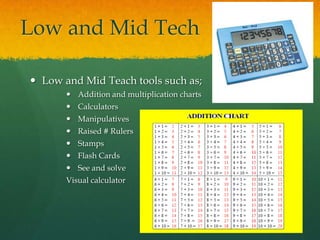
Low and Mid Tech

 Low and Mid Teach tools such as;
        Addition and multiplication charts
        Calculators
        Manipulatives
        Raised # Rulers
        Stamps
        Flash Cards
        See and solve
       Visual calculator
Graph Paper

 Click here to view website:

 Ability to choose type, size and measuring units

 Create your own graph paper
Onion Mountain
            Technology
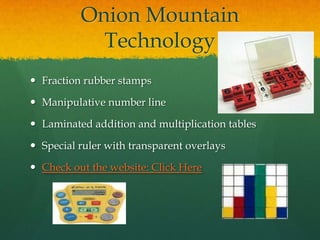
 Fraction rubber stamps

 Manipulative number line

 Laminated addition and multiplication tables

 Special ruler with transparent overlays

 Check out the website: Click Here
FASTT Math

 Watch Fastt Math Demo

 Fluency and Automaticity through Systematic
  Teaching with Technology

 Math intervention program that helps students
  acquire Math Fact Fluency
Visual Spatial or Motor
      Control Difficulties
 Students with disabilities may experience difficulty
  with writing numbers, aligning digits in
  computation problems, and creating visual
  representations (e.g. shapes or angles) for a number
  of reasons

 Students may have difficulty copying math
  problems from books, whiteboards, or blackborads

 Students unable to read their own work or place
  digits in wrong place value
Expectations

 Students may be expected to solve problems with
  numbers of:
- Fractions
-   Decimals
-   Percent’s,
- Draw and label lines
- Angles
- Two and three dimension figures
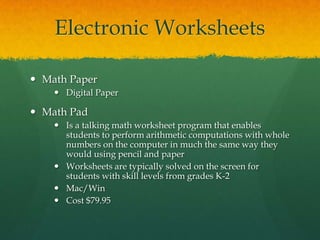
Electronic Worksheets

 Math Paper
     Digital Paper

 Math Pad
     Is a talking math worksheet program that enables
      students to perform arithmetic computations with whole
      numbers on the computer in much the same way they
      would using pencil and paper
     Worksheets are typically solved on the screen for
      students with skill levels from grades K-2
     Mac/Win
     Cost $79.95
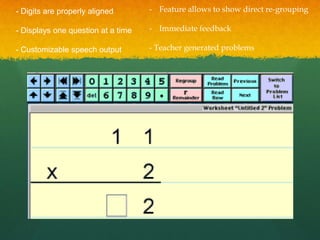
- Digits are properly aligned       - Feature allows to show direct re-grouping

- Displays one question at a time   - Immediate feedback

- Customizable speech output        - Teacher generated problems
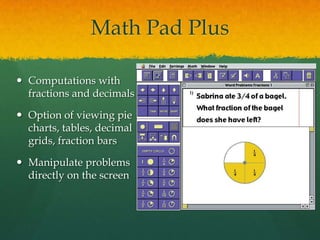
Math Pad Plus

 Computations with
  fractions and decimals

 Option of viewing pie
  charts, tables, decimal
  grids, fraction bars

 Manipulate problems
  directly on the screen
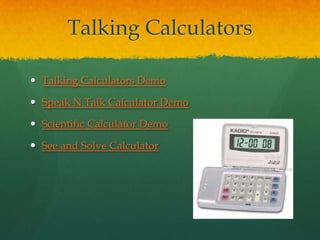
Talking Calculators

 Talking Calculators Demo

 Speak N Talk Calculator Demo

 Scientific Calculator Demo

 See and Solve Calculator
Virtual Pencil Arithmetic
       (Henter Math)
 Check out the VP
 Students who are pencil impaired (blind, motor
  impairments or learning disabilities that interfere with
  writing)
 Addition, subtraction, multiplication, division with
  whole numbers, fractions, and decimal scores
 Speech feedback
 Tutor Mode
 Test Mode
Number Navigation

 Simple math processor

 Enter and solve basic math problems

 Customize the font, colour, font size

 Cost: FREE

 Number Navigation Picture
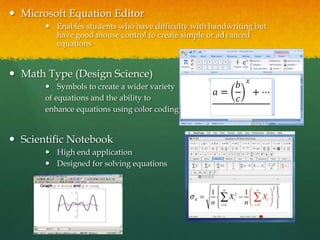
 Microsoft Equation Editor
        Enables students who have difficulty with handwriting but
         have good mouse control to create simple or advanced
         equations


 Math Type (Design Science)
        Symbols to create a wider variety
       of equations and the ability to
       enhance equations using color coding


 Scientific Notebook
        High end application
        Designed for solving equations
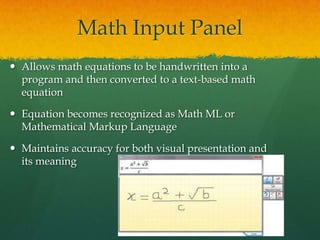
Math Input Panel
 Allows math equations to be handwritten into a
  program and then converted to a text-based math
  equation

 Equation becomes recognized as Math ML or
  Mathematical Markup Language

 Maintains accuracy for both visual presentation and
  its meaning
EmPower Program
    Fx Draw, FX Equation, Fx Graph,
                Fx Stat

 Construct geometric figures, write equations, create
  graphs and produced statistically correct images

 Assist with writing equations, and create math
  graphics with standard tools

 Cost: Free!!
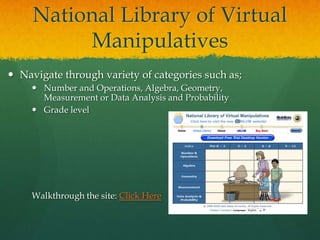
National Library of Virtual
          Manipulatives
 Navigate through variety of categories such as;
      Number and Operations, Algebra, Geometry,
       Measurement or Data Analysis and Probability
      Grade level


     Walkthrough the site: Click Here
Glencoe Virtual
            Manipulative
 Manipulative Website

 Search by Grade level, Manipulative and
  Background tool

 Click Here for Walkthrough
Gismo’s Virtual
            Manipulatives
 450 on-line simulations for grades 3-12 for math

 You may use this as a 30-day trial or you can view
  each activity for 5 minutes per 24 hr. period or you
  can pay for the full use.

 Browse by grade level, topic, textbook or standards

 Click here to see:
 Illuminations
 Students who need extended practice, visual
  representations of concepts and/or interactive
  activities can benefit

 Site Walk Through: Click here

 Internet 4 Classrooms
 Build math skills of students in K-8

 Material to reinforce instruction, or specific subject
  mater

 Cost: Free
Math Playground

 Large selection of resources to support learning
  concepts, skills, word problems

 Online math activities, games, word problems, logic
  puzzles

 Cost: Free!

 Check it out: Click here
 Conceptua Math

 Focuses on fractions, offers a variety of tools for
  teachers to enhance instruction

 Provides visual models, spoken text

 Formative assessments, ability to monitor student
  learning

 Watch the fraction overview: Click Here


 Destination Math

 Watch example: Click Here
Talking Balance

 The Talking Balance tells the student how much
  mass is in the cup, in a safe and audible formal.

 Watch it!
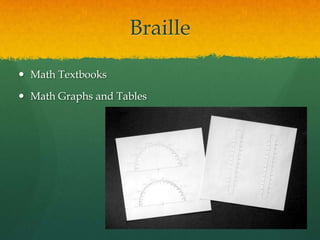
Braille

 Math Textbooks

 Math Graphs and Tables
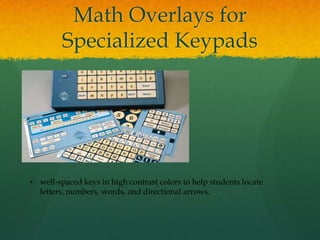
Math Overlays for
         Specialized Keypads


• well-spaced keys in high contrast colors to help students locate
  letters, numbers, words, and directional arrows.
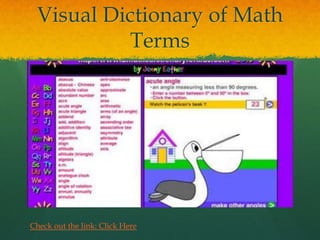
Visual Dictionary of Math
          Terms


Check out the link: Click Here
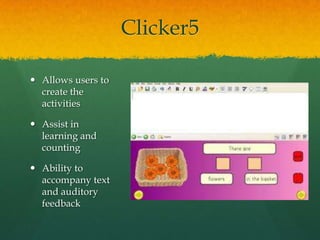
Clicker5

 Allows users to
  create the
  activities

 Assist in
  learning and
  counting

 Ability to
  accompany text
  and auditory
  feedback

Math prez

  • 1.
    MATH SONG AssistiveTechnology to Support Math Assisting students to use all three – Automaticity, fluency, and conceptual understanding –to become effective problem solvers
  • 2.
    Desirable Features of Educational Applications  Simplified screens and instructions  Consistent placement of menus and control features  Graphics along with text to support non-readers and early readers  Audio output  Accessibility by a variety of methods  Ability to set pace and level of difficulty  Appropriate and unambiguous feedback  Easy error correction
  • 3.
     Simply displayingor speaking the message “WRONG” delivers feedback that may be perceived as harsh. It may diminish students’ interest and motivation over time.  Explanatory Feedback
  • 4.
    Definitions  Automaticity:  the fast accurate, and effortless processing of content information”  Computational Fluency:  being able to efficiently and accurately carry out procedures to solve computation problems  relies on basic number facts
  • 5.
     Educational applicationsare particularly promising for helping these students master needed skills because they can be customized to meet individual needs, provide sufficient repetition, and systematically present materials.  Achieving fluency and automaticity with important; visual-spatial organization (e.g., aligning digits for computation); understanding math concepts such as number sense, time, measurement, and money; and solving word problems are all difficult for students with math disabilities to master.
  • 6.
    Low and MidTech  Low and Mid Teach tools such as;  Addition and multiplication charts  Calculators  Manipulatives  Raised # Rulers  Stamps  Flash Cards  See and solve Visual calculator
  • 7.
    Graph Paper  Clickhere to view website:  Ability to choose type, size and measuring units  Create your own graph paper
  • 8.
    Onion Mountain Technology  Fraction rubber stamps  Manipulative number line  Laminated addition and multiplication tables  Special ruler with transparent overlays  Check out the website: Click Here
  • 9.
    FASTT Math  WatchFastt Math Demo  Fluency and Automaticity through Systematic Teaching with Technology  Math intervention program that helps students acquire Math Fact Fluency
  • 10.
    Visual Spatial orMotor Control Difficulties  Students with disabilities may experience difficulty with writing numbers, aligning digits in computation problems, and creating visual representations (e.g. shapes or angles) for a number of reasons  Students may have difficulty copying math problems from books, whiteboards, or blackborads  Students unable to read their own work or place digits in wrong place value
  • 11.
    Expectations  Students maybe expected to solve problems with numbers of: - Fractions - Decimals - Percent’s, - Draw and label lines - Angles - Two and three dimension figures
  • 12.
    Electronic Worksheets  MathPaper  Digital Paper  Math Pad  Is a talking math worksheet program that enables students to perform arithmetic computations with whole numbers on the computer in much the same way they would using pencil and paper  Worksheets are typically solved on the screen for students with skill levels from grades K-2  Mac/Win  Cost $79.95
  • 13.
    - Digits areproperly aligned - Feature allows to show direct re-grouping - Displays one question at a time - Immediate feedback - Customizable speech output - Teacher generated problems
  • 14.
    Math Pad Plus Computations with fractions and decimals  Option of viewing pie charts, tables, decimal grids, fraction bars  Manipulate problems directly on the screen
  • 15.
    Talking Calculators  TalkingCalculators Demo  Speak N Talk Calculator Demo  Scientific Calculator Demo  See and Solve Calculator
  • 16.
    Virtual Pencil Arithmetic (Henter Math)  Check out the VP  Students who are pencil impaired (blind, motor impairments or learning disabilities that interfere with writing)  Addition, subtraction, multiplication, division with whole numbers, fractions, and decimal scores  Speech feedback  Tutor Mode  Test Mode
  • 17.
    Number Navigation  Simplemath processor  Enter and solve basic math problems  Customize the font, colour, font size  Cost: FREE  Number Navigation Picture
  • 18.
     Microsoft EquationEditor  Enables students who have difficulty with handwriting but have good mouse control to create simple or advanced equations  Math Type (Design Science)  Symbols to create a wider variety of equations and the ability to enhance equations using color coding  Scientific Notebook  High end application  Designed for solving equations
  • 19.
    Math Input Panel Allows math equations to be handwritten into a program and then converted to a text-based math equation  Equation becomes recognized as Math ML or Mathematical Markup Language  Maintains accuracy for both visual presentation and its meaning
  • 20.
    EmPower Program Fx Draw, FX Equation, Fx Graph, Fx Stat  Construct geometric figures, write equations, create graphs and produced statistically correct images  Assist with writing equations, and create math graphics with standard tools  Cost: Free!!
  • 21.
    National Library ofVirtual Manipulatives  Navigate through variety of categories such as;  Number and Operations, Algebra, Geometry, Measurement or Data Analysis and Probability  Grade level Walkthrough the site: Click Here
  • 22.
    Glencoe Virtual Manipulative  Manipulative Website  Search by Grade level, Manipulative and Background tool  Click Here for Walkthrough
  • 23.
    Gismo’s Virtual Manipulatives  450 on-line simulations for grades 3-12 for math  You may use this as a 30-day trial or you can view each activity for 5 minutes per 24 hr. period or you can pay for the full use.  Browse by grade level, topic, textbook or standards  Click here to see:
  • 24.
     Illuminations  Studentswho need extended practice, visual representations of concepts and/or interactive activities can benefit  Site Walk Through: Click here  Internet 4 Classrooms  Build math skills of students in K-8  Material to reinforce instruction, or specific subject mater  Cost: Free
  • 25.
    Math Playground  Largeselection of resources to support learning concepts, skills, word problems  Online math activities, games, word problems, logic puzzles  Cost: Free!  Check it out: Click here
  • 26.
     Conceptua Math Focuses on fractions, offers a variety of tools for teachers to enhance instruction  Provides visual models, spoken text  Formative assessments, ability to monitor student learning  Watch the fraction overview: Click Here  Destination Math  Watch example: Click Here
  • 27.
    Talking Balance  TheTalking Balance tells the student how much mass is in the cup, in a safe and audible formal.  Watch it!
  • 28.
    Braille  Math Textbooks Math Graphs and Tables
  • 29.
    Math Overlays for Specialized Keypads • well-spaced keys in high contrast colors to help students locate letters, numbers, words, and directional arrows.
  • 30.
    Visual Dictionary ofMath Terms Check out the link: Click Here
  • 31.
    Clicker5  Allows usersto create the activities  Assist in learning and counting  Ability to accompany text and auditory feedback

Editor's Notes

  • #2 Play the Video:This helps to show the importance of being able to understand Math because it is all around us and in everything we doImportant to have these math support technologies because in many cases sutdents with disablities need even more instruction, practice and reinforcement than their peers, have difficulty remembering as many facts as their peers, and fail to transfer math facts to long term memory. Through this they have difficulty retriveing quickly those math facts This presentation going to give overview of Assistive technology to help support students understanding of mathMath viewed as 3 having to understand 3 major ideas.1) automaticity, fleuncy, and conceptual understanding
  • #3 Clear and unclutteredUnderstand where to focus the students attentionKnowledge of where to access menus and know when to click to engage Spoken instuction and relevant feedbackPace, suffident time to master content
  • #4 Important notice of feedback, must be appropaite for both correct and incorrect answers. Designed to help students understand why an answer is incorrect and why an alternative answer is correct.
  • #6 This highlights the importance of creating assistive technology devices to help with the understanding and functioning of these math categories
  • #7 Many of these can be seen in primary classes but they seem to disapear as students get older, it is important to present these and have them availble for use if need be It also says that if compensation if essential because it frees up automaticity for working memory. IT allows students to devote their cognitive resources to higher order thinking instead of trying to figure out basic math facts
  • #9 Magnetic Multitile graphing tilesCoin-u-latorhttp://www.onionmountaintech.com/kit.php?id=15 They have a low-mid level kit for 560 dollars which can include
  • #10 Assess students udnerstanding of basic facts and builds customized activites on themStrengthens memorization of facts and eliminate the need to rely on counting strategies to solve problems
  • #11 So even if they have achieved automaticity with number facts they may not be able to arrive at a correct answer
  • #12 Advanced math equations include writing combinations of letters or symbols, and a multitude of numbers These can be problematic for students with visual and spatial difficulties
  • #13 Minimizes the handwriting demands of math workStudents with fine motor difficulties can use keyboard or clicking the mouseStudents with severe difficulties can ustilize the Math pads scanning feature
  • #14 Teachers can see all the student work that has been completed. They can print out the steps with the problem and the teacher can understand where in the computation process any mistakes were made This program is for students who have difficulty working with paper pencil task due to fine motor skills, students who need speech output, students who have difficulty setting up problems so digits are aligned properly, students who require immediate feedback, and students who are more motivated and engaged in academic takss when using the computer
  • #15 Great for visual learners Understanding may be enhanced because you can manipulate problems on screen
  • #17 Provides same as mathpadPerforming and showing stepsExtensive speech feedback program reads problems and provides enough information so students who cannot see the problem can understand the position of digits and can navigate to where they need to be. Features a “Tutor” programThis program informs the student they are in the problem, what steps need to be done to solve it, and if desierded the answer
  • #18 Similar to the electronic worksheetsBasic
  • #21 Registration codes free of charge for all its products to any student whose disability makes mathemaics and science materials difficult to produce
  • #22 Great for students who need extended practice, visual representations of concepts, and or interactive activities
  • #26 Students can check work after each step and receive feedback
  • #27 DestinationFocuses on math reasoning, conceptual understanding, and problem solving for studentsUse of animation and audio outputStep by step instruction
  • #28 Talkng scales, or thermometers
  • #30 Alternate keyboardIntellikeys is overlay for specialized keyboard
  • #31 Show example of acute angleProvides animation and definition Over 600 definitions of math terms
  • #32 Clicker 5 Word processing can be used to read aloud word problems to students who are strugllingSome websites have lessons already created……http://clickerpedia.wikispaces.com/Fio