Managing multiple environments
with Ansible
Jiri Tyr
About me
● Using Ansible since 2014
● Ansible contributor
○ Modules: yum_repository , jenkins_plugin , ldap_attr, ldap_entry
○ Jinja2 filter: comment
○ Bug fixing (mount module)
○ Code reviews
● Author of more than 100 publicly available Ansible roles
○ https://github.com/jtyr
○ https://galaxy.ansible.com/jtyr
The principle of managing multiple envs
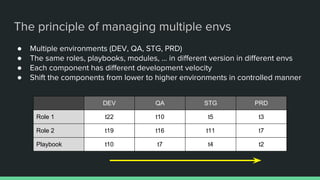
● Multiple environments (DEV, QA, STG, PRD)
● The same roles, playbooks, modules, ... in different version in different envs
● Each component has different development velocity
● Shift the components from lower to higher environments in controlled manner
DEV QA STG PRD
Role 1 t22 t10 t5 t3
Role 2 t19 t16 t11 t7
Playbook t10 t7 t4 t2
How to achieve it?
How to achieve it?
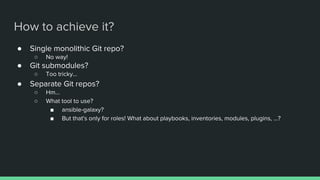
● Single monolithic Git repo?
○ No way!
● Git submodules?
○ Too tricky...
● Separate Git repos?
○ Hm...
○ What tool to use?
■ ansible-galaxy?
■ But that's only for roles! What about playbooks, inventories, modules, plugins, ...?
The solution is...
Android repo script
● Tool used for managing Android repositories
● Wrapper around Git
● Fetches whatever Git repos into a single work directory
● Individual repos stay as Git repos with all their history
● Integrates with Gerrit code review system
● Using Manifest file (XML)
○ Android Repo Manifest Management tool (armm)
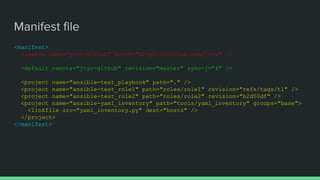
Manifest file
<manifest>
<remote name="jtyr-github" fetch="https://github.com/jtyr" />
<default remote="jtyr-github" revision="master" sync-j="4" />
<project name="ansible-test_playbook" path="." />
<project name="ansible-test_role1" path="roles/role1" revision="refs/tags/t1" />
<project name="ansible-test_role2" path="roles/role2" revision="b2d50df" />
<project name="ansible-yaml_inventory" path="tools/yaml_inventory" groups="base">
<linkfile src="yaml_inventory.py" dest="hosts" />
</project>
</manifest>
How to use it?
How to use it?
# Get the repo script and make it executable
sudo curl -s 'https://gerrit.googlesource.com/git-repo/+/stable/repo?format=TEXT' | 
base64 -d > /usr/local/bin/repo
chmod +x /usr/local/bin/repo
# Create the work directory and fetch all components
export ENV=dev
mkdir -p /tmp/ansible/env/$ENV
cd /tmp/ansible/env/$ENV
repo init -u https://github.com/jtyr/ansible-repo-test_manifest.git -b $ENV
repo sync --no-clone-bundle
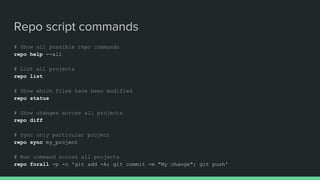
Repo script commands
# Show all possible repo commands
repo help --all
# List all projects
repo list
# Show which files have been modified
repo status
# Show changes across all projects
repo diff
# Sync only particular project
repo sync my_project
# Run command across all projects
repo forall -p -c 'git add -A; git commit -m "My change"; git push'
Demo time...
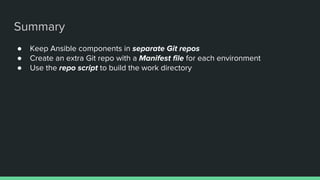
Summary
● Keep Ansible components in separate Git repos
● Create an extra Git repo with a Manifest file for each environment
● Use the repo script to build the work directory
Thank you for your attention!
Questions?

Managing multiple environments with Ansible

  • 1.
  • 2.
    About me ● UsingAnsible since 2014 ● Ansible contributor ○ Modules: yum_repository , jenkins_plugin , ldap_attr, ldap_entry ○ Jinja2 filter: comment ○ Bug fixing (mount module) ○ Code reviews ● Author of more than 100 publicly available Ansible roles ○ https://github.com/jtyr ○ https://galaxy.ansible.com/jtyr
  • 3.
    The principle ofmanaging multiple envs
  • 4.
    The principle ofmanaging multiple envs ● Multiple environments (DEV, QA, STG, PRD) ● The same roles, playbooks, modules, ... in different version in different envs ● Each component has different development velocity ● Shift the components from lower to higher environments in controlled manner DEV QA STG PRD Role 1 t22 t10 t5 t3 Role 2 t19 t16 t11 t7 Playbook t10 t7 t4 t2
  • 5.
  • 6.
    How to achieveit? ● Single monolithic Git repo? ○ No way! ● Git submodules? ○ Too tricky... ● Separate Git repos? ○ Hm... ○ What tool to use? ■ ansible-galaxy? ■ But that's only for roles! What about playbooks, inventories, modules, plugins, ...?
  • 7.
  • 8.
    Android repo script ●Tool used for managing Android repositories ● Wrapper around Git ● Fetches whatever Git repos into a single work directory ● Individual repos stay as Git repos with all their history ● Integrates with Gerrit code review system ● Using Manifest file (XML) ○ Android Repo Manifest Management tool (armm)
  • 9.
    Manifest file <manifest> <remote name="jtyr-github"fetch="https://github.com/jtyr" /> <default remote="jtyr-github" revision="master" sync-j="4" /> <project name="ansible-test_playbook" path="." /> <project name="ansible-test_role1" path="roles/role1" revision="refs/tags/t1" /> <project name="ansible-test_role2" path="roles/role2" revision="b2d50df" /> <project name="ansible-yaml_inventory" path="tools/yaml_inventory" groups="base"> <linkfile src="yaml_inventory.py" dest="hosts" /> </project> </manifest>
  • 10.
  • 11.
    How to useit? # Get the repo script and make it executable sudo curl -s 'https://gerrit.googlesource.com/git-repo/+/stable/repo?format=TEXT' | base64 -d > /usr/local/bin/repo chmod +x /usr/local/bin/repo # Create the work directory and fetch all components export ENV=dev mkdir -p /tmp/ansible/env/$ENV cd /tmp/ansible/env/$ENV repo init -u https://github.com/jtyr/ansible-repo-test_manifest.git -b $ENV repo sync --no-clone-bundle
  • 12.
    Repo script commands #Show all possible repo commands repo help --all # List all projects repo list # Show which files have been modified repo status # Show changes across all projects repo diff # Sync only particular project repo sync my_project # Run command across all projects repo forall -p -c 'git add -A; git commit -m "My change"; git push'
  • 13.
  • 14.
    Summary ● Keep Ansiblecomponents in separate Git repos ● Create an extra Git repo with a Manifest file for each environment ● Use the repo script to build the work directory
  • 15.
    Thank you foryour attention! Questions?