Bangladesh University
Batch: 48 Evening
Dept: CSE
Project II : Mail Server
Course Code: CSE-4201
Platform: Linux Cent OS 7 in VmWare
Submitted To
Dr. Uzzal Kumar Prodhan
Associate Professor
Department of Computer Science & Engineering
Bangladesh University
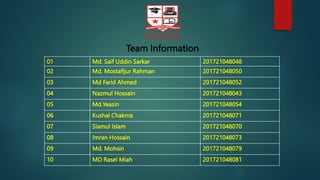
01 Md. Saif Uddin Sarkar 201721048048
02 Md. Mostafijur Rahman 201721048050
03 Md Farid Ahmed 201721048052
04 Nazmul Hossain 201721048043
05 Md.Yeasin 201721048054
06 Kushal Chakma 201721048071
07 Siamul Islam 201721048070
08 Imran Hossain 201721048073
09 Md. Mohsin 201721048079
10 MD Rasel Miah 201721048081
Team Information
Case Study on iRedMail
Using Linux- As a result of completing this offering, we should be able to perform and
validate the key tasks needed to become a full-time Linux administrator.
This guide will walk you through the steps to install iRedMail on RedHat 7. iRedMail is an
easy to deploy, configure and manage Mail solution for Linux, FreeBSD and OpenBSD
systems. With iRedMail, it becomes so easy to deploy an opensource, fully fledged, powerful
mail server with features only available in commercial mail solutions.
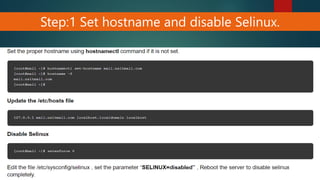
Step:1 Set hostname and disable Selinux.
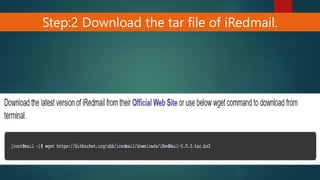
Step:2 Download the tar file of iRedmail.
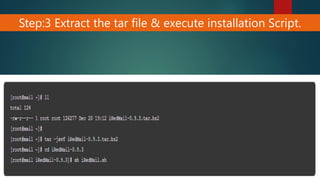
Step:3 Extract the tar file & execute installation Script.
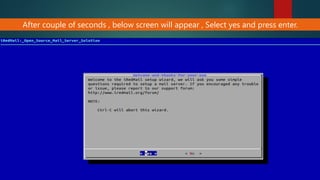
After couple of seconds , below screen will appear , Select yes and press enter.
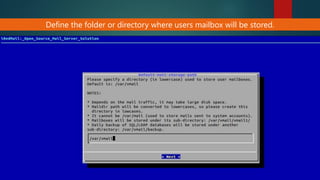
Define the folder or directory where users mailbox will be stored.
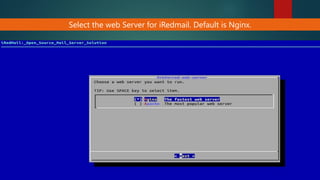
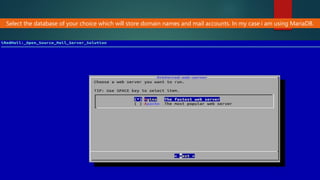
Select the web Server for iRedmail. Default is Nginx.
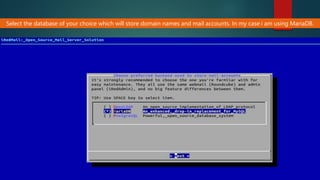
Select the database of your choice which will store domain names and mail accounts. In my case i am using MariaDB.
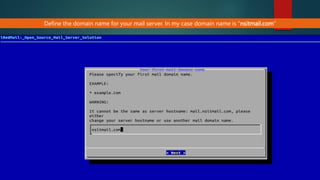
Define the domain name for your mail server. In my case domain name is “nsitmail.com”
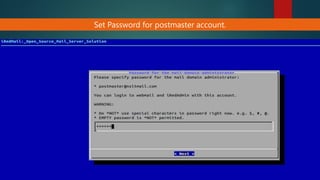
Set Password for postmaster account.
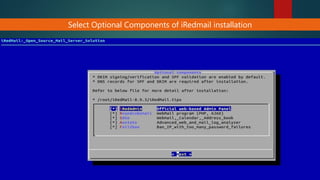
Select Optional Components of iRedmail installation
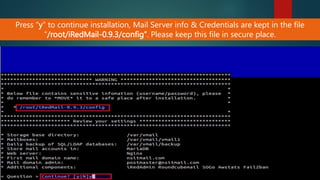
Press “y” to continue installation, Mail Server info & Credentials are kept in the file
“/root/iRedMail-0.9.3/config”. Please keep this file in secure place.
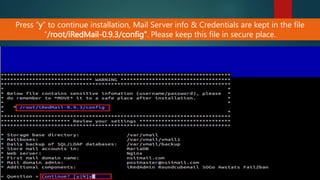
Press “y” to continue installation, Mail Server info & Credentials are kept in the file
“/root/iRedMail-0.9.3/config”. Please keep this file in secure place.
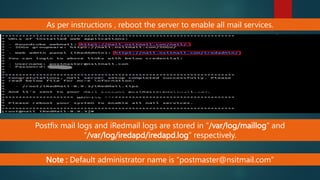
As per instructions , reboot the server to enable all mail services.
Postfix mail logs and iRedmail logs are stored in “/var/log/maillog” and
“/var/log/iredapd/iredapd.log” respectively.
Postfix mail logs and iRedmail logs are stored in
“/var/log/maillog” and “/var/log/iredapd/iredapd.log”
respectively.
Note : Default administrator name is “postmaster@nsitmail.com”
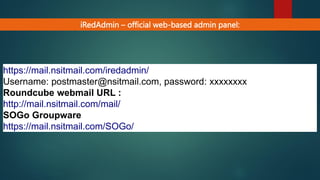
iRedAdmin – official web-based admin panel:
https://mail.nsitmail.com/iredadmin/
Username: postmaster@nsitmail.com, password: xxxxxxxx
Roundcube webmail URL :
http://mail.nsitmail.com/mail/
SOGo Groupware
https://mail.nsitmail.com/SOGo/
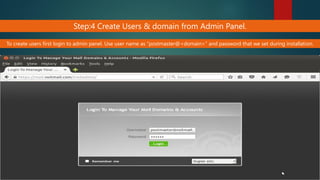
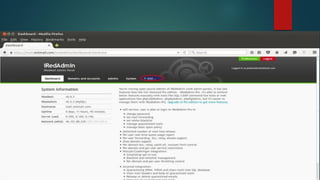
Step:4 Create Users & domain from Admin Panel.
To create users first login to admin panel. Use user name as “postmaster@<domain>” and password that we set during installation.
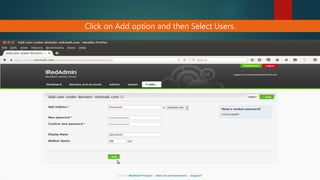
Click on Add option and then Select Users.
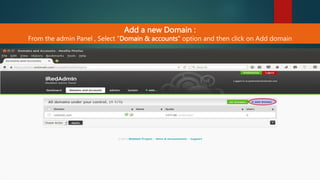
Add a new Domain :
From the admin Panel , Select “Domain & accounts” option and then click on Add domain
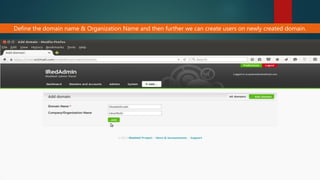
Define the domain name & Organization Name and then further we can create users on newly created domain.
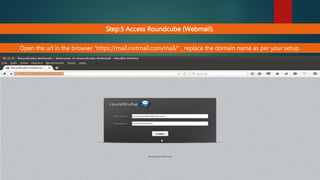
Step:5 Access Roundcube (Webmail).
Open the url in the browser “https://mail.nsitmail.com/mail/” , replace the domain name as per your setup.
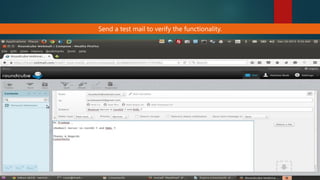
Send a test mail to verify the functionality.
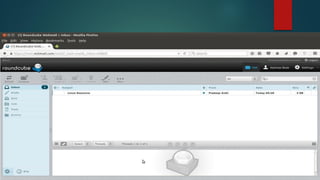
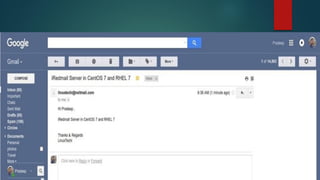
As we see that i got the mail from iRedmail mail server, so we can say the iRedmail is successfully installed and configured.

mail server on linux

  • 1.
    Bangladesh University Batch: 48Evening Dept: CSE Project II : Mail Server Course Code: CSE-4201 Platform: Linux Cent OS 7 in VmWare
  • 2.
    Submitted To Dr. UzzalKumar Prodhan Associate Professor Department of Computer Science & Engineering Bangladesh University
  • 3.
    01 Md. SaifUddin Sarkar 201721048048 02 Md. Mostafijur Rahman 201721048050 03 Md Farid Ahmed 201721048052 04 Nazmul Hossain 201721048043 05 Md.Yeasin 201721048054 06 Kushal Chakma 201721048071 07 Siamul Islam 201721048070 08 Imran Hossain 201721048073 09 Md. Mohsin 201721048079 10 MD Rasel Miah 201721048081 Team Information
  • 4.
    Case Study oniRedMail Using Linux- As a result of completing this offering, we should be able to perform and validate the key tasks needed to become a full-time Linux administrator. This guide will walk you through the steps to install iRedMail on RedHat 7. iRedMail is an easy to deploy, configure and manage Mail solution for Linux, FreeBSD and OpenBSD systems. With iRedMail, it becomes so easy to deploy an opensource, fully fledged, powerful mail server with features only available in commercial mail solutions.
  • 5.
    Step:1 Set hostnameand disable Selinux.
  • 6.
    Step:2 Download thetar file of iRedmail.
  • 7.
    Step:3 Extract thetar file & execute installation Script.
  • 8.
    After couple ofseconds , below screen will appear , Select yes and press enter.
  • 9.
    Define the folderor directory where users mailbox will be stored.
  • 10.
    Select the webServer for iRedmail. Default is Nginx.
  • 11.
    Select the databaseof your choice which will store domain names and mail accounts. In my case i am using MariaDB.
  • 12.
    Select the databaseof your choice which will store domain names and mail accounts. In my case i am using MariaDB.
  • 13.
    Define the domainname for your mail server. In my case domain name is “nsitmail.com”
  • 14.
    Set Password forpostmaster account.
  • 15.
    Select Optional Componentsof iRedmail installation
  • 16.
    Press “y” tocontinue installation, Mail Server info & Credentials are kept in the file “/root/iRedMail-0.9.3/config”. Please keep this file in secure place.
  • 17.
    Press “y” tocontinue installation, Mail Server info & Credentials are kept in the file “/root/iRedMail-0.9.3/config”. Please keep this file in secure place.
  • 18.
    As per instructions, reboot the server to enable all mail services. Postfix mail logs and iRedmail logs are stored in “/var/log/maillog” and “/var/log/iredapd/iredapd.log” respectively. Postfix mail logs and iRedmail logs are stored in “/var/log/maillog” and “/var/log/iredapd/iredapd.log” respectively. Note : Default administrator name is “postmaster@nsitmail.com”
  • 19.
    iRedAdmin – officialweb-based admin panel: https://mail.nsitmail.com/iredadmin/ Username: postmaster@nsitmail.com, password: xxxxxxxx Roundcube webmail URL : http://mail.nsitmail.com/mail/ SOGo Groupware https://mail.nsitmail.com/SOGo/
  • 20.
    Step:4 Create Users& domain from Admin Panel. To create users first login to admin panel. Use user name as “postmaster@<domain>” and password that we set during installation.
  • 22.
    Click on Addoption and then Select Users.
  • 23.
    Add a newDomain : From the admin Panel , Select “Domain & accounts” option and then click on Add domain
  • 24.
    Define the domainname & Organization Name and then further we can create users on newly created domain.
  • 25.
    Step:5 Access Roundcube(Webmail). Open the url in the browser “https://mail.nsitmail.com/mail/” , replace the domain name as per your setup.
  • 27.
    Send a testmail to verify the functionality.
  • 29.
    As we seethat i got the mail from iRedmail mail server, so we can say the iRedmail is successfully installed and configured.