Course :Machine Vision
Unit I Introduction
Unit II Image Acquisition
Unit III Image Processing
Unit IV Image Analysis
Unit V Machine Vision Applications
What is Machine Vision Software?
• Machine vision software allows engineers and developers to design,
deploy and manage vision applications.
• Vision applications are used by machines to extract and ingest data
from visual imagery.
• Kinds of data available are geometric patterns (or other kinds of
pattern recognition), object location, heat detection and mapping,
measurements and alignments, or blob analysis.
Features of Machine Vision Software
Machine Vision Software provides the following features:
•Suite of tools for building 2D and 3D vision apps
•Support for multiple image types (e.g. analog, digital, color,
monochrome, scans, etc.)
•Integratable with third-party smart cameras
•Blob detection & analysis
•Image processing, integration with analytics suite
Machine Vision Software
• Machine vision software drives component capability, reliability, and
usability
• Main machine vision component differentiation is in the software
implementation
• Available image processing and analysis tools
• Ability to manipulate imaging and system hardware
• Method for inspection task configuration/programming
• Interface to hardware, communications and I/O
• Operator interface and display capability
• Often, system software complexity increases with system capability
• AND greater ease of use usually is at the expense of some
algorithmic and/or
configuration capabilities
Machine Vision Software
What’s Important
Sufficient algorithm depth and capability to perform the required inspection tasks
– Consider:
» Speed of processing
» Level of tool parameterization
» Ease with which tools can be combined
Adequate flexibility in the process configuration to service the automation requirements
Enough I/O and communications capability to interface with existing automation as
necessary
Appropriate software/computer interfacing to implement an operator interface as needed
for the application
Digital Image Processing
• The field of digital image processing refers to processing
digital images by means of digital computer.
DIGITAL IMAGE FUNDAMENTALS
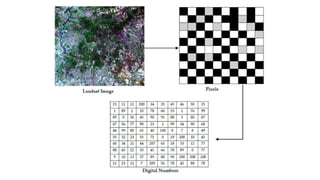
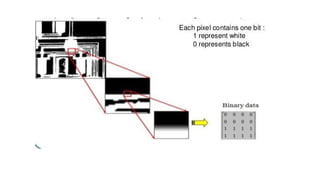
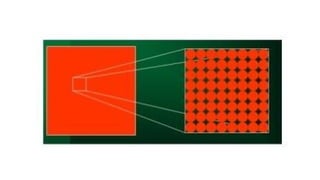
• Digital image is composed of a finite number of elements, each of
which has a particular location and value. These elements are called
picture elements, image elements, pels and pixels. Pixel is the term
used most widely to denote the elements of digital image.
Image
• An image is a two-dimensional function that represents a measure of
some characteristic such as brightness or color of a viewed scene. An
image is a projection of a 3-D scene into a 2D projection plane.
• An image may be defined as a two-dimensional function f(x,y), where
x and y are spatial (plane) coordinates, and the amplitude of f at any
pair of coordinates (x,y) is called the intensity of the image at that
point.
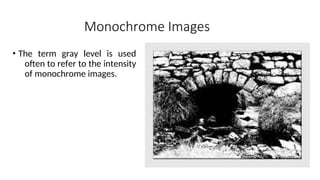
Monochrome Images
• The term gray level is used
often to refer to the intensity
of monochrome images.
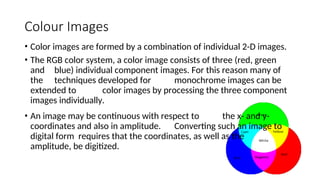
Colour Images
• Color images are formed by a combination of individual 2-D images.
• The RGB color system, a color image consists of three (red, green
and blue) individual component images. For this reason many of
the techniques developed for monochrome images can be
extended to color images by processing the three component
images individually.
• An image may be continuous with respect to the x- and y-
coordinates and also in amplitude. Converting such an image to
digital form requires that the coordinates, as well as the
amplitude, be digitized.
APPLICATIONS OF DIGITAL IMAGE
PROCESSING
Digital image processing has a broad spectrum of applications, such as
•Remote sensing via satellites and other spacecrafts
•Image transmission and storage for business applications
•Medical processing,
•RADAR (Radio Detection and Ranging)
•SONAR(Sound Navigation and Ranging) and
• Acoustic image processing (The study of underwater sound is
known as underwater acoustics or hydro acoustics.)
•Robotics and automated inspection of industrial parts.
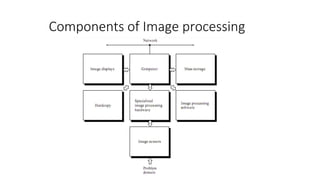
Components of Image processing
System:
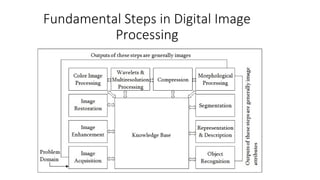
Fundamental Steps in Digital Image
Processing
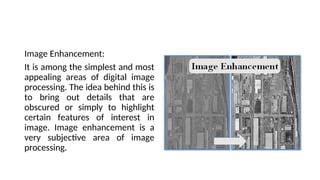
Image Enhancement:
It is among the simplest and most
appealing areas of digital image
processing. The idea behind this is
to bring out details that are
obscured or simply to highlight
certain features of interest in
image. Image enhancement is a
very subjective area of image
processing.
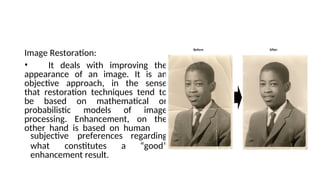
Image Restoration:
• It deals with improving the
appearance of an image. It is an
objective approach, in the sense
that restoration techniques tend to
be based on mathematical or
probabilistic models of image
processing. Enhancement, on the
other hand is based on human
what constitutes a
subjective preferences regarding
“good”
enhancement result.
Color image processing
• Compression: It deals with techniques reducing the storage required to
save an image, or the bandwidth required to transmit it over the network.
It has to major approaches a) Lossless Compression b) Lossy Compression
• Morphological processing: It deals with tools for extracting image
components that are useful in the representation and description of
shape and boundary of objects. It is majorly used in automated inspection
applications.
• Representation and Description:
• Recognition: It is the process that assigns label to an object based on its
descriptors. It is the last step of image processing which use artificial
intelligence of software.
Knowledge base:
Knowledge about a problem domain is coded into an image processing
system in the form of a knowledge base. This knowledge may be as
simple as detailing regions of an image where the information of the
interest in known to be located. Thus limiting search that has to be
conducted in seeking the information. The knowledge base also can be
quite complex such interrelated list of all major possible defects in a
materials inspection problems or an image database containing high
resolution satellite images of a region in connection with change
detection application.
SAMPLING AND QUANTIZATION
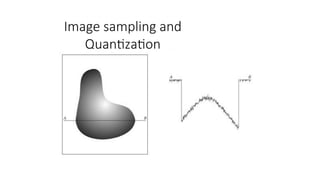
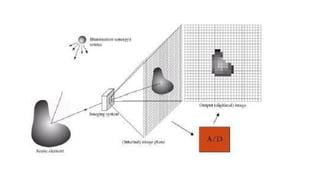
• To create a digital image, we need to convert the continuous
sensed data into digital from.
• This involves two processes – sampling and quantization
SAMPLING AND QUANTIZATION
• An image may be continuous with respect to the x and y coordinates
and also in amplitude. To convert it into digital form we have to
sample the function in both coordinates and in amplitudes.
• Digitalizing the coordinate values is called sampling
• Digitalizing the amplitude values is called quantization.
Digital Image definition
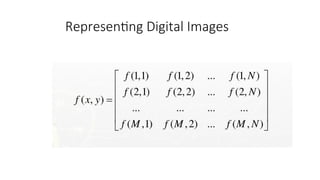
• A digital image f(m,n) described in a 2D discrete space is derived from
an analog image f(x,y) in a 2D continuous space through a sampling
process that is frequently referred to as digitization.
• The 2D continuous image f(x,y) is divided into N rows and M columns.
The intersection of a row and a column is termed a pixel. The value
assigned to the integer coordinates (m,n) with m=0,1,2..N-1 and
n=0,1,2…N-1 is f(m,n). In fact, in most cases, is actually a function of
many variables including depth, color and time (t).
Processing of Digital image
There are three types of computerized processes in the processing
of image
•Low level
•Mid level
•High level
Low level process
•these involve primitive operations such as image processing to reduce
noise, contrast enhancement and image sharpening. These kind
of processes are characterized by fact that the both inputs and
output are images.
Mid level image processing
•It involves tasks like segmentation, description of those objects to
reduce them to a form suitable for computer processing, and
classification of individual objects.
•The inputs to the process are generally images but outputs are
attributes extracted from images.
High level processing
•It involves “making sense” of an ensemble of recognized objects, as in
image analysis, and performing the cognitive functions normally
associated with vision.
Representing Digital Images
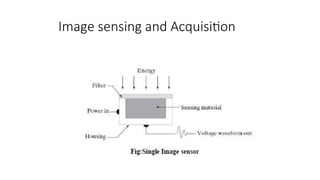
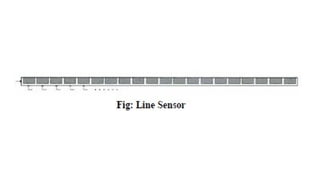
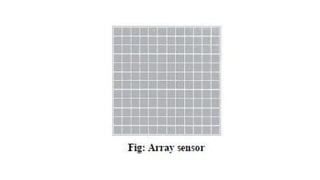
Image sensing and Acquisition
Image sampling and
Quantization
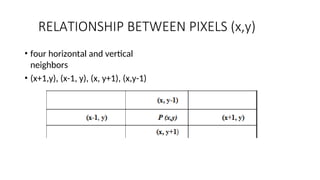
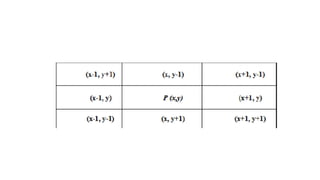
RELATIONSHIP BETWEEN PIXELS (x,y)
• four horizontal and vertical
neighbors
• (x+1,y), (x-1, y), (x, y+1), (x,y-1)
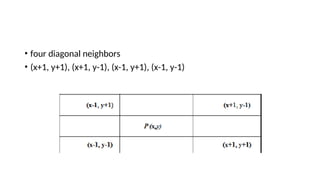
• four diagonal neighbors
• (x+1, y+1), (x+1, y-1), (x-1, y+1), (x-1, y-1)
ADJACENCY AND CONNECTIVITY
Image Filtering
• Filtering is a technique for modifying or enhancing an image. For
example, you can filter an image to emphasize certain features or
remove other features. Image processing operations implemented
with filtering include smoothing, sharpening, and edge enhancement.
IMAGE SEGMENTATION
• Image segmentation is the division of an image into regions or
categories, which correspond to different objects or parts of objects.
• Every pixel in an image is allocated to one of a number of these
categories.
• Image segmentation is the key behind image understanding. Image
segmentation is considered as an important basic operation for
meaningful analysis and interpretation of image acquired.
A good segmentation is typically one in which:
•pixels in the same category have similar grey
scale of multivariate values and form a connected region,
•neighboring pixels which are in different categories
have dissimilar values.
Segmentation is often the critical step in image analysis: the point at
which we move from considering each pixel as a unit of observation
to working with objects (or parts of objects) in the image, composed
of many pixels.
There are three general approaches to segmentation,
•Termed thresholding,
•Edge-based methods and
•Region-based methods.
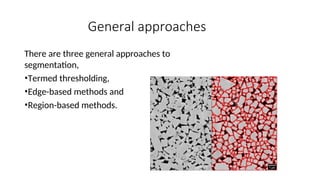
General approaches
There are three general approaches to
segmentation,
•Termed thresholding,
•Edge-based methods and
•Region-based methods.
• A number of image segmentation techniques are available, but
there is no one single technique that is suitable to all the
application.
• Researchers have extensively worked over this fundamental problem
and proposed various methods for image segmentation. These
methods can be broadly classified into seven groups:
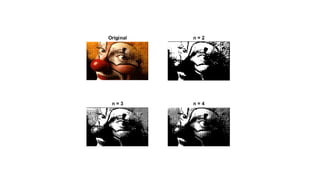
THRESHOLDING
• Thresholding is the simplest and most commonly used method of
segmentation. Given a single threshold, t, the pixel located at lattice
position (i, j), with grayscale value fij , is allocated to category 1 if
• F(ij) ≤ t.
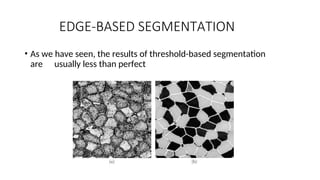
EDGE-BASED SEGMENTATION
• As we have seen, the results of threshold-based segmentation
are usually less than perfect
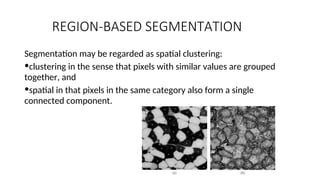
REGION-BASED SEGMENTATION
Segmentation may be regarded as spatial clustering:
•clustering in the sense that pixels with similar values are grouped
together, and
•spatial in that pixels in the same category also form a single
connected component.
Point – Line - Edge
detection
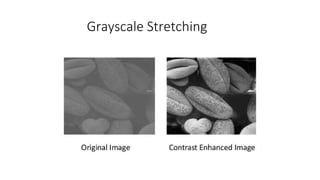
Grayscale Stretching
Image smoothing and sharpening
Morphological Image Processing
• Morphology is a broad set of image processing operations that
process images based on shapes.
• Morphological operations apply a structuring element to an input
image, creating an output image of the same size.
• In a morphological operation, the value of each pixel in the output
image is based on a comparison of the corresponding pixel in the
input image with its neighbors.
• Binary images may contain numerous imperfections. In
particular, the binary regions produced by simple thresholding
are distorted by noise and texture.
• Morphological image processing pursues the goals of removing
these imperfections by accounting for the form and structure
of the image.
• These techniques can be extended to grey scale images.
• Morphological techniques probe an image with a small shape or
template called a structuring element.
Machine Vision lecture notes for Unit 3.ppt

Machine Vision lecture notes for Unit 3.ppt

  • 1.
    Course :Machine Vision UnitI Introduction Unit II Image Acquisition Unit III Image Processing Unit IV Image Analysis Unit V Machine Vision Applications
  • 2.
    What is MachineVision Software? • Machine vision software allows engineers and developers to design, deploy and manage vision applications. • Vision applications are used by machines to extract and ingest data from visual imagery. • Kinds of data available are geometric patterns (or other kinds of pattern recognition), object location, heat detection and mapping, measurements and alignments, or blob analysis.
  • 3.
    Features of MachineVision Software Machine Vision Software provides the following features: •Suite of tools for building 2D and 3D vision apps •Support for multiple image types (e.g. analog, digital, color, monochrome, scans, etc.) •Integratable with third-party smart cameras •Blob detection & analysis •Image processing, integration with analytics suite
  • 4.
    Machine Vision Software •Machine vision software drives component capability, reliability, and usability • Main machine vision component differentiation is in the software implementation • Available image processing and analysis tools • Ability to manipulate imaging and system hardware • Method for inspection task configuration/programming • Interface to hardware, communications and I/O • Operator interface and display capability • Often, system software complexity increases with system capability • AND greater ease of use usually is at the expense of some algorithmic and/or configuration capabilities
  • 5.
    Machine Vision Software What’sImportant Sufficient algorithm depth and capability to perform the required inspection tasks – Consider: » Speed of processing » Level of tool parameterization » Ease with which tools can be combined Adequate flexibility in the process configuration to service the automation requirements Enough I/O and communications capability to interface with existing automation as necessary Appropriate software/computer interfacing to implement an operator interface as needed for the application
  • 6.
    Digital Image Processing •The field of digital image processing refers to processing digital images by means of digital computer.
  • 7.
    DIGITAL IMAGE FUNDAMENTALS •Digital image is composed of a finite number of elements, each of which has a particular location and value. These elements are called picture elements, image elements, pels and pixels. Pixel is the term used most widely to denote the elements of digital image.
  • 8.
    Image • An imageis a two-dimensional function that represents a measure of some characteristic such as brightness or color of a viewed scene. An image is a projection of a 3-D scene into a 2D projection plane. • An image may be defined as a two-dimensional function f(x,y), where x and y are spatial (plane) coordinates, and the amplitude of f at any pair of coordinates (x,y) is called the intensity of the image at that point.
  • 9.
    Monochrome Images • Theterm gray level is used often to refer to the intensity of monochrome images.
  • 11.
    Colour Images • Colorimages are formed by a combination of individual 2-D images. • The RGB color system, a color image consists of three (red, green and blue) individual component images. For this reason many of the techniques developed for monochrome images can be extended to color images by processing the three component images individually. • An image may be continuous with respect to the x- and y- coordinates and also in amplitude. Converting such an image to digital form requires that the coordinates, as well as the amplitude, be digitized.
  • 12.
    APPLICATIONS OF DIGITALIMAGE PROCESSING Digital image processing has a broad spectrum of applications, such as •Remote sensing via satellites and other spacecrafts •Image transmission and storage for business applications •Medical processing, •RADAR (Radio Detection and Ranging) •SONAR(Sound Navigation and Ranging) and • Acoustic image processing (The study of underwater sound is known as underwater acoustics or hydro acoustics.) •Robotics and automated inspection of industrial parts.
  • 13.
    Components of Imageprocessing System:
  • 14.
    Fundamental Steps inDigital Image Processing
  • 15.
    Image Enhancement: It isamong the simplest and most appealing areas of digital image processing. The idea behind this is to bring out details that are obscured or simply to highlight certain features of interest in image. Image enhancement is a very subjective area of image processing.
  • 16.
    Image Restoration: • Itdeals with improving the appearance of an image. It is an objective approach, in the sense that restoration techniques tend to be based on mathematical or probabilistic models of image processing. Enhancement, on the other hand is based on human what constitutes a subjective preferences regarding “good” enhancement result.
  • 17.
    Color image processing •Compression: It deals with techniques reducing the storage required to save an image, or the bandwidth required to transmit it over the network. It has to major approaches a) Lossless Compression b) Lossy Compression • Morphological processing: It deals with tools for extracting image components that are useful in the representation and description of shape and boundary of objects. It is majorly used in automated inspection applications. • Representation and Description: • Recognition: It is the process that assigns label to an object based on its descriptors. It is the last step of image processing which use artificial intelligence of software.
  • 18.
    Knowledge base: Knowledge abouta problem domain is coded into an image processing system in the form of a knowledge base. This knowledge may be as simple as detailing regions of an image where the information of the interest in known to be located. Thus limiting search that has to be conducted in seeking the information. The knowledge base also can be quite complex such interrelated list of all major possible defects in a materials inspection problems or an image database containing high resolution satellite images of a region in connection with change detection application.
  • 19.
    SAMPLING AND QUANTIZATION •To create a digital image, we need to convert the continuous sensed data into digital from. • This involves two processes – sampling and quantization
  • 20.
    SAMPLING AND QUANTIZATION •An image may be continuous with respect to the x and y coordinates and also in amplitude. To convert it into digital form we have to sample the function in both coordinates and in amplitudes. • Digitalizing the coordinate values is called sampling • Digitalizing the amplitude values is called quantization.
  • 21.
    Digital Image definition •A digital image f(m,n) described in a 2D discrete space is derived from an analog image f(x,y) in a 2D continuous space through a sampling process that is frequently referred to as digitization. • The 2D continuous image f(x,y) is divided into N rows and M columns. The intersection of a row and a column is termed a pixel. The value assigned to the integer coordinates (m,n) with m=0,1,2..N-1 and n=0,1,2…N-1 is f(m,n). In fact, in most cases, is actually a function of many variables including depth, color and time (t).
  • 25.
    Processing of Digitalimage There are three types of computerized processes in the processing of image •Low level •Mid level •High level
  • 26.
    Low level process •theseinvolve primitive operations such as image processing to reduce noise, contrast enhancement and image sharpening. These kind of processes are characterized by fact that the both inputs and output are images.
  • 27.
    Mid level imageprocessing •It involves tasks like segmentation, description of those objects to reduce them to a form suitable for computer processing, and classification of individual objects. •The inputs to the process are generally images but outputs are attributes extracted from images.
  • 28.
    High level processing •Itinvolves “making sense” of an ensemble of recognized objects, as in image analysis, and performing the cognitive functions normally associated with vision.
  • 29.
  • 30.
    Image sensing andAcquisition
  • 34.
  • 36.
    RELATIONSHIP BETWEEN PIXELS(x,y) • four horizontal and vertical neighbors • (x+1,y), (x-1, y), (x, y+1), (x,y-1)
  • 37.
    • four diagonalneighbors • (x+1, y+1), (x+1, y-1), (x-1, y+1), (x-1, y-1)
  • 39.
  • 40.
    Image Filtering • Filteringis a technique for modifying or enhancing an image. For example, you can filter an image to emphasize certain features or remove other features. Image processing operations implemented with filtering include smoothing, sharpening, and edge enhancement.
  • 41.
    IMAGE SEGMENTATION • Imagesegmentation is the division of an image into regions or categories, which correspond to different objects or parts of objects. • Every pixel in an image is allocated to one of a number of these categories. • Image segmentation is the key behind image understanding. Image segmentation is considered as an important basic operation for meaningful analysis and interpretation of image acquired.
  • 42.
    A good segmentationis typically one in which: •pixels in the same category have similar grey scale of multivariate values and form a connected region, •neighboring pixels which are in different categories have dissimilar values.
  • 43.
    Segmentation is oftenthe critical step in image analysis: the point at which we move from considering each pixel as a unit of observation to working with objects (or parts of objects) in the image, composed of many pixels. There are three general approaches to segmentation, •Termed thresholding, •Edge-based methods and •Region-based methods.
  • 44.
    General approaches There arethree general approaches to segmentation, •Termed thresholding, •Edge-based methods and •Region-based methods.
  • 45.
    • A numberof image segmentation techniques are available, but there is no one single technique that is suitable to all the application. • Researchers have extensively worked over this fundamental problem and proposed various methods for image segmentation. These methods can be broadly classified into seven groups:
  • 46.
    THRESHOLDING • Thresholding isthe simplest and most commonly used method of segmentation. Given a single threshold, t, the pixel located at lattice position (i, j), with grayscale value fij , is allocated to category 1 if • F(ij) ≤ t.
  • 48.
    EDGE-BASED SEGMENTATION • Aswe have seen, the results of threshold-based segmentation are usually less than perfect
  • 49.
    REGION-BASED SEGMENTATION Segmentation maybe regarded as spatial clustering: •clustering in the sense that pixels with similar values are grouped together, and •spatial in that pixels in the same category also form a single connected component.
  • 50.
    Point – Line- Edge detection
  • 51.
  • 52.
  • 53.
    Morphological Image Processing •Morphology is a broad set of image processing operations that process images based on shapes. • Morphological operations apply a structuring element to an input image, creating an output image of the same size. • In a morphological operation, the value of each pixel in the output image is based on a comparison of the corresponding pixel in the input image with its neighbors.
  • 54.
    • Binary imagesmay contain numerous imperfections. In particular, the binary regions produced by simple thresholding are distorted by noise and texture. • Morphological image processing pursues the goals of removing these imperfections by accounting for the form and structure of the image. • These techniques can be extended to grey scale images. • Morphological techniques probe an image with a small shape or template called a structuring element.