Modulos Nginx usando Lua 
Rachad Honein
NGINX 
¤ HTTP server with High Performance 
¤ Events based architecture 
¤ Small footprint on memory and processing 
¤ Declarative Configuration 
¤ Like Apache natively extensible through C modules
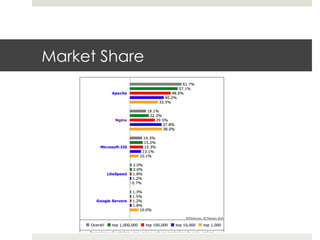
Market Share
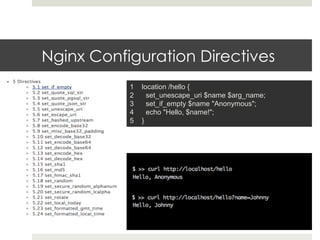
Nginx Configuration Directives 
1 location /hello { 
2 set_unescape_uri $name $arg_name; 
3 set_if_empty $name "Anonymous"; 
4 echo "Hello, $name!"; 
5 }
Lua
Lua
Lua 
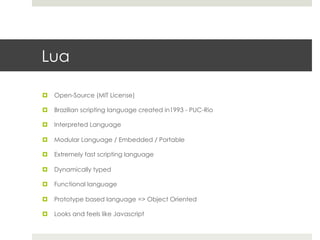
¤ Open-Source (MIT License) 
¤ Brazilian scripting language created in1993 - PUC-Rio 
¤ Interpreted Language 
¤ Modular Language / Embedded / Portable 
¤ Extremely fast scripting language 
¤ Dynamically typed 
¤ Functional language 
¤ Prototype based language => Object Oriented 
¤ Looks and feels like Javascript
Who uses Lua? 
¤ Very popular in Games Engines and much more 
¤ World of Warcraft 
¤ Angry Birds 
¤ Netflix 
¤ Globo 
¤ Cloudflare 
¤ Redis 
¤ Adobe Photoshop Lightroom 
¤ Apache HTTP Server 
¤ Apache Traffic Server 
¤ Firefox 
¤ MediaWiki 
¤ MySQL Proxy 
¤ MySQL Workbench 
¤ PL/Lua for PostgreSQL 
¤ Cisco 
¤ Internet of things 
https://sites.google.com/site/marbux/home/where-lua-is-used
Lua 
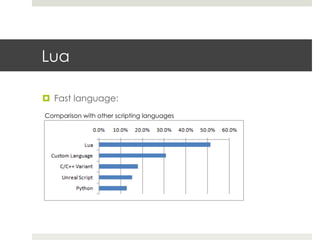
¤ Fast language: 
Comparison with other scripting languages
Lua Nginx module 
¤ The Power of Lua in Nginx 
¤ "Light threads" based on Lua coroutines 
¤ Acts on all phases inside the Nginx process 
¤ Rewrite Phase 
¤ Access Phase 
¤ Content Phase 
¤ Log Phase 
¤ Exposes all the Nginx environment to Lua via an API 
http://wiki.nginx.org/HttpLuaModule 
¤ Provides a synchronous yet non-blocking API to Nginx 
¤ Very fast, if compiled with --luajit
Use cases of Nginx + Lua 
¤ Smart Programmable Router 
¤ Proxy 
¤ Load Balancer 
¤ A/B Testing 
¤ Complex Caching 
¤ Advanced logging 
¤ API Aggregator 
¤ Authentication Services 
¤ And much more…
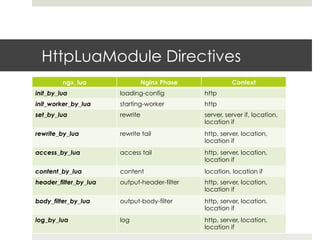
HttpLuaModule Directives 
ngx_lua Nginx Phase Context 
init_by_lua loading-config http 
init_worker_by_lua starting-worker http 
set_by_lua rewrite server, server if, location, 
location if 
rewrite_by_lua rewrite tail http, server, location, 
location if 
access_by_lua access tail http, server, location, 
location if 
content_by_lua content location, location if 
header_filter_by_lua output-header-filter http, server, location, 
location if 
body_filter_by_lua output-body-filter http, server, location, 
location if 
log_by_lua log http, server, location, 
location if
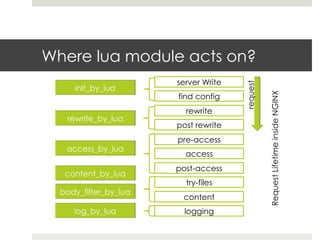
Where lua module acts on? 
server Write 
find config 
rewrite 
post rewrite 
pre-access 
access 
post-access 
try-files 
content 
logging 
request 
Request Lifetime inside NGINX
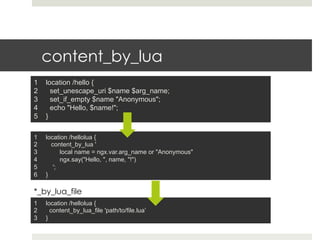
content_by_lua 
1 location /hello { 
2 set_unescape_uri $name $arg_name; 
3 set_if_empty $name "Anonymous"; 
4 echo "Hello, $name!"; 
5 } 
1 location /hellolua { 
2 content_by_lua ' 
3 local name = ngx.var.arg_name or "Anonymous" 
4 ngx.say("Hello, ", name, "!") 
5 '; 
6 } 
*_by_lua_file 
1 location /hellolua { 
2 content_by_lua_file 'path/to/file.lua’ 
3 }
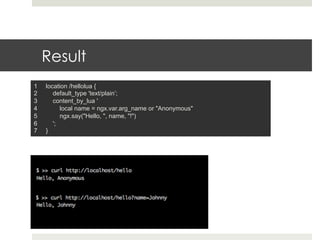
Result 
1 location /hellolua { 
2 default_type 'text/plain’; 
3 content_by_lua ' 
4 local name = ngx.var.arg_name or "Anonymous" 
5 ngx.say("Hello, ", name, "!") 
6 '; 
7 }
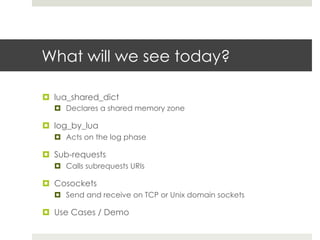
What will we see today? 
¤ lua_shared_dict 
¤ Declares a shared memory zone 
¤ log_by_lua 
¤ Acts on the log phase 
¤ Sub-requests 
¤ Calls subrequests URIs 
¤ Cosockets 
¤ Send and receive on TCP or Unix domain sockets 
¤ Use Cases / Demo
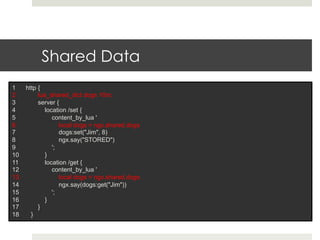
Shared Data 
1 http { 
2 lua_shared_dict dogs 10m; 
3 server { 
4 location /set { 
5 content_by_lua ' 
6 local dogs = ngx.shared.dogs 
7 dogs:set("Jim", 8) 
8 ngx.say("STORED") 
9 '; 
10 } 
11 location /get { 
12 content_by_lua ' 
13 local dogs = ngx.shared.dogs 
14 ngx.say(dogs:get("Jim")) 
15 '; 
16 } 
17 } 
18 }
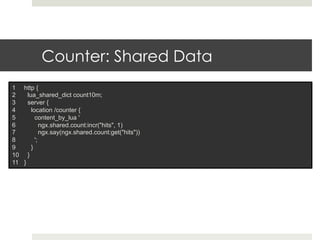
Counter: Shared Data 
1 http { 
2 lua_shared_dict count10m; 
3 server { 
4 location /counter { 
5 content_by_lua ' 
6 ngx.shared.count:incr("hits", 1) 
7 ngx.say(ngx.shared.count:get("hits")) 
8 '; 
9 } 
10 } 
11 }
log_by_lua 
Log slow requests >5 seconds 
1 location / { 
2 proxy_pass http://mybackend; 
3 log_by_lua ' 
4 if tonumber(ngx.var.upstream_response_time) >= 5 then 
5 ngx.log(ngx.WARN, "[SLOW] Ngx upstream response time: " .. ngx.var.upstream_response_time .. 
"s from " .. ngx.var.upstream_addr); 
6 end 
7 '; 
8 } 
Tell me about 500 error 
1 location /{ 
2 log_by_lua ’ 
3 if ngx.status >= 500 then 
4 send_email… 
5 end'; 
6 }
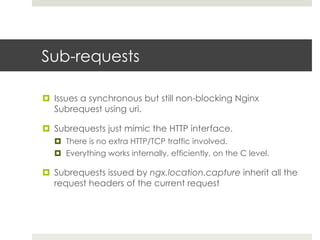
Sub-requests 
¤ Issues a synchronous but still non-blocking Nginx 
Subrequest using uri. 
¤ Subrequests just mimic the HTTP interface. 
¤ There is no extra HTTP/TCP traffic involved. 
¤ Everything works internally, efficiently, on the C level. 
¤ Subrequests issued by ngx.location.capture inherit all the 
request headers of the current request
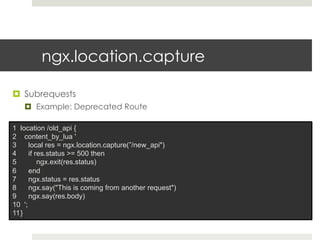
ngx.location.capture 
¤ Subrequests 
¤ Example: Deprecated Route 
1 location /old_api { 
2 content_by_lua ' 
3 local res = ngx.location.capture(”/new_api") 
4 if res.status >= 500 then 
5 ngx.exit(res.status) 
6 end 
7 ngx.status = res.status 
8 ngx.say("This is coming from another request") 
9 ngx.say(res.body) 
10 '; 
11 }
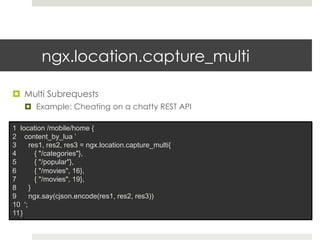
ngx.location.capture_multi 
¤ Multi Subrequests 
¤ Example: Cheating on a chatty REST API 
1 location /mobile/home { 
2 content_by_lua ’ 
3 res1, res2, res3 = ngx.location.capture_multi{ 
4 { "/categories"}, 
5 { "/popular"}, 
6 { "/movies", 16}, 
7 { "/movies", 19}, 
8 } 
9 ngx.say(cjson.encode(res1, res2, res3)) 
10 '; 
11 }
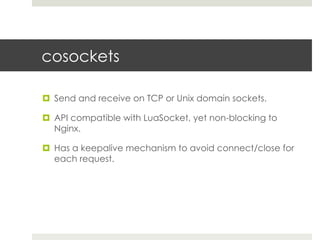
cosockets 
¤ Send and receive on TCP or Unix domain sockets. 
¤ API compatible with LuaSocket, yet non-blocking to 
Nginx. 
¤ Has a keepalive mechanism to avoid connect/close for 
each request.
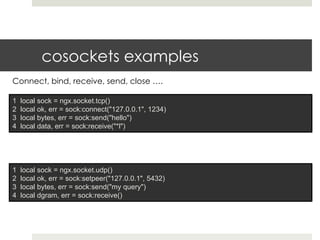
cosockets examples 
Connect, bind, receive, send, close …. 
1 local sock = ngx.socket.tcp() 
2 local ok, err = sock:connect("127.0.0.1", 1234) 
3 local bytes, err = sock:send("hello") 
4 local data, err = sock:receive("*l") 
1 local sock = ngx.socket.udp() 
2 local ok, err = sock:setpeer("127.0.0.1", 5432) 
3 local bytes, err = sock:send("my query") 
4 local dgram, err = sock:receive()
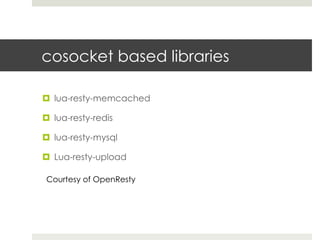
cosocket based libraries 
¤ lua-resty-memcached 
¤ lua-resty-redis 
¤ lua-resty-mysql 
¤ Lua-resty-upload 
Courtesy of OpenResty
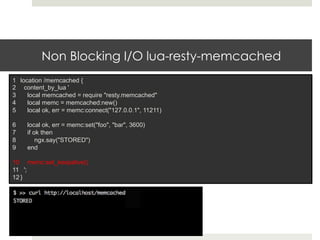
Non Blocking I/O lua-resty-memcached 
1 location /memcached { 
2 content_by_lua ' 
3 local memcached = require "resty.memcached" 
4 local memc = memcached:new() 
5 local ok, err = memc:connect("127.0.0.1", 11211) 
6 local ok, err = memc:set("foo", "bar", 3600) 
7 if ok then 
8 ngx.say("STORED") 
9 end 
10 memc:set_keepalive() 
11 '; 
12 }
Cases 
¤ Load Balancer 
¤ Inject Javascript tags into HTML 
¤ Authentication Module
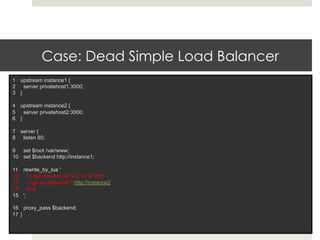
Case: Dead Simple Load Balancer 
1 upstream instance1 { 
2 server privatehost1:3000; 
3 } 
4 upstream instance2 { 
5 server privatehost2:3000; 
6 } 
7 server { 
8 listen 80; 
9 set $root /var/www; 
10 set $backend http://instance1; 
11 rewrite_by_lua ' 
12 if (ngx.var.user_id % 2 == 0) then 
13 ngx.var.backend = http://instance2 
14 end 
15 '; 
16 proxy_pass $backend; 
17 }
Case: Inject Google Analytics Code 
1 location / { 
2 proxy_pass http://mybackend; 
3 body_filter_by_lua ‘ 
4 local chunk, eof = ngx.arg[1], ngx.arg[2] 
5 local google_code = "<script type="text/javascript”> 
6 var _gaq = _gaq || [];_gaq.push(['_setAccount', 'UA-XXXXXXXX-1']); 
7 .... Google script code ….. 
8 </script></body>" 
9 string.gsub(chunk,"</body>",google_code) 
10 '; 
11 }
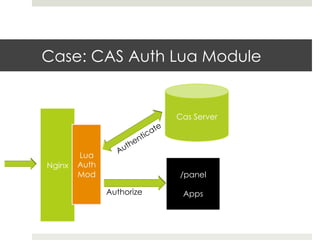
Case: CAS Auth Lua Module 
Nginx 
Lua 
Auth 
Mod 
Authorize 
/panel 
Apps
Demo App
Thank you!

Lua tech talk

  • 1.
    Modulos Nginx usandoLua Rachad Honein
  • 2.
    NGINX ¤ HTTPserver with High Performance ¤ Events based architecture ¤ Small footprint on memory and processing ¤ Declarative Configuration ¤ Like Apache natively extensible through C modules
  • 3.
  • 4.
    Nginx Configuration Directives 1 location /hello { 2 set_unescape_uri $name $arg_name; 3 set_if_empty $name "Anonymous"; 4 echo "Hello, $name!"; 5 }
  • 5.
  • 6.
  • 7.
    Lua ¤ Open-Source(MIT License) ¤ Brazilian scripting language created in1993 - PUC-Rio ¤ Interpreted Language ¤ Modular Language / Embedded / Portable ¤ Extremely fast scripting language ¤ Dynamically typed ¤ Functional language ¤ Prototype based language => Object Oriented ¤ Looks and feels like Javascript
  • 8.
    Who uses Lua? ¤ Very popular in Games Engines and much more ¤ World of Warcraft ¤ Angry Birds ¤ Netflix ¤ Globo ¤ Cloudflare ¤ Redis ¤ Adobe Photoshop Lightroom ¤ Apache HTTP Server ¤ Apache Traffic Server ¤ Firefox ¤ MediaWiki ¤ MySQL Proxy ¤ MySQL Workbench ¤ PL/Lua for PostgreSQL ¤ Cisco ¤ Internet of things https://sites.google.com/site/marbux/home/where-lua-is-used
  • 9.
    Lua ¤ Fastlanguage: Comparison with other scripting languages
  • 10.
    Lua Nginx module ¤ The Power of Lua in Nginx ¤ "Light threads" based on Lua coroutines ¤ Acts on all phases inside the Nginx process ¤ Rewrite Phase ¤ Access Phase ¤ Content Phase ¤ Log Phase ¤ Exposes all the Nginx environment to Lua via an API http://wiki.nginx.org/HttpLuaModule ¤ Provides a synchronous yet non-blocking API to Nginx ¤ Very fast, if compiled with --luajit
  • 11.
    Use cases ofNginx + Lua ¤ Smart Programmable Router ¤ Proxy ¤ Load Balancer ¤ A/B Testing ¤ Complex Caching ¤ Advanced logging ¤ API Aggregator ¤ Authentication Services ¤ And much more…
  • 12.
    HttpLuaModule Directives ngx_luaNginx Phase Context init_by_lua loading-config http init_worker_by_lua starting-worker http set_by_lua rewrite server, server if, location, location if rewrite_by_lua rewrite tail http, server, location, location if access_by_lua access tail http, server, location, location if content_by_lua content location, location if header_filter_by_lua output-header-filter http, server, location, location if body_filter_by_lua output-body-filter http, server, location, location if log_by_lua log http, server, location, location if
  • 13.
    Where lua moduleacts on? server Write find config rewrite post rewrite pre-access access post-access try-files content logging request Request Lifetime inside NGINX
  • 14.
    content_by_lua 1 location/hello { 2 set_unescape_uri $name $arg_name; 3 set_if_empty $name "Anonymous"; 4 echo "Hello, $name!"; 5 } 1 location /hellolua { 2 content_by_lua ' 3 local name = ngx.var.arg_name or "Anonymous" 4 ngx.say("Hello, ", name, "!") 5 '; 6 } *_by_lua_file 1 location /hellolua { 2 content_by_lua_file 'path/to/file.lua’ 3 }
  • 15.
    Result 1 location/hellolua { 2 default_type 'text/plain’; 3 content_by_lua ' 4 local name = ngx.var.arg_name or "Anonymous" 5 ngx.say("Hello, ", name, "!") 6 '; 7 }
  • 16.
    What will wesee today? ¤ lua_shared_dict ¤ Declares a shared memory zone ¤ log_by_lua ¤ Acts on the log phase ¤ Sub-requests ¤ Calls subrequests URIs ¤ Cosockets ¤ Send and receive on TCP or Unix domain sockets ¤ Use Cases / Demo
  • 17.
    Shared Data 1http { 2 lua_shared_dict dogs 10m; 3 server { 4 location /set { 5 content_by_lua ' 6 local dogs = ngx.shared.dogs 7 dogs:set("Jim", 8) 8 ngx.say("STORED") 9 '; 10 } 11 location /get { 12 content_by_lua ' 13 local dogs = ngx.shared.dogs 14 ngx.say(dogs:get("Jim")) 15 '; 16 } 17 } 18 }
  • 18.
    Counter: Shared Data 1 http { 2 lua_shared_dict count10m; 3 server { 4 location /counter { 5 content_by_lua ' 6 ngx.shared.count:incr("hits", 1) 7 ngx.say(ngx.shared.count:get("hits")) 8 '; 9 } 10 } 11 }
  • 19.
    log_by_lua Log slowrequests >5 seconds 1 location / { 2 proxy_pass http://mybackend; 3 log_by_lua ' 4 if tonumber(ngx.var.upstream_response_time) >= 5 then 5 ngx.log(ngx.WARN, "[SLOW] Ngx upstream response time: " .. ngx.var.upstream_response_time .. "s from " .. ngx.var.upstream_addr); 6 end 7 '; 8 } Tell me about 500 error 1 location /{ 2 log_by_lua ’ 3 if ngx.status >= 500 then 4 send_email… 5 end'; 6 }
  • 20.
    Sub-requests ¤ Issuesa synchronous but still non-blocking Nginx Subrequest using uri. ¤ Subrequests just mimic the HTTP interface. ¤ There is no extra HTTP/TCP traffic involved. ¤ Everything works internally, efficiently, on the C level. ¤ Subrequests issued by ngx.location.capture inherit all the request headers of the current request
  • 21.
    ngx.location.capture ¤ Subrequests ¤ Example: Deprecated Route 1 location /old_api { 2 content_by_lua ' 3 local res = ngx.location.capture(”/new_api") 4 if res.status >= 500 then 5 ngx.exit(res.status) 6 end 7 ngx.status = res.status 8 ngx.say("This is coming from another request") 9 ngx.say(res.body) 10 '; 11 }
  • 22.
    ngx.location.capture_multi ¤ MultiSubrequests ¤ Example: Cheating on a chatty REST API 1 location /mobile/home { 2 content_by_lua ’ 3 res1, res2, res3 = ngx.location.capture_multi{ 4 { "/categories"}, 5 { "/popular"}, 6 { "/movies", 16}, 7 { "/movies", 19}, 8 } 9 ngx.say(cjson.encode(res1, res2, res3)) 10 '; 11 }
  • 23.
    cosockets ¤ Sendand receive on TCP or Unix domain sockets. ¤ API compatible with LuaSocket, yet non-blocking to Nginx. ¤ Has a keepalive mechanism to avoid connect/close for each request.
  • 24.
    cosockets examples Connect,bind, receive, send, close …. 1 local sock = ngx.socket.tcp() 2 local ok, err = sock:connect("127.0.0.1", 1234) 3 local bytes, err = sock:send("hello") 4 local data, err = sock:receive("*l") 1 local sock = ngx.socket.udp() 2 local ok, err = sock:setpeer("127.0.0.1", 5432) 3 local bytes, err = sock:send("my query") 4 local dgram, err = sock:receive()
  • 25.
    cosocket based libraries ¤ lua-resty-memcached ¤ lua-resty-redis ¤ lua-resty-mysql ¤ Lua-resty-upload Courtesy of OpenResty
  • 26.
    Non Blocking I/Olua-resty-memcached 1 location /memcached { 2 content_by_lua ' 3 local memcached = require "resty.memcached" 4 local memc = memcached:new() 5 local ok, err = memc:connect("127.0.0.1", 11211) 6 local ok, err = memc:set("foo", "bar", 3600) 7 if ok then 8 ngx.say("STORED") 9 end 10 memc:set_keepalive() 11 '; 12 }
  • 27.
    Cases ¤ LoadBalancer ¤ Inject Javascript tags into HTML ¤ Authentication Module
  • 28.
    Case: Dead SimpleLoad Balancer 1 upstream instance1 { 2 server privatehost1:3000; 3 } 4 upstream instance2 { 5 server privatehost2:3000; 6 } 7 server { 8 listen 80; 9 set $root /var/www; 10 set $backend http://instance1; 11 rewrite_by_lua ' 12 if (ngx.var.user_id % 2 == 0) then 13 ngx.var.backend = http://instance2 14 end 15 '; 16 proxy_pass $backend; 17 }
  • 29.
    Case: Inject GoogleAnalytics Code 1 location / { 2 proxy_pass http://mybackend; 3 body_filter_by_lua ‘ 4 local chunk, eof = ngx.arg[1], ngx.arg[2] 5 local google_code = "<script type="text/javascript”> 6 var _gaq = _gaq || [];_gaq.push(['_setAccount', 'UA-XXXXXXXX-1']); 7 .... Google script code ….. 8 </script></body>" 9 string.gsub(chunk,"</body>",google_code) 10 '; 11 }
  • 30.
    Case: CAS AuthLua Module Nginx Lua Auth Mod Authorize /panel Apps
  • 31.
  • 32.