
LTSP

Linux Terminal Server Project


                                 Raman.P
                                     DBA
             Railway Hospital,Ayanavaram,
                               Chennai 23

                    raamanp@yahoo.co.in
What is LTSP ?
The Linux Terminal Server Project

(LTSP) is a package added to Linux

that allows inexpensive thin client

 computers to be connected to a

server, spreading the power of the

    server to many desktops.
      This slide is from Jim, creator of ltsp
How does it all work ?


     This slide is from Jim, creator of ltsp
Workstation Boot Methods

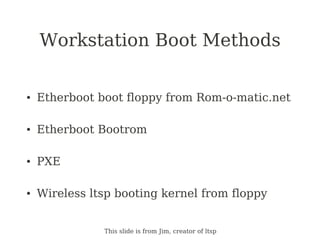
●   Etherboot boot floppy from Rom-o-matic.net

●   Etherboot Bootrom

●   PXE

●   Wireless ltsp booting kernel from floppy


               This slide is from Jim, creator of ltsp
Boot Sequence
        Thin client                                          LTSP Server
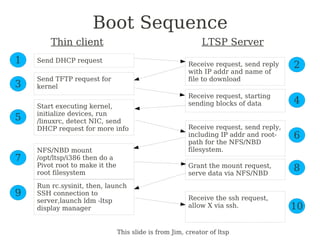
1   Send DHCP request
                                                        Receive request, send reply    2
                                                        with IP addr and name of
    Send TFTP request for                               file to download
3   kernel
                                                        Receive request, starting
                                                        sending blocks of data         4
    Start executing kernel,
    initialize devices, run
5   /linuxrc, detect NIC, send
    DHCP request for more info                          Receive request, send reply,
                                                        including IP addr and root-    6
                                                        path for the NFS/NBD
    NFS/NBD mount                                       filesystem.
7   /opt/ltsp/i386 then do a
    Pivot root to make it the                           Grant the mount request,
    root filesystem                                     serve data via NFS/NBD
                                                                                       8
    Run rc.sysinit, then, launch
9   SSH connection to
                                                        Receive the ssh request,
    server,launch ldm -ltsp
    display manager                                     allow X via ssh.               10

                                This slide is from Jim, creator of ltsp
Installing LTSP 5
Installing LTSP 5
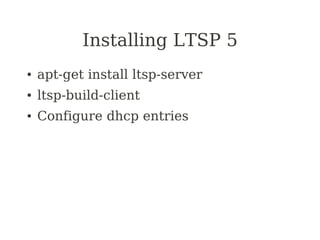
●   apt-get install ltsp-server
●   ltsp-build-client
●   Configure dhcp entries
Configuring the Server
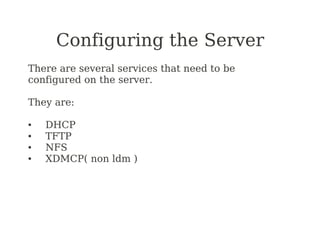
There are several services that need to be
configured on the server.

They are:

●   DHCP
●   TFTP
●   NFS
●   XDMCP( non ldm )
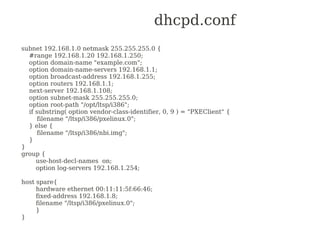
dhcpd.conf
subnet 192.168.1.0 netmask 255.255.255.0 {
  #range 192.168.1.20 192.168.1.250;
  option domain-name "example.com";
  option domain-name-servers 192.168.1.1;
  option broadcast-address 192.168.1.255;
  option routers 192.168.1.1;
  next-server 192.168.1.108;
  option subnet-mask 255.255.255.0;
  option root-path "/opt/ltsp/i386";
  if substring( option vendor-class-identifier, 0, 9 ) = "PXEClient" {
      filename "/ltsp/i386/pxelinux.0";
  } else {
      filename "/ltsp/i386/nbi.img";
  }
}
group {
     use-host-decl-names on;
     option log-servers 192.168.1.254;

host spare{
     hardware ethernet 00:11:11:5f:66:46;
     fixed-address 192.168.1.8;
     filename "/ltsp/i386/pxelinux.0";
     }
}
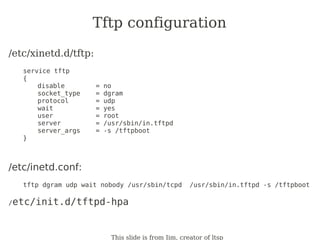
Tftp configuration
/etc/xinetd.d/tftp:
   service tftp
   {
       disable        =   no
       socket_type    =   dgram
       protocol       =   udp
       wait           =   yes
       user           =   root
       server         =   /usr/sbin/in.tftpd
       server_args    =   -s /tftpboot
   }


/etc/inetd.conf:
   tftp dgram udp wait nobody /usr/sbin/tcpd          /usr/sbin/in.tftpd -s /tftpboot

/etc/init.d/tftpd-hpa


                           This slide is from Jim, creator of ltsp
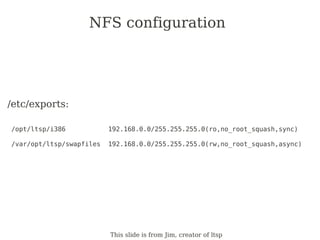
NFS configuration


/etc/exports:

/opt/ltsp/i386            192.168.0.0/255.255.255.0(ro,no_root_squash,sync)

/var/opt/ltsp/swapfiles   192.168.0.0/255.255.255.0(rw,no_root_squash,async)


                          This slide is from Jim, creator of ltsp
XDMCP configuration?
The display manager must be configured to accept remote connections

xdm-config:
   # DisplayManager.requestPort: 0

kdmrc:
   [Xdmcp]
   Enable=true
   #Port=177

gdm.conf:
   [xdmcp]
   Enable=true
   MaxSessions=100
   .
   .
   .
   [servers]
   0=/usr/bin/X11/X
                                 This slide is from Jim, creator of ltsp
Workstation Configuration
lts.conf

[Default]
    SERVER             =   192.168.0.254
    X_MOUSE_PROTOCOL   =   "IMPS/2"
    X_MOUSE_DEVICE     =   "/dev/psaux"
    SCREEN_01          =   startx

[ws001]
    PRINTER_0_DEVICE   = "/dev/lp0"
    PRINTER_0_TYPE     = "P"

[ws002]
    USE_NFS_SWAP       = Y
    SWAPFILE_SIZE      = 64m
    SCREEN_01          = shell

[ws003]
    XSERVER            = ati
    X_MODE_0           = 1600x1200


                                     This slide is from Jim, creator of ltsp
Troubleshooting
●   ltspcfg
●   netstat -anp
●   showmount -e
●   /var/log/messages
●   SCREEN_01 = shell
●   rpcinfo -p localhost
●   tcpdump & Ethereal
Our Experience
●   Total Nodes: 47
●   Average active users 15-18
●   2 LTSP server P4-1.5,2 GB RAM
●   Network: Assorted 100MB to Gigabyte
    Switch on cat5/cat6 utp cable
Our Experience
●   Clients use WindowMaker as window
    manager
●   Single application users do not have
    window manager
●   Custom application on Perl/Tk
●   Only few use OpenOffice,Browser
●   Local Printing
Advantages - Clients
●   Booting time
    –   under 30 secs on pxe clients Celeron/p3s
    –   40-50 secs on P1/P2s
●   Custom print program prints on local
    printer, with choice to select printer.
●   Roaming: Users can login anywhere in
    the hospital
Advantage - Sysadmin
●   Single point of software maintenance
●   Clients are plug and play system i.e in
    case of problem simply replace box, no
    need to install anything.
●   Central monitoring of activity
●   Database server and LTSP server on
    single switch increasing throughput
    and reliability.
Cost advantage
●   Saves money
    –   Lower cpu
    –   No HDD
    –   No FDD/CD-ROM
●   Longer Lifetime.
    –   Today's server – tomorrow's node
●   Saves environment
    –   Reduces e-waste
More Info
●   www.LTSP.org

●   ltsp_discuss mailing list

●   IRC   (#ltsp on irc.freenode.net)

●   www.k12ltsp.org

●   www.SkoleLinux.org

●   etherboot.sourceforge.net

●   www.rom-o-matic.net

●   www.tldp.org/HOWTO/Diskless-HOWTO.html

Ltsp talk

  • 1.
    LTSP Linux Terminal ServerProject Raman.P DBA Railway Hospital,Ayanavaram, Chennai 23 raamanp@yahoo.co.in
  • 2.
    What is LTSP? The Linux Terminal Server Project (LTSP) is a package added to Linux that allows inexpensive thin client computers to be connected to a server, spreading the power of the server to many desktops. This slide is from Jim, creator of ltsp
  • 3.
    How does itall work ? This slide is from Jim, creator of ltsp
  • 4.
    Workstation Boot Methods ● Etherboot boot floppy from Rom-o-matic.net ● Etherboot Bootrom ● PXE ● Wireless ltsp booting kernel from floppy This slide is from Jim, creator of ltsp
  • 5.
    Boot Sequence Thin client LTSP Server 1 Send DHCP request Receive request, send reply 2 with IP addr and name of Send TFTP request for file to download 3 kernel Receive request, starting sending blocks of data 4 Start executing kernel, initialize devices, run 5 /linuxrc, detect NIC, send DHCP request for more info Receive request, send reply, including IP addr and root- 6 path for the NFS/NBD NFS/NBD mount filesystem. 7 /opt/ltsp/i386 then do a Pivot root to make it the Grant the mount request, root filesystem serve data via NFS/NBD 8 Run rc.sysinit, then, launch 9 SSH connection to Receive the ssh request, server,launch ldm -ltsp display manager allow X via ssh. 10 This slide is from Jim, creator of ltsp
  • 6.
  • 7.
    Installing LTSP 5 ● apt-get install ltsp-server ● ltsp-build-client ● Configure dhcp entries
  • 8.
    Configuring the Server Thereare several services that need to be configured on the server. They are: ● DHCP ● TFTP ● NFS ● XDMCP( non ldm )
  • 9.
    dhcpd.conf subnet 192.168.1.0 netmask255.255.255.0 { #range 192.168.1.20 192.168.1.250; option domain-name "example.com"; option domain-name-servers 192.168.1.1; option broadcast-address 192.168.1.255; option routers 192.168.1.1; next-server 192.168.1.108; option subnet-mask 255.255.255.0; option root-path "/opt/ltsp/i386"; if substring( option vendor-class-identifier, 0, 9 ) = "PXEClient" { filename "/ltsp/i386/pxelinux.0"; } else { filename "/ltsp/i386/nbi.img"; } } group { use-host-decl-names on; option log-servers 192.168.1.254; host spare{ hardware ethernet 00:11:11:5f:66:46; fixed-address 192.168.1.8; filename "/ltsp/i386/pxelinux.0"; } }
  • 10.
    Tftp configuration /etc/xinetd.d/tftp: service tftp { disable = no socket_type = dgram protocol = udp wait = yes user = root server = /usr/sbin/in.tftpd server_args = -s /tftpboot } /etc/inetd.conf: tftp dgram udp wait nobody /usr/sbin/tcpd /usr/sbin/in.tftpd -s /tftpboot /etc/init.d/tftpd-hpa This slide is from Jim, creator of ltsp
  • 11.
    NFS configuration /etc/exports: /opt/ltsp/i386 192.168.0.0/255.255.255.0(ro,no_root_squash,sync) /var/opt/ltsp/swapfiles 192.168.0.0/255.255.255.0(rw,no_root_squash,async) This slide is from Jim, creator of ltsp
  • 12.
    XDMCP configuration? The displaymanager must be configured to accept remote connections xdm-config: # DisplayManager.requestPort: 0 kdmrc: [Xdmcp] Enable=true #Port=177 gdm.conf: [xdmcp] Enable=true MaxSessions=100 . . . [servers] 0=/usr/bin/X11/X This slide is from Jim, creator of ltsp
  • 13.
    Workstation Configuration lts.conf [Default] SERVER = 192.168.0.254 X_MOUSE_PROTOCOL = "IMPS/2" X_MOUSE_DEVICE = "/dev/psaux" SCREEN_01 = startx [ws001] PRINTER_0_DEVICE = "/dev/lp0" PRINTER_0_TYPE = "P" [ws002] USE_NFS_SWAP = Y SWAPFILE_SIZE = 64m SCREEN_01 = shell [ws003] XSERVER = ati X_MODE_0 = 1600x1200 This slide is from Jim, creator of ltsp
  • 14.
    Troubleshooting ● ltspcfg ● netstat -anp ● showmount -e ● /var/log/messages ● SCREEN_01 = shell ● rpcinfo -p localhost ● tcpdump & Ethereal
  • 15.
    Our Experience ● Total Nodes: 47 ● Average active users 15-18 ● 2 LTSP server P4-1.5,2 GB RAM ● Network: Assorted 100MB to Gigabyte Switch on cat5/cat6 utp cable
  • 16.
    Our Experience ● Clients use WindowMaker as window manager ● Single application users do not have window manager ● Custom application on Perl/Tk ● Only few use OpenOffice,Browser ● Local Printing
  • 17.
    Advantages - Clients ● Booting time – under 30 secs on pxe clients Celeron/p3s – 40-50 secs on P1/P2s ● Custom print program prints on local printer, with choice to select printer. ● Roaming: Users can login anywhere in the hospital
  • 18.
    Advantage - Sysadmin ● Single point of software maintenance ● Clients are plug and play system i.e in case of problem simply replace box, no need to install anything. ● Central monitoring of activity ● Database server and LTSP server on single switch increasing throughput and reliability.
  • 19.
    Cost advantage ● Saves money – Lower cpu – No HDD – No FDD/CD-ROM ● Longer Lifetime. – Today's server – tomorrow's node ● Saves environment – Reduces e-waste
  • 20.
    More Info ● www.LTSP.org ● ltsp_discuss mailing list ● IRC (#ltsp on irc.freenode.net) ● www.k12ltsp.org ● www.SkoleLinux.org ● etherboot.sourceforge.net ● www.rom-o-matic.net ● www.tldp.org/HOWTO/Diskless-HOWTO.html