Loops and Conditional
Statements
SAAD SHAIKH
Conditional Statements
 In our daily life we do many things which depends on some kind of
conditions for e.g. If I study I will pass exams. If he is hungry he will eat etc.
 So in programming languages also we can perform different sets of
actions depending on the circumstances.
 There are three major decision making instructions:
 If statement.
 If else statement.
 Switch statement.
If statement
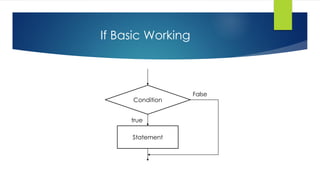
 If statement is the simplest conditional statement.
 If enables us to check condition is true or false.
 When the condition is true it will execute the statement and when false it
will not execute the statement.
 If syntax:
if(condition is true)
{
execute statements;
}
If Basic Working
Statement
Condition
true
False
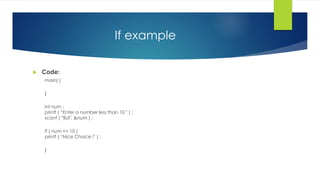
If example
 Code:
main( )
{
int num ;
printf ( “Enter a number less than 10 " ) ;
scanf ( "%d", &num ) ;
if ( num <= 10 )
printf ( “Nice Choice !" ) ;
}
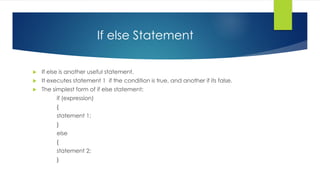
If else Statement
 If else is another useful statement.
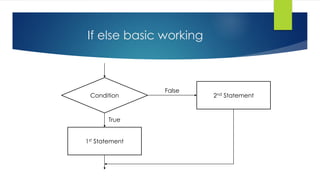
 It executes statement 1 if the condition is true, and another if its false.
 The simplest form of if else statement:
if (expression)
{
statement 1;
}
else
{
statement 2;
}
If else basic working
Condition
1st Statement
2nd Statement
True
False
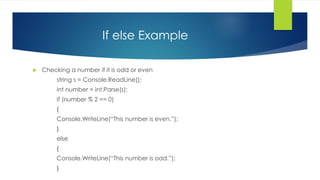
If else Example
 Checking a number if it is odd or even
string s = Console.ReadLine();
int number = int.Parse(s);
if (number % 2 == 0)
{
Console.WriteLine(“This number is even.”);
}
else
{
Console.WriteLine(“This number is odd.”);
}
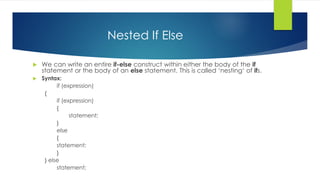
Nested If Else
 We can write an entire if-else construct within either the body of the if
statement or the body of an else statement. This is called ‘nesting‘ of ifs.
 Syntax:
if (expression)
{
if (expression)
{
statement;
}
else
{
statement;
}
} else
statement;
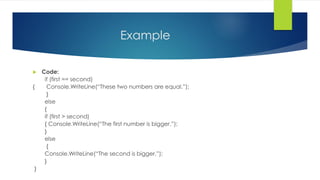
Example
 Code:
if (first == second)
{ Console.WriteLine(“These two numbers are equal.”);
}
else
{
if (first > second)
{ Console.WriteLine(“The first number is bigger.”);
}
else
{
Console.WriteLine(“The second is bigger.”);
}
}
If .. Else if
 When you have multiple expressions to evaluate, you can use the if. Else if-
else form of the if statement.
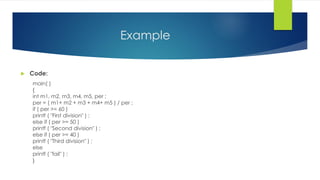
Example
 Code:
main( )
{
int m1, m2, m3, m4, m5, per ;
per = ( m1+ m2 + m3 + m4+ m5 ) / per ;
if ( per >= 60 )
printf ( "First division" ) ;
else if ( per >= 50 )
printf ( "Second division" ) ;
else if ( per >= 40 )
printf ( "Third division" ) ;
else
printf ( "fail" ) ;
}
Switch
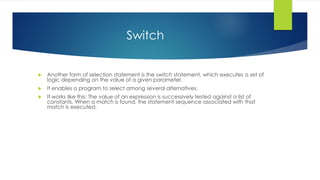
 Another form of selection statement is the switch statement, which executes a set of
logic depending on the value of a given parameter.
 It enables a program to select among several alternatives.
 It works like this: The value of an expression is successively tested against a list of
constants. When a match is found, the statement sequence associated with that
match is executed.
Switch
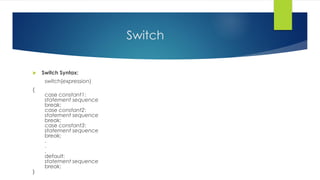
 Switch Syntax:
switch(expression)
{
case constant1:
statement sequence
break;
case constant2:
statement sequence
break;
case constant3:
statement sequence
break;
.
.
.
default:
statement sequence
break;
}
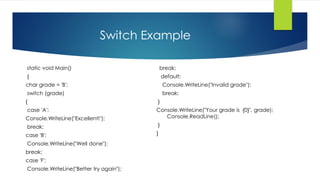
Switch Example
static void Main()
{
char grade = 'B';
switch (grade)
{
case 'A':
Console.WriteLine("Excellent!");
break;
case 'B':
Console.WriteLine("Well done");
break;
case 'F':
Console.WriteLine("Better try again");
break;
default:
Console.WriteLine("Invalid grade");
break;
}
Console.WriteLine("Your grade is {0}", grade);
Console.ReadLine();
}
}
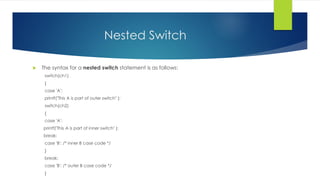
Nested Switch
 The syntax for a nested switch statement is as follows:
switch(ch1)
{
case 'A':
printf("This A is part of outer switch" );
switch(ch2)
{
case 'A':
printf("This A is part of inner switch" );
break;
case 'B': /* inner B case code */
}
break;
case 'B': /* outer B case code */
}
Example
 Code:
static void Main(string[] args)
{
int a = 100;
int b = 200;
switch (a)
{
case 100:
Console.WriteLine("This is part of outer switch ");
switch (b)
{
case 200:
Console.WriteLine("This is part of inner switch ");
break;
}
break;
}
Console.WriteLine("Exact value of a is : {0}", a);
Console.WriteLine("Exact value of b is : {0}", b);
Console.ReadLine();
}
 Output:
This is part of outer switch
This is part of inner switch
Exact value of a is : 100
Exact value of b is : 200
What is loop?
 Loop is essential technique when writing a code – it is
basically the ability to repeat a block of code X times.
 A loop is a way to execute a piece of code
repeatedly.
 Go round and round until the condition is met.
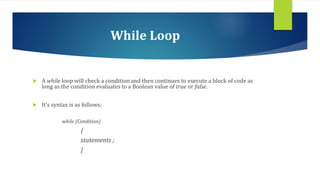
While Loop
 A while loop will check a condition and then continues to execute a block of code as
long as the condition evaluates to a Boolean value of true or false.
 It’s syntax is as follows:
while (Condition)
{
statements ;
}
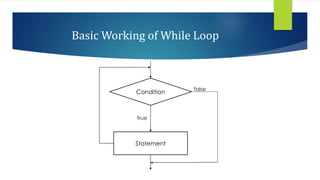
Condition
Basic Working of While Loop
Statement
true
false
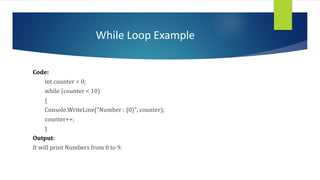
While Loop Example
Code:
int counter = 0;
while (counter < 10)
{
Console.WriteLine("Number : {0}", counter);
counter++;
}
Output:
It will print Numbers from 0 to 9.
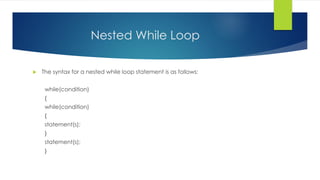
Nested While Loop
 The syntax for a nested while loop statement is as follows:
while(condition)
{
while(condition)
{
statement(s);
}
statement(s);
}
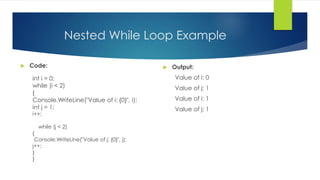
Nested While Loop Example
 Code:
int i = 0;
while (i < 2)
{
Console.WriteLine("Value of i: {0}", i);
int j = 1;
i++;
while (j < 2)
{
Console.WriteLine("Value of j: {0}", j);
j++;
}
}
 Output:
Value of i: 0
Value of j: 1
Value of i: 1
Value of j: 1
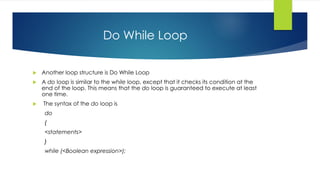
Do While Loop
 Another loop structure is Do While Loop
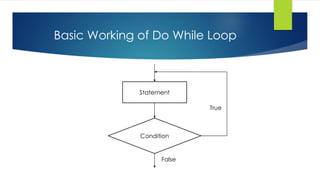
 A do loop is similar to the while loop, except that it checks its condition at the
end of the loop. This means that the do loop is guaranteed to execute at least
one time.
 The syntax of the do loop is
do
{
<statements>
}
while (<Boolean expression>);
Basic Working of Do While Loop
Statement
Condition
True
False
Do While Example
 Code:
class Program
{
static void Main(string[] args)
{
int table,i,res;
table=12;
i=1;
do
{
res = table * I;
Console.WriteLine("{0} x {1} = {2}", table, i, res);
i++;
}
while (i <= 10);
Console.ReadLine();
}
}
 Output:
12 x 1 = 12
12 x 2 = 24
12 x 3 = 36
12 x 4 = 48
12 x 5 = 60
12 x 6 = 72
12 x 7 = 84
12 x 8 = 92
12 x 9 = 108
12 x 10 = 120
For Loop
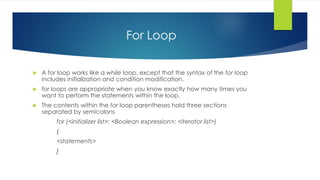
 A for loop works like a while loop, except that the syntax of the for loop
includes initialization and condition modification.
 for loops are appropriate when you know exactly how many times you
want to perform the statements within the loop.
 The contents within the for loop parentheses hold three sections
separated by semicolons
for (<initializer list>; <Boolean expression>; <iterator list>)
{
<statements>
}
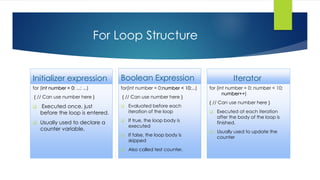
For Loop Structure
Initializer expression
for (int number = 0; ...; ...)
{ // Can use number here }
 Executed once, just
before the loop is entered.
 Usually used to declare a
counter variable.
Boolean Expression
for(int number = 0;number < 10;...)
{ // Can use number here }
 Evaluated before each
iteration of the loop
 If true, the loop body is
executed
 If false, the loop body is
skipped
 Also called test counter.
Iterator
for (int number = 0; number < 10;
number++)
{ // Can use number here }
 Executed at each iteration
after the body of the loop is
finished.
 Usually used to update the
counter
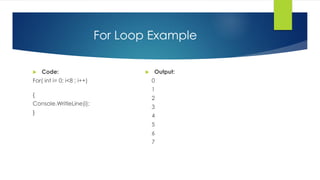
For Loop Example
 Code:
For( int i= 0; i<8 ; i++)
{
Console.WritleLine(i);
}
 Output:
0
1
2
3
4
5
6
7
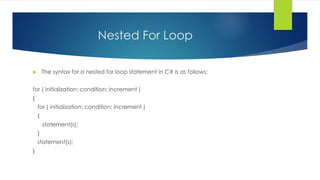
Nested For Loop
 The syntax for a nested for loop statement in C# is as follows:
for ( initialization; condition; increment )
{
for ( initialization; condition; increment )
{
statement(s);
}
statement(s);
}
Example
 Code:
int n = int.Parse(Console.ReadLine());
for(int row = 1; row <= n; row++)
{
for(int column = 1; column <= row;
column++)
{
Console.Write("{0} ", column);
}
Console.WriteLine();
}
 Output:
1
1 2
....
1 2 3 ... n
Thank you!

Loops and conditional statements

  • 1.
  • 2.
    Conditional Statements  Inour daily life we do many things which depends on some kind of conditions for e.g. If I study I will pass exams. If he is hungry he will eat etc.  So in programming languages also we can perform different sets of actions depending on the circumstances.  There are three major decision making instructions:  If statement.  If else statement.  Switch statement.
  • 3.
    If statement  Ifstatement is the simplest conditional statement.  If enables us to check condition is true or false.  When the condition is true it will execute the statement and when false it will not execute the statement.  If syntax: if(condition is true) { execute statements; }
  • 4.
  • 5.
    If example  Code: main() { int num ; printf ( “Enter a number less than 10 " ) ; scanf ( "%d", &num ) ; if ( num <= 10 ) printf ( “Nice Choice !" ) ; }
  • 6.
    If else Statement If else is another useful statement.  It executes statement 1 if the condition is true, and another if its false.  The simplest form of if else statement: if (expression) { statement 1; } else { statement 2; }
  • 7.
    If else basicworking Condition 1st Statement 2nd Statement True False
  • 8.
    If else Example Checking a number if it is odd or even string s = Console.ReadLine(); int number = int.Parse(s); if (number % 2 == 0) { Console.WriteLine(“This number is even.”); } else { Console.WriteLine(“This number is odd.”); }
  • 9.
    Nested If Else We can write an entire if-else construct within either the body of the if statement or the body of an else statement. This is called ‘nesting‘ of ifs.  Syntax: if (expression) { if (expression) { statement; } else { statement; } } else statement;
  • 10.
    Example  Code: if (first== second) { Console.WriteLine(“These two numbers are equal.”); } else { if (first > second) { Console.WriteLine(“The first number is bigger.”); } else { Console.WriteLine(“The second is bigger.”); } }
  • 11.
    If .. Elseif  When you have multiple expressions to evaluate, you can use the if. Else if- else form of the if statement.
  • 12.
    Example  Code: main( ) { intm1, m2, m3, m4, m5, per ; per = ( m1+ m2 + m3 + m4+ m5 ) / per ; if ( per >= 60 ) printf ( "First division" ) ; else if ( per >= 50 ) printf ( "Second division" ) ; else if ( per >= 40 ) printf ( "Third division" ) ; else printf ( "fail" ) ; }
  • 13.
    Switch  Another formof selection statement is the switch statement, which executes a set of logic depending on the value of a given parameter.  It enables a program to select among several alternatives.  It works like this: The value of an expression is successively tested against a list of constants. When a match is found, the statement sequence associated with that match is executed.
  • 14.
    Switch  Switch Syntax: switch(expression) { caseconstant1: statement sequence break; case constant2: statement sequence break; case constant3: statement sequence break; . . . default: statement sequence break; }
  • 15.
    Switch Example static voidMain() { char grade = 'B'; switch (grade) { case 'A': Console.WriteLine("Excellent!"); break; case 'B': Console.WriteLine("Well done"); break; case 'F': Console.WriteLine("Better try again"); break; default: Console.WriteLine("Invalid grade"); break; } Console.WriteLine("Your grade is {0}", grade); Console.ReadLine(); } }
  • 16.
    Nested Switch  Thesyntax for a nested switch statement is as follows: switch(ch1) { case 'A': printf("This A is part of outer switch" ); switch(ch2) { case 'A': printf("This A is part of inner switch" ); break; case 'B': /* inner B case code */ } break; case 'B': /* outer B case code */ }
  • 17.
    Example  Code: static voidMain(string[] args) { int a = 100; int b = 200; switch (a) { case 100: Console.WriteLine("This is part of outer switch "); switch (b) { case 200: Console.WriteLine("This is part of inner switch "); break; } break; } Console.WriteLine("Exact value of a is : {0}", a); Console.WriteLine("Exact value of b is : {0}", b); Console.ReadLine(); }  Output: This is part of outer switch This is part of inner switch Exact value of a is : 100 Exact value of b is : 200
  • 18.
    What is loop? Loop is essential technique when writing a code – it is basically the ability to repeat a block of code X times.  A loop is a way to execute a piece of code repeatedly.  Go round and round until the condition is met.
  • 19.
    While Loop  Awhile loop will check a condition and then continues to execute a block of code as long as the condition evaluates to a Boolean value of true or false.  It’s syntax is as follows: while (Condition) { statements ; }
  • 20.
    Condition Basic Working ofWhile Loop Statement true false
  • 21.
    While Loop Example Code: intcounter = 0; while (counter < 10) { Console.WriteLine("Number : {0}", counter); counter++; } Output: It will print Numbers from 0 to 9.
  • 22.
    Nested While Loop The syntax for a nested while loop statement is as follows: while(condition) { while(condition) { statement(s); } statement(s); }
  • 23.
    Nested While LoopExample  Code: int i = 0; while (i < 2) { Console.WriteLine("Value of i: {0}", i); int j = 1; i++; while (j < 2) { Console.WriteLine("Value of j: {0}", j); j++; } }  Output: Value of i: 0 Value of j: 1 Value of i: 1 Value of j: 1
  • 24.
    Do While Loop Another loop structure is Do While Loop  A do loop is similar to the while loop, except that it checks its condition at the end of the loop. This means that the do loop is guaranteed to execute at least one time.  The syntax of the do loop is do { <statements> } while (<Boolean expression>);
  • 25.
    Basic Working ofDo While Loop Statement Condition True False
  • 26.
    Do While Example Code: class Program { static void Main(string[] args) { int table,i,res; table=12; i=1; do { res = table * I; Console.WriteLine("{0} x {1} = {2}", table, i, res); i++; } while (i <= 10); Console.ReadLine(); } }  Output: 12 x 1 = 12 12 x 2 = 24 12 x 3 = 36 12 x 4 = 48 12 x 5 = 60 12 x 6 = 72 12 x 7 = 84 12 x 8 = 92 12 x 9 = 108 12 x 10 = 120
  • 27.
    For Loop  Afor loop works like a while loop, except that the syntax of the for loop includes initialization and condition modification.  for loops are appropriate when you know exactly how many times you want to perform the statements within the loop.  The contents within the for loop parentheses hold three sections separated by semicolons for (<initializer list>; <Boolean expression>; <iterator list>) { <statements> }
  • 28.
    For Loop Structure Initializerexpression for (int number = 0; ...; ...) { // Can use number here }  Executed once, just before the loop is entered.  Usually used to declare a counter variable. Boolean Expression for(int number = 0;number < 10;...) { // Can use number here }  Evaluated before each iteration of the loop  If true, the loop body is executed  If false, the loop body is skipped  Also called test counter. Iterator for (int number = 0; number < 10; number++) { // Can use number here }  Executed at each iteration after the body of the loop is finished.  Usually used to update the counter
  • 29.
    For Loop Example Code: For( int i= 0; i<8 ; i++) { Console.WritleLine(i); }  Output: 0 1 2 3 4 5 6 7
  • 30.
    Nested For Loop The syntax for a nested for loop statement in C# is as follows: for ( initialization; condition; increment ) { for ( initialization; condition; increment ) { statement(s); } statement(s); }
  • 31.
    Example  Code: int n= int.Parse(Console.ReadLine()); for(int row = 1; row <= n; row++) { for(int column = 1; column <= row; column++) { Console.Write("{0} ", column); } Console.WriteLine(); }  Output: 1 1 2 .... 1 2 3 ... n
  • 32.