
A complete Logging Solution for
Openshift - EFK
Jatan Malde
AssociateTechnical Support Engineer
Red Hat
Agenda
1. The Problem?
2. A typical Architecture
3. Why EFK?
4. Overview of Fluentd
5. Overview of ElasticSearch
6. Overview of Kibana
7. Ansible Playbook Variables for EFK
8. Demo
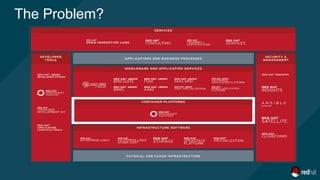
The Problem?
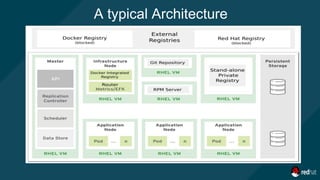
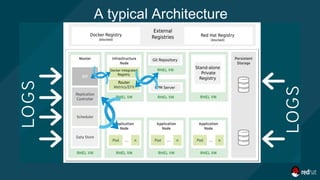
A typical Architecture
1. Long (grows with the number of nodes)
2. Tedious (which log files to read?)
3. Inaccurate (am I reading the right information?)
4. Cumbersome & complex (how to correlate
events between nodes?)
5. Etc.
Manual Parsing of logs is:
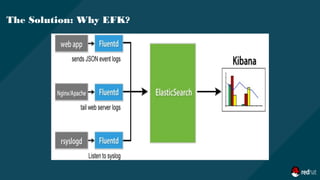
The Solution: Why EFK?
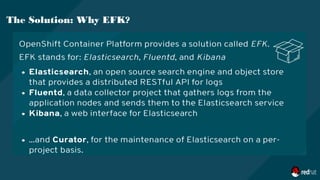
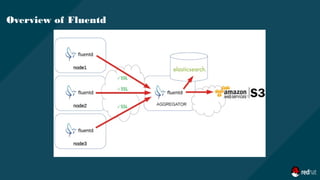
1. Fluentd is an open source data collector for unified logging layer.
2. Fluentd allows you to unify data collection and consumption for a better use and
understanding of data.
3. Deployed as a DaemonSet
a. An OpenShift object which ensures that all nodes run a copy of a pod.
4. The service reads log entries from the /var/log/messages and
/var/log/containers/container.log files or from journal if logging driver is set to journald
Overview of Fluentd
Overview of Fluentd
The configuration file consists of the following directives:
1. source directives determine the input sources.
2. match directives determine the output destinations.
3. filter directives determine the event processing pipelines.
4. system directives set system wide configuration.
5. label directives group the output and filter for internal routing
6. @include directives include other files.
Overview of Fluentd
Overview of Fluentd
Fluentd.conf
@includeconfigs.d/dynamic/input-syslog-*.conf
@includeconfigs.d/openshift/input-post-*.conf
<label @INGRESS>
@includeconfigs.d/openshift/filter-pre-*.conf
@includeconfigs.d/openshift/filter-post-*.conf
</label>
<label @OUTPUT>
## matches
@includeconfigs.d/openshift/output-pre-*.conf
@includeconfigs.d/openshift/output-operations.conf
@includeconfigs.d/openshift/output-applications.conf
</label>
secure-forward.conf: |
# cat /etc/fluent/configs.d/openshift/input-pre-systemd.conf
<source>
@typesystemd
@label @INGRESS
path "#{ENV['JOURNAL_SOURCE'] || '/run/log/journal'}"
pos_file"#{ENV['JOURNAL_POS_FILE'] ||
'/var/log/journal.pos'}"
filters"#{ENV['JOURNAL_FILTERS_JSON'] || '[]'}"
tag journal
read_from_head
"#{ENV['JOURNAL_READ_FROM_HEAD'] || 'false'}"
</source>
1. Elasticsearch is a search server based on Lucene.
2. It provides a distributed, multitenant-capable full-text search engine with a RESTful web
interface and schema-free JSON documents.
Overview of ElasticSearch
1. Easy to scale (Distributed)
2. Everything is one JSON call away (RESTful API)
3. Unleashed power of Lucene under the hood
4. Multi-tenancy
5. Configurable and Extensible
6. Document Oriented
7. Schema free
8. Conflict management
Why ElasticSearch?
1. Cluster
2. Node
3. Index
4. Document
5. Shards
6. Replica
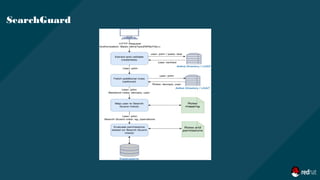
7. SearchGuard
Few Concepts
SearchGuard
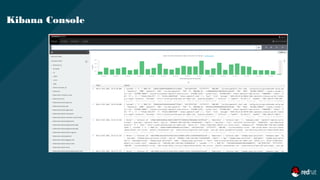
1. Kibana is the web interface that reads logs entries from the Elasticsearch database.
2. It can create visualization graphs, charts, time tables, and reports, using time-based
and non-time-based events.
3. You can visualize the cluster data, export CSV files, create dashboards, and run
advanced requests.
4. Use the route to access the Kibana web console
Kibana
Kibana Console
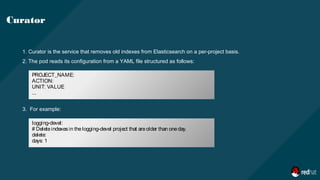
1. Curator is the service that removes old indexes from Elasticsearch on a per-project basis.
2. The pod reads its configuration from a YAML file structured as follows:
3. For example:
Curator
PROJECT_NAME:
ACTION:
UNIT: VALUE
...
logging-devel:
# Deleteindexesin thelogging-devel project that areolder than oneday.
delete:
days: 1
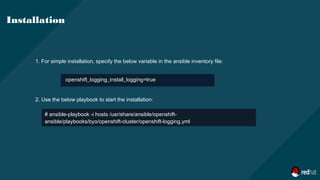
1. For simple installation, specify the below variable in the ansible inventory file:
2. Use the below playbook to start the installation:
Installation
openshift_logging_install_logging=true
# ansible-playbook -i hosts /usr/share/ansible/openshift-
ansible/playbooks/byo/openshift-cluster/openshift-logging.yml
openshift_logging_install_logging=true *1
openshift_hosted_logging_deployer_prefix=registry.lab.example.com:5000/openshift3/ *2
openshift_logging_use_ops=false *3
openshift_logging_kibana_hostname=kibana.apps.lab.example.com *4
openshift_logging_fluentd_memory_limit='128Mi' *5
openshift_logging_es_memory_limit='8Gi' *6
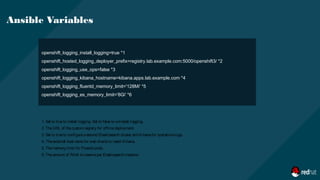
Ansible Variables
1. Set to trueto install logging. Set to falseto uninstall logging.
2. TheURL of thecustom registry for offlinedeployment.
3. Set to trueto configureasecond Elasticsearch cluster and Kibanafor operationslogs.
4. Theexternal host namefor web clientsto reach Kibana.
5. Thememory limit for Fluentd pods.
6. Theamount of RAM to reserveper Elasticsearch instance
openshift_logging_es_allow_external=True *1
openshift_logging_es_hostname=elasticsearch.apps.lab.example.com *2
openshift_logging_image_version=latest *3
openshift_hosted_logging_deployer_version=latest *4
openshift_hosted_logging_storage_kind=nfs *5
openshift_hosted_logging_storage_access_modes=['ReadWriteOnce'] *6
Ansible Variables
1. Set to trueto exposeElasticsearch asaroute.
2. Theexternal facing host nameto usefor therouteand theTLSserver certificate.
3. Theimageversion for thelogging imagesto use.
4. Theimageversion for thedeployer imagesto use.
5. Thestorageback end to use.
6. Thevolumeaccessmode.
openshift_hosted_logging_storage_nfs_directory=/exports *1
openshift_hosted_registry_storage_nfs_options='*(rw,root_squash)' *2
openshift_hosted_logging_storage_volume_name=logging-es *3
openshift_hosted_logging_storage_volume_size=5Gi *4
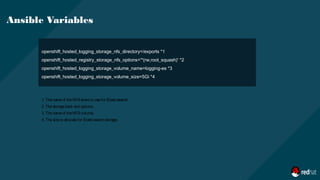
Ansible Variables
1. Thenameof theNFS shareto usefor Elasticsearch.
2. Thestorageback end options.
3. Thenameof theNFS volume.
4. Thesizeto allocatefor Elasticsearch storage.
THANK YOU
plus.google.com/+RedHat
linkedin.com/company/red-hat
youtube.com/user/RedHatVideos
facebook.com/redhatinc
twitter.com/RedHatNews

Logging presentation

  • 1.
    A complete LoggingSolution for Openshift - EFK Jatan Malde AssociateTechnical Support Engineer Red Hat
  • 2.
    Agenda 1. The Problem? 2.A typical Architecture 3. Why EFK? 4. Overview of Fluentd 5. Overview of ElasticSearch 6. Overview of Kibana 7. Ansible Playbook Variables for EFK 8. Demo
  • 3.
  • 4.
  • 5.
  • 6.
    1. Long (growswith the number of nodes) 2. Tedious (which log files to read?) 3. Inaccurate (am I reading the right information?) 4. Cumbersome & complex (how to correlate events between nodes?) 5. Etc. Manual Parsing of logs is:
  • 7.
  • 8.
  • 9.
    1. Fluentd isan open source data collector for unified logging layer. 2. Fluentd allows you to unify data collection and consumption for a better use and understanding of data. 3. Deployed as a DaemonSet a. An OpenShift object which ensures that all nodes run a copy of a pod. 4. The service reads log entries from the /var/log/messages and /var/log/containers/container.log files or from journal if logging driver is set to journald Overview of Fluentd
  • 10.
  • 11.
    The configuration fileconsists of the following directives: 1. source directives determine the input sources. 2. match directives determine the output destinations. 3. filter directives determine the event processing pipelines. 4. system directives set system wide configuration. 5. label directives group the output and filter for internal routing 6. @include directives include other files. Overview of Fluentd
  • 12.
    Overview of Fluentd Fluentd.conf @includeconfigs.d/dynamic/input-syslog-*.conf @includeconfigs.d/openshift/input-post-*.conf <label@INGRESS> @includeconfigs.d/openshift/filter-pre-*.conf @includeconfigs.d/openshift/filter-post-*.conf </label> <label @OUTPUT> ## matches @includeconfigs.d/openshift/output-pre-*.conf @includeconfigs.d/openshift/output-operations.conf @includeconfigs.d/openshift/output-applications.conf </label> secure-forward.conf: | # cat /etc/fluent/configs.d/openshift/input-pre-systemd.conf <source> @typesystemd @label @INGRESS path "#{ENV['JOURNAL_SOURCE'] || '/run/log/journal'}" pos_file"#{ENV['JOURNAL_POS_FILE'] || '/var/log/journal.pos'}" filters"#{ENV['JOURNAL_FILTERS_JSON'] || '[]'}" tag journal read_from_head "#{ENV['JOURNAL_READ_FROM_HEAD'] || 'false'}" </source>
  • 13.
    1. Elasticsearch isa search server based on Lucene. 2. It provides a distributed, multitenant-capable full-text search engine with a RESTful web interface and schema-free JSON documents. Overview of ElasticSearch
  • 14.
    1. Easy toscale (Distributed) 2. Everything is one JSON call away (RESTful API) 3. Unleashed power of Lucene under the hood 4. Multi-tenancy 5. Configurable and Extensible 6. Document Oriented 7. Schema free 8. Conflict management Why ElasticSearch?
  • 15.
    1. Cluster 2. Node 3.Index 4. Document 5. Shards 6. Replica 7. SearchGuard Few Concepts
  • 16.
  • 17.
    1. Kibana isthe web interface that reads logs entries from the Elasticsearch database. 2. It can create visualization graphs, charts, time tables, and reports, using time-based and non-time-based events. 3. You can visualize the cluster data, export CSV files, create dashboards, and run advanced requests. 4. Use the route to access the Kibana web console Kibana
  • 18.
  • 19.
    1. Curator isthe service that removes old indexes from Elasticsearch on a per-project basis. 2. The pod reads its configuration from a YAML file structured as follows: 3. For example: Curator PROJECT_NAME: ACTION: UNIT: VALUE ... logging-devel: # Deleteindexesin thelogging-devel project that areolder than oneday. delete: days: 1
  • 20.
    1. For simpleinstallation, specify the below variable in the ansible inventory file: 2. Use the below playbook to start the installation: Installation openshift_logging_install_logging=true # ansible-playbook -i hosts /usr/share/ansible/openshift- ansible/playbooks/byo/openshift-cluster/openshift-logging.yml
  • 21.
    openshift_logging_install_logging=true *1 openshift_hosted_logging_deployer_prefix=registry.lab.example.com:5000/openshift3/ *2 openshift_logging_use_ops=false*3 openshift_logging_kibana_hostname=kibana.apps.lab.example.com *4 openshift_logging_fluentd_memory_limit='128Mi' *5 openshift_logging_es_memory_limit='8Gi' *6 Ansible Variables 1. Set to trueto install logging. Set to falseto uninstall logging. 2. TheURL of thecustom registry for offlinedeployment. 3. Set to trueto configureasecond Elasticsearch cluster and Kibanafor operationslogs. 4. Theexternal host namefor web clientsto reach Kibana. 5. Thememory limit for Fluentd pods. 6. Theamount of RAM to reserveper Elasticsearch instance
  • 22.
    openshift_logging_es_allow_external=True *1 openshift_logging_es_hostname=elasticsearch.apps.lab.example.com *2 openshift_logging_image_version=latest*3 openshift_hosted_logging_deployer_version=latest *4 openshift_hosted_logging_storage_kind=nfs *5 openshift_hosted_logging_storage_access_modes=['ReadWriteOnce'] *6 Ansible Variables 1. Set to trueto exposeElasticsearch asaroute. 2. Theexternal facing host nameto usefor therouteand theTLSserver certificate. 3. Theimageversion for thelogging imagesto use. 4. Theimageversion for thedeployer imagesto use. 5. Thestorageback end to use. 6. Thevolumeaccessmode.
  • 23.
    openshift_hosted_logging_storage_nfs_directory=/exports *1 openshift_hosted_registry_storage_nfs_options='*(rw,root_squash)' *2 openshift_hosted_logging_storage_volume_name=logging-es*3 openshift_hosted_logging_storage_volume_size=5Gi *4 Ansible Variables 1. Thenameof theNFS shareto usefor Elasticsearch. 2. Thestorageback end options. 3. Thenameof theNFS volume. 4. Thesizeto allocatefor Elasticsearch storage.
  • 24.