
Jumping Bean
IPv6 Yourself
This Event Sponsored by
The Linux Professional Institute South Africa
Get IPv6 Training!
Jumping Bean
What is IPv6?
● Replacement for IPv4,
● 128 bit IP address
– IPv4 allowed for 4.3 billion possible addresses,
– IPv6 allows for 340 undecillion addresses 3.40E38,
– 7.9E28 more than IPv4 addresses,
– ~ 4.8x1028 addresses for every human on earth (7 billion people).
– 1E32 – number of stars in the universe (estimated)
– 1E82 – number of atoms in the universe (estimated)
● Not backwardly compatible with IPv4
Jumping Bean
IPv6 History
● RFC 791 (IPv4) published 1981
● RFC 2460 (IPv6) published 1998
● Why is this important?
– Was created based on experience at the time,
● e.g. Privacy/Tracking was not such a concern as today,
– Architecture may seem odd or unnecessarily complex when viewed from
today,
– Short-coming in the standard may be partly responsible for slow
adoption,
● E.G You need a router, a DHCP server and a DNS server for most setups.
– ZeroConf will address this
● Lack of backwards compatibility is the biggest + expense of reconfiguring network
Jumping Bean
IPv6 Benefits
● No need for NAT,
● Every device gets a unique, publicly routable, address,
● Devices can have more than one address,
● Reduces or eliminates chance of network address collision when merging networks,
● “Simplified” configuration,
● Better handling for mobile devices, device keeps IP address while moving between
networks,
● Better multicast support,
● IPSec was mandatory, now optional,
● Simplified router processing
– No support for fragmentation,
– Packet header processing more efficient
● ...
Jumping Bean
IPv6 Address Notation
● Address written in hexadecimal,
– Written as 8 groups of 16 bits separated by a colon:
● 2001:0db8:85a3:0000:0000:8a2e:0370:7334
● Abbreviation rules:
– Drop leading zeros in 16 bit group,
– If 16 bits all zero replace with empty string e.g ::
– If there are sequential groups of 0 replaced by empty
string then collapse into a single double colon ::
● 2001:db8:85a3::8a2e:370:7334
Jumping Bean
IPv6 History
● RFC 791 (IPv4) published 1981
● RFC 2460 (IPv6) published 1998
● Why is this important?
– Was created based on experience at the time,
● e.g. Privacy/Tracking was not such a concern as today,
– Architecture may seem odd or unnecessarily complex when viewed from
today,
– Short-coming in the standard may be partly responsible for slow
adoption,
● E.G You need a router, a DHCP server and a DNS server for most setups.
– ZeroConf will address this
● Lack of backwards compatibility is the biggest + expense of reconfiguring network
Jumping Bean
IPv6 Address Notation
● Subnet prefix (Network mask) is fixed at 64 most
significant bits
– no CIDR,
● Interface identifier (host portion) is fixed at 64 least
significant bits
● Common to see IPv6 address with prefix mask that don't
match 64 bits,
– Used in routing,
– Used in address block assignment,
– Used in slicing up blocks for special usage
Jumping Bean
IPv6 Address Allocation
● Internet Assigned Numbers Authority (IANA)
assigned Regional Internet Registrars 23/12 bit
blocks,
● Regional Internet registrars (Afrinic) assign
blocks 19/32 to local Internet registrars,
● End User recommended to get a /48 block which
means 65335 subnets but now recommended 56
subnet only 256 subnets. ISPs will probably only
get a single subnet. :(
Jumping Bean
IPv6 Address Allocation
● Entities can apply for own, provider
independent, IPv6 address block with
Regional registrar
● Great for ISP independence,
● IPv4 routing tables size (current) - 545K,
● IPv6 routing table size (current) - 22K,
● Could IPv6 table explosion occur?
Jumping Bean
IPv6 How it Works
● Every interface has a link-local address,
– Network segment only,
● Additional address obtain via
– Manual configuration, or
– Automatic configuration,
● Other address types
– Unique local address (ULA) - site routable,
– Global address – internet routable,
Jumping Bean
IPv6 Link Local
● Each interface auto-assigned a link-local ip address – fe80::/10,
– Mandatory - replaces layer 2 arp protocols with layer 3,
● Neighbourhood discovery,
● Router solicitation
– Automatically or manually configured.
– Unique only on local network segment,
– Used to boot strap other IPv6 protocols and addresses
– Interface prefix is generated from mac address on ethernet NICs using
EUI64:
● Mac address is 48 bits long,
● Interface identifier is 64 bits long
– Not forwarded by routers
Jumping Bean
IPv6 – SLAAC
● Stateless Automatic Address Configuration - allows IPv6
networks to auto-configure themselves via ICMPv6 packets
● Link-Local address allows for
– the issuing of router solicitation packets,
– Receipt of router advertisement packets,
● Routers
– Receive solicitation packets,
– Send advertisement packets
– Provide node with one or more network prefix and router address
– Network prefix can be a ULA or global address
– Client does duplicate address detection (DAD)
Jumping Bean
IPv6 - SLAAC
● Pros
– Automatic configurations,
– No configuration required by client,
● Cons
– No updating of DNS for nodes,
– Limited set of configurations options for auto
configuration of nodes
Jumping Bean
IPv6 - Configurations
● SLAAC can be used in a number of ways:
– Stateless without DHCPv6,
– Stateless with DHCPv6
– Stateful with DHCPv6
● Stateless -
– Router/DHCP server does not track ip address,
– Simply provides network prefix,
– Node not guaranteed to get same IPv6 address,
– Node configures host identifier,
● Stateful -
– DHCP server keeps track of addresses handed out (leases),
– DHCP can assign same IPv6 address to returning node (DUID),
Jumping Bean
IPv6 - Configurations
● Without DHCP - Router can also send
– DNS server information,
– Router IPv6 address (default gateway),
– Flags
● With DHCP – Node can obtain
– Fixed IP address,
– Additional configuration information
● DUID – device unique id,
– DHCPv6 does not use mac address for unique identification,
– Each address assigned based on DUID and interface Association identifier,
– Designed to prevent updating DHCP server when network card changes
– DUID is created by OS or DHCPClient,
– IAID – from mac(?)
Jumping Bean
Unique Local Address
● ULA – similar to private addresses in IPv4,
● Can route traffic across network segments,
● Used for company or home lan,
● Should not be routed by gateway devices,
● Network prefix fc00::/7. As 8th bit is always 1 will
see fd00 for ula address
● You can create your own ULA or use sites such
as http://unique-local-ipv6.com/
Jumping Bean
Global Addresses
● Assigned by ISP or Afrinic etc,
● Globally routable,
● Similar to IPv4 public addresses,
● For ISP router will need to receive IPv6 prefix
for use in configuring IP addresses for nodes,
● Global address current start with 2001::
Jumping Bean
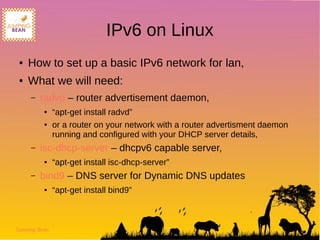
IPv6 on Linux
● How to set up a basic IPv6 network for lan,
● What we will need:
– radvd – router advertisement daemon,
● “apt-get install radvd”
● or a router on your network with a router advertisment daemon
running and configured with your DHCP server details,
– isc-dhcp-server – dhcpv6 capable server,
● “apt-get install isc-dhcp-server”
– bind9 – DNS server for Dynamic DNS updates
● “apt-get install bind9”
Jumping Bean
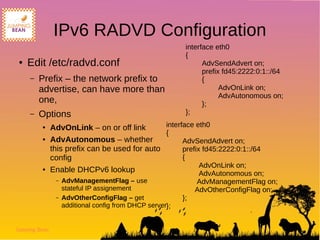
IPv6 RADVD Configuration
● Edit /etc/radvd.conf
– Prefix – the network prefix to
advertise, can have more than
one,
– Options
● AdvOnLink – on or off link
● AdvAutonomous – whether
this prefix can be used for auto
config
● Enable DHCPv6 lookup
– AdvManagementFlag – use
stateful IP assignement
– AdvOtherConfigFlag – get
additional config from DHCP server
interface eth0
{
AdvSendAdvert on;
prefix fd45:2222:0:1::/64
{
AdvOnLink on;
AdvAutonomous on;
};
};
interface eth0
{
AdvSendAdvert on;
prefix fd45:2222:0:1::/64
{
AdvOnLink on;
AdvAutonomous on;
AdvManagementFlag on;
AdvOtherConfigFlag on;
};
};
Jumping Bean
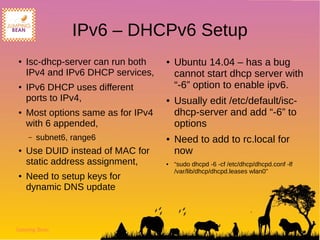
IPv6 – DHCPv6 Setup
● Isc-dhcp-server can run both
IPv4 and IPv6 DHCP services,
● IPv6 DHCP uses different
ports to IPv4,
● Most options same as for IPv4
with 6 appended,
– subnet6, range6
● Use DUID instead of MAC for
static address assignment,
● Need to setup keys for
dynamic DNS update
● Ubuntu 14.04 – has a bug
cannot start dhcp server with
“-6” option to enable ipv6.
● Usually edit /etc/default/isc-
dhcp-server and add “-6” to
options
● Need to add to rc.local for
now
● “sudo dhcpd -6 -cf /etc/dhcp/dhcpd.conf -lf
/var/lib/dhcp/dhcpd.leases wlan0”
Jumping Bean
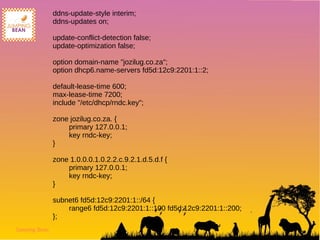
ddns-update-style interim;
ddns-updates on;
update-conflict-detection false;
update-optimization false;
option domain-name "jozilug.co.za";
option dhcp6.name-servers fd5d:12c9:2201:1::2;
default-lease-time 600;
max-lease-time 7200;
include "/etc/dhcp/rndc.key";
zone jozilug.co.za. {
primary 127.0.0.1;
key rndc-key;
}
zone 1.0.0.0.1.0.2.2.c.9.2.1.d.5.d.f {
primary 127.0.0.1;
key rndc-key;
}
subnet6 fd5d:12c9:2201:1::/64 {
range6 fd5d:12c9:2201:1::100 fd5d:12c9:2201:1::200;
};
Jumping Bean
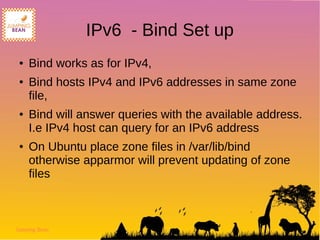
IPv6 - Bind Set up
● Bind works as for IPv4,
● Bind hosts IPv4 and IPv6 addresses in same zone
file,
● Bind will answer queries with the available address.
I.e IPv4 host can query for an IPv6 address
● On Ubuntu place zone files in /var/lib/bind
otherwise apparmor will prevent updating of zone
files
Jumping Bean
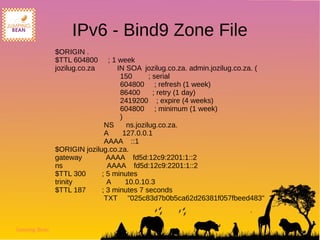
IPv6 - Bind9 Zone File
$ORIGIN .
$TTL 604800 ; 1 week
jozilug.co.za IN SOA jozilug.co.za. admin.jozilug.co.za. (
150 ; serial
604800 ; refresh (1 week)
86400 ; retry (1 day)
2419200 ; expire (4 weeks)
604800 ; minimum (1 week)
)
NS ns.jozilug.co.za.
A 127.0.0.1
AAAA ::1
$ORIGIN jozilug.co.za.
gateway AAAA fd5d:12c9:2201:1::2
ns AAAA fd5d:12c9:2201:1::2
$TTL 300 ; 5 minutes
trinity A 10.0.10.3
$TTL 187 ; 3 minutes 7 seconds
TXT "025c83d7b0b5ca62d26381f057fbeed483"
Jumping Bean
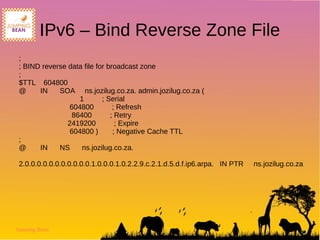
IPv6 – Bind Reverse Zone File
;
; BIND reverse data file for broadcast zone
;
$TTL 604800
@ IN SOA ns.jozilug.co.za. admin.jozilug.co.za (
1 ; Serial
604800 ; Refresh
86400 ; Retry
2419200 ; Expire
604800 ) ; Negative Cache TTL
;
@ IN NS ns.jozilug.co.za.
2.0.0.0.0.0.0.0.0.0.0.0.1.0.0.0.1.0.2.2.9.c.2.1.d.5.d.f.ip6.arpa. IN PTR ns.jozilug.co.za
Jumping Bean
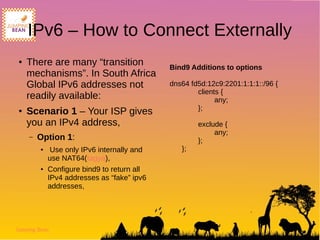
IPv6 – How to Connect Externally
● There are many “transition
mechanisms”. In South Africa
Global IPv6 addresses not
readily available:
● Scenario 1 – Your ISP gives
you an IPv4 address,
– Option 1:
● Use only IPv6 internally and
use NAT64(tagya),
● Configure bind9 to return all
IPv4 addresses as “fake” ipv6
addresses,
Bind9 Additions to options
dns64 fd5d:12c9:2201:1:1:1::/96 {
clients {
any;
};
exclude {
any;
};
};
Jumping Bean
IPv6 – How to Connect Externally
● Scenario 1:
– Option 1:
– Pros – can use Iptables v4
to managed internet
connection on Nat64 IPV4
pool,
– Use only IPv6 internally,
– Easy to setup
– Cons – No access to global
IPv6 network. IPv6 only
hosts will remain dark
● Scenario 1:
– Option 2:
● Create a dual stack
solution
● Set up DHCPv4 along
with DHCPv6,
● Create IPV6 SIT tunnel
(6in4) to router IPv6 traffic
● Use a tunnel broker like
Hurricane Electric or
SixXs
Jumping Bean
IPv6 – How to Connect Externally
● Scenario 1:
– Option2:
● Pros – Can access IPv6 and IPv4
network,
● Can host own IPv6 services,
● No more dynamic Ips I.e the
tunnel broker provides a global
IPV6 address you can access
from any IPv6 network
● Cons - Tunnel is slow, need to
route traffic overseas,
● Need a static IPv4 address on the
local tunnel side or have to update
tunnel information at broker.
● Scenario 1:
– Option 3: use dual stack with
torendo tunnelling. Requires a
global IPv6 address,
● Scenario 2: Your ISP gives you
an IPv6 address and no IPv4
address
– Option 1: Use 6to4 relay at ISP?,
– Note: Most services should start to
be available from IPv6 addresses
as adoption grows
– IPv4 only hosts will be dark.
– Transition mechanisms available
Jumping Bean
Get IPv6 Training at Jumping Bean

IPv6 How To Set Up a Linux IPv6 Lan

  • 1.
    Jumping Bean IPv6 Yourself ThisEvent Sponsored by The Linux Professional Institute South Africa Get IPv6 Training!
  • 2.
    Jumping Bean What isIPv6? ● Replacement for IPv4, ● 128 bit IP address – IPv4 allowed for 4.3 billion possible addresses, – IPv6 allows for 340 undecillion addresses 3.40E38, – 7.9E28 more than IPv4 addresses, – ~ 4.8x1028 addresses for every human on earth (7 billion people). – 1E32 – number of stars in the universe (estimated) – 1E82 – number of atoms in the universe (estimated) ● Not backwardly compatible with IPv4
  • 3.
    Jumping Bean IPv6 History ●RFC 791 (IPv4) published 1981 ● RFC 2460 (IPv6) published 1998 ● Why is this important? – Was created based on experience at the time, ● e.g. Privacy/Tracking was not such a concern as today, – Architecture may seem odd or unnecessarily complex when viewed from today, – Short-coming in the standard may be partly responsible for slow adoption, ● E.G You need a router, a DHCP server and a DNS server for most setups. – ZeroConf will address this ● Lack of backwards compatibility is the biggest + expense of reconfiguring network
  • 4.
    Jumping Bean IPv6 Benefits ●No need for NAT, ● Every device gets a unique, publicly routable, address, ● Devices can have more than one address, ● Reduces or eliminates chance of network address collision when merging networks, ● “Simplified” configuration, ● Better handling for mobile devices, device keeps IP address while moving between networks, ● Better multicast support, ● IPSec was mandatory, now optional, ● Simplified router processing – No support for fragmentation, – Packet header processing more efficient ● ...
  • 5.
    Jumping Bean IPv6 AddressNotation ● Address written in hexadecimal, – Written as 8 groups of 16 bits separated by a colon: ● 2001:0db8:85a3:0000:0000:8a2e:0370:7334 ● Abbreviation rules: – Drop leading zeros in 16 bit group, – If 16 bits all zero replace with empty string e.g :: – If there are sequential groups of 0 replaced by empty string then collapse into a single double colon :: ● 2001:db8:85a3::8a2e:370:7334
  • 6.
    Jumping Bean IPv6 History ●RFC 791 (IPv4) published 1981 ● RFC 2460 (IPv6) published 1998 ● Why is this important? – Was created based on experience at the time, ● e.g. Privacy/Tracking was not such a concern as today, – Architecture may seem odd or unnecessarily complex when viewed from today, – Short-coming in the standard may be partly responsible for slow adoption, ● E.G You need a router, a DHCP server and a DNS server for most setups. – ZeroConf will address this ● Lack of backwards compatibility is the biggest + expense of reconfiguring network
  • 7.
    Jumping Bean IPv6 AddressNotation ● Subnet prefix (Network mask) is fixed at 64 most significant bits – no CIDR, ● Interface identifier (host portion) is fixed at 64 least significant bits ● Common to see IPv6 address with prefix mask that don't match 64 bits, – Used in routing, – Used in address block assignment, – Used in slicing up blocks for special usage
  • 8.
    Jumping Bean IPv6 AddressAllocation ● Internet Assigned Numbers Authority (IANA) assigned Regional Internet Registrars 23/12 bit blocks, ● Regional Internet registrars (Afrinic) assign blocks 19/32 to local Internet registrars, ● End User recommended to get a /48 block which means 65335 subnets but now recommended 56 subnet only 256 subnets. ISPs will probably only get a single subnet. :(
  • 9.
    Jumping Bean IPv6 AddressAllocation ● Entities can apply for own, provider independent, IPv6 address block with Regional registrar ● Great for ISP independence, ● IPv4 routing tables size (current) - 545K, ● IPv6 routing table size (current) - 22K, ● Could IPv6 table explosion occur?
  • 10.
    Jumping Bean IPv6 Howit Works ● Every interface has a link-local address, – Network segment only, ● Additional address obtain via – Manual configuration, or – Automatic configuration, ● Other address types – Unique local address (ULA) - site routable, – Global address – internet routable,
  • 11.
    Jumping Bean IPv6 LinkLocal ● Each interface auto-assigned a link-local ip address – fe80::/10, – Mandatory - replaces layer 2 arp protocols with layer 3, ● Neighbourhood discovery, ● Router solicitation – Automatically or manually configured. – Unique only on local network segment, – Used to boot strap other IPv6 protocols and addresses – Interface prefix is generated from mac address on ethernet NICs using EUI64: ● Mac address is 48 bits long, ● Interface identifier is 64 bits long – Not forwarded by routers
  • 12.
    Jumping Bean IPv6 –SLAAC ● Stateless Automatic Address Configuration - allows IPv6 networks to auto-configure themselves via ICMPv6 packets ● Link-Local address allows for – the issuing of router solicitation packets, – Receipt of router advertisement packets, ● Routers – Receive solicitation packets, – Send advertisement packets – Provide node with one or more network prefix and router address – Network prefix can be a ULA or global address – Client does duplicate address detection (DAD)
  • 13.
    Jumping Bean IPv6 -SLAAC ● Pros – Automatic configurations, – No configuration required by client, ● Cons – No updating of DNS for nodes, – Limited set of configurations options for auto configuration of nodes
  • 14.
    Jumping Bean IPv6 -Configurations ● SLAAC can be used in a number of ways: – Stateless without DHCPv6, – Stateless with DHCPv6 – Stateful with DHCPv6 ● Stateless - – Router/DHCP server does not track ip address, – Simply provides network prefix, – Node not guaranteed to get same IPv6 address, – Node configures host identifier, ● Stateful - – DHCP server keeps track of addresses handed out (leases), – DHCP can assign same IPv6 address to returning node (DUID),
  • 15.
    Jumping Bean IPv6 -Configurations ● Without DHCP - Router can also send – DNS server information, – Router IPv6 address (default gateway), – Flags ● With DHCP – Node can obtain – Fixed IP address, – Additional configuration information ● DUID – device unique id, – DHCPv6 does not use mac address for unique identification, – Each address assigned based on DUID and interface Association identifier, – Designed to prevent updating DHCP server when network card changes – DUID is created by OS or DHCPClient, – IAID – from mac(?)
  • 16.
    Jumping Bean Unique LocalAddress ● ULA – similar to private addresses in IPv4, ● Can route traffic across network segments, ● Used for company or home lan, ● Should not be routed by gateway devices, ● Network prefix fc00::/7. As 8th bit is always 1 will see fd00 for ula address ● You can create your own ULA or use sites such as http://unique-local-ipv6.com/
  • 17.
    Jumping Bean Global Addresses ●Assigned by ISP or Afrinic etc, ● Globally routable, ● Similar to IPv4 public addresses, ● For ISP router will need to receive IPv6 prefix for use in configuring IP addresses for nodes, ● Global address current start with 2001::
  • 18.
    Jumping Bean IPv6 onLinux ● How to set up a basic IPv6 network for lan, ● What we will need: – radvd – router advertisement daemon, ● “apt-get install radvd” ● or a router on your network with a router advertisment daemon running and configured with your DHCP server details, – isc-dhcp-server – dhcpv6 capable server, ● “apt-get install isc-dhcp-server” – bind9 – DNS server for Dynamic DNS updates ● “apt-get install bind9”
  • 19.
    Jumping Bean IPv6 RADVDConfiguration ● Edit /etc/radvd.conf – Prefix – the network prefix to advertise, can have more than one, – Options ● AdvOnLink – on or off link ● AdvAutonomous – whether this prefix can be used for auto config ● Enable DHCPv6 lookup – AdvManagementFlag – use stateful IP assignement – AdvOtherConfigFlag – get additional config from DHCP server interface eth0 { AdvSendAdvert on; prefix fd45:2222:0:1::/64 { AdvOnLink on; AdvAutonomous on; }; }; interface eth0 { AdvSendAdvert on; prefix fd45:2222:0:1::/64 { AdvOnLink on; AdvAutonomous on; AdvManagementFlag on; AdvOtherConfigFlag on; }; };
  • 20.
    Jumping Bean IPv6 –DHCPv6 Setup ● Isc-dhcp-server can run both IPv4 and IPv6 DHCP services, ● IPv6 DHCP uses different ports to IPv4, ● Most options same as for IPv4 with 6 appended, – subnet6, range6 ● Use DUID instead of MAC for static address assignment, ● Need to setup keys for dynamic DNS update ● Ubuntu 14.04 – has a bug cannot start dhcp server with “-6” option to enable ipv6. ● Usually edit /etc/default/isc- dhcp-server and add “-6” to options ● Need to add to rc.local for now ● “sudo dhcpd -6 -cf /etc/dhcp/dhcpd.conf -lf /var/lib/dhcp/dhcpd.leases wlan0”
  • 21.
    Jumping Bean ddns-update-style interim; ddns-updateson; update-conflict-detection false; update-optimization false; option domain-name "jozilug.co.za"; option dhcp6.name-servers fd5d:12c9:2201:1::2; default-lease-time 600; max-lease-time 7200; include "/etc/dhcp/rndc.key"; zone jozilug.co.za. { primary 127.0.0.1; key rndc-key; } zone 1.0.0.0.1.0.2.2.c.9.2.1.d.5.d.f { primary 127.0.0.1; key rndc-key; } subnet6 fd5d:12c9:2201:1::/64 { range6 fd5d:12c9:2201:1::100 fd5d:12c9:2201:1::200; };
  • 22.
    Jumping Bean IPv6 -Bind Set up ● Bind works as for IPv4, ● Bind hosts IPv4 and IPv6 addresses in same zone file, ● Bind will answer queries with the available address. I.e IPv4 host can query for an IPv6 address ● On Ubuntu place zone files in /var/lib/bind otherwise apparmor will prevent updating of zone files
  • 23.
    Jumping Bean IPv6 -Bind9 Zone File $ORIGIN . $TTL 604800 ; 1 week jozilug.co.za IN SOA jozilug.co.za. admin.jozilug.co.za. ( 150 ; serial 604800 ; refresh (1 week) 86400 ; retry (1 day) 2419200 ; expire (4 weeks) 604800 ; minimum (1 week) ) NS ns.jozilug.co.za. A 127.0.0.1 AAAA ::1 $ORIGIN jozilug.co.za. gateway AAAA fd5d:12c9:2201:1::2 ns AAAA fd5d:12c9:2201:1::2 $TTL 300 ; 5 minutes trinity A 10.0.10.3 $TTL 187 ; 3 minutes 7 seconds TXT "025c83d7b0b5ca62d26381f057fbeed483"
  • 24.
    Jumping Bean IPv6 –Bind Reverse Zone File ; ; BIND reverse data file for broadcast zone ; $TTL 604800 @ IN SOA ns.jozilug.co.za. admin.jozilug.co.za ( 1 ; Serial 604800 ; Refresh 86400 ; Retry 2419200 ; Expire 604800 ) ; Negative Cache TTL ; @ IN NS ns.jozilug.co.za. 2.0.0.0.0.0.0.0.0.0.0.0.1.0.0.0.1.0.2.2.9.c.2.1.d.5.d.f.ip6.arpa. IN PTR ns.jozilug.co.za
  • 25.
    Jumping Bean IPv6 –How to Connect Externally ● There are many “transition mechanisms”. In South Africa Global IPv6 addresses not readily available: ● Scenario 1 – Your ISP gives you an IPv4 address, – Option 1: ● Use only IPv6 internally and use NAT64(tagya), ● Configure bind9 to return all IPv4 addresses as “fake” ipv6 addresses, Bind9 Additions to options dns64 fd5d:12c9:2201:1:1:1::/96 { clients { any; }; exclude { any; }; };
  • 26.
    Jumping Bean IPv6 –How to Connect Externally ● Scenario 1: – Option 1: – Pros – can use Iptables v4 to managed internet connection on Nat64 IPV4 pool, – Use only IPv6 internally, – Easy to setup – Cons – No access to global IPv6 network. IPv6 only hosts will remain dark ● Scenario 1: – Option 2: ● Create a dual stack solution ● Set up DHCPv4 along with DHCPv6, ● Create IPV6 SIT tunnel (6in4) to router IPv6 traffic ● Use a tunnel broker like Hurricane Electric or SixXs
  • 27.
    Jumping Bean IPv6 –How to Connect Externally ● Scenario 1: – Option2: ● Pros – Can access IPv6 and IPv4 network, ● Can host own IPv6 services, ● No more dynamic Ips I.e the tunnel broker provides a global IPV6 address you can access from any IPv6 network ● Cons - Tunnel is slow, need to route traffic overseas, ● Need a static IPv4 address on the local tunnel side or have to update tunnel information at broker. ● Scenario 1: – Option 3: use dual stack with torendo tunnelling. Requires a global IPv6 address, ● Scenario 2: Your ISP gives you an IPv6 address and no IPv4 address – Option 1: Use 6to4 relay at ISP?, – Note: Most services should start to be available from IPv6 addresses as adoption grows – IPv4 only hosts will be dark. – Transition mechanisms available
  • 28.
    Jumping Bean Get IPv6Training at Jumping Bean