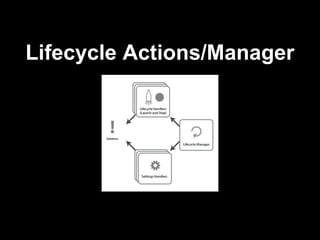
The document outlines the functionality of a lifecycle manager that manages user sessions, tracks active sessions, and applies system settings. It describes lifecycle actions including start and stop configurations for applications like Firefox and screen magnifiers. Examples of specific commands and settings handlers for session management are provided.


![exec Lifecycle Action
{
start: [
{
type: 'gpii.launch.exec',
command: 'firefox'
}
],
stop: [
{
type: 'gpii.launch.exec',
command: 'pkill -2 firefox'
}
]
}](https://image.slidesharecdn.com/lifecycleactionsmanager-120709070709-phpapp01/85/Lifecycle-actions-manager-4-320.jpg)
![Settings handlers lifecycle actions
"setSettings" / "restoreSettings"
{
start: [
"setSettings",
{
type: 'gpii.launch.exec',
command: 'firefox'
}
],
stop: [
{
type: 'gpii.launch.exec',
command: 'pkill -2 firefox'
},
"restoreSettings"
]
}](https://image.slidesharecdn.com/lifecycleactionsmanager-120709070709-phpapp01/85/Lifecycle-actions-manager-5-320.jpg)
![Creating Lifecycle Action
Screen magnifier example
{
start: [
"setSettings", {
type: 'gpii.launch.exec',
command: 'gsettings set org.gnome.desktop.a11y.
applications screen-magnifier-enabled true'
}],
stop: [{
type: 'gpii.launch.exec',
command: 'gsettings set org.gnome.desktop.a11y.
applications screen-magnifier-enabled false'
}, "restoreSettings"]
}](https://image.slidesharecdn.com/lifecycleactionsmanager-120709070709-phpapp01/85/Lifecycle-actions-manager-6-320.jpg)


