Lesson 11
• Decision Statements
• If then
• If then else
• if...elif...else...fi
• case
Decision Making
Unix Shell supports conditional statements
Used to perform different actions based on different conditions
• if...else statements
• case...esac statement
If then
if...fi statement
if...fi statement is the fundamental control statement.
Allows Shell to make decisions and execute statements conditionally.
Syntax:
if [ expression ]
then
Statement(s) to be executed if expression is true
fi
• Shell expression is evaluated. If the resulting value is true, given statement(s) are executed.
• If expression is false then no statement would be not executed.
• Most of the times you will use comparison operators while making decisions.
Spaces between braces and expression is mandatory otherwise there’s syntax error.
Most of the if statements check relations using relational operators
If expression is a shell command then it would be assumed true if it return 0 after its execution.
If it is a boolean expression then it would be true if it returns true.
If then
Exemple:
Vi if.sh
#!/bin/sh
a=10
b=20
if [ $a == $b ]
then
echo "a is equal to b"
fi
if [ $a != $b ]
then
echo "a is not equal to b"
fi
Exemple Result:
$ a is not equal to b
If then
Exemple:
#!/bin/bash
if [ “1” = “1” ]
then
echo “ONE”
fi
#!/bin/bash
if [ “1” = “1” ]; then
echo “ONE”
fi
Use of semicolon in which its purpose is to separate statements
if [ “1” = “1” ]; then echo “ONE”; fi # See?
all in one
If then else
if...else...fi statement
The if...else...fi statement is the next form of control statement
Allows to execute statements in controlled way making decision between two choices
Syntax:
if [ expression ]
then
Statement(s) to be executed if expression is true
else
Statement(s) to be executed if expression is not true
fi
• Shell expression is evaluated.
• If the resulting value is true, given statement(s) are executed.
• If expression is false then no statement would be not executed.
If then else
Exemple:
vi else.sh
#!/bin/sh
a=10
b=20
if [ $a == $b ]
then
echo "a is equal to b"
else
echo "a is not equal to b"
fi
Exemple Result:
$ a is not equal to b
If then else
Exemple:
#!/bin/bash
if [ “1” = “1” ]; then
echo “ONE”
else
echo “NONE”
fi
else part will only be executed only if the expression fails
if...elif...else...fi
if...elif...else...fi statement
if...elif...fi One level advance form of control statement.
Allows Shell to make correct decision out of several conditions.
Syntax:
if [ expression 1 ]
then
Statement(s) to be executed if expression 1 is true
elif [ expression 2 ]
then
Statement(s) to be executed if expression 2 is true
elif [ expression 3 ]
then
Statement(s) to be executed if expression 3 is true
else
Statement(s) to be executed if no expression is true
fi
• Series of if statements, where each if is part of the else clause of the previous statement.
• Here statement(s) are executed based on the true condition,
• if non of the condition is true then else block is executed.
if...elif...else...fi
Exemple:
#!/bin/sh
a=10
b=20
if [ $a = $b ]
then
echo "a is equal to b"
elif [ $a -gt $b ]
then
echo "a is greater than b"
elif [ $a -lt $b ]
then
echo "a is less than b"
else
echo "None of the condition met"
fi
Exemple Result:
$ a is less than b
if...elif...else...fi
Exemple:
#!/bin/bash
if [ “1” = “1” ]; then
echo “ONE”
elif [ “0” = “0” ]; then
echo “ZERO”
else
echo “NONE”
fi
Multiple related conditions use elif which is almost the same as if
it comes only after if
case...esac
You can use multiple if...elif statements to perform a multiway branch.
This is not always the best solution, when all branches depend on value of a single variable.
Shell support case...esac statement which handles exactly this situation.
similar to case statement in programming languages C or C++ and PERL etc.
• Used to execute statements based on specific values.
• Better than repeated if...elif statements if there are a large number of conditions
• Value used can be an expression
• Each set of statements must be ended by a pair of semicolons ; ;
• a *) is used to accept any value not matched with list of values
case $var in
val1)
statements;;
val2)
statements;;
*)
statements;;
esac
case...esac
Syntax:
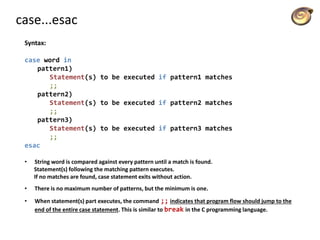
case word in
pattern1)
Statement(s) to be executed if pattern1 matches
;;
pattern2)
Statement(s) to be executed if pattern2 matches
;;
pattern3)
Statement(s) to be executed if pattern3 matches
;;
esac
• String word is compared against every pattern until a match is found.
Statement(s) following the matching pattern executes.
If no matches are found, case statement exits without action.
• There is no maximum number of patterns, but the minimum is one.
• When statement(s) part executes, the command ;; indicates that program flow should jump to the
end of the entire case statement. This is similar to break in the C programming language.
case...esac
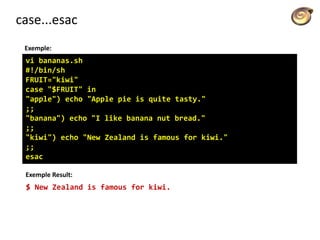
Exemple:
vi bananas.sh
#!/bin/sh
FRUIT="kiwi"
case "$FRUIT" in
"apple") echo "Apple pie is quite tasty."
;;
"banana") echo "I like banana nut bread."
;;
"kiwi") echo "New Zealand is famous for kiwi."
;;
esac
Exemple Result:
$ New Zealand is famous for kiwi.
case...esac
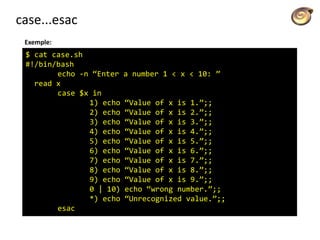
Exemple:
$ cat case.sh
#!/bin/bash
echo -n “Enter a number 1 < x < 10: ”
read x
case $x in
1) echo “Value of x is 1.”;;
2) echo “Value of x is 2.”;;
3) echo “Value of x is 3.”;;
4) echo “Value of x is 4.”;;
5) echo “Value of x is 5.”;;
6) echo “Value of x is 6.”;;
7) echo “Value of x is 7.”;;
8) echo “Value of x is 8.”;;
9) echo “Value of x is 9.”;;
0 | 10) echo “wrong number.”;;
*) echo “Unrecognized value.”;;
esac
case...esac
Exemple of evaluation of command line arguments
#!/bin/sh
option="${1}"
case ${option} in
-f) FILE="${2}"
echo "File name is $FILE"
;;
-d) DIR="${2}"
echo "Dir name is $DIR"
;;
*)
echo "`basename ${0}`:usage: [-f file] | [-d directory]"
exit 1 # Command to come out of the program with status 1
;;
esac
case...esac
Exemple output evaluation of command line arguments
$./test.sh
test.sh: usage: [ -f filename ] | [ -d directory ]
$ ./test.sh -f index.htm
$ vi test.sh
$ ./test.sh -f index.htm
File name is index.htm
$ ./test.sh -d unix
Dir name is unix
$

Licão 11 decision making - statement

  • 1.
    Lesson 11 • DecisionStatements • If then • If then else • if...elif...else...fi • case
  • 2.
    Decision Making Unix Shellsupports conditional statements Used to perform different actions based on different conditions • if...else statements • case...esac statement
  • 3.
    If then if...fi statement if...fistatement is the fundamental control statement. Allows Shell to make decisions and execute statements conditionally. Syntax: if [ expression ] then Statement(s) to be executed if expression is true fi • Shell expression is evaluated. If the resulting value is true, given statement(s) are executed. • If expression is false then no statement would be not executed. • Most of the times you will use comparison operators while making decisions. Spaces between braces and expression is mandatory otherwise there’s syntax error. Most of the if statements check relations using relational operators If expression is a shell command then it would be assumed true if it return 0 after its execution. If it is a boolean expression then it would be true if it returns true.
  • 4.
    If then Exemple: Vi if.sh #!/bin/sh a=10 b=20 if[ $a == $b ] then echo "a is equal to b" fi if [ $a != $b ] then echo "a is not equal to b" fi Exemple Result: $ a is not equal to b
  • 5.
    If then Exemple: #!/bin/bash if [“1” = “1” ] then echo “ONE” fi #!/bin/bash if [ “1” = “1” ]; then echo “ONE” fi Use of semicolon in which its purpose is to separate statements if [ “1” = “1” ]; then echo “ONE”; fi # See? all in one
  • 6.
    If then else if...else...fistatement The if...else...fi statement is the next form of control statement Allows to execute statements in controlled way making decision between two choices Syntax: if [ expression ] then Statement(s) to be executed if expression is true else Statement(s) to be executed if expression is not true fi • Shell expression is evaluated. • If the resulting value is true, given statement(s) are executed. • If expression is false then no statement would be not executed.
  • 7.
    If then else Exemple: vielse.sh #!/bin/sh a=10 b=20 if [ $a == $b ] then echo "a is equal to b" else echo "a is not equal to b" fi Exemple Result: $ a is not equal to b
  • 8.
    If then else Exemple: #!/bin/bash if[ “1” = “1” ]; then echo “ONE” else echo “NONE” fi else part will only be executed only if the expression fails
  • 9.
    if...elif...else...fi if...elif...else...fi statement if...elif...fi Onelevel advance form of control statement. Allows Shell to make correct decision out of several conditions. Syntax: if [ expression 1 ] then Statement(s) to be executed if expression 1 is true elif [ expression 2 ] then Statement(s) to be executed if expression 2 is true elif [ expression 3 ] then Statement(s) to be executed if expression 3 is true else Statement(s) to be executed if no expression is true fi • Series of if statements, where each if is part of the else clause of the previous statement. • Here statement(s) are executed based on the true condition, • if non of the condition is true then else block is executed.
  • 10.
    if...elif...else...fi Exemple: #!/bin/sh a=10 b=20 if [ $a= $b ] then echo "a is equal to b" elif [ $a -gt $b ] then echo "a is greater than b" elif [ $a -lt $b ] then echo "a is less than b" else echo "None of the condition met" fi Exemple Result: $ a is less than b
  • 11.
    if...elif...else...fi Exemple: #!/bin/bash if [ “1”= “1” ]; then echo “ONE” elif [ “0” = “0” ]; then echo “ZERO” else echo “NONE” fi Multiple related conditions use elif which is almost the same as if it comes only after if
  • 12.
    case...esac You can usemultiple if...elif statements to perform a multiway branch. This is not always the best solution, when all branches depend on value of a single variable. Shell support case...esac statement which handles exactly this situation. similar to case statement in programming languages C or C++ and PERL etc. • Used to execute statements based on specific values. • Better than repeated if...elif statements if there are a large number of conditions • Value used can be an expression • Each set of statements must be ended by a pair of semicolons ; ; • a *) is used to accept any value not matched with list of values case $var in val1) statements;; val2) statements;; *) statements;; esac
  • 13.
    case...esac Syntax: case word in pattern1) Statement(s)to be executed if pattern1 matches ;; pattern2) Statement(s) to be executed if pattern2 matches ;; pattern3) Statement(s) to be executed if pattern3 matches ;; esac • String word is compared against every pattern until a match is found. Statement(s) following the matching pattern executes. If no matches are found, case statement exits without action. • There is no maximum number of patterns, but the minimum is one. • When statement(s) part executes, the command ;; indicates that program flow should jump to the end of the entire case statement. This is similar to break in the C programming language.
  • 14.
    case...esac Exemple: vi bananas.sh #!/bin/sh FRUIT="kiwi" case "$FRUIT"in "apple") echo "Apple pie is quite tasty." ;; "banana") echo "I like banana nut bread." ;; "kiwi") echo "New Zealand is famous for kiwi." ;; esac Exemple Result: $ New Zealand is famous for kiwi.
  • 15.
    case...esac Exemple: $ cat case.sh #!/bin/bash echo-n “Enter a number 1 < x < 10: ” read x case $x in 1) echo “Value of x is 1.”;; 2) echo “Value of x is 2.”;; 3) echo “Value of x is 3.”;; 4) echo “Value of x is 4.”;; 5) echo “Value of x is 5.”;; 6) echo “Value of x is 6.”;; 7) echo “Value of x is 7.”;; 8) echo “Value of x is 8.”;; 9) echo “Value of x is 9.”;; 0 | 10) echo “wrong number.”;; *) echo “Unrecognized value.”;; esac
  • 16.
    case...esac Exemple of evaluationof command line arguments #!/bin/sh option="${1}" case ${option} in -f) FILE="${2}" echo "File name is $FILE" ;; -d) DIR="${2}" echo "Dir name is $DIR" ;; *) echo "`basename ${0}`:usage: [-f file] | [-d directory]" exit 1 # Command to come out of the program with status 1 ;; esac
  • 17.
    case...esac Exemple output evaluationof command line arguments $./test.sh test.sh: usage: [ -f filename ] | [ -d directory ] $ ./test.sh -f index.htm $ vi test.sh $ ./test.sh -f index.htm File name is index.htm $ ./test.sh -d unix Dir name is unix $