Lessons Learned using the Classroom Experience Project How to fail at video conferenced teaching Jay Beavers, Microsoft Research Richard Anderson, Univ of Washington
UW Professional Master's Program Five year old program with established distance courses. One course per quarter video conferenced between UW and Microsoft. One evening per week Commuting distance
Before ClassroomXP technology ISDN Based video conferencing Netmeeting for PowerPoint distribution Electronic white board Lecture archive Continual improvement in quality Lighting, microphones, audio processing, camera management, etc.
How to fail at video conferencing, Jim Gemmel Voice quality must be competitive with telephony Video should increase, not decrease ‘presence’ Starting up a video conference should be as easy as making a telephone call Video conferencing must be ubiquitous
Potential advantages for using ConferenceXP Higher quality video and audio Ease of setup and installation Address some known problems Whiteboard
Friendly Environment for ClassroomXP trials Substantial resources on both sides Established program Near-located Existing relationship Experiment Is higher quality video better Better interactivity through ink on PPT
What we hoped to achieve Increased interaction between sites Ability of remote students to interact with the instructor Ability of instructor to engage remote students Student interaction across sites No degradation of experience of local students No System Administrator
What happened Week 1 Used old system (for comparison) Weeks 2-4 Bad patch cable caused 30% packet loss, maiming Conferencing app Weeks 5-9 Router incompatibilities caused intermittent multicast failure (~15 minutes between failure) Weeks 10-12 Worked as expected
How to fail at a distance course Transmission failures Production quality Lighting, room noise, camera management Structured presentations limit activity Classroom issues Table layout, overhead positionning Attitudes
Transmission failures No connection – if the bits don’t get through, there is no class Interruptions – short failures  Degradation of performance  (audio, video, signal and latency)
Production quality Microphones Not picking up sound Picking up too much Lighting Camera quality Field of view Distance
Presentation Restrictions imposed by technology Limitations on materials Loss of fidelity of transmitted materials
Classroom issues Placement of projectors Dispersal of audience Student seating Conference rooms versus lecture hall
Attitudes Resentment of technology Not attempting to engage other site Instructor – not encouraging questions Students – not asking questions
Multicast Lack of reliability Vender incompatibility issues Substantial time to localize problems Intermittent failures
Multicast test tools Details on what is needed – it would be great to create interest in this
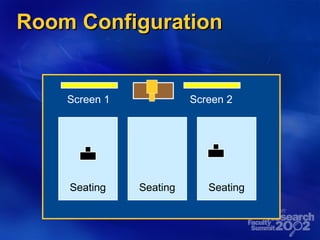
Room Configuration Screen 1 Screen 2 Seating Seating Seating
Content Issues Sound issues – difficulty of room(s).  Value of picking up background noise (sense of presence). Camera issues in remote room Configuration required students to sit at distance Some students avoided sitting in field of view
Student Reactions I Repeated failures reduced students attempt to interact across sites Even intermittent failures had significant psychological impact Students recognized that we were  attempting  to do a good job (we were present in the remote classroom, and shared their pain)
Student Reactions II With our workarounds (high latency video, conference phone) students did not participate. In spite of technical difficulties many students chose to attend the remote site (commuting 15 miles in traffic being an alternative) Local students complained of intrusiveness of interruptions.  Had little sympathy for remote students.
Faculty Reaction With technological difficulties, taught primarily to local class Presentation tools readily accepted
Take 2 Network diagnostics & testing 7x24 test agents Long term statistics gathering & web reporting Concept of “Administrative Console” Diagnostics to quickly determine fault Over 20 points of potential failure in “I can’t hear the professor” Non-invasive reset, diagnostics, configuration change Rooms dedicated to distance classes Lighting, wall color, ceiling mikes, projector & A/C noise, projector positioning, table layout Ease of startup & shutdown
 

Lessons Learned using the Classroom Experience Project

  • 1.
    Lessons Learned usingthe Classroom Experience Project How to fail at video conferenced teaching Jay Beavers, Microsoft Research Richard Anderson, Univ of Washington
  • 2.
    UW Professional Master'sProgram Five year old program with established distance courses. One course per quarter video conferenced between UW and Microsoft. One evening per week Commuting distance
  • 3.
    Before ClassroomXP technologyISDN Based video conferencing Netmeeting for PowerPoint distribution Electronic white board Lecture archive Continual improvement in quality Lighting, microphones, audio processing, camera management, etc.
  • 4.
    How to failat video conferencing, Jim Gemmel Voice quality must be competitive with telephony Video should increase, not decrease ‘presence’ Starting up a video conference should be as easy as making a telephone call Video conferencing must be ubiquitous
  • 5.
    Potential advantages forusing ConferenceXP Higher quality video and audio Ease of setup and installation Address some known problems Whiteboard
  • 6.
    Friendly Environment forClassroomXP trials Substantial resources on both sides Established program Near-located Existing relationship Experiment Is higher quality video better Better interactivity through ink on PPT
  • 7.
    What we hopedto achieve Increased interaction between sites Ability of remote students to interact with the instructor Ability of instructor to engage remote students Student interaction across sites No degradation of experience of local students No System Administrator
  • 8.
    What happened Week1 Used old system (for comparison) Weeks 2-4 Bad patch cable caused 30% packet loss, maiming Conferencing app Weeks 5-9 Router incompatibilities caused intermittent multicast failure (~15 minutes between failure) Weeks 10-12 Worked as expected
  • 9.
    How to failat a distance course Transmission failures Production quality Lighting, room noise, camera management Structured presentations limit activity Classroom issues Table layout, overhead positionning Attitudes
  • 10.
    Transmission failures Noconnection – if the bits don’t get through, there is no class Interruptions – short failures Degradation of performance (audio, video, signal and latency)
  • 11.
    Production quality MicrophonesNot picking up sound Picking up too much Lighting Camera quality Field of view Distance
  • 12.
    Presentation Restrictions imposedby technology Limitations on materials Loss of fidelity of transmitted materials
  • 13.
    Classroom issues Placementof projectors Dispersal of audience Student seating Conference rooms versus lecture hall
  • 14.
    Attitudes Resentment oftechnology Not attempting to engage other site Instructor – not encouraging questions Students – not asking questions
  • 15.
    Multicast Lack ofreliability Vender incompatibility issues Substantial time to localize problems Intermittent failures
  • 16.
    Multicast test toolsDetails on what is needed – it would be great to create interest in this
  • 17.
    Room Configuration Screen1 Screen 2 Seating Seating Seating
  • 18.
    Content Issues Soundissues – difficulty of room(s). Value of picking up background noise (sense of presence). Camera issues in remote room Configuration required students to sit at distance Some students avoided sitting in field of view
  • 19.
    Student Reactions IRepeated failures reduced students attempt to interact across sites Even intermittent failures had significant psychological impact Students recognized that we were attempting to do a good job (we were present in the remote classroom, and shared their pain)
  • 20.
    Student Reactions IIWith our workarounds (high latency video, conference phone) students did not participate. In spite of technical difficulties many students chose to attend the remote site (commuting 15 miles in traffic being an alternative) Local students complained of intrusiveness of interruptions. Had little sympathy for remote students.
  • 21.
    Faculty Reaction Withtechnological difficulties, taught primarily to local class Presentation tools readily accepted
  • 22.
    Take 2 Networkdiagnostics & testing 7x24 test agents Long term statistics gathering & web reporting Concept of “Administrative Console” Diagnostics to quickly determine fault Over 20 points of potential failure in “I can’t hear the professor” Non-invasive reset, diagnostics, configuration change Rooms dedicated to distance classes Lighting, wall color, ceiling mikes, projector & A/C noise, projector positioning, table layout Ease of startup & shutdown
  • 23.