Humanities Module - Session Five: Keeping up to date
Lesson plan
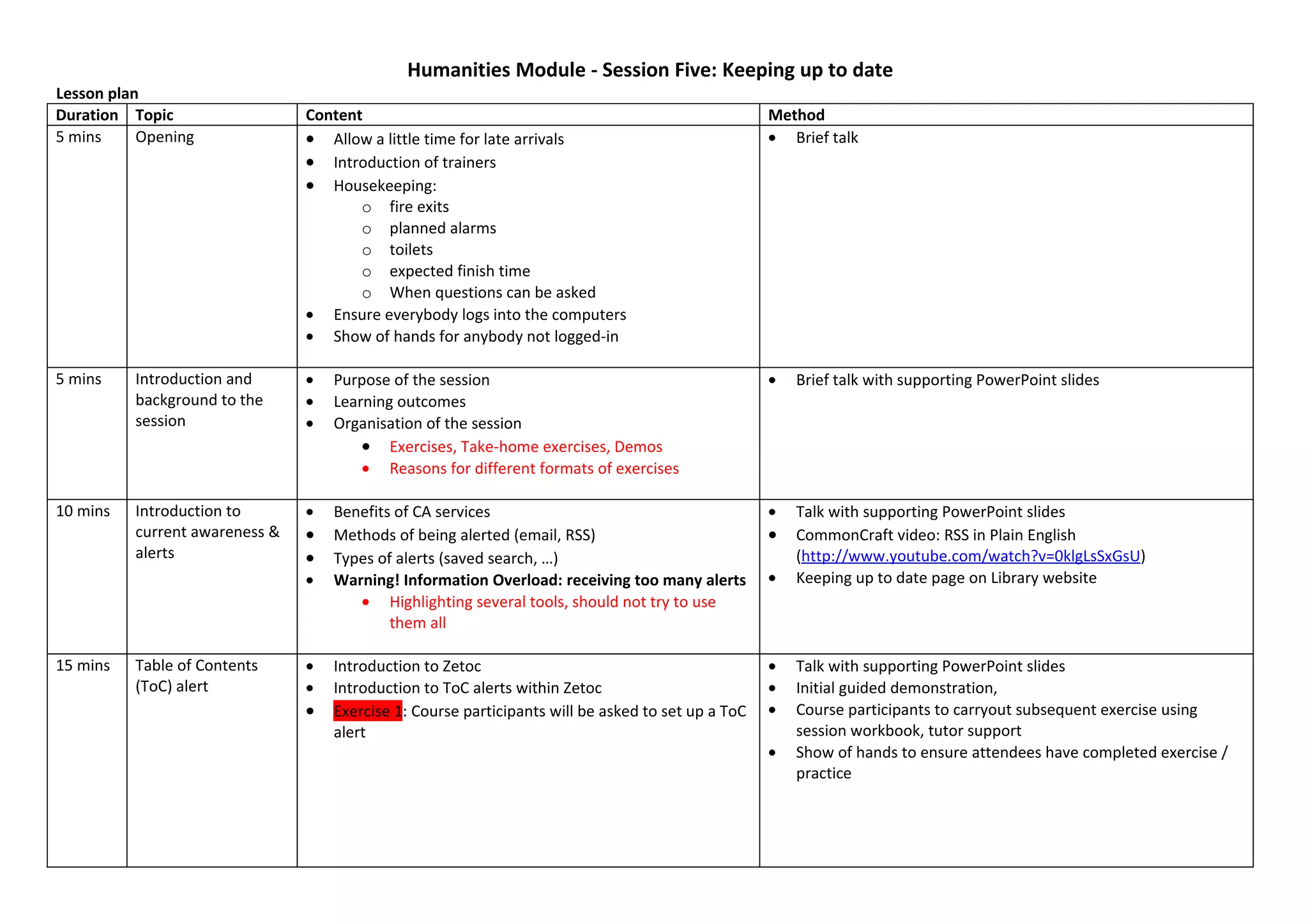
Duration Topic                  Content                                                             Method
5 mins     Opening              • Allow a little time for late arrivals                             • Brief talk
                                • Introduction of trainers
                                • Housekeeping:
                                       o fire exits
                                       o planned alarms
                                       o toilets
                                       o expected finish time
                                       o When questions can be asked
                                • Ensure everybody logs into the computers
                                • Show of hands for anybody not logged-in

5 mins    Introduction and      •   Purpose of the session                                          •   Brief talk with supporting PowerPoint slides
          background to the     •   Learning outcomes
          session               •   Organisation of the session
                                        • Exercises, Take-home exercises, Demos
                                        • Reasons for different formats of exercises

10 mins   Introduction to       •   Benefits of CA services                                         •   Talk with supporting PowerPoint slides
          current awareness &   •   Methods of being alerted (email, RSS)                           •   CommonCraft video: RSS in Plain English
          alerts                •   Types of alerts (saved search, …)                                   (http://www.youtube.com/watch?v=0klgLsSxGsU)
                                •   Warning! Information Overload: receiving too many alerts        •   Keeping up to date page on Library website
                                       • Highlighting several tools, should not try to use
                                            them all

15 mins   Table of Contents     •   Introduction to Zetoc                                           •   Talk with supporting PowerPoint slides
          (ToC) alert           •   Introduction to ToC alerts within Zetoc                         •   Initial guided demonstration,
                                •   Exercise 1: Course participants will be asked to set up a ToC   •   Course participants to carryout subsequent exercise using
                                    alert                                                               session workbook, tutor support
                                                                                                    •   Show of hands to ensure attendees have completed exercise /
                                                                                                        practice
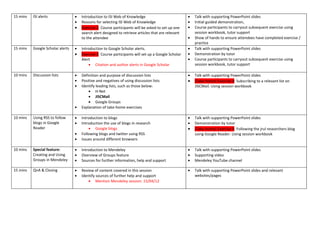
15 mins   ISI alerts              •   Introduction to ISI Web of Knowledge                           •   Talk with supporting PowerPoint slides
                                  •   Reasons for selecting ISI Web of Knowledge                     •   Initial guided demonstration,
                                  •   Exercise 2: Course participants will be asked to set up one    •   Course participants to carryout subsequent exercise using
                                      search alert designed to retrieve articles that are relevant       session workbook, tutor support
                                      to the attendee                                                •   Show of hands to ensure attendees have completed exercise /
                                                                                                         practice
15 mins   Google Scholar alerts   •   Introduction to Google Scholar alerts.                         •   Talk with supporting PowerPoint slides
                                  •   Exercise 3: Course participants will set up a Google Scholar   •   Demonstration by tutor
                                      Alert                                                          •   Course participants to carryout subsequent exercise using
                                          • Citation and author alerts in Google Scholar                 session workbook, tutor support

10 mins   Discussion lists        •   Definition and purpose of discussion lists                     •   Talk with supporting PowerPoint slides
                                  •   Positive and negatives of using discussion lists               •   (Take-home) Exercise 4: Subscribing to a relevant list on
                                  •   Identify leading lists, such as those below:                       JISCMail. Using session workbook
                                          • H-Net
                                          • JISCMail
                                          • Google Groups
                                  •   Explanation of take-home exercises

10 mins   Using RSS to follow     •   Introduction to blogs                                          •   Talk with supporting PowerPoint slides
          blogs in Google         •   Introduction the use of blogs in research                      •   Demonstration by tutor
          Reader                          • Google blogs                                             •   (Take-home) Exercise 5: Following the jrul researchers blog
                                  •   Following blogs and twitter using RSS                              using Google Reader. Using session workbook
                                  •   Issues around different browsers

10 mins   Special feature:        •   Introduction to Mendeley                                       •   Talk with supporting PowerPoint slides
          Creating and Using      •   Overview of Groups feature                                     •   Supporting video
          Groups in Mendeley      •   Sources for further information, help and support              •   Mendeley YouTube channel

15 mins   QnA & Closing           •   Review of content covered in this session                      •   Talk with supporting PowerPoint slides and relevant
                                  •   Identify sources of further help and support                       websites/pages
                                          • Mention Mendeley session: 15/04/12

Lesson plan session five - keeping up to date

  • 1.
    Humanities Module -Session Five: Keeping up to date Lesson plan Duration Topic Content Method 5 mins Opening • Allow a little time for late arrivals • Brief talk • Introduction of trainers • Housekeeping: o fire exits o planned alarms o toilets o expected finish time o When questions can be asked • Ensure everybody logs into the computers • Show of hands for anybody not logged-in 5 mins Introduction and • Purpose of the session • Brief talk with supporting PowerPoint slides background to the • Learning outcomes session • Organisation of the session • Exercises, Take-home exercises, Demos • Reasons for different formats of exercises 10 mins Introduction to • Benefits of CA services • Talk with supporting PowerPoint slides current awareness & • Methods of being alerted (email, RSS) • CommonCraft video: RSS in Plain English alerts • Types of alerts (saved search, …) (http://www.youtube.com/watch?v=0klgLsSxGsU) • Warning! Information Overload: receiving too many alerts • Keeping up to date page on Library website • Highlighting several tools, should not try to use them all 15 mins Table of Contents • Introduction to Zetoc • Talk with supporting PowerPoint slides (ToC) alert • Introduction to ToC alerts within Zetoc • Initial guided demonstration, • Exercise 1: Course participants will be asked to set up a ToC • Course participants to carryout subsequent exercise using alert session workbook, tutor support • Show of hands to ensure attendees have completed exercise / practice
  • 2.
    15 mins ISI alerts • Introduction to ISI Web of Knowledge • Talk with supporting PowerPoint slides • Reasons for selecting ISI Web of Knowledge • Initial guided demonstration, • Exercise 2: Course participants will be asked to set up one • Course participants to carryout subsequent exercise using search alert designed to retrieve articles that are relevant session workbook, tutor support to the attendee • Show of hands to ensure attendees have completed exercise / practice 15 mins Google Scholar alerts • Introduction to Google Scholar alerts. • Talk with supporting PowerPoint slides • Exercise 3: Course participants will set up a Google Scholar • Demonstration by tutor Alert • Course participants to carryout subsequent exercise using • Citation and author alerts in Google Scholar session workbook, tutor support 10 mins Discussion lists • Definition and purpose of discussion lists • Talk with supporting PowerPoint slides • Positive and negatives of using discussion lists • (Take-home) Exercise 4: Subscribing to a relevant list on • Identify leading lists, such as those below: JISCMail. Using session workbook • H-Net • JISCMail • Google Groups • Explanation of take-home exercises 10 mins Using RSS to follow • Introduction to blogs • Talk with supporting PowerPoint slides blogs in Google • Introduction the use of blogs in research • Demonstration by tutor Reader • Google blogs • (Take-home) Exercise 5: Following the jrul researchers blog • Following blogs and twitter using RSS using Google Reader. Using session workbook • Issues around different browsers 10 mins Special feature: • Introduction to Mendeley • Talk with supporting PowerPoint slides Creating and Using • Overview of Groups feature • Supporting video Groups in Mendeley • Sources for further information, help and support • Mendeley YouTube channel 15 mins QnA & Closing • Review of content covered in this session • Talk with supporting PowerPoint slides and relevant • Identify sources of further help and support websites/pages • Mention Mendeley session: 15/04/12