CS433 – Advance
Programming
Home Work
• Java Stands for?
• Installation of latest SDK-JDK
• How to set java variable(s) in Windows/Linux?
Java - An Introduction
• Java - The new programming language developed by Sun
Microsystems in 1991.
• Originally called Oak by James Gosling, one of the inventors of the
Java Language.
• HotJava
• The first Java-enabled Web browser
• JDK Evolutions
• J2SE, J2ME, and J2EE (not mentioned in the book, but could discuss
here optionally)
Java Introduction
• Originally created for consumer electronics (TV, VCR, Freeze, Washing
Machine, Mobile Phone).
• Java - CPU Independent language
• Internet and Web was just emerging, so Sun turned it into a language
of Internet Programming.
• It allows you to publish a webpage with Java code in it.
5
Characteristics of Java
• Java is simple
• Java is object-oriented
• Java is distributed
• Java is interpreted
• Java is robust
• Java is secure
• Java is architecture-neutral
• Java is portable
• Java’s performance
• Java is multithreaded
• Java is dynamic
Write once, run anywhere
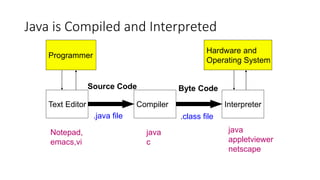
Java is Compiled and Interpreted
Text Editor Compiler Interpreter
Programmer
Source Code
.java file
Byte Code
.class file
Hardware and
Operating System
Notepad,
emacs,vi
java
c
java
appletviewer
netscape
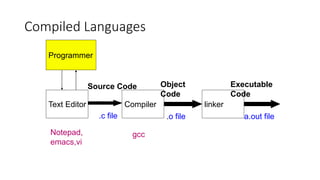
Compiled Languages
Text Editor Compiler linker
Programmer
Source Code
.c file
Object
Code
.o file
Notepad,
emacs,vi
gcc
Executable
Code
a.out file
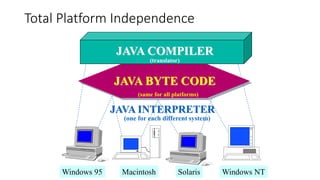
Total Platform Independence
JAVA COMPILER
JAVA BYTE CODE
JAVA INTERPRETER
Windows 95 Macintosh Solaris Windows NT
(translator)
(same for all platforms)
(one for each different system)
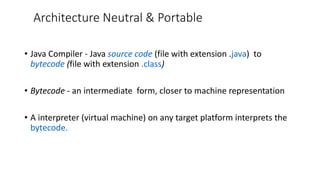
Architecture Neutral & Portable
• Java Compiler - Java source code (file with extension .java) to
bytecode (file with extension .class)
• Bytecode - an intermediate form, closer to machine representation
• A interpreter (virtual machine) on any target platform interprets the
bytecode.
Rich Class Environment
• Core Classes
language
Utilities
Input/Output
Low-Level Networking
Abstract Graphical User Interface
• Internet Classes
TCP/IP Networking
WWW and HTML
Distributed Programs
12
JDK Versions
• JDK 1.02 (1995)
• JDK 1.1 (1996)
• Java 2 SDK v 1.2 (a.k.a JDK 1.2, 1998)
• Java 2 SDK v 1.3 (a.k.a JDK 1.3, 2000)
• Java 2 SDK v 1.4 (a.k.a JDK 1.4, 2002)
• Find the latest release details … ?
13
JDK Editions
• Java Standard Edition (J2SE)
• J2SE can be used to develop client-side standalone
applications or applets.
• Java Enterprise Edition (J2EE)
• J2EE can be used to develop server-side applications
such as Java servlets and Java ServerPages.
• Java Micro Edition (J2ME).
• J2ME can be used to develop applications for mobile
devices such as cell phones.
14
Java IDE Tools
• JDK/JRE,
• Eclipse, Net Bean
• BlueJ
• GlassFish
• Tomcat,
• Borland JBuilder,
• Sun ONE Studio by
Sun MicroSystems
• Forte by Sun
MicroSystems
• Borland JBuilder
• Microsoft Visual J++
• WebGain Café
• IBM Visual Age for
Java
Home Reading
How Does Java Compares to C++ and Other
OO Languages
Overlap of C, C++, and Java
C
C++
Java
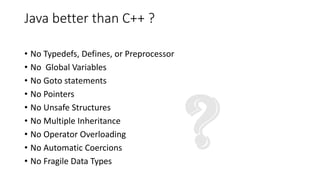
Java better than C++ ?
• No Typedefs, Defines, or Preprocessor
• No Global Variables
• No Goto statements
• No Pointers
• No Unsafe Structures
• No Multiple Inheritance
• No Operator Overloading
• No Automatic Coercions
• No Fragile Data Types
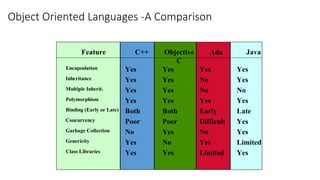
Object Oriented Languages -A Comparison
Feature C++ Objective
C
Ada Java
Encapsulation Yes Yes Yes Yes
Inheritance Yes Yes No Yes
Multiple Inherit. Yes Yes No No
Polymorphism Yes Yes Yes Yes
Binding (Early or Late) Both Both Early Late
Concurrency Poor Poor Difficult Yes
Garbage Collection No Yes No Yes
Genericity Yes No Yes Limited
Class Libraries Yes Yes Limited Yes
Java Integrates
Power of Compiled Languages
and
Flexibility of Interpreted
Languages
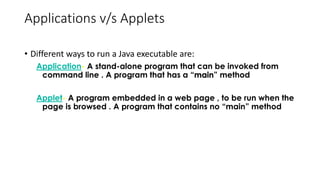
Applications v/s Applets
• Different ways to run a Java executable are:
Application- A stand-alone program that can be invoked from
command line . A program that has a “main” method
Applet- A program embedded in a web page , to be run when the
page is browsed . A program that contains no “main” method
Applets v/s Applications
• Different ways to run a Java executable are
Application- A stand-alone program that can be invoked from
command line . A program that has a “main” method
Applet- A program embedded in a web page , to be run when the
page is browsed . A program that contains no “main” method
• Application –Executed by the Java interpreter.
• Applet- Java enabled web browser.

Lecture-01 _Java Introduction CS 441 Fast

  • 1.
  • 2.
    Home Work • JavaStands for? • Installation of latest SDK-JDK • How to set java variable(s) in Windows/Linux?
  • 3.
    Java - AnIntroduction • Java - The new programming language developed by Sun Microsystems in 1991. • Originally called Oak by James Gosling, one of the inventors of the Java Language. • HotJava • The first Java-enabled Web browser • JDK Evolutions • J2SE, J2ME, and J2EE (not mentioned in the book, but could discuss here optionally)
  • 4.
    Java Introduction • Originallycreated for consumer electronics (TV, VCR, Freeze, Washing Machine, Mobile Phone). • Java - CPU Independent language • Internet and Web was just emerging, so Sun turned it into a language of Internet Programming. • It allows you to publish a webpage with Java code in it.
  • 5.
    5 Characteristics of Java •Java is simple • Java is object-oriented • Java is distributed • Java is interpreted • Java is robust • Java is secure • Java is architecture-neutral • Java is portable • Java’s performance • Java is multithreaded • Java is dynamic
  • 6.
  • 7.
    Java is Compiledand Interpreted Text Editor Compiler Interpreter Programmer Source Code .java file Byte Code .class file Hardware and Operating System Notepad, emacs,vi java c java appletviewer netscape
  • 8.
    Compiled Languages Text EditorCompiler linker Programmer Source Code .c file Object Code .o file Notepad, emacs,vi gcc Executable Code a.out file
  • 9.
    Total Platform Independence JAVACOMPILER JAVA BYTE CODE JAVA INTERPRETER Windows 95 Macintosh Solaris Windows NT (translator) (same for all platforms) (one for each different system)
  • 10.
    Architecture Neutral &Portable • Java Compiler - Java source code (file with extension .java) to bytecode (file with extension .class) • Bytecode - an intermediate form, closer to machine representation • A interpreter (virtual machine) on any target platform interprets the bytecode.
  • 11.
    Rich Class Environment •Core Classes language Utilities Input/Output Low-Level Networking Abstract Graphical User Interface • Internet Classes TCP/IP Networking WWW and HTML Distributed Programs
  • 12.
    12 JDK Versions • JDK1.02 (1995) • JDK 1.1 (1996) • Java 2 SDK v 1.2 (a.k.a JDK 1.2, 1998) • Java 2 SDK v 1.3 (a.k.a JDK 1.3, 2000) • Java 2 SDK v 1.4 (a.k.a JDK 1.4, 2002) • Find the latest release details … ?
  • 13.
    13 JDK Editions • JavaStandard Edition (J2SE) • J2SE can be used to develop client-side standalone applications or applets. • Java Enterprise Edition (J2EE) • J2EE can be used to develop server-side applications such as Java servlets and Java ServerPages. • Java Micro Edition (J2ME). • J2ME can be used to develop applications for mobile devices such as cell phones.
  • 14.
    14 Java IDE Tools •JDK/JRE, • Eclipse, Net Bean • BlueJ • GlassFish • Tomcat, • Borland JBuilder, • Sun ONE Studio by Sun MicroSystems • Forte by Sun MicroSystems • Borland JBuilder • Microsoft Visual J++ • WebGain Café • IBM Visual Age for Java
  • 15.
  • 16.
    How Does JavaCompares to C++ and Other OO Languages
  • 17.
    Overlap of C,C++, and Java C C++ Java
  • 18.
    Java better thanC++ ? • No Typedefs, Defines, or Preprocessor • No Global Variables • No Goto statements • No Pointers • No Unsafe Structures • No Multiple Inheritance • No Operator Overloading • No Automatic Coercions • No Fragile Data Types
  • 19.
    Object Oriented Languages-A Comparison Feature C++ Objective C Ada Java Encapsulation Yes Yes Yes Yes Inheritance Yes Yes No Yes Multiple Inherit. Yes Yes No No Polymorphism Yes Yes Yes Yes Binding (Early or Late) Both Both Early Late Concurrency Poor Poor Difficult Yes Garbage Collection No Yes No Yes Genericity Yes No Yes Limited Class Libraries Yes Yes Limited Yes
  • 20.
    Java Integrates Power ofCompiled Languages and Flexibility of Interpreted Languages
  • 21.
    Applications v/s Applets •Different ways to run a Java executable are: Application- A stand-alone program that can be invoked from command line . A program that has a “main” method Applet- A program embedded in a web page , to be run when the page is browsed . A program that contains no “main” method
  • 22.
    Applets v/s Applications •Different ways to run a Java executable are Application- A stand-alone program that can be invoked from command line . A program that has a “main” method Applet- A program embedded in a web page , to be run when the page is browsed . A program that contains no “main” method • Application –Executed by the Java interpreter. • Applet- Java enabled web browser.