Introduction to Computers and
Programming
Lecture 1:
administrative details and an
introduction to computers
Professor: Evan Korth
New York University
Road Map for Today
 Welcome to Introduction to Computers and
Programming!
 Course Description
– What material will we cover?
– What am I getting myself into?
 Administrative Issues
– Course Web Page, Text Book, Exams, Office Hours, Homework,
Grading, Cheating Policy, etc.
 Syllabus
 History of Computers
 Intro. to Programming Languages and Java
 Reading
– Liang 6 and Liang 7: chapter 1.1 – 1.4, 1.6 - 1.7
– (most of today’s material is not in the book)
2
Course Prerequisites
 Prerequisites:
– No prior programming experience required (Really)
 Who should be taking this course:
– students who want to switch to a computer science
major
– students who want a computer science minor or a
computer applications minor
– students who are just interested in programming.
 Who should NOT be taking this course
– Students trying to get out of taking a math
requirement. This class may be more difficult than
the math you are trying to avoid.
 You must get a c or better in this class to take
further computer science classes. 3
Course Description
 Official Description: Elementary introduction
to programming. The characteristics of
computers are discussed and students
design, code, and debug programs using a
high level programming language.
4
What the class is really about
There are three main goals of this course:
1. Basics of Java
2. Core Concepts of Programming
Languages
5
1. Learn the Basics of Java
Programming
 Java is a popular programming language, widely
used in industry.
 We will learn all the specifics of how to program
in Java.
 This includes all the peculiar rules that are
specific to Java.
 We will cover the fundamentals: Variables,
Arithmetic, If / Else, For Loops, While Loops,
Arrays, Methods, etc.
6
For Example
/* Sample Java Program */
public class Sample
{
public static void main (String [] args)
{
int i;
for (i = 1; i <= 10; i++)
{
System.out.println ("Number: " + i);
}
}
}
This program counts
from 1 to 10. In a
few weeks, it will all
make sense (I
promise!)
7
2. Learn the Core Concepts of all
Programming Languages
 There are many programming languages
available: Pascal, c, Java, Ada, Perl.
 All of these languages share core concepts.
 By focusing on these concepts, you are better able
to learn any programming language.
 Hence, by learning Java, you are poised to learn
other languages, such as C++ or Perl.
 By learning the core concepts, you are also much
more marketable as you are able to learn new
technologies quicker.
 Note: Java is an object oriented programming
language. However, we will not touch upon the
concepts which categorize it as one. 8
An Example: For Loops
 Java has a construct called a for loop that
enables a program to repeat actions over and
over.
 Most other languages also have a for loop.
 Hence, by learning about for loops in
Java, you can easily learn for loops in C or
Ada.
9
3. Learn the Principles of
Software Development
 Building high quality software is very difficult.
 The course presents the syntax and concepts of
programming, and also presents strategies for
building real software that addresses real
problems.
 I will also try to bring my real-world industry
experience to class.
10
Administrative Matters
11
Course Web Site
 Course web site is available at:
http://www.cs.nyu.edu/courses/spring09/V22.0002-
003/index.html
Web site contains the following information:
– Administrative information
– Course Syllabus
– Homework assignments
– Class notes
– Class programs
– Sample exams
– Compiler instructions
– Link to the class mailing list
12
Class mailing list
 First assignment is to join it. Do it today!
 Go to:
http://cs.nyu.edu/mailman/listinfo/v22_0002_003_s
p09
and follow the instructions
 All assignments and news will be sent to the
class list
 Homework questions should be sent to the list
and answered by students when possible.
13
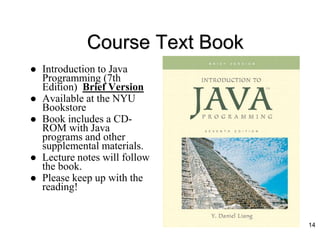
Course Text Book
 Introduction to Java
Programming (7th
Edition) Brief Version
 Available at the NYU
Bookstore
 Book includes a CD-
ROM with Java
programs and other
supplemental materials.
 Lecture notes will follow
the book.
 Please keep up with the
reading!
14
Software
 For the course, you may use any IDE you are
comfortable using. I will use one or more of the
following in the classroom:
– Eclipse
– JCreator (Note: this IDE has no debugger)
– Netbeans
 All these products can be downloaded from the
web for free.
 The class website has instructions on
downloading and installing these programs.
 If you do not have your own computer, the
computer labs on campus have the software.
15
Grading
 Your grade will be determined as follows:
– First Midterm (20%)
– Second Midterm (20%)
– Homework (possible quizzes) (20%)
– Final Exam (40%)
 Class participation will help your grade!
16
homework
Ten points will be deducted for each class day late, with a
possible maximum of 30 points being deducted.
Home works will not be accepted after the third class following
its due date.
For each assignment that you do not hand in within the time limit,
your final grade will be lowered by one letter grade ( i.e., if you
are averaging a B+, but you have missed 2 home works, your
final grade will be B-).
Submit the program via email to the grader (more on this later)
Back up your work. Computer crashes or lost programs are not
valid excuses for not handing in an assignment.
17
A Word About Cheating
 For the purposes of this class, cheating is
defined as by the CS Department’s
academic integrity policy
– Discussing homework concepts is fine, but
you must submit your own work.
 If you are caught cheating, you will
receive an immediate FAILURE for the
course.
18
Student Civility
 In an effort to make this class enjoyable
for everybody…
– Please be on time to class!
– Please do not talk to your friends and
neighbors in class! It disturbs everyone, and
makes it hard to concentrate. If you have a
question, just ask me!
– Please turn your pagers and cell-phones off!
19
Help is always available
 Option 1: Come to my Office Hours
– Monday 12:30 – 1:30; Tuesday, 5:00 – 6:00;
Thursday, 2:00 – 3:00 (I may change the
time of my office hours)
– Location: Room 319 Warren Weaver Hall
– I get bored when nobody visits!
– If you cannot make my office hours, I will be
happy to make an appointment with you.
Please try to give me advance warning when
you need an appointment.
 Option 2: Write to the class mailing list. Please do
not send homework code to the list.
 Option 3: lab tutors – see website for details
 Option 4: e-tutor – see website for details
 Option 5: College Learning Center Tutors
20
Introduction
 The purpose of this course is to teach you
about computing, but particularly,
programming in Java (a powerful, widely-
used programming language).
 Why care about computers and
programming?
– Enabling technology
– Growing field with great opportunity (read: $)
– Creative outlet
21
22
What Is a Computer?
 Computer
– Performs computations and makes logical decisions
– Millions / billions times faster than human beings
 Computer programs
– Sets of instructions by which a computer processes
data
 Hardware
– Physical devices of computer system
 Software
– Programs that run on computers
 2003 Prentice Hall, Inc. All rights reserved. (modified by Evan Korth)
23
Computer Organization
 Six logical units of computer system
– Input unit
 Mouse, keyboard
– Output unit
 Printer, monitor, audio speakers
– Memory unit
 Retains input and processed information
– Arithmetic and logic unit (ALU)
 Performs calculations
– Central processing unit (CPU)
 Supervises operation of other devices
– Secondary storage unit
 Hard drives, floppy drives
 2003 Prentice Hall, Inc. All rights reserved.
24
Evolution of Operating Systems
 Batch processing
– One job (task) at a time
– Operating systems developed
 Programs to make computers more convenient to
use
 Switch jobs easier
 Multiprogramming
– “Simultaneous” jobs
– Timesharing operating systems
 2003 Prentice Hall, Inc. All rights reserved.
Personal Computing, Distributed
Computing, and Client/Server
Computing
 Personal computers
– Economical enough for individual
– Popularized by Steve Jobs and Steve Wozniak
with the introduction of the Apple in 1977.
– In 1981 IBM introduced the IBM personal
computer using “off the shelf” components.
 2003 Prentice Hall, Inc. All rights reserved.
25
(modified by Evan Korth)
The boot process
 The process by which a machine comes up from
rest state to the state that is usable is known as
booting
 When the power is turned on
– The CPU runs the BIOS (Basic Input / Output
System)
 Usually located on a chip on the motherboard
 Runs POST (Power On Self Test) of various hardware
components
 Loads the boot sector program
26
The boot process (continued)
– Boot Sector Program
 Located in the first sector of the hard disk or
floppy disk
 Is responsible for loading the rest of the operation
system into the RAM
– Operating System
 Once it is loaded, it configures the various
hardware components
 Then it waits for the user to issue commands
 Then you can run your applications
27
Machine Languages, Assembly
Languages, and High-level Languages
 Three types of programming languages
– Machine languages
 Strings of numbers giving machine specific instructions
 Example:
+1300042774 (these would really be in binary)
+1400593419
+1200274027
– Assembly languages
 English-like abbreviations representing elementary
computer operations (translated via assemblers)
 Example:
LOAD BASEPAY
ADD OVERPAY
STORE GROSSPAY
 2000 Prentice Hall, Inc. All rights reserved.
28
Machine Languages, Assembly
Languages, and High-level Languages
– High-level languages
 Instructions closer to everyday English
– English is a natural language. Although high level
programming languages are closer to natural languages, it is
difficult to get too close due to the ambiguities in natural
languages (a statement in English can mean different things
to different people – obviously that is unacceptable for
computer programming). However, this is a big research
area of computer science.
 Use mathematical notations (translated via compilers)
 Example:
grossPay = basePay + overTimePay
 Interpreter – Executes high level language programs
without compilation.
 2003 Prentice Hall, Inc. All rights reserved.
29
(modified by Evan Korth)
Some Procedural High-level
Languages
 Other high-level languages
– FORTRAN
 Used for scientific and engineering applications
– COBOL
 Used to manipulate large amounts of data
– Pascal
 Intended for academic use
 2003 Prentice Hall, Inc. All rights reserved.
30
The Key Software Trend:
Object Technology
 Objects
– Reusable software components that model items in the
real world
– Meaningful software units
 Date objects, time objects, paycheck objects, invoice objects,
audio objects, video objects, file objects, record objects, etc.
 Any noun can be represented as an object
– Very reusable
– More understandable, better organized, and easier to
maintain than procedural programming
– Favor modularity
 2000 Prentice Hall, Inc. All rights reserved.
31
History of Java
 A group of 13 Sun employees including
James Gosling started the “Green Project”
in 1991 with the intention of planning for
the next wave in computing.
 They designed the *7 which was “an
interactive, handheld home-
entertainment device controller
with an animated touchscreen
user interface”
 Gosling’s contribution to the project was
an entirely new processor independent
language call “Oak”.
32
33
History or Java (continued)
 To make a long story short, people at Sun
decided to use this new language for the web.
 At the Sun World conference in May 1995, Marc
Andreessen of Netscape announced an agreement
to integrate Java into its browser. This meant
that webpages were no longer going to be static.
 Over the next few years, java became very
popular for writing applets (small programs
included on webpages)
 Today in addition to writing applets, Java is used
for writing large applications as well as
applications for mobile devices
 For more on the history of Java, check out:
http://java.sun.com/features/1998/05/birthday.html
34
Characteristics of Java
Java is simple
Java is object-oriented
Java is distributed
Java is interpreted
Java is robust
Java is secure
Java is architecture-neutral
Java is portable
Java’s performance
Java is multithreaded
Java is dynamic
35
Basics of a Typical Java
Environment
 Java programs normally undergo five phases
– Edit
 Programmer writes program (and stores program on disk)
– Compile
 Compiler creates bytecodes from program
– Load
 Class loader stores bytecodes in memory
– Verify
 Verifier ensures bytecodes do not violate security
requirements
– Execute
 Interpreter translates bytecodes into machine language
 2003 Prentice Hall, Inc. All rights reserved.
36
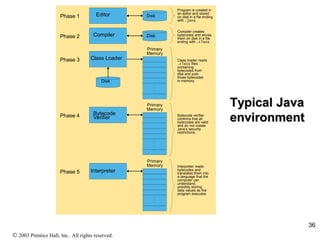
Typical Java
environment
Primary
Memory
.
.
.
.
.
.
Disk
Disk
Disk
Editor
Compiler
Class Loader
Program is created in
an editor and stored
on disk in a file ending
with .java.
Compiler creates
bytecodes and stores
them on disk in a file
ending with .class.
Class loader reads
.class files
containing
bytecodes from
disk and puts
those bytecodes
in memory.
Phase 1
Phase 2
Phase 3
Primary
Memory
.
.
.
.
.
.
Bytecode
Verifier Bytecode verifier
confirms that all
bytecodes are valid
and do not violate
Java’s security
restrictions.
Phase 4
Primary
Memory
.
.
.
.
.
.
Interpreter
Interpreter reads
bytecodes and
translates them into
a language that the
computer can
understand,
possibly storing
data values as the
program executes.
Phase 5
 2003 Prentice Hall, Inc. All rights reserved.
Another Basic Step for Java
Programming
 Debugging
– Check program execution and output to ensure
program compiles and runs as expected
– If it doesn’t, make corrections in the edit
phase and repeat the remaining steps
37
Hardware Trends
 Every year or two the following approximately
double:
– Amount of memory in which to execute programs
– Amount of secondary storage (such as disk storage)
 Used to hold programs and data over the longer term
– Processor speeds
 The speeds at which computers execute their programs
 2003 Prentice Hall, Inc. All rights reserved.
38

Lecture01 0089

  • 1.
    Introduction to Computersand Programming Lecture 1: administrative details and an introduction to computers Professor: Evan Korth New York University
  • 2.
    Road Map forToday  Welcome to Introduction to Computers and Programming!  Course Description – What material will we cover? – What am I getting myself into?  Administrative Issues – Course Web Page, Text Book, Exams, Office Hours, Homework, Grading, Cheating Policy, etc.  Syllabus  History of Computers  Intro. to Programming Languages and Java  Reading – Liang 6 and Liang 7: chapter 1.1 – 1.4, 1.6 - 1.7 – (most of today’s material is not in the book) 2
  • 3.
    Course Prerequisites  Prerequisites: –No prior programming experience required (Really)  Who should be taking this course: – students who want to switch to a computer science major – students who want a computer science minor or a computer applications minor – students who are just interested in programming.  Who should NOT be taking this course – Students trying to get out of taking a math requirement. This class may be more difficult than the math you are trying to avoid.  You must get a c or better in this class to take further computer science classes. 3
  • 4.
    Course Description  OfficialDescription: Elementary introduction to programming. The characteristics of computers are discussed and students design, code, and debug programs using a high level programming language. 4
  • 5.
    What the classis really about There are three main goals of this course: 1. Basics of Java 2. Core Concepts of Programming Languages 5
  • 6.
    1. Learn theBasics of Java Programming  Java is a popular programming language, widely used in industry.  We will learn all the specifics of how to program in Java.  This includes all the peculiar rules that are specific to Java.  We will cover the fundamentals: Variables, Arithmetic, If / Else, For Loops, While Loops, Arrays, Methods, etc. 6
  • 7.
    For Example /* SampleJava Program */ public class Sample { public static void main (String [] args) { int i; for (i = 1; i <= 10; i++) { System.out.println ("Number: " + i); } } } This program counts from 1 to 10. In a few weeks, it will all make sense (I promise!) 7
  • 8.
    2. Learn theCore Concepts of all Programming Languages  There are many programming languages available: Pascal, c, Java, Ada, Perl.  All of these languages share core concepts.  By focusing on these concepts, you are better able to learn any programming language.  Hence, by learning Java, you are poised to learn other languages, such as C++ or Perl.  By learning the core concepts, you are also much more marketable as you are able to learn new technologies quicker.  Note: Java is an object oriented programming language. However, we will not touch upon the concepts which categorize it as one. 8
  • 9.
    An Example: ForLoops  Java has a construct called a for loop that enables a program to repeat actions over and over.  Most other languages also have a for loop.  Hence, by learning about for loops in Java, you can easily learn for loops in C or Ada. 9
  • 10.
    3. Learn thePrinciples of Software Development  Building high quality software is very difficult.  The course presents the syntax and concepts of programming, and also presents strategies for building real software that addresses real problems.  I will also try to bring my real-world industry experience to class. 10
  • 11.
  • 12.
    Course Web Site Course web site is available at: http://www.cs.nyu.edu/courses/spring09/V22.0002- 003/index.html Web site contains the following information: – Administrative information – Course Syllabus – Homework assignments – Class notes – Class programs – Sample exams – Compiler instructions – Link to the class mailing list 12
  • 13.
    Class mailing list First assignment is to join it. Do it today!  Go to: http://cs.nyu.edu/mailman/listinfo/v22_0002_003_s p09 and follow the instructions  All assignments and news will be sent to the class list  Homework questions should be sent to the list and answered by students when possible. 13
  • 14.
    Course Text Book Introduction to Java Programming (7th Edition) Brief Version  Available at the NYU Bookstore  Book includes a CD- ROM with Java programs and other supplemental materials.  Lecture notes will follow the book.  Please keep up with the reading! 14
  • 15.
    Software  For thecourse, you may use any IDE you are comfortable using. I will use one or more of the following in the classroom: – Eclipse – JCreator (Note: this IDE has no debugger) – Netbeans  All these products can be downloaded from the web for free.  The class website has instructions on downloading and installing these programs.  If you do not have your own computer, the computer labs on campus have the software. 15
  • 16.
    Grading  Your gradewill be determined as follows: – First Midterm (20%) – Second Midterm (20%) – Homework (possible quizzes) (20%) – Final Exam (40%)  Class participation will help your grade! 16
  • 17.
    homework Ten points willbe deducted for each class day late, with a possible maximum of 30 points being deducted. Home works will not be accepted after the third class following its due date. For each assignment that you do not hand in within the time limit, your final grade will be lowered by one letter grade ( i.e., if you are averaging a B+, but you have missed 2 home works, your final grade will be B-). Submit the program via email to the grader (more on this later) Back up your work. Computer crashes or lost programs are not valid excuses for not handing in an assignment. 17
  • 18.
    A Word AboutCheating  For the purposes of this class, cheating is defined as by the CS Department’s academic integrity policy – Discussing homework concepts is fine, but you must submit your own work.  If you are caught cheating, you will receive an immediate FAILURE for the course. 18
  • 19.
    Student Civility  Inan effort to make this class enjoyable for everybody… – Please be on time to class! – Please do not talk to your friends and neighbors in class! It disturbs everyone, and makes it hard to concentrate. If you have a question, just ask me! – Please turn your pagers and cell-phones off! 19
  • 20.
    Help is alwaysavailable  Option 1: Come to my Office Hours – Monday 12:30 – 1:30; Tuesday, 5:00 – 6:00; Thursday, 2:00 – 3:00 (I may change the time of my office hours) – Location: Room 319 Warren Weaver Hall – I get bored when nobody visits! – If you cannot make my office hours, I will be happy to make an appointment with you. Please try to give me advance warning when you need an appointment.  Option 2: Write to the class mailing list. Please do not send homework code to the list.  Option 3: lab tutors – see website for details  Option 4: e-tutor – see website for details  Option 5: College Learning Center Tutors 20
  • 21.
    Introduction  The purposeof this course is to teach you about computing, but particularly, programming in Java (a powerful, widely- used programming language).  Why care about computers and programming? – Enabling technology – Growing field with great opportunity (read: $) – Creative outlet 21
  • 22.
    22 What Is aComputer?  Computer – Performs computations and makes logical decisions – Millions / billions times faster than human beings  Computer programs – Sets of instructions by which a computer processes data  Hardware – Physical devices of computer system  Software – Programs that run on computers  2003 Prentice Hall, Inc. All rights reserved. (modified by Evan Korth)
  • 23.
    23 Computer Organization  Sixlogical units of computer system – Input unit  Mouse, keyboard – Output unit  Printer, monitor, audio speakers – Memory unit  Retains input and processed information – Arithmetic and logic unit (ALU)  Performs calculations – Central processing unit (CPU)  Supervises operation of other devices – Secondary storage unit  Hard drives, floppy drives  2003 Prentice Hall, Inc. All rights reserved.
  • 24.
    24 Evolution of OperatingSystems  Batch processing – One job (task) at a time – Operating systems developed  Programs to make computers more convenient to use  Switch jobs easier  Multiprogramming – “Simultaneous” jobs – Timesharing operating systems  2003 Prentice Hall, Inc. All rights reserved.
  • 25.
    Personal Computing, Distributed Computing,and Client/Server Computing  Personal computers – Economical enough for individual – Popularized by Steve Jobs and Steve Wozniak with the introduction of the Apple in 1977. – In 1981 IBM introduced the IBM personal computer using “off the shelf” components.  2003 Prentice Hall, Inc. All rights reserved. 25 (modified by Evan Korth)
  • 26.
    The boot process The process by which a machine comes up from rest state to the state that is usable is known as booting  When the power is turned on – The CPU runs the BIOS (Basic Input / Output System)  Usually located on a chip on the motherboard  Runs POST (Power On Self Test) of various hardware components  Loads the boot sector program 26
  • 27.
    The boot process(continued) – Boot Sector Program  Located in the first sector of the hard disk or floppy disk  Is responsible for loading the rest of the operation system into the RAM – Operating System  Once it is loaded, it configures the various hardware components  Then it waits for the user to issue commands  Then you can run your applications 27
  • 28.
    Machine Languages, Assembly Languages,and High-level Languages  Three types of programming languages – Machine languages  Strings of numbers giving machine specific instructions  Example: +1300042774 (these would really be in binary) +1400593419 +1200274027 – Assembly languages  English-like abbreviations representing elementary computer operations (translated via assemblers)  Example: LOAD BASEPAY ADD OVERPAY STORE GROSSPAY  2000 Prentice Hall, Inc. All rights reserved. 28
  • 29.
    Machine Languages, Assembly Languages,and High-level Languages – High-level languages  Instructions closer to everyday English – English is a natural language. Although high level programming languages are closer to natural languages, it is difficult to get too close due to the ambiguities in natural languages (a statement in English can mean different things to different people – obviously that is unacceptable for computer programming). However, this is a big research area of computer science.  Use mathematical notations (translated via compilers)  Example: grossPay = basePay + overTimePay  Interpreter – Executes high level language programs without compilation.  2003 Prentice Hall, Inc. All rights reserved. 29 (modified by Evan Korth)
  • 30.
    Some Procedural High-level Languages Other high-level languages – FORTRAN  Used for scientific and engineering applications – COBOL  Used to manipulate large amounts of data – Pascal  Intended for academic use  2003 Prentice Hall, Inc. All rights reserved. 30
  • 31.
    The Key SoftwareTrend: Object Technology  Objects – Reusable software components that model items in the real world – Meaningful software units  Date objects, time objects, paycheck objects, invoice objects, audio objects, video objects, file objects, record objects, etc.  Any noun can be represented as an object – Very reusable – More understandable, better organized, and easier to maintain than procedural programming – Favor modularity  2000 Prentice Hall, Inc. All rights reserved. 31
  • 32.
    History of Java A group of 13 Sun employees including James Gosling started the “Green Project” in 1991 with the intention of planning for the next wave in computing.  They designed the *7 which was “an interactive, handheld home- entertainment device controller with an animated touchscreen user interface”  Gosling’s contribution to the project was an entirely new processor independent language call “Oak”. 32
  • 33.
    33 History or Java(continued)  To make a long story short, people at Sun decided to use this new language for the web.  At the Sun World conference in May 1995, Marc Andreessen of Netscape announced an agreement to integrate Java into its browser. This meant that webpages were no longer going to be static.  Over the next few years, java became very popular for writing applets (small programs included on webpages)  Today in addition to writing applets, Java is used for writing large applications as well as applications for mobile devices  For more on the history of Java, check out: http://java.sun.com/features/1998/05/birthday.html
  • 34.
    34 Characteristics of Java Javais simple Java is object-oriented Java is distributed Java is interpreted Java is robust Java is secure Java is architecture-neutral Java is portable Java’s performance Java is multithreaded Java is dynamic
  • 35.
    35 Basics of aTypical Java Environment  Java programs normally undergo five phases – Edit  Programmer writes program (and stores program on disk) – Compile  Compiler creates bytecodes from program – Load  Class loader stores bytecodes in memory – Verify  Verifier ensures bytecodes do not violate security requirements – Execute  Interpreter translates bytecodes into machine language  2003 Prentice Hall, Inc. All rights reserved.
  • 36.
    36 Typical Java environment Primary Memory . . . . . . Disk Disk Disk Editor Compiler Class Loader Programis created in an editor and stored on disk in a file ending with .java. Compiler creates bytecodes and stores them on disk in a file ending with .class. Class loader reads .class files containing bytecodes from disk and puts those bytecodes in memory. Phase 1 Phase 2 Phase 3 Primary Memory . . . . . . Bytecode Verifier Bytecode verifier confirms that all bytecodes are valid and do not violate Java’s security restrictions. Phase 4 Primary Memory . . . . . . Interpreter Interpreter reads bytecodes and translates them into a language that the computer can understand, possibly storing data values as the program executes. Phase 5  2003 Prentice Hall, Inc. All rights reserved.
  • 37.
    Another Basic Stepfor Java Programming  Debugging – Check program execution and output to ensure program compiles and runs as expected – If it doesn’t, make corrections in the edit phase and repeat the remaining steps 37
  • 38.
    Hardware Trends  Everyyear or two the following approximately double: – Amount of memory in which to execute programs – Amount of secondary storage (such as disk storage)  Used to hold programs and data over the longer term – Processor speeds  The speeds at which computers execute their programs  2003 Prentice Hall, Inc. All rights reserved. 38