XML For Dummies
        http://it-
        slideshares.blogspot.com

Book Author : Lucinda Dykes & Ed Tittle
Lecture 4 : Adding XTHML for the Web
http://it-
              slideshares.blogspot.com
Contents
1.   HTML, XML, and XHTML


2.   Comparing XML and HTML


3.   XHTML Makes the Move to XML Syntax


4.   Convert a document from HTML to XHTML


5.   The Role of DOCTYPE Declarations
4.1. HTML, XML, and
XHTML
 HTML, XHTML, and XML represent
 stages in the development of markup
 languages.

 ◦ HTML, designed to display content in
   Web browsers, came first.

 ◦ XML, intended for data exchange, came
   next.

 ◦ XHTML — which uses the markup tags of
   HTML and the strict syntax of XML.
http://it-
4.1.1 What HTML does
          slideshares.blogspot.com


best
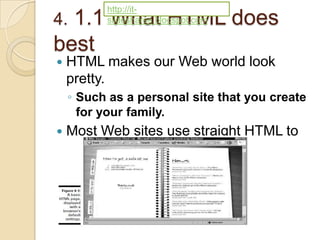
   HTML makes our Web world look
    pretty.
    ◦ Such as a personal site that you create
      for your family.
   Most Web sites use straight HTML to
    display data
http://it-
 1.2 The limits of
4.             slideshares.blogspot.com


HTML
   HTML was enlisted to perform some pretty specify tasks.
    ◦ Allow tight control over document display.
    ◦ Provide the flexibility to describe different, specific types of
      information and data.
    ◦ Convey information from a variety of media and in a
      various formats.
    ◦ Define complex linking relationships between document.
    ◦ Publish a single set of information cross a variety of media.
   Two overarching problems prevent Web designers from
    achieving this control with HTML:
    ◦ HTML lacks fine controls.
       Not include mechanisms for the control.
       …
    ◦ Display vary.
       Problems with browsers that users view web pages (IE,
        Firefox…)
       …
4.2. Comparing XML and
HTMLHTML are not the same kind of markup
XML and
    language.
   But XML and HTML both derive from the same
    parent SGML.
    ◦ So they must be similar, right ?
 HTML and XML both use tags and attributes.
 XML and HTML look similar.
 HTML defines basic text elements and includes
  defaults (and more explicit controls) for how text
  may be displayed in a browser window
 XML tells us only what each element means.
 XML says nothing about how elements should or
  must be displayed — XML separates content and
  the presentation of that content.
4.2.1 Using XML to describe
            data
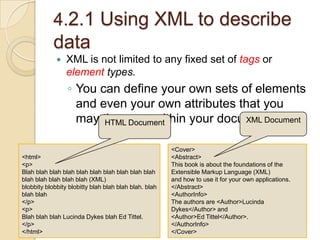
                XML is not limited to any fixed set of tags or
                 element types.
                 ◦ You can define your own sets of elements
                   and even your own attributes that you
                   may then Document
                        HTML use within your documents.
                                                 XML Document


                                                       <Cover>
<html>                                                 <Abstract>
<p>                                                    This book is about the foundations of the
Blah blah blah blah blah blah blah blah blah blah      Extensible Markup Language (XML)
blah blah blah blah blah (XML)                         and how to use it for your own applications.
blobbity blobbity blobitty blah blah blah blah. blah   </Abstract>
blah blah                                              <AuthorInfo>
</p>                                                   The authors are <Author>Lucinda
<p>                                                    Dykes</Author> and
Blah blah blah Lucinda Dykes blah Ed Tittel.           <Author>Ed Tittel</Author>.
</p>                                                   </AuthorInfo>
</html>                                                </Cover>
4. 2.2 The benefits of using
HTML
   It’s quick, easy, and cheap.

   HTML is way easier than the alternative.

   Anyone can create an HTML document by
    using a text editor and a little knowledge.

    ◦ Even if you don’t know HTML, you can use an
      HTML editor — a What You See Is What You
      Get-style (that is, WYSIWYG-style) editor
      such as FrontPage or Dreamweaver — to
      produce readable Web pages in minutes.
4.2.3 The benefits of
using XML
XML seems to be brimming with benefits.
    ◦   Unlimited element
    ◦   Structured data
    ◦   Data exchange
    ◦   XML complements HTML
    ◦   XML documents are well formed
    ◦   Self-describing
    ◦   Search engines
    ◦   Updates
    ◦   User-selected view of data
 Intelligent XML-based pages that contain human-
  readable data offer exciting potential for users.
 A Web designer/developer reaps several benefits
  from XML as well.
 The benefits of XML are endless.
4. 3. XHTML Makes the Move to
XML Syntax
 XHTML is the successor to HTML 4.01; in effect,
  it’s the final version of HTML.
 XHTML is a clever reformulation of HTML 4 as an
  application of XML 1.0.
 Why do we like XHTML?
    ◦ XHTML documents can be viewed, edited, and validated
      using XML tools.
    ◦ Well-formed XHTML documents mean better-structured
      documents.
    ◦ XHTML documents can be delivered using different
      Internet media types and output devices.
    ◦ Using valid XHTML gives you the best chance of having
      your document displayed the way you intend.
4.    3.1 Making the switch
   Making the switch from HTML to XHTML means
    mastering the rules of XHTML — in particular, XML
    syntax and structure.
   You have only a few major rules to get under your
    belt, but you have to follow them if you want to
    create a valid XHTML document. 
    ◦ Every tag in an XHTML document must be closed.
    ◦ Empty elements (elements without content, such as a br
      tag) must be correctly formatted with a closing slash.
    ◦ All tags must be nested correctly — the tag you open last
      must be the tag you close first
    ◦ All XHTML tags must be written using only lowercase.
    ◦ All attribute values must be put in quotation marks.
   An acceptable XML document must be well
    formed.
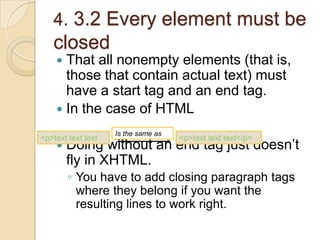
4. 3.2 Every element must be
   closed
     That all nonempty elements (that is,
      those that contain actual text) must
      have a start tag and an end tag.
     In the case of HTML

                    Is the same as
<p>text text text                    <p>text text text</p>
       Doing without an end tag just doesn’t
        fly in XHTML.
        ◦ You have to add closing paragraph tags
          where they belong if you want the
          resulting lines to work right.
4. 3.3 Empty elements must be
formatted correctly
 All nonempty XML elements must use
  both a start tag and an end tag to be
  correct.
 An empty element is a singleton tag
  (also called an empty tag) that hangs
  around by itself.
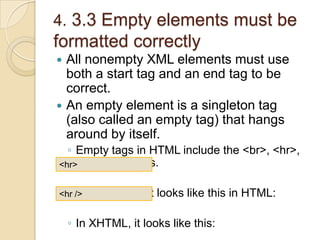
  ◦ Empty tags in HTML include the <br>, <hr>,
<hr>and <img> tags.


  ◦ The
<hr />    hr element looks like this in HTML:

    ◦ In XHTML, it looks like this:
4. 3.4 Tags must be properly
    nested
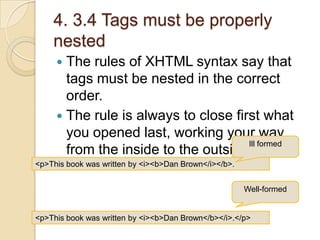
      The rules of XHTML syntax say that
       tags must be nested in the correct
       order.
      The rule is always to close first what
       you opened last, working your way
                                      Ill formed
       from the inside to the outside tags.
<p>This book was written by <i><b>Dan Brown</i></b>.


                                                       Well-formed


<p>This book was written by <i><b>Dan Brown</b></i>.</p>
4.3.5 Case makes a
difference
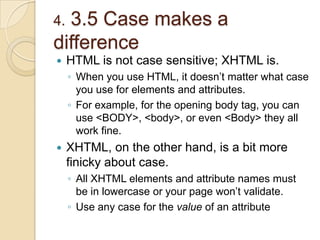
    HTML is not case sensitive; XHTML is.
     ◦ When you use HTML, it doesn’t matter what case
       you use for elements and attributes.
     ◦ For example, for the opening body tag, you can
       use <BODY>, <body>, or even <Body> they all
       work fine.
    XHTML, on the other hand, is a bit more
     finicky about case.
     ◦ All XHTML elements and attribute names must
       be in lowercase or your page won’t validate.
     ◦ Use any case for the value of an attribute
4. 3.6 Attribute values are in
  quotation marks
      In XHTML, all attribute values must be in quotation marks.
        ◦ The following markup works just fine on an HTML page:

        ◦ You have to add quotation marks around the attribute value
<tr align=right>
         to create valid XHTML.


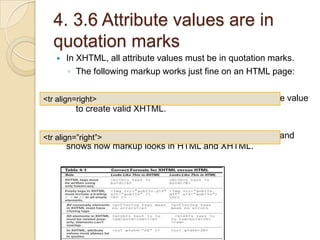
<tr align=”right”> highlights the major rules for XHTML syntax and
     Table 4-1
       shows how markup looks in HTML and XHTML.
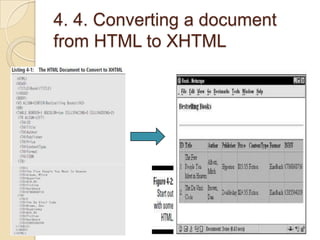
4. 4. Converting a document
from HTML to XHTML
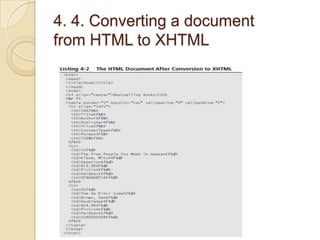
4. 4. Converting a document
from HTML to XHTML
4. 5. The Role of DOCTYPE
Declarations
   The DOCTYPE declaration serves several
    purposes:
    ◦ It allows your page to be validated as
      XHTML.
    ◦ It tells the browser which version of which
      markup language you used to create the
      page and references the specific DTD for
      that language.
    ◦ It enables your page to be displayed
      properly in Web-standards-compliant
      browsers.
   You have three different DOCTYPES to choose
    among for an XHTML 1.0 document: strict,
    transitional, and frames.
http://it-
          slideshares.blogspot.com
4.6 Summary
   Understanding the limitations of HTML

   Comparing HTML with XML

   Getting the best of both worlds:
    XHTML

   Converting HTML to XHTML

Lecture 4 - Adding XTHML for the Web

  • 1.
    XML For Dummies http://it- slideshares.blogspot.com Book Author : Lucinda Dykes & Ed Tittle Lecture 4 : Adding XTHML for the Web
  • 2.
    http://it- slideshares.blogspot.com Contents 1. HTML, XML, and XHTML 2. Comparing XML and HTML 3. XHTML Makes the Move to XML Syntax 4. Convert a document from HTML to XHTML 5. The Role of DOCTYPE Declarations
  • 3.
    4.1. HTML, XML,and XHTML  HTML, XHTML, and XML represent stages in the development of markup languages. ◦ HTML, designed to display content in Web browsers, came first. ◦ XML, intended for data exchange, came next. ◦ XHTML — which uses the markup tags of HTML and the strict syntax of XML.
  • 4.
    http://it- 4.1.1 What HTMLdoes slideshares.blogspot.com best  HTML makes our Web world look pretty. ◦ Such as a personal site that you create for your family.  Most Web sites use straight HTML to display data
  • 5.
    http://it- 1.2 Thelimits of 4. slideshares.blogspot.com HTML  HTML was enlisted to perform some pretty specify tasks. ◦ Allow tight control over document display. ◦ Provide the flexibility to describe different, specific types of information and data. ◦ Convey information from a variety of media and in a various formats. ◦ Define complex linking relationships between document. ◦ Publish a single set of information cross a variety of media.  Two overarching problems prevent Web designers from achieving this control with HTML: ◦ HTML lacks fine controls.  Not include mechanisms for the control.  … ◦ Display vary.  Problems with browsers that users view web pages (IE, Firefox…)  …
  • 6.
    4.2. Comparing XMLand HTMLHTML are not the same kind of markup XML and language.  But XML and HTML both derive from the same parent SGML. ◦ So they must be similar, right ?  HTML and XML both use tags and attributes.  XML and HTML look similar.  HTML defines basic text elements and includes defaults (and more explicit controls) for how text may be displayed in a browser window  XML tells us only what each element means.  XML says nothing about how elements should or must be displayed — XML separates content and the presentation of that content.
  • 7.
    4.2.1 Using XMLto describe data  XML is not limited to any fixed set of tags or element types. ◦ You can define your own sets of elements and even your own attributes that you may then Document HTML use within your documents. XML Document <Cover> <html> <Abstract> <p> This book is about the foundations of the Blah blah blah blah blah blah blah blah blah blah Extensible Markup Language (XML) blah blah blah blah blah (XML) and how to use it for your own applications. blobbity blobbity blobitty blah blah blah blah. blah </Abstract> blah blah <AuthorInfo> </p> The authors are <Author>Lucinda <p> Dykes</Author> and Blah blah blah Lucinda Dykes blah Ed Tittel. <Author>Ed Tittel</Author>. </p> </AuthorInfo> </html> </Cover>
  • 8.
    4. 2.2 Thebenefits of using HTML  It’s quick, easy, and cheap.  HTML is way easier than the alternative.  Anyone can create an HTML document by using a text editor and a little knowledge. ◦ Even if you don’t know HTML, you can use an HTML editor — a What You See Is What You Get-style (that is, WYSIWYG-style) editor such as FrontPage or Dreamweaver — to produce readable Web pages in minutes.
  • 9.
    4.2.3 The benefitsof using XML XML seems to be brimming with benefits. ◦ Unlimited element ◦ Structured data ◦ Data exchange ◦ XML complements HTML ◦ XML documents are well formed ◦ Self-describing ◦ Search engines ◦ Updates ◦ User-selected view of data  Intelligent XML-based pages that contain human- readable data offer exciting potential for users.  A Web designer/developer reaps several benefits from XML as well.  The benefits of XML are endless.
  • 10.
    4. 3. XHTMLMakes the Move to XML Syntax  XHTML is the successor to HTML 4.01; in effect, it’s the final version of HTML.  XHTML is a clever reformulation of HTML 4 as an application of XML 1.0.  Why do we like XHTML? ◦ XHTML documents can be viewed, edited, and validated using XML tools. ◦ Well-formed XHTML documents mean better-structured documents. ◦ XHTML documents can be delivered using different Internet media types and output devices. ◦ Using valid XHTML gives you the best chance of having your document displayed the way you intend.
  • 11.
    4. 3.1 Making the switch  Making the switch from HTML to XHTML means mastering the rules of XHTML — in particular, XML syntax and structure.  You have only a few major rules to get under your belt, but you have to follow them if you want to create a valid XHTML document.  ◦ Every tag in an XHTML document must be closed. ◦ Empty elements (elements without content, such as a br tag) must be correctly formatted with a closing slash. ◦ All tags must be nested correctly — the tag you open last must be the tag you close first ◦ All XHTML tags must be written using only lowercase. ◦ All attribute values must be put in quotation marks.  An acceptable XML document must be well formed.
  • 12.
    4. 3.2 Everyelement must be closed  That all nonempty elements (that is, those that contain actual text) must have a start tag and an end tag.  In the case of HTML Is the same as <p>text text text <p>text text text</p>  Doing without an end tag just doesn’t fly in XHTML. ◦ You have to add closing paragraph tags where they belong if you want the resulting lines to work right.
  • 13.
    4. 3.3 Emptyelements must be formatted correctly  All nonempty XML elements must use both a start tag and an end tag to be correct.  An empty element is a singleton tag (also called an empty tag) that hangs around by itself. ◦ Empty tags in HTML include the <br>, <hr>, <hr>and <img> tags. ◦ The <hr /> hr element looks like this in HTML: ◦ In XHTML, it looks like this:
  • 14.
    4. 3.4 Tagsmust be properly nested  The rules of XHTML syntax say that tags must be nested in the correct order.  The rule is always to close first what you opened last, working your way Ill formed from the inside to the outside tags. <p>This book was written by <i><b>Dan Brown</i></b>. Well-formed <p>This book was written by <i><b>Dan Brown</b></i>.</p>
  • 15.
    4.3.5 Case makesa difference  HTML is not case sensitive; XHTML is. ◦ When you use HTML, it doesn’t matter what case you use for elements and attributes. ◦ For example, for the opening body tag, you can use <BODY>, <body>, or even <Body> they all work fine.  XHTML, on the other hand, is a bit more finicky about case. ◦ All XHTML elements and attribute names must be in lowercase or your page won’t validate. ◦ Use any case for the value of an attribute
  • 16.
    4. 3.6 Attributevalues are in quotation marks  In XHTML, all attribute values must be in quotation marks. ◦ The following markup works just fine on an HTML page: ◦ You have to add quotation marks around the attribute value <tr align=right> to create valid XHTML. <tr align=”right”> highlights the major rules for XHTML syntax and  Table 4-1 shows how markup looks in HTML and XHTML.
  • 17.
    4. 4. Convertinga document from HTML to XHTML
  • 18.
    4. 4. Convertinga document from HTML to XHTML
  • 19.
    4. 5. TheRole of DOCTYPE Declarations  The DOCTYPE declaration serves several purposes: ◦ It allows your page to be validated as XHTML. ◦ It tells the browser which version of which markup language you used to create the page and references the specific DTD for that language. ◦ It enables your page to be displayed properly in Web-standards-compliant browsers.  You have three different DOCTYPES to choose among for an XHTML 1.0 document: strict, transitional, and frames.
  • 20.
    http://it- slideshares.blogspot.com 4.6 Summary  Understanding the limitations of HTML  Comparing HTML with XML  Getting the best of both worlds: XHTML  Converting HTML to XHTML

Editor's Notes

  • #8 Tip Although it might seem that the terms tag and element are interchangeable, they’re not.An element includes the opening and closing tags for a tag pair — and everything in between.A tag is just a tag, all by itself.Example : One example of a tag is the opening &lt;p&gt; tag , an example of an element is &lt;p&gt;text&lt;/p&gt;.XML also provides numerous ways to translate this information so it looks the way you want it to on-screen.RememberHTML is used to describe the display of data as seen through a Web browser.XML enables you to define and use your own elements and attributes
  • #14 Note If you validate your XHTML document, you’ll find that you can either include the space before the closing slash or not — your document will validate in either case. The extra space is a browser issue, not a validation issue.
  • #17 Tip : Both single quotation marks (‘) and double quotation marks (“) are legal in XML and XHTML.
  • #19 You can convert your HTML to XHTML with ease by using Dave Raggett’s free open-source program, HTML Tidy. The maintenance of HTML Tidy is now provided by Source Forge. Check it out at http://tidy.sourceforge.net/. For a version that’s even easier to use than the original, see the HTML-Kit at www.chami.com/html-kit/.