Introduction to JavaScript
‫د‬
.
‫البلطه‬‫ابراهيم‬
2019-2018
Lecture 10
Fundamentals of Web Design Technologies
What Is JavaScript?
 JavaScript is the programming language that adds interactivity
and custom behaviors to our sites.
 It is a client-side scripting language, which means it runs on the
user‟s machine and not on the server, as other web
programming languages such as PHP and Ruby do.
 That means JavaScript is reliant on the browser‟s capabilities
and settings.
 JavaScript is also what is known as a dynamic and loosely typed
programming language.
2019-2018
What Is JavaScript?...
 As a dynamic programming language, JavaScript doesn‟t need
to be run through any form of compiler that interprets our
human-readable code into something the browser can
understand.
 JavaScript is also loosely typed.
– All this means is that we don‟t necessarily have to tell
JavaScript what a variable is.
– If we‟re setting a variable to a value of 5, we don‟t have to
programmatically specify that variable as a number.
– As you may have noted, 5 is already a number, and
JavaScript recognizes it as such.
2019-2018
What Javascript can do
 JavaScript is a way to add interactivity to a page.
– “structural” layer of a page is made up of HTML.
– “presentational” layer of a page is made up of CSS
– “behavioral” layer is made up of our JavaScript
 All of the elements, attributes, and text on a web page
can be accessed by scripts using the DOM (Document
Object Model)
2019-2018
What Javascript can do: examples
2019-2018
JavaScript detects that a
username is not available
and then inserts a message
and alters styles to make
the problem apparent
Google.com uses
JavaScript to automatically
complete a search term as it
is typed in.
What Javascript can do: examples
2019-2018
JavaScript can be used
to reveal and hide
portions of content.
JavaScript can be used to load
images into a lightbox-style gallery
Adding Javascript to a Page
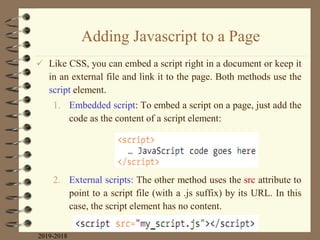
 Like CSS, you can embed a script right in a document or keep it
in an external file and link it to the page. Both methods use the
script element.
1. Embedded script: To embed a script on a page, just add the
code as the content of a script element:
2. External scripts: The other method uses the src attribute to
point to a script file (with a .js suffix) by its URL. In this
case, the script element has no content.
2019-2018
Adding Javascript to a Page...
 The advantage to external scripts is that you can apply the same
script to multiple pages (the same benefit external style sheets
offer). The downside, of course, is that each external script
requires an additional HTTP request of the server, which slows
down performance.
3. Script placement: The script element go anywhere in the
document, but the most common places for scripts are in
the head of the document and at the very end of the body.
2019-2018
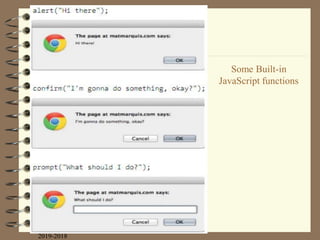
Some Built-in
JavaScript functions
2019-2018
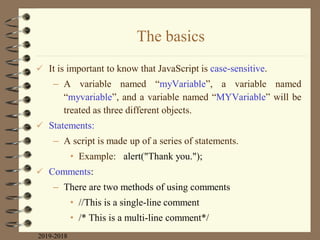
The basics
 It is important to know that JavaScript is case-sensitive.
– A variable named “myVariable”, a variable named
“myvariable”, and a variable named “MYVariable” will be
treated as three different objects.
 Statements:
– A script is made up of a series of statements.
• Example: alert("Thank you.");
 Comments:
– There are two methods of using comments
• //This is a single-line comment
• /* This is a multi-line comment*/
2019-2018
Variables
 A variable is like an information container.
– You give it a name and then assign it a value, which can a
number, text string, an element in the DOM, or a function—
anything, really.
 The following declaration creates a variable with the name
“foo” and assigns it the value 5:
var foo = 5;
– We start by declaring the variable using the var keyword.
2019-2018
Variables
 There are a few rules around variable naming:
– It must start with a letter or an underscore.
– It may contain letters, digits, and underscores in
any combination.
– It may not contain character spaces. As an
alternative, use underscores in place of spaces or
close up the space and use camel case instead (for
example, my_variable or myVariable).
– It may not contain special characters (! . , /  + * =
etc.).
2019-2018
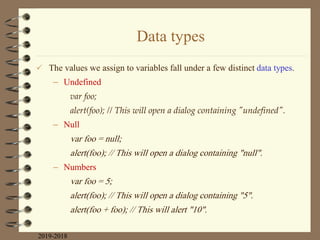
Data types
 The values we assign to variables fall under a few distinct data types.
– Undefined
var foo;
alert(foo); // This will open a dialog containing "undefined".
– Null
var foo = null;
alert(foo); // This will open a dialog containing "null".
– Numbers
var foo = 5;
alert(foo); // This will open a dialog containing "5".
alert(foo + foo); // This will alert "10".
2019-2018
Data types
– Strings
var foo = "five";
alert( foo ); // This will alert "five“
var foo = "bye"
alert (foo + foo); // This will alert "byebye"
– Booleans
var foo = true; // The variable "foo" is now true
2019-2018
Arrays
 To define an array use the following syntax:
var foo = [5, "five", "5"];
 To access any element from an array we should
provide its index:
alert( foo[0] ); // Alerts "5"
alert( foo[1] ); // Alerts "five"
alert( foo[2] ); // Also alerts "5"
2019-2018
Comparison operators
2019-2018
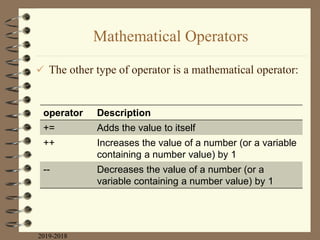
Mathematical Operators
 The other type of operator is a mathematical operator:
2019-2018
Description
operator
Adds the value to itself
+=
Increases the value of a number (or a variable
containing a number value) by 1
++
Decreases the value of a number (or a
variable containing a number value) by 1
--
If/else statements
 The structure of a conditional statement is as follows.
 Here is a simple example using the array we declared earlier:
2019-2018
if -- else
Loops
 The basic structure of a for loop is as follows:
 Here is an example of a for loop in action.
2019-2018
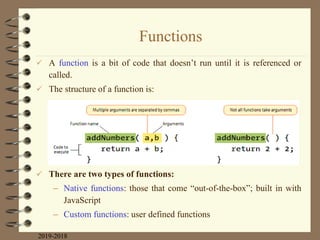
Functions
 A function is a bit of code that doesn‟t run until it is referenced or
called.
 The structure of a function is:
 There are two types of functions:
– Native functions: those that come “out-of-the-box”; built in with
JavaScript
– Custom functions: user defined functions
2019-2018
Functions...
2019-2018
Description
Function
These functions trigger browser-level
dialog boxes
alert(), confirm(), and prompt()
Returns the current date and time
Date()
This function will, among other things,
take a string data type containing
numbers and turn it into a number data
type. The string is passed to the function
as an argument.
parseInt("123")
Will execute a function after a delay. The
function is specified in the first argument,
and the delay is specified in milliseconds
in the second
setTimeout(functionName, 5000)
Native functions
Functions...
 Custom functions: To create a custom function,
– we type the function keyword followed by
– a name for the function, followed by
– opening and closing parentheses, followed by
– opening and closing curly brackets.
– Example:
2019-2018
Functions...
 Example:
 Note that we can use .length to get an array size
 Returning a value: a function may returns value
– Example:
2019-2018
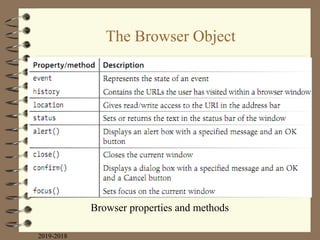
The Browser Object
 Sometimes you might want to manipulate the parts of
the browser window itself.
– For example, you might want to get or replace the
URL that is in the browser‟s address bar, or open
or close a browser window.
 In JavaScript, the browser is known as the window
object.
– The window object has a number of properties
and methods that we can use to interact with it (see
next slide).
2019-2018
The Browser Object
2019-2018
Browser properties and methods
Events
 An event is an action that can be detected with JavaScript, such
as when the document loads or when the user clicks on an
element or just moves the mouse over it.
 HTML 4.0 made it possible for a script to be tied to events on
the page whether initiated by the user, the browser itself, or
other scripts. This is known as event binding.
 In scripts, an event is identified by an event handler.
– For example, the onload event handler triggers a script when
the document loads, and
– the onclick and onmouseover handlers trigger a script when
the user clicks or mouses over an element, respectively.
2019-2018
2019-2018
Common events
Events...
 There are three common methods for applying event
handlers to items within our pages:
– As an HTML attribute
– As a method attached to the element
– Using addEventListener
2019-2018
As an HTML attribute
 You can specify the function to be run in an attribute in the
markup as shown in the following example.
 Note:
– It should be avoided for the same reason we avoid using
style attributes in our markup to apply styles to individual
elements.
2019-2018
<body onclick= “myFunction();”> /* myFunction will now run when
the user clicks anything within „body‟ */
As a method
 We can also attach functions using helpers already built into
JavaScript.
 This approach has the benefit of both simplicity and ease of
maintenance, but does have a fairly major drawback: we can
bind only one event at a time with this method.
2019-2018
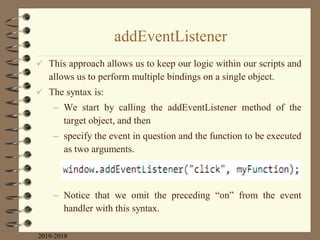
addEventListener
 This approach allows us to keep our logic within our scripts and
allows us to perform multiple bindings on a single object.
 The syntax is:
– We start by calling the addEventListener method of the
target object, and then
– specify the event in question and the function to be executed
as two arguments.
– Notice that we omit the preceding “on” from the event
handler with this syntax.
2019-2018
Example 1: A tale of two arguments
 Here‟s a simple function that accepts two arguments
and returns the greater of the two values.
2019-2018
Example 2: The longest word
 Here‟s a function that accepts an array of strings as a
single argument and returns the longest string in the
array.
2019-2018
Using Javascript
2019-2018
Meeting the Document Object Model (DOM)
 The DOM gives us a way to access and manipulate the contents
of a document.
 DOM can be used with HTML and with any XML language as
well.
 DOM can be accessed by JavaScript and other languages too,
such as PHP, Ruby, Python, C++, Java, Perl, and more.
 Without the DOM, JavaScript wouldn‟t have any sense of a
document‟s contents...
 Everything from the page‟s doctype to each individual letter in
the text can be accessed via the DOM and manipulated with
JavaScript.
2019-2018
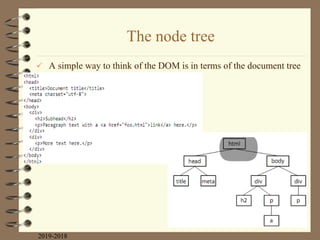
The node tree
 A simple way to think of the DOM is in terms of the document tree
2019-2018
The node tree...
2019-2018
Accessing DOM nodes
 The document object in the DOM identifies the page itself, and
more often than not will serve as the starting point for our DOM
crawling.
– Example: in this example says to look on the page
(document), find the element that has the id value
“beginner”, find the HTML content within that element
(innerHTML), and save those contents to a variable (foo).

2019-2018
Methods for accessing nodes in the document
 By element name: use, getElementsByTagName()
– Example:
– Based on this variable statement, paragraphs[0] is a
reference to the first paragraph in the document,
paragraph[1] refers to the second, and so on.
2019-2018
var paragraphs= document.getElementsByTagName( “p” );
Methods for accessing nodes in the document
 By id attribute value: use, getElementById()
– This method returns a single element based on that
element‟s ID
– Example:
2019-2018
<img src=“photo.jpg” alt= “ “ id= “lead-photo” >
var photo= document.getElementById( “lead-photo” );
Methods for accessing nodes in the document
 By class attribute value: use, getElementsByClassName()
– this allows you to access nodes in the document based on
the value of a class attribute.
– Example; suppose you have an element with a class value of
“column-a”
 By selector: use, querySelectorAll()
– It allows you to access nodes of the DOM based on a CSS-
style selector.
2019-2018
var firstColumn = document.getElementByClassName(“column-a”);
var sidebarPara= document.querySelectorAll(“.sidebar p”);
Var textInput = document.querySelectorAll(“input[type=„text‟]”);
Methods for accessing nodes in the document
 By an attribute value: use, getAttribute()
– To get the value of an attribute attached to an element node,
we call getAttribute() with a single argument: the attribute
name.
– Example:
2019-2018
<img src=“logo.jpg” alt=“company logo” id=“logo-image”>
var bigImage = document.getElementById(“logo-image”);
alter( bigImage.getAttribute(“src”) ); //alters logo.jpg
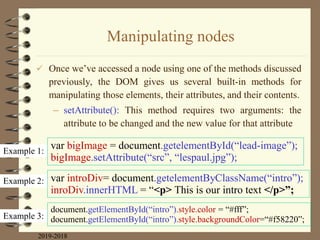
Manipulating nodes
 Once we‟ve accessed a node using one of the methods discussed
previously, the DOM gives us several built-in methods for
manipulating those elements, their attributes, and their contents.
– setAttribute(): This method requires two arguments: the
attribute to be changed and the new value for that attribute
2019-2018
Example 1:
Example 2:
Example 3:
var bigImage = document.getelementById(“lead-image”);
bigImage.setAttribute(“src”, “lespaul.jpg”);
var introDiv= document.getelementByClassName(“intro”);
inroDiv.innerHTML = “<p> This is our intro text </p>”;
document.getElementById(“intro”).style.color = “#fff”;
document.getElementById(“intro”).style.backgroundColor=“#f58220”;
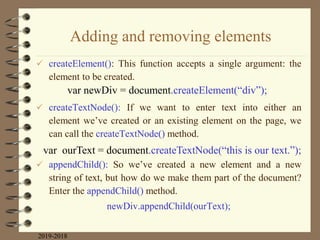
Adding and removing elements
 createElement(): This function accepts a single argument: the
element to be created.
 createTextNode(): If we want to enter text into either an
element we‟ve created or an existing element on the page, we
can call the createTextNode() method.
 appendChild(): So we‟ve created a new element and a new
string of text, but how do we make them part of the document?
Enter the appendChild() method.
newDiv.appendChild(ourText);
2019-2018
var newDiv = document.createElement(“div”);
var ourText = document.createTextNode(“this is our text.”);
Adding and removing elements
 Here we have a simple div on the page with the id “our-div”:
 Let‟s say we want to add a paragraph to #our-div that contains the text
“Hello, world”.
 We start by creating the p element (document.createElement()) as well
as a text node for the content that will go inside it (createTextNode()).
 Now we have our element and some text, and we can use
appendChild() to put the pieces together.
2019-2018
Adding and removing elements
 insertBefore(): this method inserts an element before another
element.
 replaceChild(): this method replaces one node with another and
takes two arguments.
– The first argument is the new child
– The second is the node that gets replaced by the first.
 removeChild(): this method removes a node or an entire branch
from the document tree
2019-2018
JavaScript Libraries
 A JavaScript library is a collection of prewritten functions and
methods that you can use in your scripts to accomplish common
tasks or simplify complex ones.
 Some of the most popular JS libraries as of this writing include:
– jQuery (jquery.com): is by far the most popular JavaScript
library today.
– Dojo (dojotoolkit.org). Dojo is an open source, modular
toolkit that is particularly helpful for developing web
applications with Ajax.
– Prototype (prototypejs.org). The Prototype JavaScript
Framework, written by Sam Stephenson, was developed to
add Ajax support to Ruby on Rails.
2019-2018
JavaScript Libraries
– MooTools (mootools.net). MooTools (which stands for My
ObjectOriented Tools) is another open source, modular
library written by Valerio Proietti.
– YUI (yuilibrary.com). The Yahoo! User Interface Library is
another free, open source JS library for building rich web
applications.
 If you want to search for JavaScript libraries for__________
2019-2018
- Animation
- Forms
- Information graphics
- Games
- String and math functions
- Image and 3-D effects in canvas
- Database handling
References
 J. N. Robbins, Learning Web Design A Beginner‟s Guide to HTML,
CSS, JavaScript, and Web Graphics, Fifth Edition, O‟Reilly, 2018.
 J. C. Meloni, SamsTeachYourself HTML, CSS and JavaScript All in
One, Pearson Education, 2012
 WWW. www.w3schools.com/html
2019-2018

Lecture 10.pdf

  • 1.
  • 2.
    What Is JavaScript? JavaScript is the programming language that adds interactivity and custom behaviors to our sites.  It is a client-side scripting language, which means it runs on the user‟s machine and not on the server, as other web programming languages such as PHP and Ruby do.  That means JavaScript is reliant on the browser‟s capabilities and settings.  JavaScript is also what is known as a dynamic and loosely typed programming language. 2019-2018
  • 3.
    What Is JavaScript?... As a dynamic programming language, JavaScript doesn‟t need to be run through any form of compiler that interprets our human-readable code into something the browser can understand.  JavaScript is also loosely typed. – All this means is that we don‟t necessarily have to tell JavaScript what a variable is. – If we‟re setting a variable to a value of 5, we don‟t have to programmatically specify that variable as a number. – As you may have noted, 5 is already a number, and JavaScript recognizes it as such. 2019-2018
  • 4.
    What Javascript cando  JavaScript is a way to add interactivity to a page. – “structural” layer of a page is made up of HTML. – “presentational” layer of a page is made up of CSS – “behavioral” layer is made up of our JavaScript  All of the elements, attributes, and text on a web page can be accessed by scripts using the DOM (Document Object Model) 2019-2018
  • 5.
    What Javascript cando: examples 2019-2018 JavaScript detects that a username is not available and then inserts a message and alters styles to make the problem apparent Google.com uses JavaScript to automatically complete a search term as it is typed in.
  • 6.
    What Javascript cando: examples 2019-2018 JavaScript can be used to reveal and hide portions of content. JavaScript can be used to load images into a lightbox-style gallery
  • 7.
    Adding Javascript toa Page  Like CSS, you can embed a script right in a document or keep it in an external file and link it to the page. Both methods use the script element. 1. Embedded script: To embed a script on a page, just add the code as the content of a script element: 2. External scripts: The other method uses the src attribute to point to a script file (with a .js suffix) by its URL. In this case, the script element has no content. 2019-2018
  • 8.
    Adding Javascript toa Page...  The advantage to external scripts is that you can apply the same script to multiple pages (the same benefit external style sheets offer). The downside, of course, is that each external script requires an additional HTTP request of the server, which slows down performance. 3. Script placement: The script element go anywhere in the document, but the most common places for scripts are in the head of the document and at the very end of the body. 2019-2018
  • 9.
  • 10.
    The basics  Itis important to know that JavaScript is case-sensitive. – A variable named “myVariable”, a variable named “myvariable”, and a variable named “MYVariable” will be treated as three different objects.  Statements: – A script is made up of a series of statements. • Example: alert("Thank you.");  Comments: – There are two methods of using comments • //This is a single-line comment • /* This is a multi-line comment*/ 2019-2018
  • 11.
    Variables  A variableis like an information container. – You give it a name and then assign it a value, which can a number, text string, an element in the DOM, or a function— anything, really.  The following declaration creates a variable with the name “foo” and assigns it the value 5: var foo = 5; – We start by declaring the variable using the var keyword. 2019-2018
  • 12.
    Variables  There area few rules around variable naming: – It must start with a letter or an underscore. – It may contain letters, digits, and underscores in any combination. – It may not contain character spaces. As an alternative, use underscores in place of spaces or close up the space and use camel case instead (for example, my_variable or myVariable). – It may not contain special characters (! . , / + * = etc.). 2019-2018
  • 13.
    Data types  Thevalues we assign to variables fall under a few distinct data types. – Undefined var foo; alert(foo); // This will open a dialog containing "undefined". – Null var foo = null; alert(foo); // This will open a dialog containing "null". – Numbers var foo = 5; alert(foo); // This will open a dialog containing "5". alert(foo + foo); // This will alert "10". 2019-2018
  • 14.
    Data types – Strings varfoo = "five"; alert( foo ); // This will alert "five“ var foo = "bye" alert (foo + foo); // This will alert "byebye" – Booleans var foo = true; // The variable "foo" is now true 2019-2018
  • 15.
    Arrays  To definean array use the following syntax: var foo = [5, "five", "5"];  To access any element from an array we should provide its index: alert( foo[0] ); // Alerts "5" alert( foo[1] ); // Alerts "five" alert( foo[2] ); // Also alerts "5" 2019-2018
  • 16.
  • 17.
    Mathematical Operators  Theother type of operator is a mathematical operator: 2019-2018 Description operator Adds the value to itself += Increases the value of a number (or a variable containing a number value) by 1 ++ Decreases the value of a number (or a variable containing a number value) by 1 --
  • 18.
    If/else statements  Thestructure of a conditional statement is as follows.  Here is a simple example using the array we declared earlier: 2019-2018 if -- else
  • 19.
    Loops  The basicstructure of a for loop is as follows:  Here is an example of a for loop in action. 2019-2018
  • 20.
    Functions  A functionis a bit of code that doesn‟t run until it is referenced or called.  The structure of a function is:  There are two types of functions: – Native functions: those that come “out-of-the-box”; built in with JavaScript – Custom functions: user defined functions 2019-2018
  • 21.
    Functions... 2019-2018 Description Function These functions triggerbrowser-level dialog boxes alert(), confirm(), and prompt() Returns the current date and time Date() This function will, among other things, take a string data type containing numbers and turn it into a number data type. The string is passed to the function as an argument. parseInt("123") Will execute a function after a delay. The function is specified in the first argument, and the delay is specified in milliseconds in the second setTimeout(functionName, 5000) Native functions
  • 22.
    Functions...  Custom functions:To create a custom function, – we type the function keyword followed by – a name for the function, followed by – opening and closing parentheses, followed by – opening and closing curly brackets. – Example: 2019-2018
  • 23.
    Functions...  Example:  Notethat we can use .length to get an array size  Returning a value: a function may returns value – Example: 2019-2018
  • 24.
    The Browser Object Sometimes you might want to manipulate the parts of the browser window itself. – For example, you might want to get or replace the URL that is in the browser‟s address bar, or open or close a browser window.  In JavaScript, the browser is known as the window object. – The window object has a number of properties and methods that we can use to interact with it (see next slide). 2019-2018
  • 25.
  • 26.
    Events  An eventis an action that can be detected with JavaScript, such as when the document loads or when the user clicks on an element or just moves the mouse over it.  HTML 4.0 made it possible for a script to be tied to events on the page whether initiated by the user, the browser itself, or other scripts. This is known as event binding.  In scripts, an event is identified by an event handler. – For example, the onload event handler triggers a script when the document loads, and – the onclick and onmouseover handlers trigger a script when the user clicks or mouses over an element, respectively. 2019-2018
  • 27.
  • 28.
    Events...  There arethree common methods for applying event handlers to items within our pages: – As an HTML attribute – As a method attached to the element – Using addEventListener 2019-2018
  • 29.
    As an HTMLattribute  You can specify the function to be run in an attribute in the markup as shown in the following example.  Note: – It should be avoided for the same reason we avoid using style attributes in our markup to apply styles to individual elements. 2019-2018 <body onclick= “myFunction();”> /* myFunction will now run when the user clicks anything within „body‟ */
  • 30.
    As a method We can also attach functions using helpers already built into JavaScript.  This approach has the benefit of both simplicity and ease of maintenance, but does have a fairly major drawback: we can bind only one event at a time with this method. 2019-2018
  • 31.
    addEventListener  This approachallows us to keep our logic within our scripts and allows us to perform multiple bindings on a single object.  The syntax is: – We start by calling the addEventListener method of the target object, and then – specify the event in question and the function to be executed as two arguments. – Notice that we omit the preceding “on” from the event handler with this syntax. 2019-2018
  • 32.
    Example 1: Atale of two arguments  Here‟s a simple function that accepts two arguments and returns the greater of the two values. 2019-2018
  • 33.
    Example 2: Thelongest word  Here‟s a function that accepts an array of strings as a single argument and returns the longest string in the array. 2019-2018
  • 34.
  • 35.
    Meeting the DocumentObject Model (DOM)  The DOM gives us a way to access and manipulate the contents of a document.  DOM can be used with HTML and with any XML language as well.  DOM can be accessed by JavaScript and other languages too, such as PHP, Ruby, Python, C++, Java, Perl, and more.  Without the DOM, JavaScript wouldn‟t have any sense of a document‟s contents...  Everything from the page‟s doctype to each individual letter in the text can be accessed via the DOM and manipulated with JavaScript. 2019-2018
  • 36.
    The node tree A simple way to think of the DOM is in terms of the document tree 2019-2018
  • 37.
  • 38.
    Accessing DOM nodes The document object in the DOM identifies the page itself, and more often than not will serve as the starting point for our DOM crawling. – Example: in this example says to look on the page (document), find the element that has the id value “beginner”, find the HTML content within that element (innerHTML), and save those contents to a variable (foo).  2019-2018
  • 39.
    Methods for accessingnodes in the document  By element name: use, getElementsByTagName() – Example: – Based on this variable statement, paragraphs[0] is a reference to the first paragraph in the document, paragraph[1] refers to the second, and so on. 2019-2018 var paragraphs= document.getElementsByTagName( “p” );
  • 40.
    Methods for accessingnodes in the document  By id attribute value: use, getElementById() – This method returns a single element based on that element‟s ID – Example: 2019-2018 <img src=“photo.jpg” alt= “ “ id= “lead-photo” > var photo= document.getElementById( “lead-photo” );
  • 41.
    Methods for accessingnodes in the document  By class attribute value: use, getElementsByClassName() – this allows you to access nodes in the document based on the value of a class attribute. – Example; suppose you have an element with a class value of “column-a”  By selector: use, querySelectorAll() – It allows you to access nodes of the DOM based on a CSS- style selector. 2019-2018 var firstColumn = document.getElementByClassName(“column-a”); var sidebarPara= document.querySelectorAll(“.sidebar p”); Var textInput = document.querySelectorAll(“input[type=„text‟]”);
  • 42.
    Methods for accessingnodes in the document  By an attribute value: use, getAttribute() – To get the value of an attribute attached to an element node, we call getAttribute() with a single argument: the attribute name. – Example: 2019-2018 <img src=“logo.jpg” alt=“company logo” id=“logo-image”> var bigImage = document.getElementById(“logo-image”); alter( bigImage.getAttribute(“src”) ); //alters logo.jpg
  • 43.
    Manipulating nodes  Oncewe‟ve accessed a node using one of the methods discussed previously, the DOM gives us several built-in methods for manipulating those elements, their attributes, and their contents. – setAttribute(): This method requires two arguments: the attribute to be changed and the new value for that attribute 2019-2018 Example 1: Example 2: Example 3: var bigImage = document.getelementById(“lead-image”); bigImage.setAttribute(“src”, “lespaul.jpg”); var introDiv= document.getelementByClassName(“intro”); inroDiv.innerHTML = “<p> This is our intro text </p>”; document.getElementById(“intro”).style.color = “#fff”; document.getElementById(“intro”).style.backgroundColor=“#f58220”;
  • 44.
    Adding and removingelements  createElement(): This function accepts a single argument: the element to be created.  createTextNode(): If we want to enter text into either an element we‟ve created or an existing element on the page, we can call the createTextNode() method.  appendChild(): So we‟ve created a new element and a new string of text, but how do we make them part of the document? Enter the appendChild() method. newDiv.appendChild(ourText); 2019-2018 var newDiv = document.createElement(“div”); var ourText = document.createTextNode(“this is our text.”);
  • 45.
    Adding and removingelements  Here we have a simple div on the page with the id “our-div”:  Let‟s say we want to add a paragraph to #our-div that contains the text “Hello, world”.  We start by creating the p element (document.createElement()) as well as a text node for the content that will go inside it (createTextNode()).  Now we have our element and some text, and we can use appendChild() to put the pieces together. 2019-2018
  • 46.
    Adding and removingelements  insertBefore(): this method inserts an element before another element.  replaceChild(): this method replaces one node with another and takes two arguments. – The first argument is the new child – The second is the node that gets replaced by the first.  removeChild(): this method removes a node or an entire branch from the document tree 2019-2018
  • 47.
    JavaScript Libraries  AJavaScript library is a collection of prewritten functions and methods that you can use in your scripts to accomplish common tasks or simplify complex ones.  Some of the most popular JS libraries as of this writing include: – jQuery (jquery.com): is by far the most popular JavaScript library today. – Dojo (dojotoolkit.org). Dojo is an open source, modular toolkit that is particularly helpful for developing web applications with Ajax. – Prototype (prototypejs.org). The Prototype JavaScript Framework, written by Sam Stephenson, was developed to add Ajax support to Ruby on Rails. 2019-2018
  • 48.
    JavaScript Libraries – MooTools(mootools.net). MooTools (which stands for My ObjectOriented Tools) is another open source, modular library written by Valerio Proietti. – YUI (yuilibrary.com). The Yahoo! User Interface Library is another free, open source JS library for building rich web applications.  If you want to search for JavaScript libraries for__________ 2019-2018 - Animation - Forms - Information graphics - Games - String and math functions - Image and 3-D effects in canvas - Database handling
  • 49.
    References  J. N.Robbins, Learning Web Design A Beginner‟s Guide to HTML, CSS, JavaScript, and Web Graphics, Fifth Edition, O‟Reilly, 2018.  J. C. Meloni, SamsTeachYourself HTML, CSS and JavaScript All in One, Pearson Education, 2012  WWW. www.w3schools.com/html 2019-2018