Lecture 01
Enterprise Application
Architecture
Agenda
 The Post-PC era
 Enterprise Application
 Building Blocks
 Service Oriented Architecture
 Layering
Reading
 Fowler Introduction,1 Layering
 Service Oriented Architecture
 Software as a Service
 Steve Yegge’s Rant
The Post-PC era
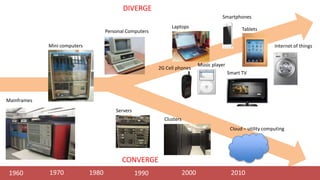
1960 1970 1980 1990 2000 2010
Mainframes
Mini computers
Personal Computers
Servers
Clusters
Cloud – utility computing
Laptops
Music player
2G Cell phones
CONVERGE
DIVERGE
Smartphones
Tablets
Smart TV
Internet of things
2000 2010
THE DIGITAL
DECADE
“[The Personal Computer] can
become the 'Digital Hub'
of our emerging digital lifestyle,
adding tremendous value
to our other devices.”
- Steve Jobs, 2001 Keynote
introducing the iPod
THE DIGITAL
DECADE
2000 2010
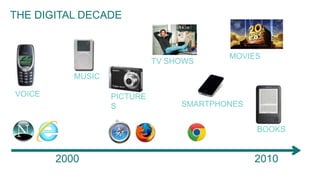
THE DIGITAL DECADE
MUSIC
PICTURE
S
VOICE
SMARTPHONES
TV SHOWS
MOVIES
BOOKS
WHAT HAPPENED
AT THE END OF THE
DIGITAL DECADE?
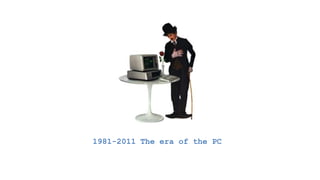
1981-2011 The era of the PC
THE PC IS JUST A
DEVICE
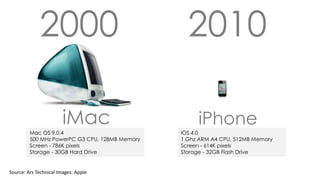
2000 2010
iMac iPhone
Mac OS 9.0.4
500 MHz PowerPC G3 CPU, 128MB Memory
Screen - 786K pixels
Storage - 30GB Hard Drive
iOS 4.0
1 Ghz ARM A4 CPU, 512MB Memory
Screen - 614K pixels
Storage - 32GB Flash Drive
Source: Ars Technical Images: Apple
Digital Lifestyle
The “mobile web” is just the
web – there is only one web
digital online
world
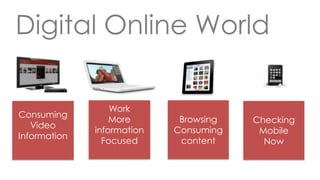
Digital Online World
Work
More
information
Focused
Digital Online World
Browsing
Consuming
content
Checking
Mobile
Now
Consuming
Video
Information
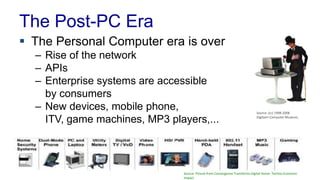
The Post-PC Era
 The Personal Computer era is over
– Rise of the network
– APIs
– Enterprise systems are accessible
by consumers
– New devices, mobile phone,
ITV, game machines, MP3 players,...
Source: (cc) 1998-2008
Digibarn Computer Museum,
Source: Picture from Convergence Transforms Digital Home: Techno-Economic
Impact
The Post-PC Era
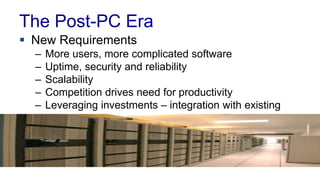
 New Requirements
– More users, more complicated software
– Uptime, security and reliability
– Scalability
– Competition drives need for productivity
– Leveraging investments – integration with existing
systems
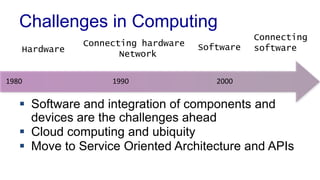
Challenges in Computing
 Software and integration of components and
devices are the challenges ahead
 Cloud computing and ubiquity
 Move to Service Oriented Architecture and APIs
1980 1990 2000
Hardware
Connecting hardware
Network
Software
Connecting
software
New Approch to
Software
Architecture
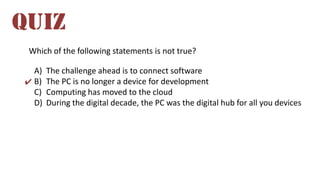
Which of the following statements is not true?
A) The challenge ahead is to connect software
B) The PC is no longer a device for development
C) Computing has moved to the cloud
D) During the digital decade, the PC was the digital hub for all you devices
QUIZ
✔
Enterprise Application
Enterprise Applications
 Software running in corporate data centers
 Characteristics
– Involve data, some times huge amounts
– Concurrent data access, multiple users
– Lot of user interface screens
– Integration with other enterprise application
– Use of middleware software, such as databases,
application servers, web servers
– Operated by specialists – system operators
Examples
 B2C (business to consumer)
– E-commerce web sites such as Amazon, eBay
– Commercial services like banking
 Commerce Solutions
– Payroll, patient records, shipping tracking, cost
analysis, credit scoring, insurance, supply chain,
accounting, customer service, and foreign exchange
trading
 Information
– Stock quotes, sports results, email, blogs
Software as a Service (SaaS)
 “On-demand” software
– Cloud computing
 IT infrastructure demands
– Communication: interacting with the software
– Scalability: dealing with fluctuation
– Dependability: available 24/7
Software as a Service Examples
 E-mail services
 Project management
 Blog services
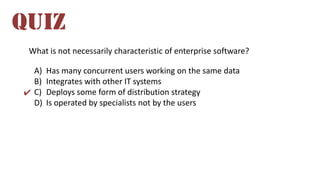
What is not necessarily characteristic of enterprise software?
A) Has many concurrent users working on the same data
B) Integrates with other IT systems
C) Deploys some form of distribution strategy
D) Is operated by specialists not by the users
QUIZ
✔
Building Blocks
Building Enterprise Applications
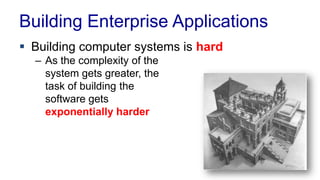
 Building computer systems is hard
– As the complexity of the
system gets greater, the
task of building the
software gets
exponentially harder
Building Enterprise Applications
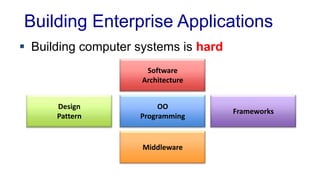
 Building computer systems is hard
Design
Pattern
Middleware
Frameworks
OO
Programming
Software
Architecture
Software Architecture
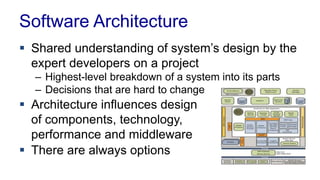
 Shared understanding of system’s design by the
expert developers on a project
– Highest-level breakdown of a system into its parts
– Decisions that are hard to change
 Architecture influences design
of components, technology,
performance and middleware
 There are always options
Object Oriented Programming
 OO is key to development of systems
– Design for reusability, flexibility and performance
 One of the biggest hurdles for developers
– Each component should be simple with simple task
– Involves understanding of interaction of parts
“OO design is more important than specific technologies, such as J2EE. We
should try to avoid letting our technology choices, such as J2EE, constrain
our ability to use true OO design”
– Rod Johnson
“If the design is good, there is no code”
– Jónas Þór, Senior Betware developer
Design Patterns
 Design using known ideas
– Design patterns are standard solutions to common
problems in software design
– Systematic approach for problems that reoccur in
software development
– Patterns have name and definitions - not language
dependant
 History
– Landmark book from 1995: Design Patterns:
Elements of Reusable Object-Oriented Software
Gang of Four (GoF)
Middleware
 Enterprise system are built on middleware
– Can cover a broad spectrum of software and generally sits
between an application and an operating system
– For example, databases, application servers, web servers,
messaging systems, transaction monitors
– “The plumbing”
 Horizontal market
– Solves common problems – not specific business
requirements
– Low-level system
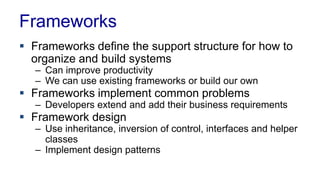
Frameworks
 Frameworks define the support structure for how to
organize and build systems
– Can improve productivity
– We can use existing frameworks or build our own
 Frameworks implement common problems
– Developers extend and add their business requirements
 Framework design
– Use inheritance, inversion of control, interfaces and helper
classes
– Implement design patterns
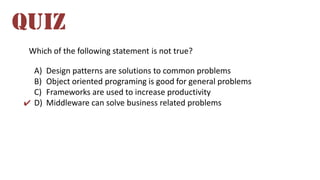
Which of the following statement is not true?
A) Design patterns are solutions to common problems
B) Object oriented programing is good for general problems
C) Frameworks are used to increase productivity
D) Middleware can solve business related problems
QUIZ
✔
Evolution of Enterprise Software
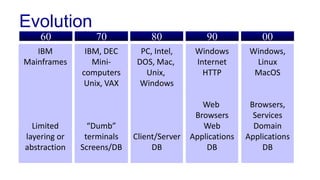
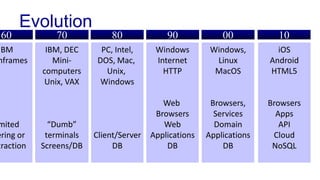
Evolution
60 70 80 90 00
IBM
Mainframes
Limited
layering or
abstraction
IBM, DEC
Mini-
computers
Unix, VAX
“Dumb”
terminals
Screens/DB
PC, Intel,
DOS, Mac,
Unix,
Windows
Client/Server
DB
Windows
Internet
HTTP
Web
Browsers
Web
Applications
DB
Windows,
Linux
MacOS
Browsers,
Services
Domain
Applications
DB
Evolution
60 70 80 90 00
IBM
nframes
mited
ering or
traction
IBM, DEC
Mini-
computers
Unix, VAX
“Dumb”
terminals
Screens/DB
PC, Intel,
DOS, Mac,
Unix,
Windows
Client/Server
DB
Windows
Internet
HTTP
Web
Browsers
Web
Applications
DB
Windows,
Linux
MacOS
Browsers,
Services
Domain
Applications
DB
iOS
Android
HTML5
Browsers
Apps
API
Cloud
NoSQL
10
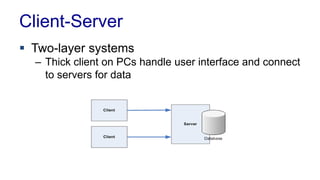
Client-Server
 Two-layer systems
– Thick client on PCs handle user interface and connect
to servers for data
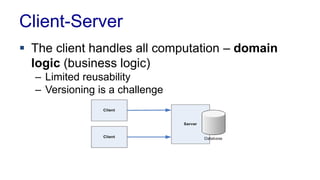
Client-Server
 The client handles all computation – domain
logic (business logic)
– Limited reusability
– Versioning is a challenge
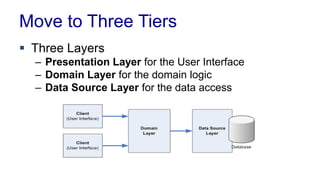
Move to Three Tiers
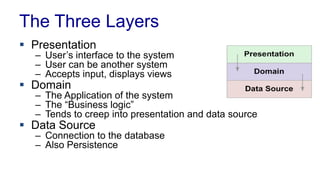
 Three Layers
– Presentation Layer for the User Interface
– Domain Layer for the domain logic
– Data Source Layer for the data access
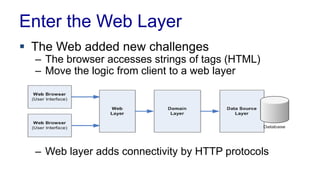
Enter the Web Layer
 The Web added new challenges
– The browser accesses strings of tags (HTML)
– Move the logic from client to a web layer
– Web layer adds connectivity by HTTP protocols
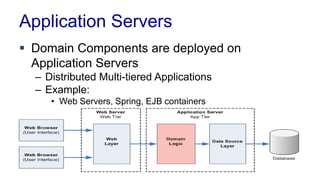
Application Servers
 Domain Components are deployed on
Application Servers
– Distributed Multi-tiered Applications
– Example:
• Web Servers, Spring, EJB containers
Client Types
 Native Applications – Apps
– Usually use some OS GUI and APIs
– Windows, Linux, MacOS, iOS, Andriod
– Communication can be anything
 Embedded
– Run inside Web Browsers
– Flash, Java Applets
– Communication with XML using HTTP
Client Types
 Rich Internet Application (RIA)
– JavaScript calls REST/SOAP services for data
– HTML with XML/Json using Ajax/jQuery
 HTML Presentation in Browsers
– All functionality is server side
– Simple HTML
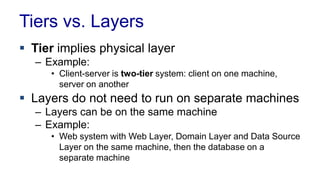
Tiers vs. Layers
 Tier implies physical layer
– Example:
• Client-server is two-tier system: client on one machine,
server on another
 Layers do not need to run on separate machines
– Layers can be on the same machine
– Example:
• Web system with Web Layer, Domain Layer and Data Source
Layer on the same machine, then the database on a
separate machine
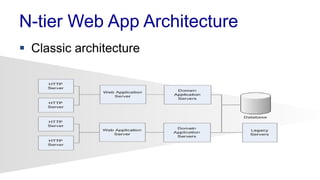
N-tier Web App Architecture
 Classic architecture
Which of the following statements is not true?
A) Versioning is only a challenge with client-service model
B) Layers need not be on a separate machines
C) Web servers can be used as application servers
D) Scalability is achieved by duplicating the system
QUIZ
✔
Service Oriented Architecture
Imagine you are building
an e-commerce web site
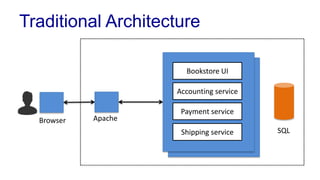
Traditional Architecture
Bookstore UI
Accounting service
Payment service
Shipping service SQL
Browser Apache
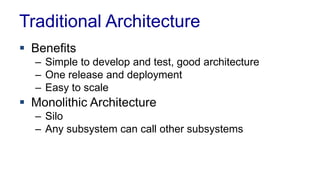
 Benefits
– Simple to develop and test, good architecture
– One release and deployment
– Easy to scale
 Monolithic Architecture
– Silo
– Any subsystem can call other subsystems
Traditional Architecture
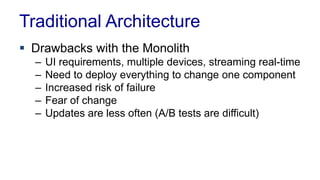
 Drawbacks with the Monolith
– UI requirements, multiple devices, streaming real-time
– Need to deploy everything to change one component
– Increased risk of failure
– Fear of change
– Updates are less often (A/B tests are difficult)
Traditional Architecture
Service Oriented Architecture
 Software Architecture where all components
are designed to be services
 Applications composed of interoperable services
– Easy to build new services
– Easy to change
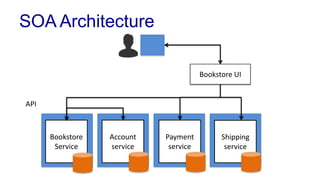
SOA Architecture
Bookstore
Service
Account
service
Payment
service
Shipping
service
Bookstore UI
API
Bezos’ Mandate
1. All teams will henceforth expose their data and
functionality through service interfaces
2. Teams must communicate with each other
through these interfaces
3. There will be no other form of interprocess
communication allowed
Bezos’ Mandate
4. It doesn't matter what technology they use
5. All service interfaces, without exception, must
be designed from the ground up to be
externalizable. No exceptions.
6. Anyone who doesn't do this will be fired.
Which statement is not true about SOA?
A) SOA does not affect performance
B) No service can access other service data except using APIs
C) SOA improves productivity though reuse
D) Monoliths system must deploy all components
QUIZ
✔
Layering
Layering
 Software systems can get complicated
– Abstractions are needed
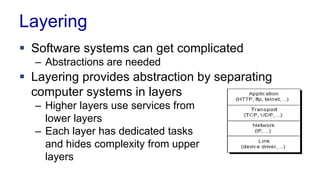
 Layering provides abstraction by separating
computer systems in layers
– Higher layers use services from
lower layers
– Each layer has dedicated tasks
and hides complexity from upper
layers
Benefits of Layering
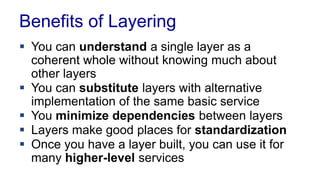
 You can understand a single layer as a
coherent whole without knowing much about
other layers
 You can substitute layers with alternative
implementation of the same basic service
 You minimize dependencies between layers
 Layers make good places for standardization
 Once you have a layer built, you can use it for
many higher-level services
Downsides
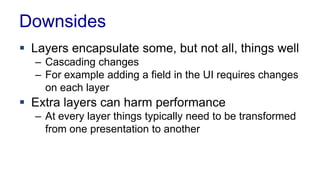
 Layers encapsulate some, but not all, things well
– Cascading changes
– For example adding a field in the UI requires changes
on each layer
 Extra layers can harm performance
– At every layer things typically need to be transformed
from one presentation to another
The Three Layers
 Presentation
– User’s interface to the system
– User can be another system
– Accepts input, displays views
 Domain
– The Application of the system
– The “Business logic”
– Tends to creep into presentation and data source
 Data Source
– Connection to the database
– Also Persistence
Summary
 The Post-PC era poses new challenges
 Enterprise Application defined
 Building Blocks for building enterprise
applications
 Service Oriented Architecture
 Layering is the oldest trick in the book

L01 Enterprise Application Architecture

  • 1.
  • 2.
    Agenda  The Post-PCera  Enterprise Application  Building Blocks  Service Oriented Architecture  Layering
  • 3.
    Reading  Fowler Introduction,1Layering  Service Oriented Architecture  Software as a Service  Steve Yegge’s Rant
  • 4.
  • 5.
    1960 1970 19801990 2000 2010 Mainframes Mini computers Personal Computers Servers Clusters Cloud – utility computing Laptops Music player 2G Cell phones CONVERGE DIVERGE Smartphones Tablets Smart TV Internet of things
  • 6.
  • 8.
    “[The Personal Computer]can become the 'Digital Hub' of our emerging digital lifestyle, adding tremendous value to our other devices.” - Steve Jobs, 2001 Keynote introducing the iPod THE DIGITAL DECADE
  • 9.
    2000 2010 THE DIGITALDECADE MUSIC PICTURE S VOICE SMARTPHONES TV SHOWS MOVIES BOOKS
  • 10.
    WHAT HAPPENED AT THEEND OF THE DIGITAL DECADE?
  • 12.
  • 14.
    THE PC ISJUST A DEVICE
  • 15.
    2000 2010 iMac iPhone MacOS 9.0.4 500 MHz PowerPC G3 CPU, 128MB Memory Screen - 786K pixels Storage - 30GB Hard Drive iOS 4.0 1 Ghz ARM A4 CPU, 512MB Memory Screen - 614K pixels Storage - 32GB Flash Drive Source: Ars Technical Images: Apple
  • 16.
    Digital Lifestyle The “mobileweb” is just the web – there is only one web digital online world
  • 17.
  • 18.
  • 19.
    The Post-PC Era The Personal Computer era is over – Rise of the network – APIs – Enterprise systems are accessible by consumers – New devices, mobile phone, ITV, game machines, MP3 players,... Source: (cc) 1998-2008 Digibarn Computer Museum, Source: Picture from Convergence Transforms Digital Home: Techno-Economic Impact
  • 20.
    The Post-PC Era New Requirements – More users, more complicated software – Uptime, security and reliability – Scalability – Competition drives need for productivity – Leveraging investments – integration with existing systems
  • 21.
    Challenges in Computing Software and integration of components and devices are the challenges ahead  Cloud computing and ubiquity  Move to Service Oriented Architecture and APIs 1980 1990 2000 Hardware Connecting hardware Network Software Connecting software
  • 22.
  • 23.
    Which of thefollowing statements is not true? A) The challenge ahead is to connect software B) The PC is no longer a device for development C) Computing has moved to the cloud D) During the digital decade, the PC was the digital hub for all you devices QUIZ ✔
  • 24.
  • 40.
    Enterprise Applications  Softwarerunning in corporate data centers  Characteristics – Involve data, some times huge amounts – Concurrent data access, multiple users – Lot of user interface screens – Integration with other enterprise application – Use of middleware software, such as databases, application servers, web servers – Operated by specialists – system operators
  • 41.
    Examples  B2C (businessto consumer) – E-commerce web sites such as Amazon, eBay – Commercial services like banking  Commerce Solutions – Payroll, patient records, shipping tracking, cost analysis, credit scoring, insurance, supply chain, accounting, customer service, and foreign exchange trading  Information – Stock quotes, sports results, email, blogs
  • 42.
    Software as aService (SaaS)  “On-demand” software – Cloud computing  IT infrastructure demands – Communication: interacting with the software – Scalability: dealing with fluctuation – Dependability: available 24/7
  • 43.
    Software as aService Examples  E-mail services  Project management  Blog services
  • 44.
    What is notnecessarily characteristic of enterprise software? A) Has many concurrent users working on the same data B) Integrates with other IT systems C) Deploys some form of distribution strategy D) Is operated by specialists not by the users QUIZ ✔
  • 45.
  • 46.
    Building Enterprise Applications Building computer systems is hard – As the complexity of the system gets greater, the task of building the software gets exponentially harder
  • 47.
    Building Enterprise Applications Building computer systems is hard Design Pattern Middleware Frameworks OO Programming Software Architecture
  • 48.
    Software Architecture  Sharedunderstanding of system’s design by the expert developers on a project – Highest-level breakdown of a system into its parts – Decisions that are hard to change  Architecture influences design of components, technology, performance and middleware  There are always options
  • 49.
    Object Oriented Programming OO is key to development of systems – Design for reusability, flexibility and performance  One of the biggest hurdles for developers – Each component should be simple with simple task – Involves understanding of interaction of parts “OO design is more important than specific technologies, such as J2EE. We should try to avoid letting our technology choices, such as J2EE, constrain our ability to use true OO design” – Rod Johnson “If the design is good, there is no code” – Jónas Þór, Senior Betware developer
  • 50.
    Design Patterns  Designusing known ideas – Design patterns are standard solutions to common problems in software design – Systematic approach for problems that reoccur in software development – Patterns have name and definitions - not language dependant  History – Landmark book from 1995: Design Patterns: Elements of Reusable Object-Oriented Software Gang of Four (GoF)
  • 51.
    Middleware  Enterprise systemare built on middleware – Can cover a broad spectrum of software and generally sits between an application and an operating system – For example, databases, application servers, web servers, messaging systems, transaction monitors – “The plumbing”  Horizontal market – Solves common problems – not specific business requirements – Low-level system
  • 52.
    Frameworks  Frameworks definethe support structure for how to organize and build systems – Can improve productivity – We can use existing frameworks or build our own  Frameworks implement common problems – Developers extend and add their business requirements  Framework design – Use inheritance, inversion of control, interfaces and helper classes – Implement design patterns
  • 53.
    Which of thefollowing statement is not true? A) Design patterns are solutions to common problems B) Object oriented programing is good for general problems C) Frameworks are used to increase productivity D) Middleware can solve business related problems QUIZ ✔
  • 54.
  • 55.
    Evolution 60 70 8090 00 IBM Mainframes Limited layering or abstraction IBM, DEC Mini- computers Unix, VAX “Dumb” terminals Screens/DB PC, Intel, DOS, Mac, Unix, Windows Client/Server DB Windows Internet HTTP Web Browsers Web Applications DB Windows, Linux MacOS Browsers, Services Domain Applications DB
  • 56.
    Evolution 60 70 8090 00 IBM nframes mited ering or traction IBM, DEC Mini- computers Unix, VAX “Dumb” terminals Screens/DB PC, Intel, DOS, Mac, Unix, Windows Client/Server DB Windows Internet HTTP Web Browsers Web Applications DB Windows, Linux MacOS Browsers, Services Domain Applications DB iOS Android HTML5 Browsers Apps API Cloud NoSQL 10
  • 57.
    Client-Server  Two-layer systems –Thick client on PCs handle user interface and connect to servers for data
  • 58.
    Client-Server  The clienthandles all computation – domain logic (business logic) – Limited reusability – Versioning is a challenge
  • 59.
    Move to ThreeTiers  Three Layers – Presentation Layer for the User Interface – Domain Layer for the domain logic – Data Source Layer for the data access
  • 60.
    Enter the WebLayer  The Web added new challenges – The browser accesses strings of tags (HTML) – Move the logic from client to a web layer – Web layer adds connectivity by HTTP protocols
  • 61.
    Application Servers  DomainComponents are deployed on Application Servers – Distributed Multi-tiered Applications – Example: • Web Servers, Spring, EJB containers
  • 62.
    Client Types  NativeApplications – Apps – Usually use some OS GUI and APIs – Windows, Linux, MacOS, iOS, Andriod – Communication can be anything  Embedded – Run inside Web Browsers – Flash, Java Applets – Communication with XML using HTTP
  • 63.
    Client Types  RichInternet Application (RIA) – JavaScript calls REST/SOAP services for data – HTML with XML/Json using Ajax/jQuery  HTML Presentation in Browsers – All functionality is server side – Simple HTML
  • 64.
    Tiers vs. Layers Tier implies physical layer – Example: • Client-server is two-tier system: client on one machine, server on another  Layers do not need to run on separate machines – Layers can be on the same machine – Example: • Web system with Web Layer, Domain Layer and Data Source Layer on the same machine, then the database on a separate machine
  • 65.
    N-tier Web AppArchitecture  Classic architecture
  • 66.
    Which of thefollowing statements is not true? A) Versioning is only a challenge with client-service model B) Layers need not be on a separate machines C) Web servers can be used as application servers D) Scalability is achieved by duplicating the system QUIZ ✔
  • 67.
  • 68.
    Imagine you arebuilding an e-commerce web site
  • 69.
    Traditional Architecture Bookstore UI Accountingservice Payment service Shipping service SQL Browser Apache
  • 70.
     Benefits – Simpleto develop and test, good architecture – One release and deployment – Easy to scale  Monolithic Architecture – Silo – Any subsystem can call other subsystems Traditional Architecture
  • 71.
     Drawbacks withthe Monolith – UI requirements, multiple devices, streaming real-time – Need to deploy everything to change one component – Increased risk of failure – Fear of change – Updates are less often (A/B tests are difficult) Traditional Architecture
  • 72.
    Service Oriented Architecture Software Architecture where all components are designed to be services  Applications composed of interoperable services – Easy to build new services – Easy to change
  • 73.
  • 74.
    Bezos’ Mandate 1. Allteams will henceforth expose their data and functionality through service interfaces 2. Teams must communicate with each other through these interfaces 3. There will be no other form of interprocess communication allowed
  • 75.
    Bezos’ Mandate 4. Itdoesn't matter what technology they use 5. All service interfaces, without exception, must be designed from the ground up to be externalizable. No exceptions. 6. Anyone who doesn't do this will be fired.
  • 76.
    Which statement isnot true about SOA? A) SOA does not affect performance B) No service can access other service data except using APIs C) SOA improves productivity though reuse D) Monoliths system must deploy all components QUIZ ✔
  • 77.
  • 78.
    Layering  Software systemscan get complicated – Abstractions are needed  Layering provides abstraction by separating computer systems in layers – Higher layers use services from lower layers – Each layer has dedicated tasks and hides complexity from upper layers
  • 79.
    Benefits of Layering You can understand a single layer as a coherent whole without knowing much about other layers  You can substitute layers with alternative implementation of the same basic service  You minimize dependencies between layers  Layers make good places for standardization  Once you have a layer built, you can use it for many higher-level services
  • 80.
    Downsides  Layers encapsulatesome, but not all, things well – Cascading changes – For example adding a field in the UI requires changes on each layer  Extra layers can harm performance – At every layer things typically need to be transformed from one presentation to another
  • 81.
    The Three Layers Presentation – User’s interface to the system – User can be another system – Accepts input, displays views  Domain – The Application of the system – The “Business logic” – Tends to creep into presentation and data source  Data Source – Connection to the database – Also Persistence
  • 82.
    Summary  The Post-PCera poses new challenges  Enterprise Application defined  Building Blocks for building enterprise applications  Service Oriented Architecture  Layering is the oldest trick in the book