Java Server Pages
2
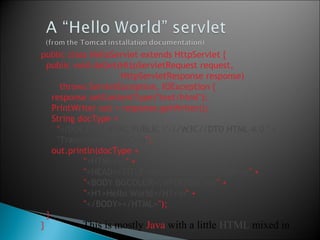
public class HelloServlet extends HttpServlet {
public void doGet(HttpServletRequest request,
HttpServletResponse response)
throws ServletException, IOException {
response.setContentType("text/html");
PrintWriter out = response.getWriter();
String docType =
"<!DOCTYPE HTML PUBLIC "-//W3C//DTD HTML 4.0 " +
"Transitional//EN">n";
out.println(docType +
"<HTML>n" +
"<HEAD><TITLE>Hello</TITLE></HEAD>n" +
"<BODY BGCOLOR="#FDF5E6">n" +
"<H1>Hello World</H1>n" +
"</BODY></HTML>");
}
} This is mostly Java with a little HTML mixed in
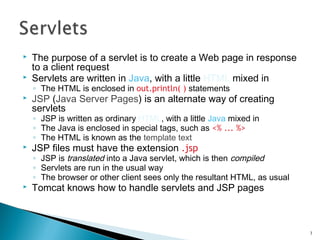
 The purpose of a servlet is to create a Web page in response
to a client request
 Servlets are written in Java, with a little HTML mixed in
◦ The HTML is enclosed in out.println( ) statements
 JSP (Java Server Pages) is an alternate way of creating
servlets
◦ JSP is written as ordinary HTML, with a little Java mixed in
◦ The Java is enclosed in special tags, such as <% ... %>
◦ The HTML is known as the template text
 JSP files must have the extension .jsp
◦ JSP is translated into a Java servlet, which is then compiled
◦ Servlets are run in the usual way
◦ The browser or other client sees only the resultant HTML, as usual
 Tomcat knows how to handle servlets and JSP pages
3
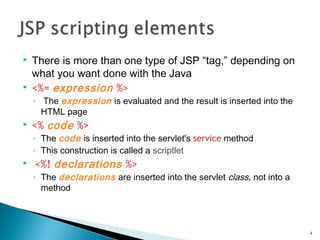
 There is more than one type of JSP “tag,” depending on
what you want done with the Java
 <%= expression %>
◦ The expression is evaluated and the result is inserted into the
HTML page
 <% code %>
◦ The code is inserted into the servlet's service method
◦ This construction is called a scriptlet
 <%! declarations %>
◦ The declarations are inserted into the servlet class, not into a
method
4
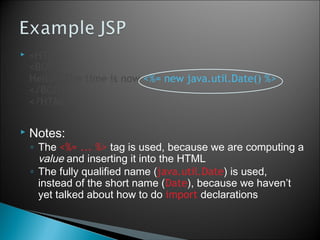
 <HTML>
<BODY>
Hello!  The time is now <%= new java.util.Date() %>
</BODY>
</HTML>
 Notes:
◦ The <%= ... %> tag is used, because we are computing a
value and inserting it into the HTML
◦ The fully qualified name (java.util.Date) is used,
instead of the short name (Date), because we haven’t
yet talked about how to do import declarations
5
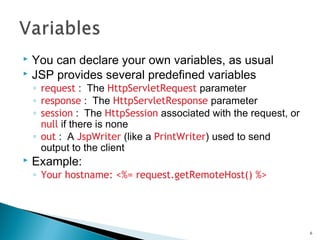
 You can declare your own variables, as usual
 JSP provides several predefined variables
◦ request : The HttpServletRequest parameter
◦ response : The HttpServletResponse parameter
◦ session : The HttpSession associated with the request, or
null if there is none
◦ out : A JspWriter (like a PrintWriter) used to send
output to the client
 Example:
◦ Your hostname: <%= request.getRemoteHost() %>
6
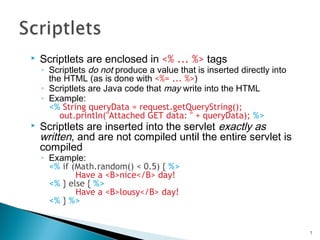
 Scriptlets are enclosed in <% ... %> tags
◦ Scriptlets do not produce a value that is inserted directly into
the HTML (as is done with <%= ... %>)
◦ Scriptlets are Java code that may write into the HTML
◦ Example:
<% String queryData = request.getQueryString();
out.println("Attached GET data: " + queryData); %>
 Scriptlets are inserted into the servlet exactly as
written, and are not compiled until the entire servlet is
compiled
◦ Example:
<% if (Math.random() < 0.5) { %>
Have a <B>nice</B> day!
<% } else { %>
Have a <B>lousy</B> day!
<% } %>
7
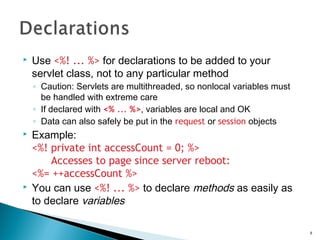
 Use <%! ... %> for declarations to be added to your
servlet class, not to any particular method
◦ Caution: Servlets are multithreaded, so nonlocal variables must
be handled with extreme care
◦ If declared with <% ... %>, variables are local and OK
◦ Data can also safely be put in the request or session objects
 Example:
<%! private int accessCount = 0; %>
Accesses to page since server reboot:
<%= ++accessCount %>
 You can use <%! ... %> to declare methods as easily as
to declare variables
8
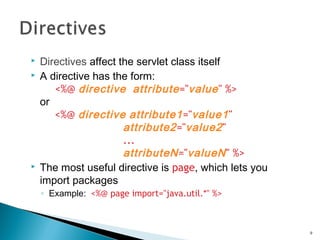
 Directives affect the servlet class itself
 A directive has the form:
<%@ directive attribute="value" %>
or
<%@ directive attribute1="value1"
attribute2="value2"
...
attributeN="valueN" %>
 The most useful directive is page, which lets you
import packages
◦ Example: <%@ page import="java.util.*" %>
9
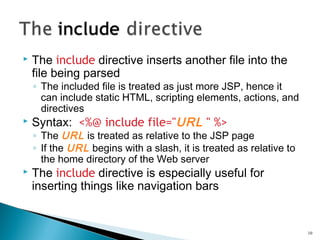
 The include directive inserts another file into the
file being parsed
◦ The included file is treated as just more JSP, hence it
can include static HTML, scripting elements, actions, and
directives
 Syntax: <%@ include file="URL " %>
◦ The URL is treated as relative to the JSP page
◦ If the URL begins with a slash, it is treated as relative to
the home directory of the Web server
 The include directive is especially useful for
inserting things like navigation bars
10
 Actions are XML-syntax tags used to control the
servlet engine
 <jsp:include page="URL " flush="true" />
◦ Inserts the indicated relative URL at execution time (not
at compile time, like the include directive does)
◦ This is great for rapidly changing data
 <jsp:forward page="URL" />
<jsp:forward page="<%= JavaExpression %>" />
◦ Jump to the (static) URL or the (dynamically computed)
JavaExpression resulting in a URL
11
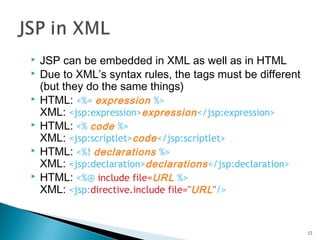
 JSP can be embedded in XML as well as in HTML
 Due to XML’s syntax rules, the tags must be different
(but they do the same things)
 HTML: <%= expression %>
XML: <jsp:expression>expression</jsp:expression>
 HTML: <% code %>
XML: <jsp:scriptlet>code</jsp:scriptlet>
 HTML: <%! declarations %>
XML: <jsp:declaration>declarations</jsp:declaration>
 HTML: <%@ include file=URL %>
XML: <jsp:directive.include file="URL"/>
12
13

Jsp intro

  • 1.
  • 2.
    2 public class HelloServletextends HttpServlet { public void doGet(HttpServletRequest request, HttpServletResponse response) throws ServletException, IOException { response.setContentType("text/html"); PrintWriter out = response.getWriter(); String docType = "<!DOCTYPE HTML PUBLIC "-//W3C//DTD HTML 4.0 " + "Transitional//EN">n"; out.println(docType + "<HTML>n" + "<HEAD><TITLE>Hello</TITLE></HEAD>n" + "<BODY BGCOLOR="#FDF5E6">n" + "<H1>Hello World</H1>n" + "</BODY></HTML>"); } } This is mostly Java with a little HTML mixed in
  • 3.
     The purposeof a servlet is to create a Web page in response to a client request  Servlets are written in Java, with a little HTML mixed in ◦ The HTML is enclosed in out.println( ) statements  JSP (Java Server Pages) is an alternate way of creating servlets ◦ JSP is written as ordinary HTML, with a little Java mixed in ◦ The Java is enclosed in special tags, such as <% ... %> ◦ The HTML is known as the template text  JSP files must have the extension .jsp ◦ JSP is translated into a Java servlet, which is then compiled ◦ Servlets are run in the usual way ◦ The browser or other client sees only the resultant HTML, as usual  Tomcat knows how to handle servlets and JSP pages 3
  • 4.
     There ismore than one type of JSP “tag,” depending on what you want done with the Java  <%= expression %> ◦ The expression is evaluated and the result is inserted into the HTML page  <% code %> ◦ The code is inserted into the servlet's service method ◦ This construction is called a scriptlet  <%! declarations %> ◦ The declarations are inserted into the servlet class, not into a method 4
  • 5.
     <HTML> <BODY> Hello!  Thetime is now <%= new java.util.Date() %> </BODY> </HTML>  Notes: ◦ The <%= ... %> tag is used, because we are computing a value and inserting it into the HTML ◦ The fully qualified name (java.util.Date) is used, instead of the short name (Date), because we haven’t yet talked about how to do import declarations 5
  • 6.
     You candeclare your own variables, as usual  JSP provides several predefined variables ◦ request : The HttpServletRequest parameter ◦ response : The HttpServletResponse parameter ◦ session : The HttpSession associated with the request, or null if there is none ◦ out : A JspWriter (like a PrintWriter) used to send output to the client  Example: ◦ Your hostname: <%= request.getRemoteHost() %> 6
  • 7.
     Scriptlets areenclosed in <% ... %> tags ◦ Scriptlets do not produce a value that is inserted directly into the HTML (as is done with <%= ... %>) ◦ Scriptlets are Java code that may write into the HTML ◦ Example: <% String queryData = request.getQueryString(); out.println("Attached GET data: " + queryData); %>  Scriptlets are inserted into the servlet exactly as written, and are not compiled until the entire servlet is compiled ◦ Example: <% if (Math.random() < 0.5) { %> Have a <B>nice</B> day! <% } else { %> Have a <B>lousy</B> day! <% } %> 7
  • 8.
     Use <%!... %> for declarations to be added to your servlet class, not to any particular method ◦ Caution: Servlets are multithreaded, so nonlocal variables must be handled with extreme care ◦ If declared with <% ... %>, variables are local and OK ◦ Data can also safely be put in the request or session objects  Example: <%! private int accessCount = 0; %> Accesses to page since server reboot: <%= ++accessCount %>  You can use <%! ... %> to declare methods as easily as to declare variables 8
  • 9.
     Directives affectthe servlet class itself  A directive has the form: <%@ directive attribute="value" %> or <%@ directive attribute1="value1" attribute2="value2" ... attributeN="valueN" %>  The most useful directive is page, which lets you import packages ◦ Example: <%@ page import="java.util.*" %> 9
  • 10.
     The includedirective inserts another file into the file being parsed ◦ The included file is treated as just more JSP, hence it can include static HTML, scripting elements, actions, and directives  Syntax: <%@ include file="URL " %> ◦ The URL is treated as relative to the JSP page ◦ If the URL begins with a slash, it is treated as relative to the home directory of the Web server  The include directive is especially useful for inserting things like navigation bars 10
  • 11.
     Actions areXML-syntax tags used to control the servlet engine  <jsp:include page="URL " flush="true" /> ◦ Inserts the indicated relative URL at execution time (not at compile time, like the include directive does) ◦ This is great for rapidly changing data  <jsp:forward page="URL" /> <jsp:forward page="<%= JavaExpression %>" /> ◦ Jump to the (static) URL or the (dynamically computed) JavaExpression resulting in a URL 11
  • 12.
     JSP canbe embedded in XML as well as in HTML  Due to XML’s syntax rules, the tags must be different (but they do the same things)  HTML: <%= expression %> XML: <jsp:expression>expression</jsp:expression>  HTML: <% code %> XML: <jsp:scriptlet>code</jsp:scriptlet>  HTML: <%! declarations %> XML: <jsp:declaration>declarations</jsp:declaration>  HTML: <%@ include file=URL %> XML: <jsp:directive.include file="URL"/> 12
  • 13.