Performance and
Load Testing
Performance & Load Testing
Basics
 Introduction to Performance Testing
 Difference between Performance, Load and Stress Testing
 Why Performance Testing?
 When is it required?
 What should be tested?
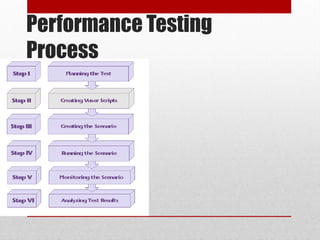
 Performance Testing Process
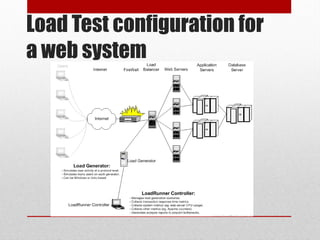
 Load Test configuration for a web system
 Practice Questions
Introduction to
Performance Testing
• Performance testing is the process of determining the speed or effectiveness of
a computer, network, software program or device.
• Before going into the details, we should understand the factors that governs
Performance testing:
 Throughput
 Response Time
 Tuning
 Benchmarking
Throughput
• Capability of a product to handle
multiple transactions in a give
period.
• Throughput represents the number
of requests/business transactions
processed by the product in a
specified time duration.
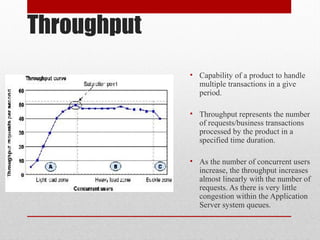
• As the number of concurrent users
increase, the throughput increases
almost linearly with the number of
requests. As there is very little
congestion within the Application
Server system queues.
Throughput
• In the heavy load zone or Section B, as the concurrent client load increases,
throughput remains relatively constant.
• In Section C (the buckle zone) one or more of the system components have
become exhausted and throughput starts to degrade. For example, the system
might enter the buckle zone when the network connections at the Web server
exhaust the limits of the network adapter or if the requests exceed operating
system limits for file handles.
Response Time
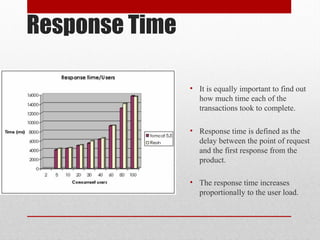
• It is equally important to find out
how much time each of the
transactions took to complete.
• Response time is defined as the
delay between the point of request
and the first response from the
product.
• The response time increases
proportionally to the user load.
Tuning
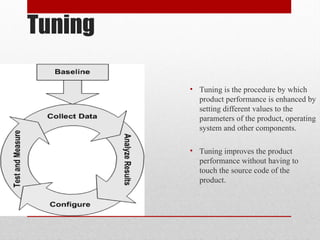
• Tuning is the procedure by which
product performance is enhanced by
setting different values to the
parameters of the product, operating
system and other components.
• Tuning improves the product
performance without having to
touch the source code of the
product.
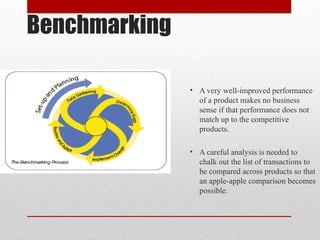
Benchmarking
• A very well-improved performance
of a product makes no business
sense if that performance does not
match up to the competitive
products.
• A careful analysis is needed to
chalk out the list of transactions to
be compared across products so that
an apple-apple comparison becomes
possible.
Performance Testing-
Definition
• The testing to evaluate the response time (speed), throughput and utilization of
system to execute its required functions in comparison with different versions
of the same product or a different competitive product is called Performance
Testing.
• Performance testing is done to derive benchmark numbers for the system.
• Heavy load is not applied to the system
• Tuning is performed until the system under test achieves the expected levels of
performance.
Performance, Load and
Stress Testing
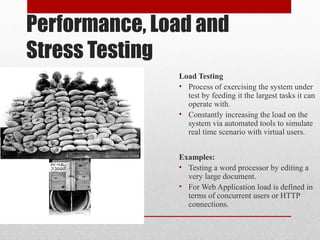
Load Testing
• Process of exercising the system under
test by feeding it the largest tasks it can
operate with.
• Constantly increasing the load on the
system via automated tools to simulate
real time scenario with virtual users.
Examples:
• Testing a word processor by editing a
very large document.
• For Web Application load is defined in
terms of concurrent users or HTTP
connections.
Performance, Load and
Stress Testing
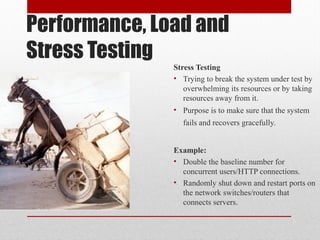
Stress Testing
• Trying to break the system under test by
overwhelming its resources or by taking
resources away from it.
• Purpose is to make sure that the system
fails and recovers gracefully.
Example:
• Double the baseline number for
concurrent users/HTTP connections.
• Randomly shut down and restart ports on
the network switches/routers that
connects servers.
Why Performance Testing?
• The week of Feb 6, 2000:
Hackers delivered over 1-Billion transactions concurrently to each one of these
sites.
 Yahoo
 eBay
 Buy.com
 Amazon
 eTrade
How did you think they performed ?
Why Performance Testing
• Identifies problems early on before they become costly to resolve.
• Reduces development cycles.
• Produces better quality, more scalable code.
• Prevents revenue and credibility loss due to poor Web site performance.
• Enables intelligent planning for future expansion.
• To ensure that the system meets performance expectations such as response
time, throughput etc. under given levels of load.
• Expose bugs that do not surface in cursory testing, such as memory
management bugs, memory leaks, buffer overflows, etc.
When is it required?
Design Phase:
Pages containing lots of images and multimedia for reasonable wait times. Heavy
loads are less important than knowing which types of content cause slowdowns.
Development Phase:
To check results of individual pages and processes, looking for breaking points,
unnecessary code and bottlenecks.
Deployment Phase:
To identify the minimum hardware and software requirements for the application.
What should be tested?
• High frequency transactions: The most frequently used transactions have the
potential to impact the performance of all of the other transactions if they are
not efficient.
• Mission Critical transactions: The more important transactions that facilitate
the core objectives of the system should be included, as failure under load of
these transactions has, by definition, the greatest impact.
• Read Transactions: At least one READ ONLY transaction should be included,
so that performance of such transactions can be differentiated from other more
complex transactions.
• Update Transactions: At least one update transaction should be included so
that performance of such transactions can be differentiated from other
transactions.
Performance Testing
Process
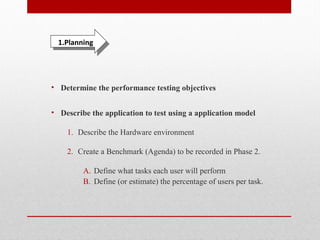
• Determine the performance testing objectives
• Describe the application to test using a application model
1. Describe the Hardware environment
2. Create a Benchmark (Agenda) to be recorded in Phase 2.
A. Define what tasks each user will perform
B. Define (or estimate) the percentage of users per task.
1.Planning1.Planning
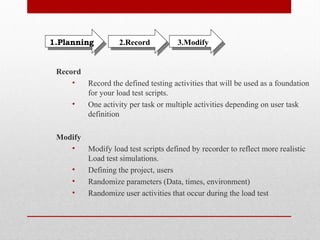
Record
• Record the defined testing activities that will be used as a foundation
for your load test scripts.
• One activity per task or multiple activities depending on user task
definition
Modify
• Modify load test scripts defined by recorder to reflect more realistic
Load test simulations.
• Defining the project, users
• Randomize parameters (Data, times, environment)
• Randomize user activities that occur during the load test
3.Modify3.Modify2.Record2.Record1.Planning1.Planning
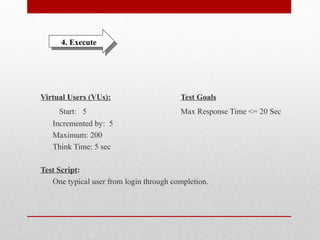
Virtual Users (VUs): Test Goals
Start: 5 Max Response Time <= 20 Sec
Incremented by: 5
Maximum: 200
Think Time: 5 sec
Test Script:
One typical user from login through completion.
4. Execute4. Execute
• Monitoring the scenario: We monitor scenario execution using the various
online runtime monitors.
• Analysing test results: During scenario execution, the tool records the
performance of the application under different loads. We use the graphs and
reports to analyse the application’s performance.
6. Analyze6. Analyze5.Monitor5.Monitor
Load Test configuration for
a web system
Questions to Review your
Skills
• What are the factors that governs Performance Testing?
• How are Throughput and Response time related with user load?
• How do we decide whether the application passed or failed the load test?
• What do you mean by Capacity, Stability and Scalability of an application.
• What is the difference between Performance, Load and Stress testing?
• What is Longevity, endurance, spike and Volume Testing?
• At what point in SDLC, performance testing is required?
• How to identify the transactions in a complete application for load testing?
• Define the 6 steps involved in Performance Testing Process?
• Explain the Load Test configuration of a web system and what is the role of
Load Generators in it?
Load Testing Tools
 Manual testing Limitations
 Benefits of Automation
 Tools used for Performance Testing
 Practice Questions
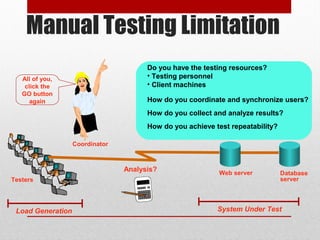
Testers
Load Generation System Under Test
Do you have the testing resources?
• Testing personnel
• Client machines
How do you coordinate and synchronize users?
How do you collect and analyze results?
How do you achieve test repeatability?
Analysis?
123.20
All of you,
click the
GO button
again
Manual Testing Limitation
Web server Database
server
Coordinator
Manual Testing Limitations
 Expensive, requiring large amounts of both personnel and machinery.
 Complicated, especially co-ordinating and synchronising multiple testers
 Involves a high degree of organization, especially to record and analyse results
meaningfully
 Repeatability of the manual tests is limited
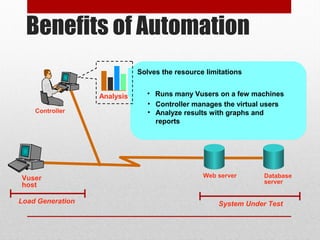
Load Generation System Under Test
Benefits of Automation
Web server Database
server
Vuser
host
• Controller manages the virtual users
• Analyze results with graphs and
reports
• Replaces testers with virtual users
Solves the resource limitations
• Runs many Vusers on a few machinesAnalysis
Controller
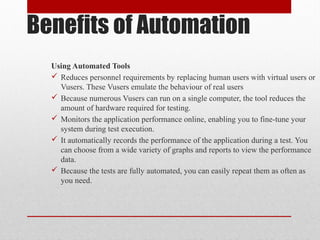
Benefits of Automation
Using Automated Tools
 Reduces personnel requirements by replacing human users with virtual users or
Vusers. These Vusers emulate the behaviour of real users
 Because numerous Vusers can run on a single computer, the tool reduces the
amount of hardware required for testing.
 Monitors the application performance online, enabling you to fine-tune your
system during test execution.
 It automatically records the performance of the application during a test. You
can choose from a wide variety of graphs and reports to view the performance
data.
 Because the tests are fully automated, you can easily repeat them as often as
you need.
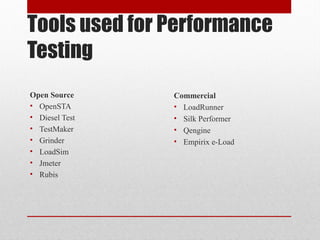
Tools used for Performance
Testing
Open Source
• OpenSTA
• Diesel Test
• TestMaker
• Grinder
• LoadSim
• Jmeter
• Rubis
Commercial
• LoadRunner
• Silk Performer
• Qengine
• Empirix e-Load
Jmeter
• 100% Java desktop application
• For Web and FTP, Java, SOAP/XML-RPC, JDBC applications
Advantages:
• Open Source
• The distributed testing
• Various target systems
• Extensibility: Pluggable samplers allow unlimited testing capabilities
Drawbacks:
• Chart representation quite confuse
• Terminology not very clear
• Necessary to start remote machine one by one
• Remote machines must be declared in a property file before starting application
Questions to Review your
Skills
• What are the limitations of manual load testing?
• Why tools are used for automating load test?
• List 5 Open Source and 5 Commercial load test tools.
• What are the disadvantages of LoadRunner?
• Explain the following Load Test tools: Silk Performer, Qengine.
• Give a detailed comparison between Empirix E-load and LoadRunner.
• Which other tools are commonly used for load testing?
JMeter
SUMMARY
Introduction
What is Jmeter ?
Why ?
Preparing tests
Step 1 Proxy server
Step 2 Organization
Step 3 Genericity
Step 4 Assertions
Running tests
Non GUI mode
Distributed testing
Analyzing Test
Introduction
• Definition :
• JMeter is an Apache Jakarta project that can be used as a
load testing tool for analyzing and measuring the
performance of a variety of services, with a focus on web
applications.
• Why ? :
• JMeter can be used as a unit test tool for JDBC database
connection, FTP, LDAP, WebServices,J MS, HTTP and
generic TCP connections. JMeter can also be configured as
a monitor, although this is typically considered an ad-hoc
solution in lieu of advanced monitoring solutions.
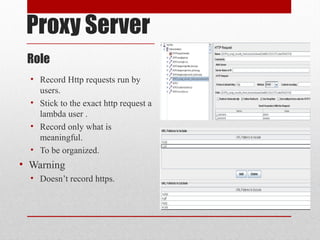
Proxy Server
Role
• Record Http requests run by
users.
• Stick to the exact http request a
lambda user .
• Record only what is
meaningful.
• To be organized.
• Warning
• Doesn’t record https.
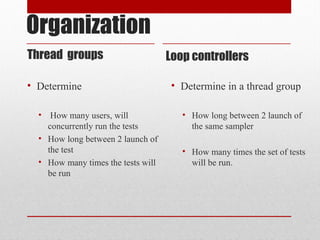
Organization
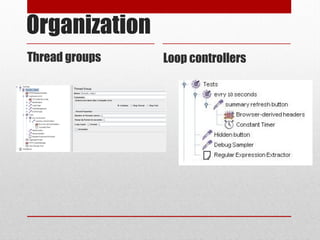
Thread groups Loop controllers
• Determine
• How many users, will
concurrently run the tests
• How long between 2 launch of
the test
• How many times the tests will
be run
• Determine in a thread group
• How long between 2 launch of
the same sampler
• How many times the set of tests
will be run.
Organization
Thread groups Loop controllers
Organization
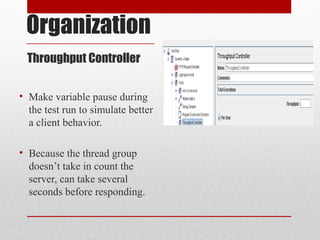
Throughput Controller
• Make variable pause during
the test run to simulate better
a client behavior.
• Because the thread group
doesn’t take in count the
server, can take several
seconds before responding.
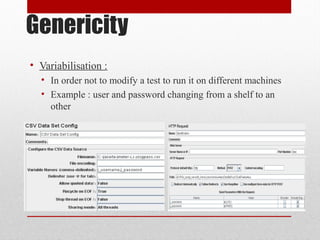
Genericity
• Variabilisation :
• In order not to modify a test to run it on different machines
• Example : user and password changing from a shelf to an
other
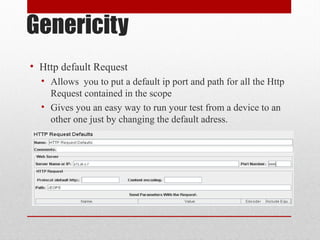
Genericity
• Http default Request
• Allows you to put a default ip port and path for all the Http
Request contained in the scope
• Gives you an easy way to run your test from a device to an
other one just by changing the default adress.
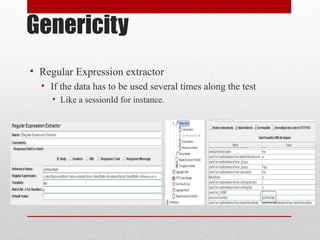
Genericity
• Regular Expression extractor
• If the data has to be used several times along the test
• Like a sessionId for instance.
Assertions
• Response assertion
• To match a pattern in the response code
• The response code for instance.
• Xpath assertion
• Using the DOM of the response to check if an element
appear.
• A research result for instance.
• Size assertion
• To know if the size of the response received match with the
size expected
• To verify if the file received is the good one.
Running tests
• Non Gui Mode
• Why?
• The stress due to test and display is too high when running
distributed tests.
• How ?
• By running command line
Example : jmeter -n -t my_test.jmx -l log.jtl -H my.proxy.server -P
8000
Distributed testing
• Why ?
• To simulate stressed environment with a lot of clients.
• How ?
• Edit “remote_hosts=127.0.0.1” in jmeter.properties
• Start jmeter_server.bat on the host machines
• Run jmeter.bat
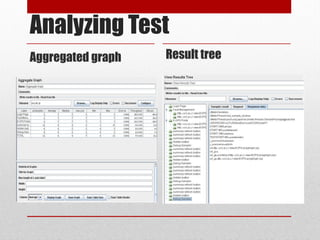
Analyzing Test
Aggregated graph Result tree
• Gives all the statistics
concerning the tests
• May be recorded in a
specified file for further
treatment (data mining)
• Gives in a tree form, all the
samplers results, the
requests, and the sampler
data.
• May also be recorded in a
specified file for further
treatment
Analyzing Test
Aggregated graph Result tree
Thank You

JMeter

  • 1.
  • 2.
    Performance & LoadTesting Basics  Introduction to Performance Testing  Difference between Performance, Load and Stress Testing  Why Performance Testing?  When is it required?  What should be tested?  Performance Testing Process  Load Test configuration for a web system  Practice Questions
  • 3.
    Introduction to Performance Testing •Performance testing is the process of determining the speed or effectiveness of a computer, network, software program or device. • Before going into the details, we should understand the factors that governs Performance testing:  Throughput  Response Time  Tuning  Benchmarking
  • 4.
    Throughput • Capability ofa product to handle multiple transactions in a give period. • Throughput represents the number of requests/business transactions processed by the product in a specified time duration. • As the number of concurrent users increase, the throughput increases almost linearly with the number of requests. As there is very little congestion within the Application Server system queues.
  • 5.
    Throughput • In theheavy load zone or Section B, as the concurrent client load increases, throughput remains relatively constant. • In Section C (the buckle zone) one or more of the system components have become exhausted and throughput starts to degrade. For example, the system might enter the buckle zone when the network connections at the Web server exhaust the limits of the network adapter or if the requests exceed operating system limits for file handles.
  • 6.
    Response Time • Itis equally important to find out how much time each of the transactions took to complete. • Response time is defined as the delay between the point of request and the first response from the product. • The response time increases proportionally to the user load.
  • 7.
    Tuning • Tuning isthe procedure by which product performance is enhanced by setting different values to the parameters of the product, operating system and other components. • Tuning improves the product performance without having to touch the source code of the product.
  • 8.
    Benchmarking • A verywell-improved performance of a product makes no business sense if that performance does not match up to the competitive products. • A careful analysis is needed to chalk out the list of transactions to be compared across products so that an apple-apple comparison becomes possible.
  • 9.
    Performance Testing- Definition • Thetesting to evaluate the response time (speed), throughput and utilization of system to execute its required functions in comparison with different versions of the same product or a different competitive product is called Performance Testing. • Performance testing is done to derive benchmark numbers for the system. • Heavy load is not applied to the system • Tuning is performed until the system under test achieves the expected levels of performance.
  • 10.
    Performance, Load and StressTesting Load Testing • Process of exercising the system under test by feeding it the largest tasks it can operate with. • Constantly increasing the load on the system via automated tools to simulate real time scenario with virtual users. Examples: • Testing a word processor by editing a very large document. • For Web Application load is defined in terms of concurrent users or HTTP connections.
  • 11.
    Performance, Load and StressTesting Stress Testing • Trying to break the system under test by overwhelming its resources or by taking resources away from it. • Purpose is to make sure that the system fails and recovers gracefully. Example: • Double the baseline number for concurrent users/HTTP connections. • Randomly shut down and restart ports on the network switches/routers that connects servers.
  • 12.
    Why Performance Testing? •The week of Feb 6, 2000: Hackers delivered over 1-Billion transactions concurrently to each one of these sites.  Yahoo  eBay  Buy.com  Amazon  eTrade How did you think they performed ?
  • 13.
    Why Performance Testing •Identifies problems early on before they become costly to resolve. • Reduces development cycles. • Produces better quality, more scalable code. • Prevents revenue and credibility loss due to poor Web site performance. • Enables intelligent planning for future expansion. • To ensure that the system meets performance expectations such as response time, throughput etc. under given levels of load. • Expose bugs that do not surface in cursory testing, such as memory management bugs, memory leaks, buffer overflows, etc.
  • 14.
    When is itrequired? Design Phase: Pages containing lots of images and multimedia for reasonable wait times. Heavy loads are less important than knowing which types of content cause slowdowns. Development Phase: To check results of individual pages and processes, looking for breaking points, unnecessary code and bottlenecks. Deployment Phase: To identify the minimum hardware and software requirements for the application.
  • 15.
    What should betested? • High frequency transactions: The most frequently used transactions have the potential to impact the performance of all of the other transactions if they are not efficient. • Mission Critical transactions: The more important transactions that facilitate the core objectives of the system should be included, as failure under load of these transactions has, by definition, the greatest impact. • Read Transactions: At least one READ ONLY transaction should be included, so that performance of such transactions can be differentiated from other more complex transactions. • Update Transactions: At least one update transaction should be included so that performance of such transactions can be differentiated from other transactions.
  • 16.
  • 17.
    • Determine theperformance testing objectives • Describe the application to test using a application model 1. Describe the Hardware environment 2. Create a Benchmark (Agenda) to be recorded in Phase 2. A. Define what tasks each user will perform B. Define (or estimate) the percentage of users per task. 1.Planning1.Planning
  • 18.
    Record • Record thedefined testing activities that will be used as a foundation for your load test scripts. • One activity per task or multiple activities depending on user task definition Modify • Modify load test scripts defined by recorder to reflect more realistic Load test simulations. • Defining the project, users • Randomize parameters (Data, times, environment) • Randomize user activities that occur during the load test 3.Modify3.Modify2.Record2.Record1.Planning1.Planning
  • 19.
    Virtual Users (VUs):Test Goals Start: 5 Max Response Time <= 20 Sec Incremented by: 5 Maximum: 200 Think Time: 5 sec Test Script: One typical user from login through completion. 4. Execute4. Execute
  • 20.
    • Monitoring thescenario: We monitor scenario execution using the various online runtime monitors. • Analysing test results: During scenario execution, the tool records the performance of the application under different loads. We use the graphs and reports to analyse the application’s performance. 6. Analyze6. Analyze5.Monitor5.Monitor
  • 21.
    Load Test configurationfor a web system
  • 22.
    Questions to Reviewyour Skills • What are the factors that governs Performance Testing? • How are Throughput and Response time related with user load? • How do we decide whether the application passed or failed the load test? • What do you mean by Capacity, Stability and Scalability of an application. • What is the difference between Performance, Load and Stress testing? • What is Longevity, endurance, spike and Volume Testing? • At what point in SDLC, performance testing is required? • How to identify the transactions in a complete application for load testing? • Define the 6 steps involved in Performance Testing Process? • Explain the Load Test configuration of a web system and what is the role of Load Generators in it?
  • 23.
    Load Testing Tools Manual testing Limitations  Benefits of Automation  Tools used for Performance Testing  Practice Questions
  • 24.
    Testers Load Generation SystemUnder Test Do you have the testing resources? • Testing personnel • Client machines How do you coordinate and synchronize users? How do you collect and analyze results? How do you achieve test repeatability? Analysis? 123.20 All of you, click the GO button again Manual Testing Limitation Web server Database server Coordinator
  • 25.
    Manual Testing Limitations ManualTesting Limitations  Expensive, requiring large amounts of both personnel and machinery.  Complicated, especially co-ordinating and synchronising multiple testers  Involves a high degree of organization, especially to record and analyse results meaningfully  Repeatability of the manual tests is limited
  • 26.
    Load Generation SystemUnder Test Benefits of Automation Web server Database server Vuser host • Controller manages the virtual users • Analyze results with graphs and reports • Replaces testers with virtual users Solves the resource limitations • Runs many Vusers on a few machinesAnalysis Controller
  • 27.
    Benefits of Automation UsingAutomated Tools  Reduces personnel requirements by replacing human users with virtual users or Vusers. These Vusers emulate the behaviour of real users  Because numerous Vusers can run on a single computer, the tool reduces the amount of hardware required for testing.  Monitors the application performance online, enabling you to fine-tune your system during test execution.  It automatically records the performance of the application during a test. You can choose from a wide variety of graphs and reports to view the performance data.  Because the tests are fully automated, you can easily repeat them as often as you need.
  • 28.
    Tools used forPerformance Testing Open Source • OpenSTA • Diesel Test • TestMaker • Grinder • LoadSim • Jmeter • Rubis Commercial • LoadRunner • Silk Performer • Qengine • Empirix e-Load
  • 29.
    Jmeter • 100% Javadesktop application • For Web and FTP, Java, SOAP/XML-RPC, JDBC applications Advantages: • Open Source • The distributed testing • Various target systems • Extensibility: Pluggable samplers allow unlimited testing capabilities Drawbacks: • Chart representation quite confuse • Terminology not very clear • Necessary to start remote machine one by one • Remote machines must be declared in a property file before starting application
  • 30.
    Questions to Reviewyour Skills • What are the limitations of manual load testing? • Why tools are used for automating load test? • List 5 Open Source and 5 Commercial load test tools. • What are the disadvantages of LoadRunner? • Explain the following Load Test tools: Silk Performer, Qengine. • Give a detailed comparison between Empirix E-load and LoadRunner. • Which other tools are commonly used for load testing?
  • 31.
  • 32.
    SUMMARY Introduction What is Jmeter? Why ? Preparing tests Step 1 Proxy server Step 2 Organization Step 3 Genericity Step 4 Assertions Running tests Non GUI mode Distributed testing Analyzing Test
  • 33.
    Introduction • Definition : •JMeter is an Apache Jakarta project that can be used as a load testing tool for analyzing and measuring the performance of a variety of services, with a focus on web applications. • Why ? : • JMeter can be used as a unit test tool for JDBC database connection, FTP, LDAP, WebServices,J MS, HTTP and generic TCP connections. JMeter can also be configured as a monitor, although this is typically considered an ad-hoc solution in lieu of advanced monitoring solutions.
  • 34.
    Proxy Server Role • RecordHttp requests run by users. • Stick to the exact http request a lambda user . • Record only what is meaningful. • To be organized. • Warning • Doesn’t record https.
  • 35.
    Organization Thread groups Loopcontrollers • Determine • How many users, will concurrently run the tests • How long between 2 launch of the test • How many times the tests will be run • Determine in a thread group • How long between 2 launch of the same sampler • How many times the set of tests will be run.
  • 36.
  • 37.
    Organization Throughput Controller • Makevariable pause during the test run to simulate better a client behavior. • Because the thread group doesn’t take in count the server, can take several seconds before responding.
  • 38.
    Genericity • Variabilisation : •In order not to modify a test to run it on different machines • Example : user and password changing from a shelf to an other
  • 39.
    Genericity • Http defaultRequest • Allows you to put a default ip port and path for all the Http Request contained in the scope • Gives you an easy way to run your test from a device to an other one just by changing the default adress.
  • 40.
    Genericity • Regular Expressionextractor • If the data has to be used several times along the test • Like a sessionId for instance.
  • 41.
    Assertions • Response assertion •To match a pattern in the response code • The response code for instance. • Xpath assertion • Using the DOM of the response to check if an element appear. • A research result for instance. • Size assertion • To know if the size of the response received match with the size expected • To verify if the file received is the good one.
  • 42.
    Running tests • NonGui Mode • Why? • The stress due to test and display is too high when running distributed tests. • How ? • By running command line Example : jmeter -n -t my_test.jmx -l log.jtl -H my.proxy.server -P 8000
  • 43.
    Distributed testing • Why? • To simulate stressed environment with a lot of clients. • How ? • Edit “remote_hosts=127.0.0.1” in jmeter.properties • Start jmeter_server.bat on the host machines • Run jmeter.bat
  • 44.
    Analyzing Test Aggregated graphResult tree • Gives all the statistics concerning the tests • May be recorded in a specified file for further treatment (data mining) • Gives in a tree form, all the samplers results, the requests, and the sampler data. • May also be recorded in a specified file for further treatment
  • 45.
  • 46.