BUILDING A CONTINUOUS
DELIVERY PIPELINE USING
JENKINS
Jadson Santos
Software Engineer
Continuous Delivery
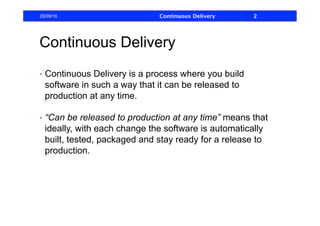
•  Continuous Delivery is a process where you build
software in such a way that it can be released to
production at any time.
•  “Can be released to production at any time” means that
ideally, with each change the software is automatically
built, tested, packaged and stay ready for a release to
production.
28/09/16 Continuous Delivery 2
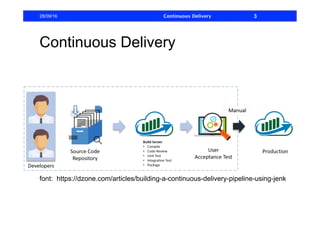
Continuous Delivery
28/09/16 Continuous Delivery 3
font: https://dzone.com/articles/building-a-continuous-delivery-pipeline-using-jenk
Continuous Delivery
•  If with each change the software if ready to production,
continuous delivery requires that you have a strong
process of automated testing
•  To ensure that you do not prepare something with error to
production
28/09/16 Continuous Delivery 4
Test Types
Blackbox Testing: also known as Behavioral Testing, It is
a software testing method that ignores the internal
mechanism of the system and focuses on test if the output
generated is correct for a given input. It is basically used for
validating the software.
Whitebox Testing: It’s a method of testing software that
tests internal structures an application. It is also called
structural testing and glass box testing. White-box testing
create an error-free environment by examining any fragile
code. It is basically used for verifying the software
28/09/16 Continuous Delivery 5
Test Categories
Unit Testing: It is the testing of an individual unit ( in OOP
usually a class). It is the easiest to be created and is
usually the most used test category.
Integration Testing: It is a type of testing in which a group
of components are combined to produce the output. Also,
the interaction between software and the outside
components (database, REST services, etc …)
28/09/16 Continuous Delivery 6
Test Categories
Functional Testing: This is a verification activity; Does
the software meet the business requirements?
Acceptance Testing: This is a validation activity; Is this
what the customer really ask for? This is usually done in
cooperation with the customer or by a customer
representative.
28/09/16 Continuous Delivery 7
Test Categories
System Testing: Test the system as a whole. It is the
category that performs the test closest to how the system
will run in production. When a programmer access the user
interface of the software and simulate the use of the
software by the final user, it is a System Testing, but not
automatized.
28/09/16 Continuous Delivery 8
Test Categories
Stress Testing: It evaluates how the system behaves
under extreme conditions.
Beta Testing: a sampling of the intended audience tries the
product out. It has the objective of testing the receipt of the
product on the market.
28/09/16 Continuous Delivery 9
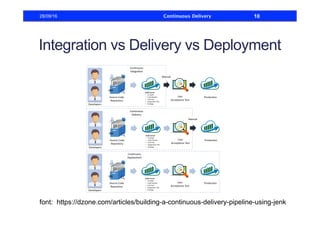
Integration vs Delivery vs Deployment
28/09/16 Continuous Delivery 10
font: https://dzone.com/articles/building-a-continuous-delivery-pipeline-using-jenk
Integration vs Delivery vs Deployment
•  Continuous Integration: is a software development
practice where ideally every code commit is built and
tested.
•  One of the advantages of this practice is that you do not
have to spend a lot of time integration hundreds commits
and resolving dozens of merge problems to integrate the
software.
•  Making the integration at every commit reduces the size
of the change in the source code and small changes are
easier to manager.
28/09/16 Continuous Delivery 11
Integration vs Delivery vs Deployment
•  Continuous Delivery is a approach in which teams
produce software in short cycles, ensuring that the
software can be reliably and quickly released at any
time.
•  Releasing smaller changes more often tends to produce
a software with less bugs and the bugs generated can be
solved more easily.
28/09/16 Continuous Delivery 12
Integration vs Delivery vs Deployment
•  In Continuous Delivery the software can be, it is ready to
be released in production, but it is not necessary
released any time.
•  Continuous Integration is necessary for Continuous
Delivery.
28/09/16 Continuous Delivery 13
Integration vs Delivery vs Deployment
•  Continuous Deployment is the next step past
Continuous Delivery, where you are not just creating a
deployable package, but you are actually deploying it
in an automated process.
•  To use Continuous Deployment we have the solve the
problem that the user is using the system, and can not
be affected at every moment with a system reboot.
28/09/16 Continuous Delivery 14
Integration vs Delivery vs Deployment
•  The advantage of Continuous Deployment is that the
user can receive the change at the exact moment when
it is ready without need to reboot the system. Also know
as “zero downtime”.
•  It is a dream, but not all scenarios need this complex
requirement.
•  Therefore sometimes just Continuous Delivery is
necessary
28/09/16 Continuous Delivery 15
Continuous Delivery
•  Only Continuous Integration is not enough to assure the
safe release in production.
•  Unit and integrations tests only test a developer's
perspective of the solution to a problem.
•  Without running Acceptance Tests in a production-like
environment, we know nothing about whether the
application meets the customer's specifications, nor
whether it can be deployed and survive in the real world
28/09/16 Continuous Delivery 16
Continuous Delivery
•  Continuous Delivery make more likely that the
application is seamlessly deployed on the production
environment, by making the application works fine
when deployed on the test server (production-like
environment) and running Automated Acceptance
Tests.
•  More about Automated Acceptance Tests:
•  https://www.thoughtworks.com/pt/insights/blog/
acceptance-test-automation
•  https://www.katalon.com
28/09/16 Continuous Delivery 17
Continuous Delivery Pipeline
Steps of your pipeline
•  Compiling the Source Code
•  Run Unit Testing
•  Packaging the application and Deploying it on a web
serve
28/09/16 Continuous Delivery 18
Jenkins
Jenkins is an extensible, open source continuous
integration server.
It builds and tests your software continuously and monitors
the execution and status of remote jobs, making it easier
for team members and users to regularly obtain the latest
stable code.
28/09/16 Continuous Delivery 19
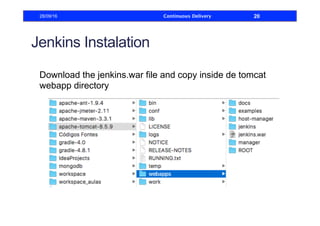
Jenkins Instalation
Download the jenkins.war file and copy inside de tomcat
webapp directory
28/09/16 Continuous Delivery 20
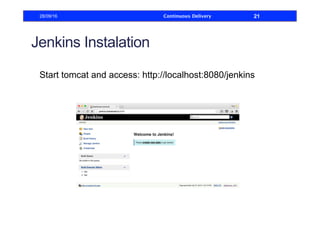
Jenkins Instalation
Start tomcat and access: http://localhost:8080/jenkins
28/09/16 Continuous Delivery 21
Continuous Delivery Pipeline
•  Usually the more common way to work with continuous
delivery is create a pipeline to easily see and manage
all stages of build process.
•  We will create a simple 3 stages pipeline where each
stages is a job on Jenkins
28/09/16 Continuous Delivery 22
Continuous Delivery Pipeline
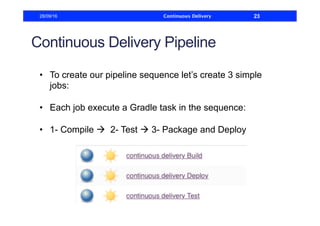
•  To create our pipeline sequence let’s create 3 simple
jobs:
•  Each job execute a Gradle task in the sequence:
•  1- Compile à 2- Test à 3- Package and Deploy
28/09/16 Continuous Delivery 23
Continuous Delivery Pipeline
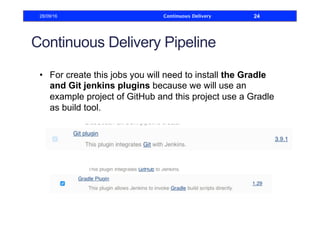
•  For create this jobs you will need to install the Gradle
and Git jenkins plugins because we will use an
example project of GitHub and this project use a Gradle
as build tool.
28/09/16 Continuous Delivery 24
Continuous Delivery Pipeline
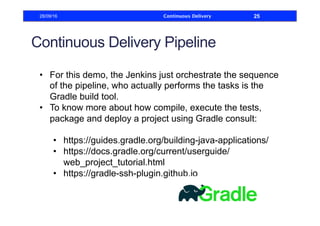
•  For this demo, the Jenkins just orchestrate the sequence
of the pipeline, who actually performs the tasks is the
Gradle build tool.
•  To know more about how compile, execute the tests,
package and deploy a project using Gradle consult:
•  https://guides.gradle.org/building-java-applications/
•  https://docs.gradle.org/current/userguide/
web_project_tutorial.html
•  https://gradle-ssh-plugin.github.io
28/09/16 Continuous Delivery 25
Continuous Delivery Pipeline
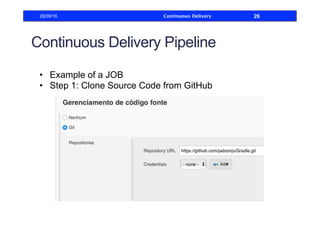
•  Example of a JOB
•  Step 1: Clone Source Code from GitHub
28/09/16 Continuous Delivery 26
Continuous Delivery Pipeline
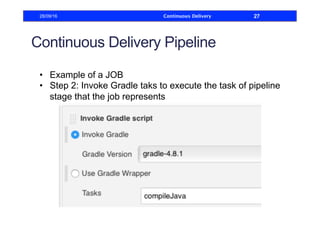
•  Example of a JOB
•  Step 2: Invoke Gradle taks to execute the task of pipeline
stage that the job represents
28/09/16 Continuous Delivery 27
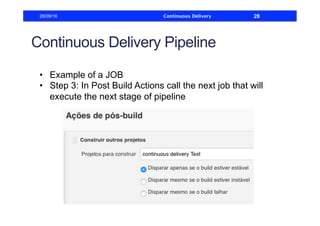
Continuous Delivery Pipeline
•  Example of a JOB
•  Step 3: In Post Build Actions call the next job that will
execute the next stage of pipeline
28/09/16 Continuous Delivery 28
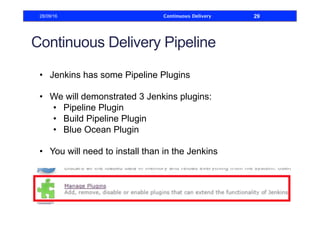
Continuous Delivery Pipeline
•  Jenkins has some Pipeline Plugins
•  We will demonstrated 3 Jenkins plugins:
•  Pipeline Plugin
•  Build Pipeline Plugin
•  Blue Ocean Plugin
•  You will need to install than in the Jenkins
28/09/16 Continuous Delivery 29
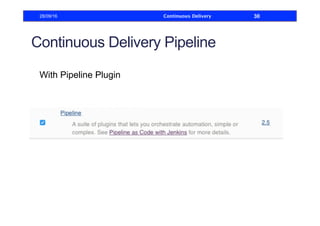
Continuous Delivery Pipeline
With Pipeline Plugin
28/09/16 Continuous Delivery 30
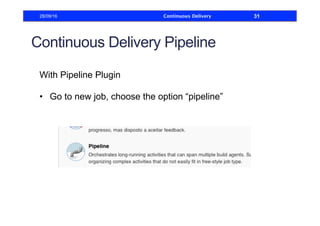
Continuous Delivery Pipeline
With Pipeline Plugin
•  Go to new job, choose the option “pipeline”
28/09/16 Continuous Delivery 31
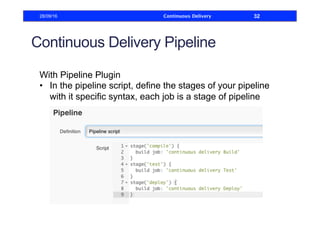
Continuous Delivery Pipeline
With Pipeline Plugin
•  In the pipeline script, define the stages of your pipeline
with it specific syntax, each job is a stage of pipeline
28/09/16 Continuous Delivery 32
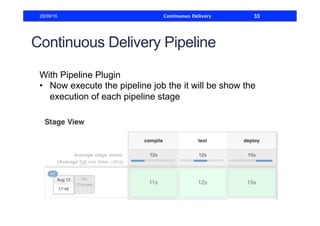
Continuous Delivery Pipeline
With Pipeline Plugin
•  Now execute the pipeline job the it will be show the
execution of each pipeline stage
28/09/16 Continuous Delivery 33
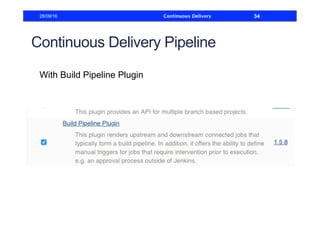
Continuous Delivery Pipeline
With Build Pipeline Plugin
28/09/16 Continuous Delivery 34
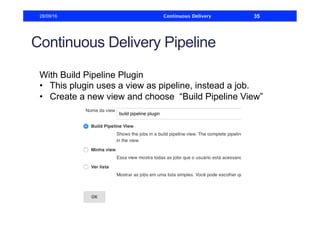
Continuous Delivery Pipeline
With Build Pipeline Plugin
•  This plugin uses a view as pipeline, instead a job.
•  Create a new view and choose “Build Pipeline View”
28/09/16 Continuous Delivery 35
Continuous Delivery Pipeline
With Build Pipeline Plugin
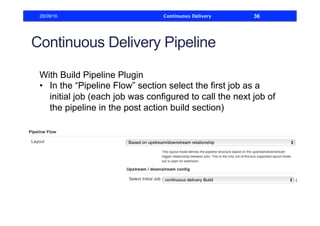
•  In the “Pipeline Flow” section select the first job as a
initial job (each job was configured to call the next job of
the pipeline in the post action build section)
28/09/16 Continuous Delivery 36
Continuous Delivery Pipeline
With Build Pipeline Plugin
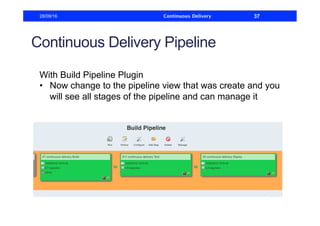
•  Now change to the pipeline view that was create and you
will see all stages of the pipeline and can manage it
28/09/16 Continuous Delivery 37
Continuous Delivery Pipeline
With Blue Ocean Plugin
•  Blue Ocean is a new project that rethinks the user
experience of Jenkins.
•  It has a sophisticated visualizations of CD pipelines and
visual pipeline editor that makes automating CD
pipelines approachable by guiding the user through an
intuitive and visual process to create a pipeline.
28/09/16 Continuous Delivery 38
Continuous Delivery Pipeline
With Blue Ocean Plugin
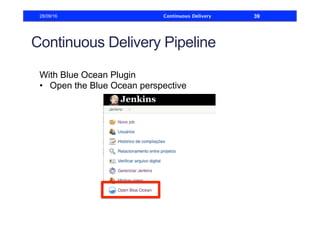
•  Open the Blue Ocean perspective
28/09/16 Continuous Delivery 39
Continuous Delivery Pipeline
With Blue Ocean Plugin
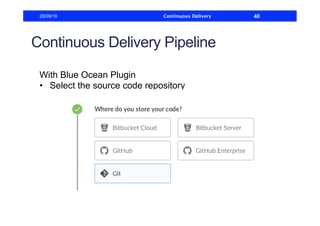
•  Select the source code repository
28/09/16 Continuous Delivery 40
Continuous Delivery Pipeline
With Blue Ocean Plugin
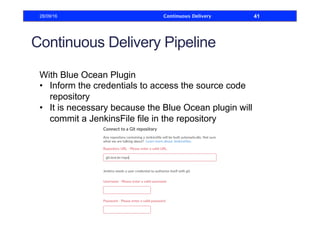
•  Inform the credentials to access the source code
repository
•  It is necessary because the Blue Ocean plugin will
commit a JenkinsFile file in the repository
28/09/16 Continuous Delivery 41
Continuous Delivery Pipeline
With Blue Ocean Plugin
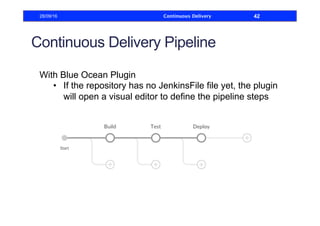
•  If the repository has no JenkinsFile file yet, the plugin
will open a visual editor to define the pipeline steps
28/09/16 Continuous Delivery 42
Continuous Delivery Pipeline
With Blue Ocean Plugin
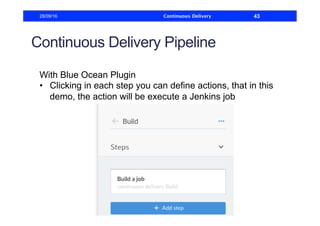
•  Clicking in each step you can define actions, that in this
demo, the action will be execute a Jenkins job
28/09/16 Continuous Delivery 43
Continuous Delivery Pipeline
With Blue Ocean Plugin
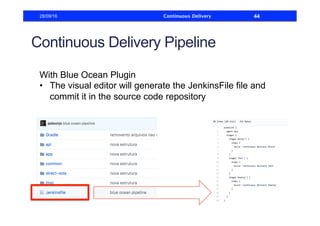
•  The visual editor will generate the JenkinsFile file and
commit it in the source code repository
28/09/16 Continuous Delivery 44
Continuous Delivery Pipeline
With Blue Ocean Plugin
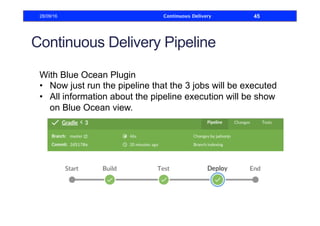
•  Now just run the pipeline that the 3 jobs will be executed
•  All information about the pipeline execution will be show
on Blue Ocean view.
28/09/16 Continuous Delivery 45
References
https://dzone.com/articles/building-a-continuous-delivery-
pipeline-using-jenk
https://code.tutsplus.com/tutorials/introduction-to-jenkins-
an-open-source-continuous-integration-server--cms-23879
https://jenkins.io/doc/tutorials/create-a-pipeline-in-blue-
ocean/
https://wiki.jenkins.io/display/JENKINS/Blue+Ocean+Plugin
28/09/16 Continuous Delivery 46
Continuous Delivery28/09/16 47

Jenkins Continuous Delivery

  • 1.
    BUILDING A CONTINUOUS DELIVERYPIPELINE USING JENKINS Jadson Santos Software Engineer
  • 2.
    Continuous Delivery •  ContinuousDelivery is a process where you build software in such a way that it can be released to production at any time. •  “Can be released to production at any time” means that ideally, with each change the software is automatically built, tested, packaged and stay ready for a release to production. 28/09/16 Continuous Delivery 2
  • 3.
    Continuous Delivery 28/09/16 ContinuousDelivery 3 font: https://dzone.com/articles/building-a-continuous-delivery-pipeline-using-jenk
  • 4.
    Continuous Delivery •  Ifwith each change the software if ready to production, continuous delivery requires that you have a strong process of automated testing •  To ensure that you do not prepare something with error to production 28/09/16 Continuous Delivery 4
  • 5.
    Test Types Blackbox Testing:also known as Behavioral Testing, It is a software testing method that ignores the internal mechanism of the system and focuses on test if the output generated is correct for a given input. It is basically used for validating the software. Whitebox Testing: It’s a method of testing software that tests internal structures an application. It is also called structural testing and glass box testing. White-box testing create an error-free environment by examining any fragile code. It is basically used for verifying the software 28/09/16 Continuous Delivery 5
  • 6.
    Test Categories Unit Testing:It is the testing of an individual unit ( in OOP usually a class). It is the easiest to be created and is usually the most used test category. Integration Testing: It is a type of testing in which a group of components are combined to produce the output. Also, the interaction between software and the outside components (database, REST services, etc …) 28/09/16 Continuous Delivery 6
  • 7.
    Test Categories Functional Testing:This is a verification activity; Does the software meet the business requirements? Acceptance Testing: This is a validation activity; Is this what the customer really ask for? This is usually done in cooperation with the customer or by a customer representative. 28/09/16 Continuous Delivery 7
  • 8.
    Test Categories System Testing:Test the system as a whole. It is the category that performs the test closest to how the system will run in production. When a programmer access the user interface of the software and simulate the use of the software by the final user, it is a System Testing, but not automatized. 28/09/16 Continuous Delivery 8
  • 9.
    Test Categories Stress Testing:It evaluates how the system behaves under extreme conditions. Beta Testing: a sampling of the intended audience tries the product out. It has the objective of testing the receipt of the product on the market. 28/09/16 Continuous Delivery 9
  • 10.
    Integration vs Deliveryvs Deployment 28/09/16 Continuous Delivery 10 font: https://dzone.com/articles/building-a-continuous-delivery-pipeline-using-jenk
  • 11.
    Integration vs Deliveryvs Deployment •  Continuous Integration: is a software development practice where ideally every code commit is built and tested. •  One of the advantages of this practice is that you do not have to spend a lot of time integration hundreds commits and resolving dozens of merge problems to integrate the software. •  Making the integration at every commit reduces the size of the change in the source code and small changes are easier to manager. 28/09/16 Continuous Delivery 11
  • 12.
    Integration vs Deliveryvs Deployment •  Continuous Delivery is a approach in which teams produce software in short cycles, ensuring that the software can be reliably and quickly released at any time. •  Releasing smaller changes more often tends to produce a software with less bugs and the bugs generated can be solved more easily. 28/09/16 Continuous Delivery 12
  • 13.
    Integration vs Deliveryvs Deployment •  In Continuous Delivery the software can be, it is ready to be released in production, but it is not necessary released any time. •  Continuous Integration is necessary for Continuous Delivery. 28/09/16 Continuous Delivery 13
  • 14.
    Integration vs Deliveryvs Deployment •  Continuous Deployment is the next step past Continuous Delivery, where you are not just creating a deployable package, but you are actually deploying it in an automated process. •  To use Continuous Deployment we have the solve the problem that the user is using the system, and can not be affected at every moment with a system reboot. 28/09/16 Continuous Delivery 14
  • 15.
    Integration vs Deliveryvs Deployment •  The advantage of Continuous Deployment is that the user can receive the change at the exact moment when it is ready without need to reboot the system. Also know as “zero downtime”. •  It is a dream, but not all scenarios need this complex requirement. •  Therefore sometimes just Continuous Delivery is necessary 28/09/16 Continuous Delivery 15
  • 16.
    Continuous Delivery •  OnlyContinuous Integration is not enough to assure the safe release in production. •  Unit and integrations tests only test a developer's perspective of the solution to a problem. •  Without running Acceptance Tests in a production-like environment, we know nothing about whether the application meets the customer's specifications, nor whether it can be deployed and survive in the real world 28/09/16 Continuous Delivery 16
  • 17.
    Continuous Delivery •  ContinuousDelivery make more likely that the application is seamlessly deployed on the production environment, by making the application works fine when deployed on the test server (production-like environment) and running Automated Acceptance Tests. •  More about Automated Acceptance Tests: •  https://www.thoughtworks.com/pt/insights/blog/ acceptance-test-automation •  https://www.katalon.com 28/09/16 Continuous Delivery 17
  • 18.
    Continuous Delivery Pipeline Stepsof your pipeline •  Compiling the Source Code •  Run Unit Testing •  Packaging the application and Deploying it on a web serve 28/09/16 Continuous Delivery 18
  • 19.
    Jenkins Jenkins is anextensible, open source continuous integration server. It builds and tests your software continuously and monitors the execution and status of remote jobs, making it easier for team members and users to regularly obtain the latest stable code. 28/09/16 Continuous Delivery 19
  • 20.
    Jenkins Instalation Download thejenkins.war file and copy inside de tomcat webapp directory 28/09/16 Continuous Delivery 20
  • 21.
    Jenkins Instalation Start tomcatand access: http://localhost:8080/jenkins 28/09/16 Continuous Delivery 21
  • 22.
    Continuous Delivery Pipeline • Usually the more common way to work with continuous delivery is create a pipeline to easily see and manage all stages of build process. •  We will create a simple 3 stages pipeline where each stages is a job on Jenkins 28/09/16 Continuous Delivery 22
  • 23.
    Continuous Delivery Pipeline • To create our pipeline sequence let’s create 3 simple jobs: •  Each job execute a Gradle task in the sequence: •  1- Compile à 2- Test à 3- Package and Deploy 28/09/16 Continuous Delivery 23
  • 24.
    Continuous Delivery Pipeline • For create this jobs you will need to install the Gradle and Git jenkins plugins because we will use an example project of GitHub and this project use a Gradle as build tool. 28/09/16 Continuous Delivery 24
  • 25.
    Continuous Delivery Pipeline • For this demo, the Jenkins just orchestrate the sequence of the pipeline, who actually performs the tasks is the Gradle build tool. •  To know more about how compile, execute the tests, package and deploy a project using Gradle consult: •  https://guides.gradle.org/building-java-applications/ •  https://docs.gradle.org/current/userguide/ web_project_tutorial.html •  https://gradle-ssh-plugin.github.io 28/09/16 Continuous Delivery 25
  • 26.
    Continuous Delivery Pipeline • Example of a JOB •  Step 1: Clone Source Code from GitHub 28/09/16 Continuous Delivery 26
  • 27.
    Continuous Delivery Pipeline • Example of a JOB •  Step 2: Invoke Gradle taks to execute the task of pipeline stage that the job represents 28/09/16 Continuous Delivery 27
  • 28.
    Continuous Delivery Pipeline • Example of a JOB •  Step 3: In Post Build Actions call the next job that will execute the next stage of pipeline 28/09/16 Continuous Delivery 28
  • 29.
    Continuous Delivery Pipeline • Jenkins has some Pipeline Plugins •  We will demonstrated 3 Jenkins plugins: •  Pipeline Plugin •  Build Pipeline Plugin •  Blue Ocean Plugin •  You will need to install than in the Jenkins 28/09/16 Continuous Delivery 29
  • 30.
    Continuous Delivery Pipeline WithPipeline Plugin 28/09/16 Continuous Delivery 30
  • 31.
    Continuous Delivery Pipeline WithPipeline Plugin •  Go to new job, choose the option “pipeline” 28/09/16 Continuous Delivery 31
  • 32.
    Continuous Delivery Pipeline WithPipeline Plugin •  In the pipeline script, define the stages of your pipeline with it specific syntax, each job is a stage of pipeline 28/09/16 Continuous Delivery 32
  • 33.
    Continuous Delivery Pipeline WithPipeline Plugin •  Now execute the pipeline job the it will be show the execution of each pipeline stage 28/09/16 Continuous Delivery 33
  • 34.
    Continuous Delivery Pipeline WithBuild Pipeline Plugin 28/09/16 Continuous Delivery 34
  • 35.
    Continuous Delivery Pipeline WithBuild Pipeline Plugin •  This plugin uses a view as pipeline, instead a job. •  Create a new view and choose “Build Pipeline View” 28/09/16 Continuous Delivery 35
  • 36.
    Continuous Delivery Pipeline WithBuild Pipeline Plugin •  In the “Pipeline Flow” section select the first job as a initial job (each job was configured to call the next job of the pipeline in the post action build section) 28/09/16 Continuous Delivery 36
  • 37.
    Continuous Delivery Pipeline WithBuild Pipeline Plugin •  Now change to the pipeline view that was create and you will see all stages of the pipeline and can manage it 28/09/16 Continuous Delivery 37
  • 38.
    Continuous Delivery Pipeline WithBlue Ocean Plugin •  Blue Ocean is a new project that rethinks the user experience of Jenkins. •  It has a sophisticated visualizations of CD pipelines and visual pipeline editor that makes automating CD pipelines approachable by guiding the user through an intuitive and visual process to create a pipeline. 28/09/16 Continuous Delivery 38
  • 39.
    Continuous Delivery Pipeline WithBlue Ocean Plugin •  Open the Blue Ocean perspective 28/09/16 Continuous Delivery 39
  • 40.
    Continuous Delivery Pipeline WithBlue Ocean Plugin •  Select the source code repository 28/09/16 Continuous Delivery 40
  • 41.
    Continuous Delivery Pipeline WithBlue Ocean Plugin •  Inform the credentials to access the source code repository •  It is necessary because the Blue Ocean plugin will commit a JenkinsFile file in the repository 28/09/16 Continuous Delivery 41
  • 42.
    Continuous Delivery Pipeline WithBlue Ocean Plugin •  If the repository has no JenkinsFile file yet, the plugin will open a visual editor to define the pipeline steps 28/09/16 Continuous Delivery 42
  • 43.
    Continuous Delivery Pipeline WithBlue Ocean Plugin •  Clicking in each step you can define actions, that in this demo, the action will be execute a Jenkins job 28/09/16 Continuous Delivery 43
  • 44.
    Continuous Delivery Pipeline WithBlue Ocean Plugin •  The visual editor will generate the JenkinsFile file and commit it in the source code repository 28/09/16 Continuous Delivery 44
  • 45.
    Continuous Delivery Pipeline WithBlue Ocean Plugin •  Now just run the pipeline that the 3 jobs will be executed •  All information about the pipeline execution will be show on Blue Ocean view. 28/09/16 Continuous Delivery 45
  • 46.
  • 47.