Javascript
• JavaScript is a light-weight object-oriented programming language which is
used by several websites for scripting the webpages. It is an interpreted,
full-fledged programming language that enables dynamic interactivity on
websites when applied to an HTML document.
• Why JavaScript was introduced?
• To create interactive websites
• Example: Pop ups, event on click
• Many websites are using JavaScript
2
Introduction
• For effective and efficient web development, developers must know three
languages:
• HTML – for creating the web page and defining its content
• CSS – for specifying the layout and styles of the various elements
• Javascript – for programming the behaviour of the web page
• JS is an easy to learn, lightweight, interpreted scripting language.
• It was created by a Netscape developer named Brendan Eich in 1995.
• It can run both on client side as well as server side web browsers.
3
Overview
• Website Client side (Js, Jquery, React js)
• Website Server side (Node JS, Express js)
• Mobile Development (React Native, Phone Gap, ionic)
• Software Development (electronjs EX-VScode)
4
Where is JavaScript used ?
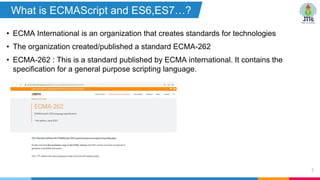
• ECMA International is an organization that creates standards for technologies
• The organization created/published a standard ECMA-262
• ECMA-262 : This is a standard published by ECMA international. It contains the
specification for a general purpose scripting language.
5
What is ECMAScript and ES6,ES7…?
?
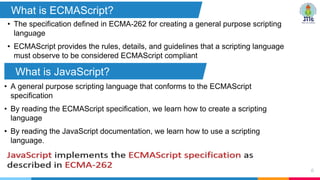
• The specification defined in ECMA-262 for creating a general purpose scripting
language
• ECMAScript provides the rules, details, and guidelines that a scripting language
must observe to be considered ECMAScript compliant
6
What is ECMAScript?
What is JavaScript?
• A general purpose scripting language that conforms to the ECMAScript
specification
• By reading the ECMAScript specification, we learn how to create a scripting
language
• By reading the JavaScript documentation, we learn how to use a scripting
language.
ECMA Script versions
7
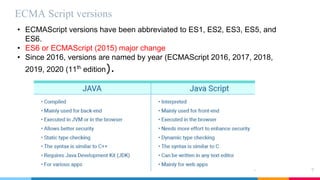
• ECMAScript versions have been abbreviated to ES1, ES2, ES3, ES5, and
ES6.
• ES6 or ECMAScript (2015) major change
• Since 2016, versions are named by year (ECMAScript 2016, 2017, 2018,
2019, 2020 (11th
edition).
8
1
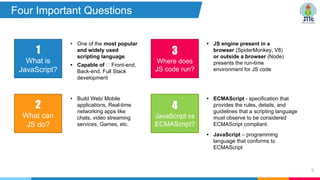
What is
JavaScript?
2
What can
JS do?
• One of the most popular
and widely used
scripting language.
• Capable of Front-end,
Back-end, Full Stack
development
• Build Web/ Mobile
applications, Real-time
networking apps like
chats, video streaming
services, Games, etc.
3
Where does
JS code run?
• JS engine present in a
browser (SpiderMonkey, V8)
or outside a browser (Node)
presents the run-time
environment for JS code
4
JavaScript vs
ECMAScript?
• ECMAScript - specification that
provides the rules, details, and
guidelines that a scripting language
must observe to be considered
ECMAScript compliant.
• JavaScript – programming
language that conforms to
ECMAScript
Four Important Questions
JS Basics
Inclusion, Output, Variables,
Data Types, Operators
9
• JavaScript code is inserted between <script> and
</script> tags.
• Any number of scripts can be placed in a web
page.
• Three ways of placing and using a script:
Inside <head> section
Inside <body> section
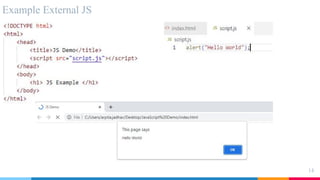
External JS file
10
JavaScript
Inclusion
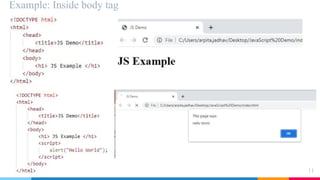
Example: Inside body tag
11
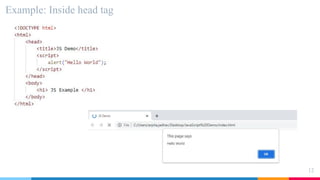
Example: Inside head tag
12
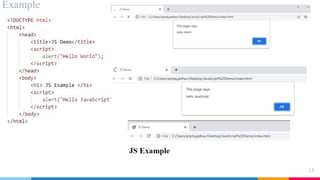
Example
13
Example External JS
14
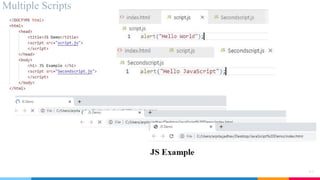
Multiple Scripts
15
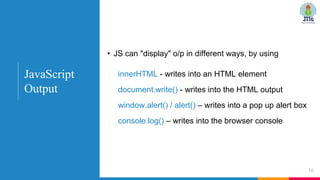
• JS can "display" o/p in different ways, by using
innerHTML - writes into an HTML element
document.write() - writes into the HTML output
window.alert() / alert() – writes into a pop up alert box
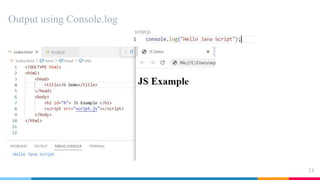
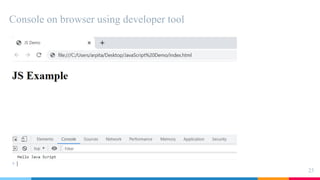
console.log() – writes into the browser console
16
JavaScript
Output
Example : Async v/s Defer
17
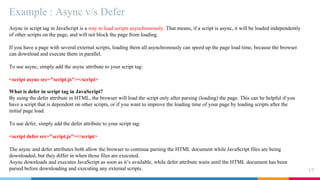
Async in script tag in JavaScript is a way to load scripts asynchronously. That means, if a script is async, it will be loaded independently
of other scripts on the page, and will not block the page from loading.
If you have a page with several external scripts, loading them all asynchronously can speed up the page load time, because the browser
can download and execute them in parallel.
To use async, simply add the async attribute to your script tag:
<script async src="script.js"></script>
What is defer in script tag in JavaScript?
By using the defer attribute in HTML, the browser will load the script only after parsing (loading) the page. This can be helpful if you
have a script that is dependent on other scripts, or if you want to improve the loading time of your page by loading scripts after the
initial page load.
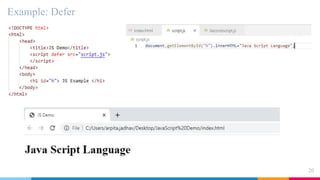
To use defer, simply add the defer attribute to your script tag:
<script defer src="script.js"></script>
The async and defer attributes both allow the browser to continue parsing the HTML document while JavaScript files are being
downloaded, but they differ in when those files are executed.
Async downloads and executes JavaScript as soon as it’s available, while defer attribute waits until the HTML document has been
parsed before downloading and executing any external scripts.
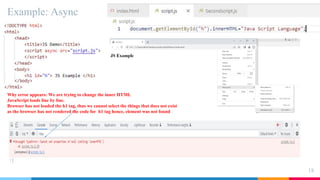
Example: Async
18
Why error appears: We are trying to change the inner HTML
JavaScript loads line by line.
Browser has not loaded the h1 tag, thus we cannot select the things that does not exist
as the browser has not rendered the code for h1 tag hence, element was not found
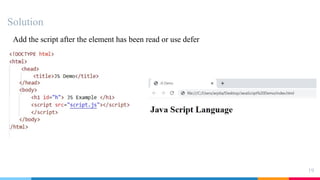
Solution
19
Add the script after the element has been read or use defer
Example: Defer
20
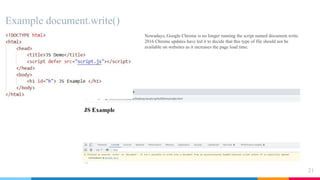
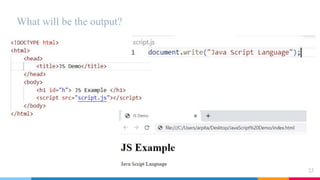
Example document.write()
21
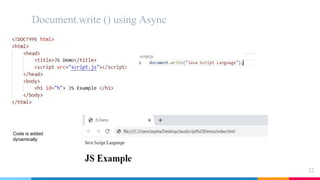
Nowadays, Google Chrome is no longer running the script named document.write.
2016 Chrome updates have led it to decide that this type of file should not be
available on websites as it increases the page load time.
Document.write () using Async
22
Code is added
dynamically
What will be the output?
23
Output using Console.log
24
Console on browser using developer tool
25
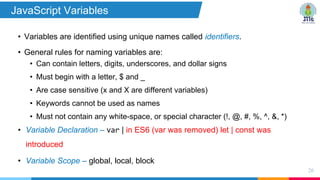
• Variables are identified using unique names called identifiers.
• General rules for naming variables are:
• Can contain letters, digits, underscores, and dollar signs
• Must begin with a letter, $ and _
• Are case sensitive (x and X are different variables)
• Keywords cannot be used as names
• Must not contain any white-space, or special character (!, @, #, %, ^, &, *)
• Variable Declaration – var | in ES6 (var was removed) let | const was
introduced
• Variable Scope – global, local, block
26
JavaScript Variables
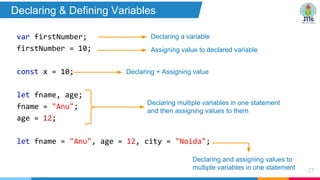
var firstNumber;
firstNumber = 10;
const x = 10;
let fname, age;
fname = "Anu";
age = 12;
let fname = "Anu", age = 12, city = "Noida";
27
Declaring a variable
Assigning value to declared variable
Declaring + Assigning value
Declaring and assigning values to
multiple variables in one statement
Declaring multiple variables in one statement
and then assigning values to them
Declaring & Defining Variables
JavaScript var keyword
28
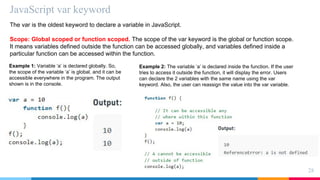
The var is the oldest keyword to declare a variable in JavaScript.
Scope: Global scoped or function scoped. The scope of the var keyword is the global or function scope.
It means variables defined outside the function can be accessed globally, and variables defined inside a
particular function can be accessed within the function.
Example 1: Variable ‘a’ is declared globally. So,
the scope of the variable ‘a’ is global, and it can be
accessible everywhere in the program. The output
shown is in the console.
Example 2: The variable ‘a’ is declared inside the function. If the user
tries to access it outside the function, it will display the error. Users
can declare the 2 variables with the same name using the var
keyword. Also, the user can reassign the value into the var variable.
JavaScript var keyword
29
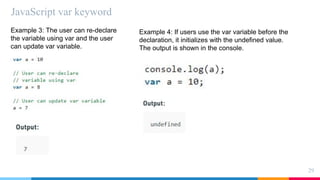
Example 3: The user can re-declare
the variable using var and the user
can update var variable.
Example 4: If users use the var variable before the
declaration, it initializes with the undefined value.
The output is shown in the console.
JavaScript: let keyword
30
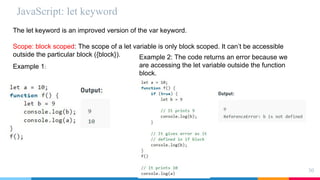
The let keyword is an improved version of the var keyword.
Scope: block scoped: The scope of a let variable is only block scoped. It can’t be accessible
outside the particular block ({block}). Example 2: The code returns an error because we
are accessing the let variable outside the function
block.
Example 1:
JavaScript: let keyword
31
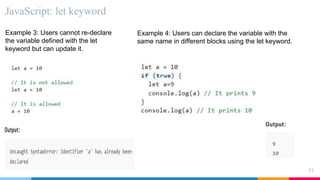
Example 3: Users cannot re-declare
the variable defined with the let
keyword but can update it.
Example 4: Users can declare the variable with the
same name in different blocks using the let keyword.
JavaScript: let keyword
32
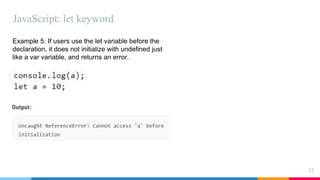
Example 5: If users use the let variable before the
declaration, it does not initialize with undefined just
like a var variable, and returns an error.
JavaScript: const keyword
33
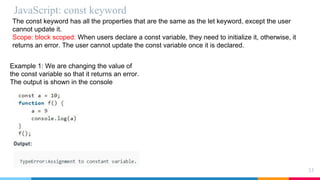
The const keyword has all the properties that are the same as the let keyword, except the user
cannot update it.
Scope: block scoped: When users declare a const variable, they need to initialize it, otherwise, it
returns an error. The user cannot update the const variable once it is declared.
Example 1: We are changing the value of
the const variable so that it returns an error.
The output is shown in the console
Var, const and let
34
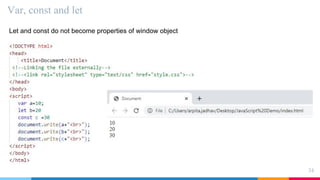
Let and const do not become properties of window object
Var, const and let
35
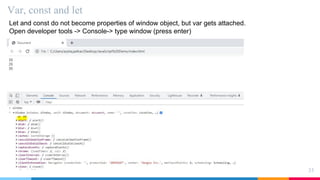
Let and const do not become properties of window object, but var gets attached.
Open developer tools -> Console-> type window (press enter)
JavaScript supports the following types of
operators:
• Arithmetic [ +, -, *, /, **, %, ++, -- ]
(** is exponential and same as Math.pow(x, y))
• Assignment [ =, +=, -=, *=, /=, %=, **= ]
• Comparison [ == (equal value), === (equal value and
equal type), !=, !===, >, <, >=, <= ]
• Logical [ &&, ||, ! ]
• Bitwise [ &, |, ~, ^, <<, >>, >>> ]
• Miscellaneous [ternary (? :) and typeof ]
36
JavaScript
Operators
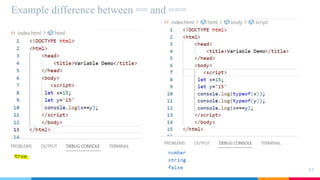
Example difference between == and ===
37
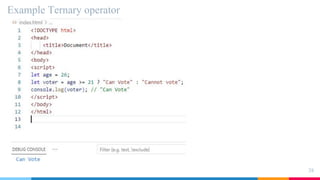
Example Ternary operator
38
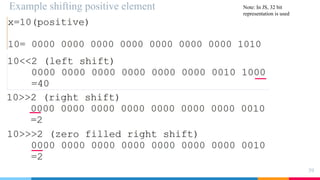
Example shifting positive element
39
Note: In JS, 32 bit
representation is used
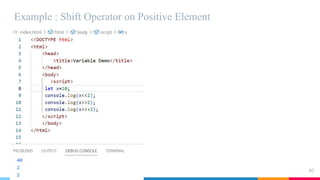
Example : Shift Operator on Positive Element
40
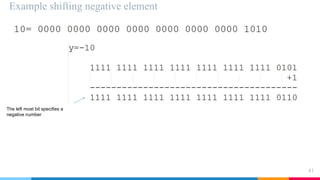
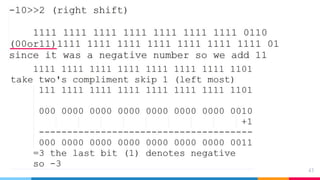
Example shifting negative element
41
The left most bit specifies a
negative number
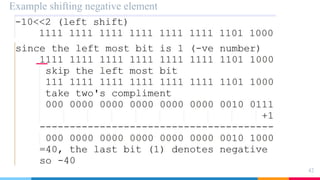
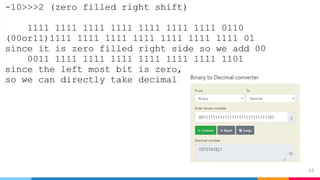
Example shifting negative element
42
43
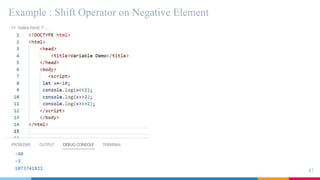
44
Example : Shift Operator on Negative Element
45
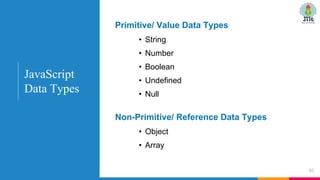
• String
• Number
• Boolean
• Undefined
• Null
46
Primitive/ Value Data Types
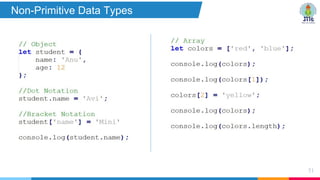
• Object
• Array
Non-Primitive/ Reference Data Types
JavaScript
Data Types
47
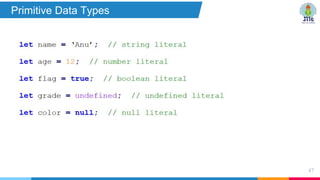
Primitive Data Types
48
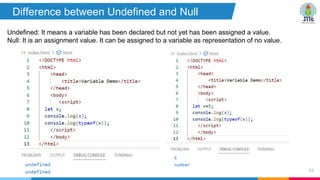
Difference between Undefined and Null
Undefined: It means a variable has been declared but not yet has been assigned a value.
Null: It is an assignment value. It can be assigned to a variable as representation of no value.
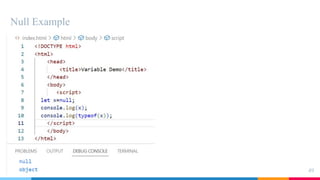
Null Example
49
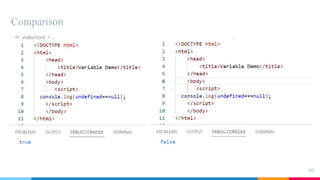
Comparison
50
51
Non-Primitive Data Types
JS Functions
52
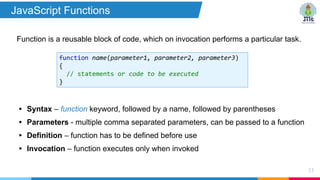
Function is a reusable block of code, which on invocation performs a particular task.
53
function name(parameter1, parameter2, parameter3)
{
// statements or code to be executed
}
• Syntax – function keyword, followed by a name, followed by parentheses
• Parameters - multiple comma separated parameters, can be passed to a function
• Definition – function has to be defined before use
• Invocation – function executes only when invoked
JavaScript Functions
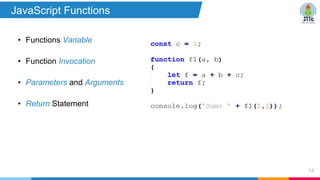
• Functions Variable
• Function Invocation
• Parameters and Arguments
• Return Statement
54
JavaScript Functions
55
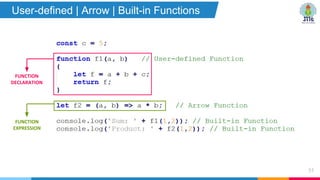
User-defined | Arrow | Built-in Functions
FUNCTION
EXPRESSION
FUNCTION
DECLARATION
56
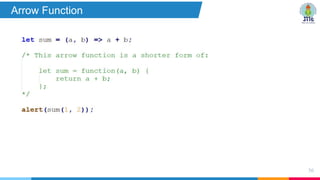
Arrow Function
57
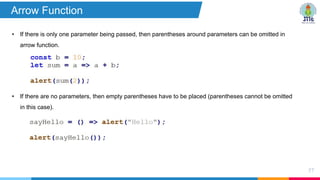
Arrow Function
• If there is only one parameter being passed, then parentheses around parameters can be omitted in
arrow function.
• If there are no parameters, then empty parentheses have to be placed (parentheses cannot be omitted
in this case).
58
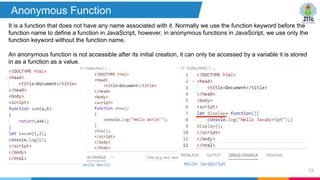
Anonymous Function
It is a function that does not have any name associated with it. Normally we use the function keyword before the
function name to define a function in JavaScript, however, in anonymous functions in JavaScript, we use only the
function keyword without the function name.
An anonymous function is not accessible after its initial creation, it can only be accessed by a variable it is stored
in as a function as a value.
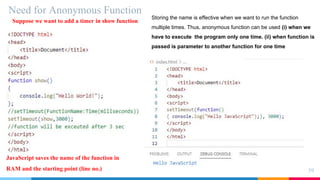
Need for Anonymous Function
59
Suppose we want to add a timer in show function
JavaScript saves the name of the function in
RAM and the starting point (line no.)
Storing the name is effective when we want to run the function
multiple times. Thus, anonymous function can be used (i) when we
have to execute the program only one time. (ii) when function is
passed is parameter to another function for one time
JS Objects
60
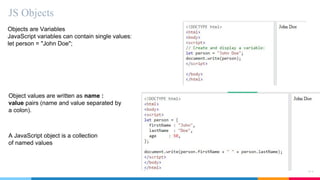
JS Objects
61
Objects are Variables
JavaScript variables can contain single values:
let person = "John Doe";
Object values are written as name :
value pairs (name and value separated by
a colon).
A JavaScript object is a collection
of named values
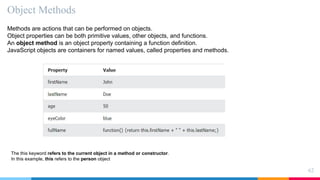
Object Methods
62
Methods are actions that can be performed on objects.
Object properties can be both primitive values, other objects, and functions.
An object method is an object property containing a function definition.
JavaScript objects are containers for named values, called properties and methods.
The this keyword refers to the current object in a method or constructor.
In this example, this refers to the person object
Creating a JavaScript Object
63
There are different ways to create new objects:
•Create a single object, using an object literal.
•Create a single object, with the keyword new.
•Factory function
•Constructor function
Using an Object Literal
64
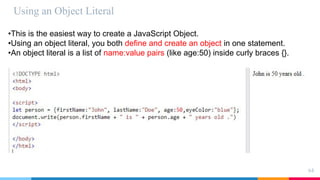
•This is the easiest way to create a JavaScript Object.
•Using an object literal, you both define and create an object in one statement.
•An object literal is a list of name:value pairs (like age:50) inside curly braces {}.
Using the JavaScript Keyword new
65
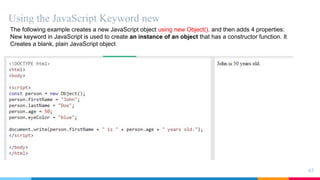
The following example creates a new JavaScript object using new Object(), and then adds 4 properties:
New keyword in JavaScript is used to create an instance of an object that has a constructor function. It
Creates a blank, plain JavaScript object
JavaScript Objects are Mutable
66
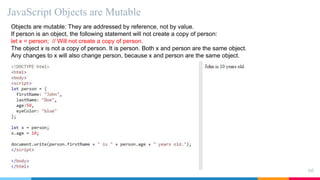
Objects are mutable: They are addressed by reference, not by value.
If person is an object, the following statement will not create a copy of person:
let x = person; // Will not create a copy of person.
The object x is not a copy of person. It is person. Both x and person are the same object.
Any changes to x will also change person, because x and person are the same object.
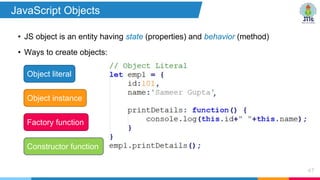
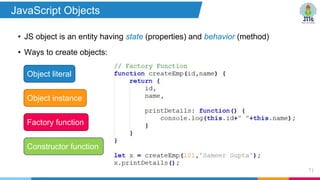
• JS object is an entity having state (properties) and behavior (method)
• Ways to create objects:
67
Object literal
Factory function
Object instance
Constructor function
JavaScript Objects
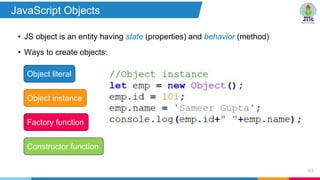
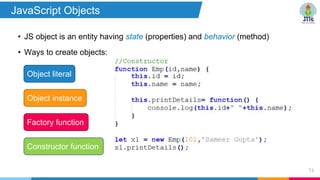
• JS object is an entity having state (properties) and behavior (method)
• Ways to create objects:
68
Object literal
Factory function
Object instance
Constructor function
JavaScript Objects
Factory function
69
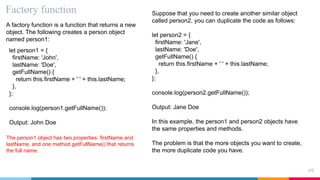
A factory function is a function that returns a new
object. The following creates a person object
named person1:
let person1 = {
firstName: 'John',
lastName: 'Doe',
getFullName() {
return this.firstName + ' ' + this.lastName;
},
};
console.log(person1.getFullName());
Output: John Doe
The person1 object has two properties: firstName and
lastName, and one method getFullName() that returns
the full name.
Suppose that you need to create another similar object
called person2, you can duplicate the code as follows:
let person2 = {
firstName: 'Jane',
lastName: 'Doe',
getFullName() {
return this.firstName + ' ' + this.lastName;
},
};
console.log(person2.getFullName());
Output: Jane Doe
In this example, the person1 and person2 objects have
the same properties and methods.
The problem is that the more objects you want to create,
the more duplicate code you have.
Example of factory function
70
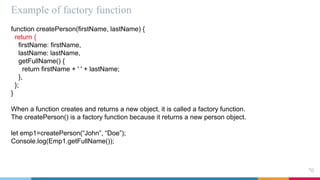
function createPerson(firstName, lastName) {
return {
firstName: firstName,
lastName: lastName,
getFullName() {
return firstName + ' ' + lastName;
},
};
}
When a function creates and returns a new object, it is called a factory function.
The createPerson() is a factory function because it returns a new person object.
let emp1=createPerson(“John”, “Doe”);
Console.log(Emp1.getFullName());
• JS object is an entity having state (properties) and behavior (method)
• Ways to create objects:
71
Object literal
Factory function
Object instance
Constructor function
JavaScript Objects
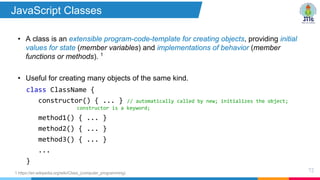
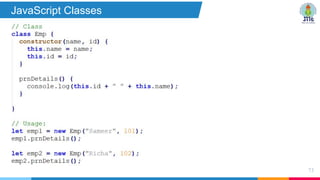
• A class is an extensible program-code-template for creating objects, providing initial
values for state (member variables) and implementations of behavior (member
functions or methods). 1
• Useful for creating many objects of the same kind.
72
1 https://en.wikipedia.org/wiki/Class_(computer_programming)
class ClassName {
constructor() { ... } // automatically called by new; initializes the object;
constructor is a keyword;
method1() { ... }
method2() { ... }
method3() { ... }
...
}
JavaScript Classes
73
JavaScript Classes
• JS object is an entity having state (properties) and behavior (method)
• Ways to create objects:
74
Object literal
Factory function
Object instance
Constructor function
JavaScript Objects
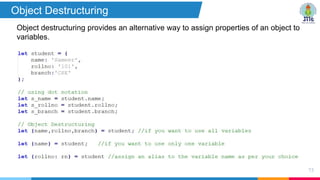
Object destructuring provides an alternative way to assign properties of an object to
variables.
75
Object Destructuring
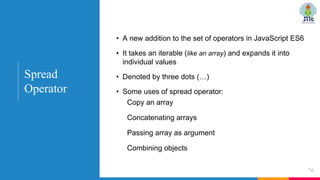
• A new addition to the set of operators in JavaScript ES6
• It takes an iterable (like an array) and expands it into
individual values
• Denoted by three dots (…)
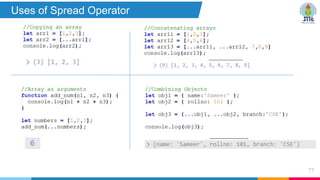
• Some uses of spread operator:
Copy an array
Concatenating arrays
Passing array as argument
Combining objects
76
Spread
Operator
77
Uses of Spread Operator
Event-driven programming &
Callback Function
79
Event driven programming
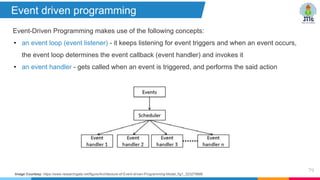
Event-Driven Programming makes use of the following concepts:
• an event loop (event listener) - it keeps listening for event triggers and when an event occurs,
the event loop determines the event callback (event handler) and invokes it
• an event handler - gets called when an event is triggered, and performs the said action
Image Courtesy: https://www.researchgate.net/figure/Architecture-of-Event-driven-Programming-Model_fig1_323279886
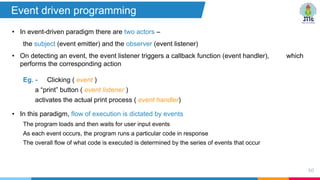
• In event-driven paradigm there are two actors –
the subject (event emitter) and the observer (event listener)
• On detecting an event, the event listener triggers a callback function (event handler), which
performs the corresponding action
Eg. - Clicking ( event )
a “print” button ( event listener )
activates the actual print process ( event handler)
• In this paradigm, flow of execution is dictated by events
The program loads and then waits for user input events
As each event occurs, the program runs a particular code in response
The overall flow of what code is executed is determined by the series of events that occur
80
Event driven programming
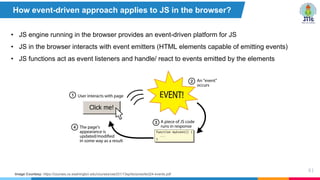
• JS engine running in the browser provides an event-driven platform for JS
• JS in the browser interacts with event emitters (HTML elements capable of emitting events)
• JS functions act as event listeners and handle/ react to events emitted by the elements
81
How event-driven approach applies to JS in the browser?
Image Courtesy: https://courses.cs.washington.edu/courses/cse331/13sp/lectures/lect24-events.pdf
What is an Event ?
something the browser or user does, like clicking
a button, loading of page, change in input field
value, occurrence of an error
82
Types of events
i. User Interface events (load, unload, error, resize, scroll)
ii. Focus & Blur events (focus, blur, focusin, focusout)
iii. Mouse events (click, mouse-down, mouseup, mouseout, mouseover)
iv. Keyboard events (input, keydown, keypress, keyup)
v. Form events (submit, input, change)
vi. Mutation events
vii. HTML5 events
viii. CSS events
JavaScript
Events
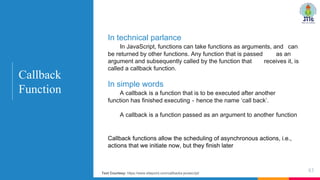
Callback functions allow the scheduling of asynchronous actions, i.e.,
actions that we initiate now, but they finish later
83
Callback
Function
In technical parlance
In JavaScript, functions can take functions as arguments, and can
be returned by other functions. Any function that is passed as an
argument and subsequently called by the function that receives it, is
called a callback function.
In simple words
A callback is a function that is to be executed after another
function has finished executing - hence the name ‘call back’.
A callback is a function passed as an argument to another function
Text Courtesy: https://www.sitepoint.com/callbacks-javascript/
84
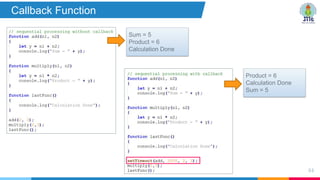
Callback Function
Sum = 5
Product = 6
Calculation Done
Product = 6
Calculation Done
Sum = 5
85
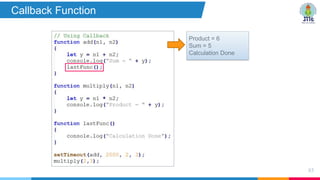
Callback Function
Product = 6
Sum = 5
Calculation Done
86
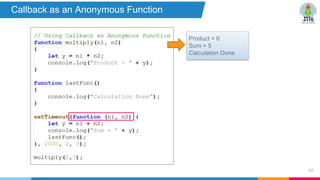
Callback as an Anonymous Function
Product = 6
Sum = 5
Calculation Done
• https://www.w3schools.com/js/default.asp
• https://www.tutorialspoint.com/javascript/index.htm
• https://data-flair.training/blogs/javascript-tutorial/
• https://www.javascripttutorial.net/
• https://javascript.info/
87
Useful Resources

Javascript pdf for beginners easy levell

  • 1.
  • 2.
    • JavaScript isa light-weight object-oriented programming language which is used by several websites for scripting the webpages. It is an interpreted, full-fledged programming language that enables dynamic interactivity on websites when applied to an HTML document. • Why JavaScript was introduced? • To create interactive websites • Example: Pop ups, event on click • Many websites are using JavaScript 2 Introduction
  • 3.
    • For effectiveand efficient web development, developers must know three languages: • HTML – for creating the web page and defining its content • CSS – for specifying the layout and styles of the various elements • Javascript – for programming the behaviour of the web page • JS is an easy to learn, lightweight, interpreted scripting language. • It was created by a Netscape developer named Brendan Eich in 1995. • It can run both on client side as well as server side web browsers. 3 Overview
  • 4.
    • Website Clientside (Js, Jquery, React js) • Website Server side (Node JS, Express js) • Mobile Development (React Native, Phone Gap, ionic) • Software Development (electronjs EX-VScode) 4 Where is JavaScript used ?
  • 5.
    • ECMA Internationalis an organization that creates standards for technologies • The organization created/published a standard ECMA-262 • ECMA-262 : This is a standard published by ECMA international. It contains the specification for a general purpose scripting language. 5 What is ECMAScript and ES6,ES7…? ?
  • 6.
    • The specificationdefined in ECMA-262 for creating a general purpose scripting language • ECMAScript provides the rules, details, and guidelines that a scripting language must observe to be considered ECMAScript compliant 6 What is ECMAScript? What is JavaScript? • A general purpose scripting language that conforms to the ECMAScript specification • By reading the ECMAScript specification, we learn how to create a scripting language • By reading the JavaScript documentation, we learn how to use a scripting language.
  • 7.
    ECMA Script versions 7 •ECMAScript versions have been abbreviated to ES1, ES2, ES3, ES5, and ES6. • ES6 or ECMAScript (2015) major change • Since 2016, versions are named by year (ECMAScript 2016, 2017, 2018, 2019, 2020 (11th edition).
  • 8.
    8 1 What is JavaScript? 2 What can JSdo? • One of the most popular and widely used scripting language. • Capable of Front-end, Back-end, Full Stack development • Build Web/ Mobile applications, Real-time networking apps like chats, video streaming services, Games, etc. 3 Where does JS code run? • JS engine present in a browser (SpiderMonkey, V8) or outside a browser (Node) presents the run-time environment for JS code 4 JavaScript vs ECMAScript? • ECMAScript - specification that provides the rules, details, and guidelines that a scripting language must observe to be considered ECMAScript compliant. • JavaScript – programming language that conforms to ECMAScript Four Important Questions
  • 9.
    JS Basics Inclusion, Output,Variables, Data Types, Operators 9
  • 10.
    • JavaScript codeis inserted between <script> and </script> tags. • Any number of scripts can be placed in a web page. • Three ways of placing and using a script: Inside <head> section Inside <body> section External JS file 10 JavaScript Inclusion
  • 11.
  • 12.
  • 13.
  • 14.
  • 15.
  • 16.
    • JS can"display" o/p in different ways, by using innerHTML - writes into an HTML element document.write() - writes into the HTML output window.alert() / alert() – writes into a pop up alert box console.log() – writes into the browser console 16 JavaScript Output
  • 17.
    Example : Asyncv/s Defer 17 Async in script tag in JavaScript is a way to load scripts asynchronously. That means, if a script is async, it will be loaded independently of other scripts on the page, and will not block the page from loading. If you have a page with several external scripts, loading them all asynchronously can speed up the page load time, because the browser can download and execute them in parallel. To use async, simply add the async attribute to your script tag: <script async src="script.js"></script> What is defer in script tag in JavaScript? By using the defer attribute in HTML, the browser will load the script only after parsing (loading) the page. This can be helpful if you have a script that is dependent on other scripts, or if you want to improve the loading time of your page by loading scripts after the initial page load. To use defer, simply add the defer attribute to your script tag: <script defer src="script.js"></script> The async and defer attributes both allow the browser to continue parsing the HTML document while JavaScript files are being downloaded, but they differ in when those files are executed. Async downloads and executes JavaScript as soon as it’s available, while defer attribute waits until the HTML document has been parsed before downloading and executing any external scripts.
  • 18.
    Example: Async 18 Why errorappears: We are trying to change the inner HTML JavaScript loads line by line. Browser has not loaded the h1 tag, thus we cannot select the things that does not exist as the browser has not rendered the code for h1 tag hence, element was not found
  • 19.
    Solution 19 Add the scriptafter the element has been read or use defer
  • 20.
  • 21.
    Example document.write() 21 Nowadays, GoogleChrome is no longer running the script named document.write. 2016 Chrome updates have led it to decide that this type of file should not be available on websites as it increases the page load time.
  • 22.
    Document.write () usingAsync 22 Code is added dynamically
  • 23.
    What will bethe output? 23
  • 24.
  • 25.
    Console on browserusing developer tool 25
  • 26.
    • Variables areidentified using unique names called identifiers. • General rules for naming variables are: • Can contain letters, digits, underscores, and dollar signs • Must begin with a letter, $ and _ • Are case sensitive (x and X are different variables) • Keywords cannot be used as names • Must not contain any white-space, or special character (!, @, #, %, ^, &, *) • Variable Declaration – var | in ES6 (var was removed) let | const was introduced • Variable Scope – global, local, block 26 JavaScript Variables
  • 27.
    var firstNumber; firstNumber =10; const x = 10; let fname, age; fname = "Anu"; age = 12; let fname = "Anu", age = 12, city = "Noida"; 27 Declaring a variable Assigning value to declared variable Declaring + Assigning value Declaring and assigning values to multiple variables in one statement Declaring multiple variables in one statement and then assigning values to them Declaring & Defining Variables
  • 28.
    JavaScript var keyword 28 Thevar is the oldest keyword to declare a variable in JavaScript. Scope: Global scoped or function scoped. The scope of the var keyword is the global or function scope. It means variables defined outside the function can be accessed globally, and variables defined inside a particular function can be accessed within the function. Example 1: Variable ‘a’ is declared globally. So, the scope of the variable ‘a’ is global, and it can be accessible everywhere in the program. The output shown is in the console. Example 2: The variable ‘a’ is declared inside the function. If the user tries to access it outside the function, it will display the error. Users can declare the 2 variables with the same name using the var keyword. Also, the user can reassign the value into the var variable.
  • 29.
    JavaScript var keyword 29 Example3: The user can re-declare the variable using var and the user can update var variable. Example 4: If users use the var variable before the declaration, it initializes with the undefined value. The output is shown in the console.
  • 30.
    JavaScript: let keyword 30 Thelet keyword is an improved version of the var keyword. Scope: block scoped: The scope of a let variable is only block scoped. It can’t be accessible outside the particular block ({block}). Example 2: The code returns an error because we are accessing the let variable outside the function block. Example 1:
  • 31.
    JavaScript: let keyword 31 Example3: Users cannot re-declare the variable defined with the let keyword but can update it. Example 4: Users can declare the variable with the same name in different blocks using the let keyword.
  • 32.
    JavaScript: let keyword 32 Example5: If users use the let variable before the declaration, it does not initialize with undefined just like a var variable, and returns an error.
  • 33.
    JavaScript: const keyword 33 Theconst keyword has all the properties that are the same as the let keyword, except the user cannot update it. Scope: block scoped: When users declare a const variable, they need to initialize it, otherwise, it returns an error. The user cannot update the const variable once it is declared. Example 1: We are changing the value of the const variable so that it returns an error. The output is shown in the console
  • 34.
    Var, const andlet 34 Let and const do not become properties of window object
  • 35.
    Var, const andlet 35 Let and const do not become properties of window object, but var gets attached. Open developer tools -> Console-> type window (press enter)
  • 36.
    JavaScript supports thefollowing types of operators: • Arithmetic [ +, -, *, /, **, %, ++, -- ] (** is exponential and same as Math.pow(x, y)) • Assignment [ =, +=, -=, *=, /=, %=, **= ] • Comparison [ == (equal value), === (equal value and equal type), !=, !===, >, <, >=, <= ] • Logical [ &&, ||, ! ] • Bitwise [ &, |, ~, ^, <<, >>, >>> ] • Miscellaneous [ternary (? :) and typeof ] 36 JavaScript Operators
  • 37.
  • 38.
  • 39.
    Example shifting positiveelement 39 Note: In JS, 32 bit representation is used
  • 40.
    Example : ShiftOperator on Positive Element 40
  • 41.
    Example shifting negativeelement 41 The left most bit specifies a negative number
  • 42.
  • 43.
  • 44.
  • 45.
    Example : ShiftOperator on Negative Element 45
  • 46.
    • String • Number •Boolean • Undefined • Null 46 Primitive/ Value Data Types • Object • Array Non-Primitive/ Reference Data Types JavaScript Data Types
  • 47.
  • 48.
    48 Difference between Undefinedand Null Undefined: It means a variable has been declared but not yet has been assigned a value. Null: It is an assignment value. It can be assigned to a variable as representation of no value.
  • 49.
  • 50.
  • 51.
  • 52.
  • 53.
    Function is areusable block of code, which on invocation performs a particular task. 53 function name(parameter1, parameter2, parameter3) { // statements or code to be executed } • Syntax – function keyword, followed by a name, followed by parentheses • Parameters - multiple comma separated parameters, can be passed to a function • Definition – function has to be defined before use • Invocation – function executes only when invoked JavaScript Functions
  • 54.
    • Functions Variable •Function Invocation • Parameters and Arguments • Return Statement 54 JavaScript Functions
  • 55.
    55 User-defined | Arrow| Built-in Functions FUNCTION EXPRESSION FUNCTION DECLARATION
  • 56.
  • 57.
    57 Arrow Function • Ifthere is only one parameter being passed, then parentheses around parameters can be omitted in arrow function. • If there are no parameters, then empty parentheses have to be placed (parentheses cannot be omitted in this case).
  • 58.
    58 Anonymous Function It isa function that does not have any name associated with it. Normally we use the function keyword before the function name to define a function in JavaScript, however, in anonymous functions in JavaScript, we use only the function keyword without the function name. An anonymous function is not accessible after its initial creation, it can only be accessed by a variable it is stored in as a function as a value.
  • 59.
    Need for AnonymousFunction 59 Suppose we want to add a timer in show function JavaScript saves the name of the function in RAM and the starting point (line no.) Storing the name is effective when we want to run the function multiple times. Thus, anonymous function can be used (i) when we have to execute the program only one time. (ii) when function is passed is parameter to another function for one time
  • 60.
  • 61.
    JS Objects 61 Objects areVariables JavaScript variables can contain single values: let person = "John Doe"; Object values are written as name : value pairs (name and value separated by a colon). A JavaScript object is a collection of named values
  • 62.
    Object Methods 62 Methods areactions that can be performed on objects. Object properties can be both primitive values, other objects, and functions. An object method is an object property containing a function definition. JavaScript objects are containers for named values, called properties and methods. The this keyword refers to the current object in a method or constructor. In this example, this refers to the person object
  • 63.
    Creating a JavaScriptObject 63 There are different ways to create new objects: •Create a single object, using an object literal. •Create a single object, with the keyword new. •Factory function •Constructor function
  • 64.
    Using an ObjectLiteral 64 •This is the easiest way to create a JavaScript Object. •Using an object literal, you both define and create an object in one statement. •An object literal is a list of name:value pairs (like age:50) inside curly braces {}.
  • 65.
    Using the JavaScriptKeyword new 65 The following example creates a new JavaScript object using new Object(), and then adds 4 properties: New keyword in JavaScript is used to create an instance of an object that has a constructor function. It Creates a blank, plain JavaScript object
  • 66.
    JavaScript Objects areMutable 66 Objects are mutable: They are addressed by reference, not by value. If person is an object, the following statement will not create a copy of person: let x = person; // Will not create a copy of person. The object x is not a copy of person. It is person. Both x and person are the same object. Any changes to x will also change person, because x and person are the same object.
  • 67.
    • JS objectis an entity having state (properties) and behavior (method) • Ways to create objects: 67 Object literal Factory function Object instance Constructor function JavaScript Objects
  • 68.
    • JS objectis an entity having state (properties) and behavior (method) • Ways to create objects: 68 Object literal Factory function Object instance Constructor function JavaScript Objects
  • 69.
    Factory function 69 A factoryfunction is a function that returns a new object. The following creates a person object named person1: let person1 = { firstName: 'John', lastName: 'Doe', getFullName() { return this.firstName + ' ' + this.lastName; }, }; console.log(person1.getFullName()); Output: John Doe The person1 object has two properties: firstName and lastName, and one method getFullName() that returns the full name. Suppose that you need to create another similar object called person2, you can duplicate the code as follows: let person2 = { firstName: 'Jane', lastName: 'Doe', getFullName() { return this.firstName + ' ' + this.lastName; }, }; console.log(person2.getFullName()); Output: Jane Doe In this example, the person1 and person2 objects have the same properties and methods. The problem is that the more objects you want to create, the more duplicate code you have.
  • 70.
    Example of factoryfunction 70 function createPerson(firstName, lastName) { return { firstName: firstName, lastName: lastName, getFullName() { return firstName + ' ' + lastName; }, }; } When a function creates and returns a new object, it is called a factory function. The createPerson() is a factory function because it returns a new person object. let emp1=createPerson(“John”, “Doe”); Console.log(Emp1.getFullName());
  • 71.
    • JS objectis an entity having state (properties) and behavior (method) • Ways to create objects: 71 Object literal Factory function Object instance Constructor function JavaScript Objects
  • 72.
    • A classis an extensible program-code-template for creating objects, providing initial values for state (member variables) and implementations of behavior (member functions or methods). 1 • Useful for creating many objects of the same kind. 72 1 https://en.wikipedia.org/wiki/Class_(computer_programming) class ClassName { constructor() { ... } // automatically called by new; initializes the object; constructor is a keyword; method1() { ... } method2() { ... } method3() { ... } ... } JavaScript Classes
  • 73.
  • 74.
    • JS objectis an entity having state (properties) and behavior (method) • Ways to create objects: 74 Object literal Factory function Object instance Constructor function JavaScript Objects
  • 75.
    Object destructuring providesan alternative way to assign properties of an object to variables. 75 Object Destructuring
  • 76.
    • A newaddition to the set of operators in JavaScript ES6 • It takes an iterable (like an array) and expands it into individual values • Denoted by three dots (…) • Some uses of spread operator: Copy an array Concatenating arrays Passing array as argument Combining objects 76 Spread Operator
  • 77.
  • 78.
  • 79.
    79 Event driven programming Event-DrivenProgramming makes use of the following concepts: • an event loop (event listener) - it keeps listening for event triggers and when an event occurs, the event loop determines the event callback (event handler) and invokes it • an event handler - gets called when an event is triggered, and performs the said action Image Courtesy: https://www.researchgate.net/figure/Architecture-of-Event-driven-Programming-Model_fig1_323279886
  • 80.
    • In event-drivenparadigm there are two actors – the subject (event emitter) and the observer (event listener) • On detecting an event, the event listener triggers a callback function (event handler), which performs the corresponding action Eg. - Clicking ( event ) a “print” button ( event listener ) activates the actual print process ( event handler) • In this paradigm, flow of execution is dictated by events The program loads and then waits for user input events As each event occurs, the program runs a particular code in response The overall flow of what code is executed is determined by the series of events that occur 80 Event driven programming
  • 81.
    • JS enginerunning in the browser provides an event-driven platform for JS • JS in the browser interacts with event emitters (HTML elements capable of emitting events) • JS functions act as event listeners and handle/ react to events emitted by the elements 81 How event-driven approach applies to JS in the browser? Image Courtesy: https://courses.cs.washington.edu/courses/cse331/13sp/lectures/lect24-events.pdf
  • 82.
    What is anEvent ? something the browser or user does, like clicking a button, loading of page, change in input field value, occurrence of an error 82 Types of events i. User Interface events (load, unload, error, resize, scroll) ii. Focus & Blur events (focus, blur, focusin, focusout) iii. Mouse events (click, mouse-down, mouseup, mouseout, mouseover) iv. Keyboard events (input, keydown, keypress, keyup) v. Form events (submit, input, change) vi. Mutation events vii. HTML5 events viii. CSS events JavaScript Events
  • 83.
    Callback functions allowthe scheduling of asynchronous actions, i.e., actions that we initiate now, but they finish later 83 Callback Function In technical parlance In JavaScript, functions can take functions as arguments, and can be returned by other functions. Any function that is passed as an argument and subsequently called by the function that receives it, is called a callback function. In simple words A callback is a function that is to be executed after another function has finished executing - hence the name ‘call back’. A callback is a function passed as an argument to another function Text Courtesy: https://www.sitepoint.com/callbacks-javascript/
  • 84.
    84 Callback Function Sum =5 Product = 6 Calculation Done Product = 6 Calculation Done Sum = 5
  • 85.
    85 Callback Function Product =6 Sum = 5 Calculation Done
  • 86.
    86 Callback as anAnonymous Function Product = 6 Sum = 5 Calculation Done
  • 87.
    • https://www.w3schools.com/js/default.asp • https://www.tutorialspoint.com/javascript/index.htm •https://data-flair.training/blogs/javascript-tutorial/ • https://www.javascripttutorial.net/ • https://javascript.info/ 87 Useful Resources