Javascript Frameworks
for Well Architected, Immersive Web Apps


                  Daniel Nelson
          Centresource Interactive Agency
A description of the problem
    and what we are seeking in a solution
An example unpacked
Traditional MVC Web App


          Model
Traditional MVC Web App


          Model


         Controller
Traditional MVC Web App


          Model


         Controller


           View
Traditional MVC Web App


             Model
Server


            Controller


              View
Traditional MVC Web App

          Model


         Controller


           View


Server
Traditional MVC Web App

          Model

         Controller

           View

Server
Traditional MVC Web App

          Model

         Controller

           View

Server
                      My Web App
                      HTML
Traditional MVC Web App

          Model

         Controller

           View

Server
                       My Web App
                      HTTP
Traditional MVC Web App

          Model

         Controller

           View

Server
                       My Web App
                      HTML
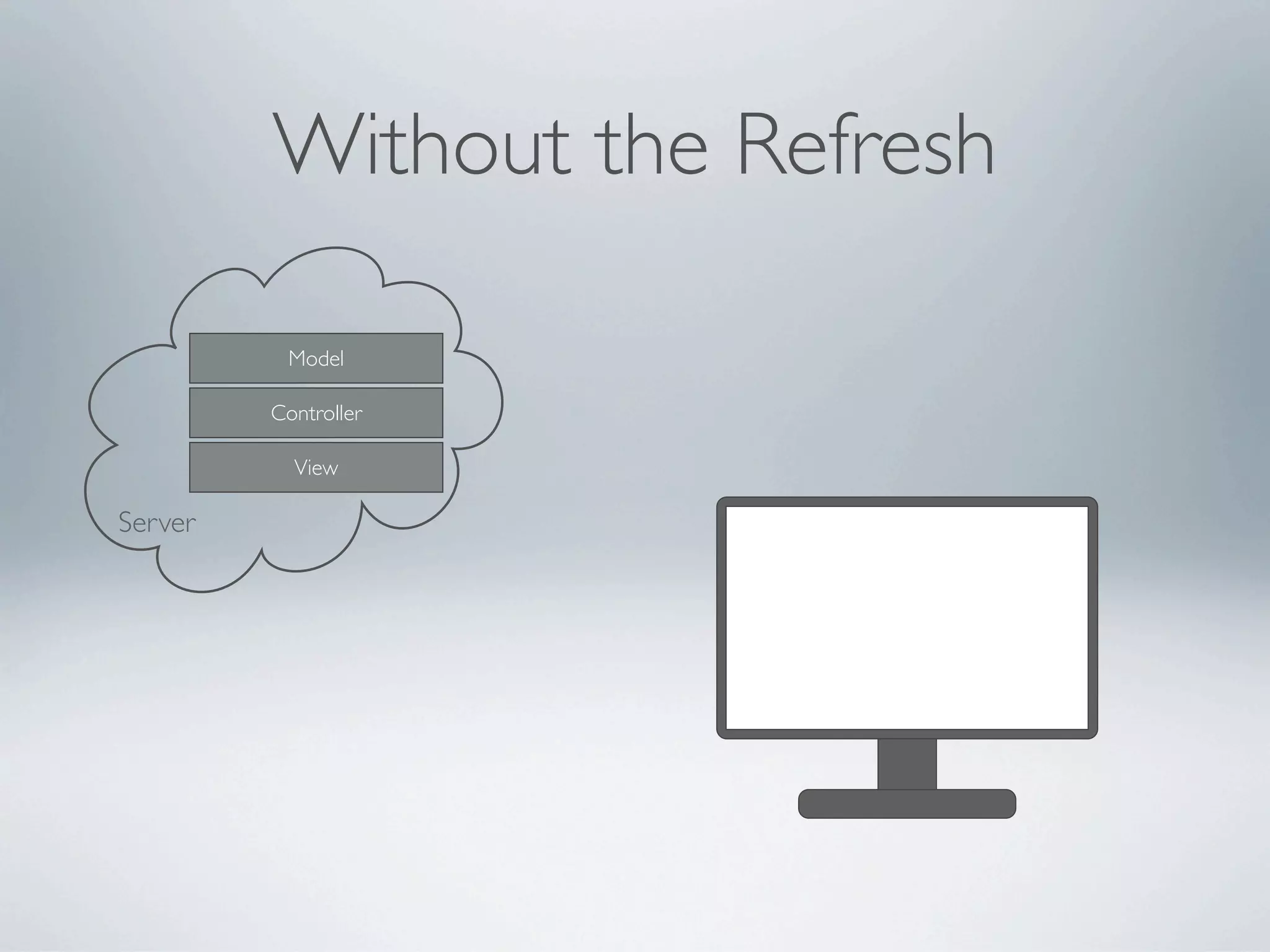
Without the Refresh

          Model

         Controller

           View

Server
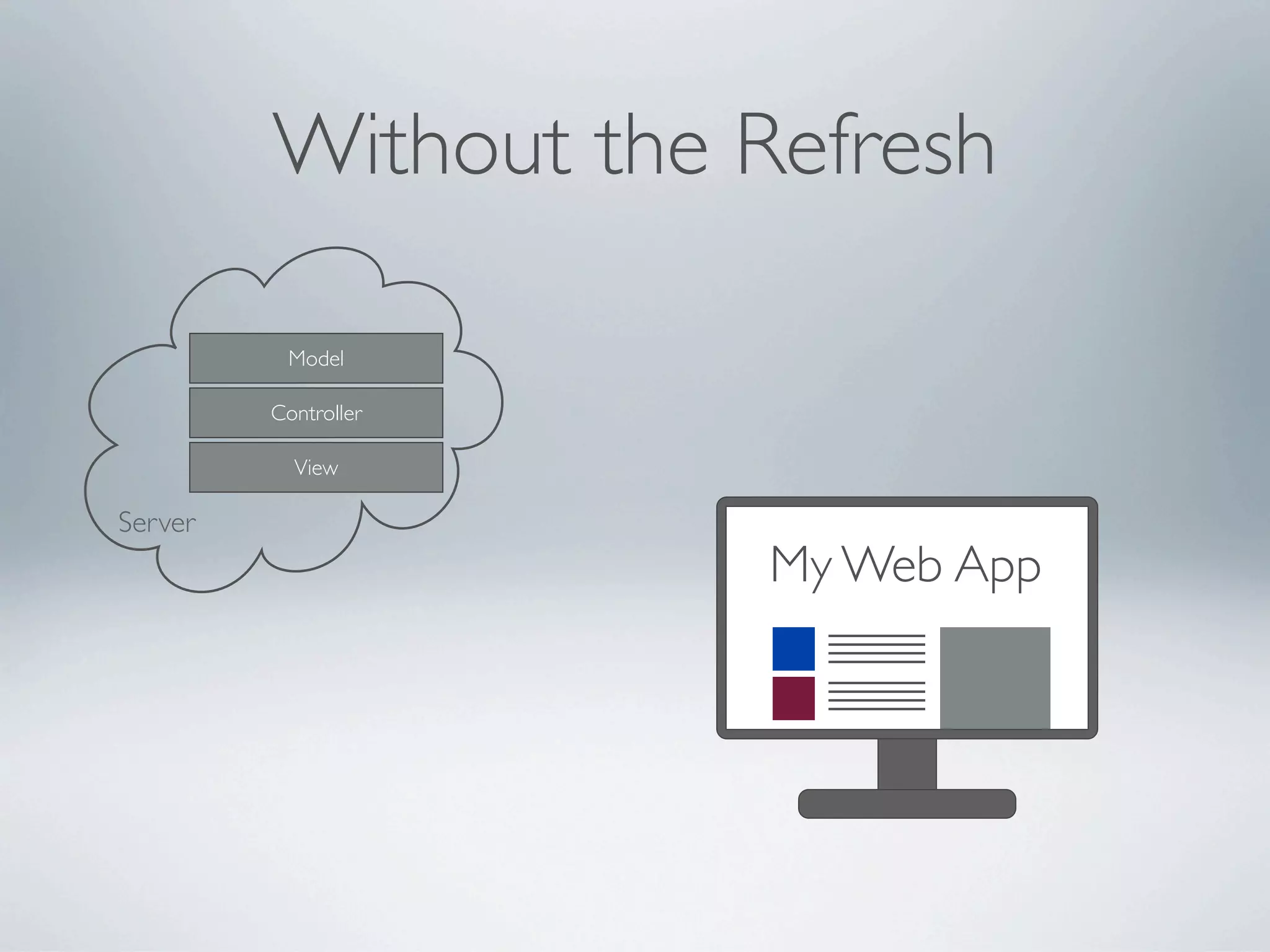
Without the Refresh

          Model

         Controller

           View

Server
                       My Web App
                      HTML+JS
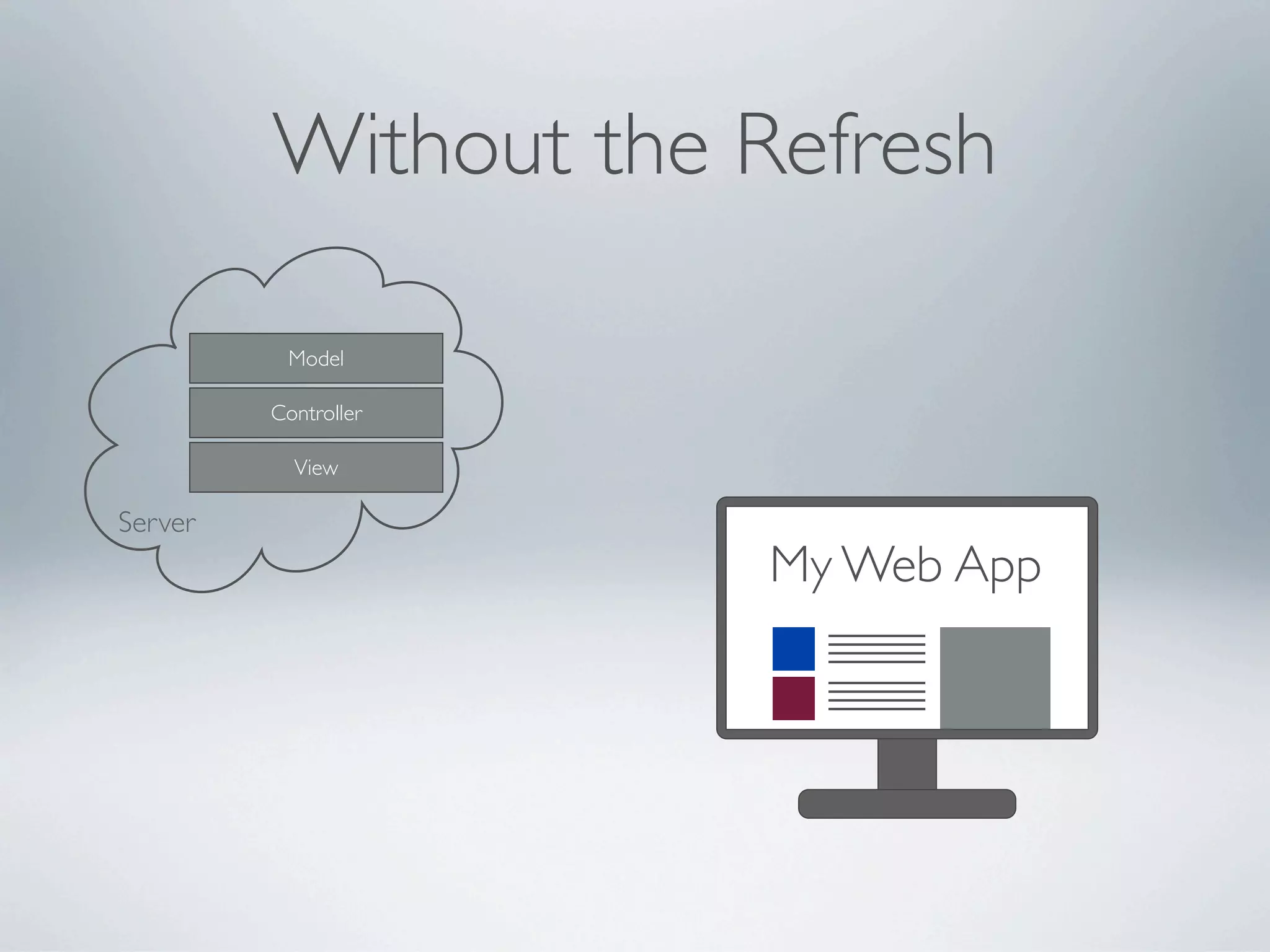
Without the Refresh

          Model

         Controller

           View

Server
                       My Web App
                      XHR
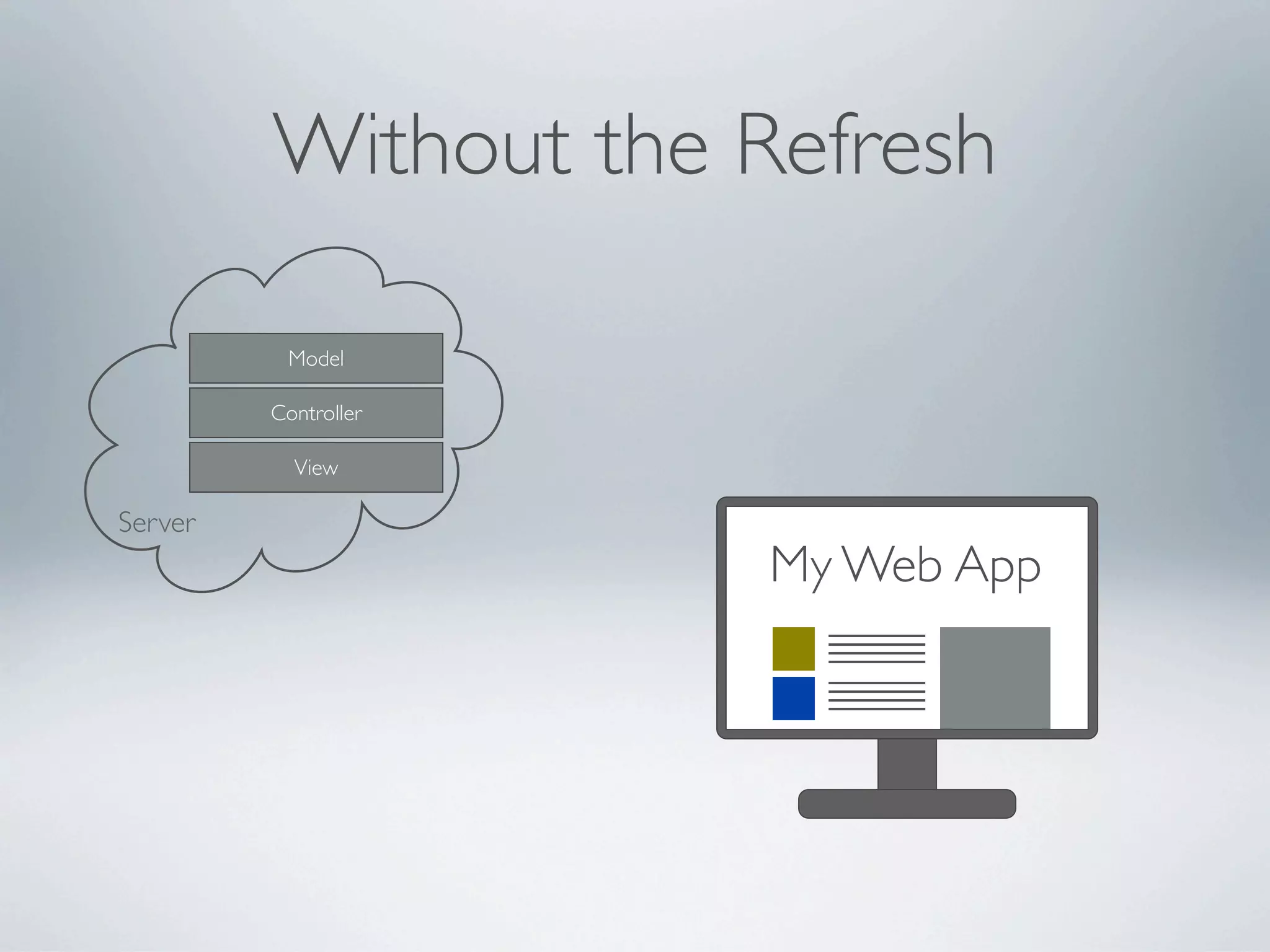
Without the Refresh

          Model

         Controller

           View

Server
                       My Web App
                      JSON
How do we render the response?
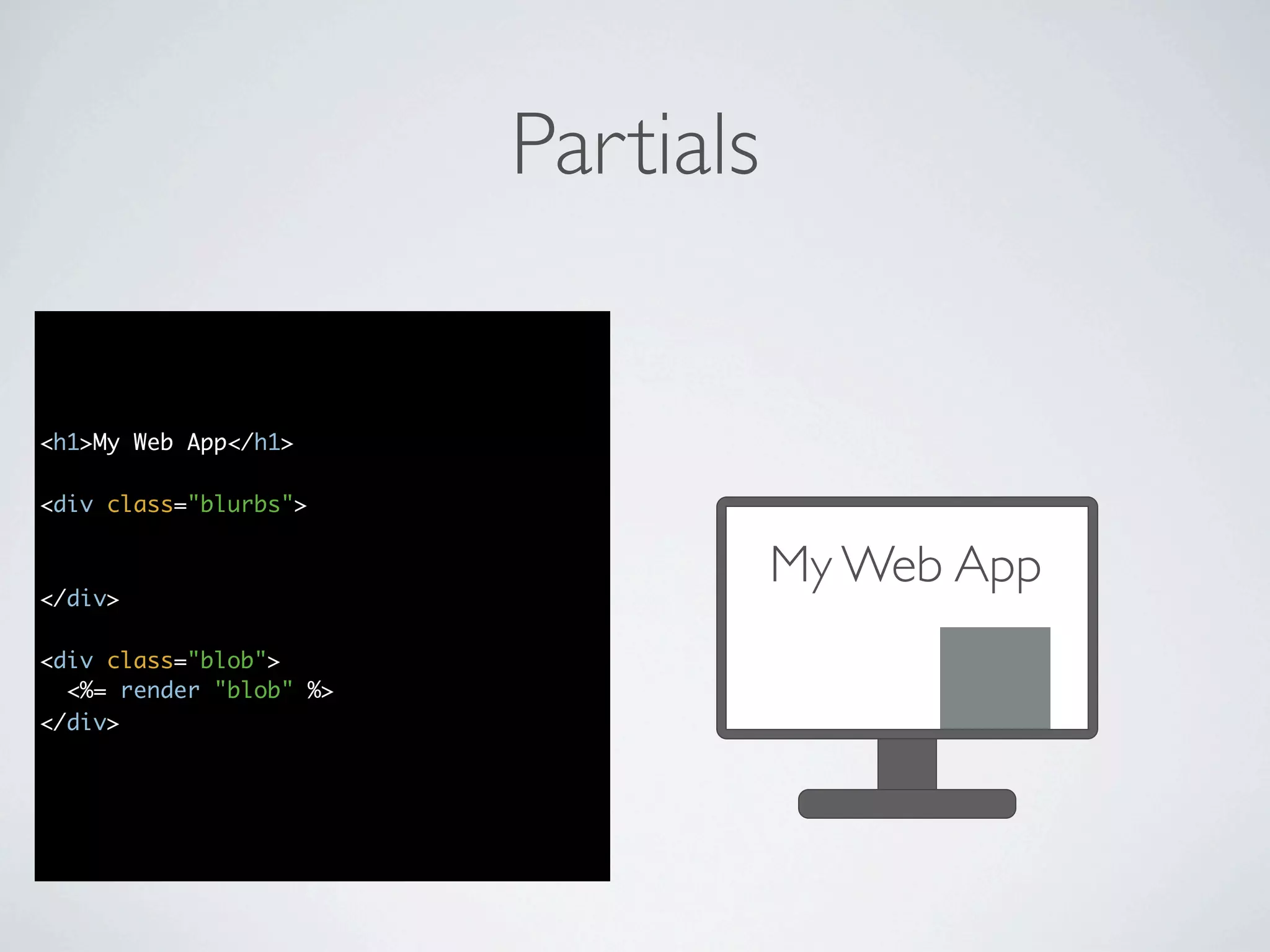
Partials


<h1>My Web App</h1>

<div class="blurbs">
  <%= render :partial => "blurb",

</div>
             :collection => @blurbs %>        My Web App
<div class="blob">
  <%= render "blob" %>
</div>
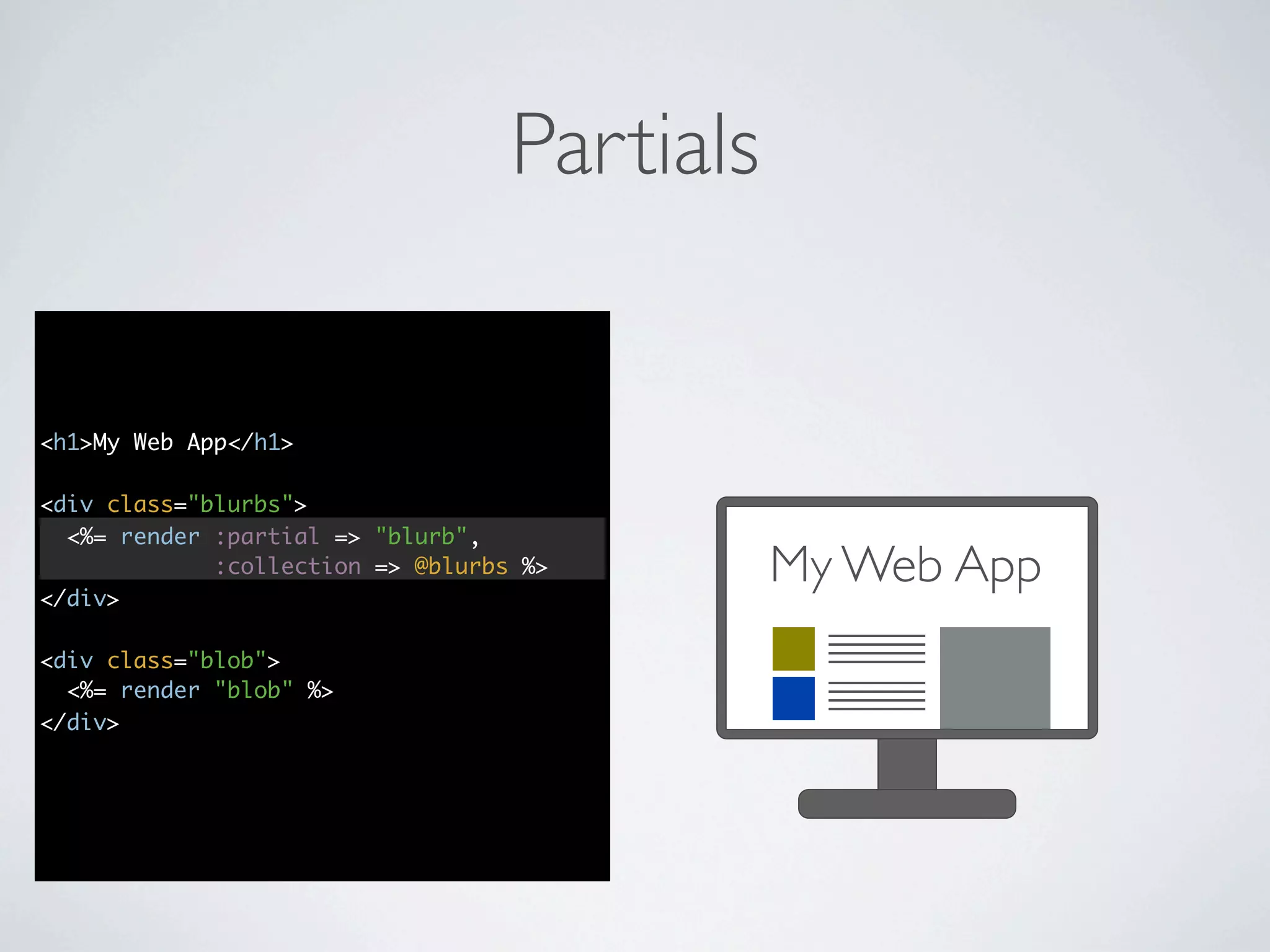
Partials


<h1>My Web App</h1>

<div class="blurbs">
  <%= render :partial => "blurb",

</div>
             :collection => @blurbs %>        My Web App
<div class="blob">
  <%= render "blob" %>
</div>
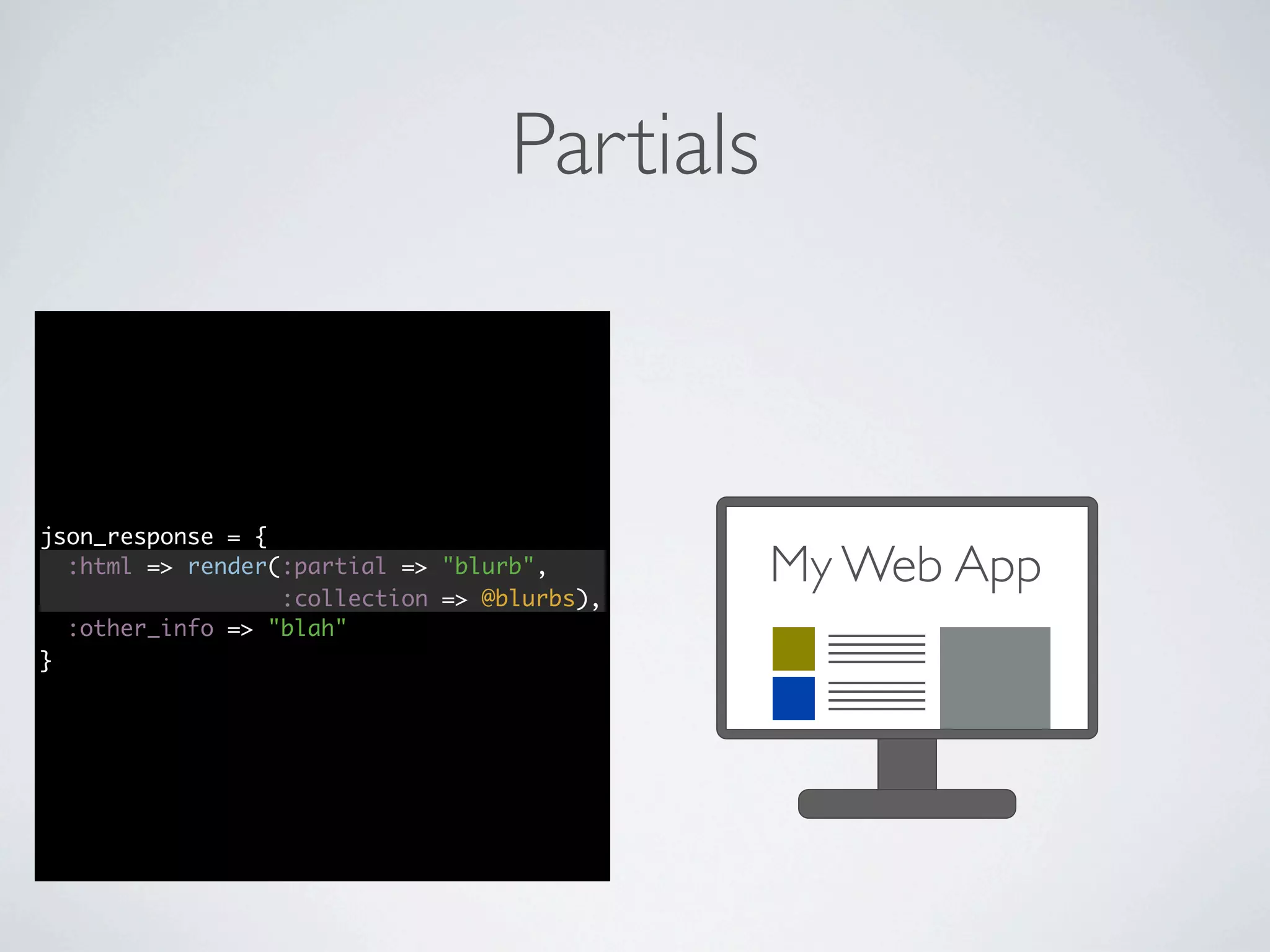
Partials


json_response = {
  :html => render(:partial => "blurb",
                  :collection => @blurbs),
                                              My Web App
  :other_info => "blah"
}
Sending HTML in the JSON

          Model

         Controller

           View

Server
                       My Web App
                      XHR
Sending HTML in the JSON

          Model

         Controller

           View

Server
                       JSON
                      My Web App
                        with
                       HTML
Is this a good solution?
Degrades gracefully
Easy to test
It works
It works
(up to a point)
A More Accurate Picture

            Model       Browser
          Controller
                             View Logic
          View Logic

Server
                        My Web App
                       XHR
What happens when the front
 end of the application becomes
as sophisticated as the back end?
What Happened to our MVC?
                       Browser
                             JS Model
           Model
                           JS Controller
         Controller
                            View Logic
         View Logic

Server
                       My Web App
                      XHR
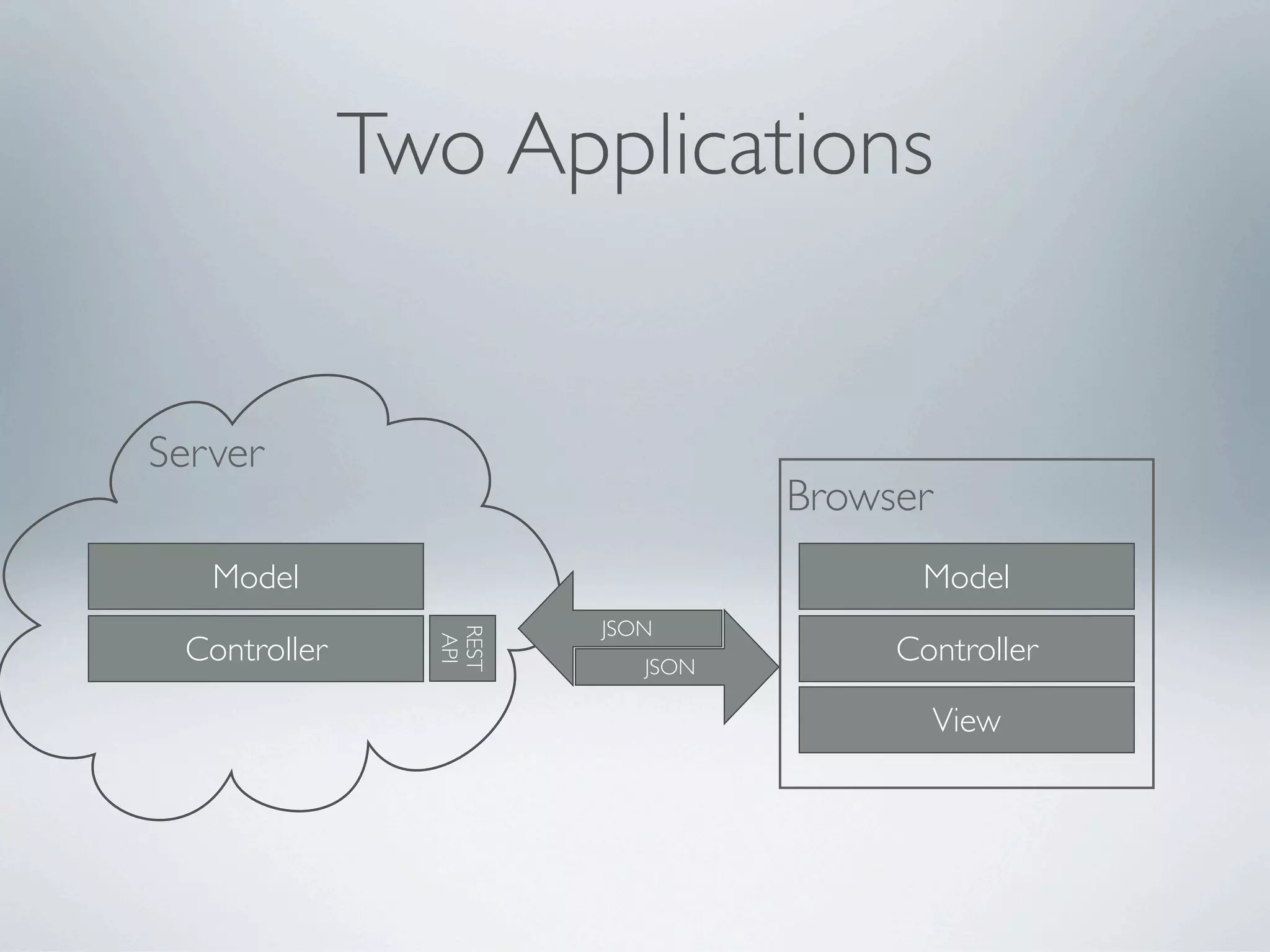
A better way
Decouple
Two Applications


Server
                                 Browser
   Model                               Model
                       JSON
                REST


 Controller                           Controller
                 API


                          JSON

                                           View
How do we achieve this?
Rails + Javascript Framework
 • AngularJS

 • Backbone.js

 • Batman

 • ExtJS/ExtDirect

 • Javascript   MVC
 • Knockout.js

 • Spine

 • SproutCore
What are we looking for?
in general
• documentation     & community
• testability

• ability   to organize code
• opinionated
What are we looking for?
in general
• documentation     & community
• testability

• ability   to organize code
• opinionated
What are we looking for?
in general                       in particular
• documentation     & community • decouple GUI from
                                  implementation logic
• testability
                                 • persisting   data abstracts XHR
• ability   to organize code
                                 • sensible   routing (for deep
• opinionated                      linking)
                                 • compatible with other tools
                                   (such as jQuery)
AngularJS
Documentation & community
        http://angularjs.org
Testability
AngularJS comes with testing built in
• Jasmine   & “e2e”
• every    step of the angularjs.org tutorial shows how to test

Fits naturally into the Rails testing ecosystem
• Jasmine   for unit specs
• RSpec    (or Cucumber) + Capybara for integration specs
• easier   in Rails than Angular alone
Organization & Opinionation
  will become apparent as we explore the code
A demo app
               Rails 3.1 + AngularJS


http://github.com/centresource/angularjs_rails_demo
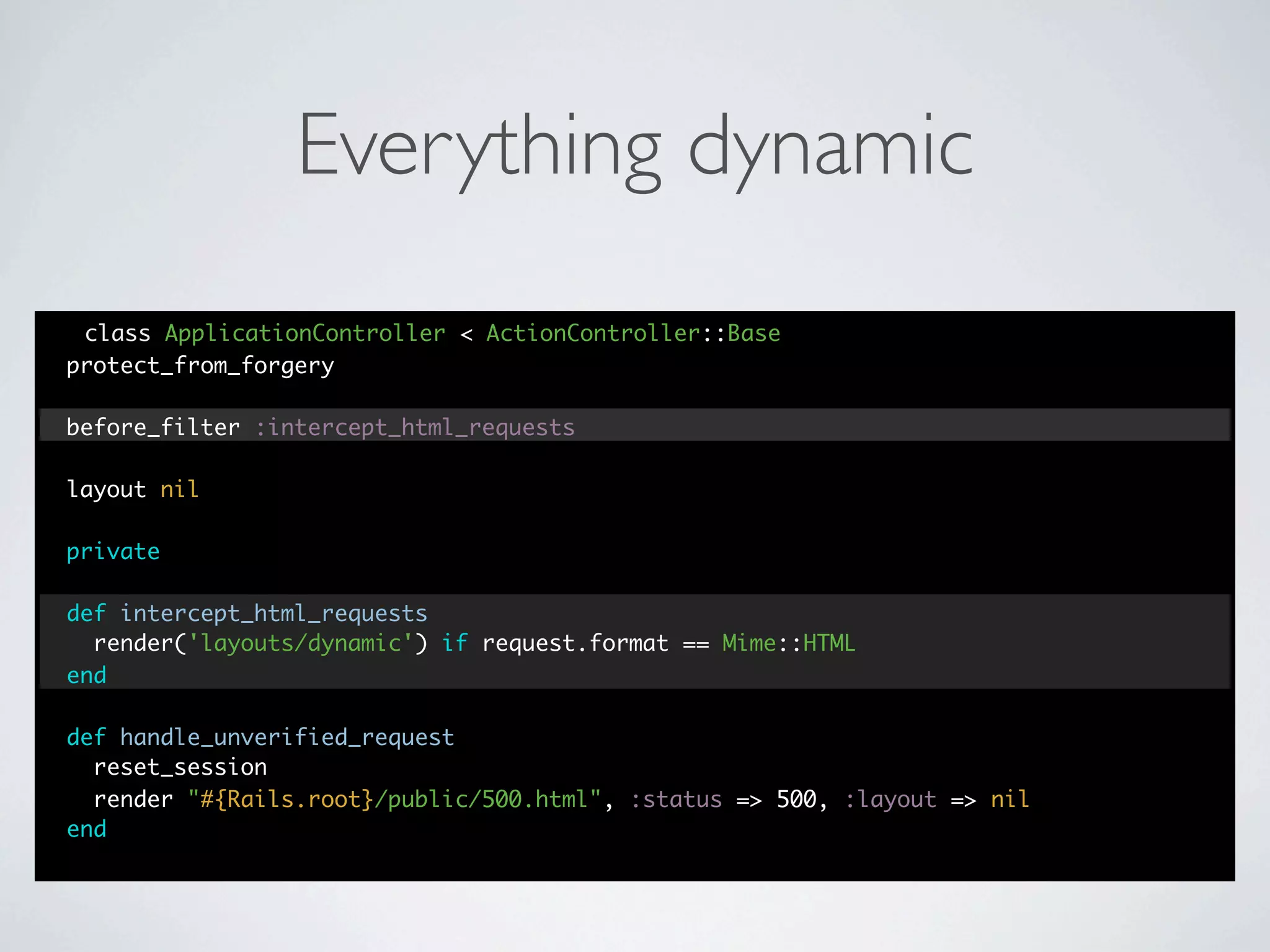
Everything dynamic
 class ApplicationController < ActionController::Base
protect_from_forgery

before_filter :intercept_html_requests

layout nil

private

def intercept_html_requests
  render('layouts/dynamic') if request.format == Mime::HTML
end

def handle_unverified_request
  reset_session
  render "#{Rails.root}/public/500.html", :status => 500, :layout => nil
end
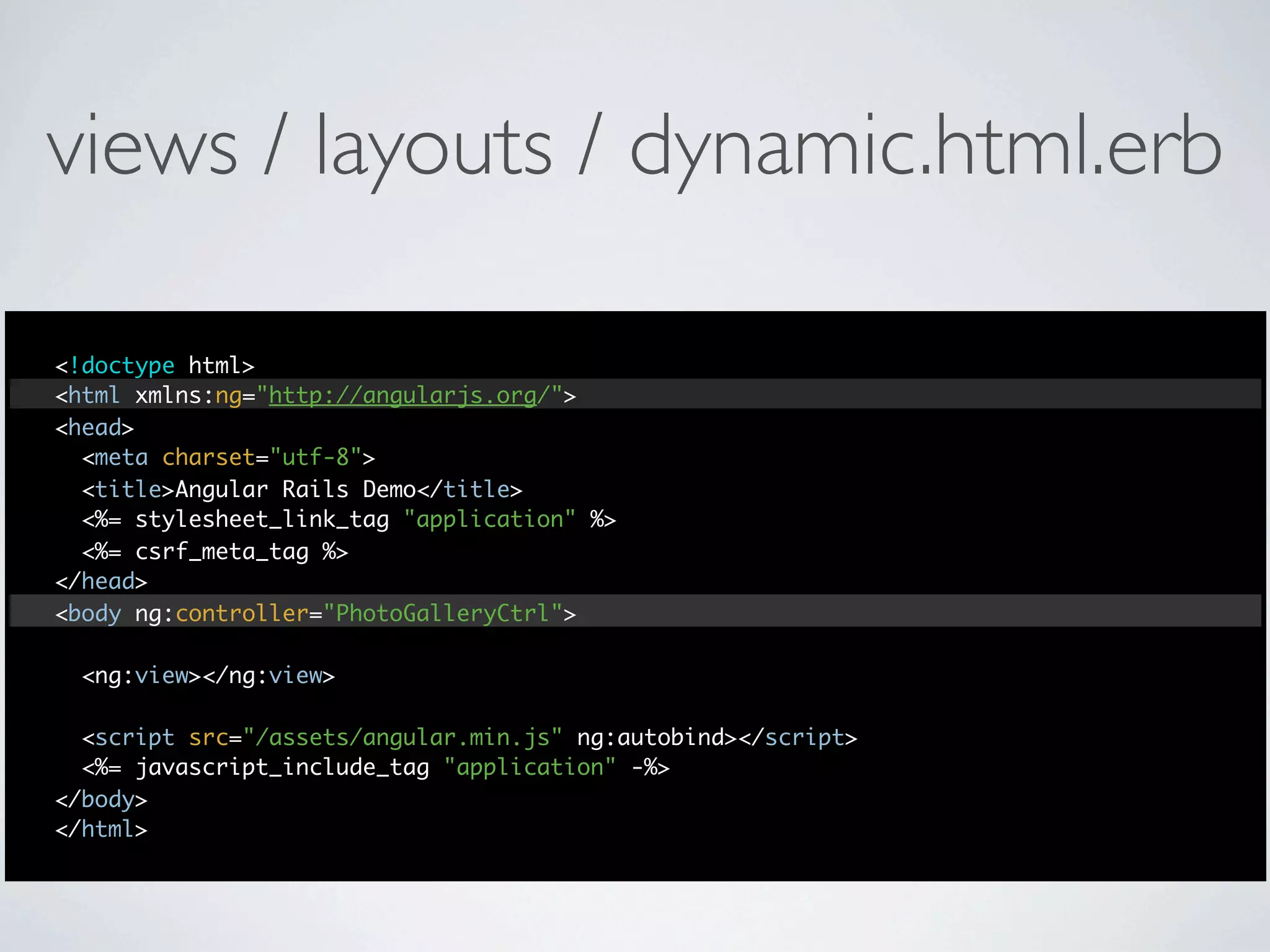
views / layouts / dynamic.html.erb

<!doctype html>
<html xmlns:ng="http://angularjs.org/">
<head>
  <meta charset="utf-8">
  <title>Angular Rails Demo</title>
  <%= stylesheet_link_tag "application" %>
  <%= csrf_meta_tag %>
</head>
<body ng:controller="PhotoGalleryCtrl">

 <ng:view></ng:view>

  <script src="/assets/angular.min.js" ng:autobind></script>
  <%= javascript_include_tag "application" -%>
</body>
</html>
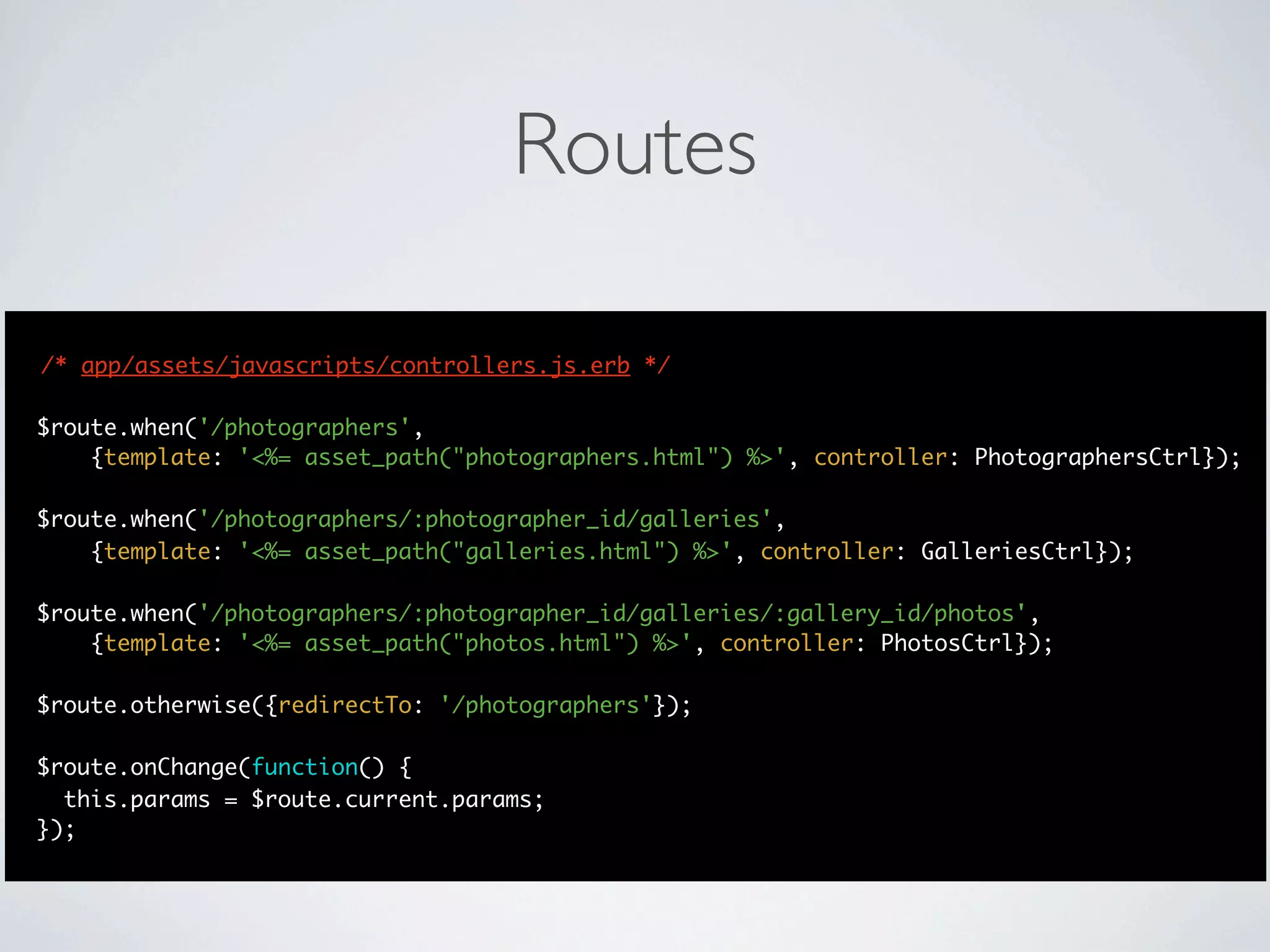
Routes

/* app/assets/javascripts/controllers.js.erb */

$route.when('/photographers',
    {template: '<%= asset_path("photographers.html") %>', controller: PhotographersCtrl});

$route.when('/photographers/:photographer_id/galleries',
    {template: '<%= asset_path("galleries.html") %>', controller: GalleriesCtrl});

$route.when('/photographers/:photographer_id/galleries/:gallery_id/photos',
    {template: '<%= asset_path("photos.html") %>', controller: PhotosCtrl});

$route.otherwise({redirectTo: '/photographers'});

$route.onChange(function() {
  this.params = $route.current.params;
});
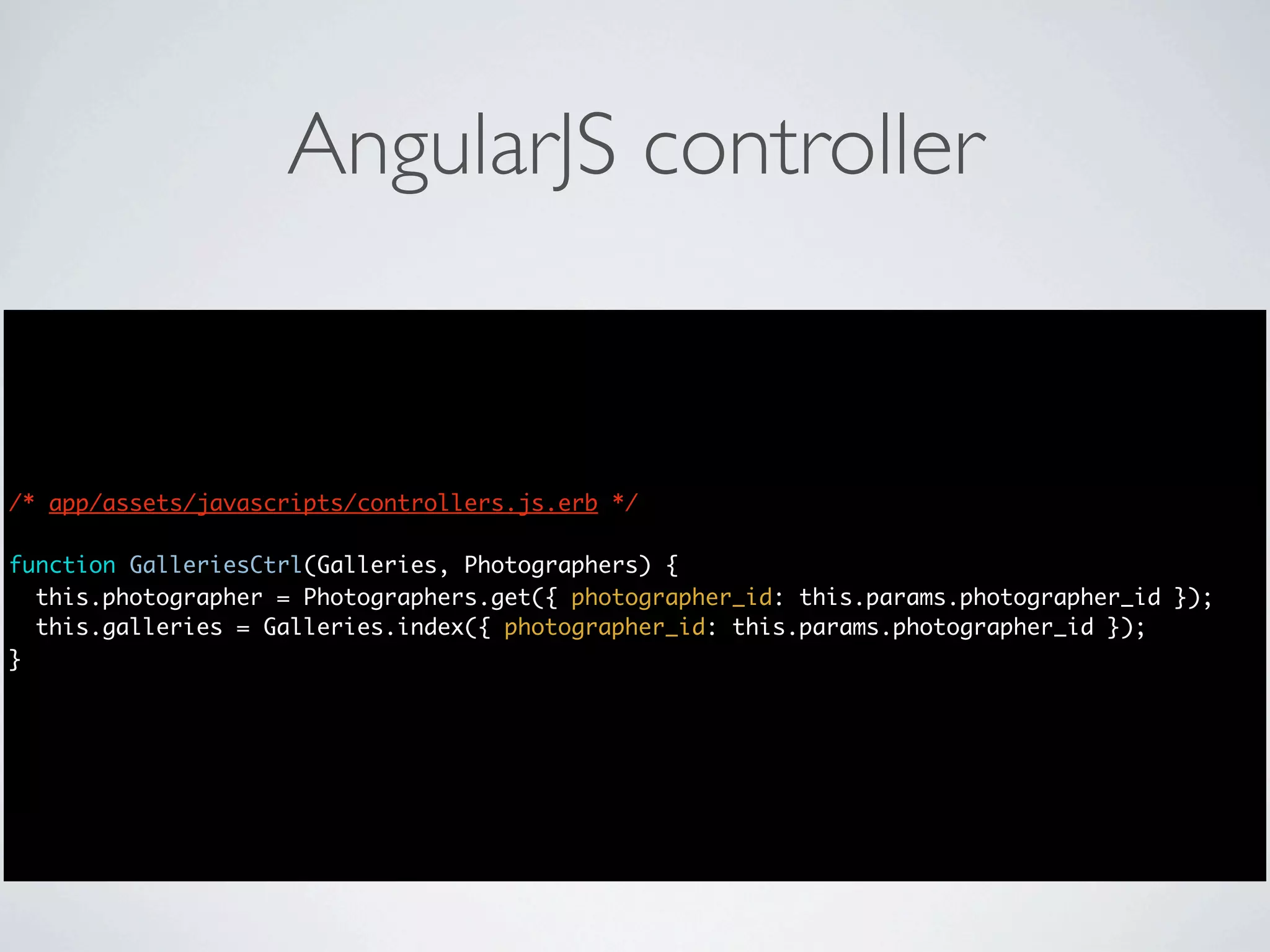
AngularJS controller


/* app/assets/javascripts/controllers.js.erb */

function GalleriesCtrl(Galleries, Photographers) {
  this.photographer = Photographers.get({ photographer_id: this.params.photographer_id });
  this.galleries = Galleries.index({ photographer_id: this.params.photographer_id });
}
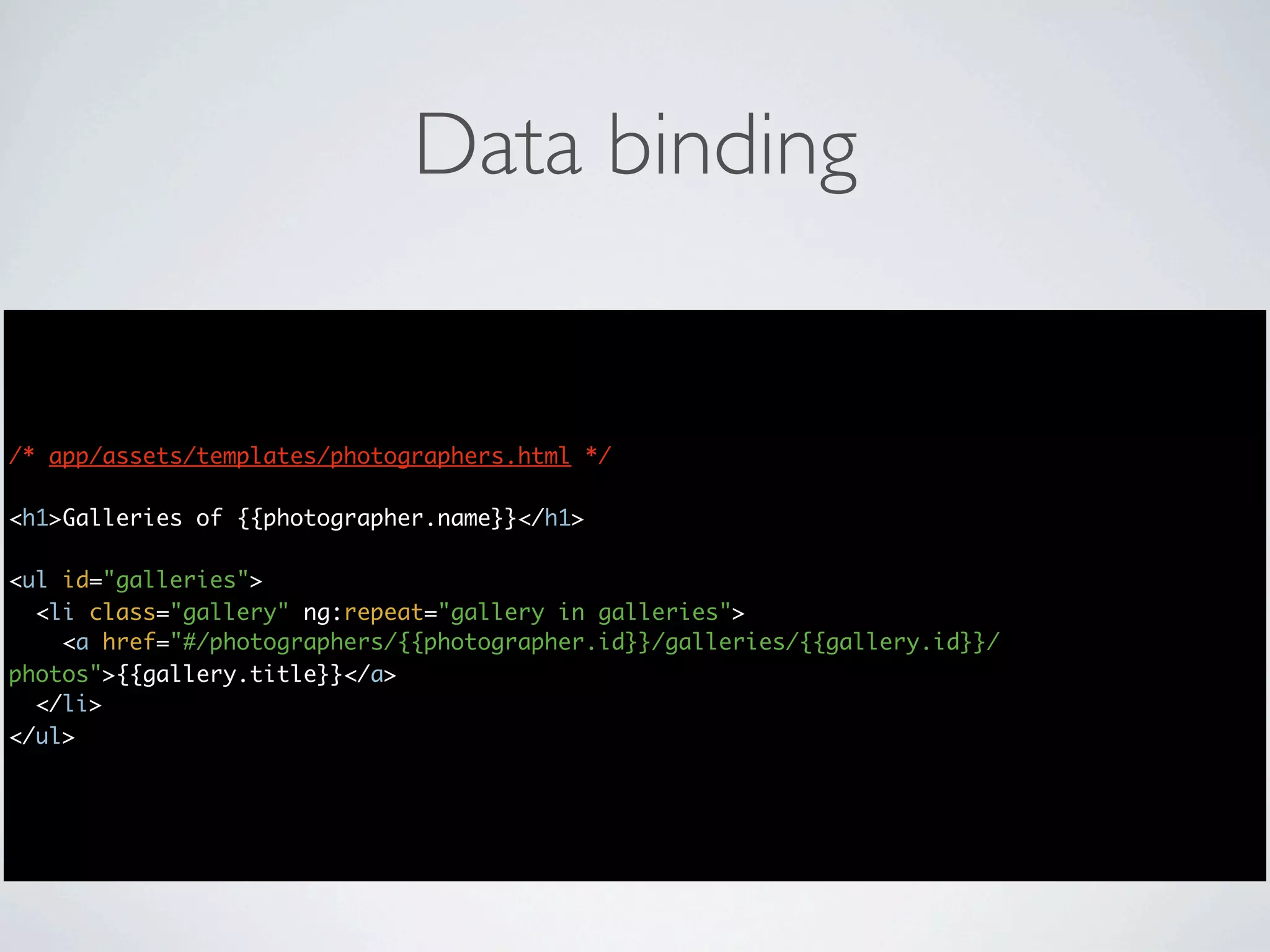
Data binding


/* app/assets/templates/photographers.html */

<h1>Galleries of {{photographer.name}}</h1>

<ul id="galleries">
  <li class="gallery" ng:repeat="gallery in galleries">
    <a href="#/photographers/{{photographer.id}}/galleries/{{gallery.id}}/
photos">{{gallery.title}}</a>
  </li>
</ul>
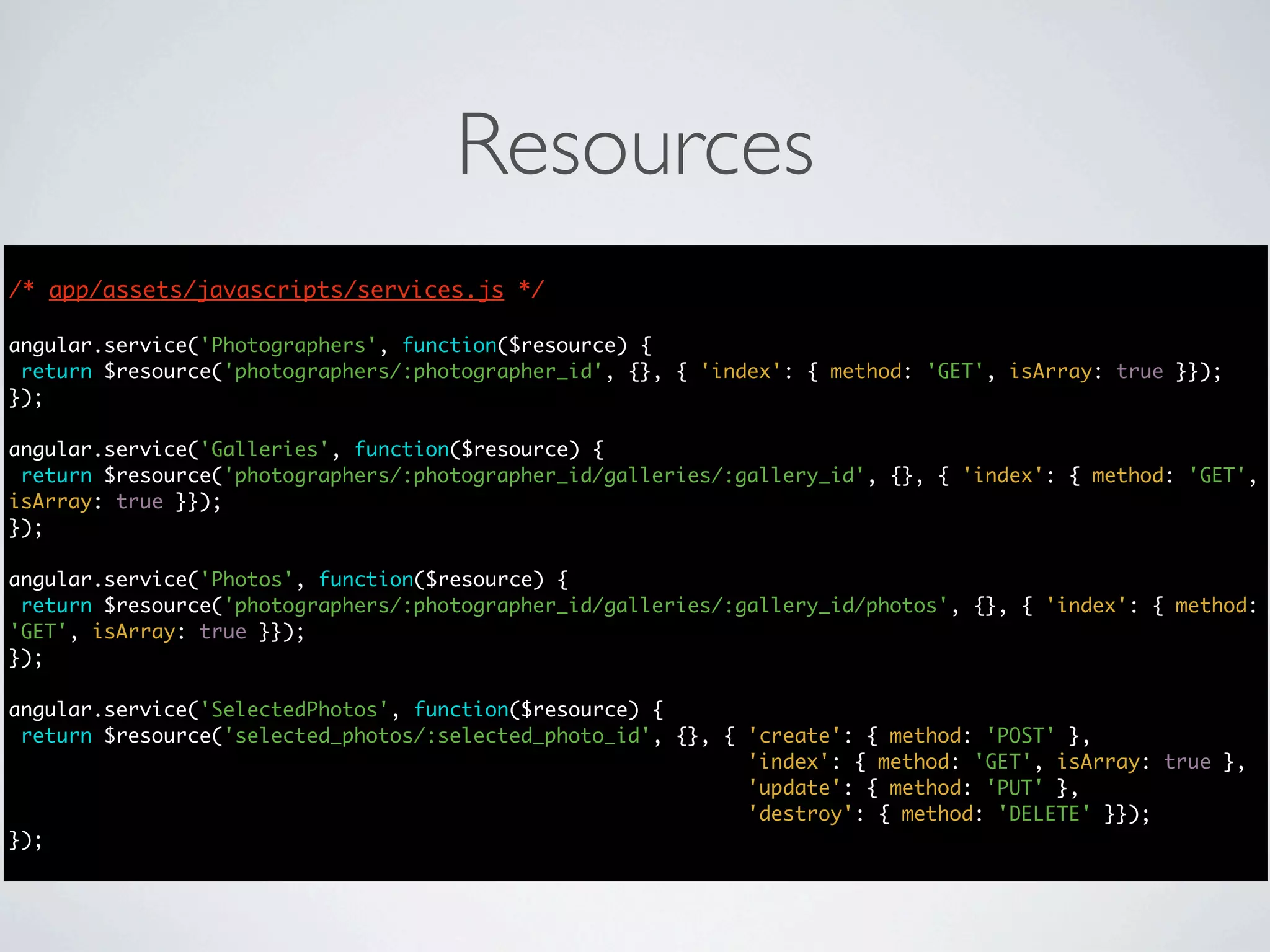
Resources
/* app/assets/javascripts/services.js */

angular.service('Photographers', function($resource) {
 return $resource('photographers/:photographer_id', {}, { 'index': { method: 'GET', isArray: true }});
});

angular.service('Galleries', function($resource) {
 return $resource('photographers/:photographer_id/galleries/:gallery_id', {}, { 'index': { method: 'GET',
isArray: true }});
});

angular.service('Photos', function($resource) {
 return $resource('photographers/:photographer_id/galleries/:gallery_id/photos', {}, { 'index': { method:
'GET', isArray: true }});
});

angular.service('SelectedPhotos', function($resource) {
 return $resource('selected_photos/:selected_photo_id', {}, { 'create': { method: 'POST' },
                                                              'index': { method: 'GET', isArray: true },
                                                              'update': { method: 'PUT' },
                                                              'destroy': { method: 'DELETE' }});
});
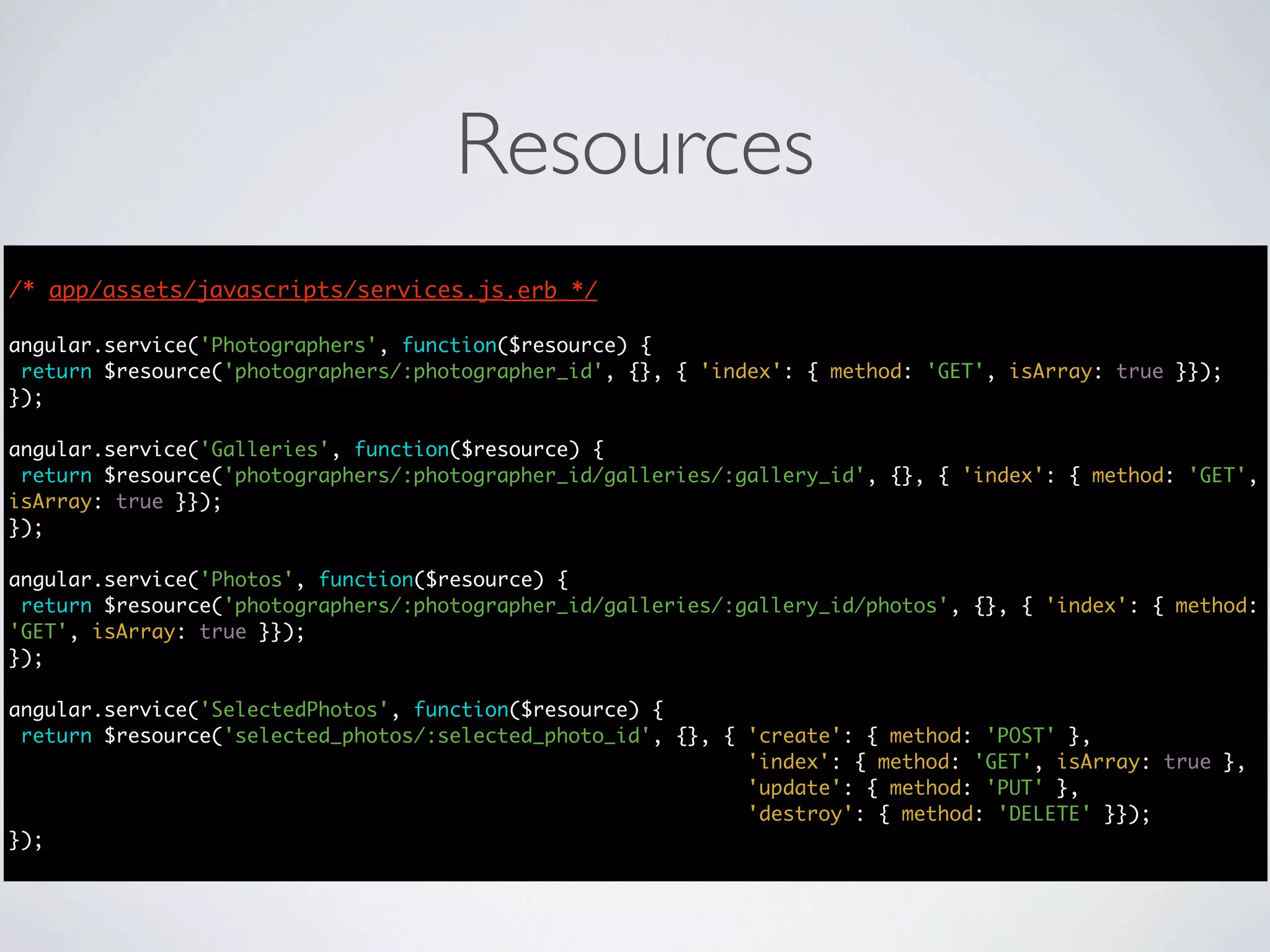
Resources
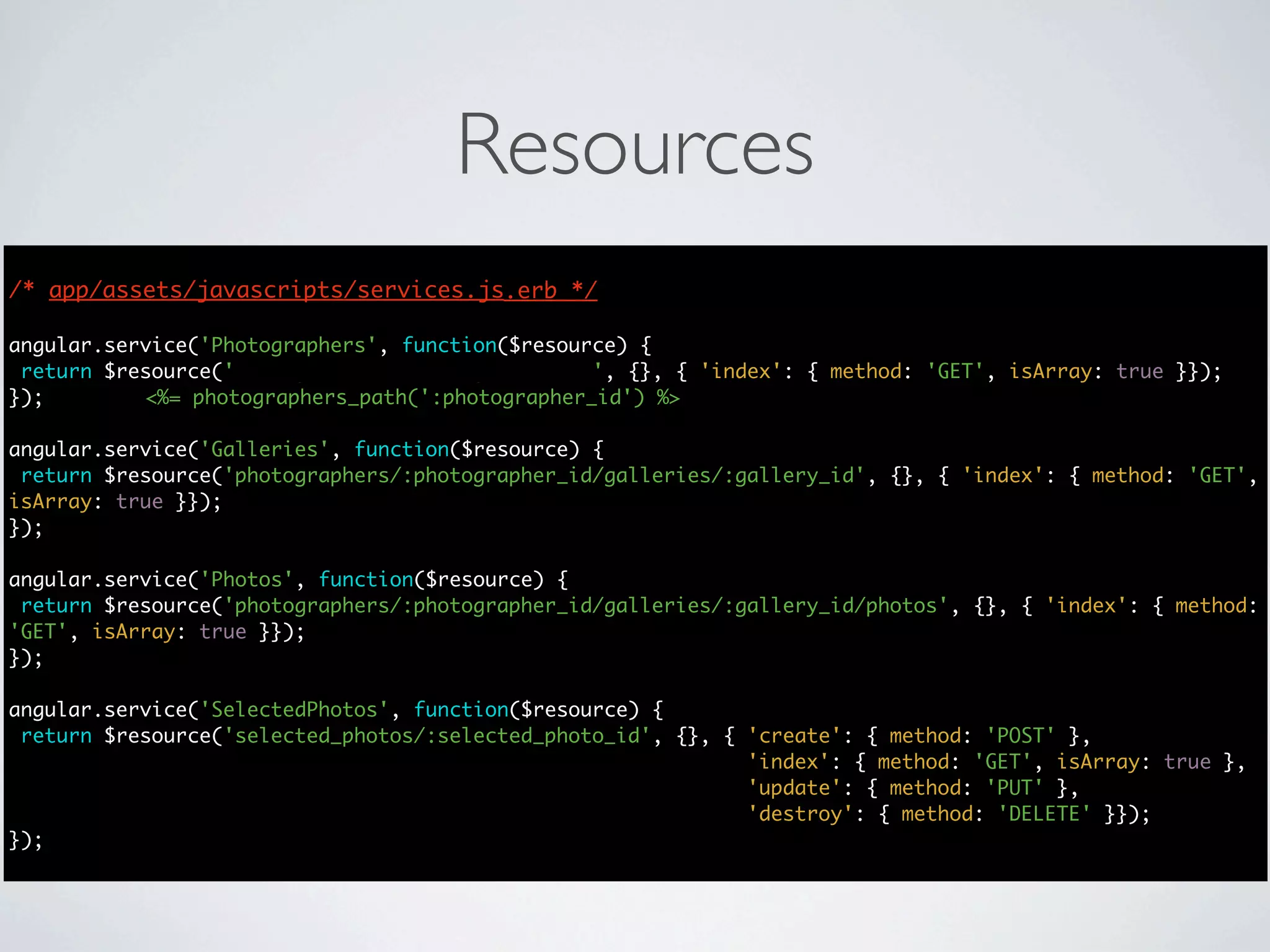
/* app/assets/javascripts/services.js.erb */
                                      */

angular.service('Photographers', function($resource) {
 return $resource('photographers/:photographer_id', {}, { 'index': { method: 'GET', isArray: true }});
});

angular.service('Galleries', function($resource) {
 return $resource('photographers/:photographer_id/galleries/:gallery_id', {}, { 'index': { method: 'GET',
isArray: true }});
});

angular.service('Photos', function($resource) {
 return $resource('photographers/:photographer_id/galleries/:gallery_id/photos', {}, { 'index': { method:
'GET', isArray: true }});
});

angular.service('SelectedPhotos', function($resource) {
 return $resource('selected_photos/:selected_photo_id', {}, { 'create': { method: 'POST' },
                                                              'index': { method: 'GET', isArray: true },
                                                              'update': { method: 'PUT' },
                                                              'destroy': { method: 'DELETE' }});
});
Resources
/* app/assets/javascripts/services.js.erb */
                                      */

angular.service('Photographers', function($resource) {
 return $resource('photographers/:photographer_id', {}, { 'index': { method: 'GET', isArray: true }});
});        <%= photographers_path(':photographer_id') %>

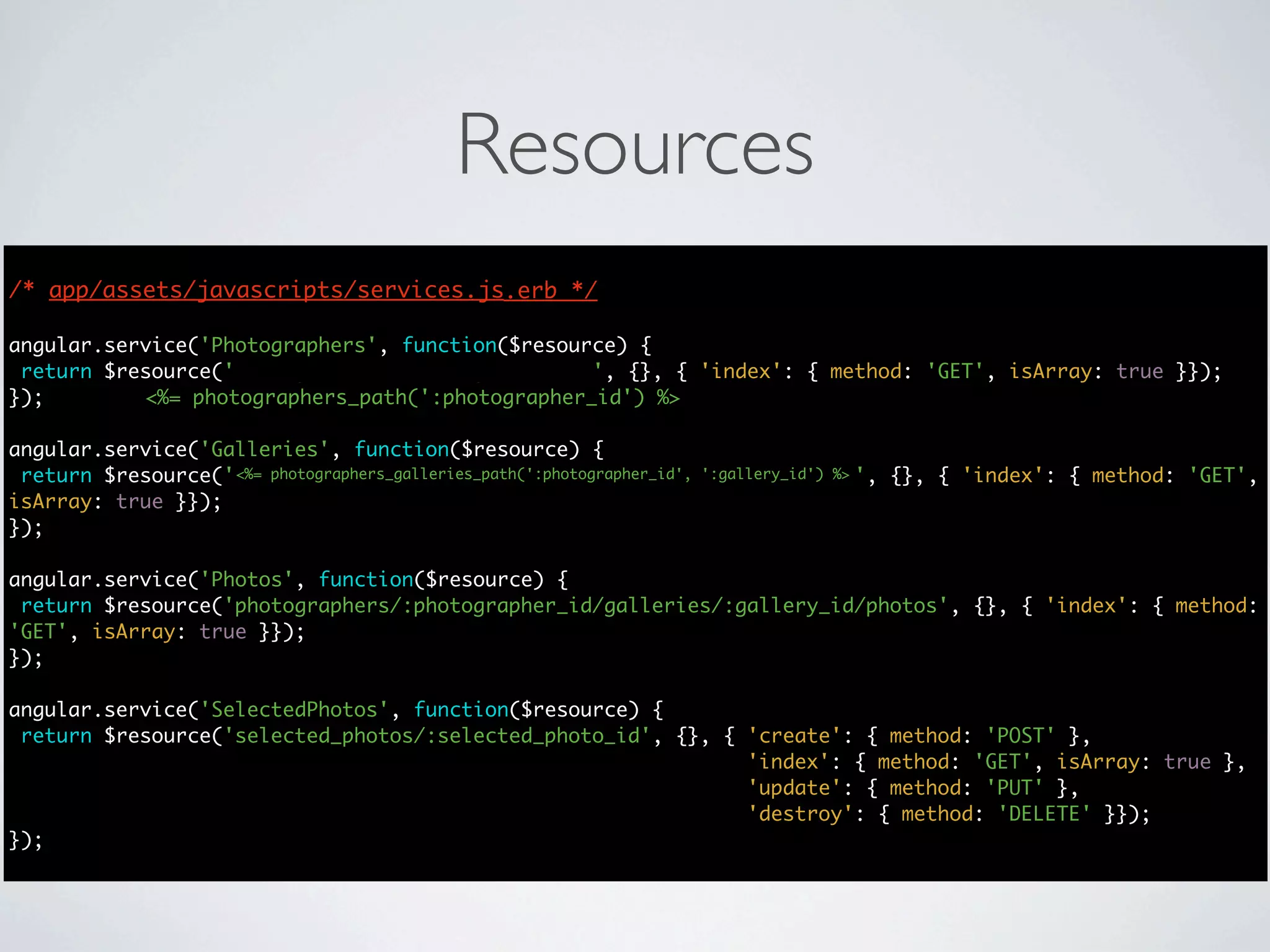
angular.service('Galleries', function($resource) {
 return $resource('photographers/:photographer_id/galleries/:gallery_id', {}, { 'index': { method: 'GET',
isArray: true }});
});

angular.service('Photos', function($resource) {
 return $resource('photographers/:photographer_id/galleries/:gallery_id/photos', {}, { 'index': { method:
'GET', isArray: true }});
});

angular.service('SelectedPhotos', function($resource) {
 return $resource('selected_photos/:selected_photo_id', {}, { 'create': { method: 'POST' },
                                                              'index': { method: 'GET', isArray: true },
                                                              'update': { method: 'PUT' },
                                                              'destroy': { method: 'DELETE' }});
});
Resources
/* app/assets/javascripts/services.js.erb */
                                      */

angular.service('Photographers', function($resource) {
 return $resource('photographers/:photographer_id', {}, { 'index': { method: 'GET', isArray: true }});
});        <%= photographers_path(':photographer_id') %>

angular.service('Galleries', function($resource) {
 return $resource('photographers/:photographer_id/galleries/:gallery_id', {}, { 'index': { method: 'GET',
                   <%= photographers_galleries_path(':photographer_id', ':gallery_id') %>
isArray: true }});
});

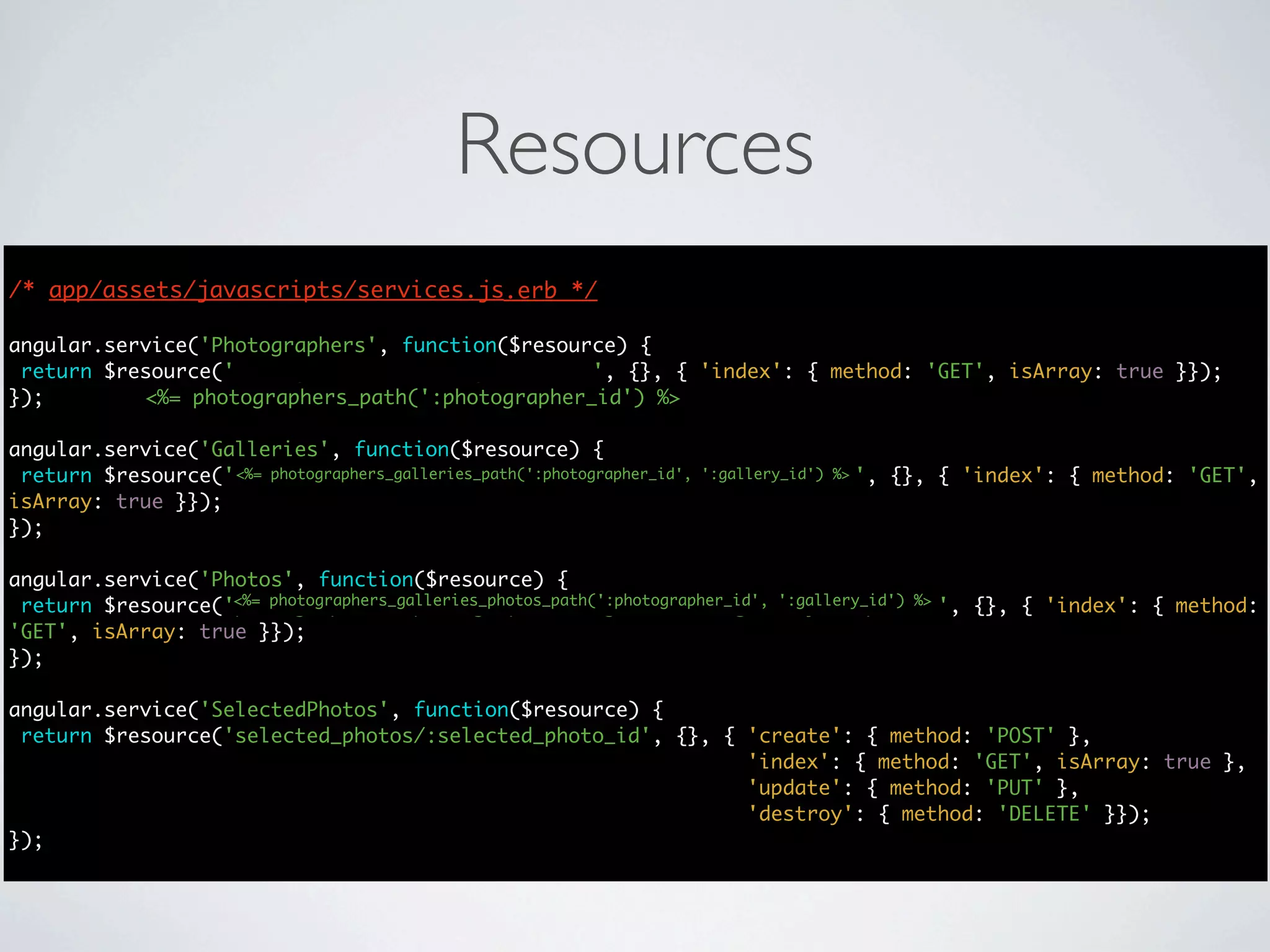
angular.service('Photos', function($resource) {
 return $resource('photographers/:photographer_id/galleries/:gallery_id/photos', {}, { 'index': { method:
'GET', isArray: true }});
});

angular.service('SelectedPhotos', function($resource) {
 return $resource('selected_photos/:selected_photo_id', {}, { 'create': { method: 'POST' },
                                                              'index': { method: 'GET', isArray: true },
                                                              'update': { method: 'PUT' },
                                                              'destroy': { method: 'DELETE' }});
});
Resources
/* app/assets/javascripts/services.js.erb */
                                      */

angular.service('Photographers', function($resource) {
 return $resource('photographers/:photographer_id', {}, { 'index': { method: 'GET', isArray: true }});
});        <%= photographers_path(':photographer_id') %>

angular.service('Galleries', function($resource) {
 return $resource('photographers/:photographer_id/galleries/:gallery_id', {}, { 'index': { method: 'GET',
                   <%= photographers_galleries_path(':photographer_id', ':gallery_id') %>
isArray: true }});
});

angular.service('Photos', function($resource) {
                   <%= photographers_galleries_photos_path(':photographer_id', ':gallery_id') %>
 return $resource('photographers/:photographer_id/galleries/:gallery_id/photos', {}, { 'index': { method:
'GET', isArray: true }});
});

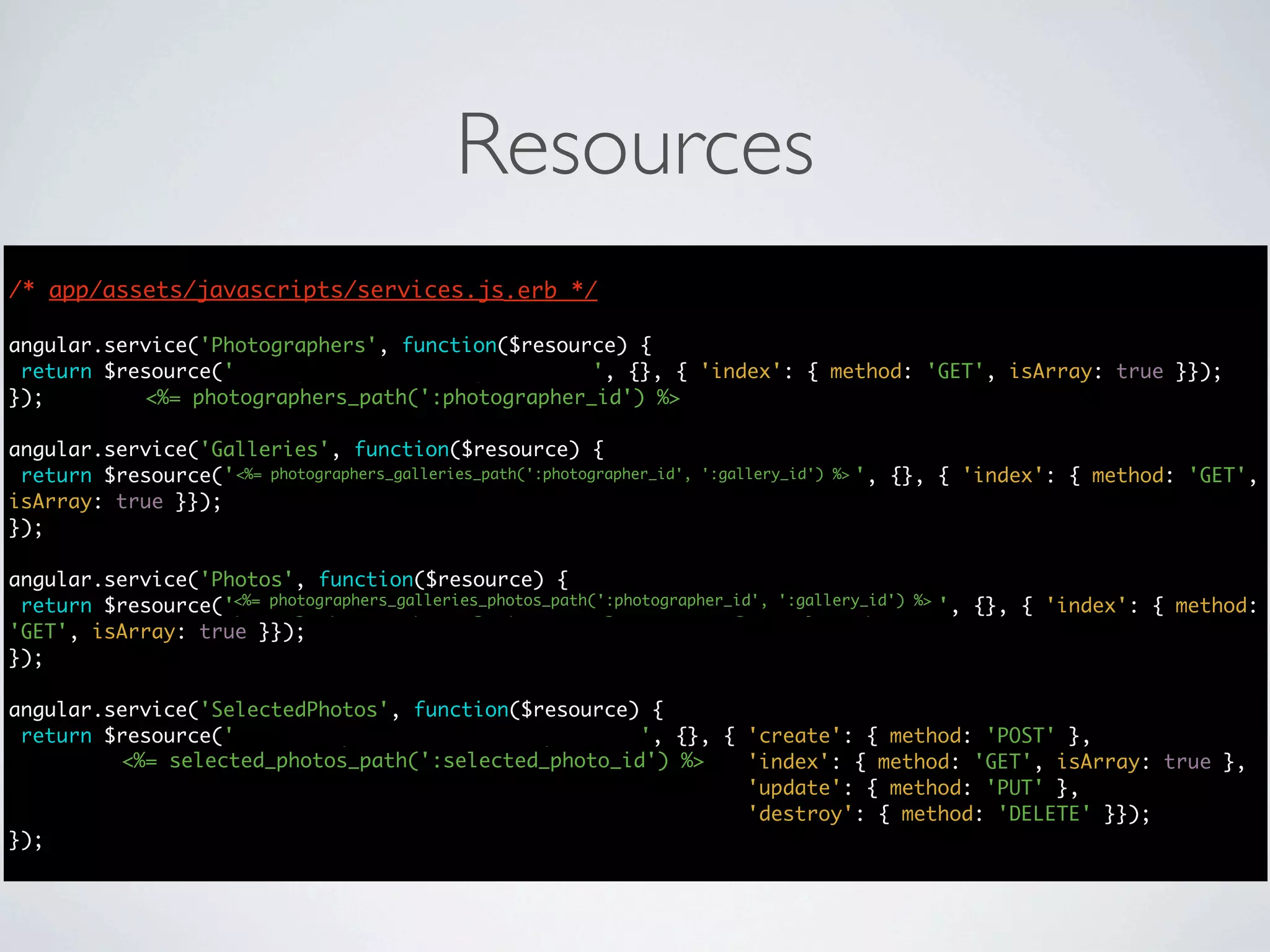
angular.service('SelectedPhotos', function($resource) {
 return $resource('selected_photos/:selected_photo_id', {}, { 'create': { method: 'POST' },
                                                              'index': { method: 'GET', isArray: true },
                                                              'update': { method: 'PUT' },
                                                              'destroy': { method: 'DELETE' }});
});
Resources
/* app/assets/javascripts/services.js.erb */
                                      */

angular.service('Photographers', function($resource) {
 return $resource('photographers/:photographer_id', {}, { 'index': { method: 'GET', isArray: true }});
});        <%= photographers_path(':photographer_id') %>

angular.service('Galleries', function($resource) {
 return $resource('photographers/:photographer_id/galleries/:gallery_id', {}, { 'index': { method: 'GET',
                   <%= photographers_galleries_path(':photographer_id', ':gallery_id') %>
isArray: true }});
});

angular.service('Photos', function($resource) {
                   <%= photographers_galleries_photos_path(':photographer_id', ':gallery_id') %>
 return $resource('photographers/:photographer_id/galleries/:gallery_id/photos', {}, { 'index': { method:
'GET', isArray: true }});
});

angular.service('SelectedPhotos', function($resource) {
 return $resource('selected_photos/:selected_photo_id', {}, { 'create': { method: 'POST' },
         <%= selected_photos_path(':selected_photo_id') %>    'index': { method: 'GET', isArray: true },
                                                              'update': { method: 'PUT' },
                                                              'destroy': { method: 'DELETE' }});
});
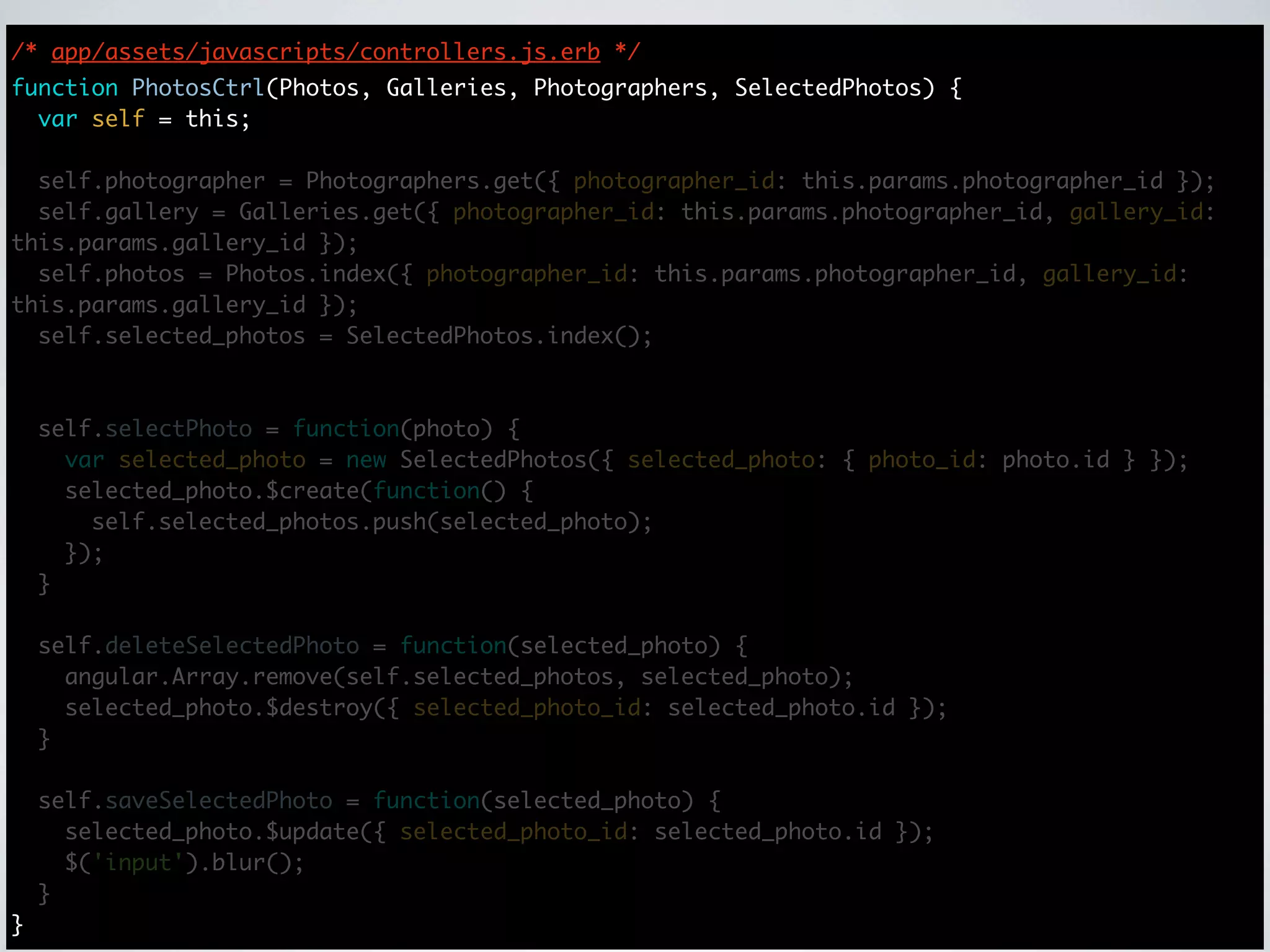
/* app/assets/javascripts/controllers.js.erb */
function PhotosCtrl(Photos, Galleries, Photographers, SelectedPhotos) {
  var self = this;

  self.photographer = Photographers.get({ photographer_id: this.params.photographer_id });
  self.gallery = Galleries.get({ photographer_id: this.params.photographer_id, gallery_id:
this.params.gallery_id });
  self.photos = Photos.index({ photographer_id: this.params.photographer_id, gallery_id:
this.params.gallery_id });
  self.selected_photos = SelectedPhotos.index();


    self.selectPhoto = function(photo) {
      var selected_photo = new SelectedPhotos({ selected_photo: { photo_id: photo.id } });
      selected_photo.$create(function() {
        self.selected_photos.push(selected_photo);
      });
    }

    self.deleteSelectedPhoto = function(selected_photo) {
      angular.Array.remove(self.selected_photos, selected_photo);
      selected_photo.$destroy({ selected_photo_id: selected_photo.id });
    }

    self.saveSelectedPhoto = function(selected_photo) {
      selected_photo.$update({ selected_photo_id: selected_photo.id });
      $('input').blur();
    }
}
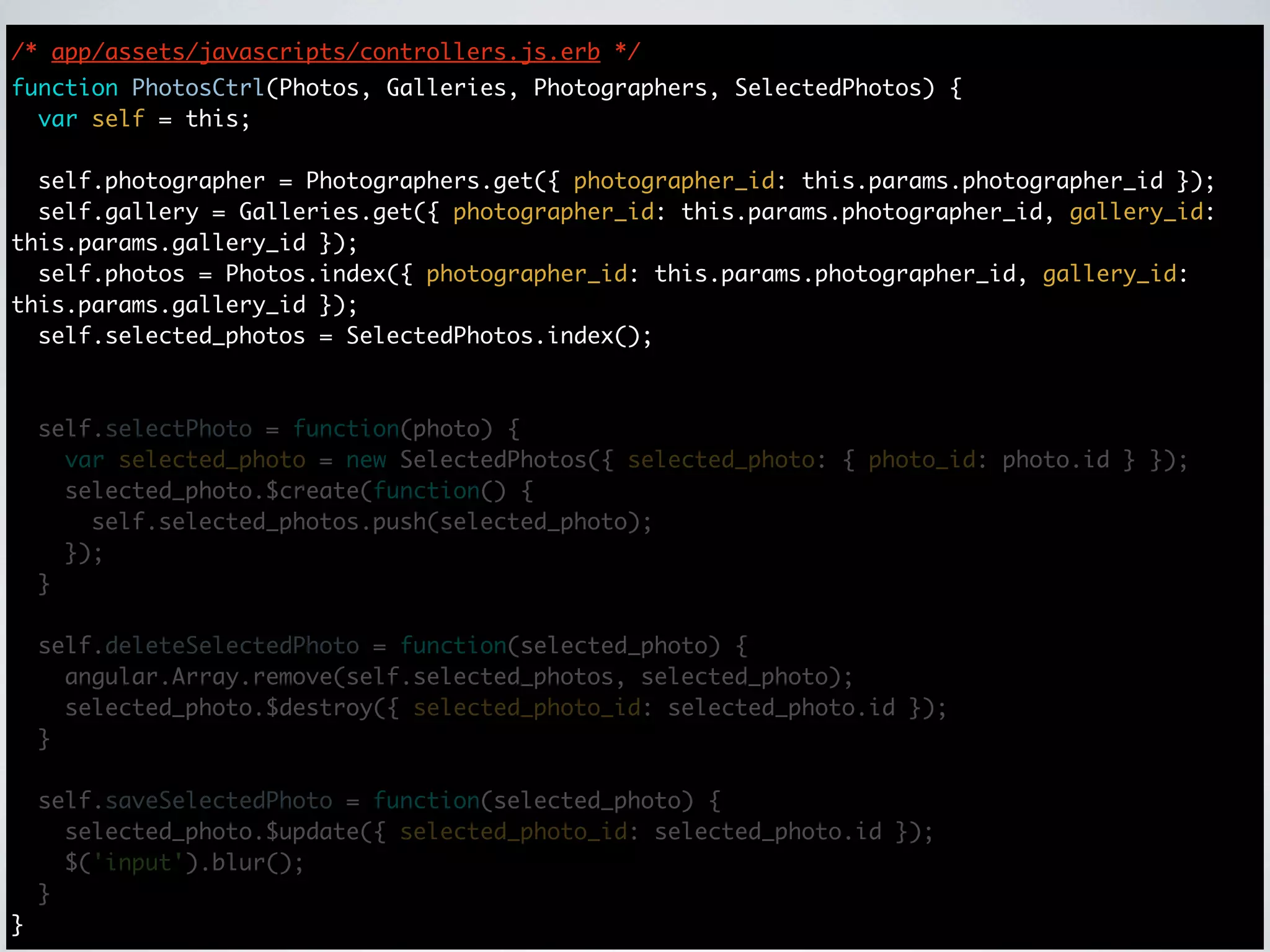
/* app/assets/javascripts/controllers.js.erb */
function PhotosCtrl(Photos, Galleries, Photographers, SelectedPhotos) {
  var self = this;

  self.photographer = Photographers.get({ photographer_id: this.params.photographer_id });
  self.gallery = Galleries.get({ photographer_id: this.params.photographer_id, gallery_id:
this.params.gallery_id });
  self.photos = Photos.index({ photographer_id: this.params.photographer_id, gallery_id:
this.params.gallery_id });
  self.selected_photos = SelectedPhotos.index();


    self.selectPhoto = function(photo) {
      var selected_photo = new SelectedPhotos({ selected_photo: { photo_id: photo.id } });
      selected_photo.$create(function() {
        self.selected_photos.push(selected_photo);
      });
    }

    self.deleteSelectedPhoto = function(selected_photo) {
      angular.Array.remove(self.selected_photos, selected_photo);
      selected_photo.$destroy({ selected_photo_id: selected_photo.id });
    }

    self.saveSelectedPhoto = function(selected_photo) {
      selected_photo.$update({ selected_photo_id: selected_photo.id });
      $('input').blur();
    }
}
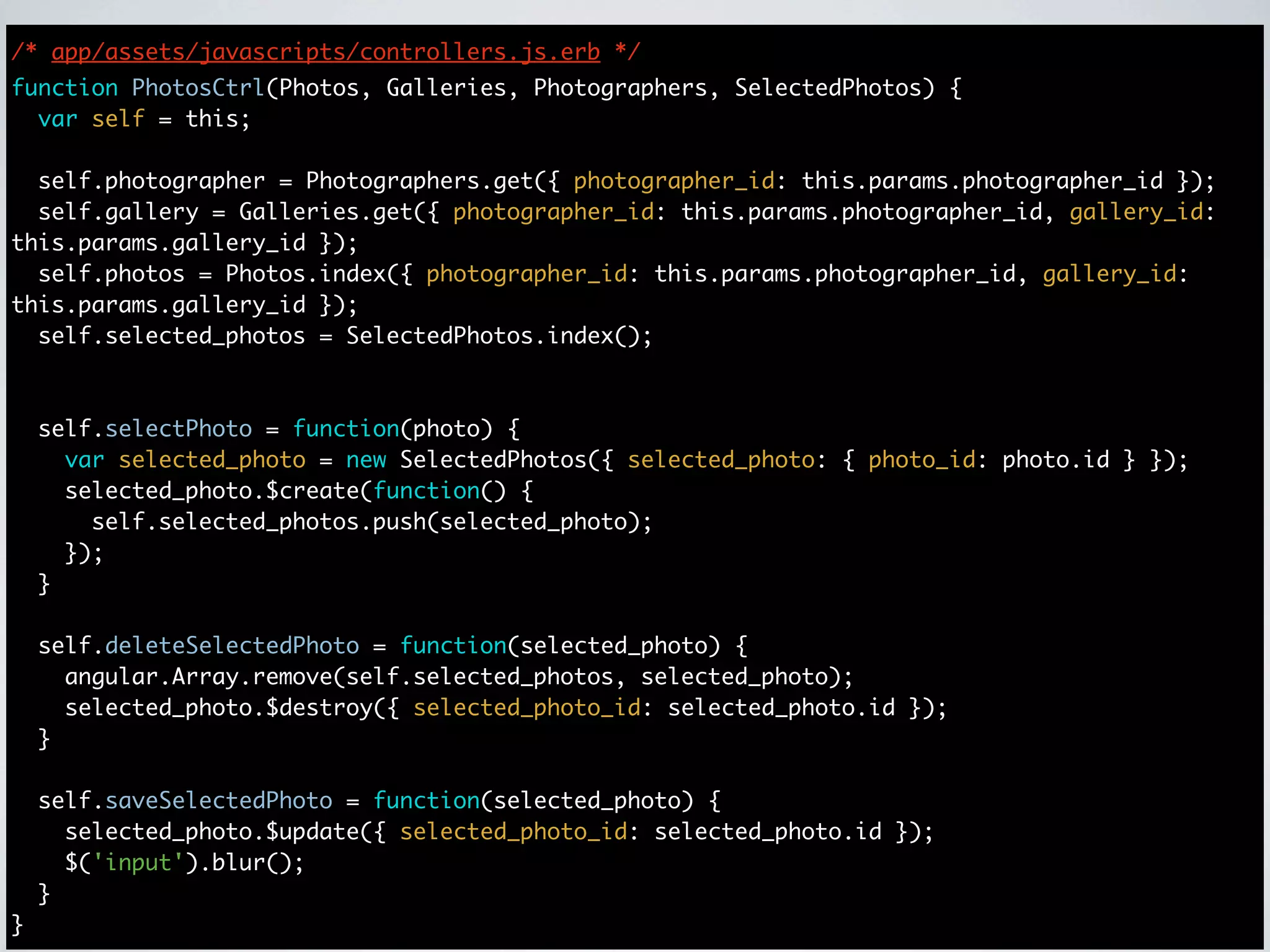
/* app/assets/javascripts/controllers.js.erb */
function PhotosCtrl(Photos, Galleries, Photographers, SelectedPhotos) {
  var self = this;

  self.photographer = Photographers.get({ photographer_id: this.params.photographer_id });
  self.gallery = Galleries.get({ photographer_id: this.params.photographer_id, gallery_id:
this.params.gallery_id });
  self.photos = Photos.index({ photographer_id: this.params.photographer_id, gallery_id:
this.params.gallery_id });
  self.selected_photos = SelectedPhotos.index();


    self.selectPhoto = function(photo) {
      var selected_photo = new SelectedPhotos({ selected_photo: { photo_id: photo.id } });
      selected_photo.$create(function() {
        self.selected_photos.push(selected_photo);
      });
    }

    self.deleteSelectedPhoto = function(selected_photo) {
      angular.Array.remove(self.selected_photos, selected_photo);
      selected_photo.$destroy({ selected_photo_id: selected_photo.id });
    }

    self.saveSelectedPhoto = function(selected_photo) {
      selected_photo.$update({ selected_photo_id: selected_photo.id });
      $('input').blur();
    }
}
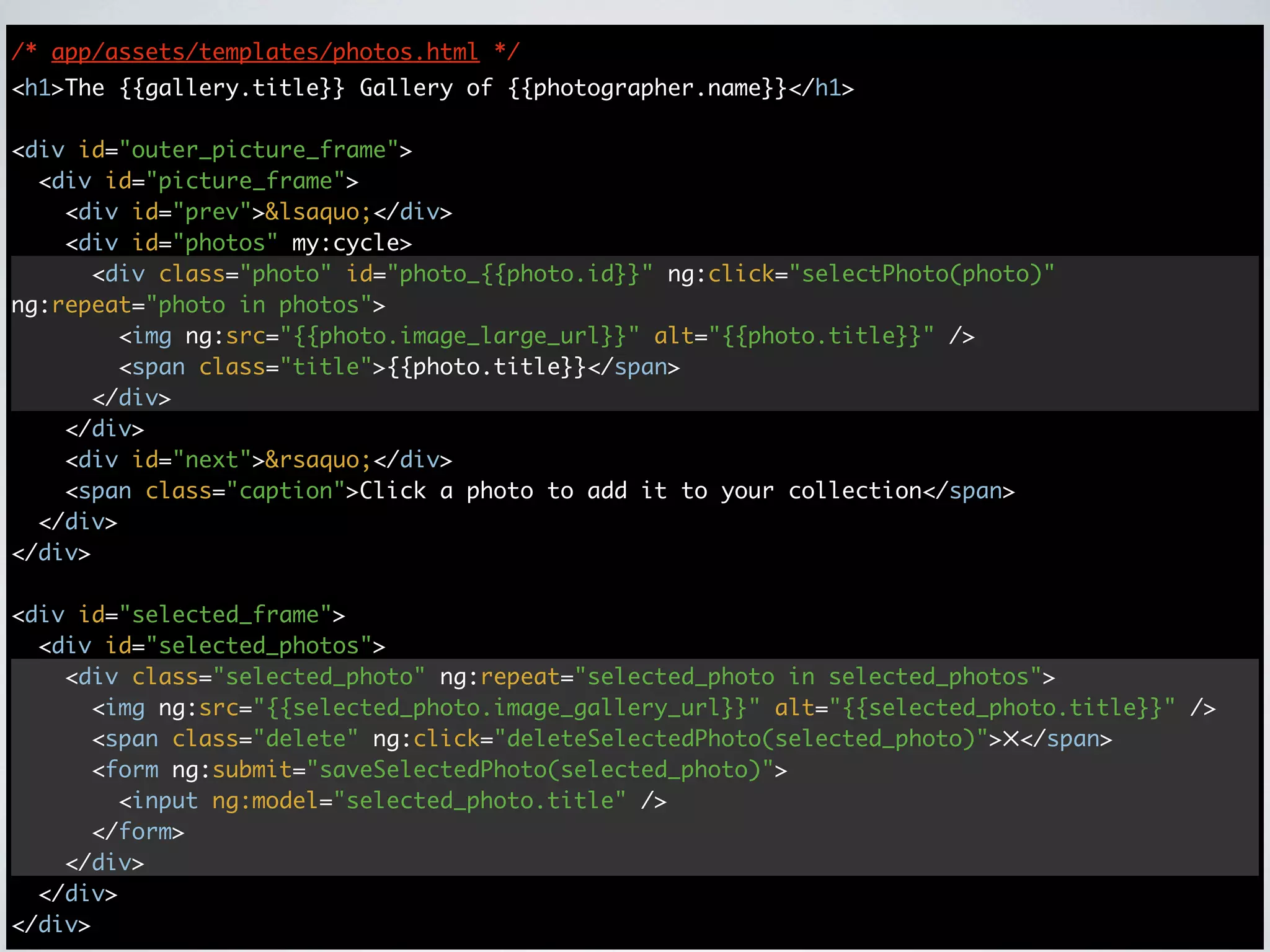
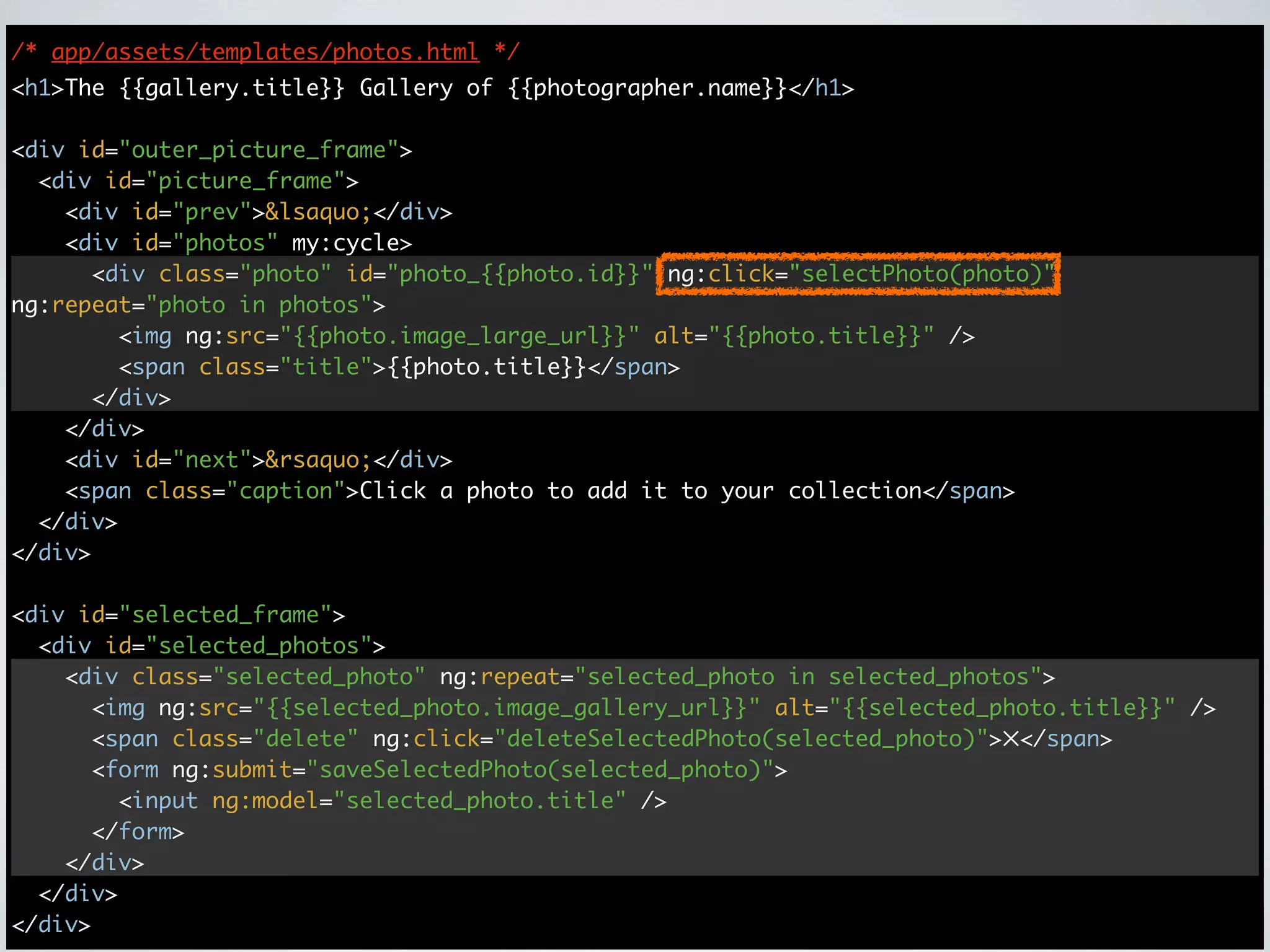
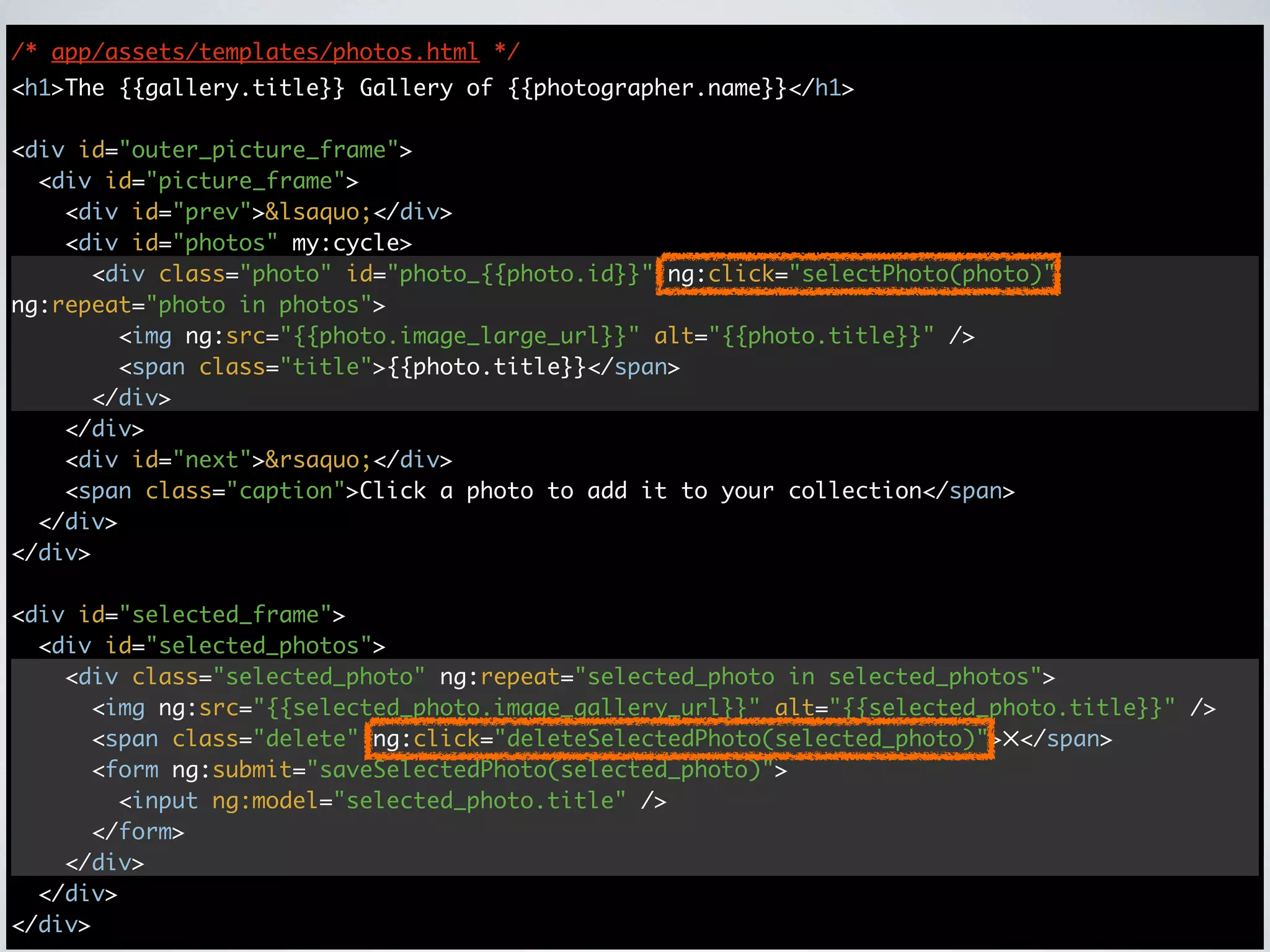
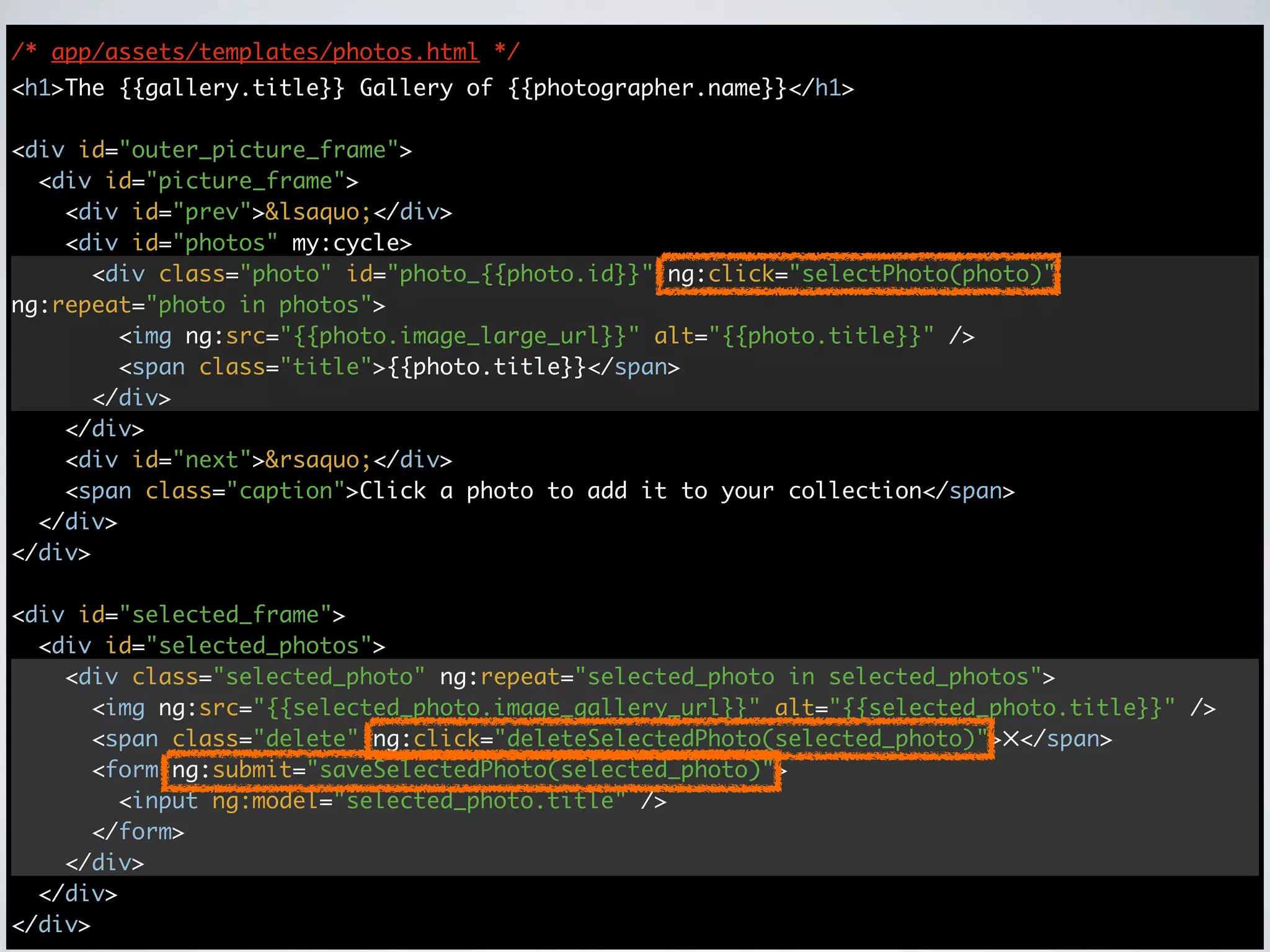
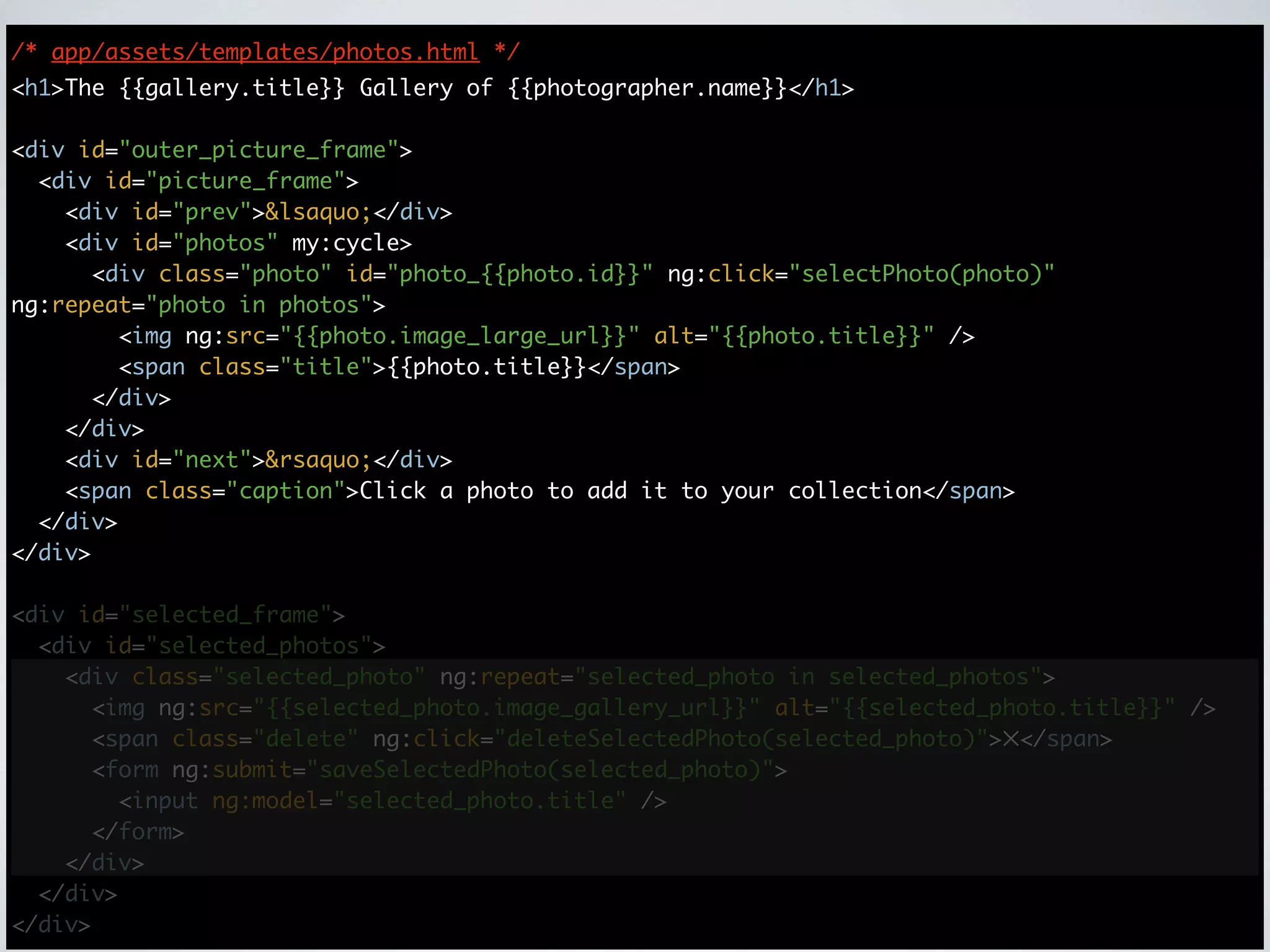
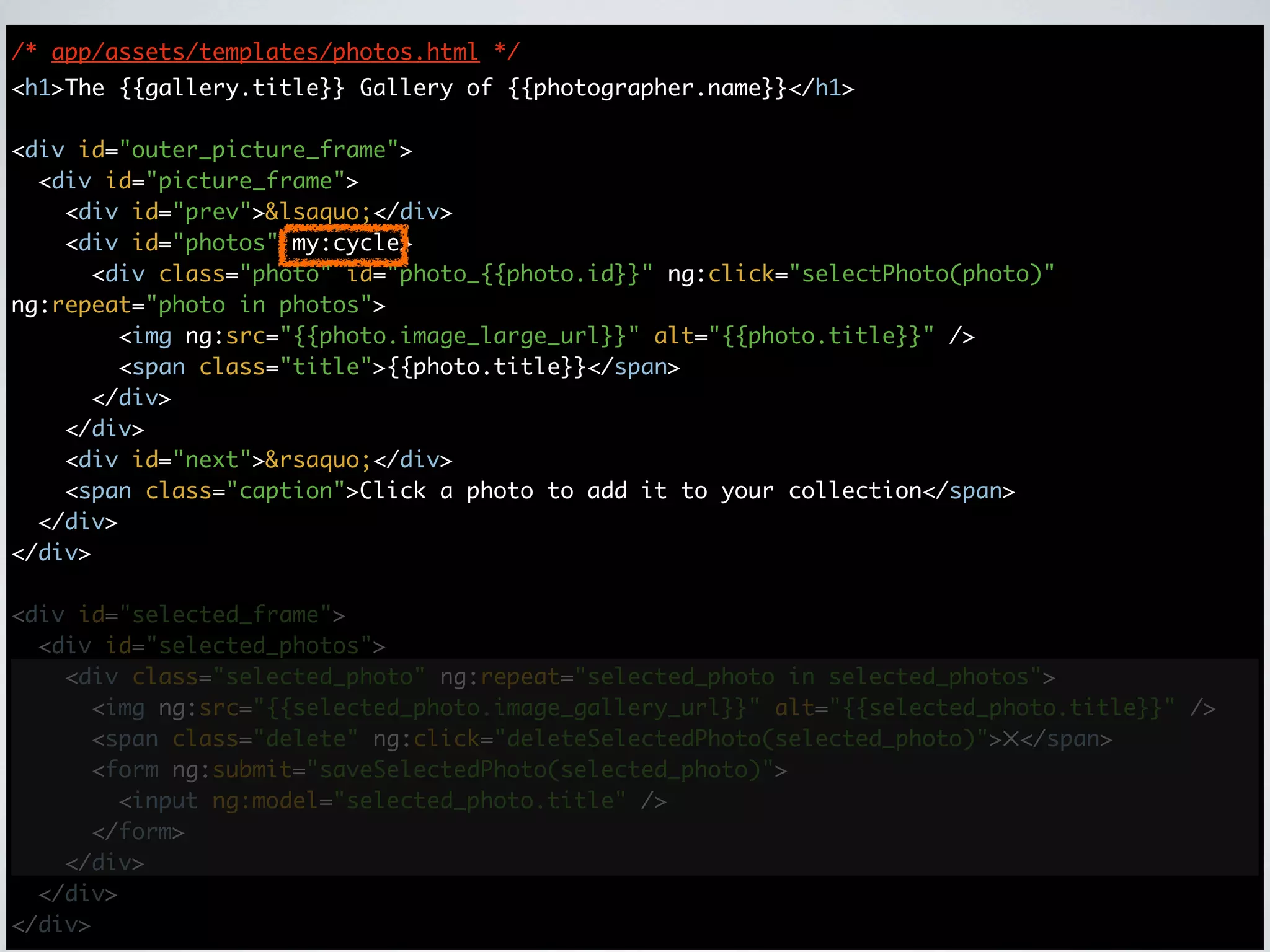
/* app/assets/templates/photos.html */
<h1>The {{gallery.title}} Gallery of {{photographer.name}}</h1>

<div id="outer_picture_frame">
  <div id="picture_frame">
    <div id="prev">&lsaquo;</div>
    <div id="photos" my:cycle>
      <div class="photo" id="photo_{{photo.id}}" ng:click="selectPhoto(photo)"
ng:repeat="photo in photos">
        <img ng:src="{{photo.image_large_url}}" alt="{{photo.title}}" />
        <span class="title">{{photo.title}}</span>
      </div>
    </div>
    <div id="next">&rsaquo;</div>
    <span class="caption">Click a photo to add it to your collection</span>
  </div>
</div>

<div id="selected_frame">
  <div id="selected_photos">
    <div class="selected_photo" ng:repeat="selected_photo in selected_photos">
      <img ng:src="{{selected_photo.image_gallery_url}}" alt="{{selected_photo.title}}" />
      <span class="delete" ng:click="deleteSelectedPhoto(selected_photo)">✕</span>
      <form ng:submit="saveSelectedPhoto(selected_photo)">
        <input ng:model="selected_photo.title" />
      </form>
    </div>
  </div>
</div>
/* app/assets/templates/photos.html */
<h1>The {{gallery.title}} Gallery of {{photographer.name}}</h1>

<div id="outer_picture_frame">
  <div id="picture_frame">
    <div id="prev">&lsaquo;</div>
    <div id="photos" my:cycle>
      <div class="photo" id="photo_{{photo.id}}" ng:click="selectPhoto(photo)"
ng:repeat="photo in photos">
        <img ng:src="{{photo.image_large_url}}" alt="{{photo.title}}" />
        <span class="title">{{photo.title}}</span>
      </div>
    </div>
    <div id="next">&rsaquo;</div>
    <span class="caption">Click a photo to add it to your collection</span>
  </div>
</div>

<div id="selected_frame">
  <div id="selected_photos">
    <div class="selected_photo" ng:repeat="selected_photo in selected_photos">
      <img ng:src="{{selected_photo.image_gallery_url}}" alt="{{selected_photo.title}}" />
      <span class="delete" ng:click="deleteSelectedPhoto(selected_photo)">✕</span>
      <form ng:submit="saveSelectedPhoto(selected_photo)">
        <input ng:model="selected_photo.title" />
      </form>
    </div>
  </div>
</div>
/* app/assets/templates/photos.html */
<h1>The {{gallery.title}} Gallery of {{photographer.name}}</h1>

<div id="outer_picture_frame">
  <div id="picture_frame">
    <div id="prev">&lsaquo;</div>
    <div id="photos" my:cycle>
      <div class="photo" id="photo_{{photo.id}}" ng:click="selectPhoto(photo)"
ng:repeat="photo in photos">
        <img ng:src="{{photo.image_large_url}}" alt="{{photo.title}}" />
        <span class="title">{{photo.title}}</span>
      </div>
    </div>
    <div id="next">&rsaquo;</div>
    <span class="caption">Click a photo to add it to your collection</span>
  </div>
</div>

<div id="selected_frame">
  <div id="selected_photos">
    <div class="selected_photo" ng:repeat="selected_photo in selected_photos">
      <img ng:src="{{selected_photo.image_gallery_url}}" alt="{{selected_photo.title}}" />
      <span class="delete" ng:click="deleteSelectedPhoto(selected_photo)">✕</span>
      <form ng:submit="saveSelectedPhoto(selected_photo)">
        <input ng:model="selected_photo.title" />
      </form>
    </div>
  </div>
</div>
/* app/assets/templates/photos.html */
<h1>The {{gallery.title}} Gallery of {{photographer.name}}</h1>

<div id="outer_picture_frame">
  <div id="picture_frame">
    <div id="prev">&lsaquo;</div>
    <div id="photos" my:cycle>
      <div class="photo" id="photo_{{photo.id}}" ng:click="selectPhoto(photo)"
ng:repeat="photo in photos">
        <img ng:src="{{photo.image_large_url}}" alt="{{photo.title}}" />
        <span class="title">{{photo.title}}</span>
      </div>
    </div>
    <div id="next">&rsaquo;</div>
    <span class="caption">Click a photo to add it to your collection</span>
  </div>
</div>

<div id="selected_frame">
  <div id="selected_photos">
    <div class="selected_photo" ng:repeat="selected_photo in selected_photos">
      <img ng:src="{{selected_photo.image_gallery_url}}" alt="{{selected_photo.title}}" />
      <span class="delete" ng:click="deleteSelectedPhoto(selected_photo)">✕</span>
      <form ng:submit="saveSelectedPhoto(selected_photo)">
        <input ng:model="selected_photo.title" />
      </form>
    </div>
  </div>
</div>
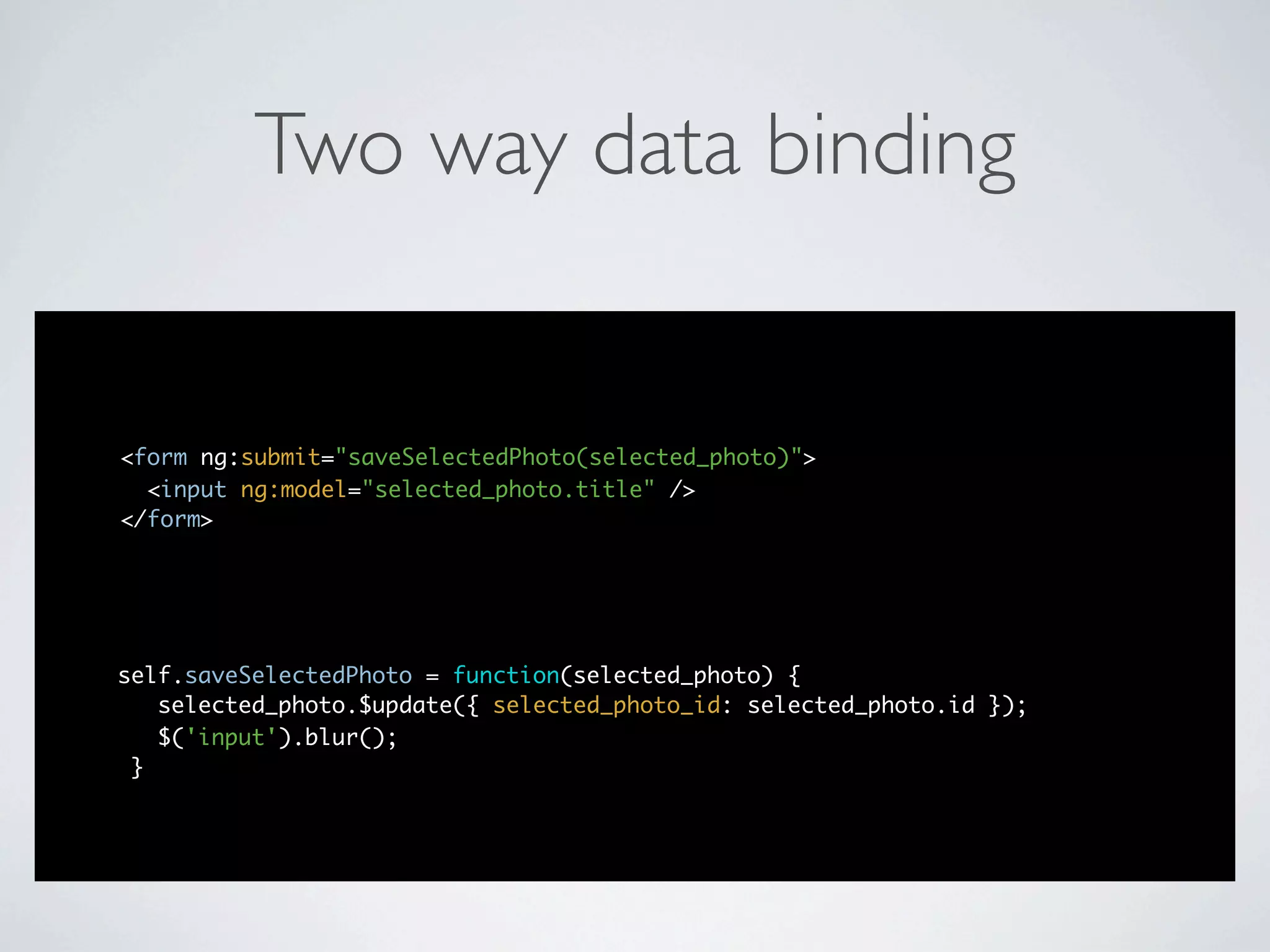
Two way data binding


<form ng:submit="saveSelectedPhoto(selected_photo)">
  <input ng:model="selected_photo.title" />
</form>


self.saveSelectedPhoto = function(selected_photo) {
   selected_photo.$update({ selected_photo_id: selected_photo.id });
   $('input').blur();
 }
/* app/assets/templates/photos.html */
<h1>The {{gallery.title}} Gallery of {{photographer.name}}</h1>

<div id="outer_picture_frame">
  <div id="picture_frame">
    <div id="prev">&lsaquo;</div>
    <div id="photos" my:cycle>
      <div class="photo" id="photo_{{photo.id}}" ng:click="selectPhoto(photo)"
ng:repeat="photo in photos">
        <img ng:src="{{photo.image_large_url}}" alt="{{photo.title}}" />
        <span class="title">{{photo.title}}</span>
      </div>
    </div>
    <div id="next">&rsaquo;</div>
    <span class="caption">Click a photo to add it to your collection</span>
  </div>
</div>

<div id="selected_frame">
  <div id="selected_photos">
    <div class="selected_photo" ng:repeat="selected_photo in selected_photos">
      <img ng:src="{{selected_photo.image_gallery_url}}" alt="{{selected_photo.title}}" />
      <span class="delete" ng:click="deleteSelectedPhoto(selected_photo)">✕</span>
      <form ng:submit="saveSelectedPhoto(selected_photo)">
        <input ng:model="selected_photo.title" />
      </form>
    </div>
  </div>
</div>
/* app/assets/templates/photos.html */
<h1>The {{gallery.title}} Gallery of {{photographer.name}}</h1>

<div id="outer_picture_frame">
  <div id="picture_frame">
    <div id="prev">&lsaquo;</div>
    <div id="photos" my:cycle>
      <div class="photo" id="photo_{{photo.id}}" ng:click="selectPhoto(photo)"
ng:repeat="photo in photos">
        <img ng:src="{{photo.image_large_url}}" alt="{{photo.title}}" />
        <span class="title">{{photo.title}}</span>
      </div>
    </div>
    <div id="next">&rsaquo;</div>
    <span class="caption">Click a photo to add it to your collection</span>
  </div>
</div>

<div id="selected_frame">
  <div id="selected_photos">
    <div class="selected_photo" ng:repeat="selected_photo in selected_photos">
      <img ng:src="{{selected_photo.image_gallery_url}}" alt="{{selected_photo.title}}" />
      <span class="delete" ng:click="deleteSelectedPhoto(selected_photo)">✕</span>
      <form ng:submit="saveSelectedPhoto(selected_photo)">
        <input ng:model="selected_photo.title" />
      </form>
    </div>
  </div>
</div>
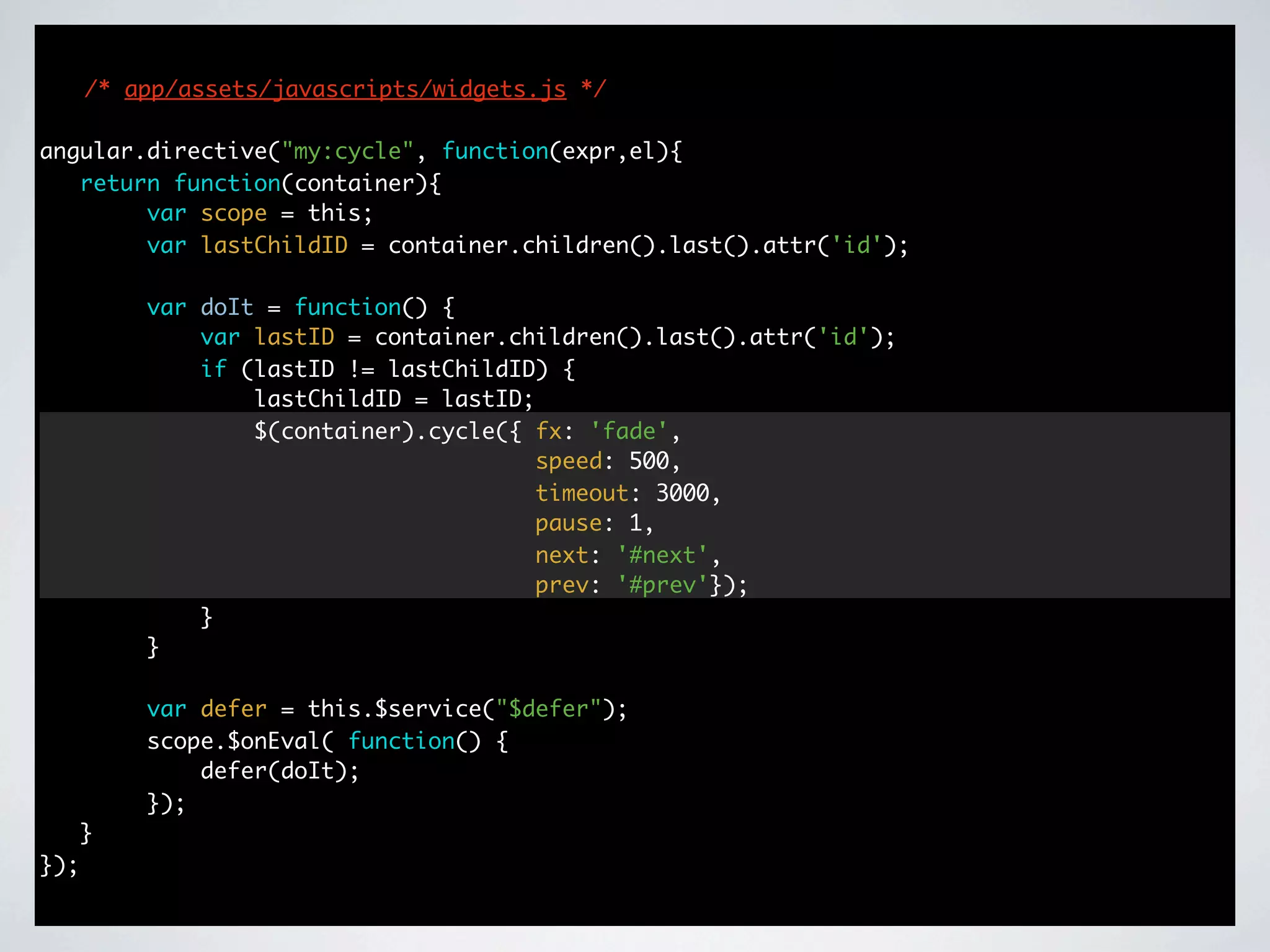
/* app/assets/javascripts/widgets.js */

angular.directive("my:cycle", function(expr,el){
   return function(container){
        var scope = this;
        var lastChildID = container.children().last().attr('id');

          var doIt = function() {
              var lastID = container.children().last().attr('id');
              if (lastID != lastChildID) {
                  lastChildID = lastID;
                  $(container).cycle({ fx: 'fade',
                                        speed: 500,
                                        timeout: 3000,
                                        pause: 1,
                                        next: '#next',
                                        prev: '#prev'});
              }
          }

          var defer = this.$service("$defer");
          scope.$onEval( function() {
              defer(doIt);
          });
      }
});
Thank You
http://github.com/centresource/angularjs_rails_demo


                    @bluejade

Javascript Frameworks for Well Architected, Immersive Web Apps

  • 1.

    Javascript Frameworks for WellArchitected, Immersive Web Apps Daniel Nelson Centresource Interactive Agency
  • 2.
    A description ofthe problem and what we are seeking in a solution
  • 3.
  • 4.
  • 5.
  • 6.
    Traditional MVC WebApp Model Controller
  • 7.
    Traditional MVC WebApp Model Controller View
  • 8.
    Traditional MVC WebApp Model Server Controller View
  • 9.
    Traditional MVC WebApp Model Controller View Server
  • 10.
    Traditional MVC WebApp Model Controller View Server
  • 11.
    Traditional MVC WebApp Model Controller View Server My Web App HTML
  • 12.
    Traditional MVC WebApp Model Controller View Server My Web App HTTP
  • 13.
    Traditional MVC WebApp Model Controller View Server My Web App HTML
  • 14.
    Without the Refresh Model Controller View Server
  • 15.
    Without the Refresh Model Controller View Server My Web App HTML+JS
  • 16.
    Without the Refresh Model Controller View Server My Web App XHR
  • 17.
    Without the Refresh Model Controller View Server My Web App JSON
  • 18.
    How do werender the response?
  • 19.
    Partials <h1>My Web App</h1> <divclass="blurbs"> <%= render :partial => "blurb", </div> :collection => @blurbs %> My Web App <div class="blob"> <%= render "blob" %> </div>
  • 20.
    Partials <h1>My Web App</h1> <divclass="blurbs"> <%= render :partial => "blurb", </div> :collection => @blurbs %> My Web App <div class="blob"> <%= render "blob" %> </div>
  • 21.
    Partials json_response = { :html => render(:partial => "blurb", :collection => @blurbs), My Web App :other_info => "blah" }
  • 22.
    Sending HTML inthe JSON Model Controller View Server My Web App XHR
  • 23.
    Sending HTML inthe JSON Model Controller View Server JSON My Web App with HTML
  • 24.
    Is this agood solution?
  • 25.
  • 26.
  • 27.
  • 28.
  • 29.
    A More AccuratePicture Model Browser Controller View Logic View Logic Server My Web App XHR
  • 30.
    What happens whenthe front end of the application becomes as sophisticated as the back end?
  • 31.
    What Happened toour MVC? Browser JS Model Model JS Controller Controller View Logic View Logic Server My Web App XHR
  • 32.
  • 33.
  • 34.
    Two Applications Server Browser Model Model JSON REST Controller Controller API JSON View
  • 35.
    How do weachieve this?
  • 36.
  • 37.
    Rails + JavascriptFramework • AngularJS • Backbone.js • Batman • ExtJS/ExtDirect • Javascript MVC • Knockout.js • Spine • SproutCore
  • 38.
    What are welooking for?
  • 39.
    What are welooking for? in general • documentation & community • testability • ability to organize code • opinionated
  • 40.
    What are welooking for? in general • documentation & community • testability • ability to organize code • opinionated
  • 41.
    What are welooking for? in general in particular • documentation & community • decouple GUI from implementation logic • testability • persisting data abstracts XHR • ability to organize code • sensible routing (for deep • opinionated linking) • compatible with other tools (such as jQuery)
  • 42.
  • 43.
    Documentation & community http://angularjs.org
  • 44.
    Testability AngularJS comes withtesting built in • Jasmine & “e2e” • every step of the angularjs.org tutorial shows how to test Fits naturally into the Rails testing ecosystem • Jasmine for unit specs • RSpec (or Cucumber) + Capybara for integration specs • easier in Rails than Angular alone
  • 45.
    Organization & Opinionation will become apparent as we explore the code
  • 46.
    A demo app Rails 3.1 + AngularJS http://github.com/centresource/angularjs_rails_demo
  • 47.
    Everything dynamic classApplicationController < ActionController::Base protect_from_forgery before_filter :intercept_html_requests layout nil private def intercept_html_requests render('layouts/dynamic') if request.format == Mime::HTML end def handle_unverified_request reset_session render "#{Rails.root}/public/500.html", :status => 500, :layout => nil end
  • 48.
    views / layouts/ dynamic.html.erb <!doctype html> <html xmlns:ng="http://angularjs.org/"> <head> <meta charset="utf-8"> <title>Angular Rails Demo</title> <%= stylesheet_link_tag "application" %> <%= csrf_meta_tag %> </head> <body ng:controller="PhotoGalleryCtrl"> <ng:view></ng:view> <script src="/assets/angular.min.js" ng:autobind></script> <%= javascript_include_tag "application" -%> </body> </html>
  • 49.
    Routes /* app/assets/javascripts/controllers.js.erb */ $route.when('/photographers', {template: '<%= asset_path("photographers.html") %>', controller: PhotographersCtrl}); $route.when('/photographers/:photographer_id/galleries', {template: '<%= asset_path("galleries.html") %>', controller: GalleriesCtrl}); $route.when('/photographers/:photographer_id/galleries/:gallery_id/photos', {template: '<%= asset_path("photos.html") %>', controller: PhotosCtrl}); $route.otherwise({redirectTo: '/photographers'}); $route.onChange(function() { this.params = $route.current.params; });
  • 50.
    AngularJS controller /* app/assets/javascripts/controllers.js.erb*/ function GalleriesCtrl(Galleries, Photographers) { this.photographer = Photographers.get({ photographer_id: this.params.photographer_id }); this.galleries = Galleries.index({ photographer_id: this.params.photographer_id }); }
  • 51.
    Data binding /* app/assets/templates/photographers.html*/ <h1>Galleries of {{photographer.name}}</h1> <ul id="galleries"> <li class="gallery" ng:repeat="gallery in galleries"> <a href="#/photographers/{{photographer.id}}/galleries/{{gallery.id}}/ photos">{{gallery.title}}</a> </li> </ul>
  • 52.
    Resources /* app/assets/javascripts/services.js */ angular.service('Photographers',function($resource) { return $resource('photographers/:photographer_id', {}, { 'index': { method: 'GET', isArray: true }}); }); angular.service('Galleries', function($resource) { return $resource('photographers/:photographer_id/galleries/:gallery_id', {}, { 'index': { method: 'GET', isArray: true }}); }); angular.service('Photos', function($resource) { return $resource('photographers/:photographer_id/galleries/:gallery_id/photos', {}, { 'index': { method: 'GET', isArray: true }}); }); angular.service('SelectedPhotos', function($resource) { return $resource('selected_photos/:selected_photo_id', {}, { 'create': { method: 'POST' }, 'index': { method: 'GET', isArray: true }, 'update': { method: 'PUT' }, 'destroy': { method: 'DELETE' }}); });
  • 53.
    Resources /* app/assets/javascripts/services.js.erb */ */ angular.service('Photographers', function($resource) { return $resource('photographers/:photographer_id', {}, { 'index': { method: 'GET', isArray: true }}); }); angular.service('Galleries', function($resource) { return $resource('photographers/:photographer_id/galleries/:gallery_id', {}, { 'index': { method: 'GET', isArray: true }}); }); angular.service('Photos', function($resource) { return $resource('photographers/:photographer_id/galleries/:gallery_id/photos', {}, { 'index': { method: 'GET', isArray: true }}); }); angular.service('SelectedPhotos', function($resource) { return $resource('selected_photos/:selected_photo_id', {}, { 'create': { method: 'POST' }, 'index': { method: 'GET', isArray: true }, 'update': { method: 'PUT' }, 'destroy': { method: 'DELETE' }}); });
  • 54.
    Resources /* app/assets/javascripts/services.js.erb */ */ angular.service('Photographers', function($resource) { return $resource('photographers/:photographer_id', {}, { 'index': { method: 'GET', isArray: true }}); }); <%= photographers_path(':photographer_id') %> angular.service('Galleries', function($resource) { return $resource('photographers/:photographer_id/galleries/:gallery_id', {}, { 'index': { method: 'GET', isArray: true }}); }); angular.service('Photos', function($resource) { return $resource('photographers/:photographer_id/galleries/:gallery_id/photos', {}, { 'index': { method: 'GET', isArray: true }}); }); angular.service('SelectedPhotos', function($resource) { return $resource('selected_photos/:selected_photo_id', {}, { 'create': { method: 'POST' }, 'index': { method: 'GET', isArray: true }, 'update': { method: 'PUT' }, 'destroy': { method: 'DELETE' }}); });
  • 55.
    Resources /* app/assets/javascripts/services.js.erb */ */ angular.service('Photographers', function($resource) { return $resource('photographers/:photographer_id', {}, { 'index': { method: 'GET', isArray: true }}); }); <%= photographers_path(':photographer_id') %> angular.service('Galleries', function($resource) { return $resource('photographers/:photographer_id/galleries/:gallery_id', {}, { 'index': { method: 'GET', <%= photographers_galleries_path(':photographer_id', ':gallery_id') %> isArray: true }}); }); angular.service('Photos', function($resource) { return $resource('photographers/:photographer_id/galleries/:gallery_id/photos', {}, { 'index': { method: 'GET', isArray: true }}); }); angular.service('SelectedPhotos', function($resource) { return $resource('selected_photos/:selected_photo_id', {}, { 'create': { method: 'POST' }, 'index': { method: 'GET', isArray: true }, 'update': { method: 'PUT' }, 'destroy': { method: 'DELETE' }}); });
  • 56.
    Resources /* app/assets/javascripts/services.js.erb */ */ angular.service('Photographers', function($resource) { return $resource('photographers/:photographer_id', {}, { 'index': { method: 'GET', isArray: true }}); }); <%= photographers_path(':photographer_id') %> angular.service('Galleries', function($resource) { return $resource('photographers/:photographer_id/galleries/:gallery_id', {}, { 'index': { method: 'GET', <%= photographers_galleries_path(':photographer_id', ':gallery_id') %> isArray: true }}); }); angular.service('Photos', function($resource) { <%= photographers_galleries_photos_path(':photographer_id', ':gallery_id') %> return $resource('photographers/:photographer_id/galleries/:gallery_id/photos', {}, { 'index': { method: 'GET', isArray: true }}); }); angular.service('SelectedPhotos', function($resource) { return $resource('selected_photos/:selected_photo_id', {}, { 'create': { method: 'POST' }, 'index': { method: 'GET', isArray: true }, 'update': { method: 'PUT' }, 'destroy': { method: 'DELETE' }}); });
  • 57.
    Resources /* app/assets/javascripts/services.js.erb */ */ angular.service('Photographers', function($resource) { return $resource('photographers/:photographer_id', {}, { 'index': { method: 'GET', isArray: true }}); }); <%= photographers_path(':photographer_id') %> angular.service('Galleries', function($resource) { return $resource('photographers/:photographer_id/galleries/:gallery_id', {}, { 'index': { method: 'GET', <%= photographers_galleries_path(':photographer_id', ':gallery_id') %> isArray: true }}); }); angular.service('Photos', function($resource) { <%= photographers_galleries_photos_path(':photographer_id', ':gallery_id') %> return $resource('photographers/:photographer_id/galleries/:gallery_id/photos', {}, { 'index': { method: 'GET', isArray: true }}); }); angular.service('SelectedPhotos', function($resource) { return $resource('selected_photos/:selected_photo_id', {}, { 'create': { method: 'POST' }, <%= selected_photos_path(':selected_photo_id') %> 'index': { method: 'GET', isArray: true }, 'update': { method: 'PUT' }, 'destroy': { method: 'DELETE' }}); });
  • 58.
    /* app/assets/javascripts/controllers.js.erb */ functionPhotosCtrl(Photos, Galleries, Photographers, SelectedPhotos) { var self = this; self.photographer = Photographers.get({ photographer_id: this.params.photographer_id }); self.gallery = Galleries.get({ photographer_id: this.params.photographer_id, gallery_id: this.params.gallery_id }); self.photos = Photos.index({ photographer_id: this.params.photographer_id, gallery_id: this.params.gallery_id }); self.selected_photos = SelectedPhotos.index(); self.selectPhoto = function(photo) { var selected_photo = new SelectedPhotos({ selected_photo: { photo_id: photo.id } }); selected_photo.$create(function() { self.selected_photos.push(selected_photo); }); } self.deleteSelectedPhoto = function(selected_photo) { angular.Array.remove(self.selected_photos, selected_photo); selected_photo.$destroy({ selected_photo_id: selected_photo.id }); } self.saveSelectedPhoto = function(selected_photo) { selected_photo.$update({ selected_photo_id: selected_photo.id }); $('input').blur(); } }
  • 59.
    /* app/assets/javascripts/controllers.js.erb */ functionPhotosCtrl(Photos, Galleries, Photographers, SelectedPhotos) { var self = this; self.photographer = Photographers.get({ photographer_id: this.params.photographer_id }); self.gallery = Galleries.get({ photographer_id: this.params.photographer_id, gallery_id: this.params.gallery_id }); self.photos = Photos.index({ photographer_id: this.params.photographer_id, gallery_id: this.params.gallery_id }); self.selected_photos = SelectedPhotos.index(); self.selectPhoto = function(photo) { var selected_photo = new SelectedPhotos({ selected_photo: { photo_id: photo.id } }); selected_photo.$create(function() { self.selected_photos.push(selected_photo); }); } self.deleteSelectedPhoto = function(selected_photo) { angular.Array.remove(self.selected_photos, selected_photo); selected_photo.$destroy({ selected_photo_id: selected_photo.id }); } self.saveSelectedPhoto = function(selected_photo) { selected_photo.$update({ selected_photo_id: selected_photo.id }); $('input').blur(); } }
  • 60.
    /* app/assets/javascripts/controllers.js.erb */ functionPhotosCtrl(Photos, Galleries, Photographers, SelectedPhotos) { var self = this; self.photographer = Photographers.get({ photographer_id: this.params.photographer_id }); self.gallery = Galleries.get({ photographer_id: this.params.photographer_id, gallery_id: this.params.gallery_id }); self.photos = Photos.index({ photographer_id: this.params.photographer_id, gallery_id: this.params.gallery_id }); self.selected_photos = SelectedPhotos.index(); self.selectPhoto = function(photo) { var selected_photo = new SelectedPhotos({ selected_photo: { photo_id: photo.id } }); selected_photo.$create(function() { self.selected_photos.push(selected_photo); }); } self.deleteSelectedPhoto = function(selected_photo) { angular.Array.remove(self.selected_photos, selected_photo); selected_photo.$destroy({ selected_photo_id: selected_photo.id }); } self.saveSelectedPhoto = function(selected_photo) { selected_photo.$update({ selected_photo_id: selected_photo.id }); $('input').blur(); } }
  • 61.
    /* app/assets/templates/photos.html */ <h1>The{{gallery.title}} Gallery of {{photographer.name}}</h1> <div id="outer_picture_frame"> <div id="picture_frame"> <div id="prev">&lsaquo;</div> <div id="photos" my:cycle> <div class="photo" id="photo_{{photo.id}}" ng:click="selectPhoto(photo)" ng:repeat="photo in photos"> <img ng:src="{{photo.image_large_url}}" alt="{{photo.title}}" /> <span class="title">{{photo.title}}</span> </div> </div> <div id="next">&rsaquo;</div> <span class="caption">Click a photo to add it to your collection</span> </div> </div> <div id="selected_frame"> <div id="selected_photos"> <div class="selected_photo" ng:repeat="selected_photo in selected_photos"> <img ng:src="{{selected_photo.image_gallery_url}}" alt="{{selected_photo.title}}" /> <span class="delete" ng:click="deleteSelectedPhoto(selected_photo)">✕</span> <form ng:submit="saveSelectedPhoto(selected_photo)"> <input ng:model="selected_photo.title" /> </form> </div> </div> </div>
  • 62.
    /* app/assets/templates/photos.html */ <h1>The{{gallery.title}} Gallery of {{photographer.name}}</h1> <div id="outer_picture_frame"> <div id="picture_frame"> <div id="prev">&lsaquo;</div> <div id="photos" my:cycle> <div class="photo" id="photo_{{photo.id}}" ng:click="selectPhoto(photo)" ng:repeat="photo in photos"> <img ng:src="{{photo.image_large_url}}" alt="{{photo.title}}" /> <span class="title">{{photo.title}}</span> </div> </div> <div id="next">&rsaquo;</div> <span class="caption">Click a photo to add it to your collection</span> </div> </div> <div id="selected_frame"> <div id="selected_photos"> <div class="selected_photo" ng:repeat="selected_photo in selected_photos"> <img ng:src="{{selected_photo.image_gallery_url}}" alt="{{selected_photo.title}}" /> <span class="delete" ng:click="deleteSelectedPhoto(selected_photo)">✕</span> <form ng:submit="saveSelectedPhoto(selected_photo)"> <input ng:model="selected_photo.title" /> </form> </div> </div> </div>
  • 63.
    /* app/assets/templates/photos.html */ <h1>The{{gallery.title}} Gallery of {{photographer.name}}</h1> <div id="outer_picture_frame"> <div id="picture_frame"> <div id="prev">&lsaquo;</div> <div id="photos" my:cycle> <div class="photo" id="photo_{{photo.id}}" ng:click="selectPhoto(photo)" ng:repeat="photo in photos"> <img ng:src="{{photo.image_large_url}}" alt="{{photo.title}}" /> <span class="title">{{photo.title}}</span> </div> </div> <div id="next">&rsaquo;</div> <span class="caption">Click a photo to add it to your collection</span> </div> </div> <div id="selected_frame"> <div id="selected_photos"> <div class="selected_photo" ng:repeat="selected_photo in selected_photos"> <img ng:src="{{selected_photo.image_gallery_url}}" alt="{{selected_photo.title}}" /> <span class="delete" ng:click="deleteSelectedPhoto(selected_photo)">✕</span> <form ng:submit="saveSelectedPhoto(selected_photo)"> <input ng:model="selected_photo.title" /> </form> </div> </div> </div>
  • 64.
    /* app/assets/templates/photos.html */ <h1>The{{gallery.title}} Gallery of {{photographer.name}}</h1> <div id="outer_picture_frame"> <div id="picture_frame"> <div id="prev">&lsaquo;</div> <div id="photos" my:cycle> <div class="photo" id="photo_{{photo.id}}" ng:click="selectPhoto(photo)" ng:repeat="photo in photos"> <img ng:src="{{photo.image_large_url}}" alt="{{photo.title}}" /> <span class="title">{{photo.title}}</span> </div> </div> <div id="next">&rsaquo;</div> <span class="caption">Click a photo to add it to your collection</span> </div> </div> <div id="selected_frame"> <div id="selected_photos"> <div class="selected_photo" ng:repeat="selected_photo in selected_photos"> <img ng:src="{{selected_photo.image_gallery_url}}" alt="{{selected_photo.title}}" /> <span class="delete" ng:click="deleteSelectedPhoto(selected_photo)">✕</span> <form ng:submit="saveSelectedPhoto(selected_photo)"> <input ng:model="selected_photo.title" /> </form> </div> </div> </div>
  • 65.
    Two way databinding <form ng:submit="saveSelectedPhoto(selected_photo)"> <input ng:model="selected_photo.title" /> </form> self.saveSelectedPhoto = function(selected_photo) { selected_photo.$update({ selected_photo_id: selected_photo.id }); $('input').blur(); }
  • 66.
    /* app/assets/templates/photos.html */ <h1>The{{gallery.title}} Gallery of {{photographer.name}}</h1> <div id="outer_picture_frame"> <div id="picture_frame"> <div id="prev">&lsaquo;</div> <div id="photos" my:cycle> <div class="photo" id="photo_{{photo.id}}" ng:click="selectPhoto(photo)" ng:repeat="photo in photos"> <img ng:src="{{photo.image_large_url}}" alt="{{photo.title}}" /> <span class="title">{{photo.title}}</span> </div> </div> <div id="next">&rsaquo;</div> <span class="caption">Click a photo to add it to your collection</span> </div> </div> <div id="selected_frame"> <div id="selected_photos"> <div class="selected_photo" ng:repeat="selected_photo in selected_photos"> <img ng:src="{{selected_photo.image_gallery_url}}" alt="{{selected_photo.title}}" /> <span class="delete" ng:click="deleteSelectedPhoto(selected_photo)">✕</span> <form ng:submit="saveSelectedPhoto(selected_photo)"> <input ng:model="selected_photo.title" /> </form> </div> </div> </div>
  • 67.
    /* app/assets/templates/photos.html */ <h1>The{{gallery.title}} Gallery of {{photographer.name}}</h1> <div id="outer_picture_frame"> <div id="picture_frame"> <div id="prev">&lsaquo;</div> <div id="photos" my:cycle> <div class="photo" id="photo_{{photo.id}}" ng:click="selectPhoto(photo)" ng:repeat="photo in photos"> <img ng:src="{{photo.image_large_url}}" alt="{{photo.title}}" /> <span class="title">{{photo.title}}</span> </div> </div> <div id="next">&rsaquo;</div> <span class="caption">Click a photo to add it to your collection</span> </div> </div> <div id="selected_frame"> <div id="selected_photos"> <div class="selected_photo" ng:repeat="selected_photo in selected_photos"> <img ng:src="{{selected_photo.image_gallery_url}}" alt="{{selected_photo.title}}" /> <span class="delete" ng:click="deleteSelectedPhoto(selected_photo)">✕</span> <form ng:submit="saveSelectedPhoto(selected_photo)"> <input ng:model="selected_photo.title" /> </form> </div> </div> </div>
  • 68.
    /* app/assets/javascripts/widgets.js */ angular.directive("my:cycle",function(expr,el){ return function(container){ var scope = this; var lastChildID = container.children().last().attr('id'); var doIt = function() { var lastID = container.children().last().attr('id'); if (lastID != lastChildID) { lastChildID = lastID; $(container).cycle({ fx: 'fade', speed: 500, timeout: 3000, pause: 1, next: '#next', prev: '#prev'}); } } var defer = this.$service("$defer"); scope.$onEval( function() { defer(doIt); }); } });
  • 69.

Editor's Notes