JavaFX 2 – A Java Developer's Guide
Presented by Stephen Chin <@steveonjava>
 1   Copyright © 2011, Oracle and/or its affiliates. All rights   Insert Information Protection Policy Classification from Slide 8
     reserved.
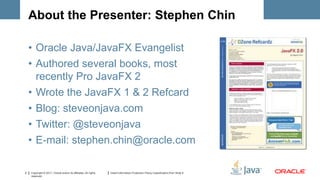
About the Presenter: Stephen Chin

    • Oracle Java/JavaFX Evangelist
    • Authored several books, most
      recently Pro JavaFX 2
    • Wrote the JavaFX 1 & 2 Refcard
    • Blog: steveonjava.com
    • Twitter: @steveonjava
    • E-mail: stephen.chin@oracle.com

2   Copyright © 2011, Oracle and/or its affiliates. All rights   Insert Information Protection Policy Classification from Slide 8
    reserved.
Safe Harbor Statement

    The following is intended to outline our general
    product direction. It is intended for information
    purposes only, and may not be incorporated into
    any contract. It is not a commitment to deliver any
    material, code, or functionality, and should not be
    relied upon in making purchasing decisions. The
    development, release, and timing of any features or
    functionality described for Oracle’s products
    remains at the sole discretion of Oracle.


3   Copyright © 2011, Oracle and/or its affiliates. All rights   Insert Information Protection Policy Classification from Slide 8
    reserved.
Lab Resources

    • Visit ProJavaFX2.com to download Chapter 1
      and all code examples
    • JavaFX site: oracle.com/javafx
    • NetBeans site: netbeans.org
    • fxexperience blog: fxexperience.com
    • Jim Weaver’s JavaFX blog: JavaFXpert.com
    • My JavaFX blog: steveonjava.com


4   Copyright © 2011, Oracle and/or its affiliates. All rights   Insert Information Protection Policy Classification from Slide 8
    reserved.
What I want you to take away

    1. The JRE with JavaFX enables graphically
       rich, fast performing applications
    2. Developing JavaFX apps is natural and fun
    3. Lots of great resources exist to help you
       get started with JavaFX
    4. You should begin playing with JavaFX
       now!


5   Copyright © 2011, Oracle and/or its affiliates. All rights   Insert Information Protection Policy Classification from Slide 8
    reserved.
1. Getting Started with JavaFX

    •   Bringing back rich-client Java
    •   Learning the history of JavaFX
    •   Obtaining JavaFX tools and resources
    •   Building and running Hello EarthRise
    •   Reviewing the structure of Hello EarthRise


6   Copyright © 2011, Oracle and/or its affiliates. All rights   Insert Information Protection Policy Classification from Slide 8
    reserved.
Bringing back rich-client Java

    • The web, originally intended for sharing
      hypertext-linked resources, has been
      force-fit into being a rich-client platform
    • The JRE with JavaFX is a much better
      client platform, enabling graphically rich,
      fast performing applications
    • See Chapter 1 JavaFX Can’t Bring Rich-
      Client Java Back by Itself section

7   Copyright © 2011, Oracle and/or its affiliates. All rights   Insert Information Protection Policy Classification from Slide 8
    reserved.
Learning the history of JavaFX

    • The brainchild of Chris Oliver while at SeeBeyond,
      which was acquired by Sun
    • JavaFX Script language and platform announced
      at JavaOne 2007
    • Oracle implemented JavaFX 2 as an API for Java,
      announced at JavaOne 2010
    • JavaFX 2.1 GA released for JavaOne India 2012
    • See Chapter 1 A Brief History of JavaFX section


8   Copyright © 2011, Oracle and/or its affiliates. All rights   Insert Information Protection Policy Classification from Slide 8
    reserved.
Obtaining JavaFX tools and resources

    • Visit oracle.com/javafx and click Download
    • Grab the co-bundled Java SE 7u6, JavaFX
      2.2 and NetBeans 7.2

    • Note: Java SE 7u4+ bundles JavaFX 2.1


9   Copyright © 2011, Oracle and/or its affiliates. All rights   Insert Information Protection Policy Classification from Slide 8
    reserved.
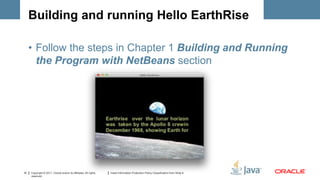
Building and running Hello EarthRise

     • Follow the steps in Chapter 1 Building and Running
       the Program with NetBeans section


10   Copyright © 2011, Oracle and/or its affiliates. All rights   Insert Information Protection Policy Classification from Slide 8
     reserved.
Demo


11   Copyright © 2011, Oracle and/or its affiliates. All rights   Insert Information Protection Policy Classification from Slide 8
     reserved.
Review the structure of Hello Earthrise

     •   Application class and overriden start()
     •   Declarative code that defines the UI
     •   Using the Stage class
     •   Using the Scene class
     •   Displaying images
     •   See Chapter 1 Understanding the Hello
         Earthrise Program section

12   Copyright © 2011, Oracle and/or its affiliates. All rights   Insert Information Protection Policy Classification from Slide 8
     reserved.
Code Walkthru


13   Copyright © 2011, Oracle and/or its affiliates. All rights   Insert Information Protection Policy Classification from Slide 8
     reserved.
2. Using the JavaFX UI Controls

     •   Demo the StarterApp example
     •   Examine the StarterApp code
     •   Survey UI controls in StarterApp
     •   Leveraging the UI controls in code
     •   Associating a JavaFX CSS style sheet
     •   Defining model classes


14   Copyright © 2011, Oracle and/or its affiliates. All rights   Insert Information Protection Policy Classification from Slide 8
     reserved.
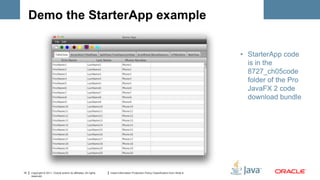
Demo the StarterApp example


                                                                                                                                     • StarterApp code
                                                                                                                                       is in the
                                                                                                                                       8727_ch05code
                                                                                                                                       folder of the Pro
                                                                                                                                       JavaFX 2 code
                                                                                                                                       download bundle


15   Copyright © 2011, Oracle and/or its affiliates. All rights   Insert Information Protection Policy Classification from Slide 8
     reserved.
Demo


16   Copyright © 2011, Oracle and/or its affiliates. All rights   Insert Information Protection Policy Classification from Slide 8
     reserved.
Examine StarterApp code

     •   Survey UI controls in StarterApp
     •   Leveraging the UI controls in code
     •   Associating a JavaFX CSS style sheet
     •   Defining model classes


17   Copyright © 2011, Oracle and/or its affiliates. All rights   Insert Information Protection Policy Classification from Slide 8
     reserved.
Code Walkthru


18   Copyright © 2011, Oracle and/or its affiliates. All rights   Insert Information Protection Policy Classification from Slide 8
     reserved.
3. Using Media Classes with Spring

     • Demo the SpringVideoPlayer example
     • Examine the SpringVideoPlayer code
     • Using the MediaView, MediaPlayer and
       Media classes
     • Configuring and loading the Spring
       context


19   Copyright © 2011, Oracle and/or its affiliates. All rights   Insert Information Protection Policy Classification from Slide 8
     reserved.
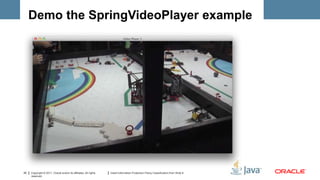
Demo the SpringVideoPlayer example


20   Copyright © 2011, Oracle and/or its affiliates. All rights   Insert Information Protection Policy Classification from Slide 8
     reserved.
Demo


21   Copyright © 2011, Oracle and/or its affiliates. All rights   Insert Information Protection Policy Classification from Slide 8
     reserved.
Examine SpringVideoPlayer code

     • Using the MediaView, MediaPlayer and
       Media classes
     • Using a procedural vs. declarative
       approach


22   Copyright © 2011, Oracle and/or its affiliates. All rights   Insert Information Protection Policy Classification from Slide 8
     reserved.
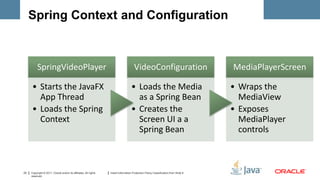
Spring Context and Configuration


          SpringVideoPlayer                                                           VideoConfiguration                             MediaPlayerScreen

     • Starts the JavaFX                                                            • Loads the Media                                • Wraps the
       App Thread                                                                     as a Spring Bean                                 MediaView
     • Loads the Spring                                                             • Creates the                                    • Exposes
       Context                                                                        Screen UI a a                                    MediaPlayer
                                                                                      Spring Bean                                      controls


23   Copyright © 2011, Oracle and/or its affiliates. All rights   Insert Information Protection Policy Classification from Slide 8
     reserved.
Code Walkthru


24   Copyright © 2011, Oracle and/or its affiliates. All rights   Insert Information Protection Policy Classification from Slide 8
     reserved.
4. Using SceneBuilder

     • Show the SceneBuilder tool
     • Create a new application from scratch in
       SceneBuilder
     • Show how to hook up a JavaFX Controller


25   Copyright © 2011, Oracle and/or its affiliates. All rights   Insert Information Protection Policy Classification from Slide 8
     reserved.
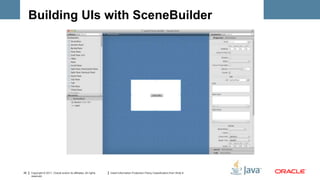
Building UIs with SceneBuilder


26   Copyright © 2011, Oracle and/or its affiliates. All rights   Insert Information Protection Policy Classification from Slide 8
     reserved.
Demo


27   Copyright © 2011, Oracle and/or its affiliates. All rights   Insert Information Protection Policy Classification from Slide 8
     reserved.
5. Deploying JavaFX apps

     • Some options are Java WebStart and
       running as an applet
           – e.g. Icon at well-known web page that
             invokes TweetBrowser via Java WebStart
     • Another good deployment option is
       creating an installer
           – “there’s an app for that”
           – See related FXexperience.com blog post
           – Packager available in JavaFX 2.2

28   Copyright © 2011, Oracle and/or its affiliates. All rights   Insert Information Protection Policy Classification from Slide 8
     reserved.
6. Embedding HTML5

     • Show the WebView API
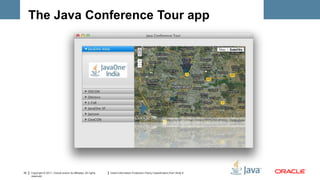
     • Demo the Java Conference Tour example
     • Examine the Java Conference Tour
       architecture


29   Copyright © 2011, Oracle and/or its affiliates. All rights   Insert Information Protection Policy Classification from Slide 8
     reserved.
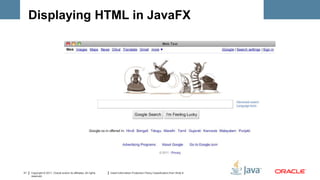
Displaying HTML in JavaFX

     public class WebViewTest extends Application {
        public static void main(String[] args) {
          launch(WebViewTest.class, args);
        }
        @Override public void start(Stage stage) {
          WebView webView = new WebView();
          webView.getEngine().load("http://google.com");
          Scene scene = new Scene(webView);
          stage.setScene(scene);
          stage.setTitle("Web Test");
          stage.show();
     }}


30   Copyright © 2011, Oracle and/or its affiliates. All rights   Insert Information Protection Policy Classification from Slide 8
     reserved.
Displaying HTML in JavaFX


31   Copyright © 2011, Oracle and/or its affiliates. All rights   Insert Information Protection Policy Classification from Slide 8
     reserved.
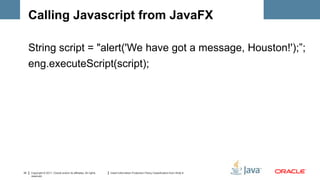
Calling Javascript from JavaFX

     String script = "alert('We have got a message, Houston!');”;
     eng.executeScript(script);


32   Copyright © 2011, Oracle and/or its affiliates. All rights   Insert Information Protection Policy Classification from Slide 8
     reserved.
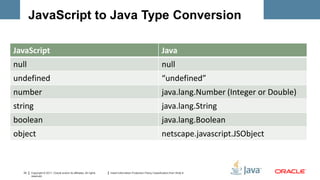
JavaScript to Java Type Conversion

JavaScript                                                                                                       Java
null                                                                                                             null
undefined                                                                                                        “undefined”
number                                                                                                           java.lang.Number (Integer or Double)
string                                                                                                           java.lang.String
boolean                                                                                                          java.lang.Boolean
object                                                                                                           netscape.javascript.JSObject


   33   Copyright © 2011, Oracle and/or its affiliates. All rights   Insert Information Protection Policy Classification from Slide 8
        reserved.
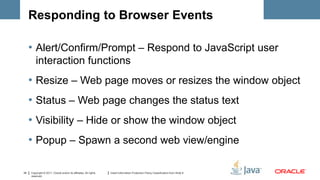
Responding to Browser Events

     • Alert/Confirm/Prompt – Respond to JavaScript user
         interaction functions
     • Resize – Web page moves or resizes the window object
     • Status – Web page changes the status text
     • Visibility – Hide or show the window object
     • Popup – Spawn a second web view/engine

34   Copyright © 2011, Oracle and/or its affiliates. All rights   Insert Information Protection Policy Classification from Slide 8
     reserved.
The Java Conference Tour app


35   Copyright © 2011, Oracle and/or its affiliates. All rights   Insert Information Protection Policy Classification from Slide 8
     reserved.
Demo


36   Copyright © 2011, Oracle and/or its affiliates. All rights   Insert Information Protection Policy Classification from Slide 8
     reserved.
Take-aways from this presentation

     1. The JRE with JavaFX enables graphically
        rich, fast performing applications
     2. Developing JavaFX apps is natural, fun,
        and even faster using SceneBuilder
     3. You can use the best parts of JavaFX and
        HTML5 together in the same application
     4. Lots of great resources exist to help you
        get started with JavaFX
     5. You should begin playing with JavaFX
37
        now!
     Copyright © 2011, Oracle and/or its affiliates. All rights
     reserved.
                                                                  Insert Information Protection Policy Classification from Slide 8
Come to JavaOne Embedded @ JavaOne

     • New JavaOne Subconf
     • Focused on the rapidly
       growing embedded market
     • Early bird registration still
       open!
     • Only $100 if you are already
       coming to JavaOne

       http://www.oracle.com/javaone/embedded
38   Copyright © 2011, Oracle and/or its affiliates. All rights   Insert Information Protection Policy Classification from Slide 8
     reserved.
Q&A


39   Copyright © 2011, Oracle and/or its affiliates. All rights   Insert Information Protection Policy Classification from Slide 8
     reserved.
40   Copyright © 2011, Oracle and/or its affiliates. All rights   Insert Information Protection Policy Classification from Slide 8
     reserved.

JavaFX 2 - A Java Developer's Guide (San Antonio JUG Version)

  • 1.
    JavaFX 2 –A Java Developer's Guide Presented by Stephen Chin <@steveonjava> 1 Copyright © 2011, Oracle and/or its affiliates. All rights Insert Information Protection Policy Classification from Slide 8 reserved.
  • 2.
    About the Presenter:Stephen Chin • Oracle Java/JavaFX Evangelist • Authored several books, most recently Pro JavaFX 2 • Wrote the JavaFX 1 & 2 Refcard • Blog: steveonjava.com • Twitter: @steveonjava • E-mail: stephen.chin@oracle.com 2 Copyright © 2011, Oracle and/or its affiliates. All rights Insert Information Protection Policy Classification from Slide 8 reserved.
  • 3.
    Safe Harbor Statement The following is intended to outline our general product direction. It is intended for information purposes only, and may not be incorporated into any contract. It is not a commitment to deliver any material, code, or functionality, and should not be relied upon in making purchasing decisions. The development, release, and timing of any features or functionality described for Oracle’s products remains at the sole discretion of Oracle. 3 Copyright © 2011, Oracle and/or its affiliates. All rights Insert Information Protection Policy Classification from Slide 8 reserved.
  • 4.
    Lab Resources • Visit ProJavaFX2.com to download Chapter 1 and all code examples • JavaFX site: oracle.com/javafx • NetBeans site: netbeans.org • fxexperience blog: fxexperience.com • Jim Weaver’s JavaFX blog: JavaFXpert.com • My JavaFX blog: steveonjava.com 4 Copyright © 2011, Oracle and/or its affiliates. All rights Insert Information Protection Policy Classification from Slide 8 reserved.
  • 5.
    What I wantyou to take away 1. The JRE with JavaFX enables graphically rich, fast performing applications 2. Developing JavaFX apps is natural and fun 3. Lots of great resources exist to help you get started with JavaFX 4. You should begin playing with JavaFX now! 5 Copyright © 2011, Oracle and/or its affiliates. All rights Insert Information Protection Policy Classification from Slide 8 reserved.
  • 6.
    1. Getting Startedwith JavaFX • Bringing back rich-client Java • Learning the history of JavaFX • Obtaining JavaFX tools and resources • Building and running Hello EarthRise • Reviewing the structure of Hello EarthRise 6 Copyright © 2011, Oracle and/or its affiliates. All rights Insert Information Protection Policy Classification from Slide 8 reserved.
  • 7.
    Bringing back rich-clientJava • The web, originally intended for sharing hypertext-linked resources, has been force-fit into being a rich-client platform • The JRE with JavaFX is a much better client platform, enabling graphically rich, fast performing applications • See Chapter 1 JavaFX Can’t Bring Rich- Client Java Back by Itself section 7 Copyright © 2011, Oracle and/or its affiliates. All rights Insert Information Protection Policy Classification from Slide 8 reserved.
  • 8.
    Learning the historyof JavaFX • The brainchild of Chris Oliver while at SeeBeyond, which was acquired by Sun • JavaFX Script language and platform announced at JavaOne 2007 • Oracle implemented JavaFX 2 as an API for Java, announced at JavaOne 2010 • JavaFX 2.1 GA released for JavaOne India 2012 • See Chapter 1 A Brief History of JavaFX section 8 Copyright © 2011, Oracle and/or its affiliates. All rights Insert Information Protection Policy Classification from Slide 8 reserved.
  • 9.
    Obtaining JavaFX toolsand resources • Visit oracle.com/javafx and click Download • Grab the co-bundled Java SE 7u6, JavaFX 2.2 and NetBeans 7.2 • Note: Java SE 7u4+ bundles JavaFX 2.1 9 Copyright © 2011, Oracle and/or its affiliates. All rights Insert Information Protection Policy Classification from Slide 8 reserved.
  • 10.
    Building and runningHello EarthRise • Follow the steps in Chapter 1 Building and Running the Program with NetBeans section 10 Copyright © 2011, Oracle and/or its affiliates. All rights Insert Information Protection Policy Classification from Slide 8 reserved.
  • 11.
    Demo 11 Copyright © 2011, Oracle and/or its affiliates. All rights Insert Information Protection Policy Classification from Slide 8 reserved.
  • 12.
    Review the structureof Hello Earthrise • Application class and overriden start() • Declarative code that defines the UI • Using the Stage class • Using the Scene class • Displaying images • See Chapter 1 Understanding the Hello Earthrise Program section 12 Copyright © 2011, Oracle and/or its affiliates. All rights Insert Information Protection Policy Classification from Slide 8 reserved.
  • 13.
    Code Walkthru 13 Copyright © 2011, Oracle and/or its affiliates. All rights Insert Information Protection Policy Classification from Slide 8 reserved.
  • 14.
    2. Using theJavaFX UI Controls • Demo the StarterApp example • Examine the StarterApp code • Survey UI controls in StarterApp • Leveraging the UI controls in code • Associating a JavaFX CSS style sheet • Defining model classes 14 Copyright © 2011, Oracle and/or its affiliates. All rights Insert Information Protection Policy Classification from Slide 8 reserved.
  • 15.
    Demo the StarterAppexample • StarterApp code is in the 8727_ch05code folder of the Pro JavaFX 2 code download bundle 15 Copyright © 2011, Oracle and/or its affiliates. All rights Insert Information Protection Policy Classification from Slide 8 reserved.
  • 16.
    Demo 16 Copyright © 2011, Oracle and/or its affiliates. All rights Insert Information Protection Policy Classification from Slide 8 reserved.
  • 17.
    Examine StarterApp code • Survey UI controls in StarterApp • Leveraging the UI controls in code • Associating a JavaFX CSS style sheet • Defining model classes 17 Copyright © 2011, Oracle and/or its affiliates. All rights Insert Information Protection Policy Classification from Slide 8 reserved.
  • 18.
    Code Walkthru 18 Copyright © 2011, Oracle and/or its affiliates. All rights Insert Information Protection Policy Classification from Slide 8 reserved.
  • 19.
    3. Using MediaClasses with Spring • Demo the SpringVideoPlayer example • Examine the SpringVideoPlayer code • Using the MediaView, MediaPlayer and Media classes • Configuring and loading the Spring context 19 Copyright © 2011, Oracle and/or its affiliates. All rights Insert Information Protection Policy Classification from Slide 8 reserved.
  • 20.
    Demo the SpringVideoPlayerexample 20 Copyright © 2011, Oracle and/or its affiliates. All rights Insert Information Protection Policy Classification from Slide 8 reserved.
  • 21.
    Demo 21 Copyright © 2011, Oracle and/or its affiliates. All rights Insert Information Protection Policy Classification from Slide 8 reserved.
  • 22.
    Examine SpringVideoPlayer code • Using the MediaView, MediaPlayer and Media classes • Using a procedural vs. declarative approach 22 Copyright © 2011, Oracle and/or its affiliates. All rights Insert Information Protection Policy Classification from Slide 8 reserved.
  • 23.
    Spring Context andConfiguration SpringVideoPlayer VideoConfiguration MediaPlayerScreen • Starts the JavaFX • Loads the Media • Wraps the App Thread as a Spring Bean MediaView • Loads the Spring • Creates the • Exposes Context Screen UI a a MediaPlayer Spring Bean controls 23 Copyright © 2011, Oracle and/or its affiliates. All rights Insert Information Protection Policy Classification from Slide 8 reserved.
  • 24.
    Code Walkthru 24 Copyright © 2011, Oracle and/or its affiliates. All rights Insert Information Protection Policy Classification from Slide 8 reserved.
  • 25.
    4. Using SceneBuilder • Show the SceneBuilder tool • Create a new application from scratch in SceneBuilder • Show how to hook up a JavaFX Controller 25 Copyright © 2011, Oracle and/or its affiliates. All rights Insert Information Protection Policy Classification from Slide 8 reserved.
  • 26.
    Building UIs withSceneBuilder 26 Copyright © 2011, Oracle and/or its affiliates. All rights Insert Information Protection Policy Classification from Slide 8 reserved.
  • 27.
    Demo 27 Copyright © 2011, Oracle and/or its affiliates. All rights Insert Information Protection Policy Classification from Slide 8 reserved.
  • 28.
    5. Deploying JavaFXapps • Some options are Java WebStart and running as an applet – e.g. Icon at well-known web page that invokes TweetBrowser via Java WebStart • Another good deployment option is creating an installer – “there’s an app for that” – See related FXexperience.com blog post – Packager available in JavaFX 2.2 28 Copyright © 2011, Oracle and/or its affiliates. All rights Insert Information Protection Policy Classification from Slide 8 reserved.
  • 29.
    6. Embedding HTML5 • Show the WebView API • Demo the Java Conference Tour example • Examine the Java Conference Tour architecture 29 Copyright © 2011, Oracle and/or its affiliates. All rights Insert Information Protection Policy Classification from Slide 8 reserved.
  • 30.
    Displaying HTML inJavaFX public class WebViewTest extends Application { public static void main(String[] args) { launch(WebViewTest.class, args); } @Override public void start(Stage stage) { WebView webView = new WebView(); webView.getEngine().load("http://google.com"); Scene scene = new Scene(webView); stage.setScene(scene); stage.setTitle("Web Test"); stage.show(); }} 30 Copyright © 2011, Oracle and/or its affiliates. All rights Insert Information Protection Policy Classification from Slide 8 reserved.
  • 31.
    Displaying HTML inJavaFX 31 Copyright © 2011, Oracle and/or its affiliates. All rights Insert Information Protection Policy Classification from Slide 8 reserved.
  • 32.
    Calling Javascript fromJavaFX String script = "alert('We have got a message, Houston!');”; eng.executeScript(script); 32 Copyright © 2011, Oracle and/or its affiliates. All rights Insert Information Protection Policy Classification from Slide 8 reserved.
  • 33.
    JavaScript to JavaType Conversion JavaScript Java null null undefined “undefined” number java.lang.Number (Integer or Double) string java.lang.String boolean java.lang.Boolean object netscape.javascript.JSObject 33 Copyright © 2011, Oracle and/or its affiliates. All rights Insert Information Protection Policy Classification from Slide 8 reserved.
  • 34.
    Responding to BrowserEvents • Alert/Confirm/Prompt – Respond to JavaScript user interaction functions • Resize – Web page moves or resizes the window object • Status – Web page changes the status text • Visibility – Hide or show the window object • Popup – Spawn a second web view/engine 34 Copyright © 2011, Oracle and/or its affiliates. All rights Insert Information Protection Policy Classification from Slide 8 reserved.
  • 35.
    The Java ConferenceTour app 35 Copyright © 2011, Oracle and/or its affiliates. All rights Insert Information Protection Policy Classification from Slide 8 reserved.
  • 36.
    Demo 36 Copyright © 2011, Oracle and/or its affiliates. All rights Insert Information Protection Policy Classification from Slide 8 reserved.
  • 37.
    Take-aways from thispresentation 1. The JRE with JavaFX enables graphically rich, fast performing applications 2. Developing JavaFX apps is natural, fun, and even faster using SceneBuilder 3. You can use the best parts of JavaFX and HTML5 together in the same application 4. Lots of great resources exist to help you get started with JavaFX 5. You should begin playing with JavaFX 37 now! Copyright © 2011, Oracle and/or its affiliates. All rights reserved. Insert Information Protection Policy Classification from Slide 8
  • 38.
    Come to JavaOneEmbedded @ JavaOne • New JavaOne Subconf • Focused on the rapidly growing embedded market • Early bird registration still open! • Only $100 if you are already coming to JavaOne http://www.oracle.com/javaone/embedded 38 Copyright © 2011, Oracle and/or its affiliates. All rights Insert Information Protection Policy Classification from Slide 8 reserved.
  • 39.
    Q&A 39 Copyright © 2011, Oracle and/or its affiliates. All rights Insert Information Protection Policy Classification from Slide 8 reserved.
  • 40.
    40 Copyright © 2011, Oracle and/or its affiliates. All rights Insert Information Protection Policy Classification from Slide 8 reserved.