Java Programming Language
Objectives


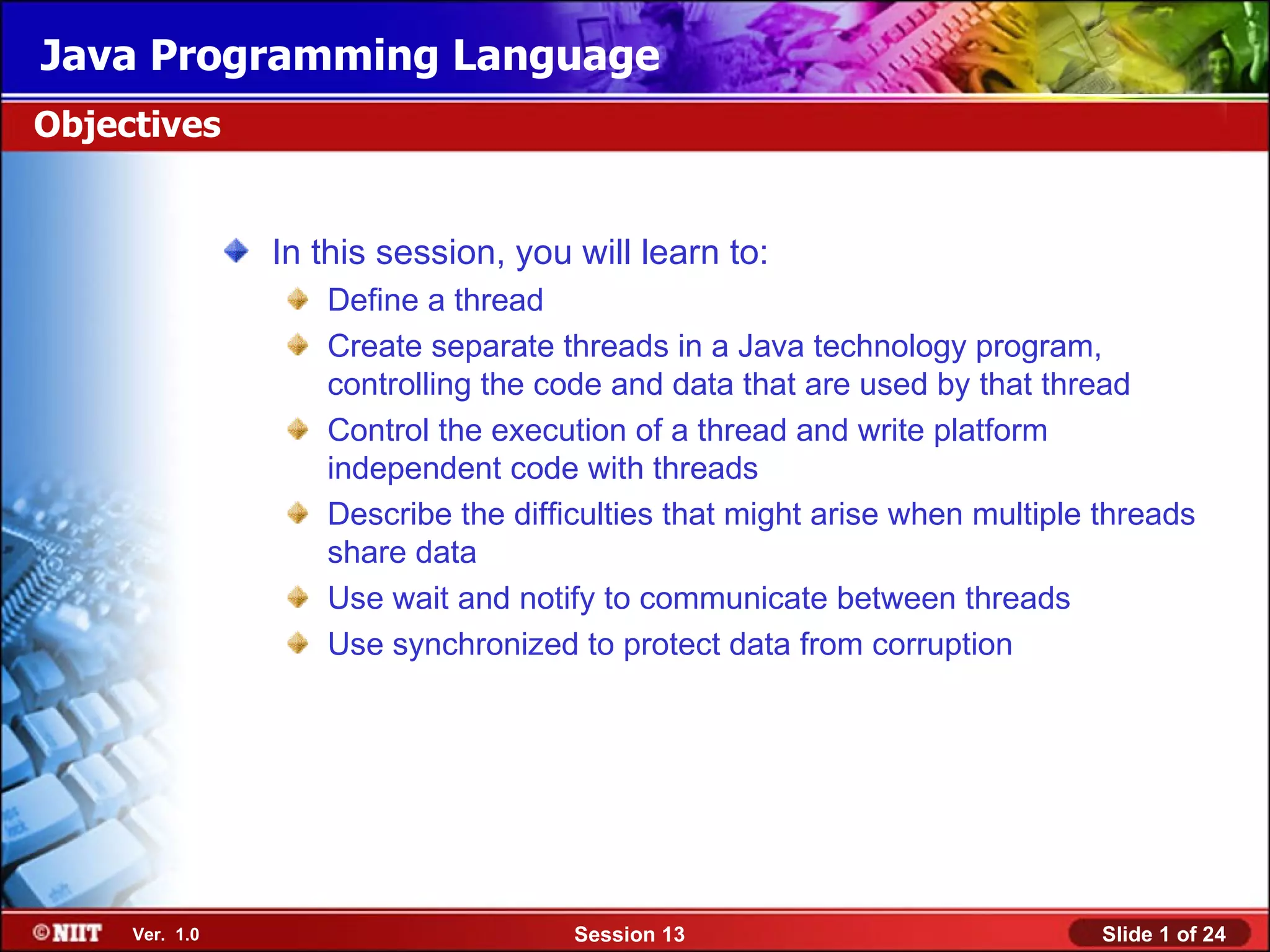
                In this session, you will learn to:
                   Define a thread
                   Create separate threads in a Java technology program,
                   controlling the code and data that are used by that thread
                   Control the execution of a thread and write platform
                   independent code with threads
                   Describe the difficulties that might arise when multiple threads
                   share data
                   Use wait and notify to communicate between threads
                   Use synchronized to protect data from corruption


     Ver. 1.0                        Session 13                             Slide 1 of 24
Java Programming Language
Threads


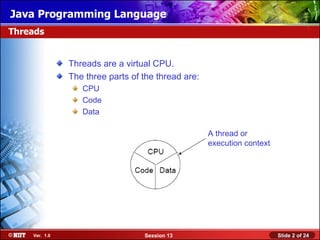
               Threads are a virtual CPU.
               The three parts of the thread are:
                  CPU
                  Code
                  Data

                                                    A thread or
                                                    execution context


    Ver. 1.0                      Session 13                            Slide 2 of 24
Java Programming Language
Creating the Thread


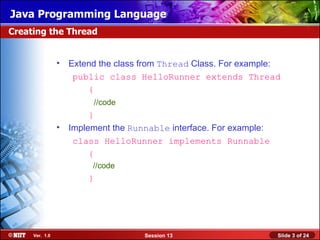
                • Extend the class from Thread Class. For example:
                   public class HelloRunner extends Thread
                      {
                        //code
                       }
                • Implement the Runnable interface. For example:
                   class HelloRunner implements Runnable
                       {
                        //code
                       }


     Ver. 1.0                      Session 13                      Slide 3 of 24
Java Programming Language
Creating the Thread (Contd.)


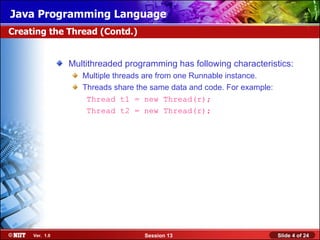
                Multithreaded programming has following characteristics:
                   Multiple threads are from one Runnable instance.
                   Threads share the same data and code. For example:
                    Thread t1 = new Thread(r);
                    Thread t2 = new Thread(r);


     Ver. 1.0                      Session 13                           Slide 4 of 24
Java Programming Language
Starting the Thread


                • Use the start() method
                • Place the thread in a runnable state


     Ver. 1.0                        Session 13          Slide 5 of 24
Java Programming Language
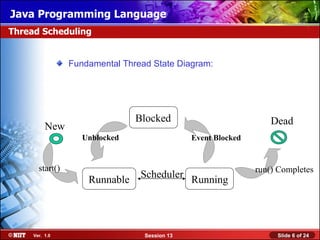
Thread Scheduling


                 Fundamental Thread State Diagram:


                                Blocked                            Dead
          New
                    Unblocked                  Event Blocked


       start()                                                 run() Completes
                     Runnable    Scheduler Running


     Ver. 1.0                     Session 13                        Slide 6 of 24
Java Programming Language
Thread Scheduling (Contd.)


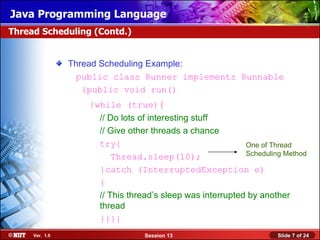
                Thread Scheduling Example:
                  public class Runner implements Runnable
                   {public void run()
                    {while (true){
                      // Do lots of interesting stuff
                      // Give other threads a chance
                      try{                                  One of Thread
                          Thread.sleep(10);                 Scheduling Method

                      }catch (InterruptedException e)
                      {
                      // This thread’s sleep was interrupted by another
                      thread
                      }}}}
     Ver. 1.0                     Session 13                         Slide 7 of 24
Java Programming Language
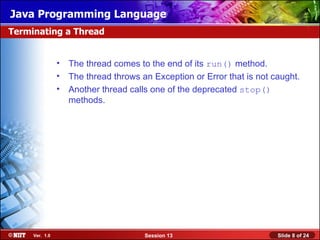
Terminating a Thread


                • The thread comes to the end of its run() method.
                • The thread throws an Exception or Error that is not caught.
                • Another thread calls one of the deprecated stop()
                  methods.


     Ver. 1.0                         Session 13                       Slide 8 of 24
Java Programming Language
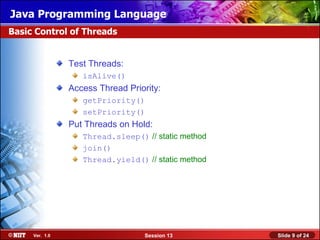
Basic Control of Threads


                Test Threads:
                   isAlive()
                Access Thread Priority:
                   getPriority()
                   setPriority()
                Put Threads on Hold:
                   Thread.sleep() // static method
                   join()
                   Thread.yield() // static method


     Ver. 1.0                      Session 13        Slide 9 of 24
Java Programming Language
Basic Control of Threads (Contd.)


                • Use of join() method:
                   public static void main(String[] args) {
                   Thread t = new Thread(new Runner());
                   t.start();
                  // Do stuff in parallel with the other thread for a while
                  // Wait here for the other thread to finish
                  try {
                          t.join();
                      }
                  catch (InterruptedException e)
                      {
                  // the other thread came back early
                        }
                  // Now continue in this thread
                  }
     Ver. 1.0                           Session 13                            Slide 10 of 24
Java Programming Language
The Object Lock Flag


                Every object has a flag that is a type of lock flag.
                The synchronized enables interaction with the lock flag.

                Object this                Thread before synchronized(this)

                                            public void push (char c)
                                             {
                                              synchronized(this) {
                                              data[idx] = c;
                                              idx++;
                                             }
                                           }


     Ver. 1.0                      Session 13                        Slide 11 of 24
Java Programming Language
The Object Lock Flag (Contd.)


                Object this           Thread after synchronized(this)

                                      public void push (char c)
                                       {synchronized(this)
                                      {
                                       data[idx] = c;
                                       idx++;
                                       }
                                      }


     Ver. 1.0                   Session 13                      Slide 12 of 24
Java Programming Language
The Object Lock Flag (Contd.)


                Object this
                lock flag missing               Another thread, trying to execute
                                                synchronized(this)
                                Waiting for
                                                    public char pop(char c)
                                object lock         {
                                                    synchronized(this)
                                                      {
                                                          idx--;
                                                          return data[idx];
                                                      }
                                                    }


     Ver. 1.0                          Session 13                            Slide 13 of 24
Java Programming Language
Releasing the Lock Flag


                The lock flag is released in the following events:
                   Released when the thread passes the end of the synchronized
                   code block
                   Released automatically when a break, return, or exception is
                   thrown by the synchronized code block


     Ver. 1.0                       Session 13                         Slide 14 of 24
Java Programming Language
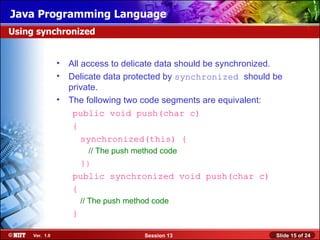
Using synchronized


                • All access to delicate data should be synchronized.
                • Delicate data protected by synchronized should be
                  private.
                • The following two code segments are equivalent:
                   public void push(char c)
                   {
                      synchronized(this) {
                         // The push method code
                     }}
                   public synchronized void push(char c)
                   {
                       // The push method code
                   }

     Ver. 1.0                          Session 13                  Slide 15 of 24
Java Programming Language
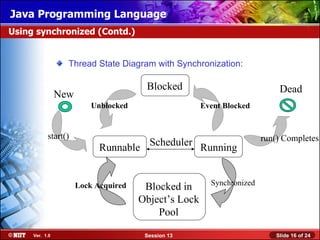
Using synchronized (Contd.)


                  Thread State Diagram with Synchronization:

                                       Blocked                              Dead
                New
                          Unblocked                   Event Blocked


           start()                                                     run() Completes
                            Runnable Scheduler Running


                                                        Synchronized
                      Lock Acquired    Blocked in
                                      Object’s Lock
                                          Pool

     Ver. 1.0                          Session 13                          Slide 16 of 24
Java Programming Language
Deadlock


               A deadlock has the following characteristics:
                  It is two threads, each waiting for a lock from the other.
                  It is not detected or avoided.
                  Deadlock can be avoided by:
                     Deciding on the order to obtain locks
                     Adhering to this order throughout
                     Releasing locks in reverse order


    Ver. 1.0                         Session 13                                Slide 17 of 24
Java Programming Language
Thread Interaction


                • wait and notify Methods
                     Scenario:
                      • Consider yourself and a cab driver as two threads.
                     Problem:
                      • How do you determine when you are at your destination?
                     Solution:
                        You notify the cab driver of your destination and relax
                        The driver drives and notifies you upon arrival at your destination


     Ver. 1.0                           Session 13                                 Slide 18 of 24
Java Programming Language
Thread Interaction (Contd.)


                Thread interactions include:
                 – The wait() and notify() methods
                 – The pools:
                      Wait pool
                      Lock pool


     Ver. 1.0                      Session 13        Slide 19 of 24
Java Programming Language
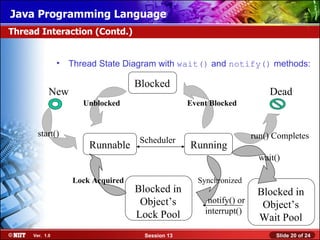
Thread Interaction (Contd.)


                •   Thread State Diagram with wait() and notify() methods:

                                    Blocked
            New                                                            Dead
                       Unblocked                   Event Blocked


       start()                                                        run() Completes
                                     Scheduler
                        Runnable                   Running
                                                                        wait()

                    Lock Acquired                    Synchronized
                                    Blocked in                         Blocked in
                                     Object’s           notify() or
                                                                        Object’s
                                    Lock Pool          interrupt()
                                                                       Wait Pool
     Ver. 1.0                         Session 13                            Slide 20 of 24
Java Programming Language
Monitor Model for Synchronization


                Leave shared data in a consistent state
                Ensure programs cannot deadlock
                Do not put threads expecting different notifications in the
                same wait pool.


     Ver. 1.0                       Session 13                         Slide 21 of 24
Java Programming Language
Demonstration


               Lets see how to create a Java class that represents a separate
               thread of control flow.


    Ver. 1.0                         Session 13                      Slide 22 of 24
Java Programming Language
Summary


               In this session, you learned that:
                – Threads are a virtual CPU.
                – The three parts of at thread are CPU, Code, and Data.
                – Thread can be created by extend the class from Thread Class
                  or by implementing Runnable interface.
                – A Java program can have multiple threads.
                – Thread need to start by using start() method.
                – Various states of thread are runnable, running, and blocked.
                – sleep() method pauses the thread for given amount of time.
                – The thread dies when run() method completes.
                – sleep(), join(), and yield() methods put the thread on
                  hold.
                – Use getPriority() method to determine the current priority
                  of the thread.


    Ver. 1.0                       Session 13                         Slide 23 of 24
Java Programming Language
Summary (Contd.)


               – When multiple threads are working on shared data,
                 synchronized keyword should be used to maintain the
                 consistency of the data.
               – Deadlock is the situation where two threads, each waiting for a
                 lock from the other.
               – wait() and notify() are methods for thread
                 communication.


    Ver. 1.0                       Session 13                           Slide 24 of 24

Java session13

  • 1.
    Java Programming Language Objectives In this session, you will learn to: Define a thread Create separate threads in a Java technology program, controlling the code and data that are used by that thread Control the execution of a thread and write platform independent code with threads Describe the difficulties that might arise when multiple threads share data Use wait and notify to communicate between threads Use synchronized to protect data from corruption Ver. 1.0 Session 13 Slide 1 of 24
  • 2.
    Java Programming Language Threads Threads are a virtual CPU. The three parts of the thread are: CPU Code Data A thread or execution context Ver. 1.0 Session 13 Slide 2 of 24
  • 3.
    Java Programming Language Creatingthe Thread • Extend the class from Thread Class. For example: public class HelloRunner extends Thread { //code } • Implement the Runnable interface. For example: class HelloRunner implements Runnable { //code } Ver. 1.0 Session 13 Slide 3 of 24
  • 4.
    Java Programming Language Creatingthe Thread (Contd.) Multithreaded programming has following characteristics: Multiple threads are from one Runnable instance. Threads share the same data and code. For example: Thread t1 = new Thread(r); Thread t2 = new Thread(r); Ver. 1.0 Session 13 Slide 4 of 24
  • 5.
    Java Programming Language Startingthe Thread • Use the start() method • Place the thread in a runnable state Ver. 1.0 Session 13 Slide 5 of 24
  • 6.
    Java Programming Language ThreadScheduling Fundamental Thread State Diagram: Blocked Dead New Unblocked Event Blocked start() run() Completes Runnable Scheduler Running Ver. 1.0 Session 13 Slide 6 of 24
  • 7.
    Java Programming Language ThreadScheduling (Contd.) Thread Scheduling Example: public class Runner implements Runnable {public void run() {while (true){ // Do lots of interesting stuff // Give other threads a chance try{ One of Thread Thread.sleep(10); Scheduling Method }catch (InterruptedException e) { // This thread’s sleep was interrupted by another thread }}}} Ver. 1.0 Session 13 Slide 7 of 24
  • 8.
    Java Programming Language Terminatinga Thread • The thread comes to the end of its run() method. • The thread throws an Exception or Error that is not caught. • Another thread calls one of the deprecated stop() methods. Ver. 1.0 Session 13 Slide 8 of 24
  • 9.
    Java Programming Language BasicControl of Threads Test Threads: isAlive() Access Thread Priority: getPriority() setPriority() Put Threads on Hold: Thread.sleep() // static method join() Thread.yield() // static method Ver. 1.0 Session 13 Slide 9 of 24
  • 10.
    Java Programming Language BasicControl of Threads (Contd.) • Use of join() method: public static void main(String[] args) { Thread t = new Thread(new Runner()); t.start(); // Do stuff in parallel with the other thread for a while // Wait here for the other thread to finish try { t.join(); } catch (InterruptedException e) { // the other thread came back early } // Now continue in this thread } Ver. 1.0 Session 13 Slide 10 of 24
  • 11.
    Java Programming Language TheObject Lock Flag Every object has a flag that is a type of lock flag. The synchronized enables interaction with the lock flag. Object this Thread before synchronized(this) public void push (char c) { synchronized(this) { data[idx] = c; idx++; } } Ver. 1.0 Session 13 Slide 11 of 24
  • 12.
    Java Programming Language TheObject Lock Flag (Contd.) Object this Thread after synchronized(this) public void push (char c) {synchronized(this) { data[idx] = c; idx++; } } Ver. 1.0 Session 13 Slide 12 of 24
  • 13.
    Java Programming Language TheObject Lock Flag (Contd.) Object this lock flag missing Another thread, trying to execute synchronized(this) Waiting for public char pop(char c) object lock { synchronized(this) { idx--; return data[idx]; } } Ver. 1.0 Session 13 Slide 13 of 24
  • 14.
    Java Programming Language Releasingthe Lock Flag The lock flag is released in the following events: Released when the thread passes the end of the synchronized code block Released automatically when a break, return, or exception is thrown by the synchronized code block Ver. 1.0 Session 13 Slide 14 of 24
  • 15.
    Java Programming Language Usingsynchronized • All access to delicate data should be synchronized. • Delicate data protected by synchronized should be private. • The following two code segments are equivalent: public void push(char c) { synchronized(this) { // The push method code }} public synchronized void push(char c) { // The push method code } Ver. 1.0 Session 13 Slide 15 of 24
  • 16.
    Java Programming Language Usingsynchronized (Contd.) Thread State Diagram with Synchronization: Blocked Dead New Unblocked Event Blocked start() run() Completes Runnable Scheduler Running Synchronized Lock Acquired Blocked in Object’s Lock Pool Ver. 1.0 Session 13 Slide 16 of 24
  • 17.
    Java Programming Language Deadlock A deadlock has the following characteristics: It is two threads, each waiting for a lock from the other. It is not detected or avoided. Deadlock can be avoided by: Deciding on the order to obtain locks Adhering to this order throughout Releasing locks in reverse order Ver. 1.0 Session 13 Slide 17 of 24
  • 18.
    Java Programming Language ThreadInteraction • wait and notify Methods Scenario: • Consider yourself and a cab driver as two threads. Problem: • How do you determine when you are at your destination? Solution: You notify the cab driver of your destination and relax The driver drives and notifies you upon arrival at your destination Ver. 1.0 Session 13 Slide 18 of 24
  • 19.
    Java Programming Language ThreadInteraction (Contd.) Thread interactions include: – The wait() and notify() methods – The pools: Wait pool Lock pool Ver. 1.0 Session 13 Slide 19 of 24
  • 20.
    Java Programming Language ThreadInteraction (Contd.) • Thread State Diagram with wait() and notify() methods: Blocked New Dead Unblocked Event Blocked start() run() Completes Scheduler Runnable Running wait() Lock Acquired Synchronized Blocked in Blocked in Object’s notify() or Object’s Lock Pool interrupt() Wait Pool Ver. 1.0 Session 13 Slide 20 of 24
  • 21.
    Java Programming Language MonitorModel for Synchronization Leave shared data in a consistent state Ensure programs cannot deadlock Do not put threads expecting different notifications in the same wait pool. Ver. 1.0 Session 13 Slide 21 of 24
  • 22.
    Java Programming Language Demonstration Lets see how to create a Java class that represents a separate thread of control flow. Ver. 1.0 Session 13 Slide 22 of 24
  • 23.
    Java Programming Language Summary In this session, you learned that: – Threads are a virtual CPU. – The three parts of at thread are CPU, Code, and Data. – Thread can be created by extend the class from Thread Class or by implementing Runnable interface. – A Java program can have multiple threads. – Thread need to start by using start() method. – Various states of thread are runnable, running, and blocked. – sleep() method pauses the thread for given amount of time. – The thread dies when run() method completes. – sleep(), join(), and yield() methods put the thread on hold. – Use getPriority() method to determine the current priority of the thread. Ver. 1.0 Session 13 Slide 23 of 24
  • 24.
    Java Programming Language Summary(Contd.) – When multiple threads are working on shared data, synchronized keyword should be used to maintain the consistency of the data. – Deadlock is the situation where two threads, each waiting for a lock from the other. – wait() and notify() are methods for thread communication. Ver. 1.0 Session 13 Slide 24 of 24