Java Swing - Lecture 1
An Introduction
Milena Radenkovic
(mvr@cs.nott.ac.uk)
slides originally by Chris Coleman
2
Timeline
• 26th
Oct (Now) - Java Necessaries, Swing Basics
• 27th
Oct - Components and Containers
• 3rd
Oct - Layout Management
• 9th
Nov - Event Handling and Listeners
• 10th
Nov - Graphics with Swing
• Java Labs TBA
3
Before we Start… (1)
• Swing is all Java.
• You must know about, and understand:
 Classes / Objects
 Method Overloading
 Inheritance
 Polymorphism
 Interfaces
 How to read the Java2 API Documents
4
Before We Start… (2)
• If Java is a problem – learn NOW, not later
when the coursework is due!
 Labs
 Come to the labs and help is there for both Java and
Swing.
 Web
 Use the Sun/Java tutorials
 Plenty of web resources out there, even the PRG notes
 Read a book?
5
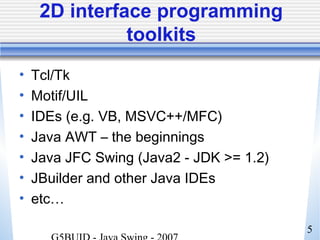
2D interface programming
toolkits
• Tcl/Tk
• Motif/UIL
• IDEs (e.g. VB, MSVC++/MFC)
• Java AWT – the beginnings
• Java JFC Swing (Java2 - JDK >= 1.2)
• JBuilder and other Java IDEs
• etc…
6
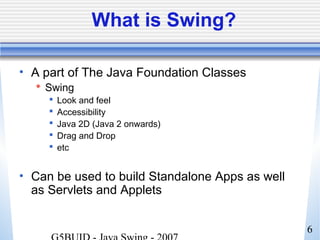
What is Swing?
• A part of The Java Foundation Classes
 Swing
 Look and feel
 Accessibility
 Java 2D (Java 2 onwards)
 Drag and Drop
 etc
• Can be used to build Standalone Apps as well
as Servlets and Applets
7
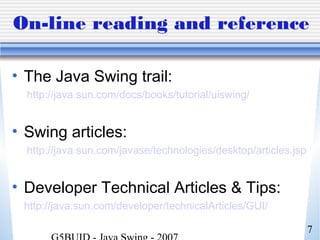
On-line reading and reference
• The Java Swing trail:
http://java.sun.com/docs/books/tutorial/uiswing/
• Swing articles:
http://java.sun.com/javase/technologies/desktop/articles.jsp
• Developer Technical Articles & Tips:
http://java.sun.com/developer/technicalArticles/GUI/
8
Books
• Java Swing (1998), Robert Eckstein,
Mark Loy, Dave Wood, O'Reilly
• JFC Swing Tutorial, The: A Guide
to Constructing GUIs, 2nd Edition
(2004); K. Walrath and M. Campione,
Addison Wesley
9
Getting started with Swing (1)
• Compiling & running programs
 Swing is standard in Java 2 (JDK >= 1.2)
 Use:
 ‘javac <program.java>’ && ‘java <program>’
 Or JCreator / IDE
10
Getting started with Swing (2)
• Computer Science Department Stuff…
 PCs
 Java 2 (1.5.0) on hard disk at csjava
 Unix (tuck and much):
 Java 2 (1.5.0) in /usr/bin (or /usr/java)
 Differences between previous versions
 http://java.sun.com/j2se/1.4.2/docs/guide/swing/SwingChanges.html
 http://java.sun.com/j2se/1.5.0/docs/guide/swing/SwingChanges.html
 Coursework marked on Win XP & JDK
1.5.0
11
Getting started with Swing (3)
• Swing, like the rest of the Java API is
subdivided into packages:
 javax.swing, javax.accessibility,
javax.swing.border …
• At the start of your code - always
 import javax.swing;
 import javax.swing.event;
• Most Swing programs also need
 import java.awt.*;
 import java.awt.event.*;
12
Differences between Swing and
AWT (1)
• Never mix Swing and AWT components
• If you know AWT, put ‘J’ in front of
everything
 AWT: Button
 Swing: JButton
• Swing does all that AWT does, but better
and there’s much more of it.
13
Differences between Swing and
AWT (2)
• Buttons and labels can display images
• Behaviour and appearance of components
• Component shape
• Borders
• Assistive technologies
• Look and feel of the program’s GUI
 Windows – (but only on Windows, M$ issues….)
 UNIX
 GTK
 etc
14
A typical Swing program
• Consists of multiple parts
 Containers
 Components
 Events
 Graphics
 (Threads)
• Now look at each in turn
15
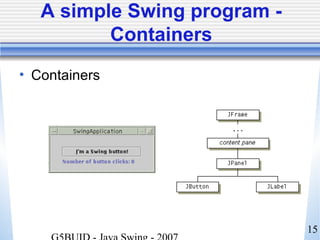
A simple Swing program -
Containers
• Containers
16
Remember this about
Containers:
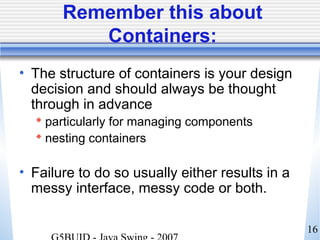
• The structure of containers is your design
decision and should always be thought
through in advance
 particularly for managing components
 nesting containers
• Failure to do so usually either results in a
messy interface, messy code or both.
17
A simple Swing program -
Components
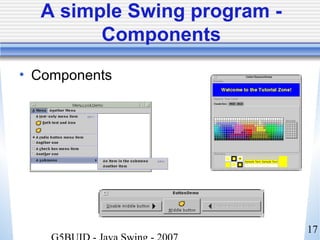
• Components
18
Remember this about
Components:
• There are many components that make your job
much easier.
• Often, you will be able to customise an existing
Swing component to do a job for you, instead of
having to start from scratch
 Eg can extend (inherit from) the JButton class and
‘paint’ a new button over the top
19
A simple Swing program -
Events
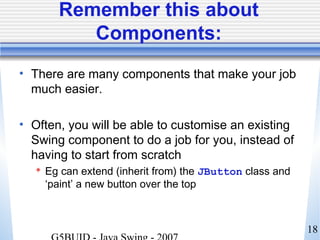
• Events
20
Remember this about events:
• ‘Events’ as seen by GUIs do not happen
all that often in an application
• Consider what is happening between events
as well as during them
21
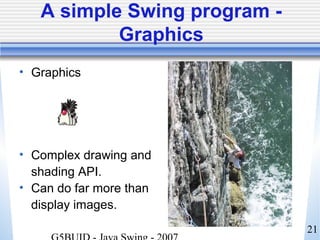
A simple Swing program -
Graphics
• Graphics
• Complex drawing and
shading API.
• Can do far more than
display images.
22
Remember this about
Graphics:
• There are many aspects of Swing that
allow you to achieve graphics-like things
without actually using ‘Graphics’.
• Therefore, you don’t have to use them
most of the time, and it is often easier not
to.
23
A simple Swing program -
Threads
• Most simple Swing GUI applications don’t
require use of any (extra) threads
• As Swing creates event-driven programs,
all code is executed on the event-
dispatching thread
24
Remember this about Threads:
The single-thread rule
“Once a Swing component has been realized,
all code that might affect or depend on the
state of that component should be executed in
the event-dispatching thread”
(with some exceptions)
25
How to Learn Swing
• Don’t even try.
• Learn general framework principles and
design styles.
• Then use the API reference, and Swing
Tutorials to discover detailed usage of
each component.
26
How to read Java Docs (1)
• Java 2 (J2SE 1.5.0) API Reference:
 http://java.sun.com/j2se/1.5.0/docs/api/
• Split into 3 Sections (html frames):
 Top Left: Packages
 Bottom Left: Classes in Packages
 Main Frame: Information about selected Class
27
How to read Java Docs (2)
• General idea is find class, and examine main
frame for information.
• Main frame pages split into sections:
 Package hierarchy & implemented interfaces
 Class Description, and links to more info
 Nested Class Summary – Detail in separate page
 Fields - 2 types Class (static) and instance, plus fields
inherited from parent classes / interfaces
 Constructor Summary
 Method Summary & inherited methods from parents
 Detailed info on all summary sections
28
Summary
• Do you know enough Java?
• 2D interface programming toolkits
• JFC/Swing
• AWT and Swing
• Getting started with Swing
• Parts of a simple Swing program
• Tomorrow: Components and Containers
• Some source code, and design styles

Java lecture

  • 1.
    Java Swing -Lecture 1 An Introduction Milena Radenkovic (mvr@cs.nott.ac.uk) slides originally by Chris Coleman
  • 2.
    2 Timeline • 26th Oct (Now)- Java Necessaries, Swing Basics • 27th Oct - Components and Containers • 3rd Oct - Layout Management • 9th Nov - Event Handling and Listeners • 10th Nov - Graphics with Swing • Java Labs TBA
  • 3.
    3 Before we Start…(1) • Swing is all Java. • You must know about, and understand:  Classes / Objects  Method Overloading  Inheritance  Polymorphism  Interfaces  How to read the Java2 API Documents
  • 4.
    4 Before We Start…(2) • If Java is a problem – learn NOW, not later when the coursework is due!  Labs  Come to the labs and help is there for both Java and Swing.  Web  Use the Sun/Java tutorials  Plenty of web resources out there, even the PRG notes  Read a book?
  • 5.
    5 2D interface programming toolkits •Tcl/Tk • Motif/UIL • IDEs (e.g. VB, MSVC++/MFC) • Java AWT – the beginnings • Java JFC Swing (Java2 - JDK >= 1.2) • JBuilder and other Java IDEs • etc…
  • 6.
    6 What is Swing? •A part of The Java Foundation Classes  Swing  Look and feel  Accessibility  Java 2D (Java 2 onwards)  Drag and Drop  etc • Can be used to build Standalone Apps as well as Servlets and Applets
  • 7.
    7 On-line reading andreference • The Java Swing trail: http://java.sun.com/docs/books/tutorial/uiswing/ • Swing articles: http://java.sun.com/javase/technologies/desktop/articles.jsp • Developer Technical Articles & Tips: http://java.sun.com/developer/technicalArticles/GUI/
  • 8.
    8 Books • Java Swing(1998), Robert Eckstein, Mark Loy, Dave Wood, O'Reilly • JFC Swing Tutorial, The: A Guide to Constructing GUIs, 2nd Edition (2004); K. Walrath and M. Campione, Addison Wesley
  • 9.
    9 Getting started withSwing (1) • Compiling & running programs  Swing is standard in Java 2 (JDK >= 1.2)  Use:  ‘javac <program.java>’ && ‘java <program>’  Or JCreator / IDE
  • 10.
    10 Getting started withSwing (2) • Computer Science Department Stuff…  PCs  Java 2 (1.5.0) on hard disk at csjava  Unix (tuck and much):  Java 2 (1.5.0) in /usr/bin (or /usr/java)  Differences between previous versions  http://java.sun.com/j2se/1.4.2/docs/guide/swing/SwingChanges.html  http://java.sun.com/j2se/1.5.0/docs/guide/swing/SwingChanges.html  Coursework marked on Win XP & JDK 1.5.0
  • 11.
    11 Getting started withSwing (3) • Swing, like the rest of the Java API is subdivided into packages:  javax.swing, javax.accessibility, javax.swing.border … • At the start of your code - always  import javax.swing;  import javax.swing.event; • Most Swing programs also need  import java.awt.*;  import java.awt.event.*;
  • 12.
    12 Differences between Swingand AWT (1) • Never mix Swing and AWT components • If you know AWT, put ‘J’ in front of everything  AWT: Button  Swing: JButton • Swing does all that AWT does, but better and there’s much more of it.
  • 13.
    13 Differences between Swingand AWT (2) • Buttons and labels can display images • Behaviour and appearance of components • Component shape • Borders • Assistive technologies • Look and feel of the program’s GUI  Windows – (but only on Windows, M$ issues….)  UNIX  GTK  etc
  • 14.
    14 A typical Swingprogram • Consists of multiple parts  Containers  Components  Events  Graphics  (Threads) • Now look at each in turn
  • 15.
    15 A simple Swingprogram - Containers • Containers
  • 16.
    16 Remember this about Containers: •The structure of containers is your design decision and should always be thought through in advance  particularly for managing components  nesting containers • Failure to do so usually either results in a messy interface, messy code or both.
  • 17.
    17 A simple Swingprogram - Components • Components
  • 18.
    18 Remember this about Components: •There are many components that make your job much easier. • Often, you will be able to customise an existing Swing component to do a job for you, instead of having to start from scratch  Eg can extend (inherit from) the JButton class and ‘paint’ a new button over the top
  • 19.
    19 A simple Swingprogram - Events • Events
  • 20.
    20 Remember this aboutevents: • ‘Events’ as seen by GUIs do not happen all that often in an application • Consider what is happening between events as well as during them
  • 21.
    21 A simple Swingprogram - Graphics • Graphics • Complex drawing and shading API. • Can do far more than display images.
  • 22.
    22 Remember this about Graphics: •There are many aspects of Swing that allow you to achieve graphics-like things without actually using ‘Graphics’. • Therefore, you don’t have to use them most of the time, and it is often easier not to.
  • 23.
    23 A simple Swingprogram - Threads • Most simple Swing GUI applications don’t require use of any (extra) threads • As Swing creates event-driven programs, all code is executed on the event- dispatching thread
  • 24.
    24 Remember this aboutThreads: The single-thread rule “Once a Swing component has been realized, all code that might affect or depend on the state of that component should be executed in the event-dispatching thread” (with some exceptions)
  • 25.
    25 How to LearnSwing • Don’t even try. • Learn general framework principles and design styles. • Then use the API reference, and Swing Tutorials to discover detailed usage of each component.
  • 26.
    26 How to readJava Docs (1) • Java 2 (J2SE 1.5.0) API Reference:  http://java.sun.com/j2se/1.5.0/docs/api/ • Split into 3 Sections (html frames):  Top Left: Packages  Bottom Left: Classes in Packages  Main Frame: Information about selected Class
  • 27.
    27 How to readJava Docs (2) • General idea is find class, and examine main frame for information. • Main frame pages split into sections:  Package hierarchy & implemented interfaces  Class Description, and links to more info  Nested Class Summary – Detail in separate page  Fields - 2 types Class (static) and instance, plus fields inherited from parent classes / interfaces  Constructor Summary  Method Summary & inherited methods from parents  Detailed info on all summary sections
  • 28.
    28 Summary • Do youknow enough Java? • 2D interface programming toolkits • JFC/Swing • AWT and Swing • Getting started with Swing • Parts of a simple Swing program • Tomorrow: Components and Containers • Some source code, and design styles