 Welcome to the course Object Oriented
Programming in JAVA. This course will
cover a core set of computer science
concepts needed to create a modern
software application using Java.
Object Oriented Programming using JAVA
2
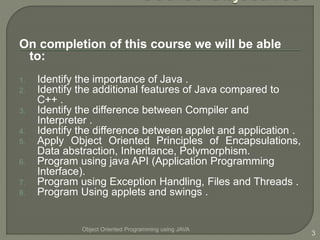
On completion of this course we will be able
to:
1. Identify the importance of Java .
2. Identify the additional features of Java compared to
C++ .
3. Identify the difference between Compiler and
Interpreter .
4. Identify the difference between applet and application .
5. Apply Object Oriented Principles of Encapsulations,
Data abstraction, Inheritance, Polymorphism.
6. Program using java API (Application Programming
Interface).
7. Program using Exception Handling, Files and Threads .
8. Program Using applets and swings .
Object Oriented Programming using JAVA
3
Object Oriented Programming using JAVA
4
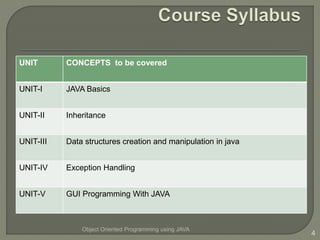
UNIT CONCEPTS to be covered
UNIT-I JAVA Basics
UNIT-II Inheritance
UNIT-III Data structures creation and manipulation in java
UNIT-IV Exception Handling
UNIT-V GUI Programming With JAVA
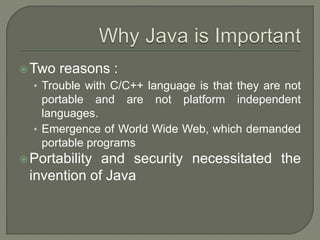
Two reasons :
• Trouble with C/C++ language is that they are not
portable and are not platform independent
languages.
• Emergence of World Wide Web, which demanded
portable programs
Portability and security necessitated the
invention of Java
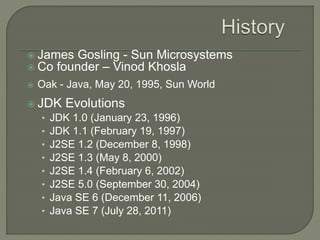
 James Gosling - Sun Microsystems
 Co founder – Vinod Khosla
 Oak - Java, May 20, 1995, Sun World
 JDK Evolutions
• JDK 1.0 (January 23, 1996)
• JDK 1.1 (February 19, 1997)
• J2SE 1.2 (December 8, 1998)
• J2SE 1.3 (May 8, 2000)
• J2SE 1.4 (February 6, 2002)
• J2SE 5.0 (September 30, 2004)
• Java SE 6 (December 11, 2006)
• Java SE 7 (July 28, 2011)
Java Editions.
J2SE(Java 2 Standard Edition) - to develop client-
side standalone applications or applets.
J2ME(Java 2 Micro Edition ) - to develop
applications for mobile devices such as cell
phones.
J2EE(Java 2 Enterprise Edition ) - to develop
server-side applications such as Java servlets and
Java ServerPages.
A general-purpose object-oriented
language.
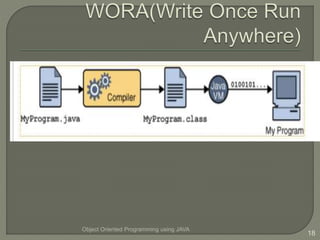
Write Once Run Anywhere (WORA).
Designed for easy Web/Internet
applications.
Widespread acceptance.
 C Language:
• Major difference is that C is a structure oriented language
and Java is an object oriented language and has
mechanism to define classes and objects.
• Java does not support an explicit pointer type
• Java does not have preprocessor, so we cant use #define,
#include and #ifdef statements.
• Java does not include structures, unions and enum data
types.
• Java does not include keywords like goto, sizeof and
typedef.
• Java adds labeled break and continue statements.
• Java adds many features required for object oriented
programming.
C++ language
Features removed in java:
Java doesn’t support pointers to avoid unauthorized
access of memory locations.
Java does not include structures, unions and enum
data types.
Java does not support operator over loading.
Preprocessor plays less important role in C++ and so
eliminated entirely in java.
Java does not perform automatic type conversions
that result in loss of precision.
 Java does not support global variables. Every
method and variable is declared within a class and
forms part of that class.
 Java does not allow default arguments.
 Java does not support inheritance of multiple super
classes by a sub class (i.e., multiple inheritance).
This is accomplished by using ‘interface’ concept.
 It is not possible to declare unsigned integers in
java.
 In java objects are passed by reference only. In
C++ objects may be passed by value or reference.
New features added in Java:
 Multithreading, that allows two or more pieces of the
same program to execute concurrently.
 C++ has a set of library functions that use a common
header file. But java replaces it with its own set of API
classes.
 It adds packages and interfaces.
 Java supports automatic garbage collection.
 break and continue statements have been enhanced in
java to accept labels as targets.
 The use of unicode characters ensures portability.
Features that differ:
 Though C++ and java supports Boolean data type, C++
takes any nonzero value as true and zero as false. True
and false in java are predefined literals that are values for
a boolean expression.
 Java has replaced the destructor function with a finalize()
function.
 C++ supports exception handling that is similar to java's.
However, in C++ there is no requirement that a thrown
exception be caught.
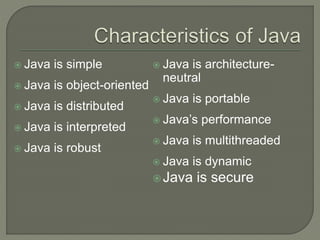
 Java is simple
 Java is object-oriented
 Java is distributed
 Java is interpreted
 Java is robust
 Java is architecture-
neutral
 Java is portable
 Java’s performance
 Java is multithreaded
 Java is dynamic
Java is secure
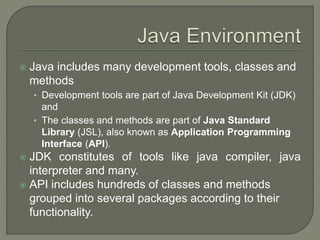
 Java includes many development tools, classes and
methods
• Development tools are part of Java Development Kit (JDK)
and
• The classes and methods are part of Java Standard
Library (JSL), also known as Application Programming
Interface (API).
 JDK constitutes of tools like java compiler, java
interpreter and many.
 API includes hundreds of classes and methods
grouped into several packages according to their
functionality.
Object Oriented Programming using JAVA
17
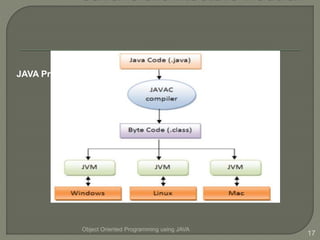
JAVA Program Execution
Object Oriented Programming using JAVA
18
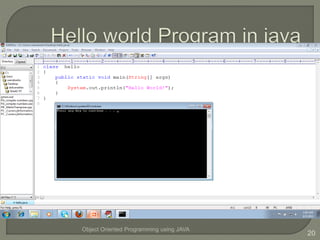
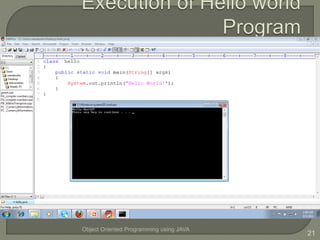
Edit Plus Software :
EditPlus is a 32-bit text editor for the
Microsoft Windows operating system.
The editor contains tools for programmers,
including syntax highlighting (and support
for custom syntax files), file type
conversions, line ending conversion
(between Linux, Windows and Mac styles),
regular expressions for search-and-
replace, spell check etc).
Object Oriented Programming using JAVA
19
Object Oriented Programming using JAVA
20
Object Oriented Programming using JAVA
21
Object Oriented Programming using JAVA
22

Java Fundamentals in Mule

  • 2.
     Welcome tothe course Object Oriented Programming in JAVA. This course will cover a core set of computer science concepts needed to create a modern software application using Java. Object Oriented Programming using JAVA 2
  • 3.
    On completion ofthis course we will be able to: 1. Identify the importance of Java . 2. Identify the additional features of Java compared to C++ . 3. Identify the difference between Compiler and Interpreter . 4. Identify the difference between applet and application . 5. Apply Object Oriented Principles of Encapsulations, Data abstraction, Inheritance, Polymorphism. 6. Program using java API (Application Programming Interface). 7. Program using Exception Handling, Files and Threads . 8. Program Using applets and swings . Object Oriented Programming using JAVA 3
  • 4.
    Object Oriented Programmingusing JAVA 4 UNIT CONCEPTS to be covered UNIT-I JAVA Basics UNIT-II Inheritance UNIT-III Data structures creation and manipulation in java UNIT-IV Exception Handling UNIT-V GUI Programming With JAVA
  • 6.
    Two reasons : •Trouble with C/C++ language is that they are not portable and are not platform independent languages. • Emergence of World Wide Web, which demanded portable programs Portability and security necessitated the invention of Java
  • 7.
     James Gosling- Sun Microsystems  Co founder – Vinod Khosla  Oak - Java, May 20, 1995, Sun World  JDK Evolutions • JDK 1.0 (January 23, 1996) • JDK 1.1 (February 19, 1997) • J2SE 1.2 (December 8, 1998) • J2SE 1.3 (May 8, 2000) • J2SE 1.4 (February 6, 2002) • J2SE 5.0 (September 30, 2004) • Java SE 6 (December 11, 2006) • Java SE 7 (July 28, 2011)
  • 8.
    Java Editions. J2SE(Java 2Standard Edition) - to develop client- side standalone applications or applets. J2ME(Java 2 Micro Edition ) - to develop applications for mobile devices such as cell phones. J2EE(Java 2 Enterprise Edition ) - to develop server-side applications such as Java servlets and Java ServerPages.
  • 9.
    A general-purpose object-oriented language. WriteOnce Run Anywhere (WORA). Designed for easy Web/Internet applications. Widespread acceptance.
  • 10.
     C Language: •Major difference is that C is a structure oriented language and Java is an object oriented language and has mechanism to define classes and objects. • Java does not support an explicit pointer type • Java does not have preprocessor, so we cant use #define, #include and #ifdef statements. • Java does not include structures, unions and enum data types. • Java does not include keywords like goto, sizeof and typedef. • Java adds labeled break and continue statements. • Java adds many features required for object oriented programming.
  • 11.
    C++ language Features removedin java: Java doesn’t support pointers to avoid unauthorized access of memory locations. Java does not include structures, unions and enum data types. Java does not support operator over loading. Preprocessor plays less important role in C++ and so eliminated entirely in java. Java does not perform automatic type conversions that result in loss of precision.
  • 12.
     Java doesnot support global variables. Every method and variable is declared within a class and forms part of that class.  Java does not allow default arguments.  Java does not support inheritance of multiple super classes by a sub class (i.e., multiple inheritance). This is accomplished by using ‘interface’ concept.  It is not possible to declare unsigned integers in java.  In java objects are passed by reference only. In C++ objects may be passed by value or reference.
  • 13.
    New features addedin Java:  Multithreading, that allows two or more pieces of the same program to execute concurrently.  C++ has a set of library functions that use a common header file. But java replaces it with its own set of API classes.  It adds packages and interfaces.  Java supports automatic garbage collection.  break and continue statements have been enhanced in java to accept labels as targets.  The use of unicode characters ensures portability.
  • 14.
    Features that differ: Though C++ and java supports Boolean data type, C++ takes any nonzero value as true and zero as false. True and false in java are predefined literals that are values for a boolean expression.  Java has replaced the destructor function with a finalize() function.  C++ supports exception handling that is similar to java's. However, in C++ there is no requirement that a thrown exception be caught.
  • 15.
     Java issimple  Java is object-oriented  Java is distributed  Java is interpreted  Java is robust  Java is architecture- neutral  Java is portable  Java’s performance  Java is multithreaded  Java is dynamic Java is secure
  • 16.
     Java includesmany development tools, classes and methods • Development tools are part of Java Development Kit (JDK) and • The classes and methods are part of Java Standard Library (JSL), also known as Application Programming Interface (API).  JDK constitutes of tools like java compiler, java interpreter and many.  API includes hundreds of classes and methods grouped into several packages according to their functionality.
  • 17.
    Object Oriented Programmingusing JAVA 17 JAVA Program Execution
  • 18.
  • 19.
    Edit Plus Software: EditPlus is a 32-bit text editor for the Microsoft Windows operating system. The editor contains tools for programmers, including syntax highlighting (and support for custom syntax files), file type conversions, line ending conversion (between Linux, Windows and Mac styles), regular expressions for search-and- replace, spell check etc). Object Oriented Programming using JAVA 19
  • 20.
  • 21.
  • 22.