Collections
Why collections?
• Collections are used to hold a collection of
objects.
• List holds objects based on order of insertion
and can hold non unique collection
• Set holds objects without any order and are
unique
• Maps holds objects based on a key and value
pair, unique key and no specific order
Different Collections Interfaces
• List
• Set
• Maps
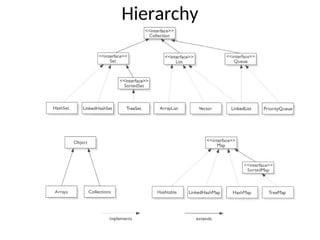
Hierarchy
Contract
• If two objects are equal according to the
equals(Object) method, then
calling the hashCode() method on each of the
two objects must produce the
same integer result.
• If two objects are unequal according to the
equals(Object) method, there's no requirement
about hashcode().
• If calling hashcode() on two objects produce
different integer result, then both of them
must be unequal according to the equals(Object).
List
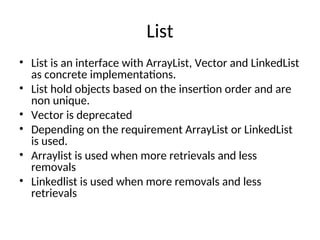
• List is an interface with ArrayList, Vector and LinkedList
as concrete implementations.
• List hold objects based on the insertion order and are
non unique.
• Vector is deprecated
• Depending on the requirement ArrayList or LinkedList
is used.
• Arraylist is used when more retrievals and less
removals
• Linkedlist is used when more removals and less
retrievals
List example
class mylist{
public static void main(String args[]){
List l = new ArrayList();
Object o = new Object();
l.add(o);// add o to list
Object x =(Object)l.get(0); // get the object in 0 position
System.out.println(l.size()); // Print the size
}
}
• This example creates an arrayList and adds an object ‘o’ to it.
• We get the object back and print the size of the list.
• Calling the get method does not remove the object from the list.
• You can use a list when the ordering is of prime importance.
Set
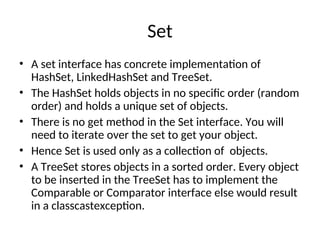
• A set interface has concrete implementation of
HashSet, LinkedHashSet and TreeSet.
• The HashSet holds objects in no specific order (random
order) and holds a unique set of objects.
• There is no get method in the Set interface. You will
need to iterate over the set to get your object.
• Hence Set is used only as a collection of objects.
• A TreeSet stores objects in a sorted order. Every object
to be inserted in the TreeSet has to implement the
Comparable or Comparator interface else would result
in a classcastexception.
Set example
class mysetExample{
public static void main(String args[]){
Set myset = new HashSet(); // create a hashset
Object o = new Object(); // create an object
boolean add = myset.add(o); // add object
boolean addagain myset.add(o); // add object again
Iterator iter = myset.iterator(); // extract the iterator
while(iter.hasNext()){
Object o = (Object)iter.next(); // Iterate over the collection
}
}
}
• In this example we are creating a hashset and adding an object to it.
• The value of add will be true and the value of addagain will be false as the same object is already
available in the set
• The iterator iterates over all the available objects in the set
• The equality of the objects is bounded by the equals(Object) and the hashcode() contract.
Map
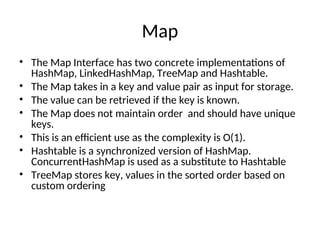
• The Map Interface has two concrete implementations of
HashMap, LinkedHashMap, TreeMap and Hashtable.
• The Map takes in a key and value pair as input for storage.
• The value can be retrieved if the key is known.
• The Map does not maintain order and should have unique
keys.
• This is an efficient use as the complexity is O(1).
• Hashtable is a synchronized version of HashMap.
ConcurrentHashMap is used as a substitute to Hashtable
• TreeMap stores key, values in the sorted order based on
custom ordering
Map
Class myMap{
public static void main(String args[]){
Map maps = new HashMap();
Object o = new Object();
maps.put(“myobj”,o);
Object o = (Object) maps.get(“myobj”);
}
}
• In this example we are creating a HashMap() and adding an object
with key as myobj and value as the object.
• We can retrieve the object using the key and the get method.
• If you override the hashcode and equals method, then pay special
attention to the contract else the implementations can lead to weird
results
Further Reading
• http://docs.oracle.com/javase/tutorial/collecti
ons/interfaces/index.html
• http://java.sun.com/developer/
onlineTraining/collections/Collection.html

Java Collection slide ppt presentation..

  • 1.
  • 2.
    Why collections? • Collectionsare used to hold a collection of objects. • List holds objects based on order of insertion and can hold non unique collection • Set holds objects without any order and are unique • Maps holds objects based on a key and value pair, unique key and no specific order
  • 3.
  • 4.
  • 5.
    Contract • If twoobjects are equal according to the equals(Object) method, then calling the hashCode() method on each of the two objects must produce the same integer result. • If two objects are unequal according to the equals(Object) method, there's no requirement about hashcode(). • If calling hashcode() on two objects produce different integer result, then both of them must be unequal according to the equals(Object).
  • 6.
    List • List isan interface with ArrayList, Vector and LinkedList as concrete implementations. • List hold objects based on the insertion order and are non unique. • Vector is deprecated • Depending on the requirement ArrayList or LinkedList is used. • Arraylist is used when more retrievals and less removals • Linkedlist is used when more removals and less retrievals
  • 7.
    List example class mylist{ publicstatic void main(String args[]){ List l = new ArrayList(); Object o = new Object(); l.add(o);// add o to list Object x =(Object)l.get(0); // get the object in 0 position System.out.println(l.size()); // Print the size } } • This example creates an arrayList and adds an object ‘o’ to it. • We get the object back and print the size of the list. • Calling the get method does not remove the object from the list. • You can use a list when the ordering is of prime importance.
  • 8.
    Set • A setinterface has concrete implementation of HashSet, LinkedHashSet and TreeSet. • The HashSet holds objects in no specific order (random order) and holds a unique set of objects. • There is no get method in the Set interface. You will need to iterate over the set to get your object. • Hence Set is used only as a collection of objects. • A TreeSet stores objects in a sorted order. Every object to be inserted in the TreeSet has to implement the Comparable or Comparator interface else would result in a classcastexception.
  • 9.
    Set example class mysetExample{ publicstatic void main(String args[]){ Set myset = new HashSet(); // create a hashset Object o = new Object(); // create an object boolean add = myset.add(o); // add object boolean addagain myset.add(o); // add object again Iterator iter = myset.iterator(); // extract the iterator while(iter.hasNext()){ Object o = (Object)iter.next(); // Iterate over the collection } } } • In this example we are creating a hashset and adding an object to it. • The value of add will be true and the value of addagain will be false as the same object is already available in the set • The iterator iterates over all the available objects in the set • The equality of the objects is bounded by the equals(Object) and the hashcode() contract.
  • 10.
    Map • The MapInterface has two concrete implementations of HashMap, LinkedHashMap, TreeMap and Hashtable. • The Map takes in a key and value pair as input for storage. • The value can be retrieved if the key is known. • The Map does not maintain order and should have unique keys. • This is an efficient use as the complexity is O(1). • Hashtable is a synchronized version of HashMap. ConcurrentHashMap is used as a substitute to Hashtable • TreeMap stores key, values in the sorted order based on custom ordering
  • 11.
    Map Class myMap{ public staticvoid main(String args[]){ Map maps = new HashMap(); Object o = new Object(); maps.put(“myobj”,o); Object o = (Object) maps.get(“myobj”); } } • In this example we are creating a HashMap() and adding an object with key as myobj and value as the object. • We can retrieve the object using the key and the get method. • If you override the hashcode and equals method, then pay special attention to the contract else the implementations can lead to weird results
  • 12.
    Further Reading • http://docs.oracle.com/javase/tutorial/collecti ons/interfaces/index.html •http://java.sun.com/developer/ onlineTraining/collections/Collection.html