Activity Types Identify Technologies for
Supporting the Iowa Core Content Areas
http://tinyurl.com/itecactivitytypes
Description
Activity Types provide listings of technologies
that support the Iowa Core. This session will
explore the Core through the lens of technology
by pairing technologies with specific concepts
and skills in each core area. Several resource
sites will be shared.
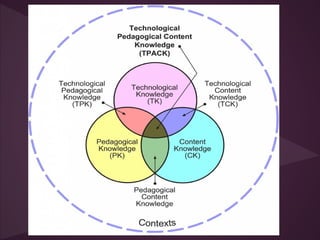
How does TPACK support the Iowa
Core?
Instructional Planning Activity Types as
Vehicles for Curriculum-Based TPACK
Development (.pdf)
Planning for students’ curriculum-based
learning that integrates appropriate and
pedagogically powerful use of the full range of
educational technologies is challenging.
Considerably detailed and deliberate planning
decisions need to be made, based upon
multiple decision points, and chosen wisely
from among a full range of possible educational
activities that incorporate technologies in
powerful ways.
Activity Types
Planning a particular learning event can be described as
the end result of five basic instructional decisions:
1. Choosing learning goals (based on the Iowa Core)
2. Making practical pedagogical decisions about the
nature of the learning experience
3. Selecting and sequencing appropriate activity types
4. Selecting formative and summative assessment
strategies
5. Selecting tools and resources that will best help
students to benefit from the learning experience
The approach to helping teachers to develop
TPACK is to suggest that they use curriculum-
specific, technology-enhanced learning activity
types as the building blocks for instructional
planning.
Harris, J., & Hofer, M. (2009).
David Warlick
Should the Tools Drive the Learning?
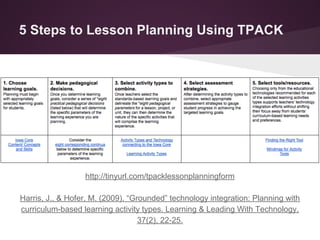
5 Steps to Lesson Planning Using TPACK
http://tinyurl.com/tpacklessonplanningform
Harris, J., & Hofer, M. (2009). “Grounded” technology integration: Planning with
curriculum-based learning activity types. Learning & Leading With Technology,
37(2), 22-25.
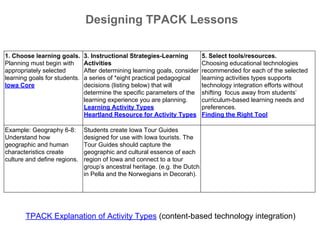
Designing TPACK Lessons
1. Choose learning goals.
Planning must begin with
appropriately selected
learning goals for students.
Iowa Core
3. Instructional Strategies-Learning
Activities
After determining learning goals, consider
a series of *eight practical pedagogical
decisions (listing below) that will
determine the specific parameters of the
learning experience you are planning.
Learning Activity Types
Heartland Resource for Activity Types
5. Select tools/resources.
Choosing educational technologies
recommended for each of the selected
learning activities types supports
technology integration efforts without
shifting focus away from students’
curriculum-based learning needs and
preferences.
Finding the Right Tool
Example: Geography 6-8:
Understand how
geographic and human
characteristics create
culture and define regions.
Students create Iowa Tour Guides
designed for use with Iowa tourists. The
Tour Guides should capture the
geographic and cultural essence of each
region of Iowa and connect to a tour
group’s ancestral heritage. (e.g. the Dutch
in Pella and the Norwegians in Decorah).
TPACK Explanation of Activity Types (content-based technology integration)
http://activitytypes.wmwikis.net
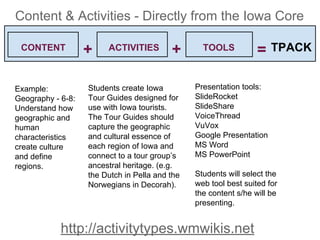
=+ +CONTENT ACTIVITIES TOOLS TPACK
Example:
Geography - 6-8:
Understand how
geographic and
human
characteristics
create culture
and define
regions.
Students create Iowa
Tour Guides designed for
use with Iowa tourists.
The Tour Guides should
capture the geographic
and cultural essence of
each region of Iowa and
connect to a tour group’s
ancestral heritage. (e.g.
the Dutch in Pella and the
Norwegians in Decorah).
Presentation tools:
SlideRocket
SlideShare
VoiceThread
VuVox
Google Presentation
MS Word
MS PowerPoint
Students will select the
web tool best suited for
the content s/he will be
presenting.
Content & Activities - Directly from the Iowa Core
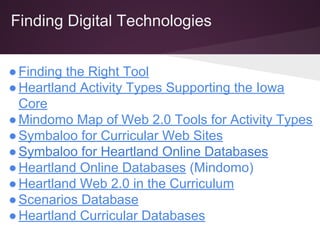
Finding Digital Technologies
●Finding the Right Tool
●Heartland Activity Types Supporting the Iowa
Core
●Mindomo Map of Web 2.0 Tools for Activity Types
●Symbaloo for Curricular Web Sites
●Symbaloo for Heartland Online Databases
●Heartland Online Databases (Mindomo)
●Heartland Web 2.0 in the Curriculum
●Scenarios Database
●Heartland Curricular Databases
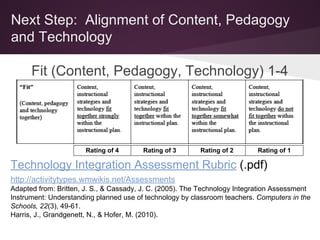
Next Step: Alignment of Content, Pedagogy
and Technology
Fit (Content, Pedagogy, Technology) 1-4
Rating
Technology Integration Assessment Rubric (.pdf)
http://activitytypes.wmwikis.net/Assessments
Adapted from: Britten, J. S., & Cassady, J. C. (2005). The Technology Integration Assessment
Instrument: Understanding planned use of technology by classroom teachers. Computers in the
Schools, 22(3), 49-61.
Harris, J., Grandgenett, N., & Hofer, M. (2010).
Rating of 4 Rating of 3 Rating of 2 Rating of 1
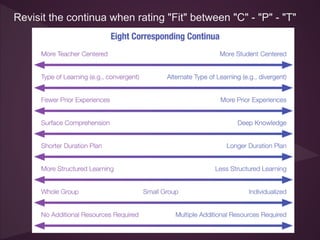
Revisit the continua when rating "Fit" between "C" - "P" - "T"
Designing TPACK Lessons
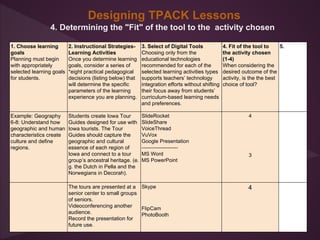
4. Determining the "Fit" of the tool to the activity chosen
1. Choose learning
goals
Planning must begin
with appropriately
selected learning goals
for students.
2. Instructional Strategies-
Learning Activities
Once you determine learning
goals, consider a series of
*eight practical pedagogical
decisions (listing below) that
will determine the specific
parameters of the learning
experience you are planning.
3. Select of Digital Tools
Choosing only from the
educational technologies
recommended for each of the
selected learning activities types
supports teachers’ technology
integration efforts without shifting
their focus away from students’
curriculum-based learning needs
and preferences.
4. Fit of the tool to
the activity chosen
(1-4)
When considering the
desired outcome of the
activity, is the the best
choice of tool?
5.
Example: Geography
6-8: Understand how
geographic and human
characteristics create
culture and define
regions.
Students create Iowa Tour
Guides designed for use with
Iowa tourists. The Tour
Guides should capture the
geographic and cultural
essence of each region of
Iowa and connect to a tour
group’s ancestral heritage. (e.
g. the Dutch in Pella and the
Norwegians in Decorah).
SlideRocket
SlideShare
VoiceThread
VuVox
Google Presentation
---------------------
MS Word
MS PowerPoint
4
3
The tours are presented at a
senior center to small groups
of seniors.
Videoconferencing another
audience.
Record the presentation for
future use.
Skype
FlipCam
PhotoBooth
4
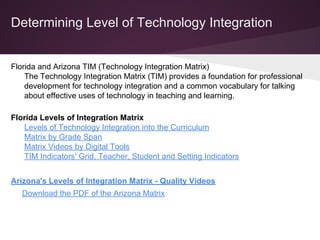
Determining Level of Technology Integration
Florida and Arizona TIM (Technology Integration Matrix)
The Technology Integration Matrix (TIM) provides a foundation for professional
development for technology integration and a common vocabulary for talking
about effective uses of technology in teaching and learning.
Florida Levels of Integration Matrix
Levels of Technology Integration into the Curriculum
Matrix by Grade Span
Matrix Videos by Digital Tools
TIM Indicators' Grid, Teacher, Student and Setting Indicators
Arizona's Levels of Integration Matrix - Quality Videos
Download the PDF of the Arizona Matrix
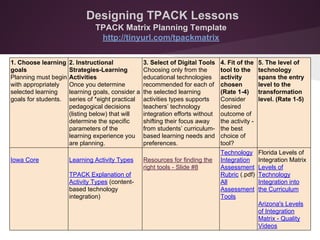
Designing TPACK Lessons
TPACK Matrix Planning Template
http://tinyurl.com/tpackmatrix
1. Choose learning
goals
Planning must begin
with appropriately
selected learning
goals for students.
2. Instructional
Strategies-Learning
Activities
Once you determine
learning goals, consider a
series of *eight practical
pedagogical decisions
(listing below) that will
determine the specific
parameters of the
learning experience you
are planning.
3. Select of Digital Tools
Choosing only from the
educational technologies
recommended for each of
the selected learning
activities types supports
teachers’ technology
integration efforts without
shifting their focus away
from students’ curriculum-
based learning needs and
preferences.
4. Fit of the
tool to the
activity
chosen
(Rate 1-4)
Consider
desired
outcome of
the activity -
the best
choice of
tool?
5. The level of
technology
spans the entry
level to the
transformation
level. (Rate 1-5)
Iowa Core Learning Activity Types
TPACK Explanation of
Activity Types (content-
based technology
integration)
Resources for finding the
right tools - Slide #8
Technology
Integration
Assessment
Rubric (.pdf)
All
Assessment
Tools
Florida Levels of
Integration Matrix
Levels of
Technology
Integration into
the Curriculum
Arizona's Levels
of Integration
Matrix - Quality
Videos
Thank you for coming!
Toy Waterman
Heartland AEA
twaterman@aea11.k12.ia.us

Itec tpack activities - tools

  • 1.
    Activity Types IdentifyTechnologies for Supporting the Iowa Core Content Areas http://tinyurl.com/itecactivitytypes
  • 2.
    Description Activity Types providelistings of technologies that support the Iowa Core. This session will explore the Core through the lens of technology by pairing technologies with specific concepts and skills in each core area. Several resource sites will be shared.
  • 3.
    How does TPACKsupport the Iowa Core?
  • 4.
    Instructional Planning ActivityTypes as Vehicles for Curriculum-Based TPACK Development (.pdf) Planning for students’ curriculum-based learning that integrates appropriate and pedagogically powerful use of the full range of educational technologies is challenging. Considerably detailed and deliberate planning decisions need to be made, based upon multiple decision points, and chosen wisely from among a full range of possible educational activities that incorporate technologies in powerful ways.
  • 5.
    Activity Types Planning aparticular learning event can be described as the end result of five basic instructional decisions: 1. Choosing learning goals (based on the Iowa Core) 2. Making practical pedagogical decisions about the nature of the learning experience 3. Selecting and sequencing appropriate activity types 4. Selecting formative and summative assessment strategies 5. Selecting tools and resources that will best help students to benefit from the learning experience
  • 6.
    The approach tohelping teachers to develop TPACK is to suggest that they use curriculum- specific, technology-enhanced learning activity types as the building blocks for instructional planning. Harris, J., & Hofer, M. (2009). David Warlick Should the Tools Drive the Learning?
  • 7.
    5 Steps toLesson Planning Using TPACK http://tinyurl.com/tpacklessonplanningform Harris, J., & Hofer, M. (2009). “Grounded” technology integration: Planning with curriculum-based learning activity types. Learning & Leading With Technology, 37(2), 22-25.
  • 8.
    Designing TPACK Lessons 1.Choose learning goals. Planning must begin with appropriately selected learning goals for students. Iowa Core 3. Instructional Strategies-Learning Activities After determining learning goals, consider a series of *eight practical pedagogical decisions (listing below) that will determine the specific parameters of the learning experience you are planning. Learning Activity Types Heartland Resource for Activity Types 5. Select tools/resources. Choosing educational technologies recommended for each of the selected learning activities types supports technology integration efforts without shifting focus away from students’ curriculum-based learning needs and preferences. Finding the Right Tool Example: Geography 6-8: Understand how geographic and human characteristics create culture and define regions. Students create Iowa Tour Guides designed for use with Iowa tourists. The Tour Guides should capture the geographic and cultural essence of each region of Iowa and connect to a tour group’s ancestral heritage. (e.g. the Dutch in Pella and the Norwegians in Decorah). TPACK Explanation of Activity Types (content-based technology integration)
  • 9.
    http://activitytypes.wmwikis.net =+ +CONTENT ACTIVITIESTOOLS TPACK Example: Geography - 6-8: Understand how geographic and human characteristics create culture and define regions. Students create Iowa Tour Guides designed for use with Iowa tourists. The Tour Guides should capture the geographic and cultural essence of each region of Iowa and connect to a tour group’s ancestral heritage. (e.g. the Dutch in Pella and the Norwegians in Decorah). Presentation tools: SlideRocket SlideShare VoiceThread VuVox Google Presentation MS Word MS PowerPoint Students will select the web tool best suited for the content s/he will be presenting. Content & Activities - Directly from the Iowa Core
  • 10.
    Finding Digital Technologies ●Findingthe Right Tool ●Heartland Activity Types Supporting the Iowa Core ●Mindomo Map of Web 2.0 Tools for Activity Types ●Symbaloo for Curricular Web Sites ●Symbaloo for Heartland Online Databases ●Heartland Online Databases (Mindomo) ●Heartland Web 2.0 in the Curriculum ●Scenarios Database ●Heartland Curricular Databases
  • 11.
    Next Step: Alignmentof Content, Pedagogy and Technology Fit (Content, Pedagogy, Technology) 1-4 Rating Technology Integration Assessment Rubric (.pdf) http://activitytypes.wmwikis.net/Assessments Adapted from: Britten, J. S., & Cassady, J. C. (2005). The Technology Integration Assessment Instrument: Understanding planned use of technology by classroom teachers. Computers in the Schools, 22(3), 49-61. Harris, J., Grandgenett, N., & Hofer, M. (2010). Rating of 4 Rating of 3 Rating of 2 Rating of 1
  • 12.
    Revisit the continuawhen rating "Fit" between "C" - "P" - "T"
  • 13.
    Designing TPACK Lessons 4.Determining the "Fit" of the tool to the activity chosen 1. Choose learning goals Planning must begin with appropriately selected learning goals for students. 2. Instructional Strategies- Learning Activities Once you determine learning goals, consider a series of *eight practical pedagogical decisions (listing below) that will determine the specific parameters of the learning experience you are planning. 3. Select of Digital Tools Choosing only from the educational technologies recommended for each of the selected learning activities types supports teachers’ technology integration efforts without shifting their focus away from students’ curriculum-based learning needs and preferences. 4. Fit of the tool to the activity chosen (1-4) When considering the desired outcome of the activity, is the the best choice of tool? 5. Example: Geography 6-8: Understand how geographic and human characteristics create culture and define regions. Students create Iowa Tour Guides designed for use with Iowa tourists. The Tour Guides should capture the geographic and cultural essence of each region of Iowa and connect to a tour group’s ancestral heritage. (e. g. the Dutch in Pella and the Norwegians in Decorah). SlideRocket SlideShare VoiceThread VuVox Google Presentation --------------------- MS Word MS PowerPoint 4 3 The tours are presented at a senior center to small groups of seniors. Videoconferencing another audience. Record the presentation for future use. Skype FlipCam PhotoBooth 4
  • 14.
    Determining Level ofTechnology Integration Florida and Arizona TIM (Technology Integration Matrix) The Technology Integration Matrix (TIM) provides a foundation for professional development for technology integration and a common vocabulary for talking about effective uses of technology in teaching and learning. Florida Levels of Integration Matrix Levels of Technology Integration into the Curriculum Matrix by Grade Span Matrix Videos by Digital Tools TIM Indicators' Grid, Teacher, Student and Setting Indicators Arizona's Levels of Integration Matrix - Quality Videos Download the PDF of the Arizona Matrix
  • 15.
    Designing TPACK Lessons TPACKMatrix Planning Template http://tinyurl.com/tpackmatrix 1. Choose learning goals Planning must begin with appropriately selected learning goals for students. 2. Instructional Strategies-Learning Activities Once you determine learning goals, consider a series of *eight practical pedagogical decisions (listing below) that will determine the specific parameters of the learning experience you are planning. 3. Select of Digital Tools Choosing only from the educational technologies recommended for each of the selected learning activities types supports teachers’ technology integration efforts without shifting their focus away from students’ curriculum- based learning needs and preferences. 4. Fit of the tool to the activity chosen (Rate 1-4) Consider desired outcome of the activity - the best choice of tool? 5. The level of technology spans the entry level to the transformation level. (Rate 1-5) Iowa Core Learning Activity Types TPACK Explanation of Activity Types (content- based technology integration) Resources for finding the right tools - Slide #8 Technology Integration Assessment Rubric (.pdf) All Assessment Tools Florida Levels of Integration Matrix Levels of Technology Integration into the Curriculum Arizona's Levels of Integration Matrix - Quality Videos
  • 16.
    Thank you forcoming! Toy Waterman Heartland AEA twaterman@aea11.k12.ia.us