Bastian Feder, Papaya Software GmbH
Nils Langner, Gruner + Jahr
Sven Kiera, TWT Interactive GmbH

Advanced Eclipse Workshop

                                      IPC spring edition 2010
                                                  30.06.2010
Who are we?

    Bastian Feder              Nils Langner

    Application developer     Qualitätsmanagement
    PHP since 2001            PHP since 2002
    Open Source addict        Founder
                                 www.phphatesme.com


    Sven Kiera

    Web developer
    PHP and Java since 1998
    Author of PHP Tool
      Integration (PTI)
Who are you?
Installation
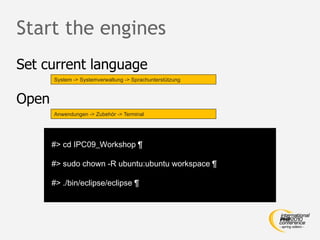
Start the engines
Set current language
       System -> Systemverwaltung -> Sprachunterstützung


Open
       Anwendungen -> Zubehör -> Terminal


       #> cd IPC09_Workshop 

       #> sudo chown -R ubuntu:ubuntu workspace 

       #> ./bin/eclipse/eclipse 
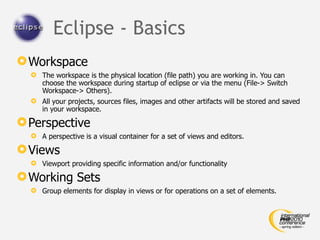
Eclipse - Basics
 Workspace
   The workspace is the physical location (file path) you are working in. You can
    choose the workspace during startup of eclipse or via the menu (File-> Switch
    Workspace-> Others).
   All your projects, sources files, images and other artifacts will be stored and saved
    in your workspace.

 Perspective
   A perspective is a visual container for a set of views and editors.

 Views
   Viewport providing specific information and/or functionality

 Working Sets
   Group elements for display in views or for operations on a set of elements.
Your Choice …
 External Tools
 SVN and PDT
 Shortcuts
 Templates
 PTI (PHP Tool Integration)
 Validators
 Xdebug
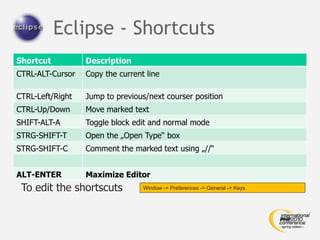
Eclipse - Shortcuts
Shortcut          Description
CTRL-ALT-Cursor   Copy the current line

CTRL-Left/Right   Jump to previous/next courser position
CTRL-Up/Down      Move marked text
SHIFT-ALT-A       Toggle block edit and normal mode
STRG-SHIFT-T      Open the „Open Type“ box
STRG-SHIFT-C      Comment the marked text using „//“


ALT-ENTER         Maximize Editor
 To edit the shortscuts           Window -> Preferences -> General -> Keys
Templates
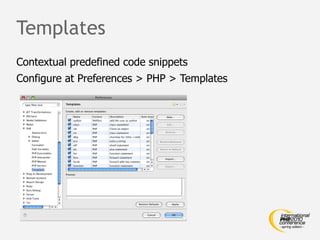
Contextual predefined code snippets
Configure at Preferences > PHP > Templates
File Templates

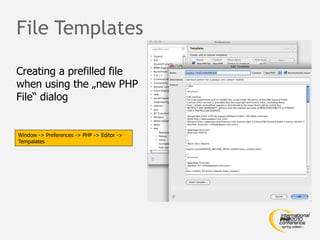
Creating a prefilled file
when using the „new PHP
File“ dialog


Window -> Preferences -> PHP -> Editor ->
Tempalates
Code Templates
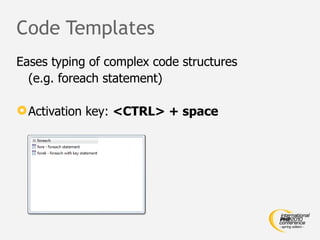
Eases typing of complex code structures
  (e.g. foreach statement)

 Activation key: <CTRL> + space
Validators

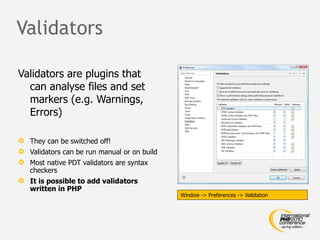
Validators are plugins that
  can analyse files and set
  markers (e.g. Warnings,
  Errors)

 They can be switched off!
 Validators can be run manual or on build
 Most native PDT validators are syntax
  checkers
 It is possible to add validators
  written in PHP
                                             Window -> Preferences -> Validation
PTI & Dynamic Language Toolkit
 Eclipse Plugins für Eclipse PDT 2.x und Zend Studio 7.x
 Ziel: Direkte Nutzung von PHP Tools in Eclipse PDT
 Aktuelle Unterstützung:
      PHP_CodeSniffer
      PHPDepend
      PHPUnit
      PHP Copy / Paste Detector
 PEAR Verwaltung inkl. aktueller PEAR Bibliothek
 Erweitert Eclipse DLTK External Checker um direkte
  Nutzung von PHP Skripten
 Open Source (EPL)
Creating a Validator
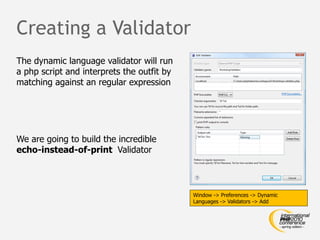
The dynamic language validator will run
a php script and interprets the outfit by
matching against an regular expression


We are going to build the incredible
echo-instead-of-print Validator


                                            Window -> Preferences -> Dynamic
                                            Languages -> Validators -> Add
Subversion                               (client configuration)


 Set        „auto-properties“
       WinXp:                        C:Dokumente & Einstellungen<USER>AnwendungsdatenSubversionconfig


       MacOs / Linux:                                            ~/.subversionconfig


[miscellany]
global-ignores = *.o *.lo *.la #*# .*.rej *.rej .*~ *~ .#* .DS_Store .project .cache .settings
enable-auto-props = yes

[auto-props]
*.js = svn:eol-style=LF;svn:keywords=Id LastChangedDate LastChangedRevision URL
*.css = svn:eol-style=LF;svn:keywords=Id LastChangedDate LastChangedRevision URL
*.php = svn:eol-style=LF;svn:keywords=Id LastChangedDate LastChangedRevision URL
*.html = svn:eol-style=LF;svn:mime-type=text/html;svn:keywords=LastChangedDate LastChangedRevision URL
*.htm = svn:eol-style=LF;svn:mime-type=text/html;svn:keywords=LastChangedDate LastChangedRevision URL
*.xsl = svn:eol-style=LF
*.xml = svn:eol-style=LF
*.xsd = svn:eol-style=LF
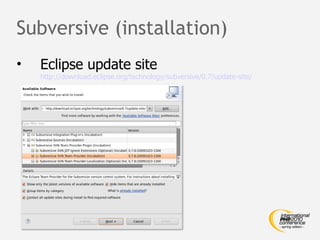
Subversive (installation)
•   Eclipse update site
    http://download.eclipse.org/technology/subversive/0.7/update-site/
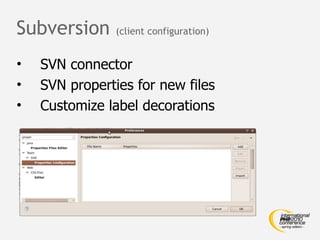
Subversion      (client configuration)


•   SVN connector
•   SVN properties for new files
•   Customize label decorations
Subversion & Subversive
 Setup
 Common      handling
   Checkout
   Commit / revert changes
 Conflict
         handling
 Extended usage
     Branching, tagging, merging, patching
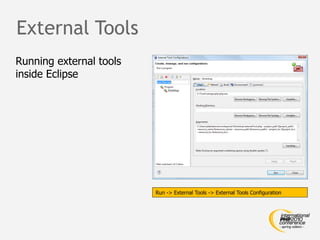
External Tools
Running external tools
inside Eclipse


                         Run -> External Tools -> External Tools Configuration
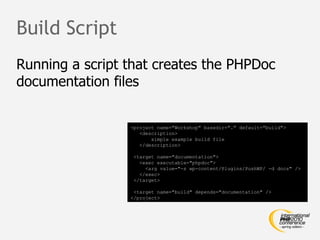
Build Script
Running a script that creates the PHPDoc
documentation files


                 <project name="Workshop" basedir="." default="build">
                    <description>
                        simple example build file
                    </description>

                  <target name="documentation">
                    <exec executable="phpdoc">
                      <arg value="-s wp-content/Plugins/PushWP/ -d docs" />
                    </exec>
                  </target>

                  <target name="build" depends="documentation" />
                 </project>
Code Beautifier
The one missing thing in PDT
Debugging
 Debugging   techniques
 Xdebug
 How   to enable Eclipse for debugging
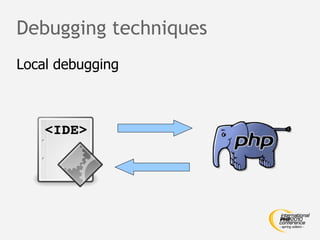
Debugging techniques
Local debugging
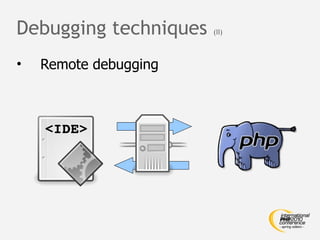
Debugging techniques   (II)


•   Remote debugging
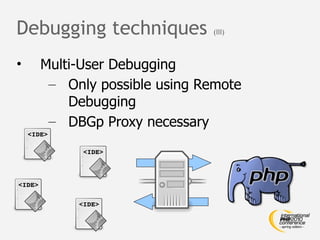
Debugging techniques        (III)


•   Multi-User Debugging
     – Only possible using Remote
        Debugging
     – DBGp Proxy necessary
Xdebug
 Debugging for PHP by Derick Rethans
  (http://www.xdebug.org)
 Provides profiling, tracing, code coverage,
  …
 Cross platform
Obtaining Xdebug
 PECL
 Download    from xdebug.org
    Installation support at
     http://xdebug.org/find-binary.php
 Package   system of Linux distribution
Xdebug configuration
Add to php.ini (e.g. on Mac)

 [XDebug]
 ;; Only Zend OR (!) XDebug
 zend_extension="/usr/lib/php/php5/extensions/no-debug-non-zts-20060613/xdebug.so"
 xdebug.remote_enable=true
 xdebug.remote_host=127.0.0.1 ;if debugging on remote server, put client IP here
 xdebug.remote_port=9000
 xdebug.remote_handler=dbgp
 ;; profiler
 xdebug.profiler_enable=Off
 xdebug.profiler_enable_trigger=On
 xdebug.profiler_output_dir=/data_lokal/temp/xdebug/profiling
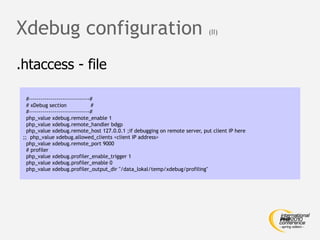
Xdebug configuration                                                        (II)


.htaccess - file

   #-------------------------------#
   # xDebug section                #
   #-------------------------------#
   php_value xdebug.remote_enable 1
   php_value xdebug.remote_handler bdgp
   php_value xdebug.remote_host 127.0.0.1 ;if debugging on remote server, put client IP here
 ;; php_value xdebug.allowed_clients <client IP address>
   php_value xdebug.remote_port 9000
   # profiler
   php_value xdebug.profiler_enable_trigger 1
   php_value xdebug.profiler_enable 0
   php_value xdebug.profiler_output_dir "/data_lokal/temp/xdebug/profiling"
Xdebug


         Hands on
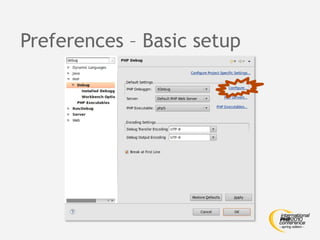
Preferences – Basic setup
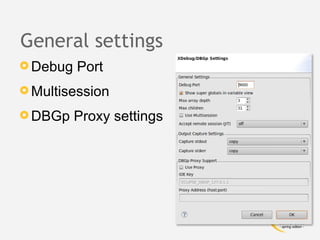
General settings
 Debug   Port
 Multisession

 DBGp    Proxy settings
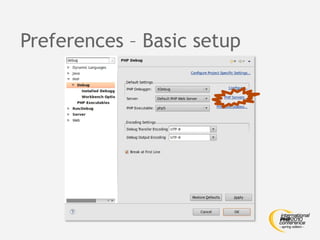
Preferences – Basic setup
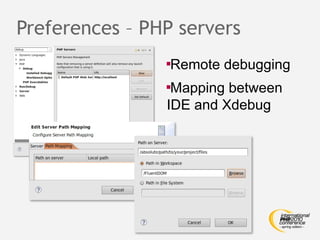
Preferences – PHP servers
                
                 Remote debugging
                
                 Mapping between
                IDE and Xdebug
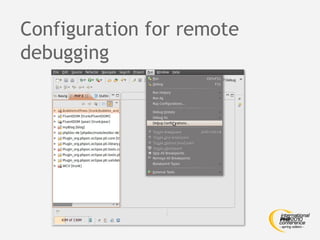
Configuration for remote
debugging
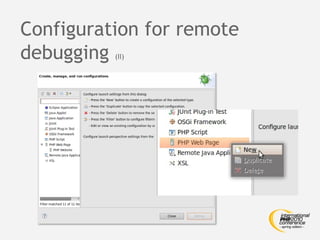
Configuration for remote
debugging (II)
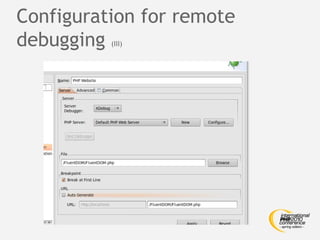
Configuration for remote
debugging (III)
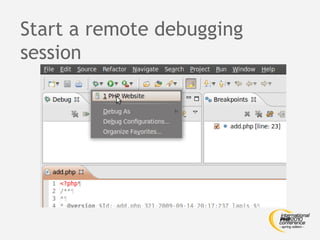
Start a remote debugging
session
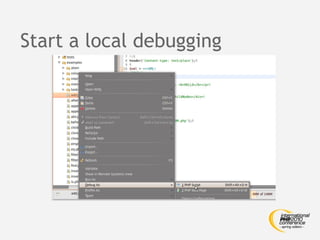
Start a local debugging
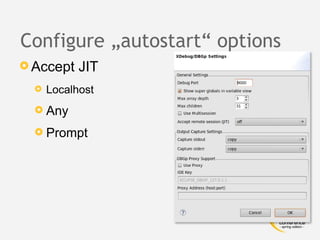
Configure „autostart“ options
 Accept    JIT
     Localhost
   Any

   Prompt
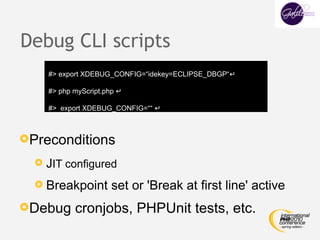
Debug CLI scripts
    #> export XDEBUG_CONFIG=“idekey=ECLIPSE_DBGP“↵

    #> php myScript.php ↵

    #> export XDEBUG_CONFIG=““ ↵


Preconditions

   JIT configured

   Breakpoint        set or 'Break at first line' active
Debug     cronjobs, PHPUnit tests, etc.
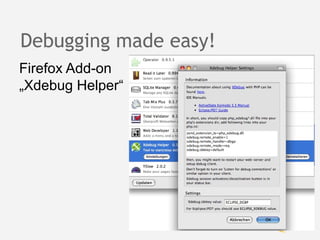
Debugging made easy!
Firefox Add-on
„Xdebug Helper“
Questions?


             Further questions? Ask us at:

             php@bastian-feder.de

             nils@phphatesme.com

             sven@kiera.de
Contact'n Rate
•    Contact
    – Websites:
           •   http://www.phphatesme.com
           •   http://blog.bastian-feder.de
           •   http://www.phpsrc.org


•    Rate the workshop @
     http://joind.in/talk/view/1749
License
This set of slides and the source code
    included in the download package is
    licensed under the

   Creative Commons Attribution-
   Noncommercial-Share Alike 2.0
   Generic License


   http://creativecommons.org/licenses/by-nc-sa/2.0/deed

Advanced Eclipse Workshop (held at IPC2010 -spring edition-)

  • 1.
    Bastian Feder, PapayaSoftware GmbH Nils Langner, Gruner + Jahr Sven Kiera, TWT Interactive GmbH Advanced Eclipse Workshop IPC spring edition 2010 30.06.2010
  • 2.
    Who are we? Bastian Feder Nils Langner Application developer Qualitätsmanagement PHP since 2001 PHP since 2002 Open Source addict Founder www.phphatesme.com Sven Kiera Web developer PHP and Java since 1998 Author of PHP Tool Integration (PTI)
  • 3.
  • 4.
  • 5.
    Start the engines Setcurrent language System -> Systemverwaltung -> Sprachunterstützung Open Anwendungen -> Zubehör -> Terminal #> cd IPC09_Workshop ¶ #> sudo chown -R ubuntu:ubuntu workspace ¶ #> ./bin/eclipse/eclipse 
  • 6.
    Eclipse - Basics Workspace  The workspace is the physical location (file path) you are working in. You can choose the workspace during startup of eclipse or via the menu (File-> Switch Workspace-> Others).  All your projects, sources files, images and other artifacts will be stored and saved in your workspace.  Perspective  A perspective is a visual container for a set of views and editors.  Views  Viewport providing specific information and/or functionality  Working Sets  Group elements for display in views or for operations on a set of elements.
  • 7.
    Your Choice … External Tools  SVN and PDT  Shortcuts  Templates  PTI (PHP Tool Integration)  Validators  Xdebug
  • 8.
    Eclipse - Shortcuts Shortcut Description CTRL-ALT-Cursor Copy the current line CTRL-Left/Right Jump to previous/next courser position CTRL-Up/Down Move marked text SHIFT-ALT-A Toggle block edit and normal mode STRG-SHIFT-T Open the „Open Type“ box STRG-SHIFT-C Comment the marked text using „//“ ALT-ENTER Maximize Editor To edit the shortscuts Window -> Preferences -> General -> Keys
  • 9.
    Templates Contextual predefined codesnippets Configure at Preferences > PHP > Templates
  • 10.
    File Templates Creating aprefilled file when using the „new PHP File“ dialog Window -> Preferences -> PHP -> Editor -> Tempalates
  • 11.
    Code Templates Eases typingof complex code structures (e.g. foreach statement)  Activation key: <CTRL> + space
  • 13.
    Validators Validators are pluginsthat can analyse files and set markers (e.g. Warnings, Errors)  They can be switched off!  Validators can be run manual or on build  Most native PDT validators are syntax checkers  It is possible to add validators written in PHP Window -> Preferences -> Validation
  • 14.
    PTI & DynamicLanguage Toolkit  Eclipse Plugins für Eclipse PDT 2.x und Zend Studio 7.x  Ziel: Direkte Nutzung von PHP Tools in Eclipse PDT  Aktuelle Unterstützung:  PHP_CodeSniffer  PHPDepend  PHPUnit  PHP Copy / Paste Detector  PEAR Verwaltung inkl. aktueller PEAR Bibliothek  Erweitert Eclipse DLTK External Checker um direkte Nutzung von PHP Skripten  Open Source (EPL)
  • 15.
    Creating a Validator Thedynamic language validator will run a php script and interprets the outfit by matching against an regular expression We are going to build the incredible echo-instead-of-print Validator Window -> Preferences -> Dynamic Languages -> Validators -> Add
  • 16.
    Subversion (client configuration)  Set „auto-properties“  WinXp: C:Dokumente & Einstellungen<USER>AnwendungsdatenSubversionconfig  MacOs / Linux: ~/.subversionconfig [miscellany] global-ignores = *.o *.lo *.la #*# .*.rej *.rej .*~ *~ .#* .DS_Store .project .cache .settings enable-auto-props = yes [auto-props] *.js = svn:eol-style=LF;svn:keywords=Id LastChangedDate LastChangedRevision URL *.css = svn:eol-style=LF;svn:keywords=Id LastChangedDate LastChangedRevision URL *.php = svn:eol-style=LF;svn:keywords=Id LastChangedDate LastChangedRevision URL *.html = svn:eol-style=LF;svn:mime-type=text/html;svn:keywords=LastChangedDate LastChangedRevision URL *.htm = svn:eol-style=LF;svn:mime-type=text/html;svn:keywords=LastChangedDate LastChangedRevision URL *.xsl = svn:eol-style=LF *.xml = svn:eol-style=LF *.xsd = svn:eol-style=LF
  • 17.
    Subversive (installation) • Eclipse update site http://download.eclipse.org/technology/subversive/0.7/update-site/
  • 18.
    Subversion (client configuration) • SVN connector • SVN properties for new files • Customize label decorations
  • 19.
    Subversion & Subversive Setup  Common handling  Checkout  Commit / revert changes  Conflict handling  Extended usage  Branching, tagging, merging, patching
  • 20.
    External Tools Running externaltools inside Eclipse Run -> External Tools -> External Tools Configuration
  • 21.
    Build Script Running ascript that creates the PHPDoc documentation files <project name="Workshop" basedir="." default="build"> <description> simple example build file </description> <target name="documentation"> <exec executable="phpdoc"> <arg value="-s wp-content/Plugins/PushWP/ -d docs" /> </exec> </target> <target name="build" depends="documentation" /> </project>
  • 22.
    Code Beautifier The onemissing thing in PDT
  • 23.
    Debugging  Debugging techniques  Xdebug  How to enable Eclipse for debugging
  • 24.
  • 25.
    Debugging techniques (II) • Remote debugging
  • 26.
    Debugging techniques (III) • Multi-User Debugging – Only possible using Remote Debugging – DBGp Proxy necessary
  • 27.
    Xdebug  Debugging forPHP by Derick Rethans (http://www.xdebug.org)  Provides profiling, tracing, code coverage, …  Cross platform
  • 28.
    Obtaining Xdebug  PECL Download from xdebug.org  Installation support at http://xdebug.org/find-binary.php  Package system of Linux distribution
  • 29.
    Xdebug configuration Add tophp.ini (e.g. on Mac) [XDebug] ;; Only Zend OR (!) XDebug zend_extension="/usr/lib/php/php5/extensions/no-debug-non-zts-20060613/xdebug.so" xdebug.remote_enable=true xdebug.remote_host=127.0.0.1 ;if debugging on remote server, put client IP here xdebug.remote_port=9000 xdebug.remote_handler=dbgp ;; profiler xdebug.profiler_enable=Off xdebug.profiler_enable_trigger=On xdebug.profiler_output_dir=/data_lokal/temp/xdebug/profiling
  • 30.
    Xdebug configuration (II) .htaccess - file #-------------------------------# # xDebug section # #-------------------------------# php_value xdebug.remote_enable 1 php_value xdebug.remote_handler bdgp php_value xdebug.remote_host 127.0.0.1 ;if debugging on remote server, put client IP here ;; php_value xdebug.allowed_clients <client IP address> php_value xdebug.remote_port 9000 # profiler php_value xdebug.profiler_enable_trigger 1 php_value xdebug.profiler_enable 0 php_value xdebug.profiler_output_dir "/data_lokal/temp/xdebug/profiling"
  • 31.
    Xdebug Hands on
  • 32.
  • 33.
    General settings  Debug Port  Multisession  DBGp Proxy settings
  • 34.
  • 35.
    Preferences – PHPservers  Remote debugging  Mapping between IDE and Xdebug
  • 36.
  • 37.
  • 38.
  • 39.
    Start a remotedebugging session
  • 40.
    Start a localdebugging
  • 41.
    Configure „autostart“ options Accept JIT  Localhost  Any  Prompt
  • 42.
    Debug CLI scripts #> export XDEBUG_CONFIG=“idekey=ECLIPSE_DBGP“↵ #> php myScript.php ↵ #> export XDEBUG_CONFIG=““ ↵ Preconditions  JIT configured  Breakpoint set or 'Break at first line' active Debug cronjobs, PHPUnit tests, etc.
  • 43.
    Debugging made easy! FirefoxAdd-on „Xdebug Helper“
  • 44.
    Questions? Further questions? Ask us at: php@bastian-feder.de nils@phphatesme.com sven@kiera.de
  • 45.
    Contact'n Rate • Contact – Websites: • http://www.phphatesme.com • http://blog.bastian-feder.de • http://www.phpsrc.org • Rate the workshop @ http://joind.in/talk/view/1749
  • 46.
    License This set ofslides and the source code included in the download package is licensed under the Creative Commons Attribution- Noncommercial-Share Alike 2.0 Generic License http://creativecommons.org/licenses/by-nc-sa/2.0/deed