Connecting to the IoT
twitter
@UniSurreyIoT
Contact email
t.elsaleh@surrey.ac.uk
Tutorial: IoT Discovery
slideshare
UniSurreyIoT
Things connected?
• Data sent to context broker?
• What if you want to expose direct
access to you things?
• You need to advertise them
– Register their availability
• Let users/applications know what
your thing is about
– And how to reach it
Outline
• About
• NGSI-9
• Deployment
• Register
• Discovery
• Subscribe
• Update subscription
• Notify
3
IoT Discovery
About
• Technically: a service discovery mechanism
– for announcing availability of context sources
via service endpoints
– Employs NGSI-9
• Synonyms: directory, registry, repository
• Analogy: “yellow pages”
– Info about service provided, and how to
contact, but does not provide data
• IoT Architecture
– Implementation of Configuration Manager GE
IoT Discovery
NGSI-9/10
• NGSI-9
– Context source availability
– Register, discover
• NGSI-10
– Context information retrieval
– Query, subscribe
• NGSI-9 is adopted in IoT Discovery
Why NGSI-9?
• Discover what is available
– Before querying for data
– Know where actual context sources are
• Not only relying on Context Broker
– Know what entities are available and
what attributes they have beforehand
– Avoid unnecessary network overload of
IoT services.
• IoT Services might be constrained
Target Users
• NGSI-9 Clients
– Context Producers
• Any IoT Agent
– Exposes a service endpoint for data/actuation provision via NGSI-10
(“data interface”)
– e.g. gateway
• Data Handling GE
– Register resources; sensing sources, actuators, processing elements
(composite of sensing sources)
• Backend device management GE
– Register sensing sources, aggregated sensing sources
– Context Consumers
• Applications
• IoT Broker
– Discover entities on behalf of the consumers
– retrieves, assembles, and processes information from the providers
– offers consumers a simple interface and masking the complexity and
heterogeneity of the IoT
• Context Broker
– Subscribes for notification of context source availability
1(a). Deploy IoT Discovery from image
• Prerequisite
– To have a FIWARE Lab account
• Steps
– Go to IoT Discovery catalogue page
– Follow the steps in “Deploying a dedicated GE
instance based on an image” in the “Creating
Instances tab”
– Check IoT Discovery is working using the
“/sanityCheck” operation from your local computer
• http://hostname:8080/ngsi9/sanityCheck
• Hints
– Remember to set the security group properly
(typically to allow port 8080)
1(b). Deploy on your own running instance
• Alternative in the case you already have a VM in
FIWARE Lab and don’t want to deploy another want
• Refer to Installation & Admin Guide
• Prerequisite
– Java 8
– mysql-server/client, tomcat7
– Tested on Ubuntu 14.04 VM and Windows 7
• Steps
– Download and extract package
– Copy war files to tomcat /webapps folder
• Hints
– Refer to installation and admin guide
– Remember to set the security group properly (typically
to port 8080)
1(c). Interact with global instance
• Pre-requisites
– FIWARE Lab account
– Get Authentication token
– Auth-token inserted in request header
• X-Auth-Token: SAFJxc323dfiDS32IDEWF..
• Address of global instance
– iot-discovery.lab.fiware.org
– Port 80
IoT-Discovery API for NGSI-9
Interface
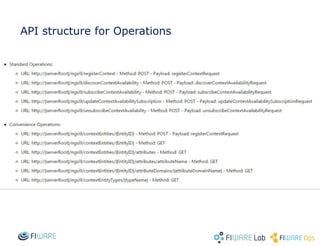
• Operations for context source availability
– Registration
– Discovery
– Subscription
– Update Subscription
– Unsubscribe
– Notification
• Standard
– POST
• Convenience
– GET, POST, UPDATE, DELETE (more RESTful)
What you will need to start
• A REST client
– Browser plugin
– Client program in your programming
language.
API structure for Operations
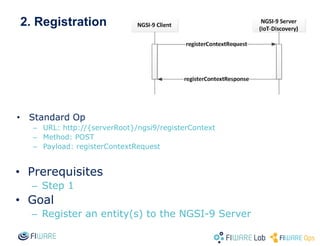
2. Registration
• Prerequisites
– Step 1
• Goal
– Register an entity(s) to the NGSI-9 Server
• Standard Op
– URL: http://{serverRoot}/ngsi9/registerContext
– Method: POST
– Payload: registerContextRequest
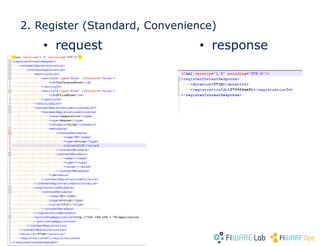
2. Register (Standard, Convenience)
• request • response
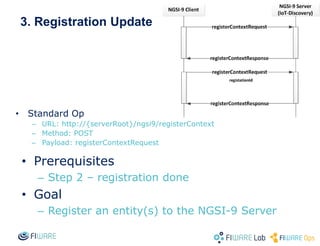
3. Registration Update
• Prerequisites
– Step 2 – registration done
• Goal
– Register an entity(s) to the NGSI-9 Server
• Standard Op
– URL: http://{serverRoot}/ngsi9/registerContext
– Method: POST
– Payload: registerContextRequest
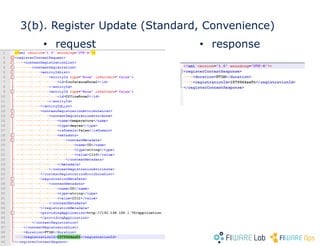
3(b). Register Update (Standard, Convenience)
• request • response
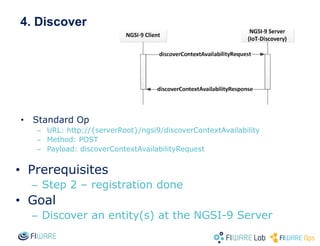
4. Discover
• Prerequisites
– Step 2 – registration done
• Goal
– Discover an entity(s) at the NGSI-9 Server
• Standard Op
– URL: http://{serverRoot}/ngsi9/discoverContextAvailability
– Method: POST
– Payload: discoverContextAvailabilityRequest
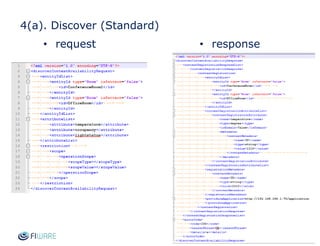
4(a). Discover (Standard)
• request • response
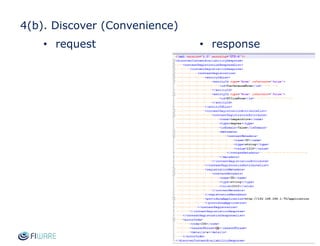
4(b). Discover (Convenience)
• request • response
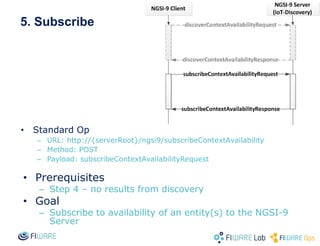
5. Subscribe
• Prerequisites
– Step 4 – no results from discovery
• Goal
– Subscribe to availability of an entity(s) to the NGSI-9
Server
• Standard Op
– URL: http://{serverRoot}/ngsi9/subscribeContextAvailability
– Method: POST
– Payload: subscribeContextAvailabilityRequest
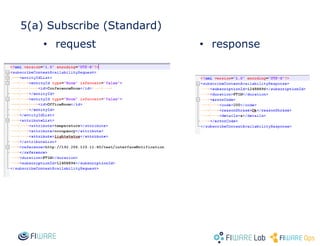
5(a) Subscribe (Standard)
• request • response
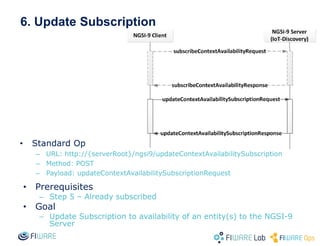
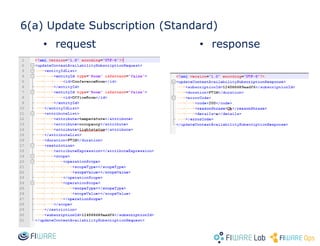
6. Update Subscription
• Prerequisites
– Step 5 – Already subscribed
• Goal
– Update Subscription to availability of an entity(s) to the NGSI-9
Server
• Standard Op
– URL: http://{serverRoot}/ngsi9/updateContextAvailabilitySubscription
– Method: POST
– Payload: updateContextAvailabilitySubscriptionRequest
6(a) Update Subscription (Standard)
• request • response
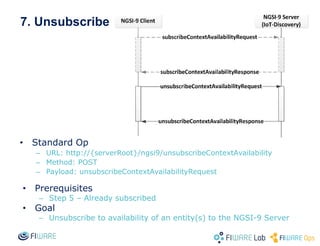
7. Unsubscribe
• Prerequisites
– Step 5 – Already subscribed
• Goal
– Unsubscribe to availability of an entity(s) to the NGSI-9 Server
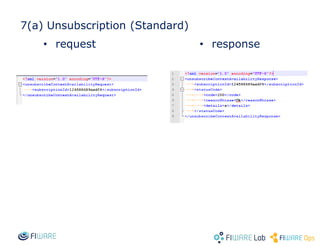
• Standard Op
– URL: http://{serverRoot}/ngsi9/unsubscribeContextAvailability
– Method: POST
– Payload: unsubscribeContextAvailabilityRequest
7(a) Unsubscription (Standard)
• request • response
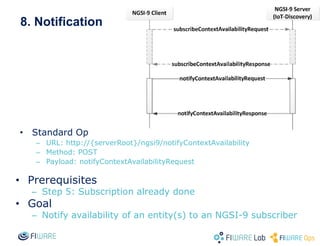
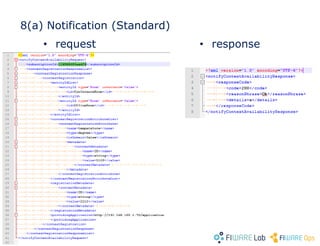
8. Notification
• Prerequisites
– Step 5: Subscription already done
• Goal
– Notify availability of an entity(s) to an NGSI-9 subscriber
• Standard Op
– URL: http://{serverRoot}/ngsi9/notifyContextAvailability
– Method: POST
– Payload: notifyContextAvailabilityRequest
8(a) Notification (Standard)
• request • response
Resources
• Slideshare:
• http://www.slideshare.net/UniSurreyIo
T/iotdiscoverytutorial
• FIWARE Wiki
– Catalogue
– Installation and Admin guide
– FI-WARE NGSI Open RESTful API
Specification
– User’s and Programmer’s guide
– Unit Tests for NGSI-9 Server
Thanks!Thanks!
FIWARE and IoT
• Provide Generic Enablers for IoT
Service Enablement
• enable “things” to become citizens of
the Internet
– available, searchable, accessible, and
usable
• for Applications to create value from
real-world interaction
– enabled by ubiquity of heterogeneous and
resource-constrained devices.

IoT Discovery tutorial

  • 1.
    Connecting to theIoT twitter @UniSurreyIoT Contact email t.elsaleh@surrey.ac.uk Tutorial: IoT Discovery slideshare UniSurreyIoT
  • 2.
    Things connected? • Datasent to context broker? • What if you want to expose direct access to you things? • You need to advertise them – Register their availability • Let users/applications know what your thing is about – And how to reach it
  • 3.
    Outline • About • NGSI-9 •Deployment • Register • Discovery • Subscribe • Update subscription • Notify 3 IoT Discovery
  • 4.
    About • Technically: aservice discovery mechanism – for announcing availability of context sources via service endpoints – Employs NGSI-9 • Synonyms: directory, registry, repository • Analogy: “yellow pages” – Info about service provided, and how to contact, but does not provide data • IoT Architecture – Implementation of Configuration Manager GE IoT Discovery
  • 5.
    NGSI-9/10 • NGSI-9 – Contextsource availability – Register, discover • NGSI-10 – Context information retrieval – Query, subscribe • NGSI-9 is adopted in IoT Discovery
  • 6.
    Why NGSI-9? • Discoverwhat is available – Before querying for data – Know where actual context sources are • Not only relying on Context Broker – Know what entities are available and what attributes they have beforehand – Avoid unnecessary network overload of IoT services. • IoT Services might be constrained
  • 7.
    Target Users • NGSI-9Clients – Context Producers • Any IoT Agent – Exposes a service endpoint for data/actuation provision via NGSI-10 (“data interface”) – e.g. gateway • Data Handling GE – Register resources; sensing sources, actuators, processing elements (composite of sensing sources) • Backend device management GE – Register sensing sources, aggregated sensing sources – Context Consumers • Applications • IoT Broker – Discover entities on behalf of the consumers – retrieves, assembles, and processes information from the providers – offers consumers a simple interface and masking the complexity and heterogeneity of the IoT • Context Broker – Subscribes for notification of context source availability
  • 8.
    1(a). Deploy IoTDiscovery from image • Prerequisite – To have a FIWARE Lab account • Steps – Go to IoT Discovery catalogue page – Follow the steps in “Deploying a dedicated GE instance based on an image” in the “Creating Instances tab” – Check IoT Discovery is working using the “/sanityCheck” operation from your local computer • http://hostname:8080/ngsi9/sanityCheck • Hints – Remember to set the security group properly (typically to allow port 8080)
  • 9.
    1(b). Deploy onyour own running instance • Alternative in the case you already have a VM in FIWARE Lab and don’t want to deploy another want • Refer to Installation & Admin Guide • Prerequisite – Java 8 – mysql-server/client, tomcat7 – Tested on Ubuntu 14.04 VM and Windows 7 • Steps – Download and extract package – Copy war files to tomcat /webapps folder • Hints – Refer to installation and admin guide – Remember to set the security group properly (typically to port 8080)
  • 10.
    1(c). Interact withglobal instance • Pre-requisites – FIWARE Lab account – Get Authentication token – Auth-token inserted in request header • X-Auth-Token: SAFJxc323dfiDS32IDEWF.. • Address of global instance – iot-discovery.lab.fiware.org – Port 80
  • 11.
  • 12.
    Interface • Operations forcontext source availability – Registration – Discovery – Subscription – Update Subscription – Unsubscribe – Notification • Standard – POST • Convenience – GET, POST, UPDATE, DELETE (more RESTful)
  • 13.
    What you willneed to start • A REST client – Browser plugin – Client program in your programming language.
  • 14.
  • 15.
    2. Registration • Prerequisites –Step 1 • Goal – Register an entity(s) to the NGSI-9 Server • Standard Op – URL: http://{serverRoot}/ngsi9/registerContext – Method: POST – Payload: registerContextRequest
  • 16.
    2. Register (Standard,Convenience) • request • response
  • 17.
    3. Registration Update •Prerequisites – Step 2 – registration done • Goal – Register an entity(s) to the NGSI-9 Server • Standard Op – URL: http://{serverRoot}/ngsi9/registerContext – Method: POST – Payload: registerContextRequest
  • 18.
    3(b). Register Update(Standard, Convenience) • request • response
  • 19.
    4. Discover • Prerequisites –Step 2 – registration done • Goal – Discover an entity(s) at the NGSI-9 Server • Standard Op – URL: http://{serverRoot}/ngsi9/discoverContextAvailability – Method: POST – Payload: discoverContextAvailabilityRequest
  • 20.
    4(a). Discover (Standard) •request • response
  • 21.
  • 22.
    5. Subscribe • Prerequisites –Step 4 – no results from discovery • Goal – Subscribe to availability of an entity(s) to the NGSI-9 Server • Standard Op – URL: http://{serverRoot}/ngsi9/subscribeContextAvailability – Method: POST – Payload: subscribeContextAvailabilityRequest
  • 23.
    5(a) Subscribe (Standard) •request • response
  • 24.
    6. Update Subscription •Prerequisites – Step 5 – Already subscribed • Goal – Update Subscription to availability of an entity(s) to the NGSI-9 Server • Standard Op – URL: http://{serverRoot}/ngsi9/updateContextAvailabilitySubscription – Method: POST – Payload: updateContextAvailabilitySubscriptionRequest
  • 25.
    6(a) Update Subscription(Standard) • request • response
  • 26.
    7. Unsubscribe • Prerequisites –Step 5 – Already subscribed • Goal – Unsubscribe to availability of an entity(s) to the NGSI-9 Server • Standard Op – URL: http://{serverRoot}/ngsi9/unsubscribeContextAvailability – Method: POST – Payload: unsubscribeContextAvailabilityRequest
  • 27.
  • 28.
    8. Notification • Prerequisites –Step 5: Subscription already done • Goal – Notify availability of an entity(s) to an NGSI-9 subscriber • Standard Op – URL: http://{serverRoot}/ngsi9/notifyContextAvailability – Method: POST – Payload: notifyContextAvailabilityRequest
  • 29.
  • 30.
    Resources • Slideshare: • http://www.slideshare.net/UniSurreyIo T/iotdiscoverytutorial •FIWARE Wiki – Catalogue – Installation and Admin guide – FI-WARE NGSI Open RESTful API Specification – User’s and Programmer’s guide – Unit Tests for NGSI-9 Server
  • 31.
  • 32.
    FIWARE and IoT •Provide Generic Enablers for IoT Service Enablement • enable “things” to become citizens of the Internet – available, searchable, accessible, and usable • for Applications to create value from real-world interaction – enabled by ubiquity of heterogeneous and resource-constrained devices.

Editor's Notes

  • #9 1. En la primera slide poned una lista de puntos de lo que se puede hacer con ese GE/set de GEs. Me refiero en plan titulares, sin muchas explicaciones. 2. Mostrad un ejemplo representativo de uno o varios de los puntos anteriores.     Recordad: si lo hacéis como demo, poned slides con capturas y explicaciones también (así sirve también por si la demo os falla en ese momento ;-) ). 3. Mostrad un enlace donde pondremos esta semana las slides de la Campus que tienen los detalles de todos los puntos mencionados en 1.    (Poned la lista de ficheros pero dejad el enlace en blanco que ya lo pondremos a última hora).
  • #10 1. En la primera slide poned una lista de puntos de lo que se puede hacer con ese GE/set de GEs. Me refiero en plan titulares, sin muchas explicaciones. 2. Mostrad un ejemplo representativo de uno o varios de los puntos anteriores.     Recordad: si lo hacéis como demo, poned slides con capturas y explicaciones también (así sirve también por si la demo os falla en ese momento ;-) ). 3. Mostrad un enlace donde pondremos esta semana las slides de la Campus que tienen los detalles de todos los puntos mencionados en 1.    (Poned la lista de ficheros pero dejad el enlace en blanco que ya lo pondremos a última hora).
  • #16 1. En la primera slide poned una lista de puntos de lo que se puede hacer con ese GE/set de GEs. Me refiero en plan titulares, sin muchas explicaciones. 2. Mostrad un ejemplo representativo de uno o varios de los puntos anteriores.     Recordad: si lo hacéis como demo, poned slides con capturas y explicaciones también (así sirve también por si la demo os falla en ese momento ;-) ). 3. Mostrad un enlace donde pondremos esta semana las slides de la Campus que tienen los detalles de todos los puntos mencionados en 1.    (Poned la lista de ficheros pero dejad el enlace en blanco que ya lo pondremos a última hora).
  • #18 1. En la primera slide poned una lista de puntos de lo que se puede hacer con ese GE/set de GEs. Me refiero en plan titulares, sin muchas explicaciones. 2. Mostrad un ejemplo representativo de uno o varios de los puntos anteriores.     Recordad: si lo hacéis como demo, poned slides con capturas y explicaciones también (así sirve también por si la demo os falla en ese momento ;-) ). 3. Mostrad un enlace donde pondremos esta semana las slides de la Campus que tienen los detalles de todos los puntos mencionados en 1.    (Poned la lista de ficheros pero dejad el enlace en blanco que ya lo pondremos a última hora).
  • #20 1. En la primera slide poned una lista de puntos de lo que se puede hacer con ese GE/set de GEs. Me refiero en plan titulares, sin muchas explicaciones. 2. Mostrad un ejemplo representativo de uno o varios de los puntos anteriores.     Recordad: si lo hacéis como demo, poned slides con capturas y explicaciones también (así sirve también por si la demo os falla en ese momento ;-) ). 3. Mostrad un enlace donde pondremos esta semana las slides de la Campus que tienen los detalles de todos los puntos mencionados en 1.    (Poned la lista de ficheros pero dejad el enlace en blanco que ya lo pondremos a última hora).
  • #23 1. En la primera slide poned una lista de puntos de lo que se puede hacer con ese GE/set de GEs. Me refiero en plan titulares, sin muchas explicaciones. 2. Mostrad un ejemplo representativo de uno o varios de los puntos anteriores.     Recordad: si lo hacéis como demo, poned slides con capturas y explicaciones también (así sirve también por si la demo os falla en ese momento ;-) ). 3. Mostrad un enlace donde pondremos esta semana las slides de la Campus que tienen los detalles de todos los puntos mencionados en 1.    (Poned la lista de ficheros pero dejad el enlace en blanco que ya lo pondremos a última hora).
  • #25 1. En la primera slide poned una lista de puntos de lo que se puede hacer con ese GE/set de GEs. Me refiero en plan titulares, sin muchas explicaciones. 2. Mostrad un ejemplo representativo de uno o varios de los puntos anteriores.     Recordad: si lo hacéis como demo, poned slides con capturas y explicaciones también (así sirve también por si la demo os falla en ese momento ;-) ). 3. Mostrad un enlace donde pondremos esta semana las slides de la Campus que tienen los detalles de todos los puntos mencionados en 1.    (Poned la lista de ficheros pero dejad el enlace en blanco que ya lo pondremos a última hora).
  • #27 1. En la primera slide poned una lista de puntos de lo que se puede hacer con ese GE/set de GEs. Me refiero en plan titulares, sin muchas explicaciones. 2. Mostrad un ejemplo representativo de uno o varios de los puntos anteriores.     Recordad: si lo hacéis como demo, poned slides con capturas y explicaciones también (así sirve también por si la demo os falla en ese momento ;-) ). 3. Mostrad un enlace donde pondremos esta semana las slides de la Campus que tienen los detalles de todos los puntos mencionados en 1.    (Poned la lista de ficheros pero dejad el enlace en blanco que ya lo pondremos a última hora).
  • #29 1. En la primera slide poned una lista de puntos de lo que se puede hacer con ese GE/set de GEs. Me refiero en plan titulares, sin muchas explicaciones. 2. Mostrad un ejemplo representativo de uno o varios de los puntos anteriores.     Recordad: si lo hacéis como demo, poned slides con capturas y explicaciones también (así sirve también por si la demo os falla en ese momento ;-) ). 3. Mostrad un enlace donde pondremos esta semana las slides de la Campus que tienen los detalles de todos los puntos mencionados en 1.    (Poned la lista de ficheros pero dejad el enlace en blanco que ya lo pondremos a última hora).