Git
The stupid content tracker basics.


                            Piotr Benetkiewicz
                            AIS.PL
Distributed
● entire(fully functional) repository on your
  disk
● remote repositories sync

● git init
● git clone xxx://remote.repo/
    ○ xxx: ssh, http, filesystem...
    ○ common: ssh -> keys authentication
●   git clone http://piotr.vpn.ais.pl/git/[login].git
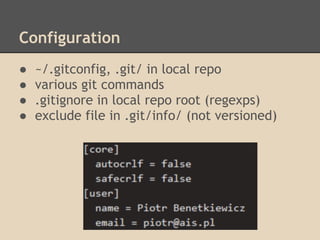
Configuration
●   ~/.gitconfig, .git/ in local repo
●   various git commands
●   .gitignore in local repo root (regexps)
●   exclude file in .git/info/ (not versioned)
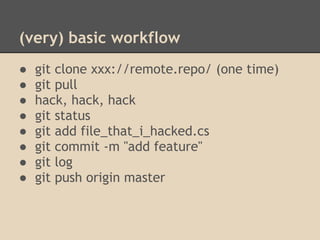
(very) basic workflow
●   git clone xxx://remote.repo/ (one time)
●   git pull
●   hack, hack, hack
●   git status
●   git add file_that_i_hacked.cs
●   git commit -m "add feature"
●   git log
●   git push origin master
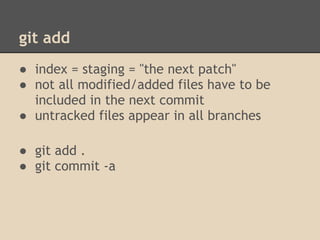
git add
● index = staging = "the next patch"
● not all modified/added files have to be
  included in the next commit
● untracked files appear in all branches

● git add .
● git commit -a
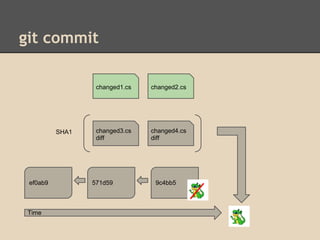
git commit

                  changed1.cs   changed2.cs


          SHA1    changed3.cs   changed4.cs
                  diff          diff


 ef0ab9          571d59          9c4bb5


 Time
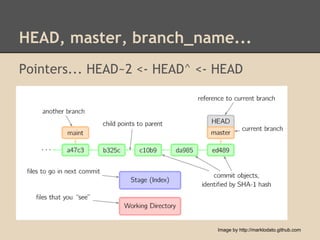
HEAD, master, branch_name...
Pointers... HEAD~2 <- HEAD^ <- HEAD


                               Image by http://marklodato.github.com
undo
change foo - git checkout foo
git add foo - git reset foo
git commit foo - git reset --[hard/soft] HEAD^
typo, forgot sth? - git commit --amend
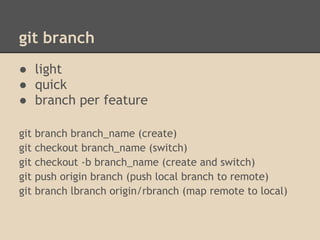
git branch
● light
● quick
● branch per feature

git   branch branch_name (create)
git   checkout branch_name (switch)
git   checkout -b branch_name (create and switch)
git   push origin branch (push local branch to remote)
git   branch lbranch origin/rbranch (map remote to local)
git merge
git merge feature_branch

create new (one) commit containing all
changes (one or more commits) from the
branch being merged
conflict
● merged files end up in staging area
● git explicitly says which files contain
  unresolved conflicts after merge
● user manually resolves conflicts
● user adds resolved files to staging
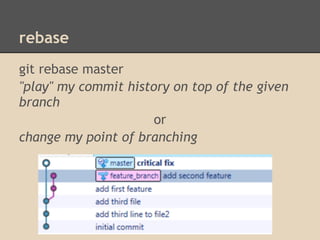
rebase
git rebase master
"play" my commit history on top of the given
branch
                      or
change my point of branching
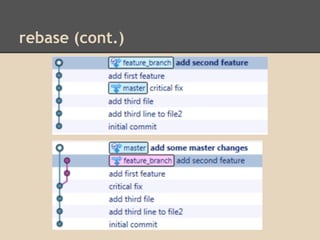
rebase (cont.)

Introduction to GIT

  • 1.
    Git The stupid contenttracker basics. Piotr Benetkiewicz AIS.PL
  • 2.
    Distributed ● entire(fully functional)repository on your disk ● remote repositories sync ● git init ● git clone xxx://remote.repo/ ○ xxx: ssh, http, filesystem... ○ common: ssh -> keys authentication ● git clone http://piotr.vpn.ais.pl/git/[login].git
  • 3.
    Configuration ● ~/.gitconfig, .git/ in local repo ● various git commands ● .gitignore in local repo root (regexps) ● exclude file in .git/info/ (not versioned)
  • 4.
    (very) basic workflow ● git clone xxx://remote.repo/ (one time) ● git pull ● hack, hack, hack ● git status ● git add file_that_i_hacked.cs ● git commit -m "add feature" ● git log ● git push origin master
  • 5.
    git add ● index= staging = "the next patch" ● not all modified/added files have to be included in the next commit ● untracked files appear in all branches ● git add . ● git commit -a
  • 6.
    git commit changed1.cs changed2.cs SHA1 changed3.cs changed4.cs diff diff ef0ab9 571d59 9c4bb5 Time
  • 7.
    HEAD, master, branch_name... Pointers...HEAD~2 <- HEAD^ <- HEAD Image by http://marklodato.github.com
  • 8.
    undo change foo -git checkout foo git add foo - git reset foo git commit foo - git reset --[hard/soft] HEAD^ typo, forgot sth? - git commit --amend
  • 9.
    git branch ● light ●quick ● branch per feature git branch branch_name (create) git checkout branch_name (switch) git checkout -b branch_name (create and switch) git push origin branch (push local branch to remote) git branch lbranch origin/rbranch (map remote to local)
  • 10.
    git merge git mergefeature_branch create new (one) commit containing all changes (one or more commits) from the branch being merged
  • 11.
    conflict ● merged filesend up in staging area ● git explicitly says which files contain unresolved conflicts after merge ● user manually resolves conflicts ● user adds resolved files to staging
  • 12.
    rebase git rebase master "play"my commit history on top of the given branch or change my point of branching
  • 13.