XML Introduction XML http://yht4ever.blogspot.com [email_address] B070066 - NIIT Quang Trung 07/2007
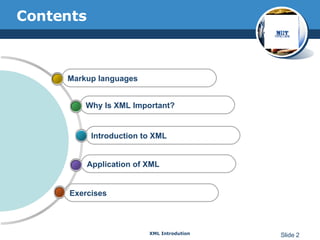
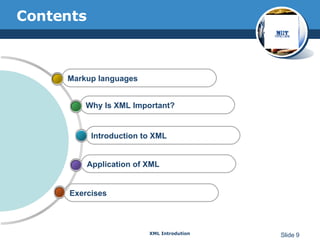
Contents Exercises Application of XML Introduction to XML Why Is XML Important?  Markup languages
Markup languages A markup language must specify  What markup is allowed  What markup is required How markup is to be distinguished from text What the markup means XML only specify the first three, the fourth is specified by DTD
SGML(ISO 8879) S tandard  G eneralized  M arkup  L anguage The international standard for defining descriptions of structure and content in text documents  Interchangeable: device-independent, system-independent Tags are not predefined Using DTD to validate the structure of the document Large, powerful, and very complex Heavily used in industrial and commercial for over a decade
HTML(RFC 1866) H yper T ext  M arkup  L anguage A small SGML application used on web (a DTD and a set of processing conventions) Can only use a predefined set of tags
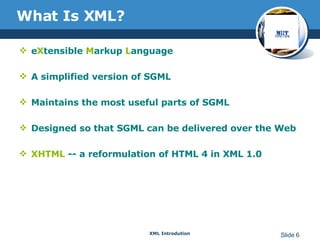
What Is XML?   e X tensible  M arkup  L anguage A simplified version of SGML Maintains the most useful parts of SGML Designed so that SGML can be delivered over the Web XHTML  -- a reformulation of HTML 4 in XML 1.0
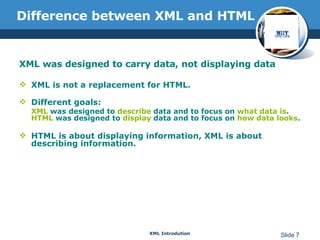
Difference between XML and HTML XML was designed to carry data, not displaying data XML is not a replacement for HTML. Different goals: XML  was designed to  describe  data and to focus on  what data is . HTML  was designed to  display  data and to focus on  how data looks . HTML is about displaying information, XML is about describing information.
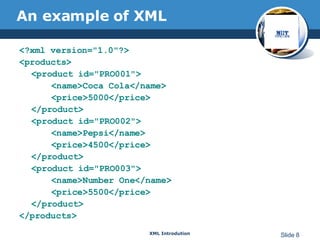
An example of XML <?xml version=&quot;1.0&quot;?> <products> <product id=&quot;PRO001&quot;> <name>Coca Cola</name> <price>5000</price> </product> <product id=&quot;PRO002&quot;> <name>Pepsi</name> <price>4500</price> </product> <product id=&quot;PRO003&quot;> <name>Number One</name> <price>5500</price> </product> </products>
Contents Exercises Application of XML Introduction to XML Why Is XML Important?  Markup languages
Why Is XML Important?  Plain Text  Easy to edit Platform independent Data Identification  Tell you what kind of data you have Can be used in different ways by different applications Easily Processed  Vendor-neutral standard
Why Is XML Important?  Stylability Inherently style-free  XSL---Extensible Stylesheet Language Different XSL formats can then be used to display the same data in different ways Inline Reusability Can be composed from separate entities Modularize your documents
Why is XML important? Linkability -- XLink and XPointer Simple unidirectional hyperlinks  Two-way links Multiple-target links “ Expanding” links  Hierarchical  Faster to access  Easier to rearrange
Contents Exercises Application of XML Introduction to XML Why Is XML Important?  Markup languages
XML Building blocks PI (Processing Instruction) Tags Elements Content Attributes Entities Comments
XML Building blocks--Prolog The part of an XML document that precedes the XML data Includes A declaration: version [, encoding, standalone] An optional DTD (Document Type Definition ) Example <?xml version=“1.0” encoding=“UTF-8” standalone=“yes”?>
Tags Tags  are used to specify a name for a given piece of information. A tag consists of opening and closing angular brackets (<>) that enclose the name of the tag. Example <EMP_NAME>Nick Shaw</EMP_NAME>
Elements Elements are represented using tags. An XML document  must always  have a  root element . General format:  <element> … </element> Empty element:  <empty-Element /> Example <Authorname>John Smith</Authorname>
Elements XML Elements are Extensible  XML documents can be extended to carry more information XML Elements have Relationships  Elements are related as parents and children  Elements have Content Elements can have different content types:   element  content,  mixed  content,  simple  content, or  empty  content  and  attributes   XML elements must follow the naming rules
Content Content  refers to the information represented by the elements of an XML document. Character or data content Element content Combination or mixed content Example <BOOKNAME>The Painted House</BOOKNAME>
Attributes Located in the start tag of elements Provide additional information about elements Often provide information that is not a part of data Must be enclosed in quotes Should I use an element or an attribute? metadata (data about data) should be stored as attributes, and that data itself should be stored as elements
Entities An  entity  is a name that is associated with a block of data.. Internal Entities: &lt; , &gt;… General Entities General entities are declared in  Document Type Definitions (DTD) Example <! ENTITY nyt &quot;The Times of India.&quot;> For more information, please visit &nyt; Thank you! Parameter Entities Are only declared and used in DTDs <!ENTITY % bool (&quot;yes | no&quot;)> <ATTLIST membership (%bool;)>
Comments Comments  are statements used to explain the XML code. Example <!--PRODUCTDATA is the root element--> The text contained within a comment entry cannot have two consecutive hyphens <!--PRODUCTDATA is the –-root element-->
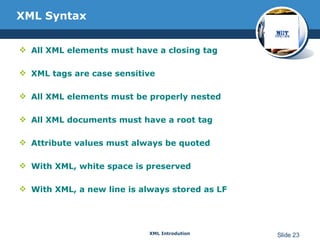
XML Syntax All XML elements must have a closing tag  XML tags are case sensitive All XML elements must be properly nested All XML documents must have a root tag Attribute values must always be quoted With XML, white space is preserved With XML, a new line is always stored as LF
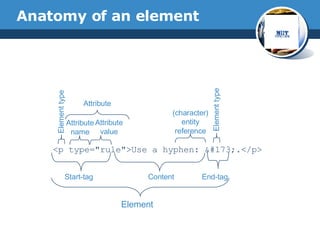
Anatomy of an element <p type=&quot;rule&quot;>Use a hyphen: &#173;.</p> Start-tag Content End-tag Element Element type Attribute name Attribute value (character) entity reference Element type Attribute
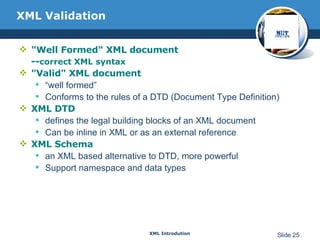
XML Validation &quot;Well Formed&quot; XML document -- correct XML syntax &quot;Valid&quot; XML document “ well formed” Conforms to the rules of a DTD (Document Type Definition) XML DTD defines the legal building blocks of an XML document Can be inline in XML or as an external reference XML Schema an XML based alternative to DTD, more powerful Support namespace and data types
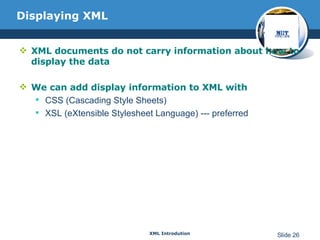
Displaying XML XML documents do not carry information about how to display the data We can add display information to XML with CSS (Cascading Style Sheets) XSL (eXtensible Stylesheet Language) --- preferred
Contents Exercises Application of XML Introduction to XML Why Is XML Important?  Markup languages
XML Application1—Separate data XML can Separate Data from HTML Store data in separate XML files Using HTML for layout and display Using Data Islands Data Islands can be bound to HTML elements Benefits: Changes in the underlying data will not require any changes to your HTML
XML Application2—Exchange data XML is used to Exchange Data Text format Software-independent, hardware-independent Exchange data between incompatible systems, given that they agree on the same tag definition. Can be read by many different types of applications Benefits: Reduce the complexity of interpreting data Easier to expand and upgrade a system
XML Application3—Store Data XML can be used to Store Data  Plain text file Store data in files or databases Application can be written to store and retrieve information from the store Other clients and applications can access your XML files as data sources Benefits: Accessible to more applications
XML Application4—Create new language XML can be used to Create new Languages  WML (Wireless Markup Language) used to markup Internet applications for handheld devices like mobile phones (WAP) MusicXML used to publishing musical scores RSS. MathML.
XML support in IE 5.0+ Internet Explorer 5.0 has the following XML support: Viewing of XML documents  Full support for W3C DTD standards  XML embedded in HTML as Data Islands  Binding XML data to HTML elements  Transforming and displaying XML with XSL  Displaying XML with CSS  Access to the XML DOM (Document Object Model) *Netscape 6.0 also have full XML support
Microsoft XML Parser Comes with IE 5.0 The parser features a language-neutral programming model that supports: JavaScript, VBScript, Perl, VB, Java, C++ and more  W3C XML 1.0 and XML DOM  DTD and validation
Java APIs for XML JAXP: Java API for XML Processing  JAXB: Java Architecture for XML Binding  JDOM: Java DOM  DOM4J: an alternative to JDOM JAXM: Java API for XML Messaging (asynchronous)  JAX-RPC: Java API for XML-based Remote Process Communications (synchronous) JAXR: Java API for XML Registries
XML is a self-descriptive language XML is a powerful language to describe structure data for web application XML is currently applied in many fields Many vendors already supports or will support XML Conclusion
Reference http://www.w3.org Teach Yourself XML in 21 Days, 3 rd  Edition Learning XML, 2 nd  Edition Hongming Yu presentation. XML tutorial http://www.w3schools.com/w3c/
Q&A Feel free to post questions at  http://yht4ever.blogspot.com . or email to:  [email_address]  or  [email_address]
http://yht4ever.blogspot.com Thank You !

Introduction to XML

  • 1.
    XML Introduction XMLhttp://yht4ever.blogspot.com [email_address] B070066 - NIIT Quang Trung 07/2007
  • 2.
    Contents Exercises Applicationof XML Introduction to XML Why Is XML Important? Markup languages
  • 3.
    Markup languages Amarkup language must specify What markup is allowed What markup is required How markup is to be distinguished from text What the markup means XML only specify the first three, the fourth is specified by DTD
  • 4.
    SGML(ISO 8879) Standard G eneralized M arkup L anguage The international standard for defining descriptions of structure and content in text documents Interchangeable: device-independent, system-independent Tags are not predefined Using DTD to validate the structure of the document Large, powerful, and very complex Heavily used in industrial and commercial for over a decade
  • 5.
    HTML(RFC 1866) Hyper T ext M arkup L anguage A small SGML application used on web (a DTD and a set of processing conventions) Can only use a predefined set of tags
  • 6.
    What Is XML? e X tensible M arkup L anguage A simplified version of SGML Maintains the most useful parts of SGML Designed so that SGML can be delivered over the Web XHTML -- a reformulation of HTML 4 in XML 1.0
  • 7.
    Difference between XMLand HTML XML was designed to carry data, not displaying data XML is not a replacement for HTML. Different goals: XML was designed to describe data and to focus on what data is . HTML was designed to display data and to focus on how data looks . HTML is about displaying information, XML is about describing information.
  • 8.
    An example ofXML <?xml version=&quot;1.0&quot;?> <products> <product id=&quot;PRO001&quot;> <name>Coca Cola</name> <price>5000</price> </product> <product id=&quot;PRO002&quot;> <name>Pepsi</name> <price>4500</price> </product> <product id=&quot;PRO003&quot;> <name>Number One</name> <price>5500</price> </product> </products>
  • 9.
    Contents Exercises Applicationof XML Introduction to XML Why Is XML Important? Markup languages
  • 10.
    Why Is XMLImportant? Plain Text Easy to edit Platform independent Data Identification Tell you what kind of data you have Can be used in different ways by different applications Easily Processed Vendor-neutral standard
  • 11.
    Why Is XMLImportant? Stylability Inherently style-free XSL---Extensible Stylesheet Language Different XSL formats can then be used to display the same data in different ways Inline Reusability Can be composed from separate entities Modularize your documents
  • 12.
    Why is XMLimportant? Linkability -- XLink and XPointer Simple unidirectional hyperlinks Two-way links Multiple-target links “ Expanding” links Hierarchical Faster to access Easier to rearrange
  • 13.
    Contents Exercises Applicationof XML Introduction to XML Why Is XML Important? Markup languages
  • 14.
    XML Building blocksPI (Processing Instruction) Tags Elements Content Attributes Entities Comments
  • 15.
    XML Building blocks--PrologThe part of an XML document that precedes the XML data Includes A declaration: version [, encoding, standalone] An optional DTD (Document Type Definition ) Example <?xml version=“1.0” encoding=“UTF-8” standalone=“yes”?>
  • 16.
    Tags Tags are used to specify a name for a given piece of information. A tag consists of opening and closing angular brackets (<>) that enclose the name of the tag. Example <EMP_NAME>Nick Shaw</EMP_NAME>
  • 17.
    Elements Elements arerepresented using tags. An XML document must always have a root element . General format: <element> … </element> Empty element: <empty-Element /> Example <Authorname>John Smith</Authorname>
  • 18.
    Elements XML Elementsare Extensible XML documents can be extended to carry more information XML Elements have Relationships Elements are related as parents and children Elements have Content Elements can have different content types: element content, mixed content, simple content, or empty content and attributes XML elements must follow the naming rules
  • 19.
    Content Content refers to the information represented by the elements of an XML document. Character or data content Element content Combination or mixed content Example <BOOKNAME>The Painted House</BOOKNAME>
  • 20.
    Attributes Located inthe start tag of elements Provide additional information about elements Often provide information that is not a part of data Must be enclosed in quotes Should I use an element or an attribute? metadata (data about data) should be stored as attributes, and that data itself should be stored as elements
  • 21.
    Entities An entity is a name that is associated with a block of data.. Internal Entities: &lt; , &gt;… General Entities General entities are declared in Document Type Definitions (DTD) Example <! ENTITY nyt &quot;The Times of India.&quot;> For more information, please visit &nyt; Thank you! Parameter Entities Are only declared and used in DTDs <!ENTITY % bool (&quot;yes | no&quot;)> <ATTLIST membership (%bool;)>
  • 22.
    Comments Comments are statements used to explain the XML code. Example <!--PRODUCTDATA is the root element--> The text contained within a comment entry cannot have two consecutive hyphens <!--PRODUCTDATA is the –-root element-->
  • 23.
    XML Syntax AllXML elements must have a closing tag XML tags are case sensitive All XML elements must be properly nested All XML documents must have a root tag Attribute values must always be quoted With XML, white space is preserved With XML, a new line is always stored as LF
  • 24.
    Anatomy of anelement <p type=&quot;rule&quot;>Use a hyphen: &#173;.</p> Start-tag Content End-tag Element Element type Attribute name Attribute value (character) entity reference Element type Attribute
  • 25.
    XML Validation &quot;WellFormed&quot; XML document -- correct XML syntax &quot;Valid&quot; XML document “ well formed” Conforms to the rules of a DTD (Document Type Definition) XML DTD defines the legal building blocks of an XML document Can be inline in XML or as an external reference XML Schema an XML based alternative to DTD, more powerful Support namespace and data types
  • 26.
    Displaying XML XMLdocuments do not carry information about how to display the data We can add display information to XML with CSS (Cascading Style Sheets) XSL (eXtensible Stylesheet Language) --- preferred
  • 27.
    Contents Exercises Applicationof XML Introduction to XML Why Is XML Important? Markup languages
  • 28.
    XML Application1—Separate dataXML can Separate Data from HTML Store data in separate XML files Using HTML for layout and display Using Data Islands Data Islands can be bound to HTML elements Benefits: Changes in the underlying data will not require any changes to your HTML
  • 29.
    XML Application2—Exchange dataXML is used to Exchange Data Text format Software-independent, hardware-independent Exchange data between incompatible systems, given that they agree on the same tag definition. Can be read by many different types of applications Benefits: Reduce the complexity of interpreting data Easier to expand and upgrade a system
  • 30.
    XML Application3—Store DataXML can be used to Store Data Plain text file Store data in files or databases Application can be written to store and retrieve information from the store Other clients and applications can access your XML files as data sources Benefits: Accessible to more applications
  • 31.
    XML Application4—Create newlanguage XML can be used to Create new Languages WML (Wireless Markup Language) used to markup Internet applications for handheld devices like mobile phones (WAP) MusicXML used to publishing musical scores RSS. MathML.
  • 32.
    XML support inIE 5.0+ Internet Explorer 5.0 has the following XML support: Viewing of XML documents Full support for W3C DTD standards XML embedded in HTML as Data Islands Binding XML data to HTML elements Transforming and displaying XML with XSL Displaying XML with CSS Access to the XML DOM (Document Object Model) *Netscape 6.0 also have full XML support
  • 33.
    Microsoft XML ParserComes with IE 5.0 The parser features a language-neutral programming model that supports: JavaScript, VBScript, Perl, VB, Java, C++ and more W3C XML 1.0 and XML DOM DTD and validation
  • 34.
    Java APIs forXML JAXP: Java API for XML Processing JAXB: Java Architecture for XML Binding JDOM: Java DOM DOM4J: an alternative to JDOM JAXM: Java API for XML Messaging (asynchronous) JAX-RPC: Java API for XML-based Remote Process Communications (synchronous) JAXR: Java API for XML Registries
  • 35.
    XML is aself-descriptive language XML is a powerful language to describe structure data for web application XML is currently applied in many fields Many vendors already supports or will support XML Conclusion
  • 36.
    Reference http://www.w3.org TeachYourself XML in 21 Days, 3 rd Edition Learning XML, 2 nd Edition Hongming Yu presentation. XML tutorial http://www.w3schools.com/w3c/
  • 37.
    Q&A Feel freeto post questions at http://yht4ever.blogspot.com . or email to: [email_address] or [email_address]
  • 38.